

Higgsfield vs Google Veo 比較
總評:選 Google Veo 還是 Higgsfield
只需要 Veo 就選 Google Veo;想用同一個餘額跑 Veo、Kling 和 Seedance 就選 Higgsfield。一支 4 秒的 Veo 3.1 Fast 影片,在 Google AI Pro 要 0.40 美元(確認於 ),在 Higgsfield Plus 約 0.78 美元(點數全部用完的情況)。Higgsfield 的條款允許它在 Enterprise 以外拿你上傳的內容做訓練(4.4),而 Google 的消費者條款既沒有授權也沒有禁止廣告用途。
 Google Veo
- 適合
- 適合製作最長 8 秒、附原生音效的主視覺鏡頭與 B-roll,使用 Google AI 方案的 Flow 點數或 Gemini API。
- 不適合
- 需要單支超過 8 秒的 Veo 短片,或需要 Google Cloud 以外智慧財產權賠償保障的買家(清單中的 Workspace 方案並未載明涵蓋 Veo)。
 Higgsfield
- 適合
- 個人用網頁版、想在同一個點數餘額下使用 Kling、Veo 與 Seedance,並以點數支付影片費用的使用者。
- 不適合
- 透過 MCP、CLI、Canvas 或 Supercomputer 代理程式做自動化的人(這些一律會消耗點數),或無法讓輸入與輸出被拿去訓練 Higgsfield 模型的品牌。
| Google Veo | Higgsfield | |
|---|---|---|
| 差異 | ||
| 每月起價(美元) | $4.99 | $15 |
| 一支 4 秒的 Veo 3.1 Fast 影片 | Google AI Pro 的 Flow 要 20 點;Ultra 要 10 點 | 約 16 點 |
| 其他影片模型 | Gemini Omni Flash | Kling、Seedance、Wan、Hailuo 等 |
| 免費額度 | 每天 50 點 Flow 點數,不累積 | 有免費方案;所有生成內容都有浮水印 |
| 隱形標記 | 每支影片都有 SynthID(Flow 說明) | Veo 影片有 SynthID(Google);可能嵌入自家標記 |
| 廣告使用(授權對照表) | Google AI 方案不明確;Google Cloud 允許 | 附條件允許(4.4、第 8 條) |
| 智慧財產權賠償 | Google Cloud 上正式推出的 Veo | 僅限 Enterprise |
| 用你的內容訓練 | 付費 Gemini API:否;Google AI 方案:不明確 | 會,Enterprise 除外(4.4) |
| 未使用的點數 | 每月 Flow 點數不會累積到下個月 | 每次續訂時過期;加購包在 90 天後過期 |
| 兩者相同之處 | ||
| 免費方案 | 兩者皆提供 | |

Veo 是單一模型;Higgsfield 把它和許多模型一起賣
Google Veo 是一款模型;Higgsfield 是模型商店,在同一個點數餘額下賣 Veo,也賣 Kling、Seedance、Wan、Hailuo 和自家模型。
Google 做出 Veo 3.1,並用三種方式販售。Flow 是它的影片編輯器,用 Google AI 方案的點數付費;Gemini App 也能跑 Veo;Gemini API 則向開發者按秒計費。每個 Flow 帳號每天有 50 點免費點數,「不論有沒有訂閱」(Flow 說明)。

Higgsfield 在同一個網頁 App 裡轉售其他公司的模型。其模型指南稱 Veo 為「Google 的模型」,條款也說部分模型「由第三方模型供應商提供」(第 8 條)。
Higgsfield 自己的 Veo 指南用四個步驟生成一支影片:
- 開啟 Video 分頁,選擇 Google Veo 3.1。
- 選擇 Standard 或 Fast。
- 輸入文字提示詞或加入圖片,或設定起始與結束畫格。
- 按下 Generate,生成 8 秒、1080p 的影片。
How to Use Veo 3.1: A Step-by-Step Guide
Step 1: Select Your Generation Engine. Start by navigating to the “Video” tab and selecting the Google Veo 3.1 model as your generation engine.
Step 2: Choose Your Generation Mode. Before you generate, choose the model that best fits your creative idea. Decide between Veo 3.1 Standard & Veo 3.1 Fast according to your creative intentions.
Step 3: Provide Your Creative Input. You can generate from a text prompt, a single image, multiple images, or define the start and end of your video by uploading a Start Frame and an End Frame.
Step 4: Generate Your Video. Click “Generate.” Veo 3.1 will then create your video, incorporating your chosen controls to deliver a high-quality, 8-second, 1080p clip that matches your vision.

在 Higgsfield 的 Veo 3.1 頁面(2026 年 10 月 18 日讀取)上,影片長度為 4、6 或 8 秒,解析度 720p 或 1080p。Flow 也提供同樣三種長度。
選擇是:向 Google 買單一模型,或在同一個分頁用到 Veo、Kling、Seedance 和 Higgsfield 自家的 Soul 圖像模型,但價格有加成。Higgsfield 的 52 個使用者來源中,有六個稱讚這種單一登入、單一點數餘額(YouTube、YouTube)。
每個列出的方案,Google 的 Veo 影片都比較便宜
下表每個方案,同樣的 Veo 3.1 影片都是 Google 比較便宜。
Flow 對 4、6 或 8 秒的 Veo 3.1 Fast 影片都收 20 點。Google AI Pro 每月 19.99 美元、含每月 1,000 點(Google AI 方案),所以每點 0.02 美元。
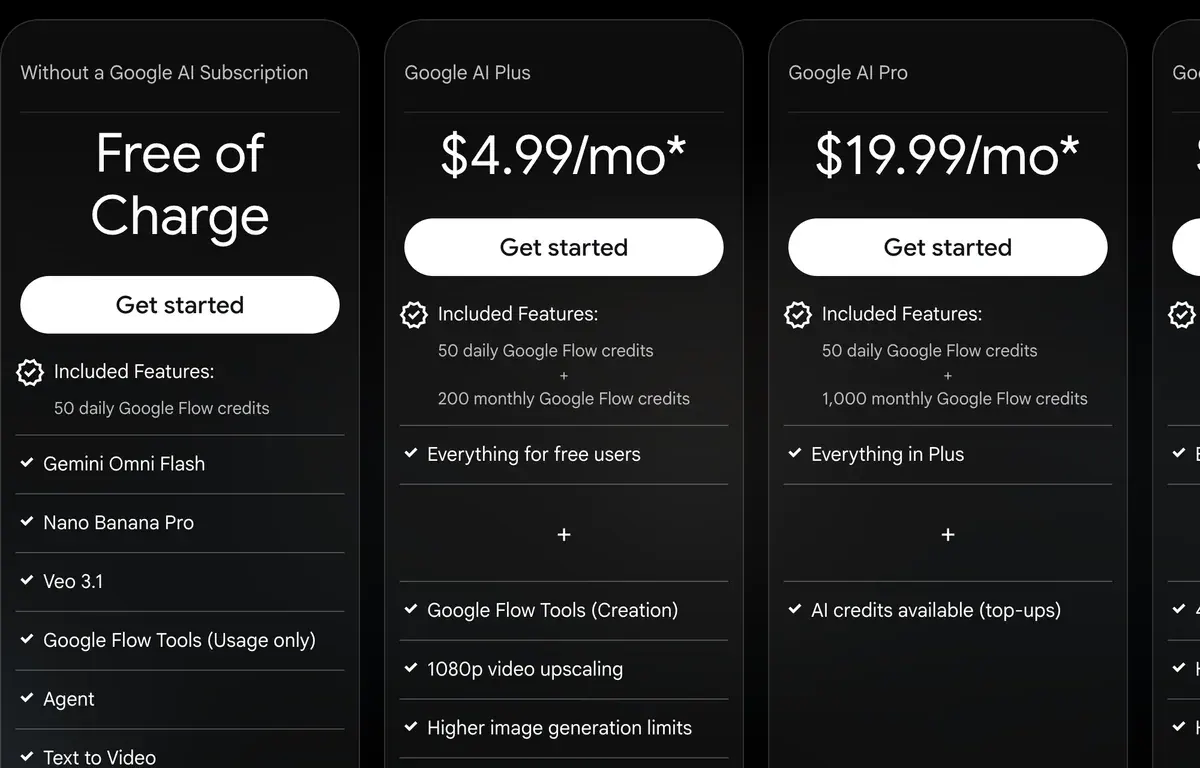
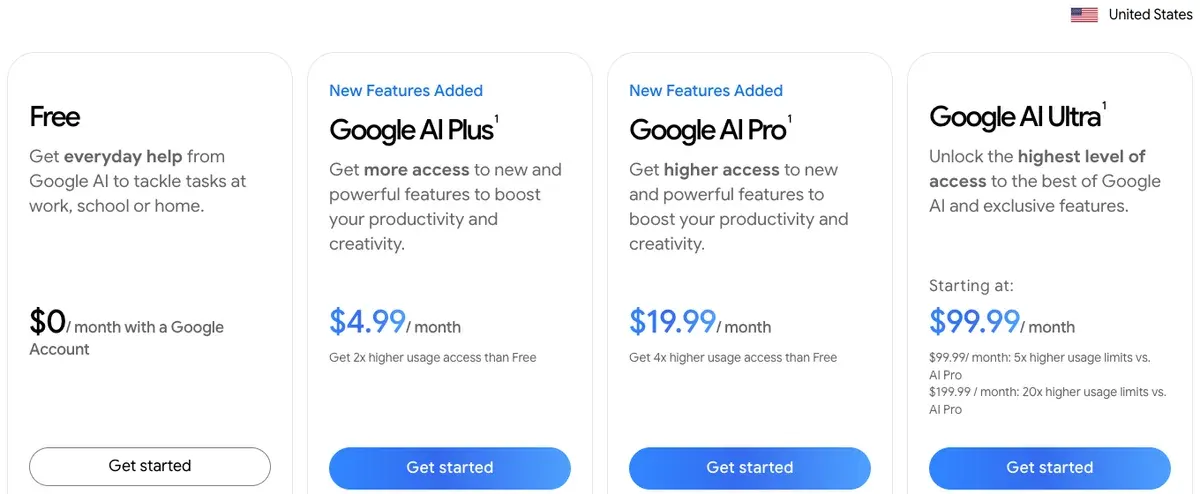
Google AI Ultra(5x)把 Fast 的價格減半,降到 10 點。
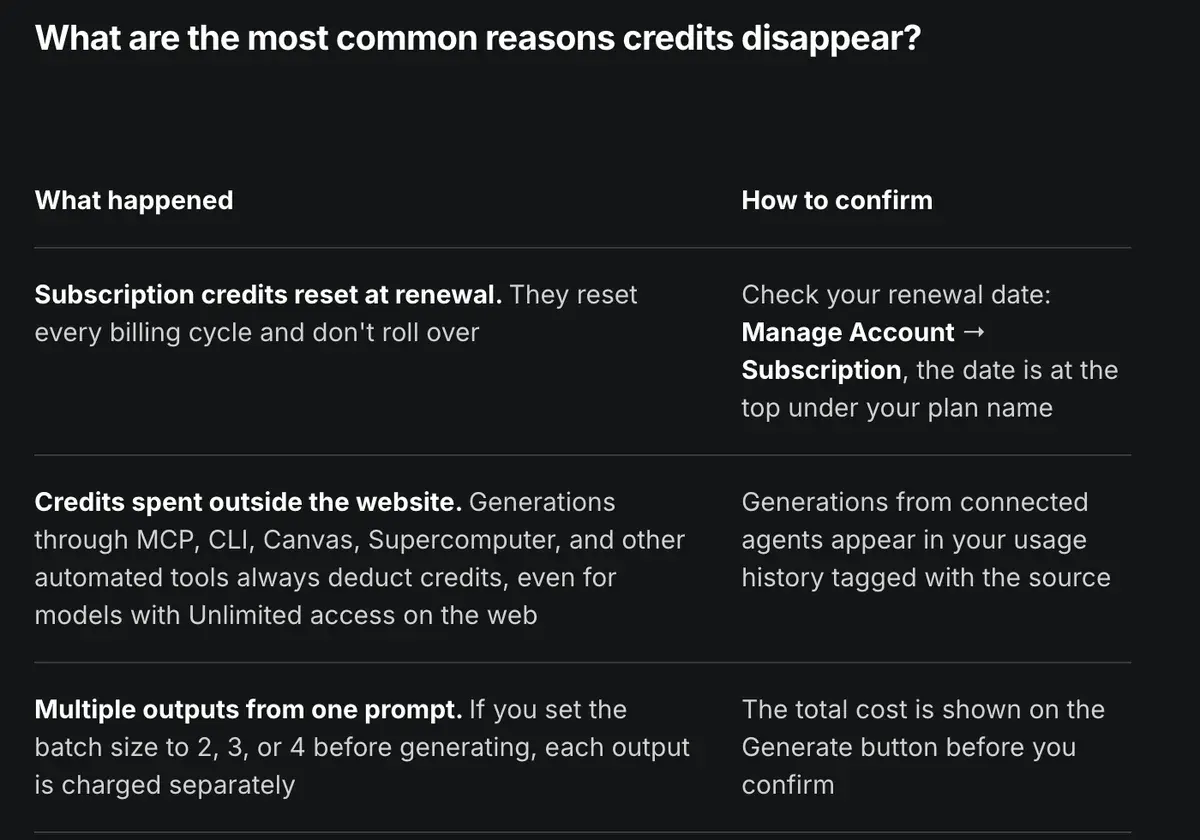
Higgsfield 在你確認前,會把費用顯示在 Generate 按鈕上(說明中心)。它的價格頁在 2026 年 10 月 19 日把 Veo 3.1 Fast 的 4 秒影片列為約 16 點。
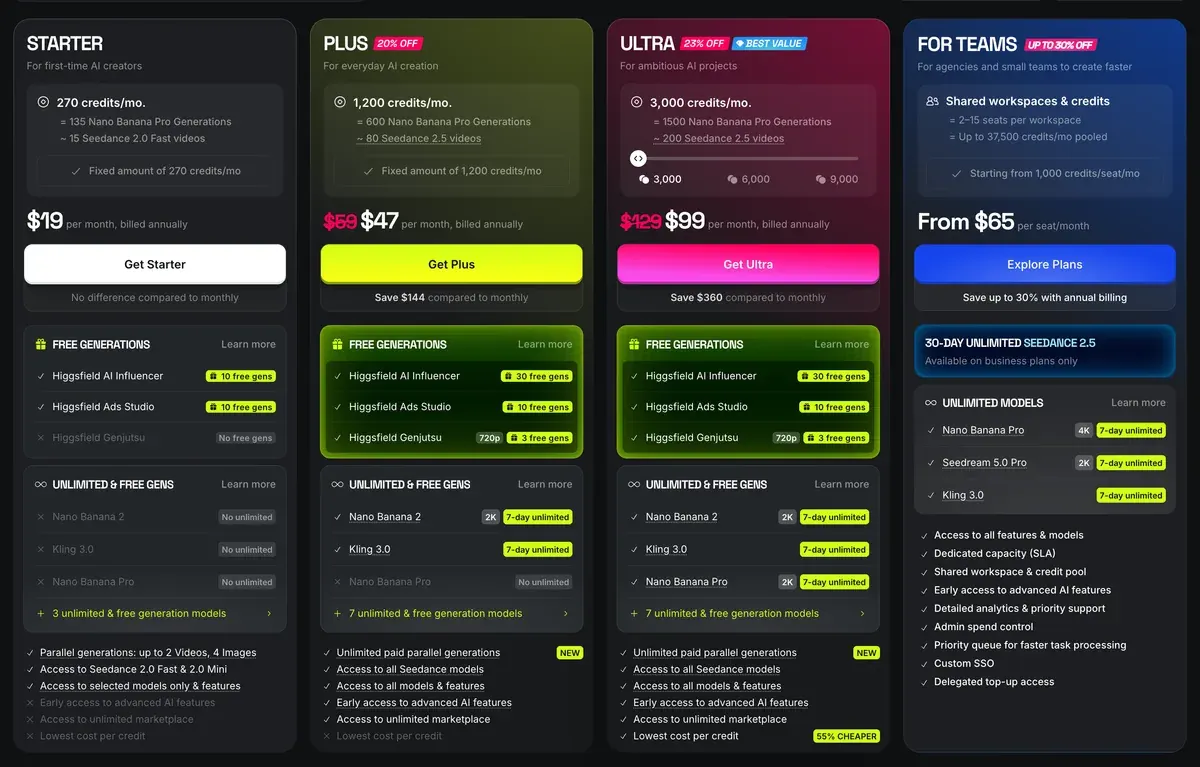
Higgsfield Starter 每月 15 美元、200 點(Higgsfield 價格)。
| 購買途徑與方案 | 點數 | 一支影片 |
|---|---|---|
| Google AI Ultra(5x),Flow | 10 | $0.10 |
| Google AI Pro,Flow | 20 | $0.40 |
| Gemini API,1080p | 按秒計費 | $0.48 |
| Higgsfield Ultra,按月計費 | 約 16 | $0.69 |
| Higgsfield Plus,按月計費 | 約 16 | $0.78 |
| Higgsfield Starter | 約 16 | $1.20 |
左右滑動查看全部 3 欄
Flow 對 4、6、8 秒的影片都收同樣的 20 點;Higgsfield 價格頁的 Veo 費率則是每 4 秒計。
Google 那幾列沒有算進每天 50 點的免費點數;加上之後,Flow 的每個數字都會更低。每個帳號都有這些點數,而 720p 的 Gemini Omni Flash 每支影片要 7–15 點。Flow 價格頁的免費方案卡列了 Veo 3.1,但費率表中 Veo 3.1 Fast 和 Lite 的費率只提供給訂閱者。
完整版模型也是同樣的情形。Flow 把 Veo 3.1 Quality 的 8 秒影片定為 100 點,在 Pro 上是 2.00 美元。Higgsfield 把完整版 Veo 3.1 列為每 4 秒約 40 點,在 Plus 上是 1.96 美元,而長度只有一半。

Higgsfield 自己的模型總整理(2026 年 6 月 9 日)把 Veo 3.1 列為最耗點數的模型之一,每支影片大約 40–70 點。
What is Google Veo 3.1 best for in AI video?
Veo 3.1 is the best model for wide, outdoor and weather-driven scenes. Its global illumination and environmental handling make landscapes, cityscapes and natural motion (water, fog, wind) feel convincing at scale, with native audio, where most models flatten depth or light.
Where it falls short: Veo 3.1 is among the most credit-intensive models at roughly 40–70 credits per video, and its consistency softens on close-up human shots versus wide scenes. For tight character work or dialogue, Kling 3.0 is stronger and far cheaper. If you only need Veo, Google’s own Flow may cost less than an aggregator subscription.
Higgsfield 的「Unlimited」並沒有補上這個差距。根據 2026 年 9 月 11 日的方案表,整年無限使用只涵蓋六個圖片模型,Ultra 方案另有 7 天的 Kling 3.0 無限期間。Veo 不在其中,所以每支 Veo 影片都要花點數。
使用者都有感。52 份 Higgsfield 來源中有八份提到,同一個模型直接向原廠買比較便宜(YouTube、YouTube)。Google 這邊,62 份來源中有 8 份表示 Flow 點數難懂又消耗快,每日點數還會在午夜歸零(YouTube、Reddit)。
各方案與點數規模請見:Higgsfield 價格與 Google Veo 價格。
廣告授權與浮水印
Higgsfield 明確寫出可商業使用,Google 的消費者條款則著墨較少。若要取得書面的賠償保障,Veo 需透過 Google Cloud 或 Higgsfield Enterprise。
Higgsfield 的條款(2026 年 7 月 26 日)寫明不會「限制你對輸出內容的商業使用」(4.4)。
第 8 條接著加上模型原廠的政策:「若這些政策較為嚴格,則以較嚴格的條款規範你對該功能或模型的使用」。所以在 Higgsfield 上生成的 Veo 影片,同樣要遵守 Google 的規則。Higgsfield 的智慧財產權賠償只涵蓋 Enterprise 客戶。
Google 的服務條款(2026 年 7 月 30 日)寫道「Google 不會主張該內容的所有權」,沒有任何條款明確允許或禁止用於廣告。授權對照表把 Google AI 方案的付費廣告用途標為「不明確」。
在 Google Cloud 上,正式推出的 Veo 版本列在受賠償保障的服務清單中(2026 年 7 月 20 日)。如果品牌的法務要為你的廣告把關,這點很重要。
訓練條款也不同。Higgsfield 條款(4.4)允許其使用你的輸入與輸出內容來訓練模型,除非你簽有 Enterprise Agreement;刪除內容只會停止日後使用。Google 的 Gemini API 價格頁則表示,付費層級的內容不會用來改進其產品。
兩邊都會在檔案上做標記。
Flow 會在每支影片中嵌入 Google 的 SynthID(織入畫面的隱形訊號),可見浮水印則是可自行開關的設定(Flow 說明)。Google DeepMind 的 Veo 頁面表示 Veo 影片都帶有 SynthID,因此在 Higgsfield 上生成的 Veo 影片也一樣。
在 Gemini App 中,浮水印設定只會關閉可見標記。SynthID 與 Content Credentials(藏在檔案資料裡的標籤)會保留在所有 Gemini Apps 媒體中(Gemini Apps 說明)。
Turn visible watermarks on or off
1. On your computer, go to gemini.google.com. 2. At the bottom left, click Settings > Media Watermark. 3. Turn the setting on or off.
Tips: This setting only controls the visible watermark. It doesn’t affect SynthID watermarks or Content Credentials for media you create with Gemini Apps; these settings apply only to Gemini Apps (web and mobile), not AI features in other Google products.
SynthID: All AI-generated media created or edited with Gemini Apps includes an invisible SynthID watermark.
Content Credentials (C2PA) provenance signals: Gemini Apps include Content Credentials (C2PA) metadata to provide information about the content’s origin.
Higgsfield 的浮水印說明文章(2026 年 8 月 28 日修改)表示,免費帳號「每次生成都會帶有 Higgsfield 浮水印」,付費方案則沒有。文中還提到 Higgsfield「可能嵌入機器可讀的隱形標記」,但沒有指明是哪個系統。升級後,先前的免費影片仍帶有浮水印。
Why does my generation have a watermark?
Paid plans don’t add a visible Higgsfield watermark to your generations, whether they’re credit-based, free generations included in your plan, or Unlimited models. Separately, Higgsfield may embed invisible, machine-readable markers or metadata that identify content as AI-generated: they aren’t a visible watermark and don’t appear on your image or video.
The watermark depends on your account type, not on the model, the credits used, or the output quality. On a free account, every generation carries a Higgsfield watermark. On any paid plan, generations come without a watermark. There is no separate watermark setting to switch on or off. The visible watermark is separate from the invisible, machine-readable markers Higgsfield may embed in AI-generated content; those markers aren’t visible in your file and aren’t removed by upgrading.
逐條比較請看授權對照表中的 Google Veo 與 Higgsfield,各工具的標記則見各方案 AI 浮水印。
退款與失敗的影片
Higgsfield 在首次付款後 7 天內、且未使用任何點數的情況下可退款,但會扣最高 6% 的手續費。續訂一律不退款(條款,9.3)。
52 份使用者來源中有九份反映,只要花過任何點數就被拒絕退款,包括誤買年繳方案的案例(Trustpilot)。Veo 方面,62 份來源中有 13 份表示提示詞遵循度偏弱,一支可用的影片要付費重跑好幾次(Reddit、Reddit)。另有 13 份反映內容審核機制擋下一般提示詞,其中包括客戶自己的照片(Reddit、Reddit)。
兩邊重跑一次花的點數相同,所以單支影片價格較低的一方,差距會越滾越大。一位 Reddit 使用者表示,一支可用的 4 秒 Fast 影片要試五次,照這個次數算,Google AI Pro 要花 2.00 美元,Higgsfield Plus 約 3.92 美元。
各自適合誰
如果你打算跑的主要是 Veo,就選透過 Flow 使用的 Google Veo。單支影片比較便宜,每天免費給 50 點,品牌案件還能靠 Google Cloud 取得賠償保障。
如果廣告會混用多個模型,就選 Higgsfield。在 Higgsfield 上,5 秒 720p 的 Kling 3.0 約 7 點,4 秒的 Veo 3.1 Fast 約 16 點。帳單與素材庫集中在一處,不用在各個 App 之間切換,Higgsfield 指南也逐一介紹各個工作室。
與其他 Veo 取得管道的比較:Veo 3 vs Kling、Veo 3 vs Runway。完整介紹:Google Veo、Higgsfield。
買家常問的 Google Veo 與 Higgsfield 問題
Higgsfield 上的 Veo 和 Flow 裡的 Veo 一樣嗎?
一樣。Higgsfield 轉售 Google 的 Veo 3.1,4、6 與 8 秒的長度規格都相同,只是改用 Higgsfield 自己的點數。
在 Higgsfield 用 Veo 比 Gemini 便宜嗎?
不會。一支 4 秒的 Veo 3.1 Fast 影片,在 Higgsfield Plus 約 0.78 美元,在 Google AI Pro 則是 0.40 美元。
Higgsfield 能移除 SynthID 浮水印嗎?
不能。Google 表示每支 Veo 影片都帶有 SynthID,Higgsfield 付費方案移除的只有 Higgsfield 自己的可見浮水印。
Veo 可以免費試用嗎?
Flow 價格頁在免費卡片列出 Veo 3.1,每個帳號每天 50 點。Veo 3.1 Fast 與 Lite 的費率表只對訂閱者開放。Higgsfield 免費方案生成的每支影片都有浮水印。
Higgsfield 下一篇:適合行銷團隊的 AI 影片工具
資料來源
- Google:Google AI 方案,Google AI Plus、Pro、Ultra 的價格,以及各方案每月附帶的 Flow 點數。確認於
- Google Flow 說明:Flow 點數,每次生成所需點數:Veo 3.1 Fast 20、Quality 100;不論有無訂閱,每日 50 點;Ultra 方案的 Lite 與 Fast 減半。確認於
- Google Flow 說明:Google Flow 入門,「可見浮水印」設定,以及每支影片都帶有 SynthID。確認於
- Google:Gemini API 價格,最後更新於 2026 年 9 月 24 日;Veo 3.1 Fast 在 1080p 下每秒 0.12 美元;付費層級的內容不會用來改進 Google 產品。確認於
- Google DeepMind:Veo,Veo 影片標有 SynthID。確認於
- Google:Google 服務條款,2026 年 7 月 30 日生效;生成內容相關條文。確認於
- Google Cloud:生成式 AI 受賠償保障服務,最後修改於 2026 年 7 月 20 日;Gemini Enterprise Agent Platform API 上正式推出的 Veo 版本。確認於
- Higgsfield:Higgsfield 價格,2026 年 10 月 9 日的方案卡片與各模型點數:Veo 3.1 每 4 秒約 40 點,Veo 3.1 Fast 約 16 點,Kling 3.0 在 720p 下每 5 秒約 7 點。確認於
- Higgsfield:Higgsfield 上的 Veo 3.1,常見問題:4、6 或 8 秒,24 FPS 下的 720p 與 1080p。確認於
- Higgsfield 說明中心:我該用哪個 AI 模型,日期為 2026 年 8 月 1 日;指出 Veo 是 Google 的模型。確認於
- Higgsfield 說明中心:What uses my credits,確認前,確切費用會顯示在 Generate 按鈕上。確認於
- Higgsfield 說明中心:浮水印與移除方式,2026 年 8 月 3 日發布、2026 年 8 月 28 日修改;免費生成有浮水印,付費方案沒有;含隱形標記。確認於
- Higgsfield:Higgsfield 使用條款,最後更新於 2026 年 7 月 26 日;第 4.4、8、9.3 條。確認於
- Higgsfield 部落格:Annual unlimited AI video plans,2026 年 9 月 11 日的方案表:六個圖像模型,以及 7 天的 Kling 3.0 限時開放。確認於
- Higgsfield 部落格:如何使用 Google Veo 3.1,從 Video 分頁到 8 秒 1080p 影片的四個步驟。確認於
- Higgsfield 部落格:2026 年最佳 5 款 AI 影片模型,日期為 2026 年 6 月 9 日;Veo 3.1 是 Higgsfield 最耗點數的模型之一,每支影片約 40 至 70 點。確認於
- Gemini Apps 說明:Gemini Apps 的浮水印設定,可見浮水印設定不影響 SynthID 與 Content Credentials。確認於
- Google:Flow,免費卡片含每日 50 點與 Veo 3.1;Plus 與 Pro 的每月點數。確認於
本頁更新紀錄
- Higgsfield 價格回落:Starter 按月或按年計費皆為每月 15 美元、200 點,Plus 每月 49 美元,按年計費每月 39 美元,含 1,000 點(原為 Starter 19 美元、270 點;Plus 59 美元,按年計費 47 美元、1,200 點);Ultra 維持每月 129 美元,按年計費每月 99 美元。
- Higgsfield 價格再度上漲:Starter 按月或按年計費皆為每月 19 美元、270 點,Plus 每月 59 美元,按年計費每月 47 美元,含 1,200 點(原為 Starter 15 美元、200 點;Plus 49 美元,按年計費 39 美元、1,000 點);Ultra 維持每月 129 美元,按年計費每月 99 美元。
- Higgsfield 價格調回:Starter 每月 15 美元、200 點,Plus 每月 49 美元,按年計費每月 39 美元,含 1,000 點,Ultra 每月 129 美元,按年計費每月 99 美元,重新有了方案卡(原為 Starter 19 美元、270 點;Plus 59 美元,按年計費 47 美元、1,200 點)。
- Higgsfield 調整價格:Starter 每月 19 美元、270 點(原為 15 美元、200 點);Plus 每月 59 美元,按年計費則為 47 美元,1,200 點(原為 49 美元或 39 美元,1,000 點)。在 Higgsfield Plus 生成一支 Veo 3.1 Fast 影片,現約 0.79 美元(原為 0.78 美元),Starter 則為 1.13 美元(原為 1.20 美元)。

相關頁面
-
-
 工具介紹 廣告用 Google Veo 3
一支 8 秒的 Veo 3.1 Fast 影片:把 Google AI Ultra(99.99 美元)的點數全部用完,每支 0.10 美元;用 Gemini API 在 1080p 下則是 0.96 美元。確認於 2026 年 9 月 24 日。
-
 價格 Veo 3 價格
Veo 3.1 Fast 的 8 秒影片:以 API 生成 720p,成本 0.80 美元;若用完 Google AI Pro(每月 19.99 美元)的每月點數,則為 0.40 美元。確認於 2026 年 9 月 24 日。
-

-
 工具介紹 廣告用 Higgsfield AI
Higgsfield 把 Kling、Veo 和 Seedance 放在同一個點數餘額下轉售。一支影片多少錢、「Unlimited」包含什麼、廣告使用條款,確認於 2026 年 9 月 24 日。
-
 價格 Higgsfield 價格
Higgsfield 方案起價每月 15 美元、200 點,約每點 0.075 美元。內容包括 Unlimited 的涵蓋範圍、免費方案、試用與退款。確認於 2026 年 10 月 21 日。


