

Higgsfield vs Google Veo
Verdict: Google Veo or Higgsfield
Google Veo if Veo is all you need; Higgsfield if you want Veo, Kling and Seedance on one balance. A 4-second Veo 3.1 Fast clip costs $0.40 on Google AI Pro, checked , and about $0.78 on Higgsfield Plus, every credit used. Higgsfield’s terms let it train on your uploads outside Enterprise (4.4), and Google’s consumer terms neither grant nor bar ad use.
 Google Veo
- Best for
- Hero shots and B-roll up to 8 s with native audio, on a Google AI plan’s Flow credits or the Gemini API.
- Not for
- Single Veo clips longer than 8 s, or buyers who need an IP indemnity outside Google Cloud, whose Workspace entries on the list state no Veo scope.
 Higgsfield
- Best for
- One person in the web app who wants Kling, Veo and Seedance on one credit balance and pays for video in credits.
- Not for
- Anyone automating through MCP, CLI, Canvas or the Supercomputer agent (these always spend credits), or brands that cannot let inputs and outputs train Higgsfield’s models.
| Google Veo | Higgsfield | |
|---|---|---|
| Where they differ | ||
| Monthly from (USD) | $4.99 | $15 |
| A 4-second Veo 3.1 Fast clip | 20 Flow credits on Google AI Pro; 10 on Ultra | About 16 credits |
| Other video models | Gemini Omni Flash | Kling, Seedance, Wan, Hailuo and more |
| Free allowance | 50 Flow credits a day, no rollover | Free plan; every generation watermarked |
| Invisible mark | SynthID on every video (Flow help) | SynthID on Veo clips (Google); may embedits own markers |
| Ad use, rights matrix | Unclear on Google AI plans; Allowed on Google Cloud | Allowed with conditions (4.4, s.8) |
| IP indemnity | Generally available Veo on Google Cloud | Enterprise only |
| Training on your content | Paid Gemini API: no; Google AI plans: unclear | Yes, outside Enterprise (4.4) |
| Unused credits | Monthly Flow credits do not roll over | Expire at each renewal; packs after 90 days |
| The same on both | ||
| Free plan | Both: Yes | |

Veo is one model; Higgsfield sells it beside many
Google Veo is a model; Higgsfield is a shop that sells Veo beside Kling, Seedance, Wan, Hailuo and its own models on one credit balance.
Google makes Veo 3.1 and sells it three ways. Flow is its video editor, paid for with credits from a Google AI plan. The Gemini app runs Veo too, and the Gemini API bills developers by the second. Every Flow account gets 50 free credits a day, “with or without a subscription” (Flow help).

Higgsfield resells other companies’ models in one web app. Its model guide calls Veo “Google’s model”, and its terms say some models “are provided by third-party model providers” (section 8).
Higgsfield’s own Veo guide runs a clip in four steps:
- Open the Video tab and pick Google Veo 3.1.
- Choose Standard or Fast.
- Add a text prompt or images, or set start and end frames.
- Press Generate for an 8-second 1080p clip.
How to Use Veo 3.1: A Step-by-Step Guide
Step 1: Select Your Generation Engine. Start by navigating to the “Video” tab and selecting the Google Veo 3.1 model as your generation engine.
Step 2: Choose Your Generation Mode. Before you generate, choose the model that best fits your creative idea. Decide between Veo 3.1 Standard & Veo 3.1 Fast according to your creative intentions.
Step 3: Provide Your Creative Input. You can generate from a text prompt, a single image, multiple images, or define the start and end of your video by uploading a Start Frame and an End Frame.
Step 4: Generate Your Video. Click “Generate.” Veo 3.1 will then create your video, incorporating your chosen controls to deliver a high-quality, 8-second, 1080p clip that matches your vision.

On its Veo 3.1 page, read on 18 October 2026, clips run 4, 6 or 8 seconds at 720p or 1080p. Flow offers the same three lengths.
The choice is one model from Google, or Veo plus Kling, Seedance and Higgsfield’s own Soul image models in one tab, at a markup. Six of 52 Higgsfield user sources praise that single login and credit balance (YouTube, YouTube).
Google costs less per Veo clip on every listed plan
Google costs less for the same Veo 3.1 clip on every plan below.
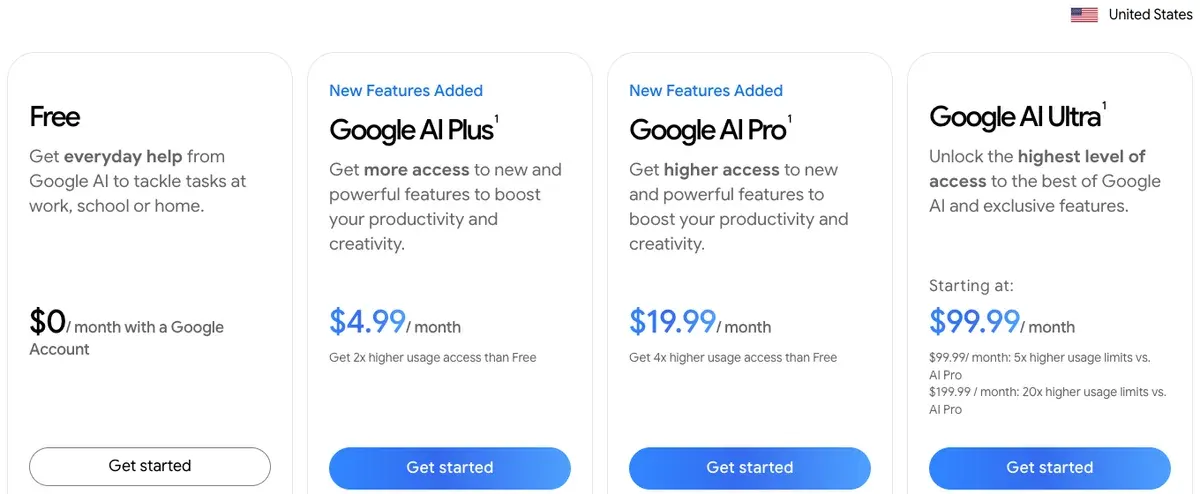
Flow charges 20 credits for a Veo 3.1 Fast clip of 4, 6 or 8 seconds. Google AI Pro costs $19.99 a month for 1,000 monthly credits (Google AI plans), so each credit costs $0.02.
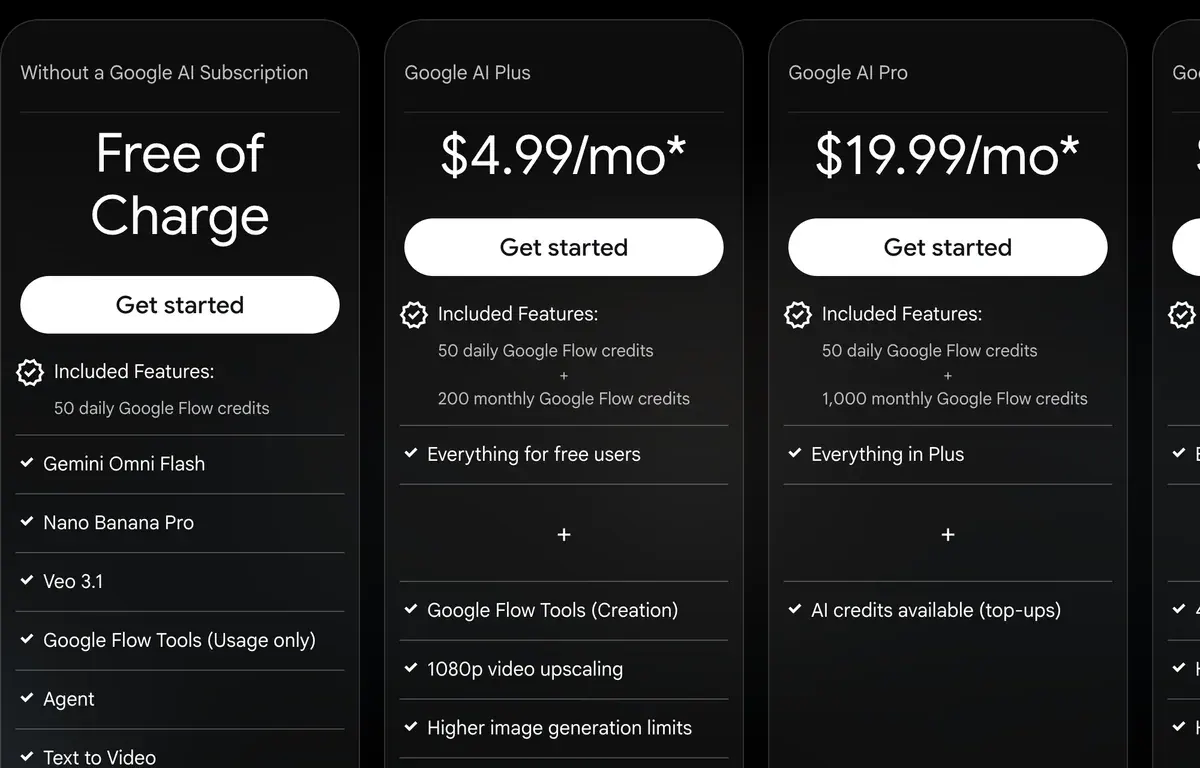
Google AI Ultra (5x) halves the Fast price to 10 credits.
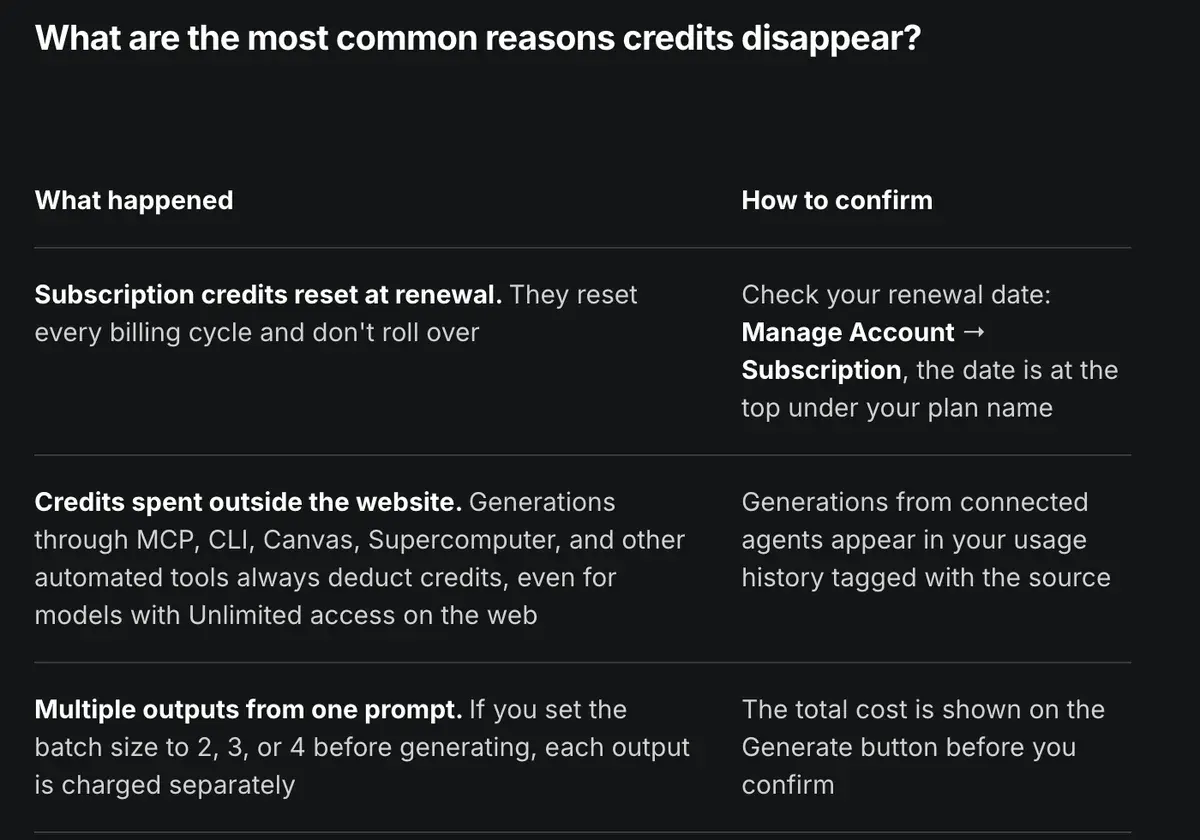
Higgsfield shows the cost on the Generate button before you confirm (help centre). Its pricing page put Veo 3.1 Fast at about 16 credits for 4 seconds on 19 October 2026.
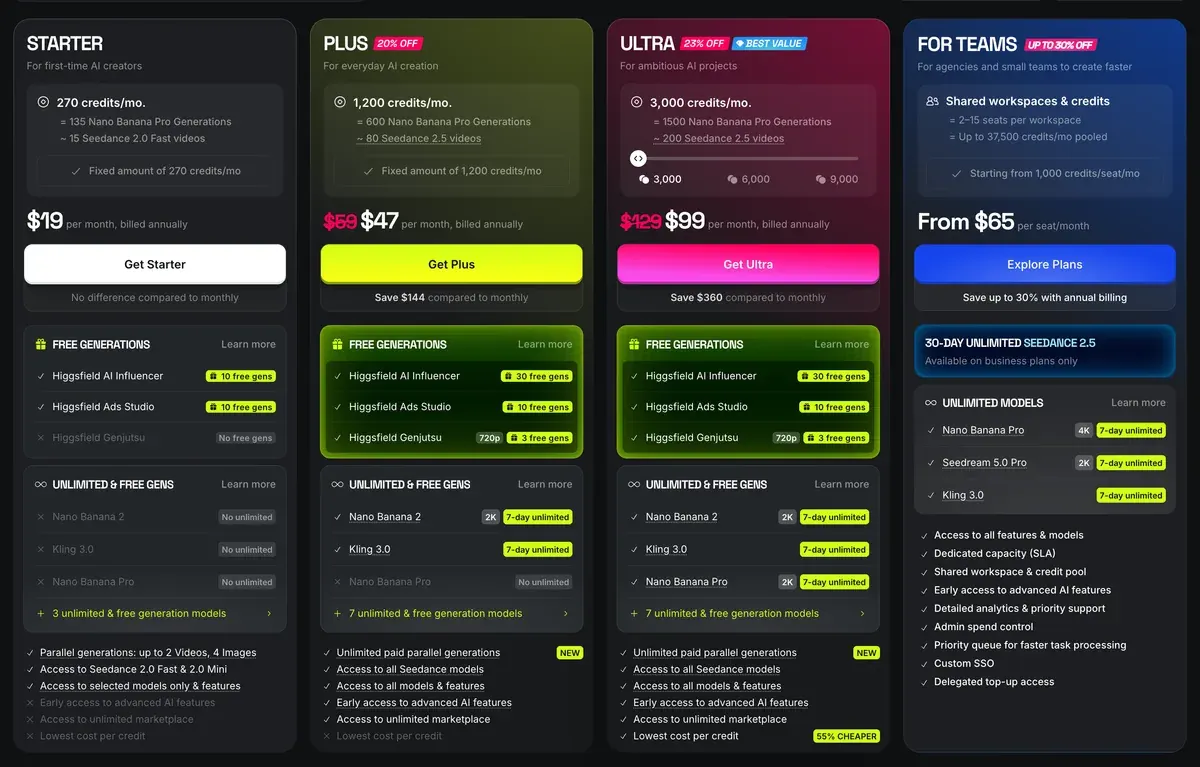
Higgsfield Starter costs $15 a month for 200 credits (Higgsfield pricing).
| Route and plan | Credits | One clip |
|---|---|---|
| Google AI Ultra (5x), Flow | 10 | $0.10 |
| Google AI Pro, Flow | 20 | $0.40 |
| Gemini API, 1080p | Billed by the second | $0.48 |
| Higgsfield Ultra, monthly | About 16 | $0.69 |
| Higgsfield Plus, monthly | About 16 | $0.78 |
| Higgsfield Starter | About 16 | $1.20 |
Scroll sideways for all 3 columns
Flow charges the same 20 credits for 4, 6 or 8 seconds; Higgsfield’s pricing page lists its Veo rates per 4 seconds.
The 50 free daily credits are left out of the Google rows; adding them lowers every Flow figure. Every account gets them, and Gemini Omni Flash at 720p costs 7 to 15 credits a clip. Flow’s pricing page lists Veo 3.1 on its free card, while its rate table gives the Veo 3.1 Fast and Lite rates for subscribers only.
The full model shows the same pattern. Flow prices Veo 3.1 Quality at 100 credits for an 8-second clip, which is $2.00 on Pro. Higgsfield put full Veo 3.1 at about 40 credits per 4 seconds, or $1.96 on Plus for half the length.
Higgsfield’s own model roundup (9 June 2026) lists Veo 3.1 among its most credit-intensive models, at roughly 40 to 70 credits a video.
What is Google Veo 3.1 best for in AI video?
Veo 3.1 is the best model for wide, outdoor and weather-driven scenes. Its global illumination and environmental handling make landscapes, cityscapes and natural motion (water, fog, wind) feel convincing at scale, with native audio, where most models flatten depth or light.
Where it falls short: Veo 3.1 is among the most credit-intensive models at roughly 40–70 credits per video, and its consistency softens on close-up human shots versus wide scenes. For tight character work or dialogue, Kling 3.0 is stronger and far cheaper. If you only need Veo, Google’s own Flow may cost less than an aggregator subscription.
Higgsfield’s “Unlimited” does not close the gap. Its 11 September 2026 plan table gives year-long unlimited use to six image models, with a 7-day Kling 3.0 window on Ultra. Veo is not on it, so every Veo clip spends credits.
Users notice. Eight of 52 Higgsfield sources say the same model costs less from its maker (YouTube, YouTube). On the Google side, 8 of 62 sources say Flow credits are confusing and go fast, with daily credits lost at midnight (YouTube, Reddit).
Every plan and credit size: Higgsfield pricing and Google Veo pricing.
Ad rights and watermarks
Higgsfield states commercial use plainly and Google’s consumer terms say less. For a documented indemnity, Veo needs Google Cloud or Higgsfield Enterprise.
Higgsfield’s terms (26 July 2026) say it does not “restrict your commercial use of Outputs” (4.4).
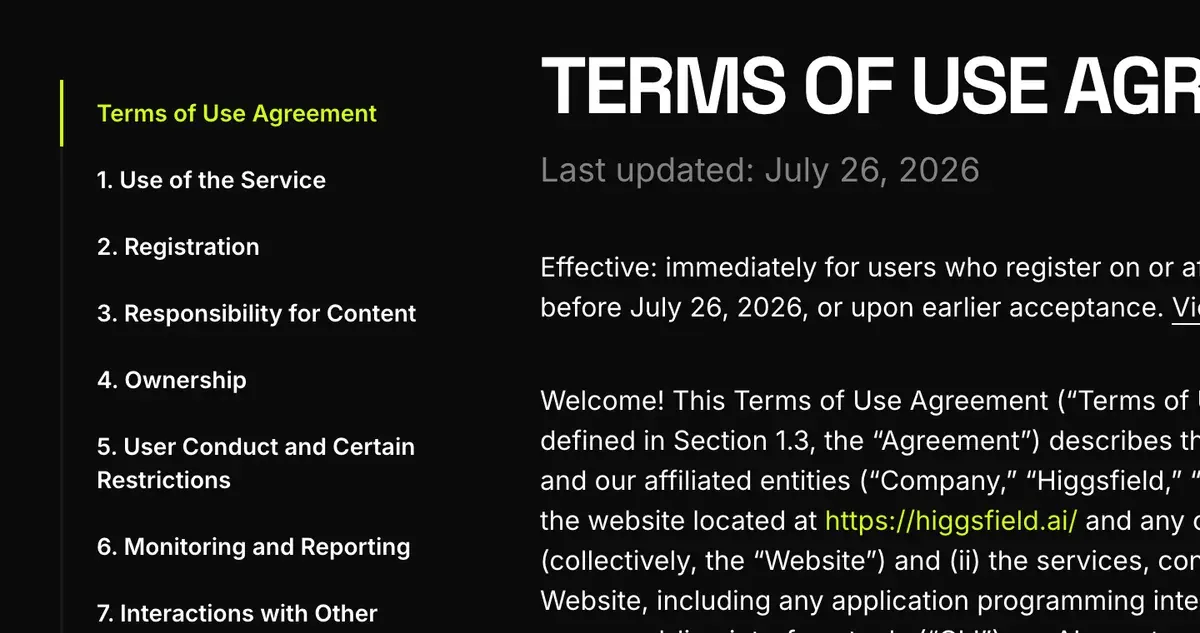
Section 8 then adds the model maker’s policy: “where those policies are more restrictive, the more restrictive terms govern your use of that feature or model”. A Veo clip made on Higgsfield answers to Google’s rules as well. Higgsfield’s IP indemnity covers Enterprise customers only.
Google’s Terms of Service (30 July 2026) say “Google won’t claim ownership over that content”, and no clause grants or bars ad use as such. The rights matrix marks Google AI plans Unclear for paid ads.
On Google Cloud, generally available Veo versions sit on the indemnified services list (20 July 2026). That matters if a brand’s legal team signs off your ads.
Training differs too. Higgsfield 4.4 lets it train on your inputs and outputs unless you hold an Enterprise Agreement; deleting content stops future use only. Google’s Gemini API pricing page says paid-tier content is not used to improve its products.
Both mark the files.
Flow embeds Google’s SynthID, an invisible signal woven into the frames, in every video, and its visible watermark is a setting you switch (Flow help). Google DeepMind’s Veo page says Veo videos carry SynthID, so a Veo clip made on Higgsfield carries it too.
In the Gemini app, the watermark setting turns off the visible mark only. SynthID and Content Credentials, a label hidden in the file’s data, stay in all Gemini Apps media (Gemini Apps Help).
Turn visible watermarks on or off
1. On your computer, go to gemini.google.com. 2. At the bottom left, click Settings > Media Watermark. 3. Turn the setting on or off.
Tips: This setting only controls the visible watermark. It doesn’t affect SynthID watermarks or Content Credentials for media you create with Gemini Apps; these settings apply only to Gemini Apps (web and mobile), not AI features in other Google products.
SynthID: All AI-generated media created or edited with Gemini Apps includes an invisible SynthID watermark.
Content Credentials (C2PA) provenance signals: Gemini Apps include Content Credentials (C2PA) metadata to provide information about the content’s origin.
Higgsfield’s watermark article (modified 28 August 2026) says “every generation carries a Higgsfield watermark” on a free account, and paid plans carry none. It adds that Higgsfield “may embed invisible, machine-readable markers”, and names no system. Upgrading leaves earlier free clips watermarked.
Why does my generation have a watermark?
Paid plans don’t add a visible Higgsfield watermark to your generations, whether they’re credit-based, free generations included in your plan, or Unlimited models. Separately, Higgsfield may embed invisible, machine-readable markers or metadata that identify content as AI-generated: they aren’t a visible watermark and don’t appear on your image or video.
The watermark depends on your account type, not on the model, the credits used, or the output quality. On a free account, every generation carries a Higgsfield watermark. On any paid plan, generations come without a watermark. There is no separate watermark setting to switch on or off. The visible watermark is separate from the invisible, machine-readable markers Higgsfield may embed in AI-generated content; those markers aren’t visible in your file and aren’t removed by upgrading.
Clause by clause: Google Veo and Higgsfield in the rights matrix, and every tool’s marks on AI watermarks by plan.
Refunds and failed clips
Higgsfield refunds a first payment within 7 days if no credit was used, minus a fee of up to 6%. It never refunds a renewal (terms, 9.3).
Nine of 52 user sources report refusals once any credit was spent, accidental annual purchases included (Trustpilot). On Veo, 13 of 62 sources say weak prompt adherence means several paid retries per usable clip (Reddit, Reddit). Another 13 report moderation blocking ordinary prompts, a client’s own photos among them (Reddit, Reddit).
A retry costs the same credits on both, so the cheaper clip price compounds. At the five attempts one Reddit user reports per usable 4-second Fast clip, Google AI Pro spends $2.00 and Higgsfield Plus about $3.92.
When each one wins
Pick Google Veo through Flow when Veo is the model you plan to run. It costs less per clip, gives 50 credits a day free, and Google Cloud adds an indemnity for brand work.
Pick Higgsfield when your ads mix models. Kling 3.0 costs about 7 credits for 5 seconds at 720p there, against about 16 for a 4-second Veo 3.1 Fast clip. One bill and one library save switching between apps, and the Higgsfield guide walks through each studio.
Head to head with other Veo routes: Veo 3 vs Kling and Veo 3 vs Runway. Full profiles: Google Veo and Higgsfield.
Questions buyers ask about Google Veo and Higgsfield
Is Veo on Higgsfield the same as Veo in Flow?
Yes. Higgsfield resells Google’s Veo 3.1, at the same 4, 6 and 8-second lengths, on its own credits.
Is Higgsfield cheaper than Gemini for Veo?
No. A 4-second Veo 3.1 Fast clip costs about $0.78 on Higgsfield Plus and $0.40 on Google AI Pro.
Does Higgsfield remove the SynthID watermark?
No. Google says every Veo video carries SynthID, and Higgsfield’s paid plans remove only Higgsfield’s own visible watermark.
Can I try Veo free?
Flow’s pricing page lists Veo 3.1 on its free card, with 50 credits a day for every account. Its rate table gives the Veo 3.1 Fast and Lite rates for subscribers only. Higgsfield’s free plan watermarks every generation.
Next on Higgsfield: AI video tools for marketing teams
All Higgsfield comparisons sit together in the Higgsfield hub
Sources
- Google: Google AI plans, Google AI Plus, Pro and Ultra prices and the monthly Flow credits each adds. Checked
- Google Flow help: Flow credits, credits per generation: Veo 3.1 Fast 20, Quality 100; 50 daily credits with or without a subscription; Ultra halves Lite and Fast. Checked
- Google Flow help: Get started with Google Flow, the Visible watermarking setting and SynthID on every video. Checked
- Google: Gemini API pricing, last updated 24 September 2026; Veo 3.1 Fast at 0.12 dollars a second at 1080p; paid-tier content not used to improve Google’s products. Checked
- Google DeepMind: Veo, Veo videos marked with SynthID. Checked
- Google: Google Terms of Service, effective 30 July 2026; the generated-content line. Checked
- Google Cloud: Generative AI indemnified services, last modified 20 July 2026; generally available Veo versions on the Gemini Enterprise Agent Platform API. Checked
- Higgsfield: Higgsfield pricing, plan cards and credit costs per model on 9 October 2026; Veo 3.1 about 40 credits per 4 seconds, Veo 3.1 Fast about 16, Kling 3.0 about 7 per 5 seconds at 720p. Checked
- Higgsfield: Veo 3.1 on Higgsfield, FAQ: 4, 6 or 8 seconds, 720p and 1080p at 24 FPS. Checked
- Higgsfield help centre: Which AI model should I use, dated 1 August 2026; names Veo as Google’s model. Checked
- Higgsfield help centre: What uses my credits, the exact cost shown on the Generate button before you confirm. Checked
- Higgsfield help centre: Watermark and how to remove it, published 3 August 2026, modified 28 August 2026; free generations watermarked, paid plans not; invisible markers. Checked
- Higgsfield: Higgsfield Terms of Use, last updated 26 July 2026; sections 4.4, 8 and 9.3. Checked
- Higgsfield blog: Annual unlimited AI video plans, the 11 September 2026 plan table: six image models and a 7-day Kling 3.0 window. Checked
- Higgsfield blog: How to use Google Veo 3.1, four steps from the Video tab to an 8-second 1080p clip. Checked
- Higgsfield blog: The 5 best AI video models in 2026, dated 9 June 2026; Veo 3.1 among Higgsfield’s most credit-intensive models, roughly 40 to 70 credits a video. Checked
- Gemini Apps Help: Watermark settings in Gemini Apps, the visible watermark setting leaves SynthID and Content Credentials in place. Checked
- Google: Flow, the free card with 50 daily credits and Veo 3.1; Plus and Pro monthly credits. Checked
What changed on this page
- Higgsfield’s prices went back: Starter is 15 dollars a month for 200 credits, Plus 49 a month or 39 billed yearly for 1,000 credits, and Ultra 129 or 99 billed yearly has a card again (was Starter 19 for 270, Plus 59 or 47 for 1,200).
- Higgsfield changed its prices: Starter is 19 dollars a month for 270 credits (was 15 for 200), Plus 59 a month or 47 billed yearly for 1,200 credits (was 49 or 39 for 1,000). A Veo 3.1 Fast clip on Higgsfield Plus is now about 0.79 dollars (was 0.78), and 1.13 on Starter (was 1.20).

Alexandre S.
Alexandre S. is a creative ad strategist and copywriter with ten years' experience in digital marketing across multiple channels.
Related pages
-
 Category Best AI video generators for ads
23 AI video generators and model shops compared on cost per clip and ad-use terms, checked 25 September 2026.
-
 Profile Google Veo 3 for ads
An 8-second Veo 3.1 Fast clip: $0.10 if every credit of Google AI Ultra ($99.99) is used, $0.96 on the Gemini API at 1080p. Checked 24 September 2026.
-
 Pricing Veo 3 pricing
An 8-second Veo 3.1 Fast clip: $0.80 on the API at 720p, or $0.40 on Google AI Pro ($19.99 a month) if every monthly credit is used. Checked 24 September 2026.
-
 Alternatives Veo 3 alternatives
A Veo 3.1 generation in Flow runs 8 seconds at most. Video models with longer takes, lower list cost a second or clearer ad terms, checked 2 October 2026.
-
 Profile Higgsfield AI for ads
Higgsfield resells Kling, Veo and Seedance on one credit balance. What a clip costs, what “Unlimited” covers and its ad terms, checked 24 September 2026.
-
 Pricing Higgsfield pricing
Higgsfield plans start at $15 a month for 200 credits, about $0.075 a credit. What Unlimited covers, the free plan, the trial and refunds. Checked 21 Oct 2026.


