YouTube Shorts 廣告
YouTube Shorts 廣告是在 Shorts 動態中、短片之間播放的直式影片廣告。Shorts 是 YouTube 可上下滑動的短影音串流。Google Ads 並沒有名為「Shorts」的活動類型,要透過六種活動類型觸及動態:Demand Gen、Performance Max、Video reach、Video view、App 和 Reservation。Reservation 是預訂式購買,須透過 Google 業務代表安排。
想要銷售成效又想掌控版位,就從 Demand Gen 開始,因為它可讓廣告群組只在 Shorts 投放。影片製作成 9:16、1080 × 1920 像素、60 秒以內、有聲音。先發布到 YouTube(想的話可設為不公開),再加進廣告。
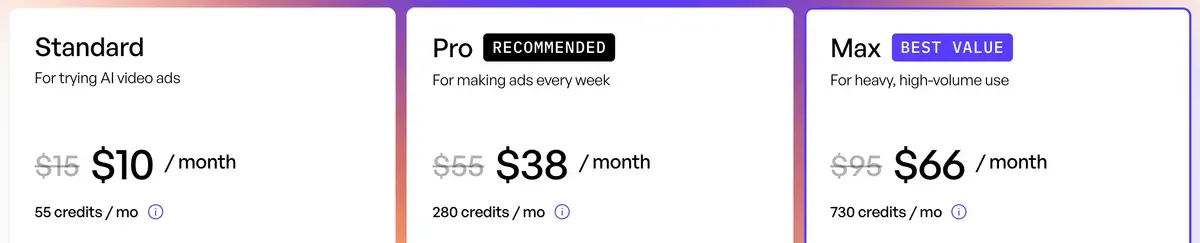
製作成本不高。Creatify 列出 30 秒虛擬人像影片在 Standard 方案為 2.73 美元(假設點數全部用完,讀取於 )。比較麻煩的是構圖:Google 的安全區域會從右緣扣掉 192 像素,幾乎是 Meta 對 Reels 邊界的三倍。
哪些 Google Ads 活動類型能觸及 Shorts?
六種都能觸及動態,但只有 Demand Gen 能在單一廣告群組內指定 Shorts。這個差異決定第一個測試該放在哪裡。
| 活動類型 | 能指定 Shorts 嗎? | 直式影片長度 |
|---|---|---|
| Demand Gen | 可以,依廣告群組設定:選「Let me choose」,再選 YouTube Shorts | 最少 5 秒,建議超過 15 秒;Shorts 須在 60 秒以內 |
| Performance Max | 沒有明確的 Shorts 設定;由 Google AI 決定影片版位 | Shorts 資格須為 10 至 60 秒 |
| Video reach | 整個活動可選擇排除特定格式 | 6 到 60 秒 |
| Video view | 整個活動可選擇排除特定格式 | 未標明範圍;建議 60 秒以內 |
| App | Google 指南中沒有提到 Shorts 控制選項 | 10 到 60 秒 |
| Reservation | 以 YouTube Select Shorts 名義銷售,須透過 Google 業務代表 | 未標明範圍;建議 60 秒以內 |
左右滑動查看全部 3 欄
Google 的 Shorts 指南仍然提到 Video Action Campaigns。Google 已於 2025 年 4 月停止新增,並在 2026 年 4 月前把最後一批轉為 Demand Gen,所以這條路線就當作 Demand Gen。
Google 把「All Google channels」稱為多數廣告主的建議選項,也提醒縮小管道選擇可能導致投放量下降。不過第一次直式測試還是建議只選 Shorts:能清楚看出單一版位的表現,廣告站得住腳再放寬。
Google 指南指出,在跨格式投放的 Video reach 或 Video view 活動中,無法把單支影片限制在單一格式。
YouTube Shorts 廣告規格:Demand Gen 與 Performance Max(PMax)
Shorts 的檔案規格到處都一樣:9:16、1080 × 1920 像素。活動類型不同,影響的是你要提供幾支影片,以及影片最短能多短。
| 規格 | Shorts 指南 | Demand Gen | Performance Max |
|---|---|---|---|
| 比例 | 建議 9:16 | 1:1、16:9、4:5,另可選 9:16 | 橫式、方形和直式 |
| 長度 | 最長 3 分鐘 | 最少 5 秒,建議超過 15 秒 | 10 秒以上 |
| 影片數量 | 未說明 | 每則廣告 1 至 5 支 | 最多 15 |
| 檔案大小上限 | 未說明 | 256 GB | 未說明 |
| 檔案存放位置 | 未說明 | 須先上傳到 YouTube;不公開也可以 | 在素材資源群組中上傳 |
左右滑動查看全部 4 欄
長度有個陷阱。Google 允許 3 分鐘,但「只有前 60 秒會在 Shorts 動態播放」,而 50 秒時會出現引導觀眾前往觀看頁面的覆蓋層。請控制在 60 秒以內。對於要求採取行動的廣告,Google 建議 10 至 30 秒。
YouTube Shorts ads: Asset specs and best practices
Length. Video ads can be up to 3 minutes long, though only the first 60 seconds will play on the Shorts feed.
Aspect ratio. Vertical videos, with a 9:16 aspect ratio, are best suited for the Shorts format.
Horizontal files. If you use horizontal assets, they’ll serve with blurred top and bottoms in the vertical Shorts experience.
Sound. Use sound (music, voiceover, or both) in your Shorts ads.
橫式影片在 Shorts 播放時,上下會出現模糊的邊條。Performance Max 更寬鬆:如果沒有影片,系統「可能自動生成」一支,也可能「翻轉你上傳的影片」用於 Shorts。建議自己加上直式影片,播什麼才由你決定。
聲音要提前規劃。Google 的 Shorts 指南建議加入音樂或旁白,並指出聲音可把轉換提升超過 20%。為靜音觀看製作的 Reel,在這裡播放前需要補上音軌。
為什麼 Reel 常常需要重剪才能放上 Shorts?
問題出在右側邊緣。上下邊界和 Meta 差不多,但 Shorts 在右側保留的空白大得多,文字和產品都要避開。
Google 的透明直式覆蓋圖是它為影片廣告提供連結的 PNG 檔,清楚區域是橫向 48 到 887、縱向 288 到 1247。Meta 的 Reels 數字14%、35% 與 6%,則套用在下方同樣 1080 × 1920 的畫面上。
| 邊緣 | Google 覆蓋圖 | Meta Reels | 兩者皆安全 |
|---|---|---|---|
| 上 | 288 | 269 | 288 |
| 下 | 672 | 672 | 672 |
| 左 | 48 | 65 | 65 |
| 右 | 192 | 65 | 192 |
左右滑動查看全部 4 欄
Reel 清楚區域中最右側 127 像素內的任何內容,都落在 Google 的清楚區域之外。價格、產品畫面和字幕結尾,都別放在這一條範圍內。
兩個平台都安全的區域是 823 × 960 像素,起點在橫向 65、縱向 288。它佔畫面的 38%,所以字幕要用短句。照這個框製作,一個母版檔案就能兩邊通用,其他 Reels 規則請看 Meta 廣告規格。
第二個原因是長度。Reels 廣告可長達 15 分鐘,太長的版本得把重點挪到前 60 秒內。第三是調性:Google 建議廣告要有原生、社群優先的感覺,而燒錄了其他平台介面的 Reel 就達不到。
YouTube 的 AI 規範適用於 AI 廣告嗎?
適用。從 Google Ads 內把影片上傳到 YouTube,系統會詢問是否由 AI 製作或編輯,「以遵守 YouTube 針對一般影片的 AI 揭露政策」。YouTube 的判斷標準是真實感,逼真但從未發生的場景就必須揭露。
由寫實 AI 演員代言、場景是從未存在過的廚房,就符合這個標準。只有 AI 撰寫腳本則不算,因為 YouTube 把腳本協助列為不需揭露的用途。YouTube 的 AI 揭露列出了界線兩邊的情況。
Labels for AI content
If creators select “Yes” to indicate that their content is realistic and generated by AI or meaningfully altered with AI, we’ll add a label to their video.
Label on the video player for photorealistic AI content. For AI content that is photorealistic, a label in the video player may also appear.
AI YouTube Shorts 廣告要花多少錢?
Creatify Standard 方案的 15 秒虛擬人像廣告為 1.36 美元,30 秒的為 2.73 美元(假設點數全部用完)。
虛擬人像影片每 15 秒收 5 點,不足則進位。20 秒的廣告會以 30 計費,所以腳本要寫到 15 或 30。兩者都在 Google 建議的 10 至 30 秒範圍內,但只有 30 符合 Demand Gen「超過 15 秒」的建議。
JoggAI 與 Creatify 這兩列是依標明的 30 秒計價。CreateUGC 和 Tagshop 沒有標明長度,所以它們的數字只能大略比較。
左右滑動查看全部 4 欄
Creatify 的 YouTube 廣告頁面能把商品連結變成 Short 或廣告,附虛擬人像、腳本選項和聲音,但沒有提供比例或長度,所以請參考上面的表格。它也還在顯示較舊的入門價 39 美元,應以價格頁為準。
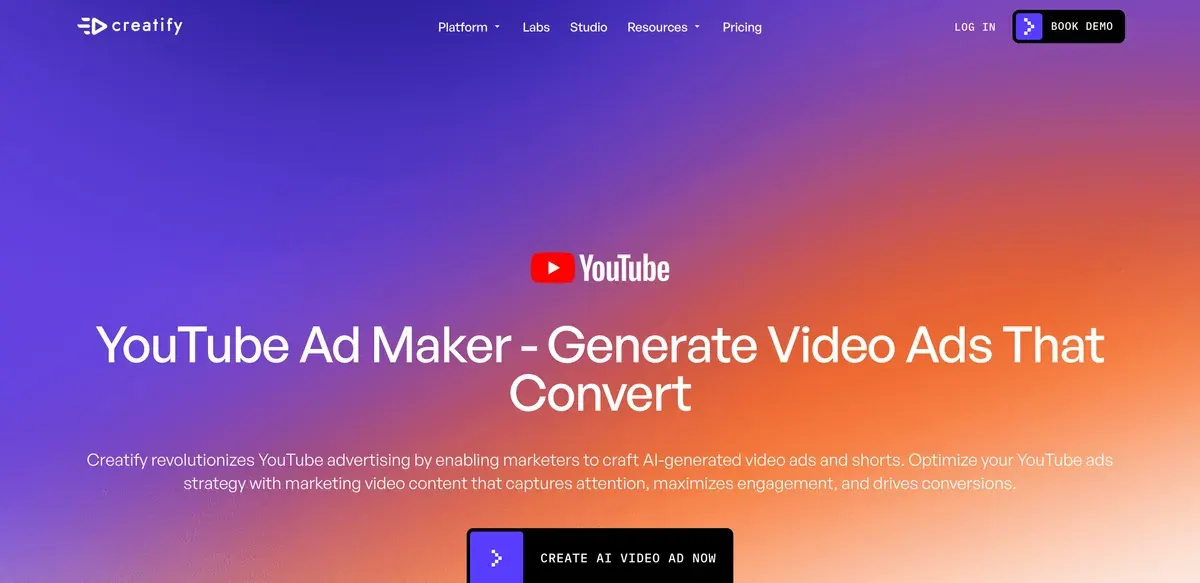
那張價格表在發布工具那一列只列出 Meta、TikTok 和 AppLovin,沒有 Google。
Creatify 的 Google Ads Agent 表示,經你核准後,可把影片加進現有的 Performance Max 素材資源群組。該頁面沒有提到 Demand Gen,所以上述測試要自己把檔案發布到 YouTube,再到 Google Ads 加進去。Google Ads 與 AI 助理說明了這類存取方式。
上傳前,每一支生成的影片都要檢查。使用者反映對嘴和細節與腳本不符(61 個來源中有 17 個:Trustpilot、Trustpilot)。
什麼時候 Shorts 不必用 Creatify
如果已經有不錯的橫式素材,就不適合。Google 的指南說,Video Enhancement 功能可在 Google Ads 內把素材做成直式版本。付費重新生成之前,先試試這個。
長篇敘事也不適合。Standard 方案影片上限 2 分鐘,Pro 為 10 分鐘,而串流前貼片的品牌影片本來就得實拍。小型企業的 CTV 廣告介紹短廣告的 16:9 路線。
Google 也建議盡量使用創作者素材。要證明實際成效的示範,找真人創作者拍攝比較保險。AI UGC vs 真人 UGC比較了兩者。
YouTube Shorts 廣告常見問題
能只在 YouTube Shorts 投放廣告嗎?
可以,在 Demand Gen 中。在廣告群組的 Channels 面板選「Let me choose」,再只勾選 YouTube Shorts。
YouTube Shorts 廣告可以多長?
最長 3 分鐘,但 Shorts 動態只會播放前 60 秒。Google 建議控制在 60 秒以內,要求採取行動的廣告則為 10 至 30 秒。
橫式影片能在 Shorts 播放嗎?
可以,影片上下會出現模糊區域。Google 表示,直式 9:16 影片的表現比橫式好。
資料來源
- Google:YouTube Shorts ads: Asset specs and best practices, Google Ads Help,3 分鐘上限、動態只播前 60 秒、建議 60 秒以內、50 秒覆蓋層、長度範圍、直式優於橫式、聲音、版位控制。確認於
- Google:Campaign Types That Support YouTube Shorts ads, Google Ads Help,Demand Gen、Video view、Video reach、Reservation、Performance Max 與 App;Reservation 須透過 YouTube Select Shorts 和 Google Ads 業務代表。確認於
- Google:Channel controls in Demand Gen campaigns, Google Ads Help,依廣告群組設定;在 Let me choose 下可選 YouTube Shorts;多數廣告主建議使用 All Google channels;投放量下降警告。確認於
- Google:About video assets for Performance Max campaigns, Google Ads Help,在素材資源群組上傳,最多 15 支影片,10 秒以上,一支 10 至 60 秒的直式影片可符合 Shorts 資格,自動生成影片,翻轉影片。確認於
- Google:About video asset specifications for Demand Gen campaigns, Google Ads Help,影片須已在 YouTube,不公開也可;四種比例,最少 5 秒,建議超過 15 秒,1 至 5 支影片,256 GB。確認於
- Google:Video ads specs and format requirements, Google Ads Help,Video reach,9:16,1080 x 1920,Shorts 為 6 至 60 秒。確認於
- Google:Video Action Campaigns are being upgraded to Demand Gen, Google Ads Help,新活動已於 2025 年 4 月移除;最後一批活動將於 2026 年 4 月前升級。確認於
- Google:About video ad specs, Google Ads Help,連結透明直式安全區域覆蓋圖,1080 x 1920 的 PNG。確認於
- Meta:Instagram Reels video ad specs, Meta Ads Guide,上方 14%、下方 35%、兩側各 6%;0 秒至 15 分鐘。確認於
- Google:Use AI content label settings and disclosures, Google Ads Help,從 Google Ads 上傳的廣告影片,會收到與一般影片相同的 AI 提問。確認於
- Creatify:Creatify for YouTube ads,商品網址轉成 Short 或廣告;沒有規格數字;仍顯示較舊的入門價。確認於
- Creatify:Creatify pricing,Ad Launcher 與 Ad Agent 列出 Meta、TikTok 和 AppLovin;Standard 方案影片最長 2 分鐘。確認於
- Creatify:AI Google Ads Agent, Creatify,經你核准後,把新影片加進現有的 Performance Max 素材資源群組。確認於
- Creatify:Creatify credit usage, billing and validity,每 15 秒 5 點,不足的部分進位計算。確認於


