YouTube Shorts ads
YouTube Shorts ads are vertical video ads that play between clips in the Shorts feed, YouTube’s swipeable stream of short videos. Google Ads sells no campaign called “Shorts”. You reach the feed through six campaign types: Demand Gen, Performance Max, Video reach, Video view, App and Reservation. Reservation is a booked buy you arrange through a Google rep.
Start with Demand Gen if you want sales and a say in placement, since it lets an ad group run on Shorts alone. Make a 9:16 video at 1080 by 1920 pixels, under 60 seconds, with sound. Publish it to YouTube first, unlisted if you like, then add it to the ad.
Making one is cheap. Creatify lists a 30-second avatar video at $2.73 on Standard if every credit is used, read on . The rework sits in the framing: Google’s safe zone takes 192 pixels off the right edge, nearly three times Meta’s margin for a Reel.
Which Google Ads campaign types reach Shorts?
All six reach the feed, and only Demand Gen lets you pick Shorts inside one ad group. That difference decides where your first test goes.
| Campaign type | Can you aim at Shorts? | Vertical video length |
|---|---|---|
| Demand Gen | Yes, per ad group: “Let me choose”, then YouTube Shorts | 5 seconds minimum, over 15 recommended; under 60 for Shorts |
| Performance Max | No Shorts setting named; Google AI places the video | 10 to 60 seconds for Shorts eligibility |
| Video reach | Opt out of formats for the whole campaign | 6 to 60 seconds |
| Video view | Opt out of formats for the whole campaign | No range stated; under 60 recommended |
| App | No Shorts control named in Google’s guide | 10 to 60 seconds |
| Reservation | Sold as YouTube Select Shorts, through a Google rep | No range stated; under 60 recommended |
Scroll sideways for all 3 columns
Google’s Shorts guide still names Video Action Campaigns as well. Google stopped new ones in April 2025 and moved the last into Demand Gen by April 2026, so treat that route as Demand Gen.
Google calls “All Google channels” the recommendation for most advertisers, and it warns that narrow channel choices can serve at lower volume. For a first vertical test, pick Shorts alone anyway. You get a clean read of one placement, then widen once the ad holds up.
Google’s guide says you can’t restrict a single video to one format in Video reach or Video view campaigns that run across formats.
YouTube Shorts ad specs, with Demand Gen and Performance Max (PMax)
The Shorts file is the same everywhere: 9:16 at 1080 by 1920 pixels. The campaign changes how many videos you supply and how short they can run.
| Spec | Shorts guide | Demand Gen | Performance Max |
|---|---|---|---|
| Ratio | 9:16 recommended | 1:1, 16:9, 4:5, and 9:16 as an option | Horizontal, square and vertical |
| Length | Up to 3 minutes | 5 seconds minimum, over 15 recommended | 10 seconds or more |
| Videos | Not stated | 1 to 5 per ad | Up to 15 |
| File limit | Not stated | 256 GB | Not stated |
| Where the file sits | Not stated | On YouTube first; unlisted works | Uploaded in the asset group |
Scroll sideways for all 4 columns
Length has one trap. Google allows 3 minutes, but “only the first 60 seconds will play on the Shorts feed”, and an overlay at 50 seconds points viewers to the watch page. Stay under 60. For ads that ask for an action, Google suggests 10 to 30 seconds.
YouTube Shorts ads: Asset specs and best practices
Length. Video ads can be up to 3 minutes long, though only the first 60 seconds will play on the Shorts feed.
Aspect ratio. Vertical videos, with a 9:16 aspect ratio, are best suited for the Shorts format.
Horizontal files. If you use horizontal assets, they’ll serve with blurred top and bottoms in the vertical Shorts experience.
Sound. Use sound (music, voiceover, or both) in your Shorts ads.
Horizontal video runs on Shorts with blurred bars above and below it. Performance Max is looser still: with no video, one “may be auto-generated” from your assets, and “Google AI may also flip your uploaded videos” for Shorts. Add your own vertical so you decide what plays.
Plan for sound. Google’s Shorts guide recommends music or voiceover, and it says sound lifts conversions by more than 20 per cent. A Reel built for silent viewing needs an audio track before it runs here.
Why does a Reel often need recutting for Shorts?
The right edge is the problem. Top and bottom margins almost match Meta’s, but Shorts keeps far more of the right side clear of your text and product.
Google’s transparent vertical overlay, the PNG it links for video ads, leaves a clear area from 48 to 887 across and 288 to 1247 down. Meta’s Reels figures, 14, 35 and 6 per cent, are applied below to the same 1080 by 1920 frame.
| Edge | Google overlay | Meta Reels | Safe on both |
|---|---|---|---|
| Top | 288 | 269 | 288 |
| Bottom | 672 | 672 | 672 |
| Left | 48 | 65 | 65 |
| Right | 192 | 65 | 192 |
Scroll sideways for all 4 columns
Anything inside the right-hand 127 pixels of a Reel’s clear area falls outside Google’s. Keep prices, product shots and caption ends out of that strip.
The box safe on both platforms is 823 by 960 pixels, starting 65 across and 288 down. It covers 38 per cent of the frame, so a caption needs short lines. Build to that box and one master file serves both, and Meta ad specs has the rest of the Reels rules.
Length is the second reason. A Reels ad can run to 15 minutes, so a long one needs its payoff moved inside the first 60 seconds. The third is tone: Google’s advice is to feel organic and social-first, and a Reel with another platform’s interface burned in fails that.
Do YouTube’s AI rules apply to AI ads?
Yes. Upload a video to YouTube from inside Google Ads and you are asked whether AI made or edited it, “to comply with YouTube’s AI disclosure policies for organic videos”. YouTube’s test is realism, and a lifelike scene that never happened needs disclosing.
An ad fronted by a photorealistic AI actor in a kitchen that never existed meets that test. An AI-written script alone doesn’t, since YouTube lists script help among the uses that need no disclosure. AI disclosure on YouTube lists both sides of the line.
Labels for AI content
If creators select “Yes” to indicate that their content is realistic and generated by AI or meaningfully altered with AI, we’ll add a label to their video.
Label on the video player for photorealistic AI content. For AI content that is photorealistic, a label in the video player may also appear.
What does an AI YouTube Shorts ad cost?
A 15-second avatar ad on Creatify Standard costs $1.36, and a 30-second one $2.73, if every credit is used.
Avatar video bills 5 credits per 15 seconds, rounded up. A 20-second ad bills as 30, so write to 15 or 30. Both sit inside Google’s 10 to 30-second advice, and only the 30 meets Demand Gen’s recommendation of “more than 15 seconds”.
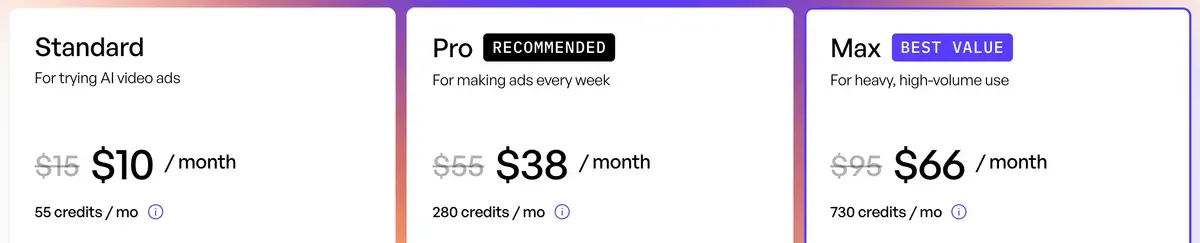
JoggAI and Creatify are the two rows priced for a stated 30 seconds. CreateUGC and Tagshop state no length, so their figures compare loosely.
Scroll sideways for all 4 columns
Creatify’s YouTube ads page turns a product link into a Short or an ad, with avatars, script options and voices. It gives no ratios or lengths, so use the tables above. It also still quotes an older entry price of $39, and the pricing page is the one to trust.
That pricing table names Meta, TikTok and AppLovin on its launcher row, with no Google.
Creatify’s Google Ads Agent says it can add videos to an existing Performance Max asset group after you approve. That page names no Demand Gen route, so for the test above you publish the file to YouTube and add it in Google Ads yourself. Google Ads and AI assistants covers that kind of access.
Check every render before you upload. Users report lip sync and details that miss the script (17 of 61 sources: Trustpilot, Trustpilot).
When to skip Creatify for Shorts
Skip it if you already hold good horizontal footage. Google’s guide says its Video Enhancement feature can make vertical versions of your assets inside Google Ads. Try that before you pay for a new render.
Skip it for long-form storytelling too. Standard caps videos at 2 minutes and Pro at 10, and a brand film for in-stream is a shoot. CTV ads for small business covers the 16:9 route for a short spot.
Google also advises using creator assets where you can. A filmed creator is the safer spend for a demo that proves a physical result. AI UGC vs human UGC weighs the two.
Questions about YouTube Shorts ads
Can you run ads only on YouTube Shorts?
Yes, in Demand Gen. In the ad group’s Channels panel, pick “Let me choose” and select YouTube Shorts alone.
How long can a YouTube Shorts ad be?
Up to 3 minutes, but only the first 60 seconds play on the Shorts feed. Google recommends staying under 60, and 10 to 30 seconds for ads that ask for an action.
Do horizontal videos run on Shorts?
Yes, with blurred areas above and below the video. Google says vertical 9:16 video does better than landscape.
More pages for Creatify users, sorted by job, in the Creatify hub
Sources
- Google: YouTube Shorts ads: Asset specs and best practices, Google Ads Help, 3-minute limit, first 60 seconds on the feed, under 60 seconds recommended, 50-second overlay, length ranges, vertical over landscape, sound, placement control. Checked
- Google: Campaign Types That Support YouTube Shorts ads, Google Ads Help, Demand Gen, Video view, Video reach, reservation, Performance Max and App; reservation through YouTube Select Shorts and a Google Ads representative. Checked
- Google: Channel controls in Demand Gen campaigns, Google Ads Help, set per ad group; YouTube Shorts as a choice under Let me choose; All Google channels recommended for most advertisers; lower volume warning. Checked
- Google: About video assets for Performance Max campaigns, Google Ads Help, upload in the asset group, up to 15 videos, 10 seconds or more, one vertical of 10 to 60 seconds for Shorts eligibility, auto-generated videos, flipped videos. Checked
- Google: About video asset specifications for Demand Gen campaigns, Google Ads Help, videos must already be on YouTube, unlisted accepted; four ratios, 5-second minimum, more than 15 seconds recommended, 1 to 5 videos, 256 GB. Checked
- Google: Video ads specs and format requirements, Google Ads Help, Video reach, 9:16 at 1080 x 1920 and 6 to 60 seconds for Shorts. Checked
- Google: Video Action Campaigns are being upgraded to Demand Gen, Google Ads Help, new campaigns removed in April 2025; final campaigns upgraded by April 2026. Checked
- Google: About video ad specs, Google Ads Help, links the transparent vertical safe zone overlay, a 1080 x 1920 PNG. Checked
- Meta: Instagram Reels video ad specs, Meta Ads Guide, 14 per cent top, 35 per cent bottom and 6 per cent each side; 0 seconds to 15 minutes. Checked
- Google: Use AI content label settings and disclosures, Google Ads Help, ad videos uploaded from Google Ads get the same AI question as organic videos. Checked
- Creatify: Creatify for YouTube ads, product URL to Short or ad; no spec figures; prints an older entry price. Checked
- Creatify: Creatify pricing, the Ad Launcher and Ad Agent rows name Meta, TikTok and AppLovin; videos up to 2 minutes on Standard. Checked
- Creatify: AI Google Ads Agent, Creatify, adds new videos to an existing Performance Max asset group after you approve. Checked
- Creatify: Creatify credit usage, billing and validity, 5 credits per 15 seconds, rounded up. Checked

Alexandre S.
Alexandre S. is a creative ad strategist and copywriter with ten years' experience in digital marketing across multiple channels.
Related pages
-
 Guide How to use Creatify
A 30-second Creatify ad uses 10 credits, and the agent’s cost is unknown until it finishes. Eight steps to a first ad, with what each spends, 5 November 2026.
-
 Guide A creative testing framework for Meta ads
AI makes ad variants cheap, but each still needs spend before its result means anything. A Meta creative testing framework with the budget maths shown.
-
 Guide Ecommerce video ads
Ecommerce video ads: the five formats online shops run, what each needs, and what one ad costs from a creator, an editor or AI. Checked 6 November 2026.
-
 Best list Free AI video generators for ads
Of 15 AI video tools with a free plan, 1 has terms that allow ads outright, and its free clips carry a watermark. Free plans checked 2 October 2026.


