MailerLite vs Mailchimp
總評:Mailchimp 還是 MailerLite
在我們列出的每個名單規模下,MailerLite 都比較便宜,而且最便宜的付費方案就有 AI 寫作。名單有 10,000 位聯絡人並要用 AI 時,MailerLite Comfort 每月 89 美元,Mailchimp Standard 每月 135 美元(確認)。兩家的條款都允許業者使用你的 AI 輸入來改進 AI 模型,Mailchimp 的條文還明指 Customer Data。
Mailchimp
- 適合
- 名單不大,想要豐富的整合目錄與範本:Essentials 500 位聯絡人每月 13 美元起。
- 不適合
- 想用便宜方案就有 AI(Essentials 沒有),或名單裡有大量已退訂聯絡人(這些也要計費)的買家。條款允許 Mailchimp 把 AI 輸入與輸出(含客戶資料)用於機器學習(條款第 30 條)。
MailerLite
- 適合
- 名單不大,想以低門檻用到自動化、到達網頁和 AI 撰寫:Comfort 500 位訂閱者每月 12 美元起。
- 不適合
- 需要超過 250 位訂閱者的免費方案,或想在 Free 使用 AI 功能(AI 寫作助理僅限付費方案)的買家;條款允許 MailerLite 用你的 AI 輸入與輸出改進 AI 模型(第 17.3 條)。
| Mailchimp | MailerLite | |
|---|---|---|
| 差異 | ||
| 每月起價(美元) | $13 | $12 |
| 最便宜的 AI 寫作方案 | 標準 | Comfort,入門付費方案 |
| 計入帳單的對象 | 已訂閱、未訂閱與已取消訂閱的聯絡人 | 只計入活躍訂閱者 |
| 付費方案超過上限時 | 下期帳單加收超額區塊 | 升到下一級距並收費 |
| 免費方案 | 250 位聯絡人,每月寄送 500 封 | 250 位訂閱者,每月 2,500 封 |
| 年繳折扣 | 未公布 | 比月費省 10% |
| AI 條款 | 輸入、輸出與 Customer Data 用於機器學習(30) | 輸入與輸出用於改進 AI 模型(17.3) |
| 兩者相同之處 | ||
| 免費方案 | 兩者皆提供 | |

Mailchimp 和 MailerLite,你的名單規模各要多少錢?
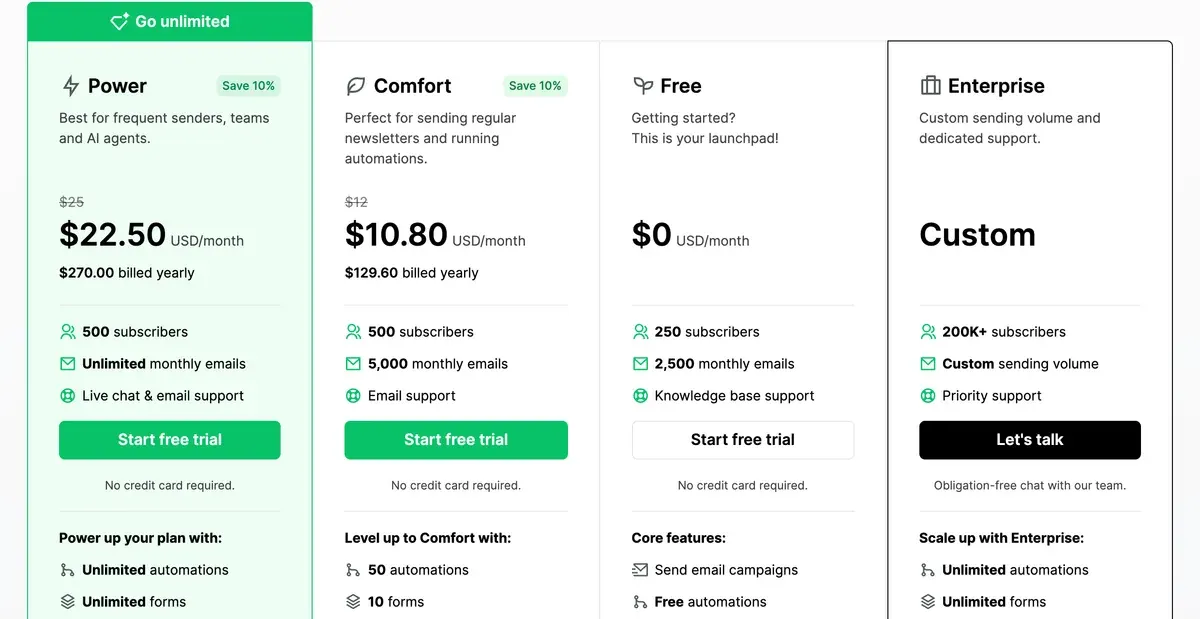
以各家最便宜的付費方案比較,下列四種名單規模都是 MailerLite 收費較低。這兩個方案分別是 Mailchimp 的 Essentials 與 MailerLite 的 Comfort。
| 工具 | 500 位聯絡人 | 2,500 位聯絡人 | 10,000 位聯絡人 | 50,000 位聯絡人 | 免費方案 | 確認於 | 價格頁 |
|---|---|---|---|---|---|---|---|
| Mailchimp | US$13 Essentials | US$45 Essentials | US$110 Essentials | US$385 Essentials | Free:最多 250 位聯絡人,每月 500 封信250 位聯絡人、每月 500 封信且每天 250 封、1 個受眾、1 個席位、含 Mailchimp 品牌標示、不能排程、範本有限、沒有生成式 AI。超過 250 位聯絡人就暫停寄信。 | mailchimp.com/pricing/marketing | |
| MailerLite | US$12 Comfort | US$33 Comfort | US$89 Comfort | US$319 Comfort | Free:最多 250 位聯絡人,每月 2,500 封信250 位訂閱者、每月 2,500 封信、2 個席位、1 個網站、1 個到達網頁、3 個表單、3 個自動化、含 MailerLite 標誌,只提供知識庫支援。主旨產生器有限制,AI 到達網頁建立器只能用一次,沒有 AI 寫作助手。 | mailerlite.com/pricing |
左右滑動查看全部 8 欄
聯絡人 500 位時,兩者只差 1 美元:Essentials 每月 13 美元,Comfort 每月 12 美元(確認,見 Mailchimp 方案、MailerLite 價格)。
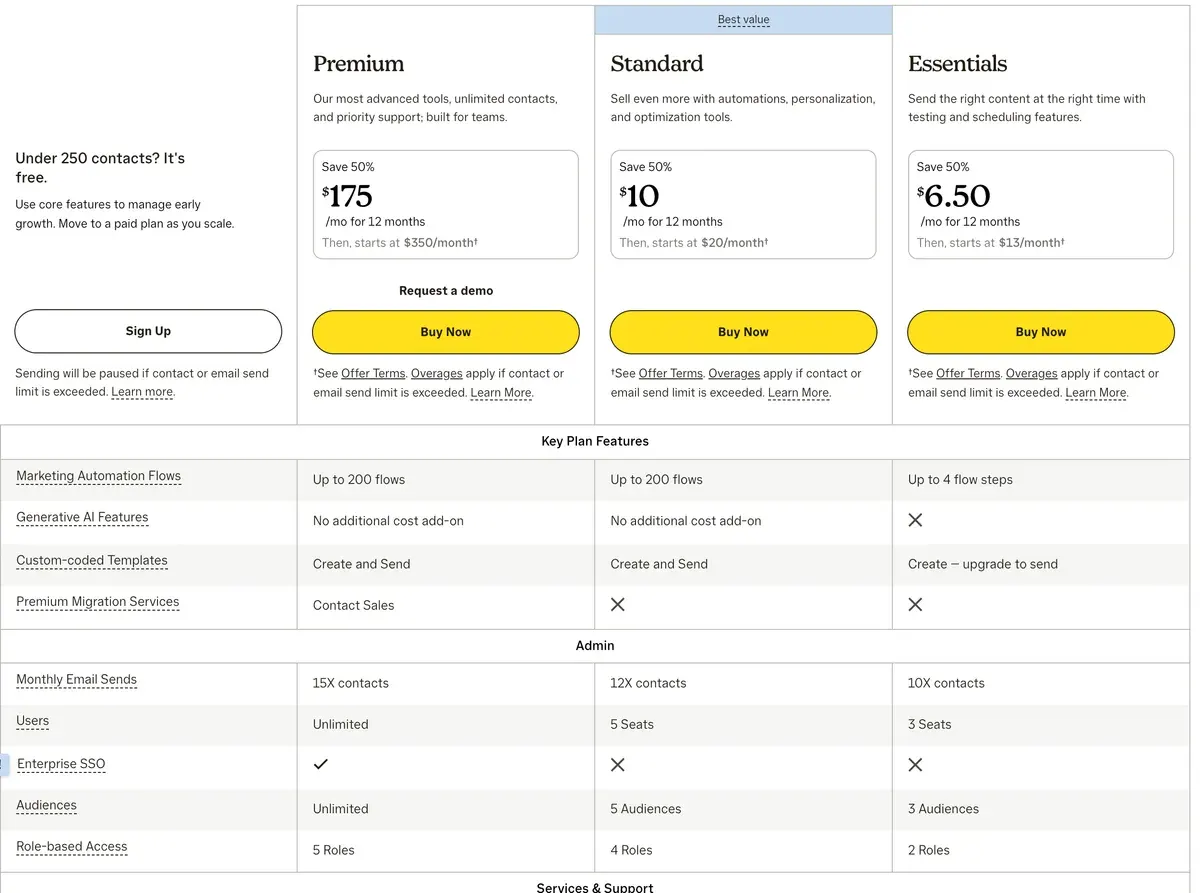
名單越大,差距越明顯。50,000 位時,Essentials 每月 385 美元,Comfort 只要 319 美元。
改成年繳,差距會再拉大。MailerLite 預付一年可省 10%(MailerLite 價格)。Mailchimp 沒有公布年繳價,價格頁雖有前 12 個月 50% 的優惠,但上述數字未計入。
想用自己的名單規模比較全部 15 款電子郵件工具,請看電子郵件工具價格表。
兩者的 AI 要多少錢?
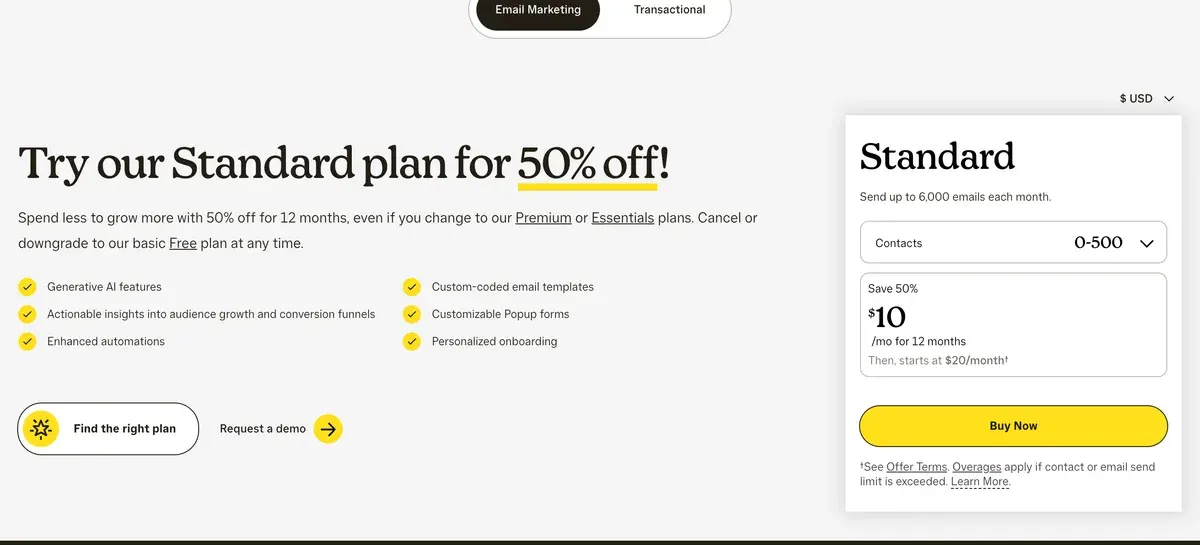
MailerLite 不用再加錢,入門付費方案就有。AI 寫作助理隨 Comfort 附贈;Mailchimp 則把生成式 AI 排除在 Essentials 之外,從 Standard 起才有。
| 工具 | AI 功能 | 最低方案 | 限制 | 確認於 |
|---|---|---|---|---|
| Mailchimp | 撰寫郵件 Generative AI features (content generation) | 標準 | Standard 和 Premium 列為無額外費用的附加功能,Essentials 和 Free 則是 不包含。條款第 30 條表示涵蓋活動、成效分析與聯絡人整理。 | |
| Mailchimp | 分眾 Advanced segmentation and pre-built segments | 標準 | 頁面上未標示為 AI。 | |
| Mailchimp | 預測 Predictive segmentation | 標準 | 列在 Premium 功能組中;註腳 17 表示預測分眾僅限 Standard 或 Premium 方案。 | |
| MailerLite | 主旨 Subject line generator | Free(有限制);Comfort 為完整版 | Free 標示為「有限」,未載明上限。 | |
| MailerLite | 撰寫郵件 AI writing assistant | Comfort | Free 沒有。以點數運作:Comfort 額度有限,Power 最多(說明文章,2026 年 6 月 16 日編輯)。 | |
| MailerLite | 寄送時間 Smart sending | Comfort | Free 沒有。Comfort 另可依時區寄送。 | |
| MailerLite | AI 代理 MCP server (Claude, ChatGPT) | Free(有限制);Comfort 為完整版 | 條款第 17.2 條:連接代理即授權其讀取及修改帳號資料。 | |
| MailerLite | 圖片 AI landing page builder | Free(限一次);Comfort 不限次數 | AI 政策還列出 AI 圖片生成器(DALL-E 3),但未說明屬於哪個方案。 | |
| MailerLite | 其他 AI-powered A/B testing | 列在 HeyLite intelligence 之下,未逐項標明方案 | 價格頁選單有列出;比較表顯示所有方案都有電子郵件 A/B 測試,Comfort 另有多變量測試。 |
左右滑動查看全部 5 欄
兩邊都要有 AI 寫作的話,差距更大。下表比較各家含 AI 寫作的最便宜方案(Mailchimp 方案、MailerLite 價格)。
| 聯絡人 | Mailchimp Standard | MailerLite Comfort | Mailchimp 貴了 |
|---|---|---|---|
| 500 | $20 | $12 | $8 |
| 2,500 | $60 | $33 | $27 |
| 10,000 | $135 | $89 | $46 |
| 50,000 | $450 | $319 | $131 |
左右滑動查看全部 4 欄
Standard 還多了預測式分眾,依購買可能性替聯絡人分組。Mailchimp 的方案表把它列在 Premium,但註腳說明「on Standard or Premium plans only」可用(Mailchimp 方案)。MailerLite 的 Comfort 則多了智慧寄送(為每位訂閱者挑選寄信時間)和主旨生成器。
誰會計入你的帳單?
Mailchimp 連已離開名單的人也計費,MailerLite 則不會。對老名單來說,這比任何級距更能改變實際價格。
Mailchimp 把已訂閱、未訂閱和已退訂的聯絡人都計入上限,只有已封存、已清除或已刪除的聯絡人才不算(Mailchimp 說明)。名單有 8,000 位活躍讀者、3,000 位過往退訂者,在你封存他們之前,仍以 15,000 級距計價。以 Essentials 計算,每月是 180 美元,而不是 110 美元(價格資料)。
How contacts are counted
Subscribed, unsubscribed, and non-subscribed contacts are included in your contact count.
Archived, cleaned, and deleted contacts don’t count toward your contact total or the price of your marketing plan.
MailerLite 只計入活躍訂閱者。但有一點要注意:某個地址只要在計費週期內曾經活躍,即使之後刪除,也會計入該週期(價格常見問題)。
How do you count subscribers?
Counting Billing is based on the number of active subscribers in your account. Subscribers who have unsubscribed or bounced don’t count. To keep things fair, we use a cumulative count within each billing cycle: this means any address that was active at any point during the cycle counts toward your limit, even if it’s deleted later.
Paid accounts When the number of active subscribers exceeds the current subscriber limit, the subscriber limit will automatically increase and your credit card will be charged for the next pricing tier.
Free accounts When the number of active subscribers exceeds the 250 active subscriber limit, sendings will be locked (campaigns + automation).
超出上限時的處理也不同。Mailchimp 會繼續寄信,並把超額區塊加到下一期帳單;MailerLite 會替付費帳號升一級並向信用卡扣款。兩家的免費方案,超過 250 就停止寄信。
Mailchimp 和 MailerLite 會拿你的名單訓練 AI 嗎?
兩家條款的答案都是「會」,只是形式不同,差別在於條文涵蓋的範圍。
| 工具 | 是否用你的資料訓練 AI | 白話說明 | 條款內容 | 使用條款 |
|---|---|---|---|---|
| Mailchimp | 會 | 條款第 30 節授予 Mailchimp 對 AI 輸入與輸出不可撤銷的授權,可用於任何目的,包括開發與改進 AI 模型,並表示可將其(包括客戶資料)用於機器學習。條款提到可在帳號設定中選擇偏好,但未說明這能停止訓練。Intuit 全球隱私聲明則把訓練 AI 模型列為個人資訊的用途之一。退出方式:條款 30 寫道You may select preferences about your data by visiting your account settings;條款並未說明這會關閉訓練。 | We may use your Inputs and Outputs, including Customer Data, for machine learning purposes in order to develop and improve the AI Model, the Services, and similar products and features, and you instruct us to process Customer Data for such purposes.Standard Terms of Use 30 | 標註日期 2025 年 10 月 10 日 |
| MailerLite | 會 | 條款第 17.3 條授予 MailerLite 使用你的 AI 輸入與輸出來改進 AI 模型的授權。AI 政策與隱私權政策 3.6 表示,合作夥伴 OpenAI 和 Google 依企業協議不會用你的資料訓練。未找到退出方式。 | You grant MailerLite a license to use your Inputs and Outputs to improve AI models, and you agree to comply with any restrictions on AI usage.Terms of service 17.3 | 標註日期 2026 年 9 月 22 日 |
左右滑動查看全部 5 欄
Mailchimp 的條款第 30 節(更新於 2025 年 10 月 10 日,2026 年 11 月 1 日確認時仍為現行版本)寫道,它「may use your Inputs and Outputs, including Customer Data, for machine learning purposes」。該條文提到帳號設定中的偏好,但沒有說明這些設定能關閉訓練。
Standard Terms of Use, 30
We may use your Inputs and Outputs, including Customer Data, for machine learning purposes in order to develop and improve the AI Model, the Services, and similar products and features, and you instruct us to process Customer Data for such purposes.
MailerLite 的條款第17.3條(更新於 2026 年 9 月 22 日)寫道:「You grant MailerLite a license to use your Inputs and Outputs to improve AI models」,沒有提到你的訂閱者資料。
Terms of service, 17.3
You grant MailerLite a license to use your Inputs and Outputs to improve AI models, and you agree to comply with any restrictions on AI usage.
其AI 政策表示,合作夥伴 OpenAI 與 Google 在企業協議下不會用你的資料訓練。但政策和第17.3條都沒有提供退出 MailerLite 自身使用的方法。想看全部 15 款工具並排比較,請看你的電子郵件工具會訓練 AI 嗎。
怎麼從 Mailchimp 搬到 MailerLite?
MailerLite 內建 Mailchimp 匯入功能。其轉換指南(最後編輯於 2026 年 8 月 13 日)說明,只要連接你的 Mailchimp 帳號,就能拉取你選的名單。
- 活躍訂閱者會一併匯入;已退訂和未確認的可自行選擇,且無法收到電子報。
- Mailchimp 的標籤會變成 MailerLite 的群組,欄位可自動或手動對應。
- 只會重建基本的欄位型分眾,行為分眾和電商分眾不會搬過去。
範本和自動化流程不會搬過去,表單和到達網頁也一樣,都得重建。匯入後在 Mailchimp 做的變更,需要手動「Sync again」。指南也要求你在寄出第一封活動信件前,先驗證寄信網域。
MailerLite 的 AI 政策表示,它用 AI 審查帳號和活動,且這項審查無法關閉(AI 政策)。
Mailchimp 的抱怨多在客服太慢,MailerLite 的好評多在客服快
我們閱讀了 Trustpilot 和 Reddit 上的公開資料:Mailchimp 25 則、MailerLite 22 則,日期從 2026 年 6 月 12 日到 10 月 30 日,大多是兩家各自最新的 20 則 Trustpilot 評價。
Mailchimp 方面:
- 客服沒幫上忙或回應慢(25 個來源中有 9 個:Trustpilot、Trustpilot)
- 帳號被鎖定或停權,寄信或匯入被合規審查卡住,短則一個週末,長達三週以上(25 個來源中有 5 個:Trustpilot、Trustpilot)
- 漲價和加收費用來得快,試用期間還被收 SMS 套餐費(25 個來源中有 5 個:Trustpilot、Trustpilot)
- 即時聊天能快速解決問題(25 個來源中有 3 個:Trustpilot、Trustpilot)
- 軟體順暢好用(25 個來源中有 2 個:Trustpilot、Trustpilot)
MailerLite 方面:
- 客服由具名人員處理,快速又有幫助(22 個來源中有 15 個:Trustpilot、Trustpilot)
- 好上手(22 個來源中有 5 個:Trustpilot、Trustpilot)
- 帳號太早被關閉或封鎖,其中兩件以違反條款為由,卻沒有說明細節(22 個來源中有 4 個:Trustpilot、Trustpilot)
- 客服請求沒人回覆(22 個來源中有 2 個:Trustpilot、Trustpilot)
其中兩件關閉發生在第一封活動信件即將寄出時。取消 Mailchimp 之前,先匯入 MailerLite 並完成網域驗證。
哪一個適合你的名單?
想以最低入門價用 AI 寫信,或名單累積了多年的退訂者,選 MailerLite。它的工具介紹和價格頁涵蓋 Power 與所有級距。
需要預測式分眾就留在 Mailchimp,MailerLite 的價格頁沒有列出這項功能;Mailchimp 把它放在 Standard 和 Premium。Mailchimp 工具介紹涵蓋它的各個方案,Mailchimp 替代方案則依用途整理其他對手。
還在考慮第三個選擇?Brevo vs MailerLite依寄信量計價,Kit vs Mailchimp適合創作者,AI 電子郵件行銷專區則列出全部 15 款工具。
Mailchimp 與 MailerLite 的常見問題
MailerLite 比 Mailchimp 便宜嗎?
便宜。聯絡人 500、2,500、10,000、50,000 位時,以各家最便宜的付費方案比較都是 MailerLite 較低,加上 AI 後差距更大。
Mailchimp 和 MailerLite,哪個免費方案比較大?
兩者都容納 250 位聯絡人。MailerLite Free 每月可寄 2,500 封,Mailchimp 是 500 封,但 MailerLite Free 沒有 AI 寫作助理。
我能把 Mailchimp 的名單匯入 MailerLite 嗎?
可以。MailerLite 的匯入功能能連上 Mailchimp,帶入活躍訂閱者,標籤會轉成群組。自動化流程和範本則要手動重建。
MailerLite 上已退訂的聯絡人要付費嗎?
不用。MailerLite 只計入活躍訂閱者。Mailchimp 則是在你封存之前,已退訂的聯絡人都會計入。
資料來源
- Mailchimp:Mailchimp marketing plans and pricing,方案表、生成式 AI 列、預測式分眾註腳與超額計費說明。確認於
- Mailchimp:About Mailchimp pricing plans,哪些聯絡人會計入上限。確認於
- Mailchimp:Mailchimp Standard Terms of Use,更新於 2025 年 10 月 10 日;第30節,涉及 AI 輸入、輸出與 Customer Data。確認於
- MailerLite:MailerLite pricing,各訂閱者級距的 Free、Comfort 與 Power、10% 年繳折扣、AI 列與訂閱者常見問題。確認於
- MailerLite:MailerLite Terms of Service,更新於 2026 年 9 月 22 日;第17.3條,涉及 AI 輸入與輸出。確認於
- MailerLite:MailerLite AI policy,OpenAI 與 Google 為 AI 合作夥伴;以 AI 審查帳號與活動。確認於
- MailerLite:How to switch from Mailchimp to MailerLite,最後編輯於 2026 年 8 月 13 日;Mailchimp 匯入、標籤轉群組,以及要手動重建的項目。確認於
- Trustpilot:Mailchimp on Trustpilot,最新 20 則評價,2026 年 9 月 30 日至 10 月 30 日。確認於
- Trustpilot:MailerLite on Trustpilot,最新 20 則評價,2026 年 10 月 13 日至 30 日。確認於
- Reddit:r/Emailmarketing threads naming Mailchimp or MailerLite,2026 年 6 月 12 日至 7 月 23 日的七則貼文,其中數則只剩標題、內文已被移除。確認於

相關頁面
-
 工具介紹 Mailchimp:依名單規模的費用、AI 與條款
Mailchimp Essentials 在 500 位聯絡人時每月 13 美元,沒有 AI;Standard 加上 AI,每月 20 美元。已退訂聯絡人也要計費。確認於 2026 年 11 月 1 日。
-
 價格 Mailchimp 價格:500 至 50,000 位聯絡人的 Free、Essentials、Standard 與 Premium
Mailchimp Free 可容納 250 位聯絡人。Essentials 在 500 位聯絡人時每月 13 美元,50,000 位時 385 美元。四種名單規模的所有方案,確認於 2026 年 11 月 1 日。
-
 替代方案 Mailchimp 替代方案:依名單規模能省多少,以及 AI 在哪
8 款 Mailchimp 替代方案在 2,500 和 10,000 位聯絡人時的價格、有 AI 的方案,以及各家是否用你的名單訓練。確認於 2026 年 11 月 1 日。
-
 工具介紹 MailerLite:依名單規模的費用、AI 功能與條款
MailerLite Comfort 在 500 位訂閱者時要 12 美元,含 AI 寫作;Free 上限為 250。四種名單規模的價格與 AI 訓練條款,2026 年 11 月 1 日確認。
-
 價格 MailerLite 價格:500 到 50,000 位訂閱者的 Free、Comfort 與 Power
MailerLite Free 可容納 250 位訂閱者;Comfort 在 500 位時每月 12 美元,50,000 位時每月 319 美元。每個級距、Power 的價差與寄送上限,2026 年 11 月 1 日確認。
-
 比較 beehiiv vs Mailchimp
beehiiv 在 2,500 位訂閱者以內免費;Mailchimp 的 AI 方案在 10,000 位聯絡人以內比較便宜,但連退訂者也算。價格與條款讀取於 2026 年 11 月 1 日。


