
ClipUGC for app ads
Verdict on ClipUGC
Worth a free try if you sell an app and want its real screen inside AI influencer clips. On Professional a 10-second clip costs $1.30, prices checked , and adding your recording is free. But its terms never mention AI videos or ads, so your ad rights rest on one FAQ answer.
 ClipUGC
- Best for
- App founders who want vertical UGC-style clips with their own screen recording inside, at about 1.30 dollars per 10-second clip on Professional.
- Not for
- Buyers who need terms that grant ad rights in writing, talking clips longer than 10 seconds per generation, or a real person’s face in the video.
| Made by | Measify Kft., the developer named on both mobile app listings; ClipUGC says it is not affiliated with clipugc.ai |
|---|---|
| Category | AI UGC and avatars, AI video generators |
| Makes | AI influencer talking clips (5 and 10 seconds); 9:16 videos with your app screen recording; AI influencer photos; multi-episode Stories; your filmed clip with an AI influencer swapped in |
| Entry price | From $14.99 a month |
| Cost per output | $1.30 per 10-second talking clip at list price, if every credit is used. Method |
| Use in ads | The clauses, quoted and dated: What ClipUGC’s terms allow in paid ads. |
| Free plan | Yes. Paid ads on the free plan: Unclear |
| Free trial | Free plan, no trial listed |
| Languages | Not stated |
| API | Yes |
| Status | Active |

What ClipUGC makes for app ads
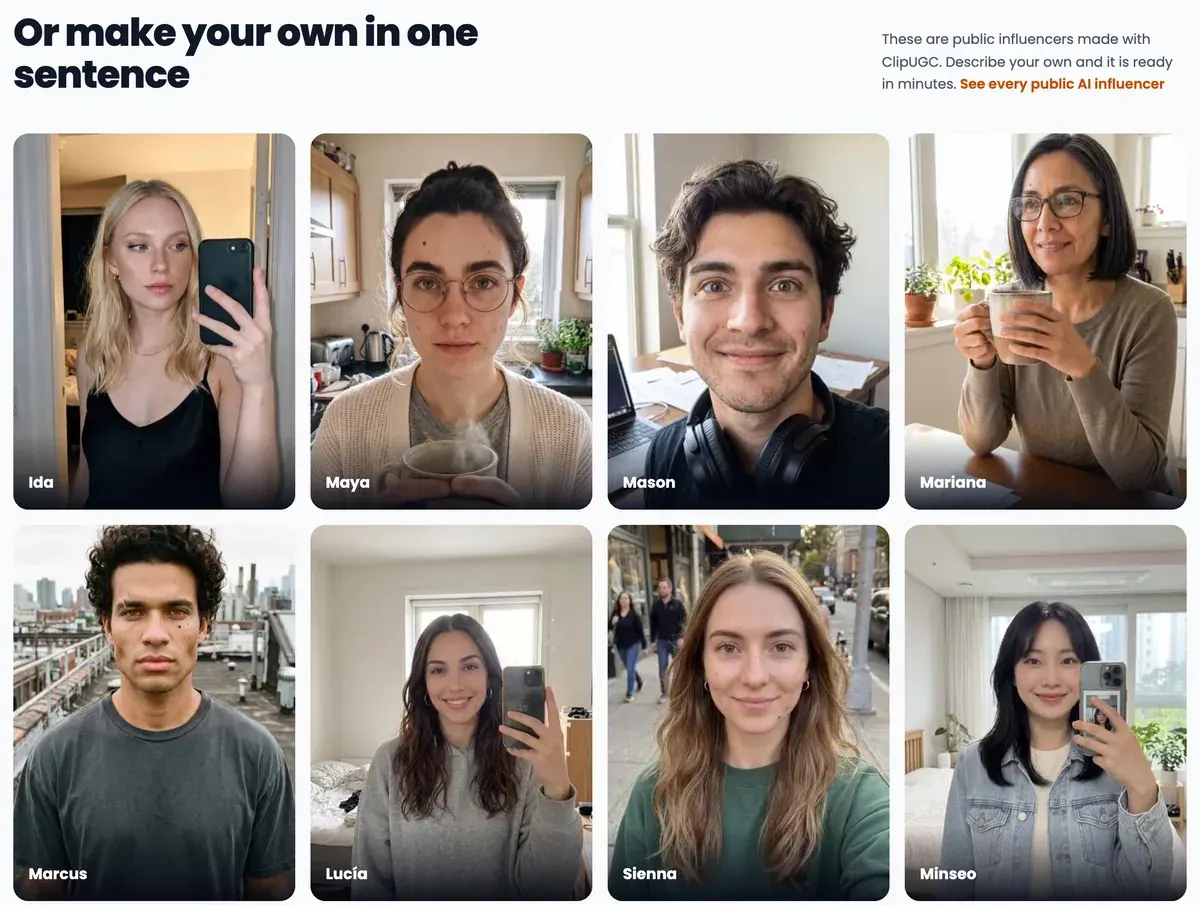
An AI influencer is a person who does not exist. It is a face and voice made by AI that talks to camera like a creator filming on a phone. ClipUGC (clipugc.com, which says it has no link to clipugc.ai) builds its product round one idea.
You describe that person once, and the same face comes back in every video you make.
Each generation is a short talking clip of 5 or 10 seconds, filmed selfie-style, with your hook or script spoken in it (pricing page). You can design your own character from a sentence or pick a public one. The public cast page lists 84 of them; the first 10 are free to use, and Professional opens all 84.
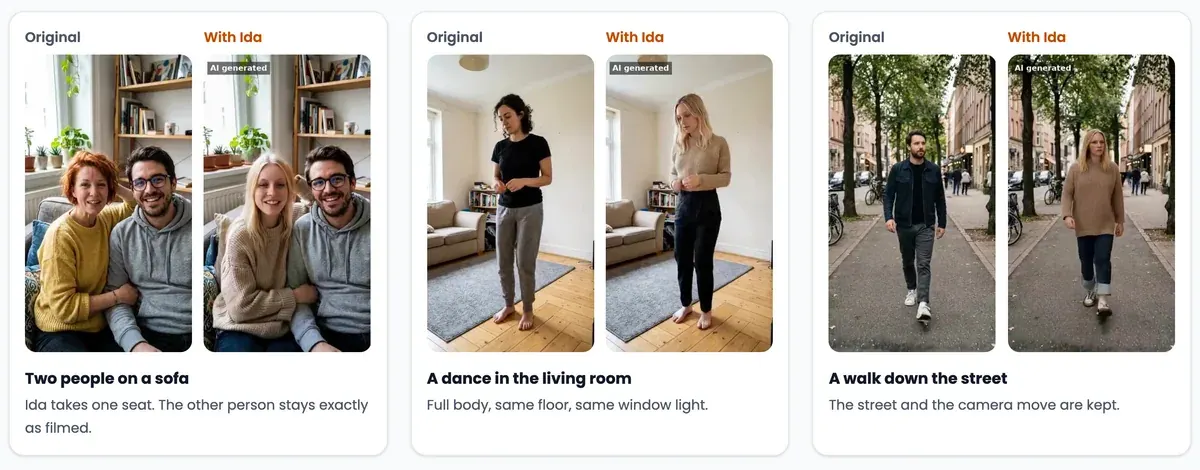
Put me in is the second tool. You upload a clip you filmed, up to 30 seconds long. An AI influencer takes the place of the person in it. The room, the light and the camera move stay as filmed (Put me in page).
Each clip takes about 10 to 12 minutes. It carries an “AI generated” label.
The same page sets a hard limit: “It does not accept photos of real people as the subject.” So you cannot make an avatar of yourself or your founder here. For that, a tool with a digital twin (an AI copy of your own face) fits better: see AI UGC for apps.
Business adds Stories: daily talking episodes with the same character, up to 5 minutes. Developers get a command-line tool on npm and a REST API on paid plans (API reference). A hosted MCP server, a connector that lets Claude or ChatGPT drive the studio, is included.
How your app footage gets into the video
This is the feature the rest of the product serves. You upload a screen recording of your app, type the on-screen hook, and ClipUGC returns one vertical 9:16 Full HD video with captions. The site’s own product description says this step “never costs a credit”.
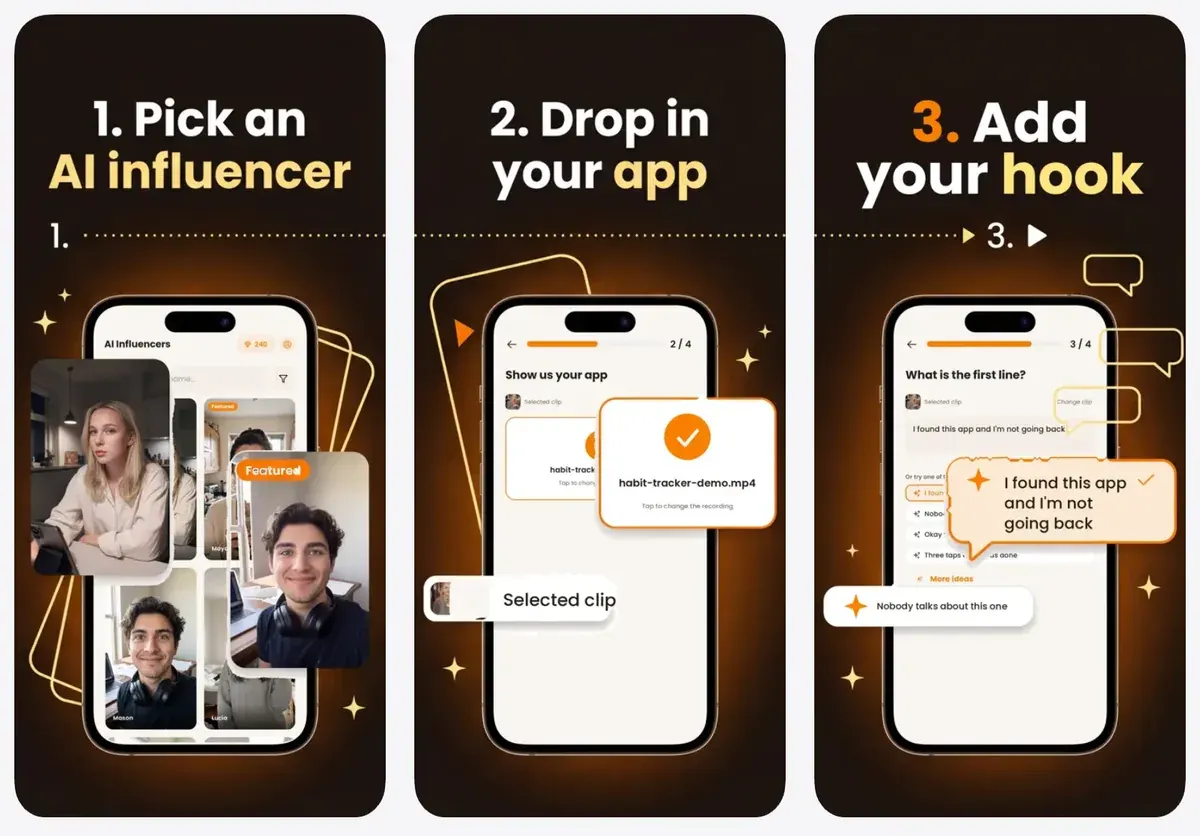
That matters for app ads in particular. An AI presenter reacting to your real screen shows what the app does, where generated app screens can promise features it lacks. Apple’s rules on app marketing, and how other tools handle the same job, are on AI UGC for apps.
There is a free starting point too. Paste an App Store or Google Play link on the free videos page. ClipUGC makes three finished videos with three public influencers, using your store screenshots. It costs no credits, one batch a day per app.
What a ClipUGC ad costs
ClipUGC sells credits, prepaid points that you spend on each video. Each thing you make costs a fixed number, listed in the pricing page’s own table. A 10-second clip is 13 credits and a 5-second clip is 7.
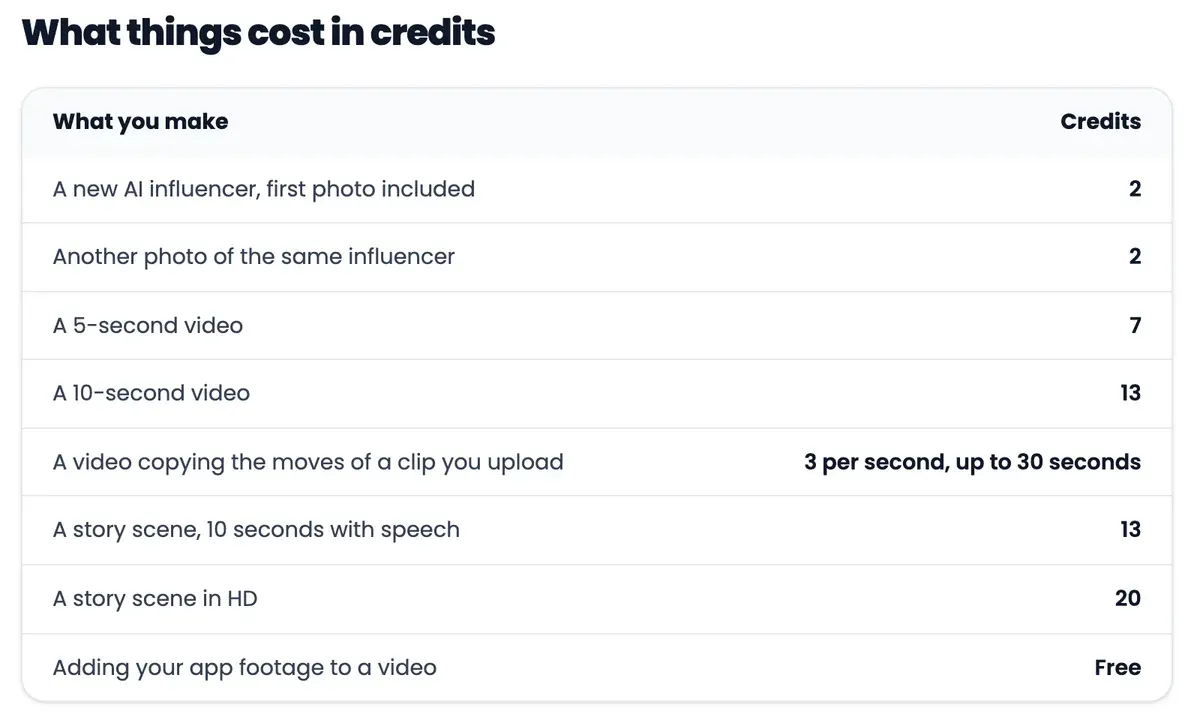
On Professional, $14.99 a month, that puts one 10-second clip at $1.30, if every credit is used. A 5-second clip works out at $0.70.
A 30-second ad built from three 10-second clips uses 39 credits: $3.90 on Professional. Business brings a 10-second clip to $1.08.
Professional’s 150 credits make 11 such clips a month and Business’s 600 make 46.
| Plan | Monthly price (USD) | Billed yearly, per month (USD) | Cost per video (USD) | Paid ads | Billed yearly, per month (USD) |
|---|---|---|---|---|---|
| Free | Free | Not published | Not computed | Unclear | Not published |
| Professional | $14.99 | $11.62 | $1.30 | Unclear | $11.62 |
| Business | $49.99 | $37.46 | Not computed | Unclear | $37.46 |
| Credit packs | Not published | Not published | Not computed | Unclear | Not published |
Scroll sideways for all 5 columns
- Free
- What you get: No monthly credits; 10 public AI influencers; unlimited videos with your app footage; small watermark
- Notes: The card ticks only
Make unlimited UGC videos with your app footage
. The site’s llms.txt (read 22 October 2026) adds 20 welcome credits at sign-up and one AI influencer of your own (photos only). The free-videos page makes three finished videos from an App Store or Google Play link at no credit cost, one batch a day per app. - Professional
- What you get: 150 credits a month (
about 11 videos, or 75 photos
), all public AI influencers, 3 own AI influencers a month, Full HD with no watermark, CLI and API access - Notes: Yearly view: 139.49 dollars a year (11.62 a month computed from the yearly total). Launch offer: 50% off the first 2 months of a monthly plan (7.49 dollars), then 14.99;
Offer ends Nov 15
; yearly plans are not discounted. The iOS app lists Monthly Premium at 14.99 and Yearly Premium at 139.99 (App Store, 22 October 2026). - Business
- What you get: 600 credits a month (
about 46 videos, or 300 photos
), 10 own AI influencers a month, Stories episodes up to 5 minutes, front-of-queue rendering, plus everything in Professional - Notes: Yearly view: 449.49 dollars a year (37.46 a month computed from the yearly total). Launch offer: 50% off the first 2 months of a monthly plan (24.99 dollars), then 49.99;
Offer ends Nov 15
. - Credit packs
- What you get: One-time top-ups: Starter Pack 50 credits for 9.99 dollars, Creator Pack 150 for 24.99, Studio Pack 400 for 59.99
- Notes: Same three packs and prices in the iOS app’s in-app purchases (App Store, 22 October 2026). The pricing page does not say whether pack credits expire.
Source: clipugc.com/pricing
$1.30 per video at list price on Professional at $14.99 a month, if every credit is used. Professional 14.99 dollars a month / 150 credits = 0.0999 dollars a credit; a 10-second talking clip costs 13 credits (pricing page credit table) = 1.30 dollars. A 5-second clip is 7 credits (0.70 dollars); adding your app footage is free. A 30-second ad made of three 10-second clips is 39 credits, 3.90 dollars. Business: 49.99 / 600 x 13 = 1.08 dollars.
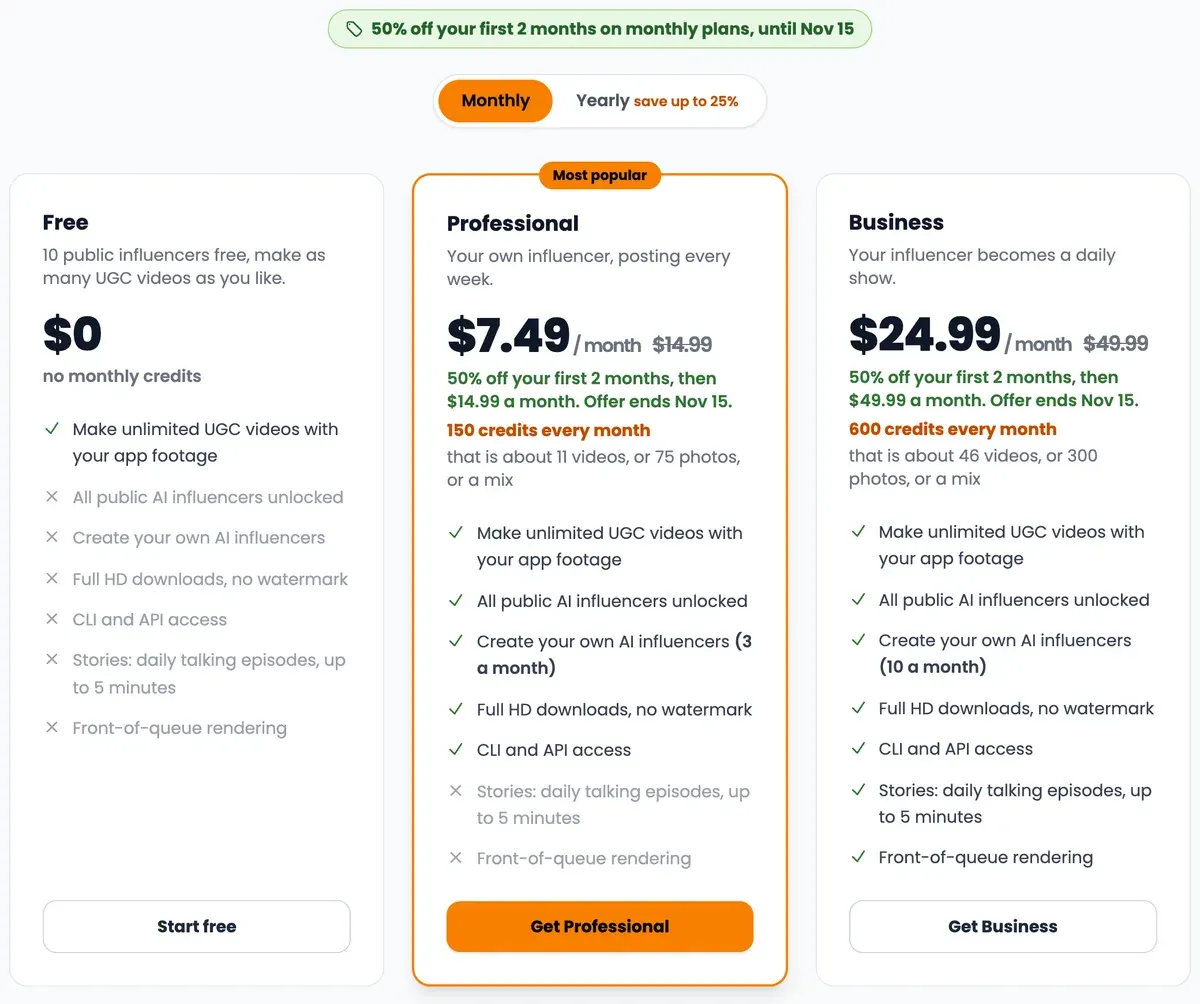
The plan cards carry a launch offer: half price for the first two months on monthly plans, with the end date printed as “Offer ends Nov 15”. Yearly plans are not discounted.
During the offer, Professional starts at $7.49 a month and Business at $24.99. Credit packs top up any plan. 50 credits cost $9.99. The 150-credit pack costs $24.99 and the 400-credit pack $59.99.
The Free plan has no monthly credits and a small watermark on its videos. The site’s product description adds 20 welcome credits at sign-up, enough for one 10-second clip.
The iOS app sells the same three credit packs, but lists its yearly plan at $139.99, where the website charges $139.49. Every plan on one page: the price tracker.
What ClipUGC’s terms allow in paid ads
ClipUGC’s Terms of Service are a general website template. They carry no date on the page and never mention AI-generated videos, advertising, AI training or watermarks.
The ownership answer sits on the homepage instead. Under “Who owns the videos?” the FAQ says “You do. Post them anywhere, organic or paid.” The terms do not repeat that line.
What the terms do say points the other way in one place. The Content section reads: “Content found on or through this Service is the property of ClipUGC or used with permission.”
It goes on: “You may not distribute, modify, transmit, reuse, download, repost, copy, or use said Content, whether in whole or in part, for commercial purposes or for personal gain, without express advance written permission from us.” The terms do not say whether your own generated videos count as that Content.
Two more lines in the same section matter for an ad buyer. You keep “any and all of your rights to any Content you submit”, such as your screen recording. And you grant ClipUGC a licence that includes “the right for us to make your Content available to other users of the Service”.
So every commercial use reads as unclear in our rights matrix: paid ads, organic posts, client work and resale. If you plan to run ClipUGC videos as paid ads on a large budget, ask team@clipugc.com to confirm the FAQ’s “organic or paid” answer in writing.
The terms hold no clause on benchmarks or comparisons, and you must be over 18 to open an account.
Is ClipUGC legit? What its listings show
ClipUGC is a young product from a small developer. The App Store names the seller as Measify Kft., a company that also publishes a piano map, a reminder app and a manga translator. The iPhone app’s first release is dated 26 September 2025 (App Store).
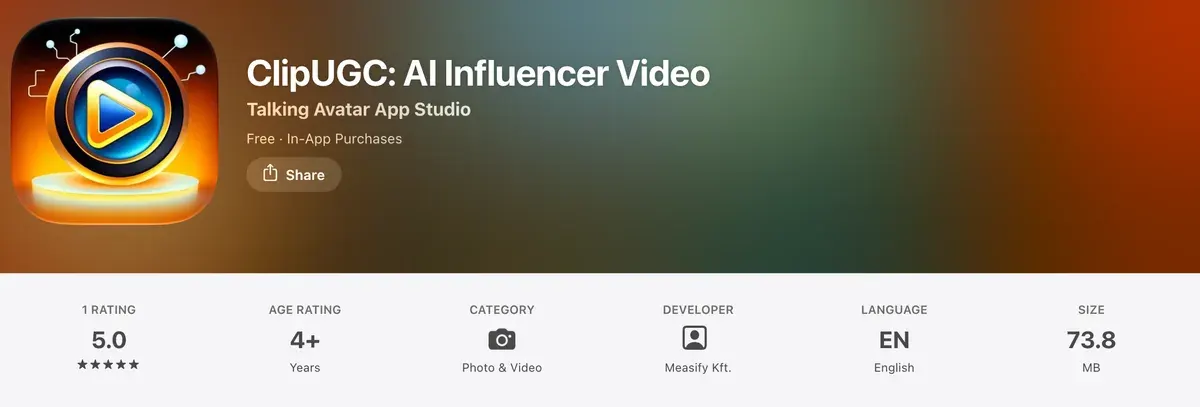
Public reviews are close to absent. The App Store shows one rating, at 5.0. Google Play shows 500+ downloads and no rating score (Google Play). Trustpilot has no page for clipugc.com.
A Reddit search on 22 October 2026 returned no thread about it. Reviews of useclip.com belong to a different company, one that sources human creators.
The homepage claims “2,600+ app builders on board” and “750+ videos generated”. These are the vendor’s own figures, with no outside count to check them against.
What that means for you: nothing in the documents suggests a problem, and nothing outside them confirms how the videos perform. The product is cheap to try. Start with the three free videos from your store link. Then pay monthly, and move to yearly only once your own ads show the clips convert.
ClipUGC pros and cons
Pros
- Your app’s screen recording goes into the video at no credit cost, on every plan
- One character keeps the same face across videos, from saved reference photos
- Credit costs are printed per output: 13 credits for a 10-second clip
- Three free videos from an App Store or Google Play link, no card
- CLI, hosted MCP server and REST API, the MCP server on the Free plan too
Cons
- The terms never mention AI output or ads; ad use rests on a homepage FAQ line
- The terms’ Content section bars commercial use of service content without written permission
- Refunds are “case-by-case” in the terms, against a 10-day guarantee on the pricing page
- One App Store rating and no Trustpilot page, so little outside evidence on output quality
- No real faces: you cannot put yourself or your founder in a video
How Arcads and Creatify handle app footage
Arcads and Creatify, two avatar tools in our database, also document a way to put an AI presenter beside your app. Both leave the final edit to you, where ClipUGC builds it.
Arcads offers Remove Background: “The result is a clean cutout ready to be placed on a custom background or used in compositing” (Arcads platform guide). You then lay the actor over your screen recording in an editor. Its stock actors are licensed likenesses of real people. See Arcads for UGC ads.
Creatify places avatars into green screen scenes (green screen page), and lists an Ad Launcher for Meta, TikTok and AppLovin. A 30-second avatar video costs $2.73 per video on Standard, if every credit is used. See Creatify for UGC ads.
-
 AI UGC and avatars
Arcads
Script-to-video ads read by 1,000+ AI actors, plus Kling, Veo and Seedance clips in the same app.
No price list published
Best for Talking-actor ads close to a whole minute long, if billing rounds up to the minute as the help centre’s one example suggests.
-
 AI UGC and avatars
Creatify
Avatar and product video ads from a URL or script, with batch variants, an ad launcher and a competitor ad tracker.
From $15 a month · checked
Best for E-commerce teams making URL-to-video ads in volume who want an ad launcher for Meta, TikTok and AppLovin in the same tool.
Every avatar tool we track, priced per video, is on the AI UGC tools page. Free plans and what each lets you run are compared in free AI UGC generators.
Questions buyers ask about ClipUGC
Is ClipUGC free?
Yes, to start. The Free plan has no monthly credits, 10 public influencers and a small watermark. The free videos page makes three videos from your app link at no credit cost.
Can I use ClipUGC videos in paid ads?
The homepage FAQ says yes, “organic or paid”. The terms say nothing about generated videos or ads, so ask ClipUGC to confirm in writing before you scale spend.
Is ClipUGC the same as clipugc.ai?
No. ClipUGC at clipugc.com, made by Measify, says on every page that it is not affiliated with clipugc.ai.
Can I put my own face in a ClipUGC video?
No. Its Put me in page says it “does not accept photos of real people as the subject”; only AI characters go in.
Sources
- ClipUGC: ClipUGC pricing, plan cards in the monthly and yearly views, the credit table, the credit packs, the launch offer and the 10-day money-back line. Checked
- ClipUGC: ClipUGC homepage, the public influencer grid, the user and video counts, and the FAQ answer on who owns the videos. Checked
- ClipUGC: ClipUGC Terms of Service, undated; the sitemap lists it as modified 17 October 2026; sections Content, Refunds and Accounts. Checked
- ClipUGC: ClipUGC Privacy Policy, service providers, Google Analytics and remarketing; no mention of AI training. Checked
- ClipUGC: ClipUGC product description for AI assistants, the site’s own text file; welcome credits, the app footage step, motion and scene replace rates, the CLI, MCP and API. Checked
- ClipUGC: Put your AI influencer in your own video, before and after examples, 3 credits a second, the AI generated label and the rule on real faces. Checked
- ClipUGC: AI influencers you can put in a video, 84 public influencers; the first 10 free, Professional unlocks them all. Checked
- ClipUGC: ClipUGC API reference, API keys on Professional and Business, credit costs, failed generations refunded. Checked
- ClipUGC: ClipUGC support, credits for a failed clip come back automatically. Checked
- Apple App Store: ClipUGC: AI Influencer Video, seller Measify Kft.; first release 26 September 2025, version 2.0.4 of 2 October 2026; 1 rating; in-app purchases. Checked
- Google Play: ClipUGC: AI Influencer Video, developer Measify Apps; 500+ downloads; updated 1 October 2026. Checked
- Trustpilot: Trustpilot search for clipugc.com, no company page; the address returned 404. Checked
- Arcads help centre: Arcads complete platform guide, Remove Background and Show Your App. Checked
- Creatify: Creatify green screen video maker. Checked

Alexandre S.
Alexandre S. is a creative ad strategist and copywriter with ten years' experience in digital marketing across multiple channels.
Related pages
-
 Category Best AI UGC generators for ads
16 AI UGC and avatar tools compared on list price per video and ad-use terms, checked 24 September 2026.
-
 Profile MakeUGC for UGC ads
17 Trustpilot reviewers report charges after cancelling or failed cancellations; MakeUGC’s terms page disagrees on ownership. Checked 2 October 2026.
-
 Guide AI UGC price per ad, tool by tool
At list price, with plan credits used in full, a 30-second AI UGC video costs $0.10 (HeyGen Avatar III) to $4.00 across seven tools. Checked 24 September 2026.
-
 Guide How to make AI UGC ads
Steps from brief to a labelled AI UGC ad: each step’s billing unit and ad terms, and the free routes whose terms allow ads. Read 2 October 2026.
-
 Profile Topview AI for ads
33 of 73 sources report Topview’s “unlimited” plans queueing clips for hours or days. Ad terms, plans from $18 a month, prices checked 1 October 2026.


