AI UGC for apps
Verdict on AI UGC for apps
ClipUGC builds your real app screen into the ad; Creatify adds your gameplay to game ads (read ). Apple’s guideline 2.3.1(a) makes promoting what an app “does not actually offer”, in or outside its store, grounds for removal. A screen generated by MakeUGC’s app workflow or Arcads’ Show Your App breaks that rule wherever it differs from your app.
For an indie app’s screen recording inside an AI influencer clip:  ClipUGC
Its product description says the app footage step “never costs a credit”, and the Free card lists unlimited videos with your app footage.
For mobile game ads built on your own gameplay footage:  Creatify
Its games page lets you “incorporate the gameplay footage”; its Ad Agent is on every plan and launches to Meta and TikTok once you approve.
For an AI actor cut out and placed over your own app recording:  Arcads
Remove Background gives “a clean cutout ready to be placed on a custom background”. Arcads publishes no price.
For a founder or teammate avatar demoing a SaaS web app:  HeyGen
Creator includes 1 custom digital twin, and the moderation policy (2.1) says you own the custom avatars you create.
For finding which app ad concepts work:  Segwise
Tags video, image and playable ads by hook and CTA across 15+ ad networks; Growth covers up to 250k dollars of monthly spend.
| Tool | Monthly from (USD) | Cost per output at list price if every credit is used | Paid ads on the cheapest paid plan | What it does | Official site |
|---|---|---|---|---|---|
 Arcads | Not published | Not computed | Allowed with conditions (every paid plan) | Script-to-video ads read by 1,000+ AI actors, plus Kling, Veo and Seedance clips in the same app. | Visit Arcads |
 Captions (Mirage) | $9.99 | $4.00per 30-second video | Unclear (every paid plan) | Phone-first app making talking videos with Mirage actors it calls completely virtual, plus AI editing and dubbing. | Visit Captions |
 ClipUGC | $14.99 | $1.30per 10-second talking clip | Unclear (Professional) | AI influencer videos for mobile apps: one consistent face, your app’s screen recording inside, CLI and MCP access. | Visit ClipUGC |
 Creatify | $15 | $2.73per 30-second video | Allowed with conditions (Standard) | Avatar and product video ads from a URL or script, batch variants, an AI agent that launches ads, a competitor tracker. | Visit Creatify |
 HeyGen | $29 | $0.10 to $1.16per 30-second video, pro rata | Allowed with conditions (Creator) | Talking-avatar videos from text, photos or your own digital twin, with translation into 175+ languages. | Visit HeyGen |
 Segwise | $499 | Not computed | Not rated | Tags video, image and playable ads by hook, emotion and CTA, and links tags to results across 15+ ad networks. | Visit Segwise |
 Synthesia | $19 | $0.43 to $0.95per 30-second video | Allowed with conditions (Starter) | Presenter-style avatar videos and dubbing in 160+ languages, built mainly for training and corporate video. | Visit Synthesia |
Scroll sideways for all 6 columns
Prices checked 16 Nov 2026. Arcads publishes no price list.
What an app ad needs that a product ad does not
An app install ad is a video whose only job is to get someone to download your app. A product ad can show a bottle in a hand. An app ad has to show what people get after the download: your real screens or your real game.
That puts two pieces in every clip. The first is a person, real or AI, who reacts or explains: the hook. The second is a recording of the real app or real gameplay: the proof. Mobile game ads often run as “hook, then gameplay”: a few seconds of a face or a fail, then the level itself.
The proof has to come from your phone, because the stores judge it against your app. Hand-held product shots are a different job, covered in AI UGC with the product in hand.
What the stores and ad platforms say about app footage
Apple’s App Review Guidelines set the rule in 2.3.1(a): “marketing your app in a misleading way, such as by promoting content or services that it does not actually offer”, within or outside the App Store, is grounds for removal.
2.3 Accurate Metadata
2.3.1 (a) marketing your app in a misleading way, such as by promoting content or services that it does not actually offer (such as iOS-based virus and malware scanners) or promoting a false price, whether within or outside of the App Store, is grounds for removal of your app from the App Store or a block from installing via alternative distribution and termination of your developer account.
2.3.4 previews may only use video screen captures of the app itself.
The same sentence adds a block from installing via alternative distribution and “termination of your developer account”. Guideline 2.3.4, “previews may only use video screen captures of the app itself”, governs App Store previews. No clause says an off-store ad must show a screen recording.
Google Play sets two rules of its own. Its app promotion policy says “Don’t use misleading text or imagery in your ad to elicit downloading your app”. Its metadata policy asks for “screenshots and videos that reflect your app’s actual experience” in the store listing.
Metadata
We don’t allow apps with misleading, improperly formatted, non-descriptive, irrelevant, excessive, or inappropriate metadata, including but not limited to the app’s description, developer name, title, icon, screenshots, and promotional images.
TikTok writes the gameplay rule down. Its playable ads page (updated September 2026) says “Don’t mislead users with gameplay that is inconsistent with your app or disguise download prompts”.
Meta’s fraud and deceptive practices policy holds no clause written for app or game footage. On Facebook and Instagram, the store rules above still apply to the app you link.
App Review covers apps sold through the App Store. No store rule covers a SaaS product sold only on the web, so each tool’s own terms decide.
Where AI UGC hurts a game: the November 2026 rulings
The UK’s advertising regulator, the ASA, showed what fake gameplay costs on 4 November 2026. It upheld complaints against four publishers, King, Scopely, Omnilojo and Vistrex (Mobilegamer.biz). King’s two Facebook ads were seen on 28 April 2026.
King’s Farm Heroes Saga ad showed falling nails, a hatch, a cow and a saw, none of which appear in the game. It carried the lines “Not in-game footage” and “Not actual gameplay”. The ASA found those labels “likely to contradict, rather than clarify” what viewers took from the ad.
Scopely’s Pixel Flow ad opened on a path puzzle the game does not have. A second ad, whose intro read as a cinematic scene, passed.
So a label does not rescue a made-up level. An AI actor reacting to your real gameplay keeps the proof honest. An AI-generated level does the opposite, and a generated app screen that differs from your app breaks Apple’s 2.3.1(a). AI mobile game ads covers the rulings and a priced 12-variant test.
TikTok’s own AI ad studio
TikTok Symphony Creative Studio, inside TikTok Ads Manager, names no app store link, screen recording or gameplay input on its help page (updated June 2026).
Its Reference to video mode takes images and videos you upload as reference, and the page says “An AI-generated label is added to all exported videos per TikTok ad policy”. So the page gives no way to bring your own app screen into a clip, and any screen it shows comes under the store rules above. How the label works: TikTok AI label guide.
Tools for app and game ads
Three tools document a way to put an AI presenter in an app or game ad. ClipUGC and Creatify use your real footage, and Arcads offers both. MakeUGC’s mobile app workflow generates the phone screen from one screenshot instead, so compare every frame with your app before it runs.
 ClipUGC: your recording built into the video
ClipUGC puts your recording and its AI influencer in one video. You upload a screen recording of your app and type the hook. It returns a 9:16 Full HD video with captions, the influencer reacting to your app.
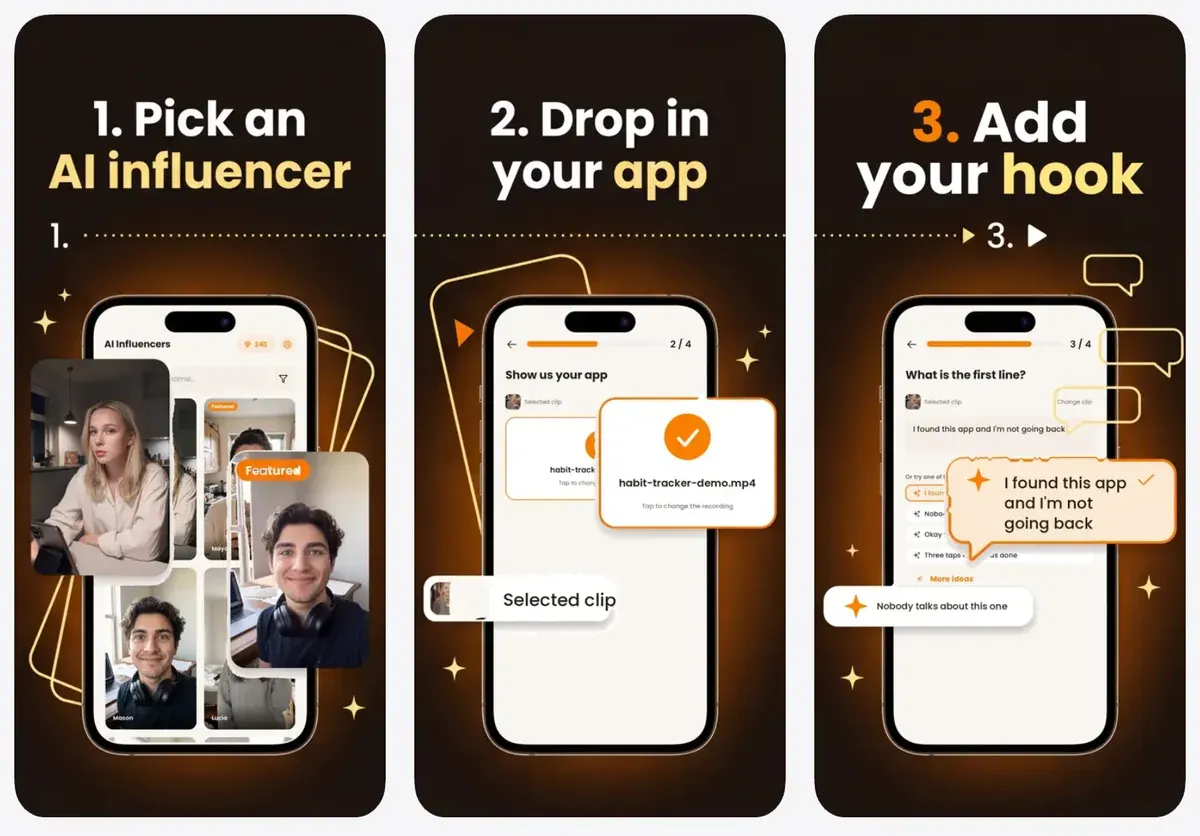
ClipUGC’s own product description says this step “never costs a credit”.
The influencer clip itself costs 13 credits for 10 seconds (ClipUGC pricing): $1.30 on Professional, $14.99 a month, if every credit is used. Its terms never mention AI videos or ads, so its rights row reads unclear (rights). ClipUGC vs Creatify prices the same 10-second clip on both. Every plan is on ClipUGC pricing.
- Best for
- An indie app founder who wants an AI influencer reacting to the real app screen, with the footage step free on every plan.
- Skip it if
- you want your founder or yourself on camera: ClipUGC accepts only AI characters, never a real person’s face.
 Creatify: gameplay footage and the Ad Agent
Creatify’s game ad page starts from your store link or web page and writes the scripts. It then lets you “incorporate the gameplay footage”, so the level in the ad is the level in the game.
Total creative control
Customize your video ad to convey the game narrative. Add custom logos, CTAs, incorporate the gameplay footage, and more.
1. Paste your game URL Insert your game’s store link or webpage, and let our AI craft high-converting ad scripts.
Its app ad page works the same way from an App Store or Google Play link, with no screen recording step on the page.
How to get started
1. Just paste your app URL Insert your App Store or Google Play link, or app’s web page, and let our AI analyze it to create high-converting ad scripts.
2. Choose the best-performing script Select the script that best captures your app’s essence for maximum engagement and ROI. Tailor to your narrative by using DIY option.
3. Customize and launch your ad Personalize the ad to match your app’s style, and hit “Render”.
Creatify documents no screen-recording step for an app. Its AI video editor says “Upload your clip and say what to change” and names no screen recording. The green screen route places “an avatar into your green screen scene”. Its API docs also export an avatar with a transparent background in WebM.
The Performance Agent page says the Ad Agent launches to Meta, Google Ads and TikTok once you approve. AppLovin, an app-install network, connects read-only. A 30-second avatar video costs $2.73 per video on Standard, $15 a month, if every credit is used.
Users single out many variations from one product link (15 of 61: G2, r/PPC). Others say outputs miss the brief, with lip sync or product details wrong (17 of 61: Trustpilot, Trustpilot), so check each cut before it runs.
- Best for
- A mobile game studio cutting many hook-then-gameplay variants from its own footage and launching them to Meta or TikTok.
- Skip it if
- you need playable ads: its game page lists none, so build the playable in your ad network’s own tool.
 Arcads: an actor cut out over your app
Arcads’ platform guide lists Remove Background: “The result is a clean cutout ready to be placed on a custom background or used in compositing”. So an actor goes over your own screen recording in an editor.
The same guide lists Show Your App: “Generate content showing your app’s UI alongside a talking actor or voiceover”, with “no screen recording software or editing skills needed”. Its mobile apps page offers actors that “show your app”, and its help article starts that feature from one app screenshot.
Create a 4-Second Video of an Actor Showing Your App (No Talking)
Step 1: Prepare Your App Screenshot Download one of your app screenshots, aiming for the highest quality possible.
Step 3: Upload and Generate the Video Upload your app screenshot, then generate the video. Arcads will create a short, realistic clip where the selected actor visually presents your app on screen, ready to be used in ads or product videos.
So the cutout is the route for your real footage. Arcads publishes no price (prices), and its terms (13.3.1, in force 16 October 2026) exclude misleading advertising from the licence.
Users say its stock actors pass as creator content in the feed (16 of 64 sources: r/dropshipping, Trustpilot).
- Best for
- App teams who want a stock actor composited over their own screen recording, with the cutout done in Arcads and the edit done in theirs.
- Skip it if
- you want one tool to finish the ad: Arcads makes the cutout, and the composite over your recording happens in your own editor.
SaaS and B2B: a founder or teammate as the avatar
A B2B ad fronted by your own founder sidesteps the stock-actor clauses. Each tool sets its own consent terms for that avatar. B2B video ads covers where those ads run.
 HeyGen: a digital twin from Creator
HeyGen’s Creator plan, $29 a month, includes 1 custom digital twin (HeyGen pricing). Its moderation policy (2.1) says “you own the rights to photo, or custom avatars you create”. Section 3.2 allows “conditional” content, such as educational or religious videos, only with custom avatars. A 30-second video costs $0.10 to $1.16 per video by avatar model, if every credit is used.
Users report avatars and lip sync that land, digital twins included (8 of 39: G2).
- Best for
- SaaS founders who want their own digital twin presenting the product, with commercial use open from Creator.
- Skip it if
- you plan to run free-plan videos: terms s.4 bar free output from advertising.
 Synthesia: personal avatars with consent
Synthesia’s user terms build a custom avatar “If Customer requests that we create a Custom Avatar using your voice or likeness and you consent”. Its Acceptable Use Policy bars stock avatars from paid social without written consent, so a founder avatar is the route for paid social. Starter is $19 a month (Synthesia pricing).
Users say viewers read the avatars as AI (19 of 69: r/elearning, r/instructionaldesign).
- Best for
- SaaS teams making product walk-throughs fronted by a consenting teammate, in many languages.
- Skip it if
- your ad uses a stock avatar on paid social: the AUP requires Synthesia’s written consent.
 Captions: an AI twin on Max
Captions’ terms (1.3) let you “create a digital twin”; custom AI actors and twins start on Max, $24.99 a month (Captions pricing). Section 3.1(xiv) asks for Mirage’s prior written consent to commercial use of Mirage Content.
- Best for
- Business teams making avatar ads on Captions on web, whose terms name advertising, and phone creators captioning and editing their own footage.
- Skip it if
- you want a Mirage stock actor in a paid ad without written consent: terms 3.1(xiv) ask for it.
Reading which app ads work
 Segwise: creative tags across app networks
Segwise tags video, image and playable ads by hook, emotion and CTA, and links tags to results across 15+ ad networks (homepage). Its site names mobile games and subscription apps among its audiences. Growth costs $499 a month after a 7-day trial (Segwise pricing; prices).
- Best for
- Mobile game and app marketers, and DTC teams spending $50K+ a month across several ad networks, who want tag-level creative analysis without manual tagging.
- Skip it if
- you spend a few thousand dollars a month: Growth, the entry plan, is priced for accounts spending up to 250k dollars a month.
Which tool for which app
Pick by what the ad has to prove.
- For an indie app with one founder and no editor, start with ClipUGC. Your recording goes in free, and the Free plan lets you judge the format first.
- For a mobile game, use Creatify with your own gameplay capture. Keep the opening hook as a reaction or a scene, and make every level shown a real level.
- For a SaaS web app, record your founder once as a HeyGen or Synthesia twin, then screen-record the product beside it.
To run them, AppLovin vs Meta ads compares the two install networks, and the Axon Ads Manager guide covers AppLovin’s self-serve route. For a younger audience, Snapchat ads sets out budgets and specs. The full scripting workflow sits in how to make AI UGC ads.
Left out, and why
Plans that bar ads on free output, such as HeyGen’s Free, stay out of the by-job rows. The free AI UGC list sets out which free plans those are.
More pages for Creatify users, sorted by job, in the Creatify hub
Sources
- ClipUGC: ClipUGC pricing, credit table; the Free card lists unlimited videos with your app footage. Checked
- ClipUGC: ClipUGC product description for AI assistants, the site’s own text file:
Upload a screen recording of your app, type the on-screen hook
;one vertical 9:16 Full HD video with captions
;This step never costs a credit
. Checked - Creatify: AI game ad maker, a store link or web page into scripts;
incorporate the gameplay footage
; no playable ads listed; no case-study figures on the page. Checked - Creatify: AI app ad maker,
Insert your App Store or Google Play link, or app’s web page
; no screen recording step on the page. Checked - Creatify: Creatify pricing, comparison table, Ad Launcher for Meta, TikTok and AppLovin. Checked
- Creatify: Free AI Video Editor,
Upload your clip and say what to change
; no screen recording named. Checked - Creatify: Create Easy Green Screen Videos With AI. Checked
- Creatify API docs: Transparent video guide, avatar video with a transparent background in WebM, through the lipsyncs endpoint. Checked
- Apple: App Review Guidelines, 2.3.1(a) and 2.3.4, the page shows no updated date. Checked
- Play Console Help: App Promotion, Developer Program Policy,
Don’t use misleading text or imagery in your ad to elicit downloading your app
. Checked - Play Console Help: Metadata, Developer Program Policy,
Provide screenshots and videos that reflect your app’s actual experience
. Checked - TikTok Business Help Center: About TikTok Playable ads, last updated September 2026. Checked
- Meta Transparency Center: Fraud, Scams and Deceptive Practices, no clause written for app or game footage. Checked
- Advertising Standards Authority: ASA Ruling on King.com Ltd, 4 November 2026; Farm Heroes Saga, two paid Facebook ads seen on 28 April 2026; the disclaimer
Not in-game footage
andNot actual gameplay
foundlikely to contradict, rather than clarify
; CAP Code 3.1, 3.7, 3.9 and 3.11. Checked - Advertising Standards Authority: ASA Ruling on Scopely Inc, 4 November 2026; Pixel Flow, a path-puzzle intro read as gameplay in a game with one mechanic; a second ad’s cinematic intro not misleading. Checked
- Mobilegamer.biz: ASA bans misleading mobile game ads from King, Scopely, Dark War Survival publisher and more, 4 November 2026; four rulings: King, Scopely, Omnilojo and Vistrex. Checked
- Arcads help centre: Arcads complete platform guide, Show Your App and Remove Background. Checked
- Arcads help centre: How to Show Your mobile App in a video with Arcads, 24 December 2025; Show Your App starts from one uploaded app screenshot. Checked
- Arcads: Arcads for mobile apps, custom AI actors that
show your app
; no screen recording upload on the page. Checked - Arcads: Arcads Terms, clause 13.3.1, in force 16 October 2026; bars use of the videos for misleading advertising or against ad platform rules. Checked
- HeyGen: HeyGen pricing. Checked
- HeyGen: HeyGen Moderation Policy (25 July 2024), 2.1 and 3.2, 3.2:
Conditional video content may be created only using custom avatars
; conditional content is informational and educational, or religious. Checked - Synthesia: Synthesia User Terms of Service (23 February 2024), Avatars. Checked
- Synthesia: Synthesia Acceptable Use Policy (23 February 2024). Checked
- Synthesia: Synthesia pricing. Checked
- Mirage US LLC: Captions Terms and Conditions (4 September 2025), 1.3 and 3.1(xiv). Checked
- Mirage: Captions pricing. Checked
- TikTok Business Help Center: How to generate videos with Symphony Creative Studio, last updated June 2026; inputs are images, videos and audio as reference, no store link, screen recording or gameplay input named. Checked
- TikTok Newsroom: TikTok Symphony updates (16 June 2025). Checked
- Segwise: Segwise pricing. Checked
- Segwise: Segwise homepage. Checked
What changed on this page
- Verdict now picks by app type: ClipUGC for an app’s screen recording, Creatify for gameplay footage. Added Google Play and TikTok gameplay rules and the ASA’s 4 November 2026 rulings on game ads.
- Added ClipUGC, which builds your app’s screen recording into its AI influencer videos at no credit cost; a 10-second clip is 13 credits.
- Updated for the 16 October 2026 price changes (Creatify’s new plan line-up): figures on this page follow.
- Segwise Pro now shows custom pricing and its token rates are gone from the pricing page; Growth is unchanged.

Alexandre S.
Alexandre S. is a creative ad strategist and copywriter with ten years' experience in digital marketing across multiple channels.
Related pages
-
 Category Best AI UGC generators for ads
15 AI UGC and avatar tools compared on list price per video and ad-use terms, checked 24 September 2026.
-
 Best list Free AI UGC video generators
Of 10 AI UGC tools, 2 allow commercial use of free output with no free-plan exception in terms or pricing; 4 bar a paid social ad. Checked 24 September 2026.
-
 Best list Best AI tools for TikTok ads
TikTok’s Symphony labels every export as AI. Paid tools for TikTok ads, with the cost of a 30-second ad if every credit is used, checked 2 October 2026.
-
 Guide Snapchat ads cost
Snapchat ads start at $5 a day; Snap advises $20 to $50. CPM and cost per click to June 2025, Snap Ad specs and a two-week test budget, checked 9 November 2026.


