How to make AI UGC ads
To make an AI UGC ad, write the brief, then pick a tool and plan whose terms allow paid ads. Size the script to the tool’s billing unit and choose a presenter you may use. Then generate within a retake budget, edit to 9:16, label it and launch.
| Step | What you decide | The documented trap | Source |
|---|---|---|---|
| 1. Brief | Offer, audience, the claim you can support, hooks | A claim you cannot back becomes the presenter’s claim | FTC, 16 CFR 465.2 |
| 2. Tool and plan | A plan whose terms allow paid ads | HeyGen and Topview bar free-plan output from ads | Each vendor’s terms |
| 3. Script | Length against the billing unit | Creatify bills a 31-second script as 45 seconds | Creatify help centre |
| 4. Presenter | Stock actor, licensed replica or your own twin | Synthesia bars stock avatars from paid social without written consent | Synthesia policy |
| 5. Generate | How many takes the budget covers | Every retake bills | User reviews, Captions help centre |
| 6. Edit | Captions, hook, safe zones, 9:16 export | Platform text overlays cover the bottom of the frame | Platform specs |
| 7. Label and launch | The AI label and the script’s claims | An AI actor claiming use reaches the FTC’s fake-testimonial rule | FTC, platform rules |
Scroll sideways for all 4 columns
Step 1: Write the brief and the hooks
A brief for an AI UGC ad fits on one screen. It names the offer, the buyer, the one claim the product can support with evidence, and three or more opening lines to test.
The claim matters most. Whatever the brief says, the presenter says out loud, and step 7 turns on whether that line is true of a real customer.
Write each hook as the first sentence spoken, five seconds or less. A hook list that varies only the opening line lets every version share one body, which step 3 makes cheaper.
Step 2: Pick a tool and a plan whose terms allow paid ads
Free plans are where the ad terms differ most: two shut ads out in writing, and Synthesia bars its stock avatars from paid social on every plan.
- HeyGen’s Free Plan output “may not be sold, sublicensed, redistributed, monetized, or used in connection with commercial activities, advertising, client work” (terms section 4, 23 July 2026).
- Topview’s terms bar users from using the services “for any commercial purpose, including for advertising, if you are a Free User” (terms, 9 September 2026).
- Synthesia’s policy bars stock avatars from “promoted”, “boosted”, or “paid” social ads “absent written express consent from Synthesia” (Acceptable Use Policy, 23 February 2024), on every plan.
- Creatify’s terms say “Users of the Free Tier have limited rights” without listing them (terms section 1, 23 September 2024), so free-plan ad rights are unclear.
- JoggAI’s free credits carry the same commercial-use grant as paid plans in its terms, with no ad bar for free users.
The rights matrix quotes each plan’s clause. The AI UGC tools hub sets the tools side by side, and app marketers have their own list in AI UGC tools for apps.
Step 3: Write the script to the billing unit
AI UGC tools bill by length, and each rounds a different way. A script sized to the unit costs less for the same ad.
Creatify bills avatar video at 5 credits per 15 seconds, rounded up (help centre, 19 August 2026).
On Starter at $39 a month (pricing page, read ), a 30-second ad works out at $3.90 per video, if every credit is used.
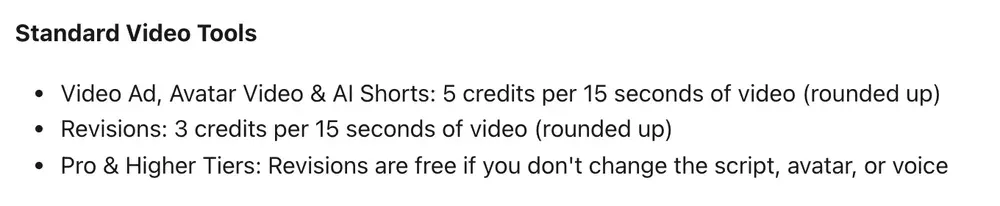
A 31-second script crosses into a third block: 15 credits, or $5.85 on Starter if every credit is used. Cutting one second saves a third of the cost.
Arcads charges 800 credits a minute per actor. Its credits article says “Length is always rounded up”, with 1 minute 45 seconds billed as 2 minutes (help centre, 29 April 2026). It names no unit. Billed by the whole minute, a 31-second ad uses 800 credits, so ten use all 8,000 Starter credits; billed pro rata, it uses 413.
Synthesia charges edits by new footage: “We only count new video seconds” (pricing FAQ). HeyGen lists per-minute credit rates by avatar model and publishes no rounding rule (help centre, 17 September 2026).
The AI UGC cost guide works these rates into a cost per ad, and the AI ad cost calculator runs them at your own volume.
Step 4: Choose a presenter you are allowed to use
AI UGC tools offer three kinds of presenter, each with its own terms. A stock actor comes from the library, a licensed replica copies a real performer, and a digital twin copies you.
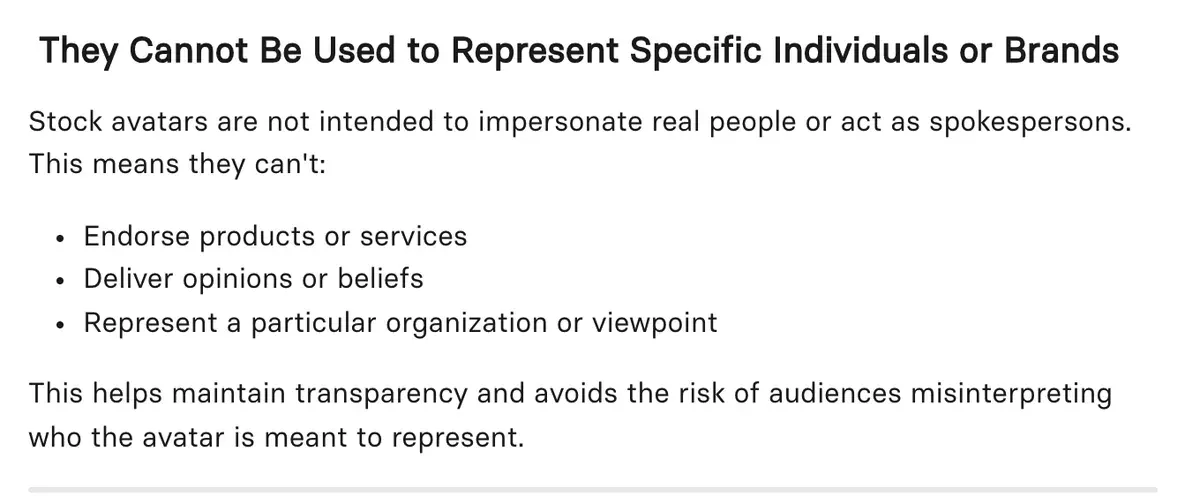
Synthesia’s help centre limits stock avatars to content “Free from personal opinions, endorsements, or sensitive claims” (help article, 22 July 2026). A stock avatar recommending your product is the use it rules out.
A twin of someone else needs that person’s written consent, and on several tools the person can later ask for removal. Are AI UGC ads legal? quotes those withdrawal clauses. For a filmed human creator’s rights, UGC ads lists what to agree before paying.
Step 5: Generate, and budget the retakes
Every regeneration bills as a new run, and it is the most reported con in HeyGen’s user reviews and the second most reported in Creatify’s. Captions bills every run, exported or not.
- Creatify: credits run out faster than the pricing suggests, because retries, failed renders and agent runs all bill (15 of 61 sources: Trustpilot, Reddit). Revisions cost 3 credits per 15 seconds on Starter (help centre, 19 August 2026).
- HeyGen: every fix or retake costs credits, including fixes for errors the tool made (8 of 39 sources: App Store, Trustpilot).
- Captions: its help centre says credits are used “regardless of if the projected is exported or saved” (help centre, 21 September 2026).

Budget the takes before the first render: if one ad in three needs a second take, the cost per usable ad is a third higher. Product shots fail in their own ways (AI UGC product in hand), and prompt-driven tools bill each attempt (AI UGC prompts).
Step 6: Edit, caption and export for 9:16
Most AI UGC tools export a captioned 9:16 video from their own editor; any video editor finishes the job. Three edits matter for paid social.
Put the hook in the opening seconds, before the scroll moves on. Burn in captions so the ad reads with the sound off. Keep text and faces clear of the bottom of the frame, where each platform lays its own caption and buttons. The TikTok ad specs give the safe zones.
Step 7: Label the ad and launch it
The script is the presenter’s, so it cannot borrow a customer’s experience. The FTC’s rule on fake testimonials makes it a violation “for a business to write, create, or sell” a testimonial that misrepresents whether the speaker used the product (16 CFR 465.2(a)). The rule’s text covers an AI actor saying “I’ve used this for a month”.
Vendors bar the same move in their terms. HeyGen bars presenting output as “entirely human generated” (terms section 2). JoggAI bars “representing that the User Output is entirely human generated” (terms). Captions’ Acceptable Use Policy bars claiming content was made solely by a human.
Then the platform label. TikTok rejects or restricts AI-generated ads with no AIGC label or disclaimer (TikTok’s AI-generated content label for ads). Meta labels ads made with its own AI tools. Its post, updated 1 June 2026, describes detection of ads made with third-party AI tools (Meta; Meta’s AI disclosure rules).
Agencies making ads for clients carry these duties too, as selling AI UGC ads sets out.
How to make AI UGC ads for free
Two free plans on our list carry terms that allow commercial use of free output with no free-plan exception: JoggAI and Wireflow. JoggAI’s Free card gives 200 one-time credits, about 1 minute of avatar video, valid for 31 days (pricing page). Its FAQ keeps Product Avatar, Product Ad Tools and Voice Clone for paid plans.
Wireflow’s two documents read differently on whether a free user can generate. Its pricing FAQ says “Running generations (image, video, audio) requires a paid plan” (pricing page); its terms say “Free tier credits refresh periodically” (terms section 4, 18 February 2026). The rights row quotes both.
Free leaves out volume. One minute of video covers a handful of hooks, with no room for retakes. Free AI UGC generators compares every free plan by its ad terms.
How many versions to make
A winning ad is found by testing many versions against each other. The creative testing framework sets out how many to run, and the creative testing budget calculator prices the test.
Sources
- Creatify: Credit Usage, Billing and Validity (Creatify help centre), updated 19 August 2026; avatar video at 5 credits per 15 seconds, rounded up; revisions at 3 credits per 15 seconds; Agent credits
cannot be determined upfront
. Checked - Arcads: How are credits counted? (Arcads help centre), updated 29 April 2026; 800 credits per minute per actor;
Length is always rounded up
, with 1 minute 45 seconds billed as 2 minutes. Checked - Synthesia: Synthesia pricing page, FAQ, edits bill new footage only: We only count new video seconds. Checked
- HeyGen: How to use credits on HeyGen (HeyGen help centre), updated 17 September 2026; per-minute credit rates by avatar model; no rounding rule stated. Checked
- Mirage (Captions): AI usage (Captions help centre), modified 21 September 2026; credits are spent whether a project is exported or saved. Checked
- HeyGen: HeyGen terms, last updated 23 July 2026; section 4 on Free Plan output; section 2 on presenting output as human-made. Checked
- Topview: Topview terms, 9 September 2026; Prohibited Uses, Free Users and advertising. Checked
- Creatify: Creatify terms, effective 23 September 2024; section 1, Free Tier rights. Checked
- Synthesia: Synthesia Acceptable Use Policy, last updated 23 February 2024; stock avatars in paid social ads. Checked
- Synthesia: Why can’t I use stock avatars for my content? (Synthesia help centre), updated 22 July 2026; stock avatars may not endorse products. Checked
- JOGG PTE. LTD.: JoggAI terms of use, undated; commercial use of output; bar on representing output as entirely human generated. Checked
- JoggAI: JoggAI pricing page, Free card with 200 one-time credits valid for 31 days; FAQ on features that need a paid plan. Checked
- Mirage: Mirage Acceptable Use Policy, effective 4 September 2025; claims that content was made solely by a human. Checked
- Wireflow: Wireflow pricing page, FAQ,
Running generations (image, video, audio) requires a paid plan
. Checked - Wireflow: Wireflow terms of service, last updated 18 February 2026; section 4,
Free tier credits refresh periodically
. Checked - Meta: Expanding GenAI Transparency for Meta’s Ads Products, published 3 February 2025, updated 1 June 2026; detection of ads made with third-party AI tools. Checked
- eCFR, US Government Publishing Office: 16 CFR 465.2, Fake or false consumer reviews, consumer testimonials, or celebrity testimonials, paragraph (a)(2), a testimonialist who did not use the product. Checked
What changed on this page
- Page written. The free section follows Free AI UGC generators: JoggAI and Wireflow allow commercial use of free output in their terms.

Alexandre S.
Alexandre S. is a creative strategist and copywriter with ten years in content and SEO. He writes and edits short-form ads, works in English and French, and reads the pricing and terms pages behind every tool on this site before anything is written about it.
Related pages
-
 Guide AI UGC vs human UGC: what the evidence says
Public comparisons of AI and human UGC ads, graded on how each was run and by whom. Most come from sellers or a single account. Checked 24 September 2026.
- Pricing HeyGen pricing
HeyGen Creator is $29 a month, so a 30-second ad costs $0.10 to $1.16 if all 600 credits are used. Free plan bars ads. Checked 24 September 2026.
- Pricing Creatify pricing
Creatify Starter gives 100 credits a month and a 30-second avatar ad uses 10. The plan that covers 10, 50 or 200 ads a month, prices checked 24 September 2026.
- Pricing Synthesia pricing
Synthesia Starter: $29 a month for 10 minutes plus up to 12 more, from $0.66 per 30-second ad. Paid ads need a personal avatar. Checked 2 October 2026.


