AI product photography tools
Verdict on AI product photography tools
AI product photography tools differ most on ad rights and on who else may use your shots. Flair puts images from three of its plans in a public gallery. Users report some tools altering the product: Pixelcut has the highest count (9 of 68), Pebblely the highest share (3 of 16). Prices were read by .
For packshot clean-up in bulk:  Photoroom
Pro caps exports at 1,000 a month. The free licence is personal and non-commercial (terms 2.1.b).
For lifestyle backgrounds at a fixed price per image:  Pebblely
Its terms allow ads on every plan. No free plan, and no refunds once an image is generated.
For catalogue work through an API:  Claid.ai
Pro bills 4 credits a Standard image and 10 a Studio Quality one. Its terms never mention generated images.
For on-model shots from a custom product model:  Flair.ai
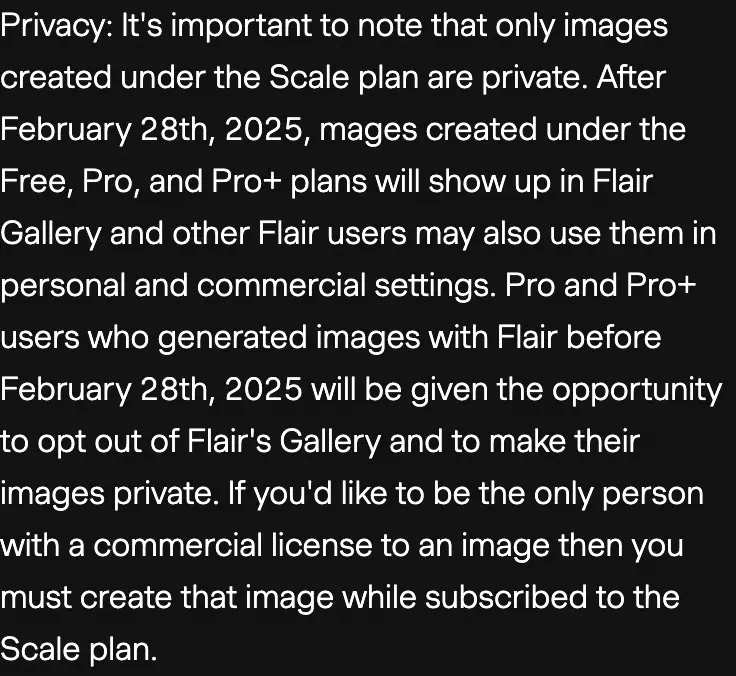
Free, Pro and Pro+ images go in a public gallery other users may reuse. Only Scale keeps them private.
For the lowest list price for a 1K Nano Banana 2 image inside an app:  Picsart
$0.09 on Pro if every credit is used, against $0.50 on Pixelcut Pro.
| Tool | Monthly from (USD) | Cost per output at list price if every credit is used | Free plan | Paid ads on the free plan | Paid ads on the cheapest paid plan | Official site |
|---|---|---|---|---|---|---|
 Claid.ai Claid.ai | $15 | $0.098per image | Yes | Unclear | Unclear (Essentials) | Visit Claid.ai |
| Flair.ai | $10 | $0.44per image | Yes | Unclear | Allowed with conditions (Pro) | Visit Flair.ai |
 Pebblely Pebblely | $9 | $0.078per image | No | No free plan | Allowed (Lite) | Visit Pebblely |
 Photoroom Photoroom | $12.99 | $0.013per image | Yes | Barred | Allowed with conditions (Pro) | Visit Photoroom |
| Picsart | $15 | $0.15per image | Yes | Allowed with conditions | Allowed with conditions (Pro) | Visit Picsart |
 Pixelcut Pixelcut | $10 | $0.50per image | Yes | Unclear | Allowed with conditions (Pro) | Visit Pixelcut |
Scroll sideways for all 7 columns
How this list was built
Photoroom’s figure is a cap on exports of any edit, so it stays apart from the generated-image range.
Can you use AI product photos in ads?
On paid plans, four tools allow it in writing, with conditions on some; Claid’s terms are unclear and Pixelcut’s licence rests on its pricing page. On free plans, only Picsart allows ads, with conditions; Photoroom bars them, and Flair, Claid and Pixelcut are unclear. Pebblely has no free plan.
| Tool and plan document, date | What it says |
|---|---|
| Photoroom Free Terms 2.1.b, 29 Jul 2026 | “for your own personal, non commercial purposes” |
| Flair paid plans Terms, Licensing, 19 Jul 2024 | “You must have a paid Flair plan to use Flair images commercially.” |
| Pebblely, all plans Terms, Content terms, 14 Feb 2024 | “You own the images you generate and can use them however you want.” |
| Claid, all plans Terms, Your Content, 10 Aug 2023 | “WE CLAIM NO OWNERSHIP RIGHTS OVER YOUR CONTENT.” Generated images are never mentioned |
| Pixelcut Pro Pricing page | Lists a “Commercial license”; the terms never mention generated images |
| Picsart, all plans AI terms, archived 14 Apr 2026 | “You may use the Output for any legal purpose” |
Scroll sideways for all 2 columns
Flair contradicts itself: its free-tier licence covers “personal or commercial use”, while the paid-plan paragraph above requires a paid plan and counts advertising as commercial. Claid’s reading is unclear and Pixelcut’s rests on its pricing page (Claid row, Pixelcut row).
Who else can use your product shots?
On Flair, other users can. Images made on Free, Pro and Pro+ “will show up in Flair Gallery and other Flair users may also use them in personal and commercial settings” (terms, Privacy). To be “the only person with a commercial license”, you need Scale.
Two tools keep rights over what you upload. Picsart takes a licence to “store, copy, use, modify, reproduce, sublicense and distribute the Input” to improve its services and those of its AI providers (AI terms); no opt-out is described. Photoroom trains on uploads unless you opt out under Data Control (2.2.c).
What one product photo costs
For the models priced per credit, the range runs from $0.03 (FLUX.2 Pro on Picsart Pro) to $1.45 (GPT Image 2 on Pixelcut Pro). Both are per generated image, if every credit is used on monthly billing (Picsart pricing, Pixelcut pricing). Picsart Pro also lists “Unlimited image generations with Flex.2 Klein”.
| Tool and plan | Model or output | Per image |
|---|---|---|
| Picsart Pro | FLUX.2 Pro, 1 credit | $0.03 |
| Picsart Pro | Nano Banana 2 at 1K, 3 credits | $0.09 |
| Pebblely Pro | Lifestyle background | $0.078 |
| Claid Pro | AI Photoshoot, Standard Quality | $0.098 |
| Flair Pro+ | Generated image | $0.44 |
| Pixelcut Pro | Nano Banana 2, 30 credits | $0.50 |
| Pixelcut Pro | GPT Image 2, about 87 credits | $1.45 |
Scroll sideways for all 3 columns
Pixelcut and Picsart resell Google’s and OpenAI’s models. Google charges $0.067 for the same 1K Nano Banana 2 image on its API (Gemini API pricing), and OpenAI $0.053 for a medium GPT Image 2 image (image guide).
Photoroom Pro works out at $0.013 per export if all 1,000 are used: a cap on exports of any edit (Photoroom pricing). The shop-by-shop table sits on the static ads hub.
Does the AI change your product?
Pixelcut has the highest count (9 of 68); Pebblely the highest share (3 of 16). None of Claid’s 18 reviews discuss output fidelity.
| Tool | Reports | What users describe |
|---|---|---|
| Pixelcut | 9 of 68 | Jewellery placed wrongly, colours altered |
| Photoroom | 6 of 76 | Distorted labels, changed clothing, lost detail |
| Pebblely | 3 of 16 | Prompts ignored, product altered |
| Flair | 2 of 24 | Logos and patterns wrong |
Scroll sideways for all 3 columns
For Pixelcut, see App Store reviews and Trustpilot; for Photoroom, Trustpilot and the App Store; for Pebblely, Trustpilot and neurodigital; for Flair, Trustpilot and Shotkit. Pixelcut and Picsart both resell Nano Banana, whose own reports follow.
Nano Banana itself draws both sides: 5 of 38 sources say product shots stay faithful (r/nanobanana, r/nanobanana), and 3 of 38 say results vary run to run (r/GeminiAI, r/nanobanana). Prompts that hold a product steady are in the product photography prompts guide.
The tools, one by one
 Photoroom: clean-up in bulk, capped exports
Photoroom Pro lists $12.99 a month with 8,000 AI credits and 1,000 exports a month (Photoroom pricing). Exports pause at the cap. 12 of 76 sources rate its background removal above other removers (Trustpilot, Product Hunt). Alternatives: Photoroom alternatives.
- Best for
- High-volume product image clean-up and staging for catalogues and ads, from a phone or in batch, at $0.013 per export on Pro monthly.
- Skip it if
- you want to run free-plan images in ads: the free licence is personal and non-commercial (terms 2.1.b).
 Claid.ai: an API for catalogue work
Claid.ai Pro lists $49 a month for 2,000 credits; a Studio Quality image costs 10 credits instead of 4 (Claid pricing). Hub entry: Claid on static ads.
- Best for
- Catalogue-scale product and on-model shots automated through an API; Claid’s homepage says
every texture, label, and fine detail preserved
. - Skip it if
- you need ad rights spelled out: Claid’s terms never mention generated images.
Flair.ai: custom models, a public gallery
Flair.ai Pro+ lists $35 a month for 80 images (Flair pricing). Ad generations use 4 times the quota, so one costs $1.75 on Pro+ monthly if every credit is used.
- Best for
- E-commerce brands needing lifestyle and on-model shots of a physical product, from a custom model trained on 6 to 10 photos.
- Skip it if
- you do not want other users reusing your product shots: only the Scale plan keeps images private.
 Pixelcut: removal on a flat plan, models on credits
Pixelcut Pro lists $10 a month with unlimited background removal and 600 AI credits (Pixelcut pricing). 20 of 68 sources say free trials turned into a full annual charge (App Store, Trustpilot). Hub entry: Pixelcut on static ads.
- Best for
- Sellers who want background removal and upscaling on a flat plan, plus credit access to several frontier image models in one app.
- Skip it if
- you generate Nano Banana images in volume: Pixelcut Pro works out at $0.50 an image, against $0.067 at 1K on Google’s API.
 Pebblely: fixed price per background
Pebblely Pro lists $39 a month for 500 images (Pebblely pricing). 7 of 16 sources call its backgrounds fast and cheap for simple products; 4 of 16 call it a poor fit for apparel and large products (cleverfashionmedia, pikes.ai).
- Best for
- Small shops that need cheap lifestyle backgrounds for packshots in bulk, at a known price per image.
- Skip it if
- you want to try before paying: Pebblely offers no free trial and no refunds once an image is generated.
Picsart: several models on one balance
Picsart Pro lists $15 a month for 500 credits a month (Picsart pricing). 5 of 48 sources say small businesses use it daily for their own ads and social posts (App Store, G2 archive). Hub entry: Picsart on static ads.
- Best for
- Small teams wanting templates and bulk editing plus Nano Banana Pro, GPT Image 2 and Seedance on one credit balance from $15 a month.
- Skip it if
- you need ad variations or localisation: Picsart lists those on Ultra only.
 Nano Banana and ChatGPT: the direct route
Nano Banana is the model behind many product shots, and Google’s API sells it per image. Ad use is unclear: Google says only that it “won’t claim ownership” (terms). The Nano Banana product photography guide covers the steps.
ChatGPT makes product images too; OpenAI’s API charges $0.053 for a medium GPT Image 2 image.
- Best for
- Editing your own product photo into new scenes, and high-volume API generation at a stated price per image ($0.067 at 1K).
- Skip it if
- you need a fixed image quota on a subscription: Google publishes no image count for any Gemini app plan.
- Best for
- Hooks, copy and the matching image in one chat, plus API images at $0.053 each (medium quality, 1024x1024).
- Skip it if
- you need a published image quota: no ChatGPT plan states one.
AI product photography with models
Photoroom Pro allows up to 1,600 AI Fashion Model images at 1K a month. Claid’s AI Fashion images cost 4 credits each on Pro. Flair trains custom models on 6 to 10 photos of your product, up to 8 Standard on Pro+.
All three set rules on real people in uploads. Photoroom requires consent from each identifiable person (2.2.c); Claid and Flair bar breaching privacy or publicity rights (rights matrix).
AI product photography for Shopify
Photoroom’s Max plan lists a Shopify integration (Photoroom pricing), and 5 of 76 sources say batch editing with the Shopify sync saves hours (Shopify App Store, aitoolshop). Store-wide ad tools are on AI ads for Shopify stores; Amazon listings on AI ads for Amazon sellers.
Free AI product photography
Picsart’s free tier is the only one that allows ads, with conditions. Photoroom’s free licence is non-commercial, and Flair’s free terms contradict themselves. Claid’s 50 free credits and Pixelcut’s free tier are unclear; Picsart’s free plan gives 5 credits a week. Pebblely has no free plan.
Left out, and why
Magic Studio, Mokker, Nightjar, Dreamina and CapCut are not on this list. Turning a product photo into video is covered in product photo to video.
Questions about AI product photography
Can AI product photos be used in Facebook ads?
On paid plans, four tools allow it in writing, with conditions on some; Claid’s and Pixelcut’s readings are unclear. Pebblely’s terms allow ads on every plan (terms). Photoroom’s free licence is non-commercial.
Is there a free AI product photo generator for commercial use?
Picsart’s free plan allows commercial use with conditions (AI terms). Photoroom’s free licence does not.
Do AI tools change product labels?
Users report it: 6 of 76 Photoroom sources name distorted labels or lost detail (Trustpilot, App Store).
Sources
- Photoroom: Photoroom pricing, Pro export cap; Max lists the Shopify integration. Checked
- Photoroom: Photoroom Terms and Conditions (effective 29 July 2026), sections 2.1.b and 2.2.c. Checked
- Flair.ai: Flair pricing. Checked
- Flair.ai: Flair Terms of Service (last updated 19 July 2024), Licensing Terms and Privacy. Checked
- Claid.ai: Claid.ai pricing, credits per operation and the pricing FAQ. Checked
- Claid.ai: Claid.ai Terms of Service (effective 10 August 2023), Your Content. Checked
- Pixelcut: Pixelcut pricing, credit table by model; Commercial license on Pro and Business. Checked
- Pixelcut Inc: Pixelcut Terms and Conditions (latest update 18 May 2026). Checked
- Pebblely: Pebblely pricing. Checked
- Pebblely: Pebblely terms (last modified 14 February 2024), Content terms. Checked
- Picsart: Picsart pricing, credits per model from the page’s own data. Checked
- Picsart: Picsart Generative AI Additional Terms of Use, archived copy of 14 April 2026. Checked
- Google AI for Developers: Gemini API pricing, Nano Banana 2 per-image prices. Checked
- Google: Google Terms of Service (effective 30 July 2026). Checked
- OpenAI API docs: Image generation guide, per-image cost table for GPT Image 2. Checked
What changed on this page
- Page written.

Alexandre S.
Alexandre S. is a creative strategist and copywriter with ten years in content and SEO. He writes and edits short-form ads, works in English and French, and reads the pricing and terms pages behind every tool on this site before anything is written about it.
Related pages
-
 Data AI ad tool price tracker
59 of 76 AI ad tools show a list price read on the vendor’s own page, last checked 25 September 2026, with the cost per clip or image where a rate allows.
-
 Calculator AI ad cost calculator
Pick a tool, an ad length and how many takes you keep to see what one usable AI ad costs to make, billing rounding included. Prices checked 24 September 2026.
- Category AI product video generators
11 AI product video generators that make ads from a product page or photo: cost, free plans, ad terms. Prices checked 1 October 2026.


