How to use Higgsfield AI
Higgsfield is one web app that sells you a single credit balance. You spend it on image and video models from Google, ByteDance, Kuaishou, OpenAI, Black Forest Labs and Higgsfield’s own Soul line. Around them sit ad tools, a talking-head studio, voice, an agent, plugins and a paid API.
To use it, pick the job, then the tab, then the model: every generation shows its credit cost before you confirm. Plans start at $15 a month.

What Higgsfield is, in one minute
Higgsfield calls itself “an AI-native creative suite” (help centre). In practice it is a shop front: Kling, Seedance, Veo, Nano Banana, GPT Image, Seedream, FLUX and others, beside Higgsfield’s own Soul image models and DoP camera model.
Kling on Higgsfield and Nano Banana on Higgsfield give the credits and limits for two of those models.
You pay one subscription and get a monthly pile of credits. Every generation shows its cost on the Generate button before you confirm.
Three facts shape everything else:
- Web only: “Higgsfield has no mobile apps and no desktop app” (official platforms). It does ship plugins for Photoshop, Premiere, After Effects, DaVinci Resolve, Figma and Blender.
- Credits are the currency. The pricing page puts a Soul 2.0 image at 0.12 credits and a 5-second Kling 3.0 clip at 720p at about 7.
- “Unlimited” is a time window, on the website only. Named models cost no credits for 7 days on some plans; MCP, the CLI, Canvas and Supercomputer always spend credits (pricing).
Sora 2 is gone: Higgsfield’s 3 October post says it “is no longer part of the Higgsfield model lineup”, though the pricing table still lists its rows.
Which Higgsfield tool for which ad job
| Ad job | Where in Higgsfield | Plan needed |
|---|---|---|
| A product still or lifestyle shot | Image: Soul 2.0, Nano Banana, Seedream | Free or any paid plan |
| Fixing one detail in a still | Edit (Layers), Inpaint | Paid plans |
| The same face in every ad | Soul ID, Elements | Any plan, with monthly caps |
| A product clip from a still | Video: Kling 3.0, Seedance, Veo 3.1 | Starter for Seedance Fast; Plus for every model |
| UGC-style ads from a product link | Marketing Studio | UGC builder on Plus and Ultra |
| A batch of static Meta ads | Ads Studio | Every plan; 10 free generations on paid plans |
| New hooks on a winning ad | Ads Studio, Ad Multiplier | Credits per run |
| A spokesperson talking to camera | Lipsync Studio, Speak 2.0 | Speak on Plus and Ultra |
| Voice-over or a dubbed version | Audio | Credits per clip |
| Every placement from one master | Reframe, upscaler | Credits per clip |
| A scripted pipeline or a bot | MCP, CLI, API | Paid plan, or API balance |
Scroll sideways for all 3 columns
Higgsfield plans and what a credit buys
Higgsfield’s pricing page on 9 October 2026, annual billing selected. Prices exclude VAT.
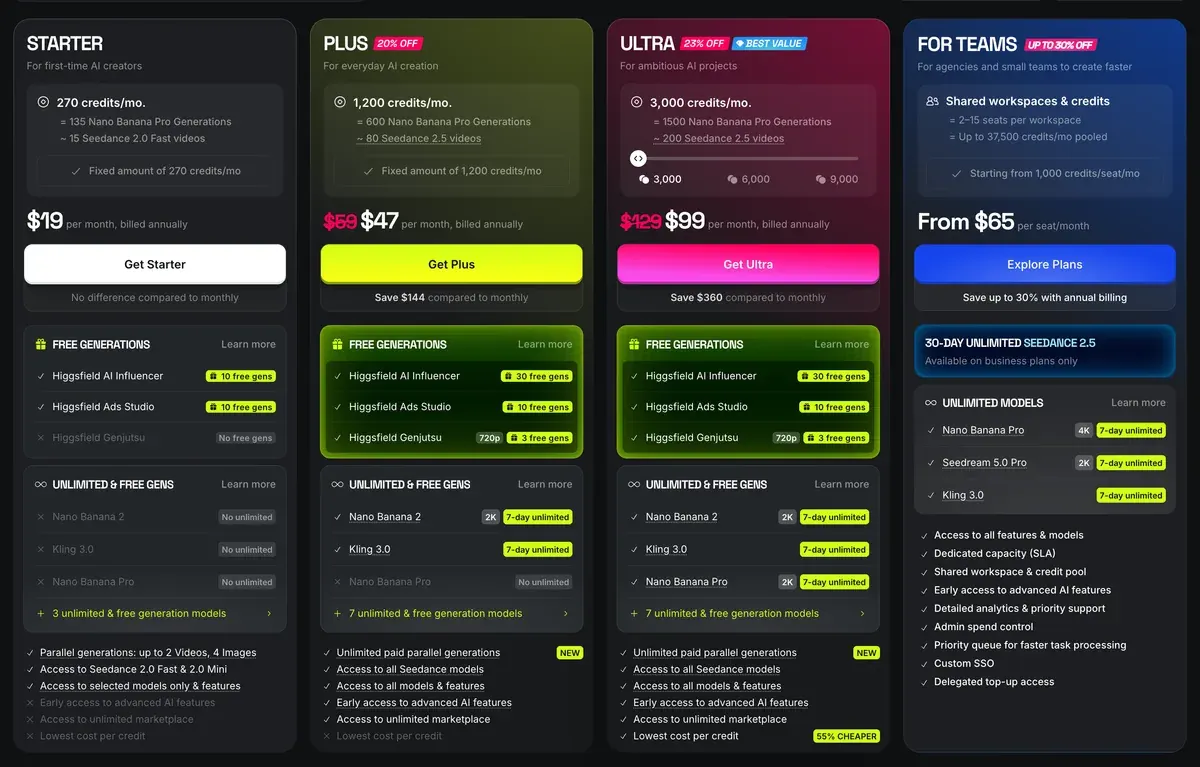
On monthly billing Plus costs $49 a month and Ultra $129 a month. Plus drops to $39 a month billed yearly and Ultra to $99 a month billed yearly. Starter stays at $15 a month either way.
Nano Banana Pro counts are credits divided by its 2 credits an image; video counts are the card’s own.
| Plan | Credits a month | What the credits buy | Video jobs at once |
|---|---|---|---|
| Starter | 200 | 100 Nano Banana Pro images, or about 11 Seedance 2.0 Fast videos | 2 |
| Plus | 1,000 | 500 Nano Banana Pro images, or about 67 Seedance 2.5 videos | 6 |
| Ultra | 3,000 | 1,500 Nano Banana Pro images, or about 200 Seedance 2.5 videos | 8 |
Scroll sideways for all 4 columns
Starter’s card says “Access to selected models only”, Seedance 2.0 Fast among them. Plus and Ultra open every model. Plus includes a 7-day unlimited window on Nano Banana 2 at 2K, and Ultra adds Nano Banana Pro. Both include Kling 3.0 for 7 days on annual billing.
Teams pay per seat: Team runs $79 a seat for 1,000 credits each, Scale $215 a seat for 2,500.
Credits reset at each renewal, and annual plans reset them every 30 days. Credit packs last 90 days. A failed generation “usually” refunds its credits, Grok being the exception (profile). Every plan, price change and refund rule: Higgsfield pricing.
Your first Higgsfield image in five steps
- Pick Image in the top bar. The model menu opens on GPT Image 2; switch it to the model the table below suits to your job. For Higgsfield’s own walkthrough, keep How do I create my first generation? open in a second tab.
- Set the ratio before you write. 9:16 for Reels and TikTok, 4:5 for the Meta feed, 1:1 for marketplaces.
- Write the photo, then the light. Who or what, where, the camera and where the light comes from. “Cinematic lighting” gives you nothing a model can use.
- Batch 2 to 4. Each output of a batch is charged separately, so a batch of four costs four images.
- Open the result at full size. Small machines and hands break first, and a phone screen hides the damage.
Free accounts carry a visible watermark that the terms bar you from removing (s.4.1); paid plans download without it (ownership article).
Which Higgsfield image model for which still
Higgsfield’s image menu holds its own Soul models and a dozen from other makers. Costs below are credits per image from the pricing page.
| Model | Made by | Suits | Credits an image |
|---|---|---|---|
| Soul 2.0 | Higgsfield | Fashion and UGC-style stills, avatar faces | 0.12 |
| Nano Banana Pro | Product edits, packaging text, quick variants | 2 (4 at 4K) | |
| Nano Banana 2 | The same jobs at Plus’s unlimited window | 2 | |
| GPT Image | OpenAI | Statics and posters where text must read | 1 |
| Seedream 4.5 and 5.0 | ByteDance | Busy compositions, instruction edits | 1 |
| FLUX.2 Pro, Flex, Max | Black Forest Labs | Prompt-faithful stills | 1, 3, 4 |
| Popcorn | Higgsfield | Storyboards of up to 8 matching frames | 1.5 |
| Ideogram, Recraft | Ideogram, Recraft | Typography, vector logos and mock-ups | Not on the table |
Scroll sideways for all 4 columns
The images in this guide come from a five-day realism contest run by the AI Video Bootcamp in September 2026 (Higgsfield runs its own contests too). Each day set one subject, from a portrait to a free choice. Alexandre S. made every one of them on Higgsfield.

Day one was a family snapshot. The prompt asked for the details a parent’s phone catches: the photographer’s own shadow on the track, low sun, the boy’s hair in the wind. It ran on Soul 2.0 first, then on Seedream 5 Pro, which made the image above.
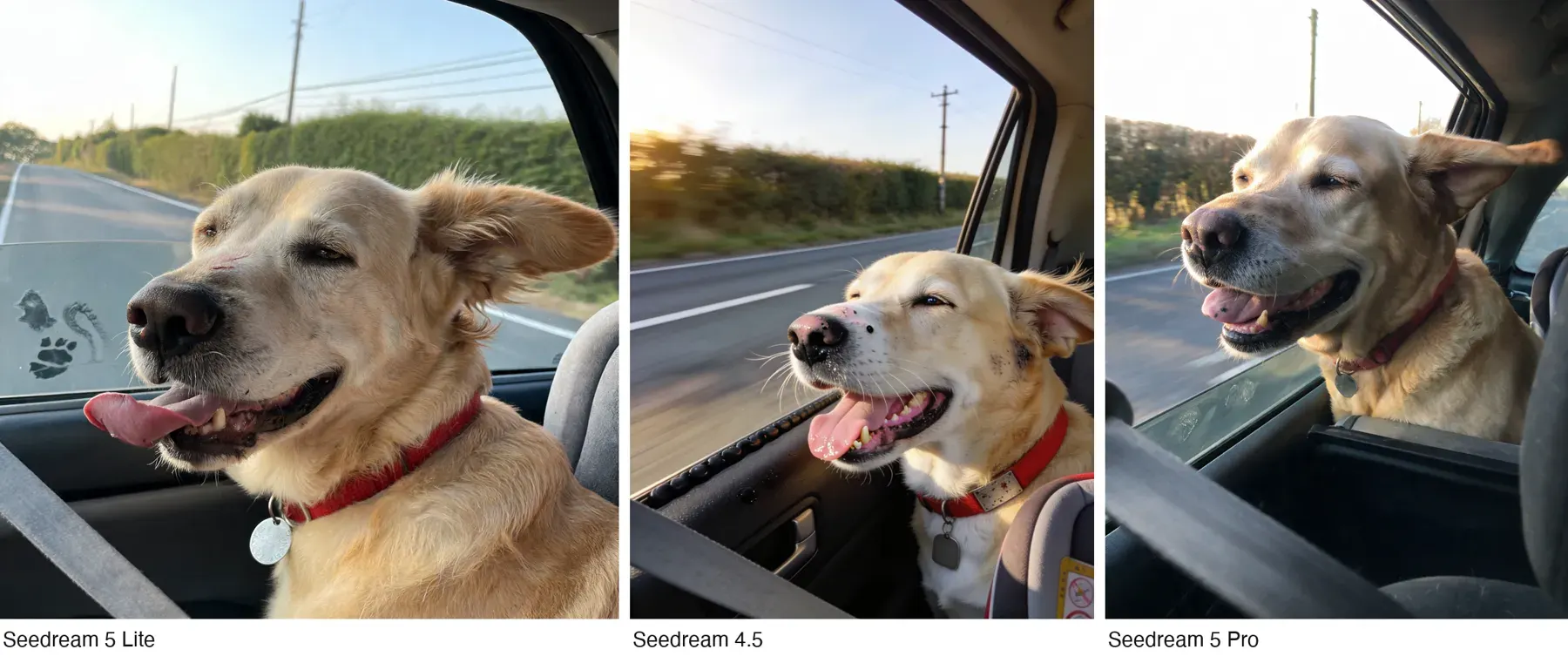
Day two shows why the model menu matters. One prompt for an old Labrador in a moving car, run on three Seedream models:
A second, longer prompt for the same dog went to Nano Banana 2 and Seedream 5 Pro. The two read the same words differently: where the dog sits, where the light lands, how much of the passenger shows.
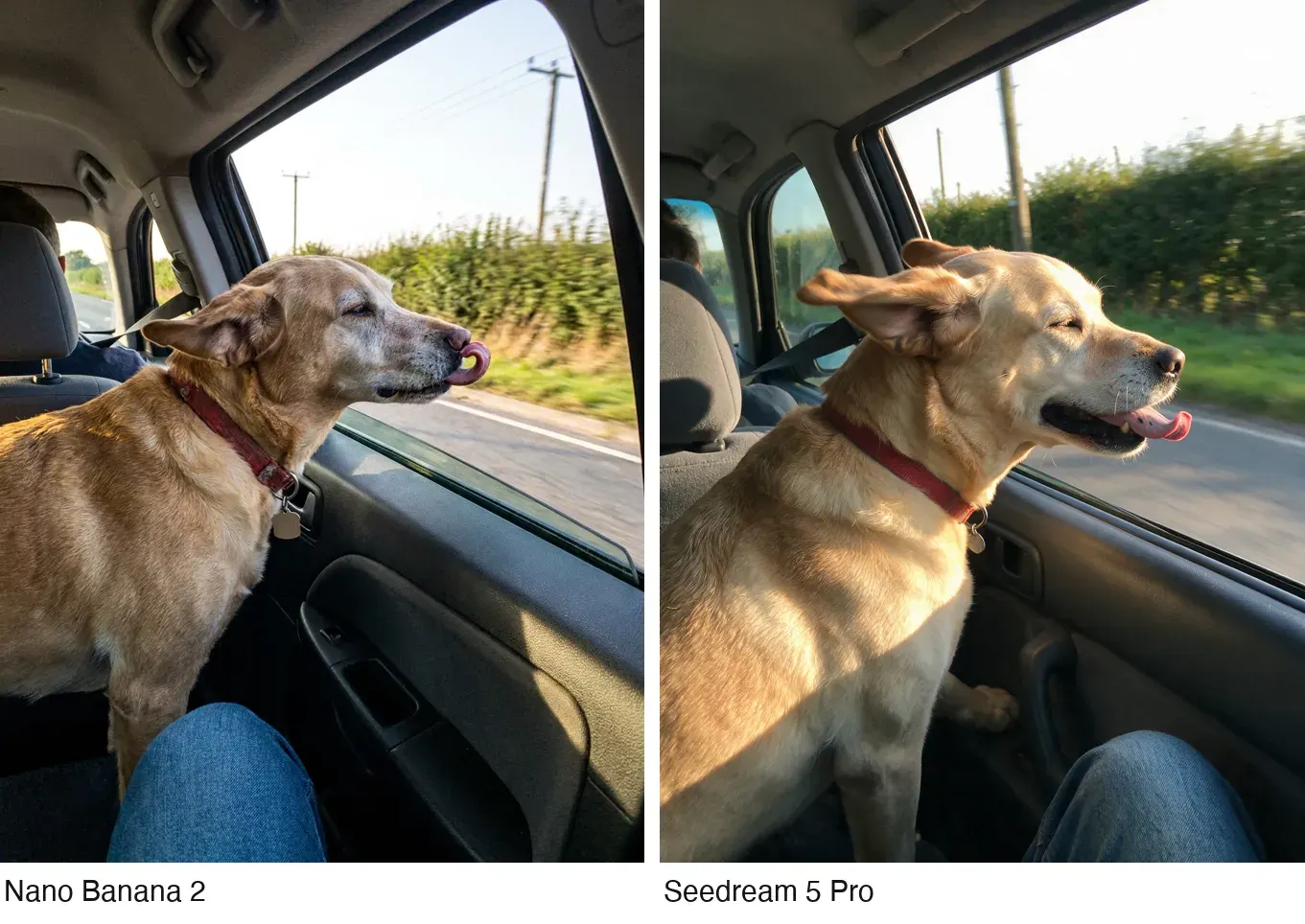
Running one prompt on two or three models costs a few credits and saves a day of rewriting. Seedream at 1 credit and Soul 2.0 at 0.12 make that comparison cheap.
How the prompts behind these images are built
Every contest prompt followed the same order, one paragraph each. It works on any Higgsfield image model.
- The kind of photo. “A candid iPhone photo taken from the back seat of a moving car, the framing a little tilted and off-centre.”
- The subject, in physical detail. Age, coat, what the hands and eyes do. Write what the body does; skip adjectives such as “happy”.
- The set. Every object that should be there, in plain words, so the model stops inventing props.
- The camera. Distance, height, lens, what is sharp and what blurs.
- The light. A single named source, where it sits and what it falls on. “A bare white fluorescent tube on the shop ceiling … is the only light on the food.”
- A two- or three-word mood. “Late and hungry.”
- The finish. “Candid phone photo, real food textures, no plastic sheen, no watermark, no readable text anywhere.”
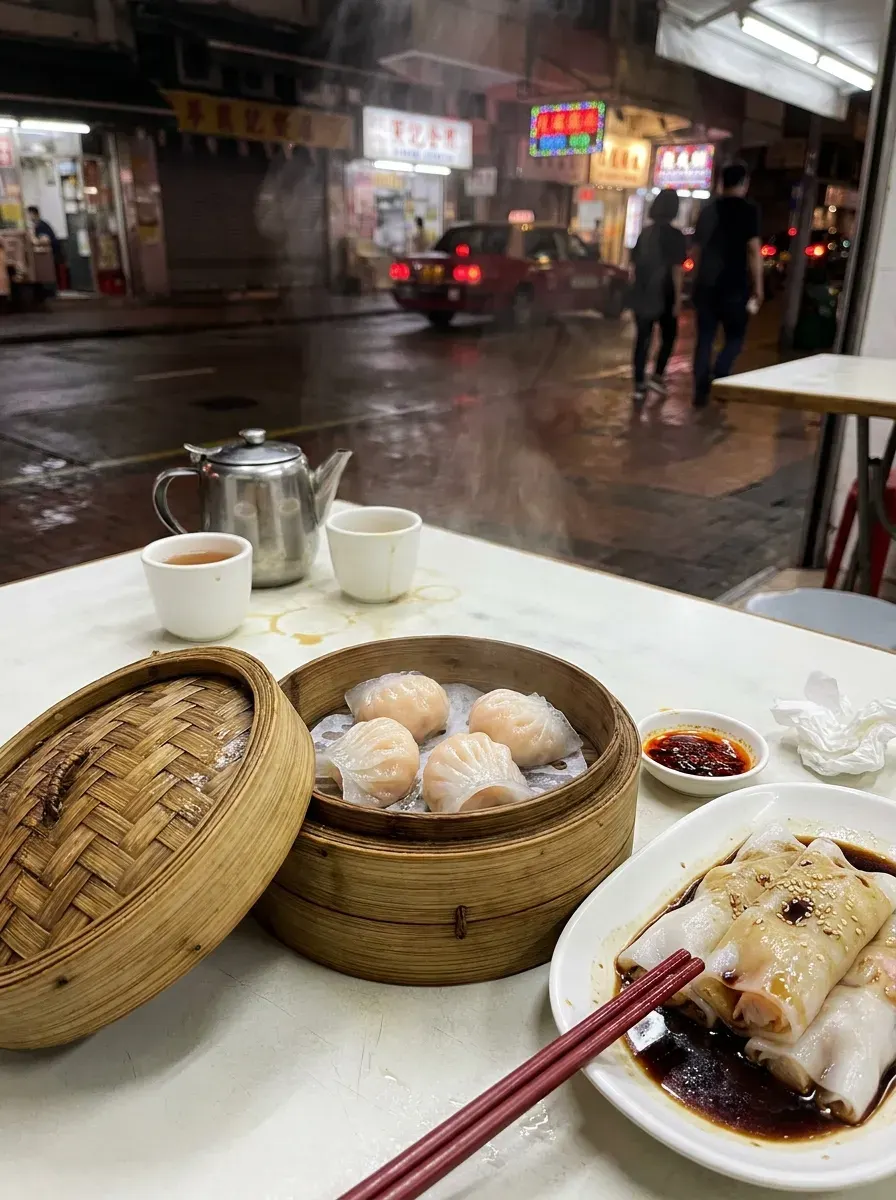
The dim sum prompt runs about 4,000 characters in that order, on Nano Banana 2. The food sits in the lower two thirds, and the street is a blur of signs whose characters were asked to dissolve. Readable text is the first thing a viewer catches as fake.
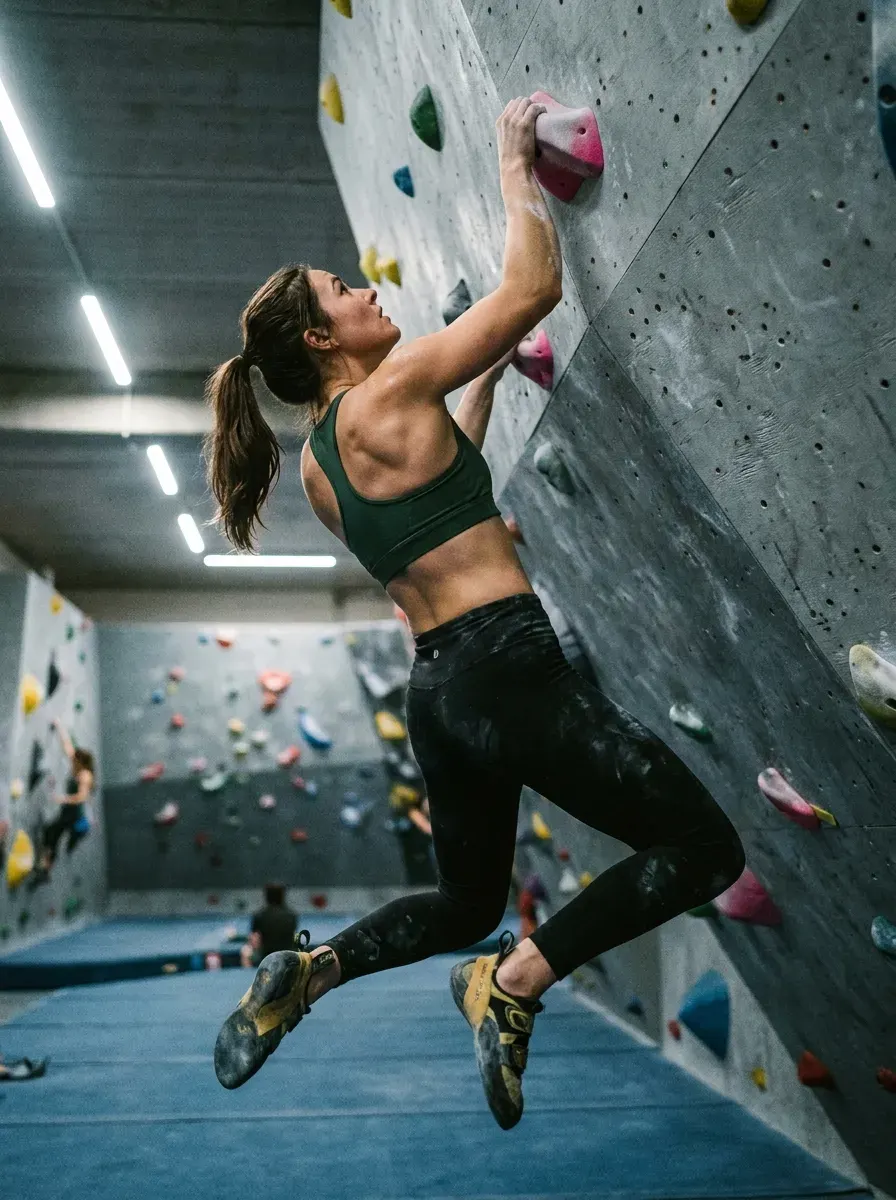
Day four switched register. The brief asked for a professional sports photograph. So the prompt named a full-frame mirrorless camera and its settings (35 mm, f/2.8, 1/1600 s, ISO 8000). Then it named the moment: the end of a swing after a catch, feet off the wall. Our Higgsfield prompts guide for ads gives ad templates model by model.
Editing a still without starting over
Higgsfield’s Edit tab (Layers) splits an image into layers and edits one region by prompt or brush. It changes text, relights, removes backgrounds and upscales (Layers). Layer separation and region edits use credits and need a paid plan.
The day-one portrait got one such edit. The old man’s hair came out flat while the boy’s blew in the wind. So this prompt went back to Seedream 5 Pro with the image attached:
Edit only the old man's hair. The breeze comes from the left edge of the frame, the same breeze that is blowing the boy's hair toward the right edge of the frame. The old man's hair is pushed the same way: the strands on the side of his head nearest the left edge of the frame lie flat against his scalp, and the strands lift and stream toward the right edge of the frame, above his ear on that side. Thick hair, not pure white, carrying grey and faint yellow tones, individual strands separated. Every other pixel in the image kept exactly as it is: his face, the boy, the hand, the clothes, the track, the shadows, the sky. Nothing added, nothing removed.
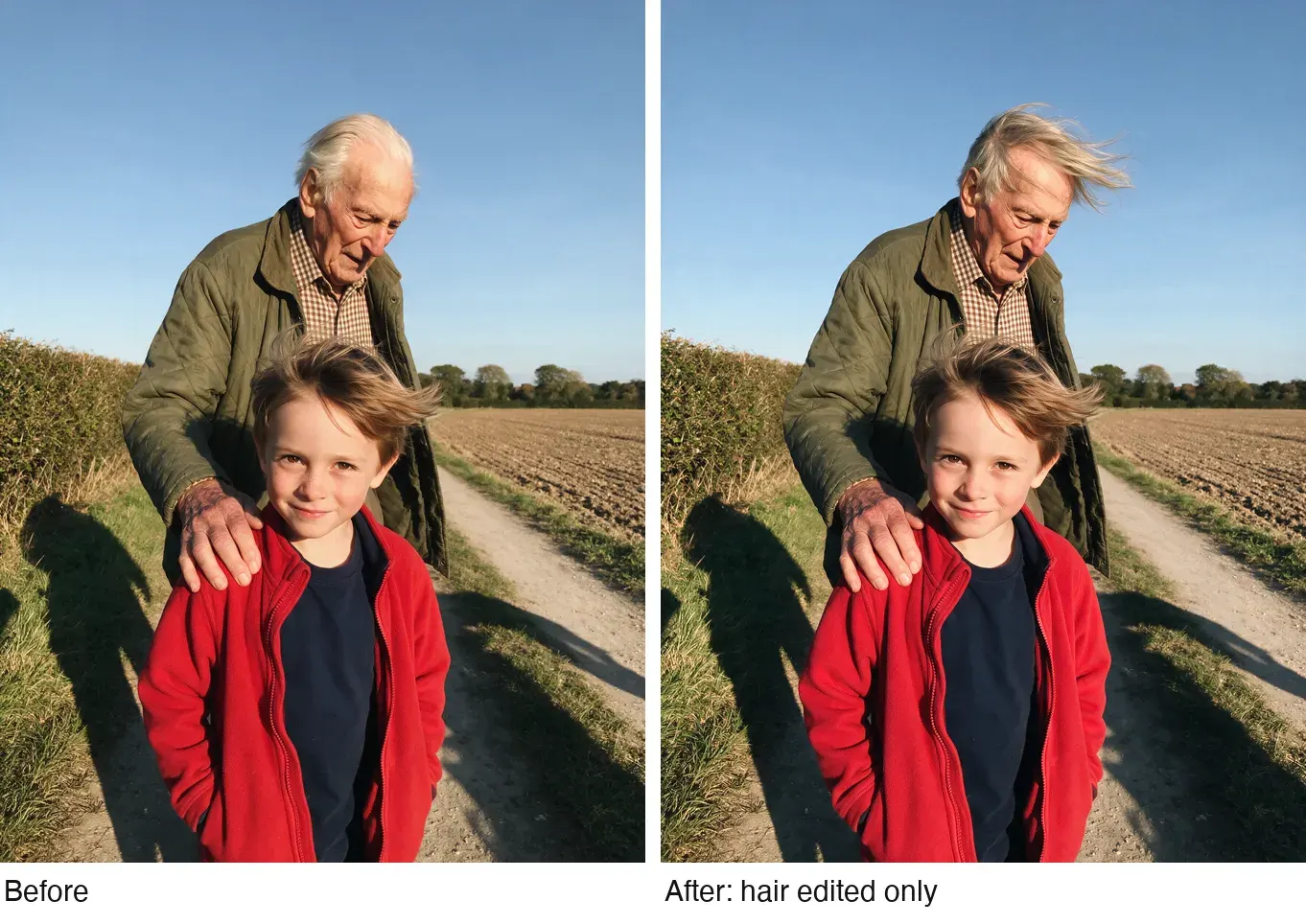
Two lines do the work: “Edit only” names the one thing to change, and the last two sentences list what must stay. Leave an object off that list and an edit model may tidy it away.
Other image tools, with the credit cost where the pricing page gives one:
- Inpaint: paint over an area and describe the replacement; Soul Inpaint costs 0.25 credits.
- Expand extends an image past its edges, a square packshot into a 9:16 story.
- Upscale runs Topaz and ByteDance upscalers to 2K or 4K, for print and large placements.
- Product Placement puts a packshot into a scene for 0.25 credits (Banana Placement, 1).
- Face Swap and Character Swap cost about 2 credits an image; five free image face swaps a day. Terms s.5.3 makes you warrant consent from every face you upload.
- Apps run one-click jobs on one image, such as Angles 2.0 and Shots, which promises “9 unique shots from one image”.
One face across a whole campaign: Soul ID and Elements
Soul ID trains a character from “20 or more photos of the same person (up to 80 supported)” in “a few minutes” (Soul ID article). One person per Soul ID, and it stays inside Higgsfield.
Each plan caps Soul ID generations. On monthly billing that is 6 a month on Starter, 33 on Plus and 100 on Ultra. Annual billing raises the caps to 80, 400 and 1,200.
Elements do the same for anything you reuse across shots: Characters, Locations and Props, called up by name in Cinema Studio and Canvas. A brand’s spokesperson, its shop and its bottle stay the same from the first ad to the fortieth.
Five of 52 public sources credit Soul ID and Elements with keeping characters and products consistent across shots (YouTube, Reddit).
Use only a face you own or hold a signed release for. Terms s.5.3 asks for “all consents, releases, and permissions” from each person, and s.4.4 lets Higgsfield train on uploads outside an Enterprise Agreement.
Higgsfield Soul 2.0 and Soul ID shows how to train a consistent character and which likeness rules apply in ads.
Plan a whole ad on a storyboard first
Popcorn, Higgsfield’s storyboard model, makes “up to 8 images in a single sequence” with the same subject in each (storyboard page). At 1.5 credits a frame, an eight-frame board costs 12 credits.
That is less than one 5-second Seedance 2.0 clip at 720p, so the cheapest place to find a bad idea is the board. Check the order of shots, where the product enters and whether the hook frame reads without sound. Then send only the frames that work to video.
Canvas takes the same idea further. Each frame becomes a node, each node feeds a video model, and nothing spends credits until a node generates.
From a still to a moving shot
Image to video keeps the still you like and lets you choose the motion model per shot.
That clip is the Seedream 5 Pro dog photo, animated with Seedance 2.5 at 720p for 5 seconds. The prompt described only what changes. Wind lifts the ears, the nose rises once, the hedge slides past, and a passenger’s phone bobs in their lap. The frame already holds everything else.
The dim sum clip used the same method for the opposite job. Everything on the table stays exactly where it is, and only the street moves.
Costs from the pricing page, for the clip length each row is priced at:
| Model | Credits | Suits |
|---|---|---|
| Kling 3.0 | About 7 per 5 s at 720p, 8 at 1080p, 30 at 4K | Low-cost motion; up to 15 s and 6 cuts in one generation |
| Seedance 2.0 | About 22 per 5 s at 720p, 60 at 1080p | Reference-driven shots with sound |
| Seedance 2.0 Fast | About 12 per 5 s at 720p | Starter’s Seedance |
| Seedance 2.5 | No published rate; Plus and above | Up to 30 s per take, up to 50 references |
| Veo 3.1 | About 40 per 4 s (Fast, 16) | Hero shots with native audio |
| Wan 3.0 | 8.75 per 5 s at 720p | First and last frame control |
| MiniMax Hailuo 2.3 | About 6 per 6 s at 768p | Fast, dynamic motion |
| Grok Imagine | About 7 per 5 s | Quick social clips; charged the moment it starts |
| Higgsfield DoP | About 3 to 7 per 3 s | Camera moves through a still |
Scroll sideways for all 3 columns
Three habits save credits. Test a new prompt at 720p or 5 seconds before the full take. Write the motion, never the picture. And give the camera one move per shot, named by what holds it: a phone in a lap, a tripod, a car mount.
Start and End Frame control, where you give the first and last frame and the model fills the gap, comes with Plus and Ultra only.
Camera moves, Effects and Cinema Studio
- Camera Controls holds “50+” motion presets, from Dolly In and Crash Zoom to 360 Orbit, Bullet Time and FPV Drone (Camera Controls). Pick one and the model follows the move.
- Effects lists 45 named visual effects on the page, such as Earth zoom, Melting and Floating fall (Effects). They make hooks for the first second of a Reel.
- Cinema Studio is a virtual film set: camera bodies, lenses, moves (up to three at once), Soul Cast actors and Elements. Version 4.0 “runs on Seedance 2.5”, with clips “up to 30 seconds” and “up to 50 references” (Cinema Studio article).
Five of 52 sources praise Soul stills and the directed camera moves of Cinema Studio (Reddit, Trustpilot).
Remaking a video you already have
These tools start from footage or a sketch instead of a blank prompt.
- Genjutsu’s Motion Transfer takes a 4 to 30 second video and “keeps the motion, camera and timing while rebuilding the scene from your references” (Genjutsu). Film a move once on a phone, then cast anyone in it.
- Genjutsu’s Object Swap changes “a selected character, outfit, product, location or object” in the same clip, with up to 30 reference images. Swap last season’s bottle for the new one in a winning ad.
- In Motion Control, Kling 3.0 drives a character with the movement of a reference video, about 7 credits per 5 seconds at 720p.
- Draw to Video animates a sketch or storyboard frame with Kling 3.0, Seedance 2.5, Veo 3.1 or Wan (Sketch to Video).
- 3D Jutsu lets you describe a set and place people and cameras by hand in 3D. Seedance 2.5 then renders the take (3D Jutsu).
Plus and Ultra include a few free Genjutsu runs at 720p: 3 a month on annual billing, 2 on monthly. Starter gets none.
Higgsfield’s ad tools for media buyers
Five tools here start from a product or an ad.
Marketing Studio turns a product photo or a product page link into ads from “1,500+” templates (Marketing Studio article). Its tabs cover UGC videos, product shots, image ads for Meta and Google placements, marketplace images and posters. Clips run up to 15 seconds. Its formats include TV Spot, Unboxing, Product Review, Tutorial and Virtual Try On (Marketing Studio).

Ads Studio reads your website into a brand kit of logo, colours, fonts and tone (Ads Studio). Give it one hero product or up to 10. Each selling point becomes a finished static ad with its own headline and call to action. Every paid plan includes 10 free Ads Studio generations.
Ad Multiplier, inside Ads Studio, recreates an existing ad of 4 to 30 seconds with your own cast and product. It keeps the edit, the motion and the original audio, and writes a new hook and call to action.
A run with a new hook and CTA (call to action) costs up to 140 credits at 720p, or 240 at 1080p. A new CTA alone costs up to 35 or 60 (Ad Multiplier post).
Virality Predictor scores a clip of up to 15 seconds for hook strength and hold rate before you spend on it (Virality Predictor). It is in beta, and the help centre calls the score “an estimate, not a guarantee”.
AI Influencer builds a virtual character from menus (type, look, outfit) or a photo, then animates it with a motion preset. A character costs 1.12 credits (AI Influencer post); Starter includes 10 free generations, Plus and Ultra 30.
The UGC builder sits on Plus and Ultra only. Marketing Studio’s template mode runs in the web app; it “isn’t available through Supercomputer, MCP, or other agentic channels yet”.
Talking clips, voice-overs and dubbing
Lipsync Studio makes a talking clip from an image or video plus a script (lipsync article). You choose the engine, from Higgsfield Speak 2.0 to Sync Lipsync 3 at up to 4K. Ready-made set-ups include a selfie, a podcast desk and a driver talking from a car. Lip sync on Higgsfield covers the steps.
| Engine | Credits |
|---|---|
| Higgsfield Speak 2.0, 720p | About 14 per 5 s |
| Kling Lipsync, 720p | About 2 per 5 s |
| Wan 2.5 Speak, 720p | About 12 per 5 s |
| Sync Lipsync 3, 4K | About 18 per 2 s |
| Veo 3 Fast with audio | About 22 per 8 s |
Scroll sideways for all 2 columns
Higgsfield Speak is a Plus and Ultra feature.
Audio has three modes: text to speech, voice change and translate, which “covers 18 languages”. Voice cloning takes a recording or an MP3 or WAV upload; clone only your own voice or one you have permission for. Seedance 2.5 and Kling 3.0 also generate sound in the same pass as the picture.
Shorts, upscaling and reframing for every placement
- Shorts Studio: upload a clip of up to 2 minutes, pick one of “40+” style presets and get a vertical short at 720p.
- Personal Clipper turns one YouTube video into short clips with subtitles, through the MCP connector.
- The video upscaler takes clips through ByteDance or Topaz to 1080p, 2K or 4K, up to 60 fps with FPS Boost (video upscaler).
- Reframe recomposes a video to a new ratio, from 9:16 to 21:9, and generates the missing edges. It works 15 seconds per scene.
- Background removal works on images in the Edit tab and for video through the plugins.
With Reframe, one 16:9 master becomes Reels, Stories and feed versions without a reshoot.
Agents, plugins, MCP and the Higgsfield API
- Supercomputer is an agent that works from a plain-language brief. It picks the models and posts results to Slack, Notion, Google Drive, TikTok and “30+ more”, on a schedule if you set one. Paid plans only; each step spends credits (Supercomputer).
- Canvas is a node board for chaining models, shared in real time; “You only spend credits when a node actually generates”.
- Katana copies the rhythm and look of a reference edit onto your footage, run from Claude through the MCP connector (Katana).
- The app and website builder makes a site or app from one prompt and hosts it at name.higgsfield.app.
- MCP and the CLI connect Claude and other agents to Higgsfield’s generation tools (MCP help). It needs a paid plan, and “Everything generated through MCP deducts credits, regardless of your plan”.
- Plugins for Photoshop, Premiere Pro, After Effects, DaVinci Resolve, Figma and Blender run on plan credits.
The Higgsfield API is sold apart from the plans: a prepaid balance with a $5 minimum top-up and no subscription (API help). Its API page lists Kling 3.0 at $0.042 a second and Seedance 2.5 at $0.144 a second.
How to connect Higgsfield to Claude (MCP) shows the connector steps and the credits every MCP call spends.
Higgsfield API pricing and access explains how to get access and what a clip costs on the prepaid balance.
What each Higgsfield plan includes, feature by feature
The pricing page’s compare table, Free to Ultra:
| Feature | Free | Starter | Plus | Ultra |
|---|---|---|---|---|
| Commercial use | No | Yes | Yes | Yes |
| Start and End Frame | No | No | Yes | Yes |
| Higgsfield Speak | No | No | Yes | Yes |
| UGC builder | No | No | Yes | Yes |
| Higgsfield ads | Yes | Yes | Yes | Yes |
| Soul ID generations a month | 1 | 6 | 33 | 100 |
| Video jobs at once | 1 | 2 | 6 | 8 |
Scroll sideways for all 5 columns
The table’s “Commercial use: No” on Free sits beside a help article that says “The Terms of Use do not tie commercial use rights to a specific plan” (ownership article). The free watermark settles it for ads anyway: s.4.1 bars removing it.
The trial is account-dependent. The help centre says “There’s no trial period”; text the pricing page loads offers a one-day unlimited trial that becomes Plus monthly unless cancelled. Read the checkout before you enter a card.
Plus is the plan most of this guide needs: every model, Speak, the UGC builder and Start and End Frame.
What Higgsfield users report, good and bad
Across 52 public reviews, videos and threads, the same points come back. Counts are how many of the 52 sources raise each one.
| What users report | Sources | Two of them |
|---|---|---|
| One login and one balance for Kling, Veo, Seedance and Nano Banana | 6 | YouTube, YouTube |
| Characters and products stay consistent through Soul ID and Elements | 5 | YouTube, Reddit |
| Refunds refused once any credit is used | 9 | Trustpilot |
| “Unlimited” runs on a slow shared queue, 20 minutes or more | 8 | Reddit, Trustpilot |
| Generations run slow or fail and still cost credits | 8 | Reddit, YouTube |
| Upsell pop-ups lead to unwanted upgrades | 8 | Reddit, Reddit |
Scroll sideways for all 3 columns
The complaints are about money more than output. That points to the habits in the next section.
Six habits that stretch your Higgsfield credits
- Draft cheap, then pay for the keeper. Find the frame on Soul 2.0 or Seedream, then spend Nano Banana Pro or 4K credits on the keeper.
- Test video short. Run a new motion prompt at 720p or 5 seconds before the long take.
- Use the Unlimited window on purpose. On Plus, Nano Banana 2 at 2K costs nothing for 7 days, on the website only. Batch your stills into that week.
- Keep failed jobs on record. A failed generation “usually” refunds; if one does not, note the job and contact support.
- Buy the plan you need for a month first. Refunds stop once a credit is used, so an annual plan bought by mistake stays bought.
- Close upgrade prompts before you click. One-click checkouts sit inside the app; read the plan name on the button.
Rules for putting Higgsfield output in a paid ad
- You can run it. Terms s.4.4: Higgsfield “does not claim ownership” of outputs and does not “restrict your commercial use”, and rights pass to clients.
- Never pass AI off as a person. Section 5.2(xi) bars presenting output as human-generated. A synthetic “customer” in a UGC ad needs the platform’s AI label. Meta’s side: Meta’s AI disclosure rules.
- Faces and voices need consent: s.5.3 makes you warrant every release.
- The maker’s policy applies too. Under s.8, a Kling or Veo clip answers to Kuaishou’s or Google’s rules, and the stricter one governs.
- Training: outside an Enterprise Agreement, Higgsfield may train on your inputs and outputs (s.4.4).
Clause by clause, every plan and use: Higgsfield in the rights matrix.
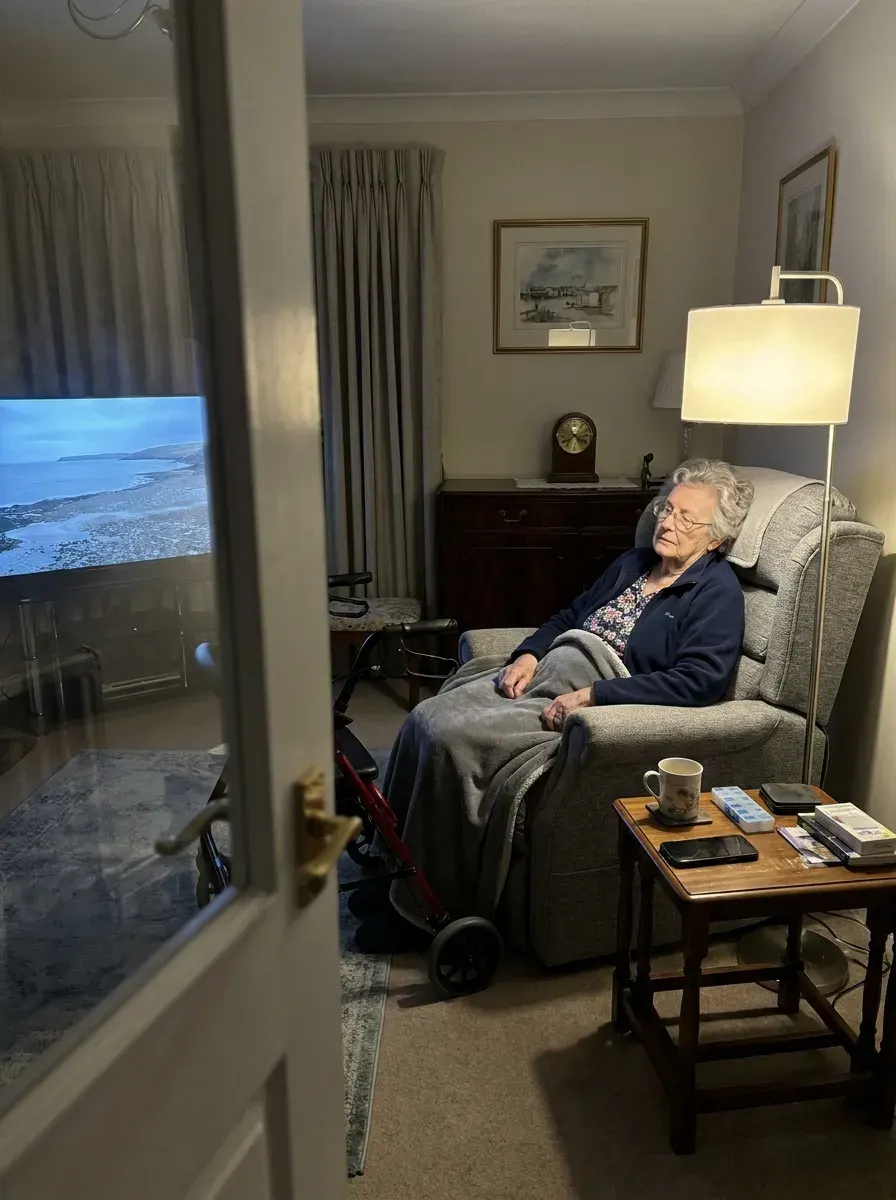
Then check the pixels. The day-five image reads as a real phone photo on a small screen. At full size, the walking frame beside the chair has one strut and a seat floating in the air. Zoom every image before it goes into an ad.
One ad from zero on Higgsfield, start to finish
- Brief. One product, one audience, one hook, one placement and its ratio.
- Frames. Run the key frame prompt on Seedream and Nano Banana side by side, a few credits each, and keep the best.
- Fix. One edit prompt per flaw, each listing what must stay.
- Face. If a person recurs, train a Soul ID from 20+ photos with a signed release.
- Motion. Animate the frame on Kling 3.0 for cheap tests, then Seedance 2.5 or Veo 3.1 for the final take.
- Voice. A Speak 2.0 or Lipsync Studio take, or a cloned voice-over in Audio.
- Variants. Reframe to every placement, then Ad Multiplier for new hooks on the version that wins.
- Check. Virality Predictor for a second opinion on the hook, then a full-size look at every frame.
Paying for the clips direct from Kling or ByteDance can cost less, as 8 of 52 user sources point out (YouTube, Reddit). Higgsfield’s case is everything above in one tab and one balance. Rivals that do part of the job: Higgsfield alternatives.
Google sells Veo itself, and Higgsfield vs Google Veo prices the two routes. Editors who already pay for stock footage can read Higgsfield vs Artlist.
Creators who want to be paid for sharing Higgsfield can read the Higgsfield affiliate program guide.
Questions about using Higgsfield
Is Higgsfield free to use?
There is a Free plan with a small set of models, a visible watermark and “Limited use” credits. Paid plans start at $15 a month for 200 credits.
Does Higgsfield have a mobile app?
No. Higgsfield’s help centre says it “has no mobile apps and no desktop app”; it runs in a browser, with plugins for Photoshop, Premiere, After Effects, Resolve, Figma and Blender.
Does Higgsfield have an API?
Yes, sold apart from the plans: a prepaid balance with a $5 minimum top-up, no subscription, and one key for every model in its API catalogue.
Is Sora still on Higgsfield?
No. Higgsfield’s 3 October 2026 post says Sora 2 “is no longer part of the Higgsfield model lineup”, after OpenAI shut the Sora 2 API.
Which Higgsfield model is cheapest for video?
On the pricing table, Seedance 1.5 costs least: about 3 credits per 5 seconds at 720p, and about 1 at 480p. Among the newest models, Kling 3.0 runs about 7 per 5 seconds at 720p and MiniMax Hailuo 2.3 about 6 per 6 seconds.
Every Higgsfield guide, sorted by job, is in the Higgsfield hub
Sources
- Higgsfield: Higgsfield pricing, Plan cards, the compare-features table and credit costs per model, read in a browser; prices exclude VAT. Checked
- Higgsfield help centre: What is Higgsfield?, Calls Higgsfield an AI-native creative suite; modified 14 September 2026. Checked
- Higgsfield help centre: Official Higgsfield platforms, No mobile app and no desktop app; modified 24 September 2026. Checked
- Higgsfield help centre: How do I create and use a Soul ID character?, 20 or more photos of one person, up to 80; modified 2 September 2026. Checked
- Higgsfield help centre: How do I use Cinema Studio?, Cinema Studio 4.0 runs on Seedance 2.5, clips up to 30 seconds, up to 50 references; modified 1 September 2026. Checked
- Higgsfield help centre: How do I use Marketing Studio to create video ads?, 1,500+ templates, 15 seconds per generation, template mode not available through agentic channels; modified 1 September 2026. Checked
- Higgsfield: Ad Multiplier in Ads Studio, Credit ceilings per run at 720p and 1080p; posted 6 October 2026. Checked
- Higgsfield help centre: Lipsync, voiceover and aspect ratios, Lipsync models, voice cloning and translation into 18 languages; modified 1 September 2026. Checked
- Higgsfield help centre: What is the Higgsfield API?, Prepaid balance, 5 dollar minimum top-up, no subscription; modified 24 September 2026. Checked
- Higgsfield help centre: What is Higgsfield MCP?, Connector for Claude and other MCP agents; every MCP generation spends credits; modified 24 September 2026. Checked
- Higgsfield: Sora 2 API shutdown and migration, Sora 2 is no longer part of the Higgsfield model lineup; posted 3 October 2026. Checked
- Higgsfield help centre: Who owns my generations, and can I use them commercially?, Commercial rights not tied to a plan; paid plans download without the watermark; modified 12 September 2026. Checked
- Higgsfield: Higgsfield Terms of Use (26 July 2026), 4.4 on commercial use and training, 5.2(xi) on output presented as human-made, 5.3 on faces and voices, 8 on third-party models. Checked
- Trustpilot, Reddit and YouTube: Higgsfield user reports, 52 public sources synthesised, checked 28 September 2026. Checked
What changed on this page
- Higgsfield’s prices went back: Starter is 15 dollars a month for 200 credits, Plus 49 a month or 39 billed yearly for 1,000 credits, and Ultra 129 or 99 billed yearly has a card again (was Starter 19 for 270, Plus 59 or 47 for 1,200).
- Higgsfield changed its prices: Starter is 19 dollars a month for 270 credits (was 15 for 200), Plus 59 a month or 47 billed yearly for 1,200 credits (was 49 or 39 for 1,000). Plan table, Soul ID caps and the Seedance 2.0 1080p rate (now about 60 credits per 5 seconds) updated.

Alexandre S.
Alexandre S. is a creative ad strategist and copywriter with ten years' experience in digital marketing across multiple channels.
Related pages
-
 Compare Higgsfield vs Kling
Higgsfield allows commercial use on every plan, but s.8 adds a model maker’s stricter rules; whether Kling’s ad clause reaches its clips is not stated.
-
 Compare Higgsfield vs Runway
One 15-second Seedance 2.0 clip: $6.00 on Runway Max, about $6.75 on Higgsfield Starter, $14.40 on Runway Standard. Ad rights and refunds side by side.
-
 Guide AI product video from image: turning one product photo into a video ad
Amazon’s ad console animates a product photo at no listed fee, for Amazon ads only; paid models bill by the second. Cost per clip and terms, checked 2 Oct 2026
-
 Guide AI UGC prompts
The prompt fields Google, Kling, Luma and ByteDance publish for UGC clips, side by side, and the credit rules that bill a failed prompt. Read 2 October 2026.


