AI B-roll generators
Verdict on AI B-roll generators
Pick an AI B-roll generator by whether it reads your script or only a prompt. MakeUGC and invideo place clips against your script, and Kling and Veo make one shot at a time. Prices checked . Ad rights differ: Kling clips made without a membership must carry Kling’s brand.
For cutaways placed between your actor’s lines:  MakeUGC
Auto B-roll drops Seedance 2.5 clips between lines, and a product photo puts your product in the shot.
For a script cut into a video with stock and generated shots:  invideo AI
Starter lists “100 Premium stock footage”; generated Seedance clips cost credits on top.
For product shots of 3 to 15 seconds with native sound:  Kling AI
Members get commercial use; non-members must label every clip with Kling’s brand (paid terms 7.2).
For B-roll with an IP indemnity, through Google Cloud:  Google Veo
Veo on Google Cloud sits on Google’s indemnified list; in Flow, clips run 4, 6 or 8 seconds.
For restyling footage you already shot:  Runway
Aleph edits existing video; terms 4.4 set no limit on commercial use but let Runway train on outputs.
| Tool | Monthly from (USD) | Cost per output at list price if every credit is used | Paid ads on the cheapest paid plan | What it does | Official site |
|---|---|---|---|---|---|
 Google Veo Google Veo | $4.99 | $0.40per Veo 3.1 Fast clip of 4 to 8 seconds | Unclear (Google AI Plus) | Google’s Veo 3.1 and Gemini Omni Flash video models, used through Flow, the Gemini app or the Gemini API. | Visit Google Veo |
 invideo AI invideo AI | $20 | $0.30per second of video | Allowed with conditions (Starter) | Script-to-edited-video agent with a timeline editor, stock library and third-party models such as Seedance and Veo. | Visit invideo AI |
 Kling AI Kling AI | Unverified | Unverified | Not rated | Kuaishou’s video models (Kling 3.0, 3.0 Omni, Turbo) with native audio, multi-shot clips up to 15 s and native 4K. | Visit Kling AI |
 MakeUGC MakeUGC | $59 | $11.80per talking-actor video | Allowed with conditions (Starter) | UGC-style video ads with 1,000+ AI creators, B-roll and product-in-hand shots; API and MCP access on every plan. | Visit MakeUGC |
 Runway Runway | $15 | $0.29per second of video | Allowed (Standard) | Gen-4.5 and Aleph video models plus hosted Kling, Seedance and Nano Banana, with an editor, agent and API. | Visit Runway |
Scroll sideways for all 6 columns
Prices checked 21 Oct 2026. Kling AI’s price is unverified.

What B-roll does in an ad
B-roll is the footage that plays over or between your main shot. In a UGC ad the main shot, called A-roll, is the person talking to camera. The B-roll is everything you cut to while they talk, such as the product on a shelf or a hand opening the box.
It does two jobs. It covers the jump cuts between takes, so a 40-second script plays as one continuous take. And it changes the picture every few seconds, which gives a scrolling viewer a reason to keep watching.
MakeUGC’s B-roll page lists the shots ad makers ask for: “Product close-ups”, “Lifestyle scenes”, “Problem shots” and “Hook openers”. It also gives the length rule most editors follow: “Short clips work best as cutaways.”
Script-matched or prompt-only
The split that matters to you is who decides where each clip goes. A script-matched tool reads your lines and places the footage. A prompt-only tool makes one shot from a sentence you write, and you place it in your editor.

| Tool | Fits your script | Clip length | Output |
|---|---|---|---|
| MakeUGC | Yes: auto B-roll places clips between lines | 5 s shown on the B-roll page | 480p and 720p on Starter, HD to 4K from Growth |
| invideo | Yes: the agent builds the whole cut from a script | 5 s Seedance clips, as the credit table prices them | Seedance 2.0 at 4K and 2.5 at 1080p from Plus |
| Kling | No: one prompt or image per clip | 3 to 15 s | 1080p or 720p |
| Google Veo | No: one prompt or image per clip | 4, 6 or 8 s in Flow | 1080p upscaling on paid Google AI plans |
| Runway | No: a prompt, an image or your own video | Not stated; 52 s of Gen-4.5 a month on Standard | 4K upscaling from Standard |
Scroll sideways for all 4 columns
 MakeUGC: B-roll placed between your actor’s lines
MakeUGC generates B-roll from a short description, with an optional product photo. Its B-roll page says to “add a product photo so it shows up in the shot”. The format step shows Seedance 2.5 as the model, with 9:16 for TikTok and Reels or 16:9 for YouTube.
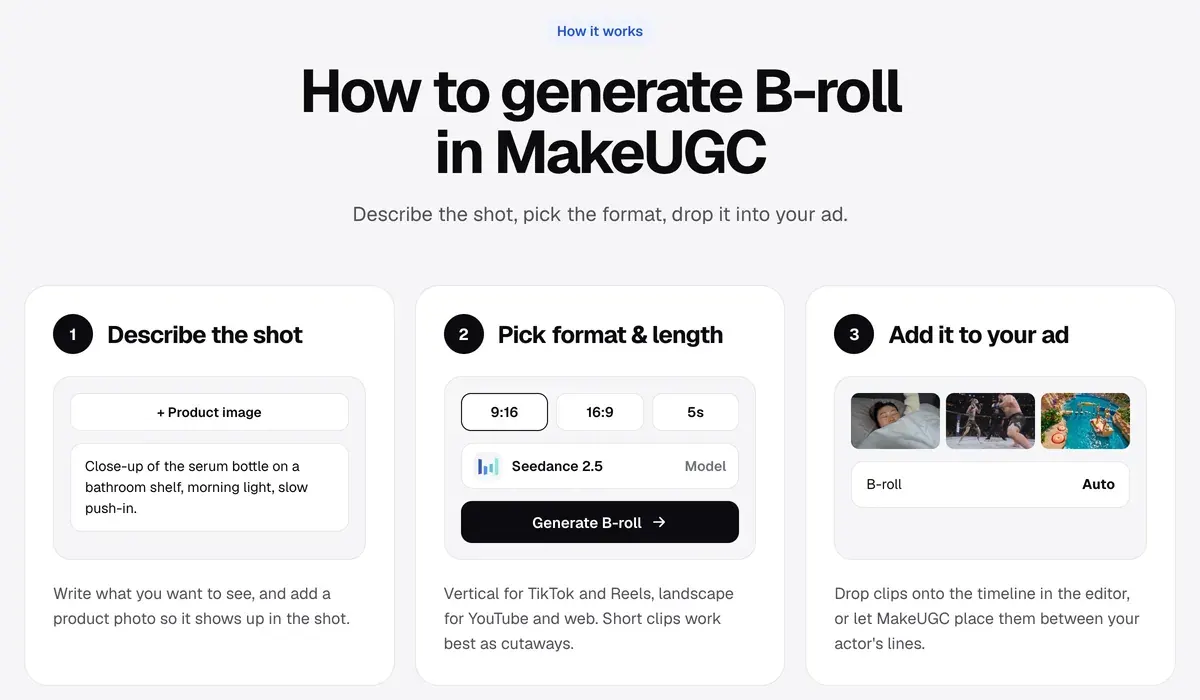
The part that saves editing time is placement. You can “drop clips onto the timeline in the editor”, or turn on auto B-roll and let MakeUGC “place them between your actor’s lines”. The page does not describe how it picks which line gets which clip.
Starter, $59 a month, exports at 480p and 720p, and HD to 4K starts on Growth, $79 a month (pricing page). Neither page gives a credit cost for a B-roll clip. The plans in full: MakeUGC pricing; every MakeUGC feature: MakeUGC hub.
In MakeUGC’s actor clips, users report lip sync that drifts and hands that move oddly. Each ad needs a check before launch (5 of 29 sources: YouTube, YouTube). Billing is the bigger complaint: charges after cancelling (17 of 29: Trustpilot, Trustpilot).
- Best for
- Direct-response teams testing many UGC and B-roll variants, with Batch Mode and product-in-hand video on every plan and API access drawing on the same credits.
- Skip it if
- you need 1080p cutaways on the entry plan: Starter exports at 480p and 720p, and HD starts on Growth.
 invideo AI: a whole cut from one script
Paste a script into invideo AI and its agent builds the video around it, with a voiceover and captions. The B-roll comes from two places. Stock footage comes with the plan: the pricing page lists “100 Premium stock footage” on Starter, $20 a month. Generated Seedance clips cost credits, at $0.30 per second of video on Starter.
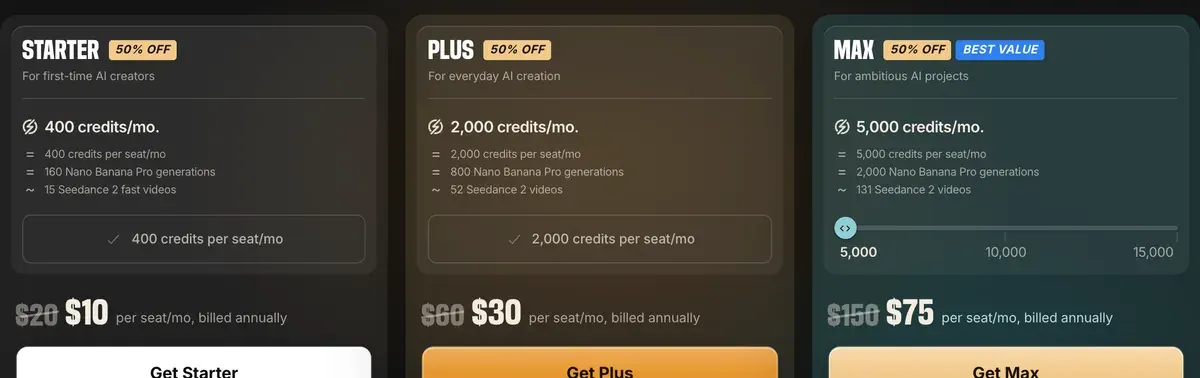
Users say much of the “AI video” is stock assembled by AI, with generated clips costing extra (6 of 42 sources: YouTube, YouTube). Others praise how fast a script becomes a finished short (7 of 42: App Store, Trustpilot).
The terms (8 July 2026, 4(h)) let you “commercialise Outputs you generate”. Stock clips follow their own licence.
- Best for
- Marketers who want a finished, edited video with stock, voice and generated shots in one tool, plus terms that rule out training on their data.
- Skip it if
- your cutaways must show your own product: stock footage cannot, so every such shot is a paid generation.
Kling: 3 to 15-second product shots
Kling’s 3.0 model makes clips of “3 to 15 seconds” at 1080p or 720p (Kling 3.0 guide). It takes a prompt, an image or several reference images. Feed it a product photo and you get a moving product shot. Native audio comes in the same pass.

Users report characters that hold across shots (4 of 37 sources: Reddit, YouTube). They also report failed and rerolled takes that still cost credits (10 of 37: Reddit, Reddit).
Rights depend on membership. The paid terms (10 October 2026) leave members’ commercial use “not restricted” (3.1.2). Under 7.2, a non-member must “label all content generated” with Kling’s brand and logo. Kling against Veo: Google Veo vs Kling.
- Best for
- Paying members making 3 to 15-second product clips with native audio who spend each month’s credits before they expire.
- Skip it if
- you plan to run ads on top-up credits alone: paid terms 7.2 make non-members brand every clip.
 Google Veo: 8-second hero shots, indemnified on Google Cloud
Google Veo 3.1 makes clips of 4, 6 or 8 seconds in Flow, Google’s video app (Flow credits help). Flow lists 50 credits a day with or without a subscription, and Google does not state that a free account runs Veo 3.1.
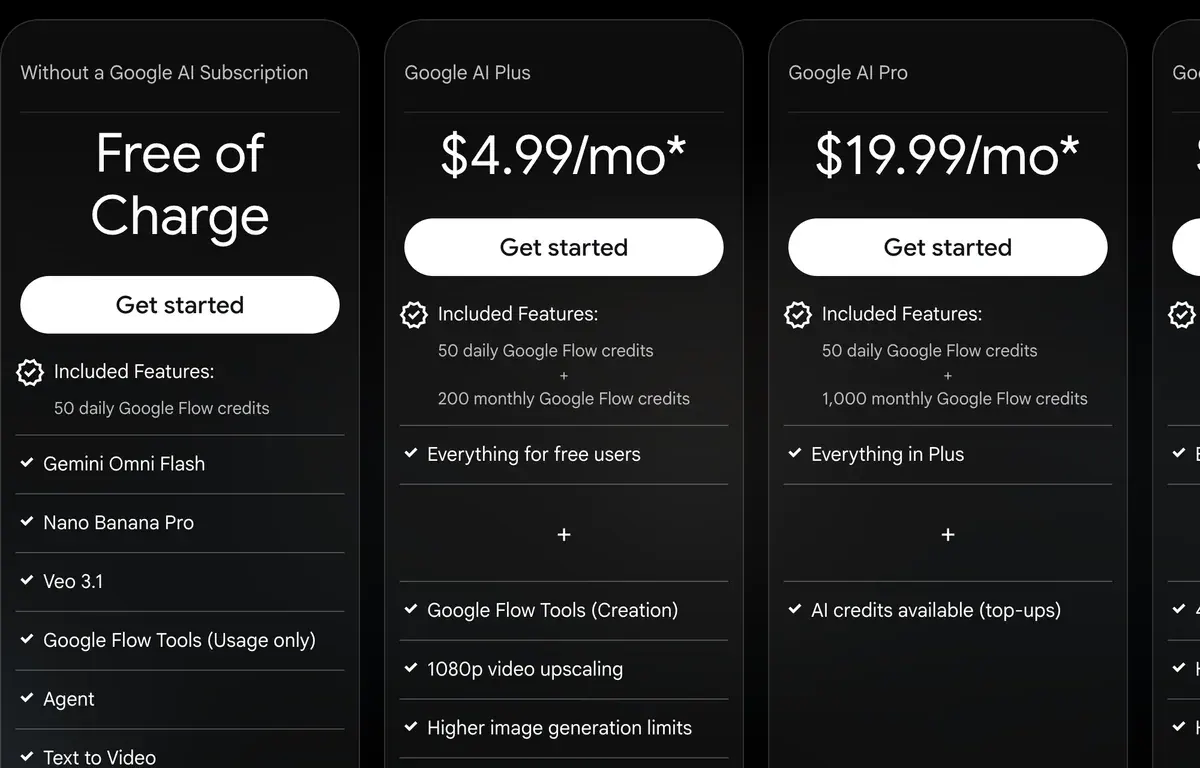
A Veo 3.1 Fast clip costs $0.40 per video on Google AI Pro, $19.99 a month. On the Gemini API, Veo 3.1 Lite starts at $0.05 a second (API pricing).
Users single out cinematic hero shots and product scenes (5 of 62 sources: Reddit, Reddit). The most common complaint is weak prompt adherence, so a usable clip takes several paid retries (13 of 62: Reddit, Reddit).
Ad rights depend on where you run it. Veo called through Google Cloud is on the indemnified services list, so Google covers IP claims on unmodified output from paid use.
For Flow and the Gemini API, Google’s Terms of Service (30 July 2026) say “Google won’t claim ownership over that content” and neither grant nor bar ad use. Prompts that work: Veo prompts for ads.
- Best for
- Hero shots and B-roll up to 8 s with native audio, on a Google AI plan’s Flow credits or the Gemini API.
- Skip it if
- one cutaway must run past 8 seconds: Flow’s Veo 3.1 clips stop there.
 Runway: B-roll from footage you already have
Runway suits the editor with raw clips. Its Aleph 2.0 model is an “in-context video editing model” (Runway models page). Users say Aleph 2.0 relights an uploaded clip or swaps its background or product. They put the limit at 30 seconds (4 of 54 sources: Reddit, YouTube).
![Thumbnail of the YouTube video "Runway Gen 4.5 - Tutorial & How to Use in 5 MINUTES! [ 2026 ]" by Skills Factory](https://i.ytimg.com/vi/w_kKWDyPZnI/hqdefault.jpg)
Standard, $15 a month, buys 52 seconds of Gen-4.5 a month and 4K upscaling (pricing page). Gen-4.5 works out at $0.29 per second of video.
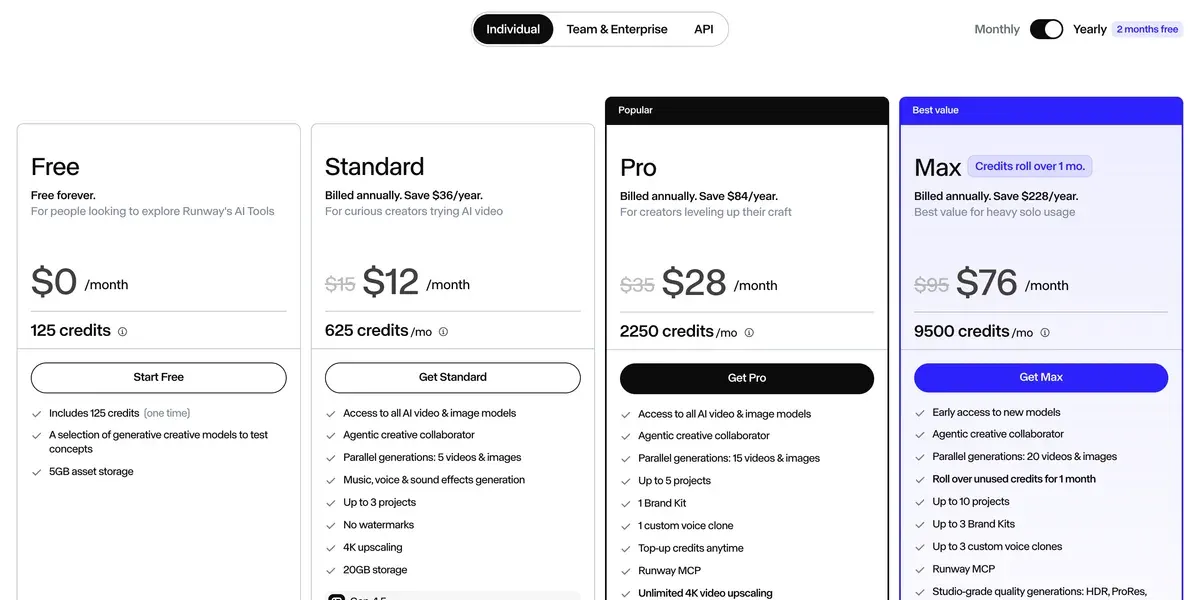
Users report briefs and products that drift: logos change and products distort (13 of 54 sources: Trustpilot, Trustpilot). The top complaint is credits running out within one or two videos (22 of 54: App Store, Trustpilot).
The terms (15 September 2026, 4.4) set no limit on commercial use and grant Runway a training licence over your inputs and outputs. Head to head: Kling vs Runway.
- Best for
- Teams that want Runway’s own models and Aleph video-to-video editing next to Kling and Seedance, with no commercial restriction on outputs.
- Skip it if
- your brand cannot let ad footage train a vendor’s models: terms 4.4 grant Runway that licence.
Stock footage or AI B-roll
The Pexels licence makes every photo and video “free to use”, ads included, and “Attribution is not required.”
Two limits push ad makers to AI. Stock cannot show your product, and the same licence says “Don’t imply endorsement of your product by people or brands on the imagery.” A stock clip of someone smiling at a bottle that is not yours does little for a product ad.
A sensible split: stock for scene setters, AI for every shot your product appears in. A product photo becomes a moving shot in Kling or MakeUGC: product photo to video.
Left out, and why
Captions is out on its ad terms. Its Prompt to Video builds a talking video with generated B-roll, and AI Edit adds B-roll to your own clip, a “Generate media” option that “uses more credits”. But the app’s terms grant no advertising licence in words; only the separate Captions on web terms do.
Higgsfield is out on cost. It sells Kling, Veo and Seedance clips from one credit balance. Users find Seedance and Kling clips cheaper on Dreamina or Kling directly (8 of 52 sources: YouTube, YouTube). Its Marketing Studio makes a whole ad from a product link or up to 5 images, handling “script, shots, camera, and edit” itself.
Against MakeUGC: Higgsfield vs MakeUGC.
Seedance runs inside MakeUGC and invideo, so it sits in those sections. Every video model in the database is on the AI video hub.
Questions buyers ask about AI B-roll
Is there a free AI B-roll generator?
Google Flow lists 50 credits a day with or without a subscription. A Veo 3.1 Fast clip costs 20 credits and Quality 100. Google does not state that a free account runs Veo 3.1. Which free plans allow ads: free AI video generators for ads.
Can AI B-roll show my own product?
Yes, from a photo. MakeUGC adds your product photo to the shot, and Kling and Veo turn a product image into a clip.
Which AI B-roll generator reads my script?
MakeUGC and invideo. MakeUGC’s auto B-roll places clips between an actor’s lines, and invideo builds the whole cut from a pasted script.
More pages for MakeUGC users, sorted by job, in the MakeUGC hub
Sources
- MakeUGC: B-roll for every ad, generated in seconds, prompt plus an optional product photo; auto B-roll places clips between the actor’s lines; Seedance 2.5; 9:16 or 16:9. Checked
- MakeUGC: MakeUGC pricing, 480p and 720p export on Starter, HD to 4K from Growth. Checked
- invideo: invideo pricing,
100 Premium stock footage
on Starter. Checked - invideo: invideo Terms (effective 8 July 2026), 4(h). Checked
- Kling AI: Kling VIDEO 3.0 model user guide, 3 to 15 seconds; 1080p and 720p; image-to-video with multi-image references. Checked
- Kling AI: Kling Terms of Paid Service (effective 10 October 2026), 3.1.2 and 7.2. Checked
- Google Flow Help: Manage your Google Flow credits, Veo 3.1 Lite and Fast make 4, 6 or 8 s clips, Quality 8 s; 1080p upscaling on paid Google AI plans. Checked
- Google: Google Terms of Service (effective 30 July 2026),
Google won’t claim ownership over that content
. Checked - Google Cloud: Generative AI indemnified services. Checked
- Google: Gemini API pricing. Checked
- Runway: Available AI models, Aleph 2.0 described as an in-context video editing model. Checked
- Runway: Runway pricing, Standard card lists 52 s of Gen-4.5 a month and 4K upscaling. Checked
- Runway: Runway Terms of Use (last updated 15 September 2026), 4.4. Checked
- Higgsfield: Marketing Automation, product link or up to 5 images; Marketing Studio handles script, shots, camera and edit. Checked
- Higgsfield: Higgsfield Terms of Use (last updated 26 July 2026), 4.4. Checked
- Mirage (Captions): Prompt to Video (Captions help), A-roll from a Mirage actor plus generated B-roll. Checked
- Mirage (Captions): AI Edit (Captions help),
Generate media
adds generated B-roll and uses more credits. Checked - Mirage US LLC: Captions Terms and Conditions (4 September 2025). Checked
- Pexels: Pexels license. Checked

Alexandre S.
Alexandre S. is a creative ad strategist and copywriter with ten years' experience in digital marketing across multiple channels.
Related pages
-
 Category Best AI video generators for ads
23 AI video generators and model shops compared on cost per clip and ad-use terms, checked 25 September 2026.
-
 Best list Free AI video generators for ads
Of 15 AI video tools with a free plan, 1 has terms that allow ads outright, and its free clips carry a watermark. Free plans checked 2 October 2026.
-
 Best list Video editors for UGC ads
UGC video editors for ads: auto captions, cuts, B-roll, free-plan watermarks and which music you may run in a Meta ad. Checked 21 October 2026.
-
 Guide AI product video from image: turning one product photo into a video ad
Amazon’s ad console animates a product photo at no listed fee, for Amazon ads only; paid models bill by the second. Cost per clip and terms, checked 2 Oct 2026


