Video editors for UGC ads
Verdict on UGC video editors
For raw UGC clips, CapCut’s free editor covers captions and cuts; Captions adds AI B-roll to your own footage. MakeUGC edits only the actor ads it generates, and invideo’s Starter, $20 a month (checked ), puts a script on a full timeline. CapCut’s commercial music is licensed for CapCut and TikTok only, so a Meta ad needs other music.
For AI cuts, captions and B-roll on your own phone footage:  Captions (Mirage)
AI Edit removes filler pauses and adds captions, B-roll and music on iOS and web; generated B-roll uses more credits.
For finishing the AI actor ads you generate:  MakeUGC
Its editor tweaks captions, music, B-roll and trims; Starter exports 480p and 720p, HD to 4K starts on Growth.
For a script-to-video ad finished on a full timeline:  invideo AI
The full timeline, multiplayer editing, colour, audio and 3D are on every plan, Starter included; generated clips cost credits.
| Tool | Monthly from (USD) | Free plan | Cost per output at list price if every credit is used | What it does | Official site |
|---|---|---|---|---|---|
 Captions (Mirage) Captions (Mirage) | $9.99 | Yes | $4.00per 30-second video | Phone-first app making talking videos with Mirage actors it calls completely virtual, plus AI editing and dubbing. | Visit Captions |
 invideo AI invideo AI | $20 | Yes | $0.30per second of video | Script-to-edited-video agent with a timeline editor, stock library and third-party models such as Seedance and Veo. | Visit invideo AI |
 MakeUGC MakeUGC | $59 | No | $11.80per talking-actor video | UGC-style video ads with 1,000+ AI creators, B-roll and product-in-hand shots; API and MCP access on every plan. | Visit MakeUGC |
Scroll sideways for all 6 columns
Prices checked 21 Oct 2026.

What a UGC edit needs
A UGC ad is a phone-style clip of a person talking about a product. The raw take is rarely the ad. You cut the pauses and put the hook first. Captions carry the words for people scrolling with the sound muted. Cutaways of the product, called B-roll, cover the jump cuts.
TikTok’s creative best practices (updated June 2025) set two timings. “Prioritize your hook in the first 6 seconds.” And “Introduce your content proposition in the first 3 seconds for better recall and awareness.”
On text, the same page says “Use captions or text overlays to provide context to your ad” and recommends “5-10 words per second”. So an editor earns its place on four jobs. It trims to the hook, writes captions you can restyle, adds B-roll and offers music you may run in a paid ad.

| Editor | Edits your own clips | Auto captions | B-roll | Free export |
|---|---|---|---|---|
| CapCut | Yes | Yes, free | Stock library | No watermark from the standard editor; some premium templates, effects and stock elements add one |
| Captions | Yes, through AI Edit | Yes | Generated or imported | Free plan: basic editing; no watermark statement published |
| MakeUGC | Its own generated clips | Yes, in the editor | Generated, placed between lines | No free plan |
| invideo AI | Full timeline on every plan | Yes | Stock and generated | Not stated on the pricing page |
| VEED | Yes | Unlimited on paid plans, 50 hours fair use | Stock | Watermarked, 720p |
| Descript | Yes | Unlimited dynamic captions | Stock search | Watermarked, 720p |
Scroll sideways for all 5 columns
Music is where ad rights break
Most editors bundle a music library, and its licence decides where the ad may run. CapCut’s “Materials License Agreement” (22 January 2026) is the clearest case.
Ordinary library tracks are out for ads. Section 3 says “You shouldn’t use a Sound for any commercial purpose”, which it spells out as “associating the music with, or promoting, a brand or business”.
Tracks marked “commercial” are Commercial Sounds, made for “advertisers or other Platform users”. Section 3 lets you share them “within CapCut, TikTok and TikTok for Business”. It adds: “Any uses of Commercial Sounds outside of the Permitted Platforms require you to obtain separate permission.”
That matters when you cut one ad in CapCut and run it on Meta and TikTok. The TikTok version can keep a Commercial Sound. The Meta version needs a track licensed for Meta, or no music.
Free editors for your own clips
CapCut: the free app for raw creator clips
CapCut is ByteDance’s editor, for phone and desktop with a web version. Its auto caption page says your videos “may be automatically converted to text free of charge”, in “multiple languages”.
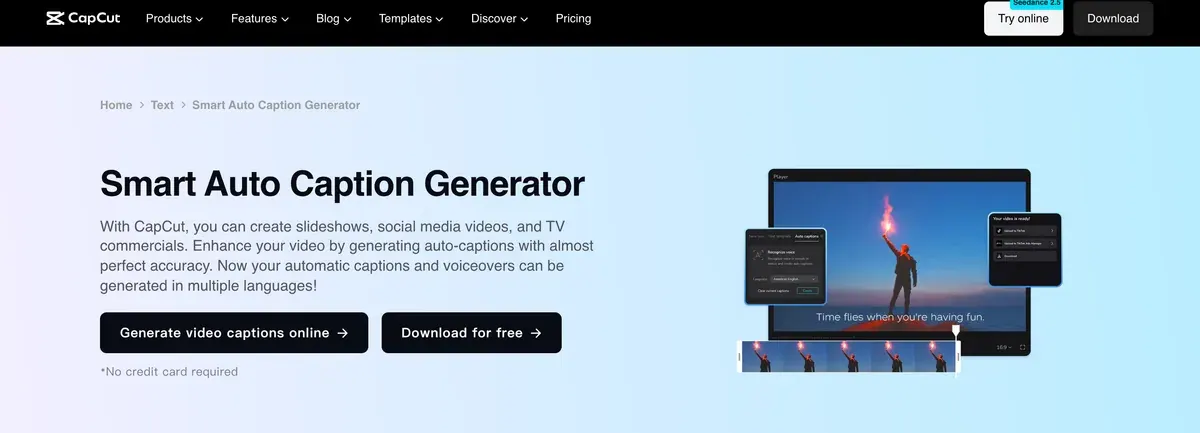

The watermark depends on how you build the edit. CapCut’s help article (18 March 2026) says “Templates often include a small CapCut watermark at the end of the video”. Its advice: “create your project using CapCut’s standard editing interface”.
Some edits get an ending clip with the CapCut logo; once you delete it, “the exported video will not contain a watermark.” The same article says “Certain advanced templates, effects, and stock elements add a watermark when used in the free version”, and that CapCut Pro “unlocks premium assets”.
VEED: browser editing with subtitles on every paid plan
VEED edits in the browser. Its pricing page says “All paid plans include unlimited subtitle generation, subject to a fair use limit of 50 hours per month.”
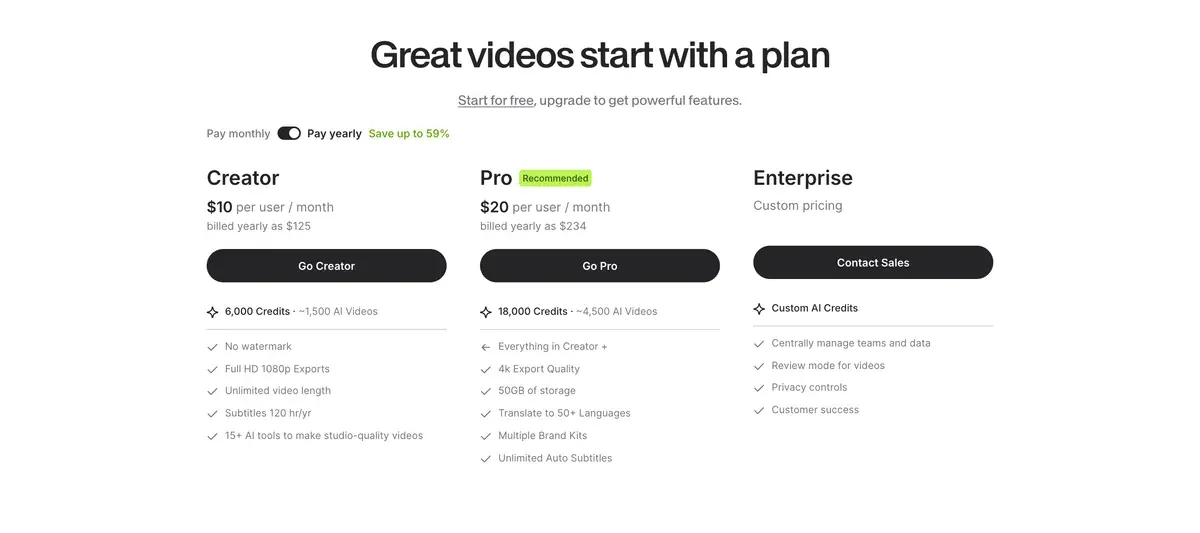
VEED’s free plan watermarks every export. Its export help (21 August 2026) says Free exports “in 720p only” and “The watermark is put on all exported videos while the account had a free subscription.” Creator exports up to 1080p.
Descript: edit the talking head as text
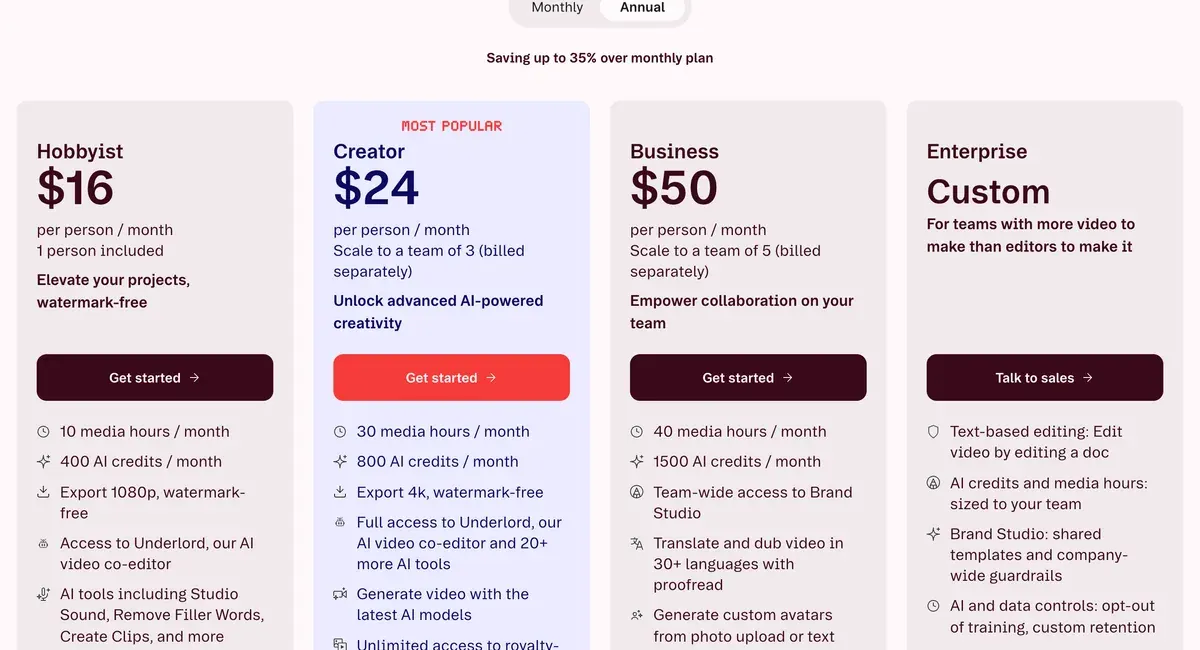
Descript turns the take into a transcript, so you cut a UGC clip by deleting words. Its pricing page lists “Unlimited” dynamic captions on every plan, Free included.
Free exports at 720p with a watermark and 60 minutes of media a month. Hobbyist, $24 a month or $16 billed yearly, adds “Export 1080p, watermark-free” and 10 hours of media.
AI editors that add B-roll and actors
 Captions: the AI Edit app for your phone footage
Captions starts from your own clip. Its AI Edit help lists “auto captions, transitions, B-roll, music, and motion graphics on iOS and web”. It “detects pauses such as filler sounds” and removes them, and you can restore the original timing.
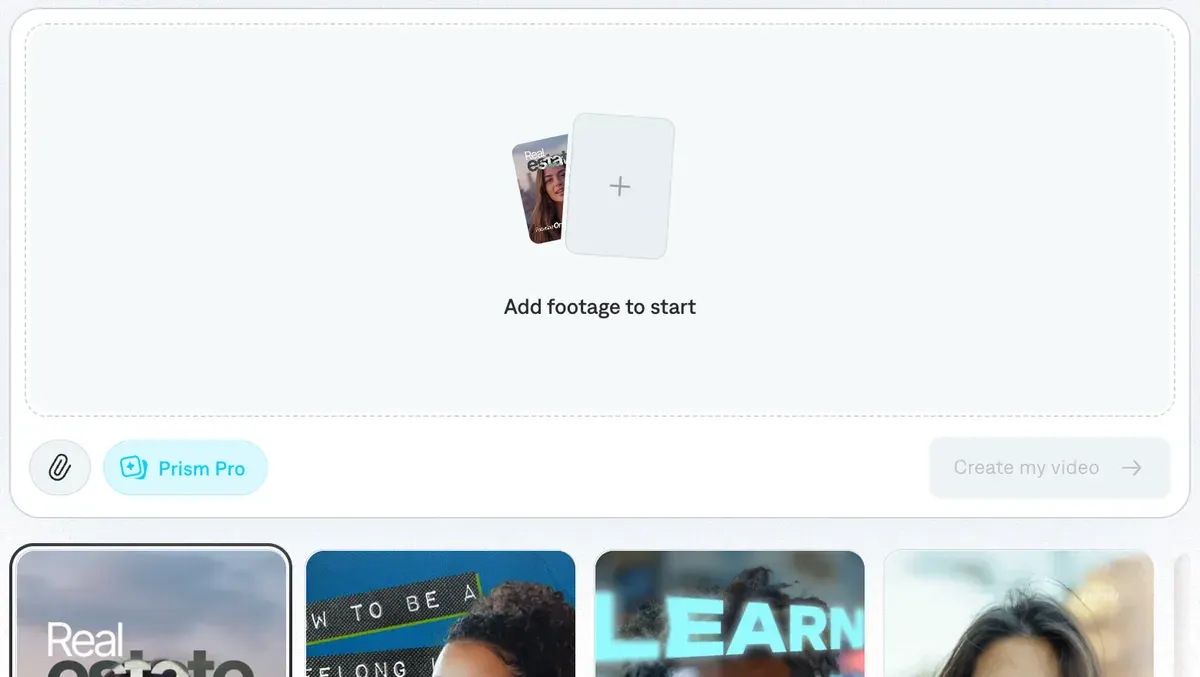
B-roll can come from your camera roll, or Captions can “generate B-roll and images for the edit”, which “uses more credits”. Max is $24.99 a month for 500 credits a month, the iOS price (Captions pricing).
Users say it makes phone-shot talking videos look finished with little editing time (5 of 36 sources: Trustpilot, Trustpilot). Others find the auto captions quick to fix (3 of 36).
The most common complaint is credits spent on failed runs and edits that ignore the instruction (8 of 36: Trustpilot, Trustpilot). One reviewer finds AI Edit cuts a video too heavily.

More on the app: Captions profile.
- Best for
- Business teams making avatar ads on Captions on web, whose terms name advertising, and phone creators captioning and editing their own footage.
- Skip it if
- you need a fixed price per edit: generated B-roll uses extra credits, and top-ups exist only on Teams, Business and Frontier 4x.
 MakeUGC: an editor for the actor ads it generates
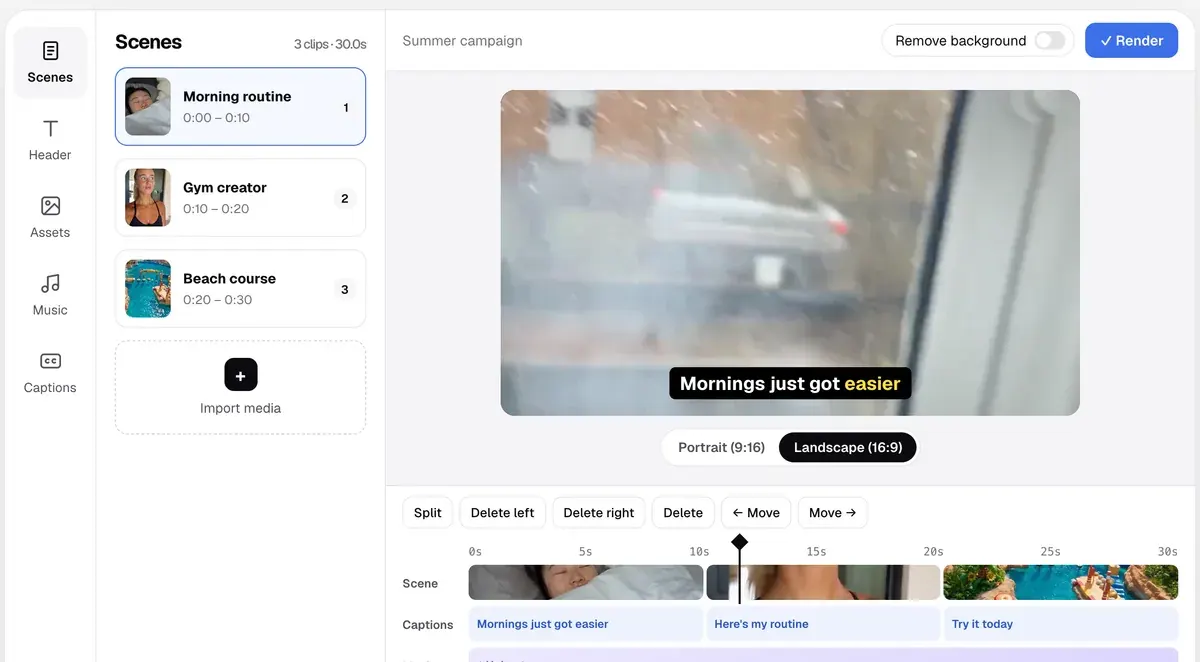
MakeUGC is an AI UGC generator with its own editor. Its homepage says “Tweak captions, music, B-roll and trims in the editor, then export in HD, 2K or 4K, or batch 10 variations at once.” The B-roll page adds auto B-roll: “let MakeUGC place them between your actor’s lines.”
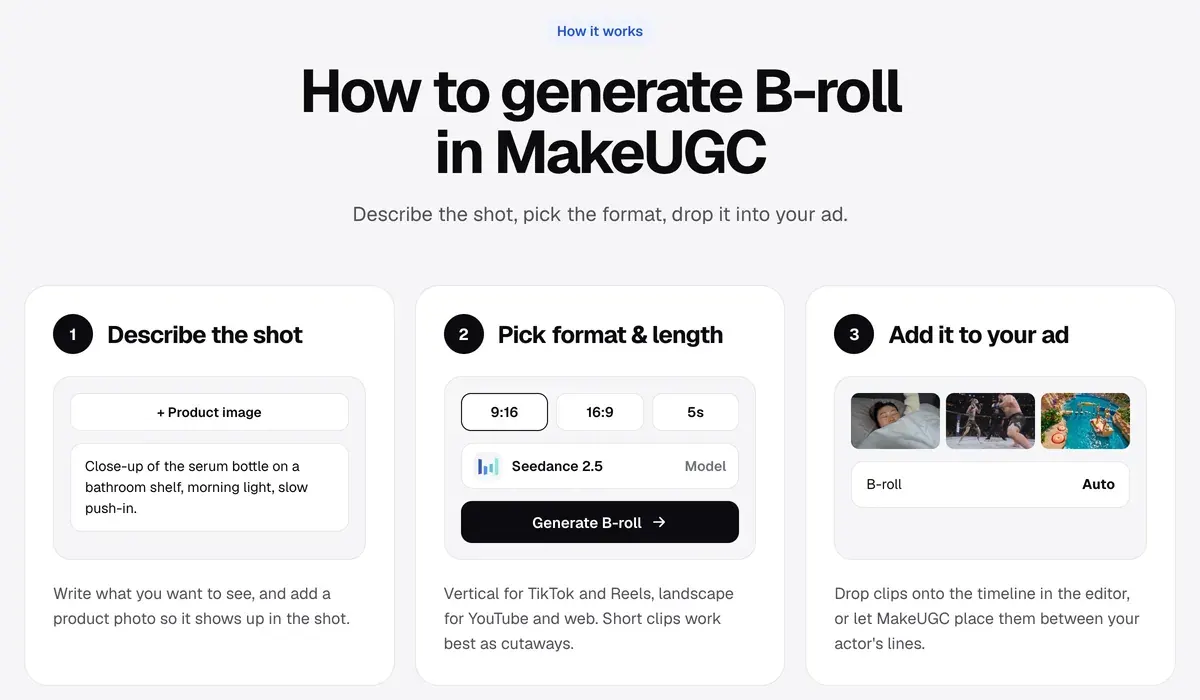
The editor works on the videos MakeUGC makes; its pages describe no import of your own camera footage. That makes it the fit when the actor is AI and the edit is the last step.
The homepage FAQ says each video is “yours to use commercially on any platform, with no watermarks.” The terms (17 November 2025) bar output “in contexts where AI-disclosure is legally required but omitted” (clause 5(f)).
Starter, $59 a month, exports at 480p and 720p; HD to 4K starts on Growth, $79 a month (MakeUGC pricing). Every plan, with the cost per video: MakeUGC pricing explained.
Users report lip sync that drifts and hands that move oddly, so clips need a check in the edit (5 of 29 sources: YouTube, YouTube). Billing draws more complaints: charges after cancelling (17 of 29: Trustpilot, Trustpilot). More on the app: MakeUGC profile. Every MakeUGC guide and comparison sits on the MakeUGC hub.
- Best for
- Direct-response teams testing many UGC and B-roll variants, with Batch Mode and product-in-hand video on every plan and API access drawing on the same credits.
- Skip it if
- you edit footage a human creator shot: MakeUGC’s pages describe editing only the videos it generates.
 invideo AI: a full timeline that takes your footage
invideo AI builds a video from a script, then hands you a timeline. Its pricing page says “The full timeline, multiplayer editing, colour, audio and 3D are on every plan, including Starter”. Starter is $20 a month.
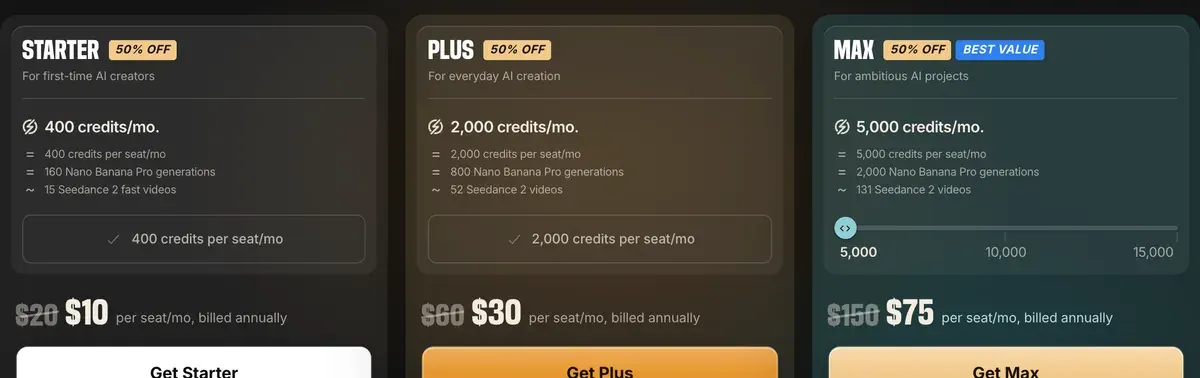
Clips generated with AI video models such as Seedance cost credits on top, at $0.30 per second of video on Starter if every credit is used (model table).
Users report its agentic editor, added in September 2026, cuts raw footage into a rough cut (2 of 42 sources: YouTube, YouTube).
Users praise how fast a script becomes a finished short with voice and captions (7 of 42 sources, on the App Store and Trustpilot). Others report one short video using a month of credits (9 of 42 sources, on Trustpilot). Testers add that free exports carry a watermark and lean on stock footage (6 of 42: YouTube, YouTube).

- Best for
- Marketers who want a finished, edited video with stock, voice and generated shots in one tool, plus terms that rule out training on their data.
- Skip it if
- you regenerate shots often: every regeneration and edit costs credits, the AI’s own mistakes included.
Left out, and why
Pippit, from the CapCut family, starts from a product link and makes a new video. This list covers editing clips you already have; Pippit sits on the AI UGC hub.
Generators with no editor of their own are on AI B-roll generators. Scripts to film before you edit: AI UGC prompt generator.
More pages for MakeUGC users, sorted by job, in the MakeUGC hub
Sources
- TikTok Business Help Center: Creative best practices for performance ads, last updated June 2025. Checked
- CapCut: Auto Caption Generator. Checked
- CapCut help: Is it possible to export videos from CapCut without a watermark?, dated 18 March 2026. Checked
- CapCut: CapCut Materials License Agreement (last updated 22 January 2026), sections 1 to 3. Checked
- Mirage (Captions): AI Edit (Captions help), the page shows no updated date. Checked
- Mirage: Captions pricing. Checked
- MakeUGC: MakeUGC homepage, editor line and the ownership answer in the FAQ. Checked
- MakeUGC: B-roll for every ad, generated in seconds. Checked
- MakeUGC: MakeUGC pricing. Checked
- invideo: invideo pricing, the full timeline, multiplayer editing, colour, audio and 3D on every plan, Starter included. Checked
- VEED: How to export your project (VEED help, updated 21 August 2026). Checked
- VEED: VEED pricing, subtitle fair use limit in the FAQ; plan prices load by script in local currency, so none is quoted. Checked
- Descript: Descript pricing, the page shows no updated date. Checked

Alexandre S.
Alexandre S. is a creative ad strategist and copywriter with ten years' experience in digital marketing across multiple channels.
Related pages
-
 Category Best AI UGC generators for ads
16 AI UGC and avatar tools compared on list price per video and ad-use terms, checked 24 September 2026.
-
 Guide How to make AI UGC ads
Steps from brief to a labelled AI UGC ad: each step’s billing unit and ad terms, and the free routes whose terms allow ads. Read 2 October 2026.
-
 Guide UGC ads: what they are and how brands run them
A UGC ad is a paid ad built on a customer’s or creator’s footage. The usage rights, platform permissions and FTC disclosure it needs, read 2 October 2026.
-
 Best list Best AI tools for TikTok ads
TikTok’s Symphony labels every export as AI. Paid tools for TikTok ads, with the cost of a 30-second ad if every credit is used, checked 2 October 2026.


