UGC prompt generator
A UGC ad is a short phone-style video of a person talking about a product. This generator turns your answers into a timed script for one, plus a prompt for MakeUGC, Seedance 2.5 or Veo 3.1.
With the starting answers, a 30-second problem-and-solution script comes to 47 spoken words, inside the 75 that fit. Everything runs in your browser, with no AI call: nothing you type leaves the page.
| Time | Beat | Spoken line | Shot | On screen |
|---|---|---|---|---|
| 0 to 3 s | Hook | Batch cooks, this one is for you. | Face to camera, product in frame | Leftovers that keep without cling film |
| 3 to 8 s | Problem | You know the drill: stretch lids never fit odd-sized bowls. | Show the problem on camera | Sound familiar? |
| 8 to 18 s | Product | Loopa seals any bowl or tin with one stretchy silicone lid. That means leftovers that keep without cling film. | Product in hand, label to the lens | Loopa |
| 18 to 25 s | Proof | Here is the proof. Watch. | Cut to real footage of Loopa working: film it, never generate it | Does it work? |
| 25 to 30 s | Call to action | Tap the link and get yours. | Point down to the link | Link below |
Scroll sideways for all 5 columns
MakeUGC talking actor brief
Actor: [age and look of your buyer: batch cooks], warm delivery, speaking to camera
Product photo: one sharp, well-lit photo of Loopa on its own, front label facing the camera
Format: Problem → solution
Script (paste as is): Batch cooks, this one is for you. You know the drill: stretch lids never fit odd-sized bowls. Loopa seals any bowl or tin with one stretchy silicone lid. That means leftovers that keep without cling film. Here is the proof. Watch. Tap the link and get yours.
Hook test, same actor: Batch cooks: here is a fix worth a few seconds. / Batch cooks, stop scrolling for a second.
Captions: Leftovers that keep without cling film / Sound familiar? / Loopa / Does it work? / Link below
MakeUGC takes an actor, a script and a product photo, so this is a brief to fill its fields, with two extra openers for a hook test.
The script follows five beats: hook, problem, product, proof, call to action. Each beat gets a time window. Each window holds 2.5 spoken words a second, about 150 words a minute. That is the rate VirtualSpeech gives for US English conversation, the top of its 120 to 150 range. Slower delivery fits fewer words.
Words in [brackets] are details only you know, so they stay out of the count. A beat whose line runs more than one word past its window is marked long, so a slow speaker cuts there first.

How to use the UGC prompt generator
- Fill in the five text fields in your buyer’s words. “What it does” starts with a verb, so the product line reads “Loopa seals any bowl or tin”.
- Pick a format and a length.
- Say who is on camera. An AI actor speaks as a presenter; a creator who has used the product speaks in the first person.
- Pick the tool the prompt is for, then copy the script and the prompt.
- Replace every [bracketed] detail before you generate or film.
The starting answers describe Loopa, a made-up silicone lid.
How the script is timed
The hook gets the first 3 seconds. The product beat gets the longest window, since it carries the name, the job and the benefit.
| Beat | 15 seconds | 30 seconds | 45 seconds |
|---|---|---|---|
| Hook | 0 to 3 | 0 to 3 | 0 to 3 |
| Problem | 3 to 5 | 3 to 8 | 3 to 10 |
| Product | 5 to 10 | 8 to 18 | 10 to 25 |
| Proof | 10 to 13 | 18 to 25 | 25 to 38 |
| Call to action | 13 to 15 | 25 to 30 | 38 to 45 |
Scroll sideways for all 4 columns
A 3-second hook holds about 7 words. “Batch cooks, this one is for you” fits; a hook that names your whole audience in one breath does not. The long marker shows where to cut.
At 45 seconds the script adds three bracketed lines. They hold one detail only your product has, a review line or figure with its source, and your offer.
How to judge a hook before you film it
A hook is the opening line, the one that earns the next two seconds. Run four checks on each one.

The first is length: read it aloud against a timer.
The second is the turn. The hook has to lead straight into the problem beat, or the viewer feels baited and leaves.
The third is truth. “I’ve had this for a month” only works if a real creator has. The generator writes that kind of line only when you choose a creator who has used it.
The fourth is the test. Change the tone and the generator writes a new opener for the same product. MakeUGC’s talking actor page pitches hook tests as “Same actor, ten different openers, one afternoon”, so the generator’s MakeUGC brief carries two extra hooks to run against the first.
Twenty more hooks by type are on the UGC script template.
Why an AI actor speaks as a presenter
An AI actor has never used your product, so the generator never gives it a first-person result. The FTC’s rule on fake testimonials (16 CFR 465.2) covers this. It bars a business from creating a testimonial that implies the speaker exists, or has used the product, when neither is true.
An actor who only describes a product is a different case. The FTC’s Endorsement Guides, 255.0 Example 6, draw the line. A scripted actor who calls a product the most effective they have tried is still endorsing it. One who only describes what it does is not.
So the AI version says “That means leftovers that keep” where the creator version says “For me, that means”.

Labels and state rules sit on top of the script: AI UGC and the law sets them out.
Which prompt to pick: MakeUGC, Seedance or Veo
| Target | What you give it | What the generator writes |
|---|---|---|
| MakeUGC talking actor | An actor, a script and a product photo | A brief for those fields, plus two hook-test openers |
| Seedance 2.5 | One text prompt, up to 30 seconds | One prompt, one shot per beat; 45 seconds needs one extend |
| Veo 3.1 in Flow | One prompt per clip of 4, 6 or 8 seconds (Quality: 8 only) | One prompt per clip, to join in your editor |
Scroll sideways for all 3 columns
Seedance 2.5 makes videos “up to 30 seconds in a single generation, with the option to extend twice” (ByteDance Seed). Veo 3.1 in Google Flow lists 4, 6 and 8-second videos on Lite and Fast, and 8 seconds only on Quality (Flow credits help).
Each clip is generated separately, so every prompt repeats the person and the room. The field-by-field reasoning is on AI UGC prompts. Model-specific advice sits on Seedance UGC ads and Veo prompts for ads.
When MakeUGC is the shorter path
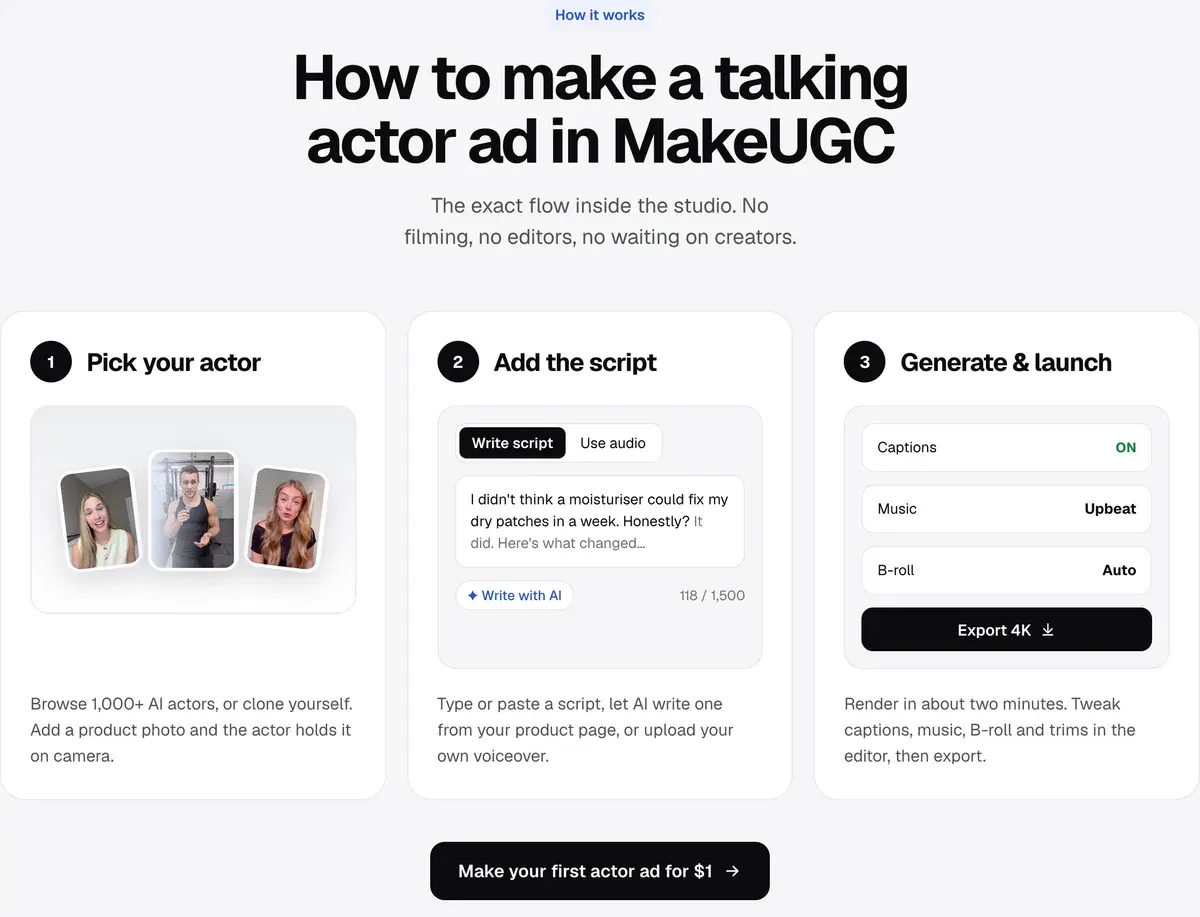
MakeUGC fits when you want a talking person holding your product without describing a scene. Its talking actor page lists three steps: pick an actor (the page says “1,000+ AI actors”; Starter includes 300+, Pro the full 1,000+), paste the script, then render “in about two minutes”.
Its product in hand FAQ asks for “A sharp, well-lit photo of the product on its own, front label facing the camera” and says a plain background works best.
Three of its six listed formats match the generator’s: Testimonial, Unboxing and Problem → solution. Plans start at $59 a month, prices checked ; the MakeUGC pricing page counts the credits. More on the MakeUGC hub and its profile.
What the generator leaves out
The generator writes the structure; the facts are yours. It does not check whether a benefit is true, and it cannot supply a review line or a figure: those brackets wait for a source. The proof beat needs real footage of your product working: a generated demo shows something nobody filmed.
It gives one camera direction a beat, no shot list. Finished ads on these beats are in UGC video examples, and the workflow from script to upload in how to make AI UGC ads.
Questions about UGC prompts
Is this UGC script generator free?
Yes. It is a page of templates that runs in your browser, with no sign-up and no AI call.
What is the difference between a UGC script and a UGC prompt?
A script is the words the person says. A prompt describes the person, the room, the camera and the action, so a video model can make the clip; the dialogue sits inside it.
Can I use the script with a human creator?
Yes. Choose “Creator who has used it” and the lines switch to the first person, with brackets for their own experience. Use the AI actor setting for a creator who has not used the product.
More pages for MakeUGC users, sorted by job, in the MakeUGC hub
Sources
- MakeUGC: Talking actor feature, the three steps, 1,000+ AI actors, about two minutes a render and the six formats with their script starters. Checked
- MakeUGC: Product in hand feature, the photo it asks for in its FAQ, sharp and well lit with the front label facing the camera, on a plain background. Checked
- ByteDance Seed: Seedance 2.5, up to 30 seconds in a single generation, with the option to extend twice. Checked
- Google Flow Help: Manage your Google Flow credits, Veo 3.1 Lite and Fast list 4, 6 and 8 second videos, Quality lists 8 only, and every model lists Extend; the page shows no date. Checked
- VirtualSpeech: Average speaking rate and words per minute, 20 August 2026; about 150 words a minute for US English conversation, citing the National Center for Voice and Speech, and 120 to 150 for conversation in its list of rates. Checked
- Federal Trade Commission, eCFR: 16 CFR 465.2, fake or false consumer reviews and testimonials, in force since 21 October 2024. Checked
- Federal Trade Commission, eCFR: Guides Concerning the Use of Endorsements and Testimonials in Advertising, 16 CFR 255, 255.0, Example 6: a scripted actor’s first-person opinion is an endorsement, a plain product description is not. Checked

Alexandre S.
Alexandre S. is a creative ad strategist and copywriter with ten years' experience in digital marketing across multiple channels.
Related pages
-
 Best list AI actors for ads
Six AI actor libraries for ads, from 40+ faces to 1,500+, with product in hand, languages, paid-ads terms and who can withdraw. Checked 21 October 2026.
-
 Guide What is UGC content?
UGC content is anything customers or creators make about a brand. Its three kinds, five video formats, where it runs and the rights it needs.
-
 Guide What is a UGC creator?
A UGC creator films ad videos a brand runs from its own accounts, paid per video, no followers needed. Pay from $50 to $3,000+ a video, and five steps to start.
-
 Calculator AI vs human UGC cost calculator
Set an AI tool’s plan against a creator’s fee per video to see what a month of UGC ads costs each way. Plan prices from official pages, formula shown.


