Kling on Higgsfield
Kling is Kuaishou’s family of video models, and Higgsfield is a studio that sells it beside other models on one credit balance. On Higgsfield, a 5-second Kling 3.0 clip at 720p uses about 7 credits.
That is $0.34 on the Plus plan, if every credit is used. At 1080p, Higgsfield lists about 8 credits, $0.39 on Plus, with no sound setting named. Kling’s own API charges $0.84 for 5 seconds at 1080p with sound.
Higgsfield’s credits and plan prices were read on 19 October 2026, Kling’s API and Luma’s rates on 2 October and Kling’s in-app rates on 24 September.
| Shop and plan | Resolution | Sound | Credits | Per 5-second clip |
|---|---|---|---|---|
| Higgsfield Starter, monthly | 720p | Not stated | about 7 | $0.53 |
| Higgsfield Plus, monthly | 720p | Not stated | about 7 | $0.34 |
| Higgsfield Ultra, monthly | 720p | Not stated | about 7 | $0.30 |
| Higgsfield Plus, monthly | 1080p | Not stated | about 8 | $0.39 |
| Higgsfield Plus, monthly | 4K | Not stated | about 30 | $1.47 |
| Kling API | 720p | On | n/a | $0.63 |
| Kling API | 1080p | On | n/a | $0.84 |
| Kling top-up, member | 1080p | On | 60 | $0.91 |
| Kling top-up, no membership | 720p | On | 45 | $0.68 |
| Luma Plus | 1080p | On | 245 | $0.74 |
Scroll sideways for all 5 columns
PromptWise states 36 Kling 3.0 videos a month on its Starter plan but no clip length or resolution, so it has no row.
How much does Kling cost on Higgsfield?
Higgsfield prices every Kling version in credits per 5 seconds and marks each figure as approximate, with a “~”. The compare table on Higgsfield’s pricing page was read on 19 October 2026:
| Kling version | 720p | 1080p | 4K |
|---|---|---|---|
| Kling 3.0 | about 7 | about 8 | about 30 |
| Kling 3.0 Motion Control | about 7 | about 12 | Not published |
| Kling 3.0 Omni, image reference | about 5 | about 7 | Not published |
| Kling 2.6 Motion Control | about 5 | about 7 | Not published |
| Kling 2.5 Turbo | about 4 | about 6 | Not published |
Scroll sideways for all 4 columns
Kling 2.6 has its own row, split by sound in place of resolution: about 10 credits with it, about 5 without. The table names no sound setting for Kling 3.0. Kling 2.1 and O1 Video have no row, so only the Generate button shows their cost.
The same page’s plan finder counts higher. It puts one 8-second Kling 3.0 generation at 720p near 14 credits, where the table’s rate gives about 11. The Generate button shows the exact cost before you confirm, so check it on your first clip.
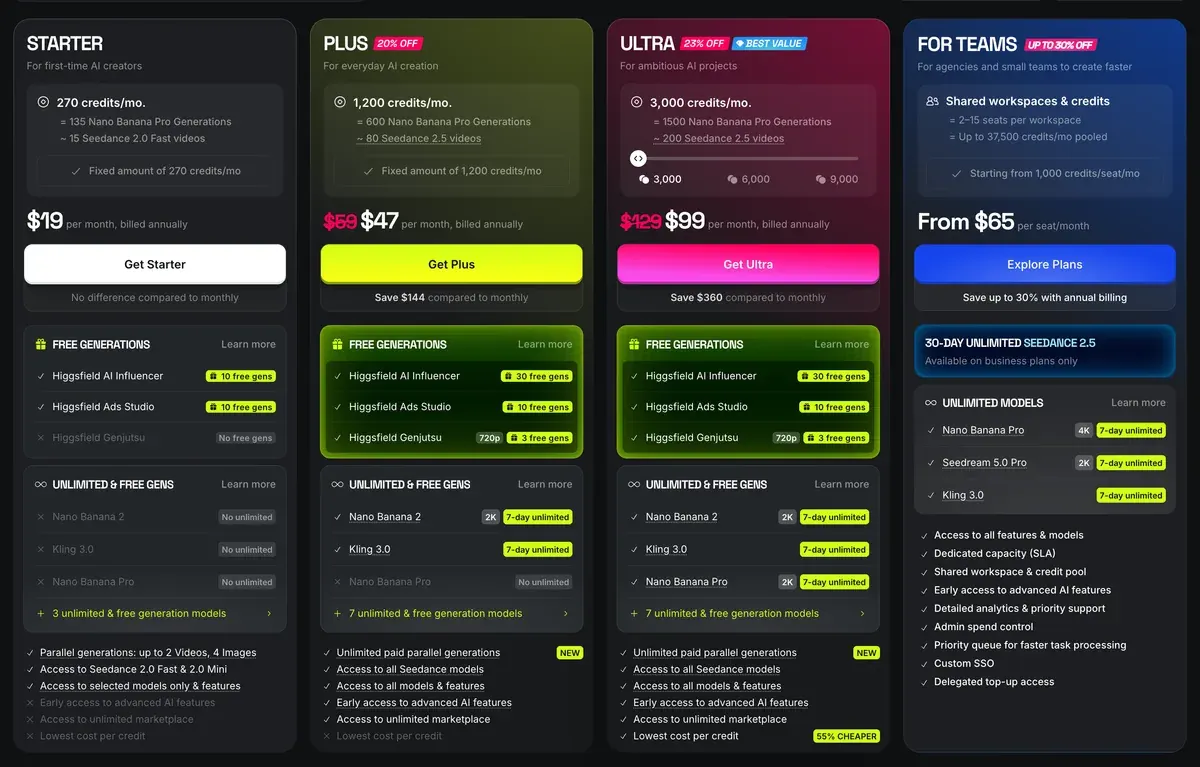
Plan price turns credits into money. Starter costs $15 a month for 200 credits, Plus $49 a month for 1,000 and Ultra $129 a month for 3,000 (pricing). On monthly billing, a 720p Kling 3.0 clip costs $0.30 on Ultra, against $0.53 on Starter.
The tables use monthly prices. Annual billing lowers every figure: at $39 a month for Plus and $99 for Ultra, the same clip costs $0.27 and $0.23. Starter costs the same on either billing.
Is Kling unlimited on Higgsfield?
Yes, for 7 days on annual billing. Higgsfield’s help centre defines Unlimited as model-specific access where generations “don’t deduct credits for a set period” (Unlimited article, modified 28 August 2026).
The annual Plus, Ultra and Business plan cards captured on 16 October 2026 carry 7 days of unlimited Kling 3.0. The monthly cards read on 9 October left it out.
The 7 days run from the day you activate them. Higgsfield’s Unlimited article says the period “doesn’t restart at renewal”, so a renewal does not bring a fresh 7 days.
What are Unlimited models, and which plans include them?
Unlimited models are specific models where generations don’t deduct credits for a set period. Mid and top plans include Unlimited models: the exact list and period for each model are shown on the plan’s card on the Pricing page, and higher plans include more models. You can also buy Unlimited access to individual models through the Unlimited Models Marketplace. Unlimited access applies only on higgsfield.ai: outside it, generations always deduct credits.
What does Unlimited model access mean? Unlimited model access means generations on specific models don’t deduct credits while the access is active. You can generate as many times as you want on those models without affecting your credit balance.
Unlimited access is model-specific: it applies only to the models included in your plan or purchased bundle, for the period stated. All other models still deduct credits.
Higgsfield’s Kling 3.0 page says more: “Premium plans unlock unlimited access across all Kling models” (Kling 3.0 page). The cards name Kling 3.0 only, and the help article calls the card “the exact list”.
The window comes with limits. Unlimited works only on higgsfield.ai, one video at a time, in the standard queue. Higgsfield’s July post caps Kling 3.0 Unlimited at 1080p and 8 seconds a clip (All Unlimited post).
You can also buy a single day of it. The same post prices a one-day Kling 3.0 bundle at 1080p, on top of a plan, at $35. At $0.39 a clip on Plus credits, that day pays from the 90th clip (35 divided by 0.392 is 89.3).
Ninety clips is a lot for one queue. Users report Unlimited waits of 20 minutes to over two hours (8 of 52 sources: Reddit, Reddit). At the shortest of those waits, 90 clips take 30 hours. A one-day pass ends before it pays. Every window and plan: Higgsfield Unlimited explained.
How to run Kling on Higgsfield
Higgsfield’s Kling help article sets out the multi-shot route (Kling help article, modified 9 September 2026):
- Open higgsfield.ai, go to Video and pick Kling. Keep Higgsfield’s own Kling guide, How do I use Kling?, open in a second tab while you work.
- Write each scene as a connected beat: action, setting, camera move and mood.
- Upload a start frame and an end frame. They pin the motion at both ends of the clip (Higgsfield transitions covers this step in depth).
- Add Elements, your saved characters or products, to keep them the same across shots.
- Turn audio on or off. Kling 3.0 and Kling 2.6 generate native sound.
- Choose a genre, such as Drama or Noir, and a speed ramp, then check the credits on the Generate button.
How do I use Kling for multi-shot generation?
Open higgsfield.ai → Video → Kling.
1. Define your scenes. Write a description for each scene: action, setting, camera move, mood. Scenes run as a sequence, so write them as connected narrative beats.
2. Upload Start and End Frames. These anchor the motion at both ends and make transitions predictable. Use the final frame of one scene as the start frame of the next to chain shots seamlessly.
3. Add Elements if needed. Elements lock specific characters, products, or objects so their identity stays consistent across all scenes.
4. Set audio. Kling 3.0 and 2.6 support native audio: sound effects, speech, and background music synced to the action. Toggle the sound off if you don’t need it.
5. Select the genre and speed ramp. Genres: General, Action, Horror, Comedy, Noir, Drama, Epic. Speed ramps: Linear, Auto, Flash In/Out, Slow-mo, Bullet Time, Impact, Ramp Up.
For a longer ad, chain clips: the last frame of one scene becomes the start frame of the next. Kling 3.0 fits up to 6 camera cuts into one 15-second generation, with sound in English, Chinese, Japanese, Korean and Spanish (Kling 3.0 page).
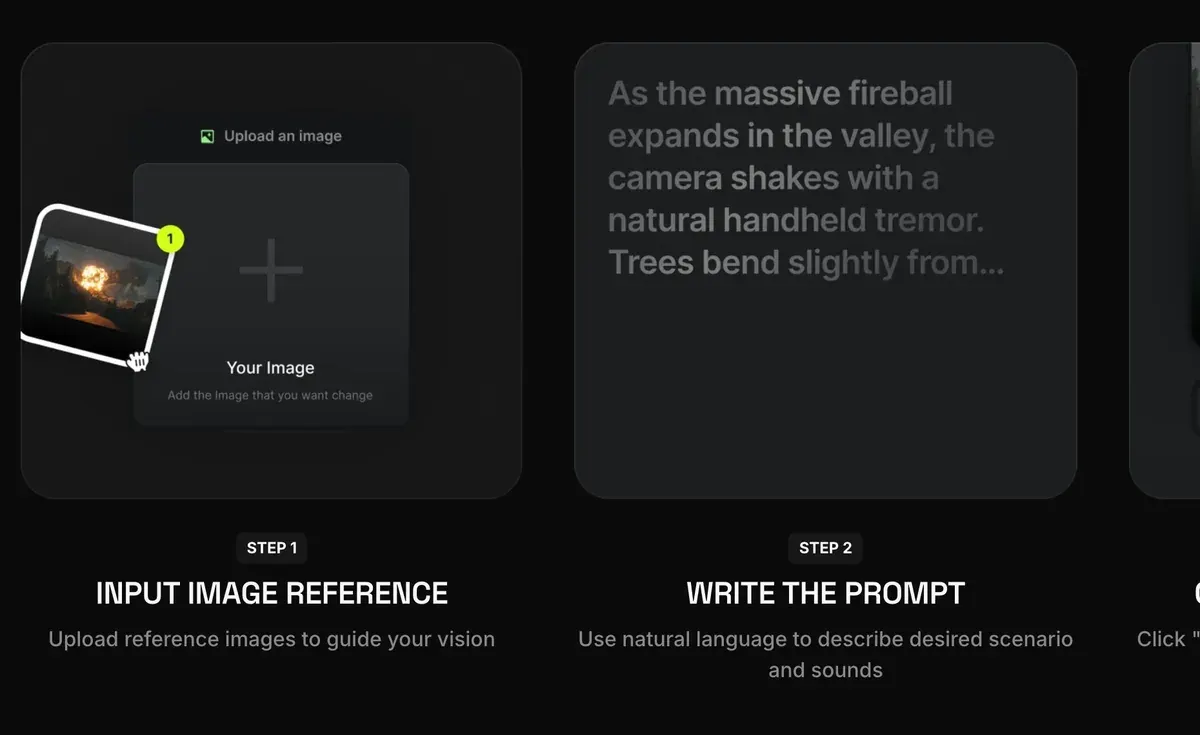
The same page shows a shorter image-to-video route: add an image reference, write the prompt in plain language, then generate.

Motion Control moves your character the way a reference video moves. You give it a character image and a motion clip, under Video, then Kling 3.0 Motion Control.
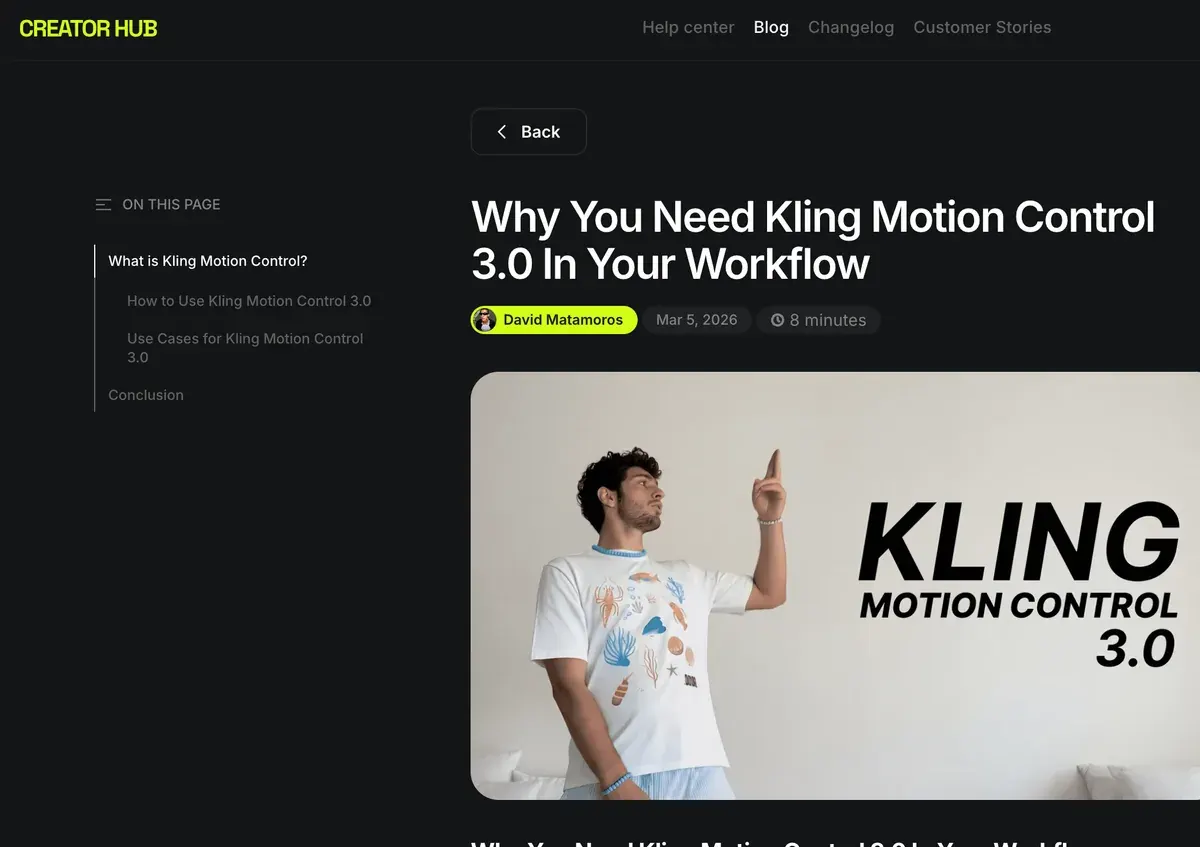
The same tool also runs through Higgsfield’s MCP connector, a link that lets an AI assistant run Higgsfield for you. There, every generation spends credits, Unlimited or not (Unlimited article). Presets and the whole workflow: Higgsfield Motion Control.
Each version has its own clip length:
| Version | Top resolution | Clip length |
|---|---|---|
| Kling 3.0, 3.0 Turbo, 3.0 Omni | 4K on 3.0 and Omni | 3 to 15 s |
| Kling 3.0 Motion Control, Kling Motion Control | 1080p | 3 to 30 s |
| Kling 2.6, O1 Video, 2.5 Turbo, 2.1, 2.1 Master | 1080p | 5 to 10 s |
Scroll sideways for all 3 columns
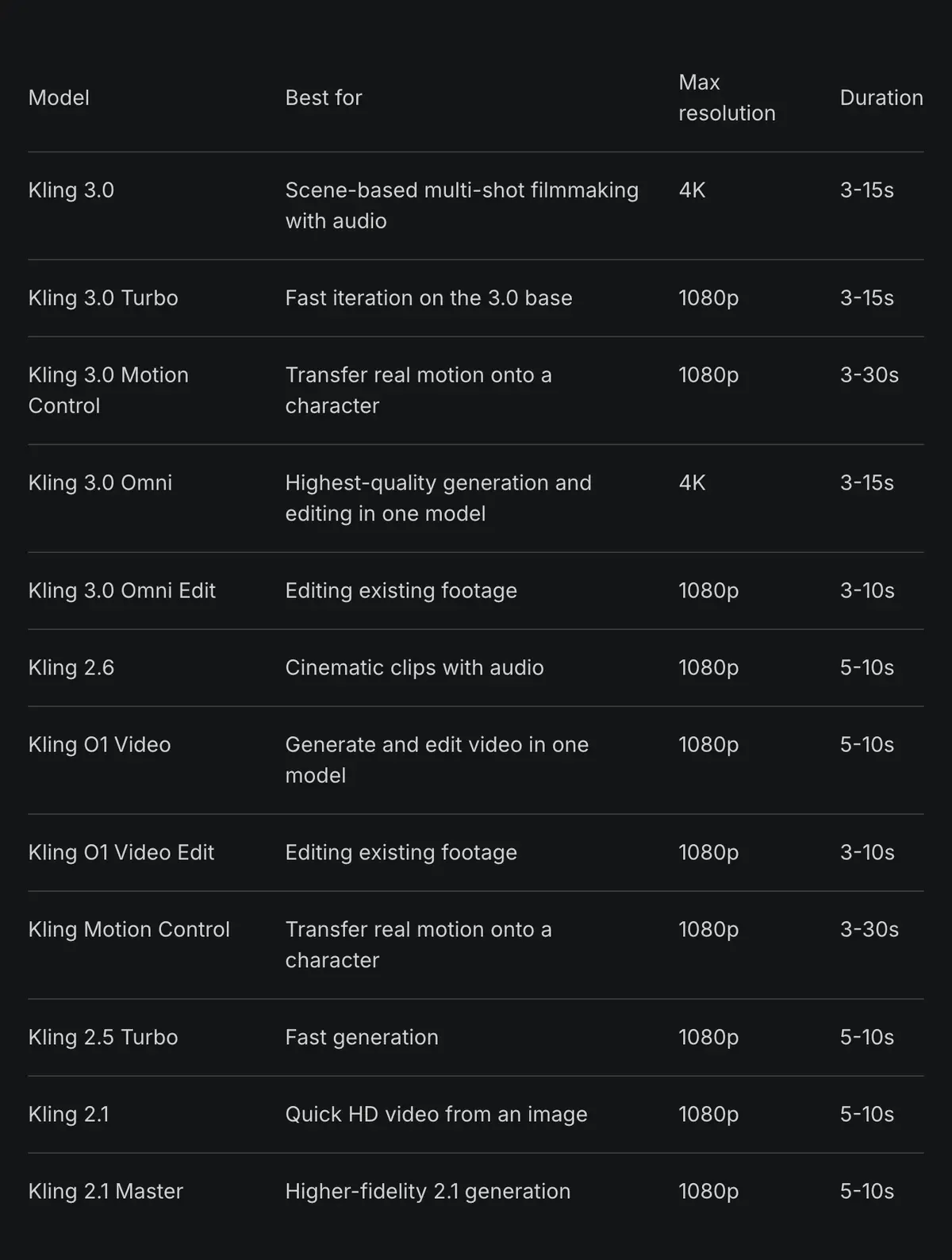
Kling 3.0 Omni Edit and O1 Video Edit change a clip you already have.
Higgsfield or Kling’s own app?
On the published rates, Higgsfield sells Kling 3.0 for less, though its table names no sound setting. A 5-second 1080p clip costs $0.39 on Higgsfield Plus if every credit is used. Kling’s API charges $0.84 and Luma Plus $0.74 (Kling API pricing, Luma pricing).
Users who compared shops report the reverse. 8 of 52 sources find Kling and Seedance clips cheaper on Kling directly or on Dreamina (YouTube, YouTube). Two things on Higgsfield’s own page can explain the gap: its table names no sound setting, and its plan finder counts higher than the table. Your Generate button shows the real figure.
The ad terms differ by route, and Kling’s carry a brand rule. Kling’s paid terms 7.2 make every non-member “label all content generated on the Website/APP” with the Kling brand (paid terms, 10 October 2026). Members get the right to remove it, and their commercial use “is not restricted” (3.1.2).
Higgsfield’s own clause 4.4 does not restrict commercial use of outputs. Free accounts get a Higgsfield watermark on every generation (watermark article).
Higgsfield earns its place when Kling is one model among several in your ad. Users praise one login and one balance for Kling, Veo, Seedance and Nano Banana (6 of 52 sources: YouTube, YouTube). Others say Soul ID and Elements keep a character the same across shots (5 of 52: YouTube, YouTube).
Both shops on price and terms: Higgsfield vs Kling. Kling’s memberships: Kling pricing. Higgsfield’s plans and terms: Higgsfield pricing and the Higgsfield profile.
Questions about Kling on Higgsfield
Is Kling 3.0 free on Higgsfield?
In a limited way. Higgsfield’s Kling 3.0 page says it “offers free access to Kling 3.0 with limited generations” and does not say how many. The free tier includes no credits, and every free generation carries a Higgsfield watermark.
Does Higgsfield have Kling 2.1?
Yes. Kling 2.1 and Kling 2.1 Master both run on Higgsfield, at up to 1080p and 5 to 10 seconds a clip.
What is Kling O1 on Higgsfield?
Kling O1 Video makes clips of 5 to 10 seconds at up to 1080p. Kling O1 Video Edit changes a clip you upload.
How long can a Kling clip be on Higgsfield?
Kling 3.0 runs 3 to 15 seconds and Motion Control up to 30. Higgsfield’s July post caps Kling 3.0 at 8 seconds under Unlimited.
Next on Higgsfield: Kling 3.0
Every Higgsfield guide, sorted by job, is in the Higgsfield hub
Sources
- Higgsfield: Higgsfield pricing, Approximate Kling credits per 5 seconds in the compare table and plan prices read 19 October; the plan finder’s 8-second figure read 9 October; annual plan cards captured 16 October. Checked
- Higgsfield help centre: How do I use Kling?, Kling versions, resolutions, clip lengths, native audio and the multi-shot steps; modified 9 September 2026. Checked
- Higgsfield help centre: What are Unlimited models, and which plans include them?, Definition, when a window starts and that it does not restart at renewal, standard queue, one video at a time, web only, MCP and CLI always use credits; modified 28 August 2026. Checked
- Higgsfield: Higgsfield All Unlimited explained, Kling 3.0 Unlimited up to 1080p and 8 seconds, and the one-day Kling 3.0 bundle price; published 22 July 2026. Checked
- Higgsfield: Kling 3.0 on Higgsfield, Clip length, camera cuts, audio languages and the free and premium access lines. Checked
- Higgsfield help centre: How do Higgsfield plans work?, Free tier models and credits; modified 14 September 2026. Checked
- Higgsfield help centre: Why is there a watermark, and how do I remove it?, Free generations carry a Higgsfield watermark; modified 28 August 2026. Checked
- Kling AI: Kling API pricing, Kling 3.0 rates a second by resolution and audio. Checked
- Kling AI: Kling 3.0 model user guide, 12 credits a second at 1080p with native audio, 9 at 720p. Checked
- Kling AI: Kling Credits Policy, 66 credits to the dollar at the standard top-up price. Checked
- Kling AI: Kling Terms of Paid Service (10 October 2026), 3.1.2 on members’ commercial use, 7.2 on the non-member brand label. Checked
- Higgsfield: Higgsfield Terms of Use (26 July 2026), 4.4 on commercial use, 8 on third-party model policies. Checked
- Luma AI: Luma pricing, Kling 3.0 at 1080p with audio, 49 credits a second; Plus at 10,000 credits a month. Checked
- Trustpilot, Reddit and YouTube: Higgsfield user reports, 52 public sources synthesised, checked 28 September 2026. Checked
What changed on this page
- Higgsfield’s prices went back: Starter is 15 dollars a month for 200 credits, Plus 49 a month or 39 billed yearly for 1,000 credits, and Ultra 129 or 99 billed yearly has a card again (was Starter 19 for 270, Plus 59 or 47 for 1,200).
- Higgsfield changed its prices: Starter is 19 dollars a month for 270 credits (was 15 for 200), Plus 59 a month or 47 billed yearly for 1,200 credits (was 49 or 39 for 1,000). Every Higgsfield clip cost recomputed; Starter now about 0.49 dollars a 720p Kling 3.0 clip.

Alexandre S.
Alexandre S. is a creative ad strategist and copywriter with ten years' experience in digital marketing across multiple channels.
Related pages
-
 Compare Kling vs Veo 3
Kling bars free-account ads, though its FAQ disagrees; Google’s consumer terms are silent, its Cloud terms set no commercial limit. Checked 2 October 2026.
-
 Compare Kling vs Seedance
Dreamina’s non-US terms bar ads unless other terms allow; Kling’s paid plans allow commercial use, with an ad-consent clause open. Checked 2 October 2026.
-
 Guide Seedance 2.0 on Higgsfield
What Seedance 2.0 costs on Higgsfield, when it is unlimited, its clip limits, and how the price compares with Dreamina and other shops. Checked 16 October 2026.
-
 Guide Nano Banana on Higgsfield
Nano Banana Pro on Higgsfield costs 2 credits an image, the same as Nano Banana 2, and 4 at 4K. Free use, Unlimited and the steps. Credits read 9 Oct 2026.
-

 Guide Wan on Higgsfield
Higgsfield runs six Wan video models. A 5-second Wan 3.0 clip at 720p costs 8.75 credits, near Alibaba’s price. When Wan beats Kling or Seedance, and the steps.


