Higgsfield transitions
A Higgsfield transition is a short AI clip that turns one shot into the next. You make it in the Transitions app, or by giving a video model a start frame and an end frame.
Start and end frames come with the Plus and Ultra plans, according to the compare table on Higgsfield’s pricing page.
| Option | You give it | Prompt | Credits |
|---|---|---|---|
| Transitions app | A start frame and an end frame (photo or clip) and an effect | None | Shown on the Generate button |
| Kling 3.0 | A start frame, an end frame or both | What happens between them | About 7 per 5 s at 720p |
| Veo 3.1 Fast | Two frame images | What happens between them | About 16 per 4 s |
| Wan 3.0 | A first and a last frame | What happens between them | 8.75 per 5 s at 720p |
Scroll sideways for all 4 columns
Kling, Veo and Wan rates come from the pricing page’s table, read on 9 October 2026.
Use the Transitions app for a quick morph on any plan. Use Kling 3.0 frames on Plus when you need to direct the motion between two shots.
What is a Higgsfield transition?
In editing, a transition is the moment one shot gives way to the next. A plain cut or a fade just swaps the pictures. On Higgsfield, a model draws the frames in between, so the first scene turns into the second on screen.
The Transitions app is the quick version. Its page says: “Upload your two clips, choose an effect, and create one seamless video” (Transitions app). You can join two photos, two videos, or one of each.
Each photo or video input runs 5 seconds at most, and you choose 5 or 10 seconds for the effect. The app page puts the finished video at 15 seconds at most, in the aspect ratio of your first clip.
The page leads with the morph effect. Higgsfield describes it as one that “transforms the visuals from the first scene directly into the second”, and calls the result a “before and after” effect.
Start and end frames are the controlled version. You upload the first and last picture of the clip, and the model works out the motion that links them. Think of it as giving a driver the start and the destination: the model picks the route.
Higgsfield’s Kling 3.0 guide says the control “sets the video’s path from one image to another” (Kling 3.0 guide, 12 February 2026). You can also attach an end frame alone, and “the model chooses how to arrive at it”.
How to make a transition, step by step
With the Transitions app
Open higgsfield.ai and choose Transitions from the Apps menu:
- Upload your first photo or clip in the Start Frame slot. Put the one with the shape you want here: a 9:16 clip first gives a 9:16 result.
- Upload the second in the End Frame slot.
- Choose an effect from the transition library, then 5 or 10 seconds. The morph suits a before and after.
- Press Generate. The button shows the credit cost before you confirm.
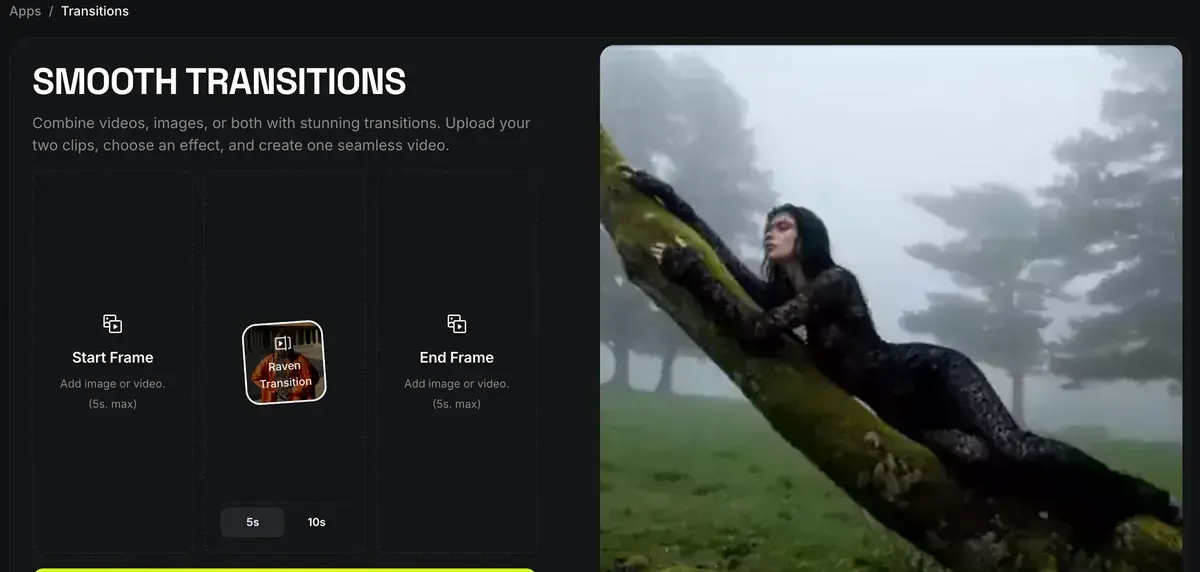
There is no prompt to write. The app page puts a run at 30 seconds to 2 minutes, “depending on your subscription plan and current server load”.
With start and end frames on Kling 3.0
Higgsfield’s Kling 3.0 guide sets out four steps for the frames. Open higgsfield.ai, go to Video and pick Kling 3.0, then:
- Prepare your two frames. “They can differ in tone and style; the model bridges them.”
- Upload them in the optional inputs section: a start frame, an end frame, or both.
- Describe the transition in the prompt: what happens between the two images and what the camera does.
- Generate, then check that the motion follows the path you meant. If it drifts, the guide says to “simplify the prompt and let the frames carry more of the direction”.
Start and End Frame Control
Start and end frame control in Kling 3.0 sets the video’s path from one image to another. You attach a start frame to define the opening of the clip, an end frame to define where the motion resolves, or both to lock the full trajectory. An end frame alone also works: the model chooses how to arrive at it.
In practice it works like this: 1. Prepare your frames. They can differ in tone and style; the model bridges them. 2. Upload them in the optional inputs section: start, end, or both. 3. Describe the transition in the prompt: what happens between the two images, and how the camera behaves. 4. Generate and check whether the motion path matches your intent. If it drifts, simplify the prompt and let the frames carry more of the direction.
Before you press Generate, set the length (3 to 15 seconds on Kling 3.0), the resolution and the aspect ratio. The credit cost updates on the button as you change them.
Prompt tips from Higgsfield’s own guides
- Keep the prompt and the end frame in agreement. The Kling 3.0 guide lists “fighting your own end frame” as a common mistake: motion that cannot plausibly arrive at the last frame makes the clip drift.
- Give each shot one action and one camera move. The same guide splits busier ideas into separate shots.
- Name the change with a short physical verb. Higgsfield’s Hailuo 2.3 guide suggests short words such as “melt”, “ignite” and “morph”, and matching the lighting between the two images.
- Fix a jerky cut with frames. The Seedance help article says to take the last frame of one clip and the first of the next, then “use first-and-last-frame to generate the transition between them”.
- Set the pace with a speed ramp. Kling’s multi-shot mode offers ramps such as Flash In/Out, Slow-mo, Bullet Time and Impact (Kling help article).
More prompt patterns by ad format: Higgsfield prompts for ads.
Which models do start and end frames, and the cost
Higgsfield’s own pages name start and end frame control on five video models:
| Model | What Higgsfield’s page says | Clip length | Credits |
|---|---|---|---|
| Kling 3.0 | “Start frame, end frame, or both” | 3 to 15 s | About 7 per 5 s at 720p, 8 at 1080p |
| Kling O1 | “Upload a beginning frame + an ending frame” | 5 or 10 s | Shown on the Generate button |
| Veo 3.1 Fast | “Provide first and last frames to generate smooth, coherent transition” | 4, 6 or 8 s | About 16 per 4 s |
| Wan | “Precise control over the first and last frame” | Not stated on the page | 8.75 per 5 s at 720p on Wan 3.0 |
| MiniMax H3 | Supply “a first and last frame” | 5 to 15 s | Shown on the Generate button |
Scroll sideways for all 4 columns
Higgsfield’s Kling O1 guide lists start and end frames plus a prompt among its supported inputs.
Supported Input Combinations
Image + Prompt; Start/End Frames + Prompt; Multiple Images (up to 7) + Prompt
Creators can: build dynamic product shots; animate characters from photos; turn outfits into model videos; previsualize scenes for film
The help centre names Wan without a version number; the pricing table’s Wan rate is for Wan 3.0. Higgsfield marks every rate as approximate, and the Generate button shows the exact cost. On Veo 3.1, frames work on the Fast model, while Veo 3.1 Standard takes reference images (Veo 3.1 page).
Of the three models with a published rate, Kling 3.0 costs the least per second. That is about 1.4 credits, against 1.75 on Wan and 4 on Veo 3.1 Fast.
At 4K a 5-second Kling 3.0 clip costs about 30 credits, about four times the 720p rate. The Kling 3.0 guide tells you to draft at 720p and rerun the final take at full size.
Plus costs $49 a month for 1,000 credits a month. A 5-second Kling 3.0 transition at 720p costs about $0.34. Prices checked .
Eight of 52 public sources report slow or failed generations that still took their credits (Reddit, YouTube). Higgsfield’s help centre says failed generations return credits automatically, “usually within a few minutes”. Another eight say the same models cost less at their makers, such as Kling direct (YouTube, Reddit). Kling’s own route: Kling on Higgsfield.
Transitions in ads: before and after, swaps, loops
A transition earns its place in an ad when the change is the message.
Before and after
The morph effect turns the first picture into the second in one move. Think of a stained shirt that comes clean, or a bare room that fills with furniture. Shoot or generate both stills from the same angle so only the subject changes.
Product or outfit swap
Use the same scene as both frames, with product A in the start frame and product B in the end frame. Higgsfield’s Outfit Swap app makes the second still for 2 credits (Higgsfield apps). Kling’s Elements “lock specific characters, products, or objects”, so the person stays the same while the product changes.
Chained scenes
For an ad longer than one clip, the Kling help article says to use “the final frame of one scene as the start frame of the next”. Each join then lines up with the shot before it. Turning a packshot into the opening frame: product photo to video.
Loops
Upload the same image as both start and end frame. The clip then ends on the picture it began with, so it plays as a loop in a feed.
Before you run it in an ad
Five of 52 public sources praise how Higgsfield keeps characters and products the same across shots (YouTube, Reddit). That consistency is what makes a swap or a chain read as one ad.
The app page says “All paid plans include commercial usage rights”. Free-plan output carries a watermark: what free covers is in is Higgsfield free?. Every other tool on the platform: how to use Higgsfield; plans and refunds: Higgsfield pricing.
Questions about Higgsfield transitions
Is the Higgsfield Transitions app free?
Yes, within the free plan’s daily credits. The app page says you can start free with daily credits, and the Generate button shows a run’s cost. Start and end frames on the video models themselves need Plus or Ultra.
How long can a Higgsfield transition be?
Up to 15 seconds in the Transitions app, which takes inputs of up to 5 seconds and a 5 or 10 second effect. Kling 3.0 makes clips of 3 to 15 seconds.
Which Higgsfield plan has start and end frames?
Plus and Ultra, per the compare table on the pricing page. Free and Starter do not include it.
Can I use only an end frame?
Yes, on Kling 3.0. Higgsfield’s guide says the model then chooses how to arrive at it.
Can I join a photo and a video?
Yes. The Transitions app takes two photos, two videos, or a photo and a video.
Every Higgsfield guide, sorted by job, is in the Higgsfield hub
Sources
- Higgsfield: Transitions app, Start Frame and End Frame slots (image or video, 5 seconds at most each), an effect, a 5 or 10 second choice; finished video 15 seconds at most; morph effect; start free with daily credits. Checked
- Higgsfield blog: Kling 3.0 user guide, 12 February 2026; Start and End Frame Control in four steps, parameters, common mistakes. Checked
- Higgsfield help centre: How do I use Kling?, Multi-shot steps with start and end frames, Elements, speed ramps; dated 1 August 2026. Checked
- Higgsfield help centre: Which AI model should I use?, Names Wan for first and last frame control. Checked
- Higgsfield help centre: How do I use Seedance?, The first-and-last-frame fix for a jerky cut; dated 1 August 2026. Checked
- Higgsfield: Veo 3.1 on Higgsfield, Start and End Frame Mode on Veo 3.1 Fast, two frame images, clips of 4, 6 or 8 seconds. Checked
- Higgsfield blog: Kling O1 guide, 30 November 2025; start and end frames, 5 or 10 second clips. Checked
- Higgsfield: MiniMax H3 on Higgsfield, First and last frame input, clips of 5 to 15 seconds. Checked
- Higgsfield blog: Minimax Hailuo 2.3 creative guide, 26 October 2025; short physical prompt words, matched lighting. Checked
- Higgsfield: Higgsfield pricing, Credits per model and the compare table’s Start and End Frame row, read in a browser; prices exclude VAT. Checked
- Higgsfield help centre: Generation is stuck or failed, Failed generations return credits automatically, usually within a few minutes; Grok is charged the moment it starts. Checked
- Trustpilot, Reddit and YouTube: Higgsfield user reports, 52 public sources synthesised, checked 28 September 2026. Checked
What changed on this page
- Higgsfield’s prices went back: Starter is 15 dollars a month for 200 credits, Plus 49 a month or 39 billed yearly for 1,000 credits, and Ultra 129 or 99 billed yearly has a card again (was Starter 19 for 270, Plus 59 or 47 for 1,200).
- Higgsfield changed its prices: Starter is 19 dollars a month for 270 credits (was 15 for 200), Plus 59 a month or 47 billed yearly for 1,200 credits (was 49 or 39 for 1,000).

Alexandre S.
Alexandre S. is a creative ad strategist and copywriter with ten years' experience in digital marketing across multiple channels.
Related pages
-
 Profile Higgsfield AI for ads
Higgsfield resells Kling, Veo and Seedance on one credit balance. What a clip costs, what “Unlimited” covers and its ad terms, checked 24 September 2026.
-
 Guide Higgsfield motion control
How Higgsfield’s motion control and motion presets work, which models support them, what they cost, and examples that suit ads. Checked 16 October 2026.
-
 Guide Seedance 2.0 on Higgsfield
What Seedance 2.0 costs on Higgsfield, when it is unlimited, its clip limits, and how the price compares with Dreamina and other shops. Checked 16 October 2026.
-
 Guide Higgsfield Cinema Studio
What Higgsfield Cinema Studio does, its camera and lens controls, what a clip costs, and when it beats plain prompting for ads. Checked 16 October 2026.
-
 Guide Higgsfield Popcorn
Higgsfield Popcorn makes storyboards of up to 8 frames with the same face and product in each. Steps, modes, credit cost and how to turn frames into video.


