UGC video examples
A UGC video is an ad shot to look like a customer’s own phone clip. Eight formats cover most of them, from the testimonial to the duet, and the table below gives each one’s opening.
Each one below gives what it is, the first three seconds, the order of the shots and whether an AI actor can make it.
| Format | First three seconds | Fits a product that |
|---|---|---|
| Testimonial | A face and a result in one line | Has real customers willing to talk |
| Unboxing | A sealed box in someone’s grip | Has packaging worth showing |
| Problem and solution | The problem, shown | Fixes one visible annoyance |
| Get ready with me | A bare face or messy room, mid-routine | Belongs to a daily routine |
| Before and after | The “before”, held for a beat | Makes a change a camera can see |
| Tutorial | The finished result, then “here’s how” | Needs a step or two to use well |
| Things I wish I knew | A numbered promise | Has a learning curve or a myth around it |
| Reaction or duet | Someone else’s clip or comment | Gets asked about in comments |
Scroll sideways for all 3 columns

What makes a video look like UGC?
UGC style comes from how the clip is shot, more than from who appears in it. Five habits do most of the work, and a brand can copy every one.
The frame is vertical (9:16), filmed on a phone held at arm’s length or propped on a shelf. The light is whatever the room has: a window, a bathroom bulb.
The speaker talks within the first second, looking into the lens instead of past it. A media buyer for Motion walks through the openers working in live client ad accounts in June 2026, starting with the talking-head “Yapper” hook.

Words appear on screen for people watching on mute. And the edit is fast, with jump cuts where a polished ad would use a dissolve.
Because a phone clip costs little to reshoot, you can try five hooks on the same body and keep the one that holds viewers.
Testimonial: a customer says what changed
A testimonial is one person telling the camera what the product did for them. It works because the viewer hears it from a peer instead of the brand.
The first three seconds put the face and the result together: “Three weeks in and my heels have stopped cracking.” No intro, no name.
The shots run in this order. First the result line, then the problem it solved and the product in hand. One specific detail follows (a smell, a texture, a number), then where to buy. Modern Millie, a UGC creator, shows a testimonial example at 9:45.
An AI actor saying “I’ve used this for a month” describes a use that never happened. The FTC’s rule on fake testimonials (465.2(a)) bars a business from creating one that misrepresents whether the speaker exists or used the product. Film real customers for this one.
An AI actor can read the same points in a presenter’s voice (“Here’s what reviewers say changed”), which the UGC script template shows line by line.
Unboxing: the first look at the product
An unboxing shows the product coming out of its packaging, with the creator’s first reaction. Viewers stay to see what is inside.
The opening three seconds show a sealed box in the creator’s grip and a line such as “Everyone kept asking about this, so here it is.” The tear or the lid lift lands in the first two seconds.
After the opening comes the reveal, each item lifted to camera, a close-up of one detail, the creator using it once, then the offer. Modern Millie’s unboxing example, posted in June 2025, starts at 4:00.

The genuine reaction is the hard part for AI. MakeUGC lists “Unboxing” among the formats on its talking actor page, and its product in hand page shows packs “opened and tasted on camera”. Keep the script to what the product is and does, and write it from the template’s hook and product beats.
Problem and solution: the annoyance, then the fix
This format opens on a problem the viewer recognises and closes on the product fixing it.
The first three seconds show the problem happening: coffee going watery, a lead pulling a shoulder, a phone on its last bar of battery. The on-screen words name it in eight or fewer.
The structure is problem shown, problem named, product introduced, product fixing it on camera, then the call to action. Modern Millie walks through a problem and solution example at 8:04.
It is the easiest format for an AI actor, because the actor states the problem and presents the fix with no personal history to claim. MakeUGC lists “Problem → solution” as a format and turns one product photo into an actor holding it. The six beats of the script template map onto it one to one.
Get ready with me: the product inside a routine
A “get ready with me” (GRWM) video follows a creator through a morning, a night out or a commute, with the product as one step. The viewer watches for the routine; the product rides along.
The first three seconds show the routine already under way, mid-step, with a line like “Getting ready for a wedding with me.”
The shots move step by step, with the product at step two or three. A close-up of it in use follows, then the finished look and where the product is from. The Motion hooks video shows the quick outfit change transition at 12:54, a common GRWM opener.
The format follows a real room and a real routine, which an AI actor in a fixed frame cannot show. MakeUGC’s format list does not include GRWM. A human creator suits it best. An AI actor can supply a short product line cut into the creator’s footage, written with the template’s product beat.
Before and after: a change the camera can see
Before and after puts two states side by side: a stained shirt and a clean one, a cracked heel and a healed one. The picture carries the claim.
The first three seconds hold the “before” long enough to register, with text such as “Day 1”. The cut to “after” comes later, which keeps people watching.
The structure is before held, the product applied, the wait (a timer or “two weeks later”), the after, then the two side by side. Modern Millie’s before and after example starts at 16:22.
The “after” must be real footage of a real result. A generated result shows a change the product never made. Use AI for the presenter around the footage, never for the result itself; the template’s proof beat covers what can stand as proof.
Tutorial: how to use it in under a minute
A tutorial teaches one use of the product. It sells by making the viewer feel able to do it.
The first three seconds show the finished result, then “Here’s how.” Leading with the end gives the reason to watch the steps.
The shots are the result, step one, step two (three at most), a common mistake, the result again, then the call to action. Modern Millie’s tutorial example starts at 17:30.
AI actors can carry the talking part, and product-in-hand shots cover small items: MakeUGC’s product in hand page shows “Earbuds, chargers and small devices, turned over to show the details”.
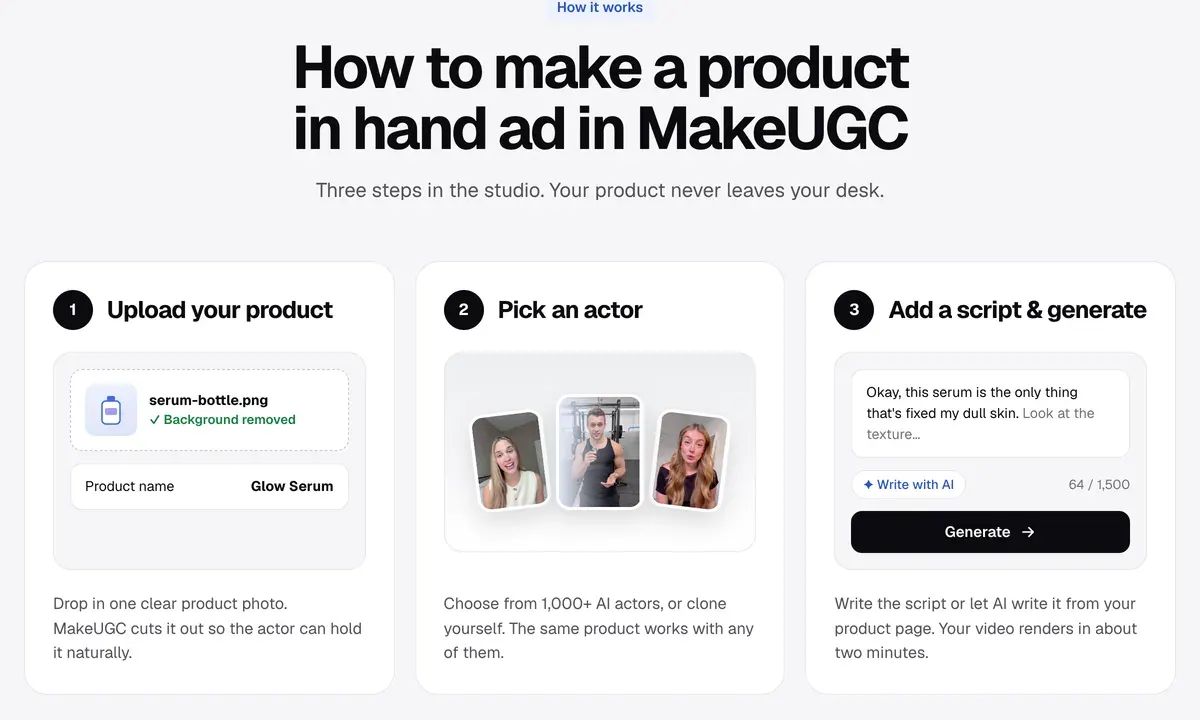
Steps on a screen or done by hand need your own footage, with the actor introducing them. The template’s timing table gives how many words fit a 15, 30 or 45 second video.
Things I wish I knew: the insider list
This format gives a short numbered list of tips about a product or category, framed as experience. “Three things I wish I knew before buying a standing desk.”
The first three seconds state the number and the topic. The number promises an end, so viewers stay to the last point.
The structure is the promise, tip one, tip two, tip three (with the product as the answer to one of them), then a closing line.
The framing is first-person experience, so it raises the same testimonial question as the first format. An AI actor can present it as “Three things buyers wish they knew”, built from your reviews. Write the hook from the template’s 20 hooks, where the “Number” type fits this format.
Reaction or duet: replying to someone else
A reaction video answers another clip or a comment. On TikTok, Duet plays your video beside the original and Stitch plays a piece of the original before yours. Viewers already know the question, so the answer gets attention.
The first three seconds show the comment or the clip being answered: “Replying to the person who asked if this works on curly hair.”
The structure is the question on screen, the answer shown with the product, one detail the asker missed, then an invitation to ask more.
The question must be real, from your own comments. Pair a real comment with an AI presenter answering it, scripted with the template’s “Reaction or stitch” hooks.
Where to find more real UGC examples
Two free libraries show live ads by format. The Meta Ad Library lists every active ad on Facebook and Instagram, searchable by advertiser or keyword. How to use the Meta Ad Library walks through the filters.
TikTok’s Top Ads filters by region, objective, ad language and format, and sorts by reach or CTR (click-through rate).
Search a competitor’s name, then sort what you find into the eight formats above. Each Meta ad shows the date it started running. An ad a competitor has kept live for months is one they keep paying for, so its format is worth trying.
Making these formats with AI actors
One format fits an AI actor from start to finish: problem and solution. Three more fit once the script drops any claim of personal use or adds your own footage. They are the unboxing, the tutorial, and things I wish I knew in a presenter’s voice.
The other four need a real person, a real result or a real comment in the frame.
MakeUGC is built for these scripted formats. Its talking actor page lists “1,000+ realistic AI actors” in “50+ Languages”. That full range sits on the Pro plan, and the Starter plan, at $59 a month, includes 300 or more of them (prices checked ). You upload “one clear product photo” and the actor holds it on camera.
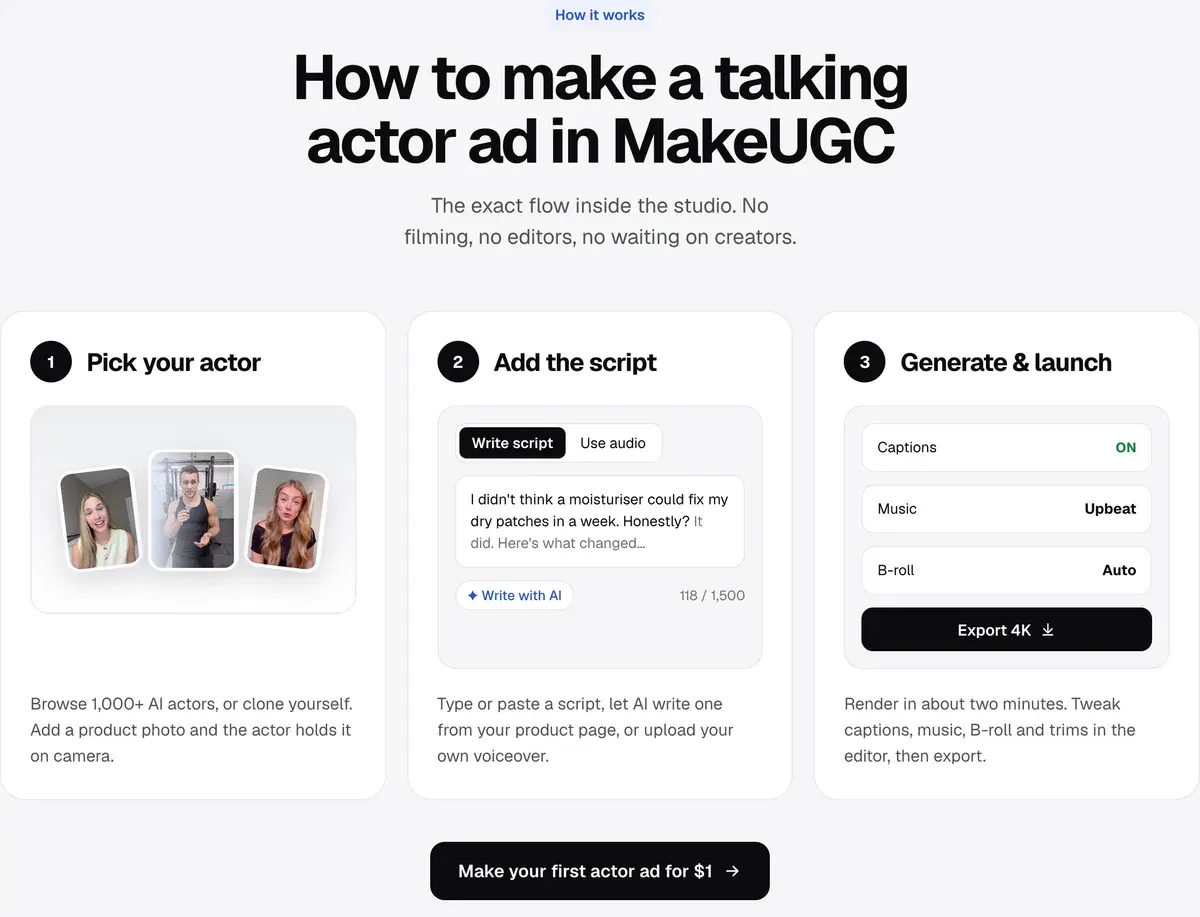
Users report it as far faster and cheaper than briefing human creators (3 of 29 sources: How to Easy, ClickHive, Product Hunt).
The most common complaint is billing: charges that continue after cancelling (17 of 29 sources: Trustpilot, Trustpilot). Lip sync and hands still need a check before a clip runs (5 of 29 sources: ClickHive, How to Easy). The MakeUGC profile has its terms and the other user reports. MakeUGC pricing lists every plan, and the MakeUGC hub gathers its guides.
Other tools render a presenter from a script too. The best AI actors for ads compares them side by side, and Higgsfield vs MakeUGC sets two of them against each other. For the format itself, what is UGC content explains where each kind runs and the rights it needs.
More pages for MakeUGC users, sorted by job, in the MakeUGC hub
Sources
- MakeUGC: Talking actor feature, Undated feature page;
1,000+ realistic AI actors
, the six format labels (Testimonial, Unboxing, Problem → solution, Podcast clip, Founder story, Hook tests),50+ Languages
. Checked - MakeUGC: Product in hand feature, Undated feature page; the three steps,
one clear product photo
, the food and drink and tech demo lines. Checked - TikTok Creative Center: Top Ads: high-performing auction ads, Filters by region, objective, ad language and ad format; sorts by reach and CTR. Checked
- Meta: Meta Ad Library, Public search of active ads on Facebook and Instagram, by advertiser or keyword. Checked
- eCFR, US Government Publishing Office: 16 CFR 465.2, Fake or false consumer reviews, consumer testimonials, or celebrity testimonials, Paragraph (a), with (1) and (2). Checked

Alexandre S.
Alexandre S. is a creative ad strategist and copywriter with ten years' experience in digital marketing across multiple channels.
Related pages
-
 Guide UGC script template for ads
A UGC ad script template to copy, 20 hooks by type and examples timed for 15, 30 and 45 seconds, for creators or AI actors. Checked 15 October 2026.
-
 Guide What is UGC content?
UGC content is anything customers or creators make about a brand. Its three kinds, five video formats, where it runs and the rights it needs.
-
 Best list AI actors for ads
Six AI actor libraries for ads, from 40+ faces to 1,500+, with product in hand, languages, paid-ads terms and who can withdraw. Checked 21 October 2026.


