Higgsfield Canvas
Higgsfield Canvas is a blank board where you wire AI models together. Each box on the board, called a node, holds one step: a prompt, a reference photo, an image model or a video model. You draw a line from one box to the next, and the output of one step becomes the input of the next.
Higgsfield’s help centre sums it up as a “node-based infinite board for multi-model visual production” (help article, modified 1 September 2026). For ad work, that puts your product photo, the still and the video made from it on one screen.
| Question | Answer |
|---|---|
| Where it sits | higgsfield.ai, Canvas, New canvas |
| What a node can be | A text prompt, an image or audio reference, an existing generation from Assets, or any Higgsfield model |
| Models available | Every Higgsfield model, for images and for video |
| How nodes run | One at a time or in sequence, and side by side for comparison |
| Building a board | Free: credits go only when a node generates |
| Unlimited plans | Do not apply: every Canvas generation spends credits |
| Teamwork | Real-time editing, invited through Share in the canvas settings |
| Reuse | Save a whole board as a template |
Scroll sideways for all 2 columns
The short version: Canvas suits you when an ad needs more than one model. A single clip from a single model is quicker in the normal generator.
What is Higgsfield Canvas?
Higgsfield Canvas is a workspace for pipelines. A pipeline is a fixed chain of steps you can run again: write the prompt, make the still, animate the still. Higgsfield’s tool guide calls it a board “where prompts, references, and generations connect into one continuous pipeline” (tool guide).
What is Canvas?
Canvas is Higgsfield’s node-based infinite board for multi-model visual production. Instead of generating one output at a time and copying results between tools, you build a visual pipeline on one screen: a prompt feeds an image, the image feeds a video, the video feeds an edit.
Every Higgsfield model is available as a node on the board.
If you have used Figma or a whiteboard app, the layout is familiar. You place boxes, connect them with lines and zoom around a board with no edges.
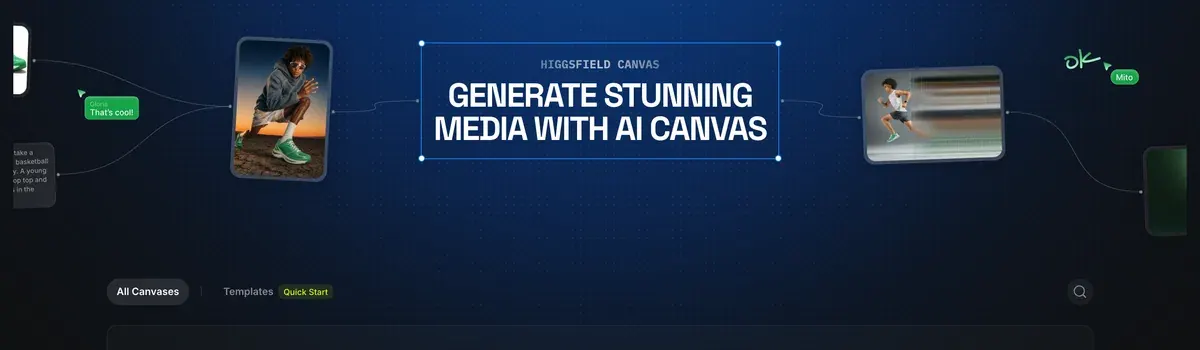
The difference from Higgsfield’s usual screens is the wiring. In the standard image or video page, you download a result and upload it again for the next model. On Canvas, the line between two nodes does that hand-over for you.
Four node types do most of the work:
- Text Prompt nodes hold the words a model reads.
- Generation nodes run a model you pick, from image models to video models.
- Reference nodes carry your uploads: product photos, a face, a voice file.
- Audio nodes attach to a video node for “voice references, voiceover, or audio sync”, in the help article’s words.
Canvas also has a home outside Higgsfield. The official Figma plugin adds Canvas nodes to FigJam boards, and those generations draw on your plan’s credits at the usual rates. Setup for that plugin: Higgsfield plugins.
How to use Canvas, step by step
- Open Higgsfield’s own guide, How do I use Canvas for multi-node generation?, and keep it beside you. It is the vendor’s reference for every node type below.
- Go to Higgsfield Canvas and choose New canvas. You need to be signed in to see your boards.
- Click the board and add a Text Prompt node. Write the shot as you would for any model.
- Connect the prompt to a generation node and pick the model in that node.
- Drag the output of that node into the input of the next one. A still from an image model can feed a video model this way.
- Add references. Upload product photos or an audio file, or pull a past generation in from Assets.
- Click Generate on each node you want to run. Nodes run on their own or in sequence, and each one spends credits only at this point.
- Save the board as a template, so the next product goes through the same chain.
How do I start a Canvas workflow?
Open higgsfield.ai → Canvas → New canvas.
Add a prompt node. Click the board and add a Text Prompt node.
Add a generation node. Connect the prompt node to a generation node and select the model.
Connect outputs to the next step. Drag the output of one generation node into the input of the next.
Generate. Click Generate on each node you want to run: nodes can be run individually or triggered in sequence.
Save as a template. Save the workflow for future projects.
DraftID, an independent creator, builds a first board node by node in a beginner walk-through.

Two model rules that trip people up
The help article flags one quirk per video model, and both change how you wire a product shot.
Kling treats a connected image as the clip’s first frame, and does not read it as a character to keep. To keep a person or product, save it as an Element (Higgsfield’s reusable character or prop) and call it in the prompt with its @ tag. Elements are covered in how to use Higgsfield.
Seedance reads connected images as references, but only when told what each one is. Start the prompt by naming the role of every reference: the character, the location, the product. Seedance prompting in detail: Seedance on Higgsfield.
How do references work in Canvas?
Seedance nodes work directly with connected reference images. Describe the role of the reference explicitly at the beginning of the prompt.
Kling nodes treat a directly connected image as a start frame rather than a character reference.
Canvas saves your board as you go, according to the help article. If it freezes, a hard refresh brings back the latest autosave.
Three ad workflows on Canvas
Higgsfield’s help article lists four jobs Canvas suits. They are chaining models, comparing outputs side by side, real-time team work and saving a workflow as a template.
RandomAI, an independent creator, builds chained image and video workflows on one board in a longer walk-through.

One product, many formats
You start with one product photo in a reference node. Wire it into several generation nodes at once. One makes a square still for the feed, one a 9:16 still for Stories, one a video for Reels. Every branch reads the same photo, so the product looks the same in each placement.
Save the board as a template. Next month’s product drops into the same reference node, and the whole set runs again.
Storyboard to shots
A storyboard is the comic-strip version of an ad: one picture per shot. Make the frames first, in an image node or with Popcorn, Higgsfield’s storyboard model. Then connect each frame to a video node.
Use Kling when the frame should be the opening shot of the clip. Use Seedance when the frame is a reference for a character or a product. Popcorn’s own steps: Higgsfield Popcorn.
Variations for testing
Ad testing means running several versions to see which one earns the cheapest result. Canvas helps at the start of that, before any money goes to Meta or TikTok.
Connect one prompt to two or three generation nodes with different models, and the results sit side by side on the board. You pick the strongest one to animate. Prompt shapes that work for ad hooks: Higgsfield prompts for ads.
What a Canvas board costs
Building is free. “Credits are deducted only when a node generates content”, says the help article. You can wire a large board and pay nothing until you press Generate.
Unlimited does not reach Canvas. The help article says “all generations in Canvas deduct credits regardless of your plan”. Higgsfield’s credits article puts MCP, the command-line tool and the Supercomputer agent under the same rule (What uses my credits). What Unlimited does cover: Higgsfield Unlimited.
Cost and Unlimited models in Canvas
Cost Building and connecting nodes is free. Credits are deducted only when a node generates content.
Unlimited No. Unlimited access applies only to standard generation on higgsfield.ai: all generations in Canvas deduct credits regardless of your plan.
Here is a sum for the storyboard workflow. Popcorn costs 1.5 credits a frame on the pricing page, as read on 9 October 2026, so an 8-frame board costs 12 credits. The pricing page’s compare table, read 21 October 2026, puts a 5-second Kling 3.0 clip at 720p at about 7 credits. Four clips cost about 28 credits.
That is 40 credits for one storyboard and four clips. On Plus, at $49 a month for 1,000 credits a month, that run costs about $1.96. On Starter, at $15 a month for 200 credits, the same run is about $3.00. Prices checked .
Two user reports matter before you build big chains. Eight of 52 public sources say generations run slow or fail and still cost credits (YouTube, Reddit). Six say credits expire. Plan credits go at the end of each period, add-on packs after 90 days, and what is left when you cancel (Trustpilot, YouTube).
So run each node once and check it before you trigger the whole chain. A failed still at the top of a board is cheap. A failed still feeding four video nodes is the expensive kind. Every plan and refund rule: Higgsfield pricing.
Canvas, Cinema Studio, Marketing Studio or Popcorn?
Each Higgsfield tool owns a different part of an ad. Canvas is the one that connects the others.
| Tool | What it does | Pick it when |
|---|---|---|
| Canvas | Chains any models on one board | The ad needs several models in a row, or a team on one board |
| Marketing Studio | Product ads and UGC videos from a product link or image | You want a finished ad from a template |
| Cinema Studio | Film-style clips with camera and lighting control | One cinematic clip matters more than volume |
| Popcorn | Storyboards of up to 8 frames with the same subject | You plan the shots before paying for video |
Scroll sideways for all 3 columns
When should I use Canvas instead of other tools?
Canvas chain multiple models in sequence; compare outputs from multiple models side by side; collaborate with a team on generations in real time; save a workflow as a reusable template.
Cinema Studio cinematic multi-shot video with camera control.
The tool guide splits it the same way. It routes “Generate a product ad from a URL or image” to Marketing Studio and “Create a cinematic video with camera control” to Cinema Studio. Chaining, team work and templates go to Canvas.
A reference node can pull any past generation from Assets, so frames or clips made in another Higgsfield tool can join a board. The tools, one by one: Higgsfield Marketing Studio, Higgsfield Cinema Studio and Higgsfield apps.
Four of 52 public sources say Higgsfield’s interface is crowded with tools and tabs that confuse new users (YouTube, Trustpilot). If that is you, start with one tool and open Canvas once a second model joins the job.
Every Higgsfield guide in one place: the Higgsfield hub. Terms, rights and user reports: the Higgsfield profile.
Questions about Higgsfield Canvas
Is Higgsfield Canvas free?
Building a board is free. Every generation on it spends credits, on any plan, Unlimited included.
Which models can I use in Canvas?
Every Higgsfield model is available as a node, according to the help article. That covers image models and video models such as Kling and Seedance.
Can a team work on one canvas?
Yes. Open Share in the canvas settings to invite a teammate, and you edit the board together in real time.
Does Canvas save my work?
Yes. The help article says Canvas autosaves as you work, and a hard refresh restores the latest save after a freeze.
Can I use Canvas in Figma?
Yes, in FigJam. Higgsfield’s official Figma plugin adds Canvas nodes there, and generations use your plan’s credits at the usual rates.
Every Higgsfield guide, sorted by job, is in the Higgsfield hub
Sources
- Higgsfield help centre: How do I use Canvas for multi-node generation?, Published 1 August 2026, modified 1 September 2026; the steps for a first workflow, every model as a node, templates, Share, Seedance and Kling reference rules, audio nodes, credits only when a node generates, no Unlimited inside Canvas, FigJam nodes, autosave. Checked
- Higgsfield: Higgsfield Canvas, Landing page with All Canvases, Templates and Quick Start; boards need a sign-in. Checked
- Higgsfield help centre: Which Higgsfield tool should I use?, Modified 1 September 2026; Canvas, Marketing Studio, Cinema Studio, Supercomputer and MCP, each with the jobs it suits. Checked
- Higgsfield help centre: What uses my credits?, MCP, CLI, Canvas and Supercomputer always deduct credits. Checked
- Higgsfield: Higgsfield pricing, Compare table, 21 October 2026: Kling 3.0 at about 7 credits per 5 seconds at 720p; Starter 200 credits a month; Popcorn at 1.5 credits an image; prices exclude VAT. Checked
- Trustpilot, Reddit and YouTube: Higgsfield user reports, 52 public sources synthesised, checked 28 September 2026. Checked
What changed on this page
- Higgsfield’s prices went back: Starter is 15 dollars a month for 200 credits, Plus 49 a month or 39 billed yearly for 1,000 credits, and Ultra 129 or 99 billed yearly has a card again (was Starter 19 for 270, Plus 59 or 47 for 1,200).

Alexandre S.
Alexandre S. is a creative ad strategist and copywriter with ten years' experience in digital marketing across multiple channels.
Related pages
-
 Guide Higgsfield Unlimited explained
Which models Higgsfield Unlimited covers on each plan, how long each window lasts, the shared queue, and what still costs credits. Checked 16 October 2026.
-
 Guide Higgsfield plugins
Higgsfield plugins for Resolve, Adobe, Figma and Blender spend plan credits; Unlimited stays on the website. Install steps from pages checked 19 October 2026.
-
 Guide Higgsfield prompts for ads
Higgsfield runs Kling, Veo and Seedance, so each prompt follows that maker’s rules and costs. Ad prompts by model, with credit costs, checked 2 October 2026.
-
 Guide Seedance 2.0 on Higgsfield
What Seedance 2.0 costs on Higgsfield, when it is unlimited, its clip limits, and how the price compares with Dreamina and other shops. Checked 16 October 2026.


