Higgsfield plugins
Higgsfield ships official plugins for DaVinci Resolve, Premiere Pro and After Effects, Photoshop, Figma and Blender, plus a Chrome extension. Each one runs on your Higgsfield credits and needs an internet connection for every generation.
The generations happen on Higgsfield’s servers, so your editing machine does none of the heavy work. And “Unlimited” models on your plan stop being unlimited inside a plugin: every generation there costs credits.
Plans start at $15 a month, prices checked . Each plugin has its own version floor, and Resolve refuses the App Store build, per Higgsfield’s plugin pages and its integrations article.
| App | Install from | Needs | Panel opens under |
|---|---|---|---|
| DaVinci Resolve | Installer from higgsfield.ai/plugins/davinci | Resolve 19 or newer, Blackmagic’s own build | Workspace, Workflow Integrations |
| Premiere Pro and After Effects | One installer for both apps | Version 2025 (25.0) per the plugin page; the help centre lists 2024 | Window, Extensions |
| Photoshop | Plugin file from higgsfield.ai/plugins/photoshop | Photoshop 2024 or newer | Window, Extensions |
| Figma and FigJam | Figma’s own Plugins menu | Figma desktop app or browser | Plugins menu |
| Blender | One signed .zip file | Blender 5.1 or later | A bar over the 3D viewport |
| Chrome | Chrome Web Store (Higgsfield Instant) | Google Chrome | Right-click on any image |
Scroll sideways for all 4 columns
Higgsfield’s pages list macOS and Windows for every desktop plugin. You sign in to your Higgsfield account inside the panel.

Which Higgsfield plugins exist?
A plugin is a small add-on that puts another company’s tools inside the app you already work in. Higgsfield’s version is a panel. You type a prompt or pick a tool, and the result lands in your project without a trip to the browser.
The help centre’s integrations article (1 August 2026) lists five plugin families: Figma and FigJam, Photoshop, Premiere Pro and After Effects, DaVinci Resolve, and Blender. It adds a Minecraft mod and Higgsfield Gaming, a browser-game builder. All of them, the article says, “use your existing Higgsfield plan credits”.
What integrations are available?
Higgsfield has official plugins and integrations for Figma and FigJam, Adobe Photoshop, Adobe Premiere Pro and After Effects, DaVinci Resolve, Blender, Minecraft, and a browser-game builder (Higgsfield Gaming). All of them use your existing Higgsfield plan credits, the same as MCP and CLI: Unlimited model access and free generations apply only on higgsfield.ai.
Figma and FigJam: Design tool plugin; Adobe Photoshop: Creative tool plugin; Adobe Premiere Pro and After Effects: Video editing plugin; DaVinci Resolve: Video editing plugin; Blender: 3D creation tool plugin; Minecraft: Game mod; Higgsfield Gaming: AI game builder.
Default generation models across the plugins: Nano Banana 2 for images, Seedance 2.0 for video.
The plugins share default models. Nano Banana 2 makes images and Seedance 2.0 makes video unless you pick another model, the same article says.
Two more routes sit outside the plugin pages. The ChatGPT plugin and the Claude connector let an AI assistant drive Higgsfield for you: how to connect Higgsfield to Claude covers them. And the Higgsfield API is for developers who want to build their own integration, with its own key and balance.
Is there a Higgsfield Chrome extension or Canva app?
There is a Chrome extension. There is no Canva app.
The extension is Higgsfield Instant, published on the Chrome Web Store by Higgsfield Inc. (version 1.2.4, updated 10 October 2026). You right-click an image on any website and pick one of its two tools. Soul Recreation redraws the image in your trained character’s style; Face Swap puts a face into it.
Before you swap a real person’s face into an ad, read our Higgsfield face swap guide.
The help centre’s list of official integrations does not name Canva. The nearest Higgsfield name is Canvas, a node-based board on higgsfield.ai where you chain generations step by step. In Figma’s FigJam, the plugin adds those Canvas nodes to your board.
DaVinci Resolve: install and use
The Resolve plugin puts seven AI tools and a colour-matching tool in one dockable panel. Higgsfield’s Resolve page sets three requirements:
- DaVinci Resolve 19 or newer. Older versions do not work.
- Blackmagic’s own build. The page says the plugin is “not compatible with the App Store version of DaVinci Resolve”, so download Resolve from blackmagicdesign.com.
- An internet connection for every generation.
Install it in three steps, as the Resolve page lists them:
- Download the installer for your system from higgsfield.ai/plugins/davinci. The Mac installer runs on Apple Silicon and Intel; Windows gets an .exe.
- Run the installer. It finds DaVinci Resolve by itself.
- Open Resolve and go to Workspace, then Workflow Integrations, then Higgsfield.
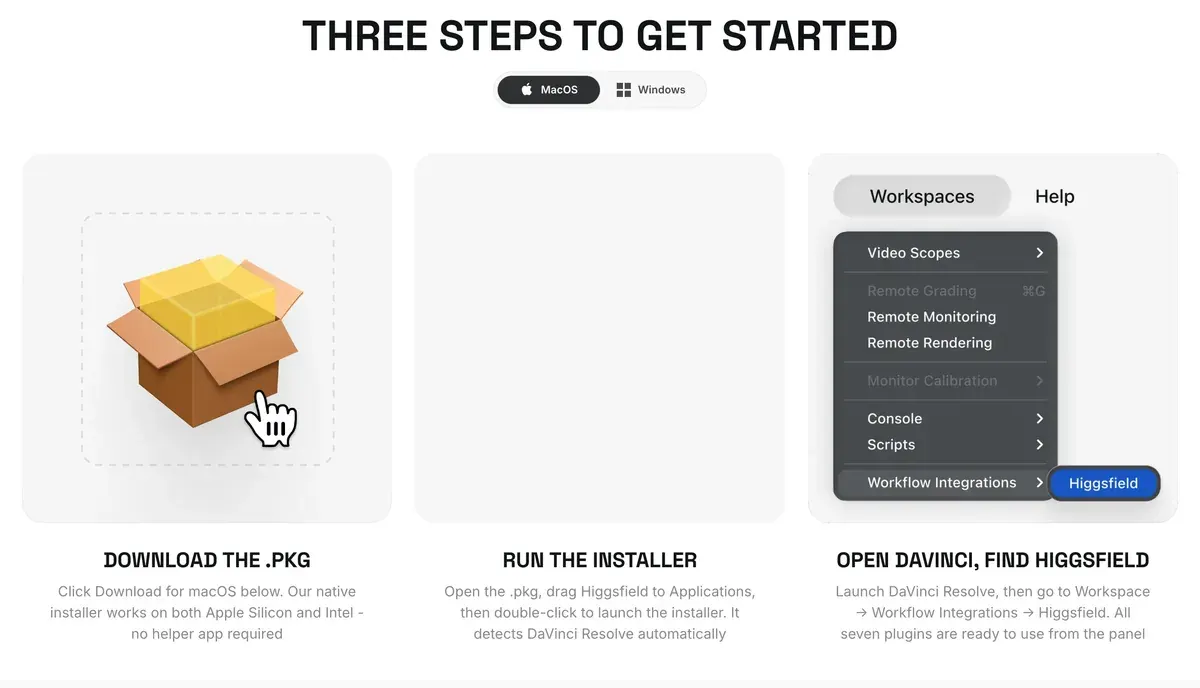
If the panel is not under Workflow Integrations, look under Workspace, then Scripts. Higgsfield’s Resolve blog post (28 July 2026) gives both menus, “on some setups”.
The panel holds Generate Video, Generate Image, Edit Video, Draw to Edit, Reframe, Remove Background and Upscale. Reframe switches a clip between 9:16, 16:9, 4:3, 3:4, 21:9 and 1:1. Subject tracking keeps the subject in frame.
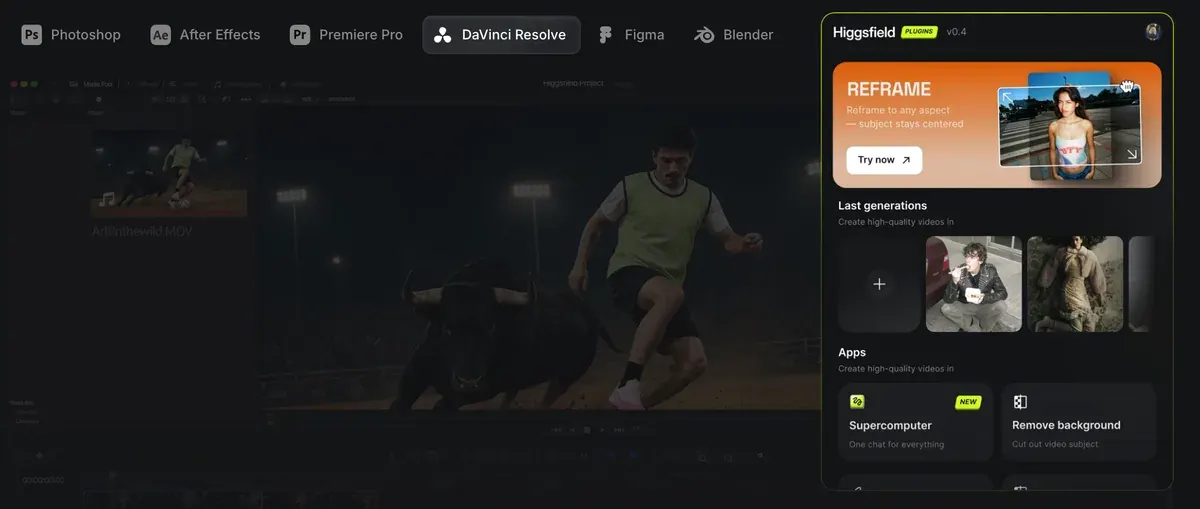
For an ad editor, that turns one clip into a 9:16 Reels cut and a 16:9 YouTube cut without manual cropping.
Only the Resolve page lists an AI LUT creator. A LUT (look-up table) is a colour recipe you can apply to footage. You give the tool a frame from your clip and a reference frame or photo. It returns the look as a .cube LUT file or as colour nodes on the current clip.
The blog post aims it at generated B-roll that looks fine alone and wrong next to your camera footage.
Import to Resolve drops any result into the Media Pool or straight onto the Timeline. One limit to plan around: the blog post says Higgsfield’s video models make clips of 4 to 15 seconds, which suits B-roll and short inserts.
After Effects and Premiere Pro
One installer covers both Adobe apps. Higgsfield’s After Effects page supports version 2025 (25.0) and newer of each. The help centre article, dated 1 August 2026, still gives version 2024 (24.0). For an older release, the plugin page says to update through Creative Cloud first.
How do I use Higgsfield in Photoshop?
Download the .UXP installer from higgsfield.ai/plugins/photoshop (macOS or Windows, no helper app), then in Photoshop open Window → Extensions → Higgsfield. Works on Photoshop 2024 and above.
Premiere Pro and After Effects. Open the panel in Premiere Pro or After Effects via Window → Extensions → Higgsfield. Works on version 2024 (24.0) and newer.
On a Mac, the steps from the plugin page:
- Download the .dmg from higgsfield.ai/plugins/after-effects or the Premiere Pro page.
- Open it, drag Higgsfield to Applications and double-click it to run the installer. It finds Premiere Pro and After Effects by itself.
- Open either app and go to Window, then Extensions, then Higgsfield.
Close both Adobe apps fully before you install. On Windows, the plugin page offers an .msi installer for Windows 10 and 11 (64-bit only). The help centre and Higgsfield’s After Effects blog post describe a second Windows route. You install the free ZXP Installer from aescripts.com and drag the Higgsfield .zxp file onto it.
The Adobe panel lists five tools: Reframe, Remove Background, Upscale, Draw to Edit and Edit Video. Generate Video and Generate Image sit in the same panel, and each result goes straight into your timeline.
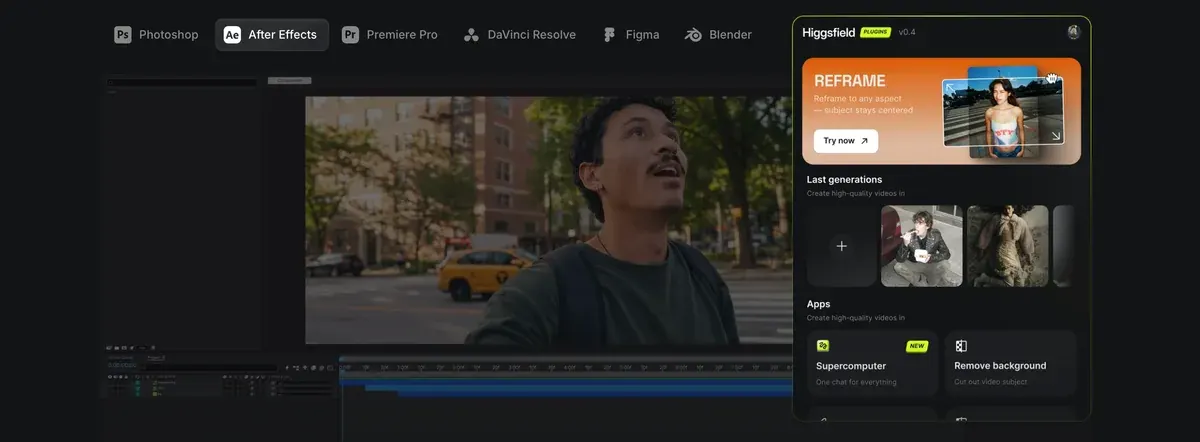
If the panel does not show, the FAQ’s first fix is to quit both apps and run the installer again. On Windows, run it as administrator. On a Mac, open System Settings, then Privacy & Security, and click “Open Anyway” if the installer was blocked.
The Adobe pages also point to a connector at bridge.higgsfield.ai/mcp, which lets Claude or ChatGPT drive Higgsfield. It is an MCP server, the standard way AI assistants plug into other apps.
The After Effects page’s example request: “Build a logo reveal with a bounce ease and a light streak in After Effects”. For animated titles and logo reveals built from a chat prompt, see Higgsfield Vibe Motion.
Photoshop and Figma
The Photoshop plugin needs Photoshop 2024 or newer, on macOS (Apple Silicon and Intel) or Windows. You install the plugin file from higgsfield.ai/plugins/photoshop, then open Window, then Extensions, then Higgsfield. Each result comes back as a new layer you can mask and blend like any other.
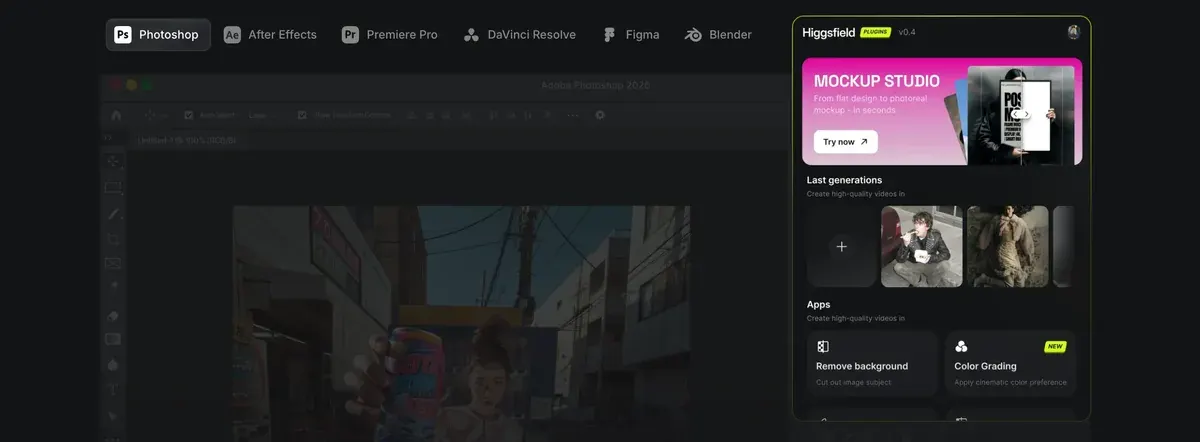
The Photoshop page leads with tools built for still work:
- Realtime AI redraws as you paint, stroke by stroke.
- Mockup Studio places a flat design or product shot on packaging, a device or a scene.
- Layer Decompose splits a flat image into separate, editable layers.
- Shots turns one frame into a set of camera angles of the same scene.
A kit of smaller tools sits under those: Character Swap, Remove Background, Face Swap, Upscale, Skin Enhancer and AI Stylist. The help centre adds that Cinema Studio and Marketing Studio open inside the Photoshop plugin.
Figma needs no installer. Right-click the canvas, open Plugins, search “Higgsfield” and sign in with your Higgsfield account. The Figma page says it runs “anywhere Figma runs”: the desktop app on macOS and Windows, and Figma in the browser.
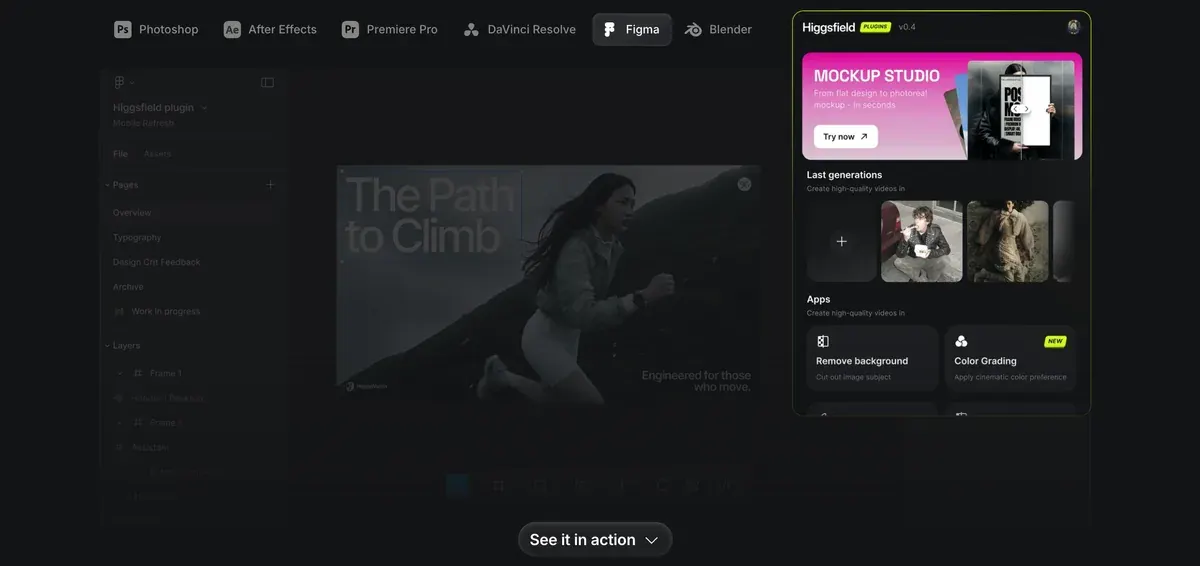
In Figma you get image and video generation plus tools that work on a selected image: Remove Background, “Color Grading”, Relight, Expand and Angles. The help centre also lists vector (SVG) generation, Mockup Studio and Face Swap. Results land on your selected frame.
How credits work in the plugins
Every plugin spends credits from the same balance as higgsfield.ai, “at the same rates as the web platform”, the help centre says. It answers the Unlimited question plainly: “Do Unlimited models work in the plugins? No. Unlimited access and free generations apply only on higgsfield.ai.”
One older Higgsfield post says otherwise: the After Effects blog post of 21 July 2026 says an Unlimited model generates “without consuming credits through the plugin”. The Resolve post of 28 July and the help centre article of 1 August both say the reverse, and they are the newer pages. Higgsfield Unlimited, explained covers what the website’s Unlimited window includes.
Blender shows the cost before you commit: “the number on the Generate button is the credit price”, its page says. On the other plugins, check the per-model credit costs on our Higgsfield pricing page.
A free account works. The Adobe FAQ says you can “sign up free at higgsfield.ai and try the plugins with starter credits”, and Higgsfield for free explains what those credits cover. Every plugin page limits commercial use of the results to paid plans.
Plugins draw on the same credit balance, so two complaints from Higgsfield users apply to them too. Eight of 52 public sources say generations run slow or fail and still cost credits (YouTube, Reddit).
Six say credits expire: subscription credits at the end of each period, add-on packs after 90 days, and whatever is left when you cancel (Trustpilot, YouTube). The rest of what users report: our Higgsfield review.
Questions about Higgsfield plugins
Does the Higgsfield plugin work with the App Store version of DaVinci Resolve?
No. Higgsfield’s Resolve page says it is not compatible with the App Store build. Install Resolve 19 or newer from blackmagicdesign.com.
Do I need a high-end computer for the Higgsfield plugins?
No. Generation runs on Higgsfield’s servers, so the plugins need an internet connection and a signed-in account. Your own GPU only matters for your usual renders.
Is there a Higgsfield plugin for Canva?
No. Higgsfield’s list of official integrations names Figma, Photoshop, Premiere Pro, After Effects, DaVinci Resolve and Blender, and no Canva app.
Do the plugins work on Higgsfield’s free plan?
Yes, with starter credits, the Adobe FAQ says. Every plugin page limits commercial use of the results to paid plans.
Can Claude control the Higgsfield plugins?
Yes, through the Higgsfield Bridge. Add a custom connector named Higgsfield Bridge with the URL bridge.higgsfield.ai/mcp and sign in. Blender’s page says the agent then builds in your open scene; the Adobe pages show it making a logo reveal in After Effects. Every other Higgsfield feature: how to use Higgsfield.
Next on Higgsfield: the Figma plugin
Every Higgsfield guide, sorted by job, is in the Higgsfield hub
Sources
- Higgsfield help centre: What external integrations does Higgsfield support?, Every official plugin, install route, version floor and feature list, and the rule that Unlimited and free generations apply only on higgsfield.ai; dated 1 August 2026. Checked
- Higgsfield: Higgsfield Plugins for DaVinci Resolve, Three install steps, Resolve 19 and newer, no App Store build, internet for every generation, the seven tools and the AI LUT creator. Checked
- Higgsfield blog: Higgsfield Meets DaVinci Resolve: Generate B-Roll Right in Your Edit, Panel tools, .cube LUT export, Import to Resolve, credits on every generation and 4 to 15 second clips; posted 28 July 2026. Checked
- Higgsfield: Higgsfield plugin for After Effects, One installer for After Effects and Premiere Pro, version 2025 (25.0) and newer, Windows 10 and 11 64-bit, the fixes when the panel is missing. Checked
- Higgsfield: Higgsfield plugin for Premiere Pro, The same installer and FAQ as the After Effects page, with the plugins sharing the web platform’s credits. Checked
- Higgsfield blog: Higgsfield Inside Adobe After Effects, Windows install through the ZXP Installer and an older line on Unlimited models in the plugin; posted 21 July 2026. Checked
- Higgsfield: Higgsfield plugin for Photoshop, Photoshop 2024 and newer, results as new layers, Realtime AI, Mockup Studio, Layer Decompose, Angles and Shots. Checked
- Higgsfield: Higgsfield plugin for Figma, Installed from inside Figma, works in Figma design files and FigJam, in the desktop app and the browser. Checked
- Higgsfield: Higgsfield plugin for Blender, Blender 5.1 and newer, a floating bar with seven tabs, the credit price shown on the Generate button. Checked
- Chrome Web Store: Higgsfield Instant, Published by Higgsfield Inc., version 1.2.4 updated 10 October 2026, Soul Recreation and Face Swap on any web image. Checked
- Trustpilot, Reddit and YouTube: Higgsfield user reports, 52 public sources synthesised, checked 28 September 2026. Checked
What changed on this page
- Higgsfield changed its prices: Starter is 19 dollars a month (was 15) and Plus 59 (was 49).

Alexandre S.
Alexandre S. is a creative ad strategist and copywriter with ten years' experience in digital marketing across multiple channels.
Related pages
-
 Compare Higgsfield vs Kling
Higgsfield allows commercial use on every plan, but s.8 adds a model maker’s stricter rules; whether Kling’s ad clause reaches its clips is not stated.
-
 Alternatives Higgsfield alternatives
Other studios that resell Kling, Veo and Seedance on one plan, set against Higgsfield on cost per clip, training terms and refunds, checked 2 October 2026.
-
 Guide Higgsfield AI Influencer Studio
How Higgsfield’s AI Influencer Studio builds a virtual creator, what a character costs in credits, and the consent and AI-label rules for ads. 18 Oct 2026.
-
 Guide Higgsfield motion control
How Higgsfield’s motion control and motion presets work, which models support them, what they cost, and examples that suit ads. Checked 16 October 2026.
-
 Guide Is Higgsfield free?
Yes: Higgsfield has a free plan with daily credits, a watermark and few models. Where more free credits come from, and what the one-day trial renews to.
-
 Guide Higgsfield Vibe Motion
Higgsfield Vibe Motion turns a chat prompt into editable motion graphics: where it sits now, the five steps, credit costs and ad uses. Checked 19 October 2026.


