Higgsfield Popcorn
Higgsfield Popcorn is a storyboard maker. You describe an ad shot by shot, and it draws up to 8 frames that keep the same person and product in each one.
A storyboard is the comic-strip version of a video: one picture per shot, in order. Popcorn makes those pictures look like one shoot. You judge the ad before you pay for any video.
| Question | Answer |
|---|---|
| Where it sits | higgsfield.ai, Image menu, Popcorn |
| What you give it | A text prompt, up to 4 image references, or both |
| What you get | A sequence of up to 8 frames |
| Modes | Manual (you set each frame), Auto (one prompt), Instadump (your photos in a reference style) |
| Aspect ratios | 3:4, 2:3, 3:2, 4:3, 16:9, 1:1, 9:16 and Auto |
| Resolution | Not published |
| Credit cost | 3 credits for a 4-frame set on the Generate button (20 October 2026); the pricing table lists 1.5 credits an image (9 October 2026) |
| Free plan | Free daily credits cover “all of Popcorn’s features”, per the storyboard page |
Scroll sideways for all 2 columns
Use Auto when you only have an idea. Use Manual when you already have a shot list or a script.
What is Higgsfield Popcorn?
Popcorn is one of Higgsfield’s own models, alongside Soul for photos and DOP for camera moves (model guide). It makes stills only.
Its storyboard page sums it up as a tool that “generates up to 8 images in one sequence” (storyboard page). Higgsfield’s help article describes it the same way, as a storyboard generator that keeps identity and lighting across up to 8 frames.
What is Popcorn?
Popcorn is Higgsfield’s native AI storyboard generator: instead of producing single frames independently, it creates coherent sequences of up to 8 frames where character identity, lighting, and atmosphere stay consistent across every shot.
Open it at higgsfield.ai → Image → Popcorn.
The difference from a normal image model is memory. Each frame is drawn as part of a set. The face and the clothes carry from the first frame to the last. Higgsfield’s persona post says Popcorn keeps “facial features, clothing texture, and lighting direction” from the first image (persona post, 30 June 2026).
In an ad, a viewer notices when the presenter’s hair or the label on the bottle changes from one shot to the next.
The help article lists three modes:
- Manual: you describe each frame yourself, from the subject to the mood.
- Auto: you write one prompt and pick a frame count, and Popcorn writes the sequence.
- Instadump: you upload your own photos and get new pictures of yourself in the style of a reference pack of up to 15 photos.
What are the creation modes?
Manual mode direct every frame yourself: define the subject, setting, style, and atmosphere shot by shot, with full storyboard-artist control.
Auto mode write one prompt, choose how many frames you want (up to 8), and Popcorn expands your story into a full cinematic sequence.
Instadump mode upload your own photos and generate a set of new images that look like you, styled after a pack of reference photos.
For an ad storyboard, Manual and Auto are the two that count. Instadump restyles photos of you.
How to build a storyboard, step by step
-
Open Higgsfield’s own guide, How do I use Popcorn?, and keep it beside you.
-
Open Popcorn from the Image menu on higgsfield.ai. The page opens on Auto mode, with an upload box for up to 4 images, a prompt box and the cost on the Generate button.
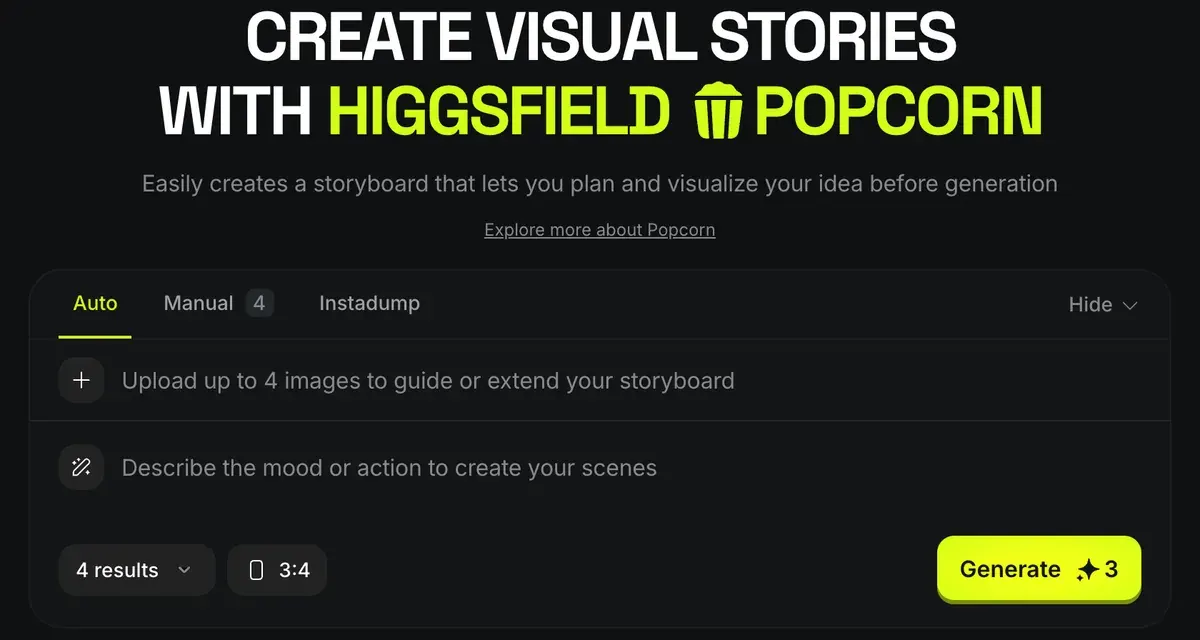
Popcorn’s own page opens on Auto mode, with room for up to 4 reference images, a prompt box and the credit cost on the Generate button Higgsfield Popcorn page, captured -
Choose a text prompt, image references or both as input. Add up to 4 references, such as your presenter’s portrait, the product and the location.
-
Name each reference by its number in the prompt. The help article’s example is “Man from image one in the setting of image three”.
How do references work?
Popcorn accepts up to 4 image references (portraits, props, locations) and merges them into one sequence: address each by its number in the prompt. For example: “Man from image one in the setting of image three, wearing the outfit from image four.”
Structure the prompt like a film cue: Subject, Setting, Style, Action, Atmosphere.
Higgsfield’s help article gives the reference rule (up to 4, addressed by number) and a five-part prompt structure. Higgsfield, How do I use Popcorn?, -
Pick Manual or Auto. In Auto, set the frame count; Higgsfield’s storyboard post gives 4, 6 or 8 as the choices.
-
Choose the aspect ratio. Pick 9:16 for Reels and TikTok, and match it to your reference photos. The help article says matching ratios gives “the most natural results”.
-
Write the prompt in the order the help article gives: subject, setting, style, action, atmosphere.
-
Press Generate. The button shows the credit cost before you confirm: 3 credits for a 4-frame set on 20 October 2026.
Fixes from Higgsfield’s help article
- Style drifts between frames: put the style words at the start of the prompt, so they apply to the whole set.
- Scenes look generic: describe what happens in the shot. Higgsfield’s storyboard post uses “a woman running through an alley chased by light reflections” as its example.
- Mood feels flat: use plain emotional words in the atmosphere part of the prompt.
- The look resets when you rerun: change the text prompt and keep the same uploads.
How do I get more accurate outputs?
The style drifts between frames. Lead with style keywords at the start of the prompt so the whole sequence follows them.
The scene looks generic. Describe the action rather than the genre: “a knight walks through fire” works better than “fantasy movie.”
Iterations keep resetting the look. Refine the text prompt instead of re-uploading inputs when generating again.
You can also edit a single frame after it is made. Change its background or framing and regenerate. The character and tone stay as they were.
Keeping the same face and product in every frame
Consistency in Popcorn starts with the first frame and the references. A clear reference photo becomes the anchor that later frames copy, across new locations and outfit changes, according to Higgsfield’s persona post.
Four habits follow from Higgsfield’s own advice:
- Upload sharp reference photos. A blurry product shot gives a blurry product in every frame.
- Describe each person and object once, clearly, when you combine several.
- Use plain descriptions of people. The storyboard post advises against brand names and celebrity identities in prompts.
- Pace Manual frames like real shots: a wide opener, a close-up of the product, a reaction.
Popcorn’s memory has a limit. It holds a face within one sequence; it does not store that face for next week. The help article draws the line. Popcorn keeps a look consistent inside a sequence; Soul ID keeps one person’s face across separate Soul images.
What is the difference between Popcorn and Soul ID?
Popcorn maintains consistency across the frames of one sequence. Soul ID is a trained identity that holds one person’s face across separate generations in the Soul models. They combine well: use a Soul-generated character as a Popcorn reference.
So for a brand presenter who fronts a whole campaign, train a Soul ID first and then build boards around that face. Soul ID needs 20 or more photos of the same person, and each plan caps its monthly Soul ID generations: Higgsfield Soul and Soul ID.
Higgsfield’s persona post draws the same line: Popcorn holds a character across storyboard frames, and Soul ID carries it into video.
The consistency problem
Higgsfield Popcorn handles it for storyboard and image sequences through frame-by-frame visual memory. Soul ID extends that to video across multiple models through trained identity.
Five of 52 public sources praise how Higgsfield keeps characters and products the same across shots, mostly through Soul ID and reference sheets (YouTube, Reddit).
Cost and plans
On 20 October 2026 the Generate button on Popcorn’s page charges 3 credits for a 4-frame set. The pricing table, read on 9 October 2026, lists 1.5 credits an image. The Generate button shows the cost before you confirm.
Plus costs $49 a month for 1,000 credits a month. At that rate a 4-frame set costs about $0.15. Starter costs $15 a month for 200 credits, which makes the same set about $0.23. Prices checked .
The pricing table puts a 5-second Kling 3.0 clip at 720p at about 7 credits. So a 4-frame set costs less than half of one clip. The board is the cheap place to throw away a weak idea.
You can start without paying. The storyboard page says free daily credits let you try “all of Popcorn’s features”. What free covers elsewhere: is Higgsfield free?.
Six of 52 public sources report that credits expire at the end of each period. Nine report refunds refused once any credit is used (Trustpilot, YouTube). Every plan and refund rule: Higgsfield pricing.
From storyboard to video
Popcorn stops at stills. The help article calls the frames a visual plan. It says to animate them with a video model such as Kling or Veo, using a frame as a start frame or a reference.
How do I turn a storyboard into video?
Use Popcorn frames as the visual plan, then animate them with the video models: a frame works as a start frame or reference for Kling or Veo, and chaining the final frame of one clip into the next keeps the motion continuous.
The storyboard page still shows an “export to Sora 2” button. Higgsfield’s Sora migration post of 3 October 2026 says Sora 2 “is no longer part of the Higgsfield model lineup”, so use the routes below.
| Route | What a frame does | Credits per 5 s at 720p |
|---|---|---|
| Kling 3.0 | Start frame, end frame or both | About 7 |
| Seedance 2.0 | Reference image for the clip | About 22 |
| Veo 3.1 Fast | First and last frame of the clip | Shown on the Generate button |
Scroll sideways for all 3 columns
Two frames in a row of your board make a ready-made start and end pair. Give them to Kling 3.0, write what happens between them, and the model draws the motion. The full method: Higgsfield transitions.
For a longer ad, chain the clips. The Kling help article tells you to use “the final frame of one scene as the start frame of the next” (Kling help article), so each cut lines up. Model by model: Kling on Higgsfield and Seedance on Higgsfield.
Send only the frames that work. Eight of 52 public sources report slow or failed generations that still cost credits (Reddit, YouTube). A clip you never needed is the expensive mistake.
Every other tool on the platform: how to use Higgsfield. Every Higgsfield guide in one place: the Higgsfield hub. Terms and user reports: the Higgsfield profile.
Questions about Higgsfield Popcorn
Is Higgsfield Popcorn free?
You can try it free. The storyboard page says free daily credits cover all of Popcorn’s features. After that, the Generate button showed 3 credits for a 4-frame set on 20 October 2026.
How many frames does Popcorn make?
Up to 8 in one sequence. To go further, use the last frame as a new reference and continue the story, as the storyboard page suggests.
Does Popcorn make video?
No. It makes stills. You turn them into clips with a video model such as Kling 3.0, Seedance or Veo 3.1.
What is the difference between Popcorn and Soul ID?
Popcorn keeps a face consistent inside one storyboard. Soul ID trains one person’s face from 20 or more photos and keeps it across separate generations. The help article says you can combine them.
Can I mix real photos and AI images?
Yes. The help article says one sequence can combine real photos with AI-generated images.
Every Higgsfield guide, sorted by job, is in the Higgsfield hub
Sources
- Higgsfield help centre: How do I use Popcorn?, Published 2 August 2026, modified 12 September 2026; Manual, Auto and Instadump modes, up to 8 frames, up to 4 image references, seven aspect ratios plus Auto, prompt order, fixes, Popcorn and Soul ID. Checked
- Higgsfield: AI storyboard generator, Up to 8 images in one sequence, three steps, free daily credits that cover all of Popcorn’s features, an export to Sora 2 button. Checked
- Higgsfield blog: How to use AI for storyboards, 22 October 2025; Manual and Auto modes, 4, 6 or 8 shots, prompting tips. Checked
- Higgsfield blog: How to keep an AI persona consistent, 30 June 2026; visual memory from the first frame, character anchoring from a reference image, consistency within a session. Checked
- Higgsfield help centre: Which AI model should I use?, Soul, Popcorn and DOP named as Higgsfield’s own models. Checked
- Higgsfield help centre: How do I use Kling?, Start and end frames, Elements, the last frame of one scene as the start of the next; dated 1 August 2026. Checked
- Higgsfield: Veo 3.1 on Higgsfield, Start and End Frame Mode on Veo 3.1 Fast, reference images on Veo 3.1 Standard. Checked
- Higgsfield blog: Sora API migration guide, 3 October 2026; Sora 2 is no longer in the Higgsfield model lineup. Checked
- Higgsfield: Higgsfield pricing, Popcorn at 1.5 credits an image (read 9 October 2026; the Generate button on higgsfield.ai/popcorn shows 3 credits for a 4-result set on 20 October 2026); Kling 3.0 about 7 credits and Seedance 2.0 about 22 per 5 seconds at 720p; plan prices read in a browser 19 October 2026; prices exclude VAT. Checked
- Trustpilot, Reddit and YouTube: Higgsfield user reports, 52 public sources synthesised, checked 28 September 2026. Checked
What changed on this page
- Higgsfield’s prices went back: Starter is 15 dollars a month for 200 credits, Plus 49 a month or 39 billed yearly for 1,000 credits, and Ultra 129 or 99 billed yearly has a card again (was Starter 19 for 270, Plus 59 or 47 for 1,200).

Alexandre S.
Alexandre S. is a creative ad strategist and copywriter with ten years' experience in digital marketing across multiple channels.
Related pages
-
 Guide Higgsfield Cinema Studio
What Higgsfield Cinema Studio does, its camera and lens controls, what a clip costs, and when it beats plain prompting for ads. Checked 16 October 2026.
-
 Guide Higgsfield prompts for ads
Higgsfield runs Kling, Veo and Seedance, so each prompt follows that maker’s rules and costs. Ad prompts by model, with credit costs, checked 2 October 2026.
-
 Guide UGC script template for ads
A UGC ad script template to copy, 20 hooks by type and examples timed for 15, 30 and 45 seconds, for creators or AI actors. Checked 15 October 2026.
-
 Guide Is Higgsfield free?
Yes: Higgsfield has a free plan with daily credits, a watermark and few models. Where more free credits come from, and what the one-day trial renews to.


