Shoppable video ads
A shoppable video ad is a video ad with products you can tap. A product card, a tag or a row of product tiles sits on or under the clip. One tap opens the product page (TikTok help), so the viewer goes from watching to buying in two steps.
Every platform builds these ads from a product catalogue. That is a list of your products with their prices and photos, sent from your shop as a product feed. TikTok asks for at least four products in stock. Google shows at least four product images under a YouTube ad.
| Platform | Ad format | What the viewer taps | Catalogue rule |
|---|---|---|---|
| TikTok, your website | “Catalog Ads” (Video Shopping Ads) | Products from your catalogue on the video | At least 4 products in stock, approved and activated |
| TikTok Shop | Video Shopping Ads for TikTok Shop | A product card or anchor link | TikTok Shopping set up first; age 18+ |
| Meta (Facebook, Instagram) | Advantage+ catalog ads | A product from the catalogue, or a product tag | 20 products recommended, none required |
| YouTube | Video or Demand Gen campaign with a product feed | A product panel below the ad | A “Merchant Center” feed; at least 4 products |
| Video shopping ads | The product Pin behind the video | Catalogue uploaded as product Pins | |
| Your own site | A shoppable video widget | A product tag with add to cart | Your store’s products |
Scroll sideways for all 4 columns

What you need before any shoppable video ad
Three things sit behind every row of that table. The first is the catalogue, the product list each platform reads. The second is the feed that keeps it current, so a price change on your store reaches the ad. The third is a tracking tag on your site, so the platform sees who viewed, added to cart and bought.
Meta spells the tag out. Its developer guide says that before you set up Advantage+ catalog ads “you must first be tracking” three standard events: ViewContent, AddToCart and Purchase. “IDs must match the IDs found in your product catalog”, so the product someone views is the one the ad shows (Meta Pixel guide).
Google reads its feed from “Merchant Center”, Google’s product database for shops. Pinterest takes your products as product Pins through its Catalogs tool, and its business page says a Shopify shop can connect directly (Pinterest shopping).
Then you need the videos: one per product the ad can show.
Shoppable video on TikTok: catalogue ads and TikTok Shop
TikTok runs two routes, split by where the sale happens.
For sales on your own website, TikTok’s “Catalog Ads” use “images, videos, and product information from your Catalog”. You need “at least 4 products in your catalog that are in stock, approved and activated” (TikTok help, updated March 2026). With no videos of your own, TikTok builds single videos or carousels from your catalogue images.
For sales inside TikTok Shop, the help page says the feature “allows you to make your TikTok in-feed video ads shoppable”.
Using product links in Video Shopping Ads
Shoppable in-feed ads. You can make your TikTok in-feed video ads shoppable. When people on TikTok see your Ad, they can browse and buy products on your TikTok Shop using product links.
Objective. To use product links in your ads, you’ll need to choose Sales as your campaign objective.
Viewers tap “the Product card or anchor link” and buy in your shop. TikTok Shopping must be set up first. The ads run on TikTok’s own placement only, with targeting from age 18 (TikTok Shop help, updated May 2024).

A TikTok Shop video also has to meet the Shop’s quality rules. TikTok Shop’s quality document, as PPC Land and Switcher Studio report it, asks shoppable videos for real footage and the creator’s face with the product. AI UGC for TikTok Shop sets out what that means for AI presenters.
Shoppable video examples on TikTok
TikTok’s own case pages show the format at three levels of effort, with the figures TikTok publishes.
- YOUKNOW. Clothing, a New Zealand streetwear label, ran Video Shopping Ads (Catalogue) on the Product Sales objective. TikTok reports “more than 15x” return on ad spend and a 102 per cent rise in click-through rate (case page).
- “Gray Madonna”, a Korean fashion brand, uploaded no videos. TikTok built them from catalogue images with its templates; the page reports 3.75x ROAS and a 2.3 per cent conversion rate (case page).
- The Beauty Story, a Singapore skincare brand, paired catalogue ads with creator videos. It found the creators through TikTok Creator Marketplace and reports 12.5x ROAS on Video Shopping Ads (case page).
Shoppable video on Meta: Advantage+ catalog ads with product video
Meta’s shoppable format is the Advantage+ catalog ad, which fills an ad template with products from your feed. A catalogue can carry a video for each product as well as an image.
Meta’s developer guide says that with Allow product video, “advertisers can deliver video assets from their catalog instead of product images”, and that “Allow product video is on by default”.
Allow product video
When Allow product video is enabled, advertisers can deliver video assets from their catalog instead of product images in Advantage+ catalog ads when it’s likely to improve their cost per result.
Each product takes one downloadable video URL of up to 200 MB. Meta recommends “a minimum of 20 products” but sets “no required minimums” (Meta developer guide).
Product tags are the second Meta route. Meta’s Advantage+ creative page lists Add product tags among the enhancements that “may be turned on by default”, for traffic or sales campaigns with a catalogue (Advantage+ creative). What Meta’s Advantage+ creative AI does to your ads shows where to switch each one off.
A shoppable video example on Meta
On, the Swiss running brand, ran more than 10,000 product-level videos as catalogue ads on Meta. Celtra, the creative vendor that built them, reports a “41% increase in ROAS on Meta” and a “45% decrease in cost per purchase” (Celtra case page, updated 14 October 2024).
Shoppable video on YouTube: product feeds in video ads
Google calls it turning “your YouTube video ads into a virtual storefront”. You attach a “Merchant Center” feed when you create a Video campaign, and “the panel below the ad automatically expands to showcase your products” (Google Ads Help).
Show your products with your video ads
Turn your YouTube video ads into a virtual storefront when you add a product feed. With this creative add-on, you can show browsable product imagery below your video ads and inspire customers to visit your website to learn more about your business or make a purchase.
Two limits come with it. Products show only when the viewer’s phone is held upright, in portrait mode. And “a minimum of 4 product images can be shown below the video ad”. Pick the feed with care: “you won’t be able to change it after you save your campaign”.
Demand Gen campaigns, which run across YouTube, Discover and Gmail, take a feed too. Google recommends “at least 4” products and 50 as best practice, and says “a vertical video will enable your ad to serve on YouTube Shorts” (Demand Gen help).
Shoppable video examples on YouTube
Google’s help page gives one figure, from March 2021: advertisers that added product feeds to Video action campaigns “achieve over 60% more conversions” (internal data, 941 campaigns; Google Ads Help).
Central Retail, a Thai retailer, ran a Video action campaign with product feeds beside one without. Google’s case page, from May 2022, reports “52X conversion volume” and a “+32% conversion rate” (Google case page).
Shoppable video on Pinterest: video shopping ads
Pinterest lists four shopping ad formats built from your catalogue, and one is the video shopping ad: “a video clip promoting a relevant product”. Its help page adds a rule worth knowing: “If your item has an associated static image as well as a video, we’ll promote the video in the shopping ad” (Pinterest Help).
So on Pinterest, adding a video to a catalogue item changes the ad by itself.
Pinterest’s shopping page cites three catalogue campaigns, none of them for video specifically. Mejuri reports 46 per cent higher ROAS on a Performance+ campaign. Andrew Martin reports 31.74 per cent higher ROAS across catalogue sales and conversion campaigns. H&M reports 2.5 per cent more checkouts from an always-on shopping campaign (Pinterest shopping).
Shoppable video on your own site: widgets and apps
On your store, shoppable video is a widget on the product page, such as a carousel or a floating player. Each clip carries its product tags.

Shopify apps do the tagging. Tolstoy’s page describes it as “Tag the right product or variant”, then publishing “shoppable feeds, Stories, carousels, and widgets” (Tolstoy).
MakeUGC has one too. “MakeUGC Shoppable Videos & UGC” launched on the Shopify App Store on 7 August 2026, with “App support provided by MakeUGC”. Its listing says you can “Tag products in-video so shoppers can add to cart while they watch”.
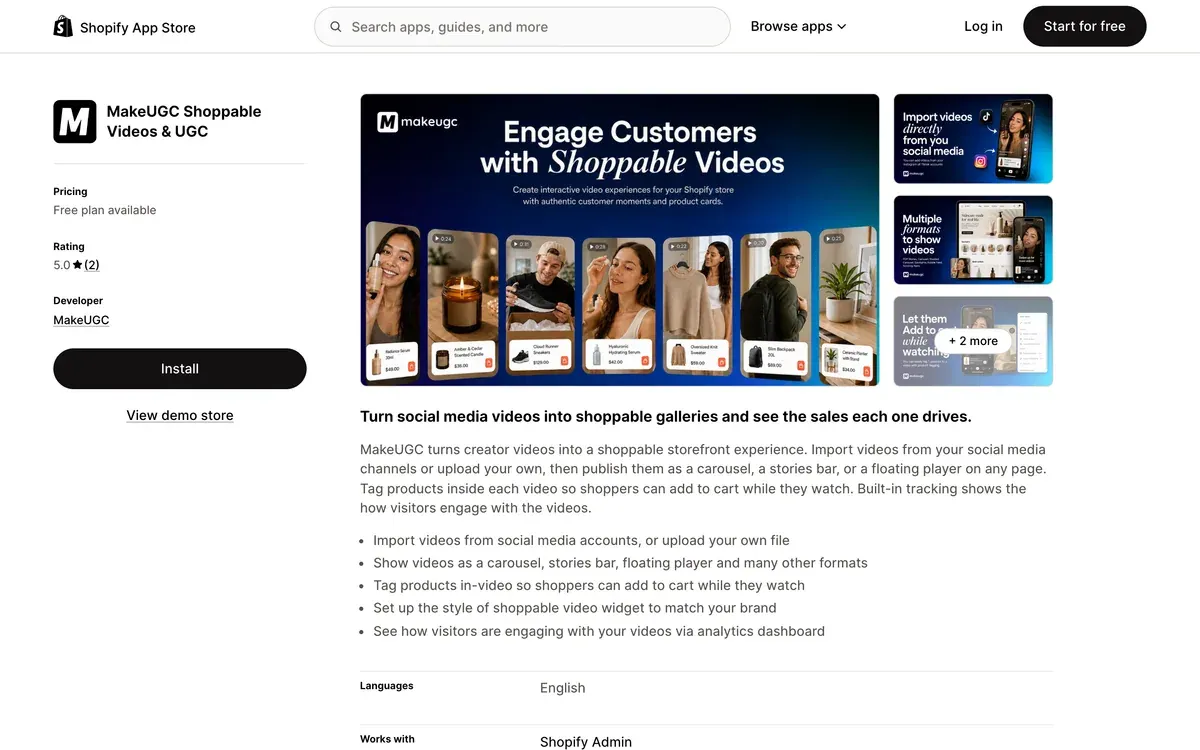
Videos come from your social accounts or your own uploads, and a dashboard shows sales per video.
The free plan covers “1 video widget, up to 5 shoppable videos”; paid tiers start at $29 a month (Shopify App Store).
The app asks for wide store access: edit products and collections, view 60 days of orders and edit Shopify admin files. It shows two reviews on 21 October 2026.
Making shoppable videos with AI
Each format above needs a video per product, or at least per product group. A catalogue of 40 products is 40 clips before you test a single hook. The simplest clip for a product tag is a person holding the product and saying what it does.
MakeUGC makes that clip from one product photo. At one photo per clip, that is 40 product photos.
Its product-in-hand page asks for “one clear product photo”, removes the background, lets you pick from “1,000+ AI actors” and renders in “about two minutes”, with export “in up to 4K” (product in hand). Its homepage lets you start from “a product URL”, so a store listing can feed the script.
Starter costs $59 a month (MakeUGC pricing).
On Shopify, MakeUGC sells both pieces as separate products. One makes AI actor clips for your ads. The other is a widget that tags uploaded videos on your product pages.
Before a TikTok Shop upload, check the route. The quality document as PPC Land and Switcher Studio report it does not say whether an AI actor counts as the creator. Ads that send buyers to your own site fall under TikTok’s ad policy, which asks for the AIGC label or a disclaimer of your own.
AI UGC product in hand compares the tools that make these clips, and the MakeUGC profile covers its plans and user reports. For the other shots in a product ad, see the AI B-roll generators, and for formats that work, the UGC video examples. The MakeUGC hub gathers its features and plans.
More pages for MakeUGC users, sorted by job, in the MakeUGC hub
Sources
- TikTok Business Help Center: How to create Video Shopping Ads (for TikTok Shop), last updated May 2024; product card or anchor link, TikTok Shopping set up first, TikTok placement only, age 18+. Checked
- TikTok Business Help Center: How to create Catalog Ads, last updated March 2026; at least 4 products in stock, approved and activated; videos or carousels from catalogue images. Checked
- TikTok for Business: YOUKNOW. Clothing success story, Video Shopping Ads (Catalogue), Product Sales objective; more than 15x ROAS, CTR up 102 per cent, CPC down 56.8 per cent. Checked
- TikTok for Business: Gray Madonna success story, Video Shopping Ads built from catalogue images with TikTok templates; 3.75x ROAS, 2.3 per cent CVR. Checked
- TikTok for Business: The Beauty Story success story, creators found through TikTok Creator Marketplace; 12.5x ROAS on Video Shopping Ads. Checked
- Celtra: On x Celtra product-level video, last updated 14 October 2024; 10,000+ product-level video catalogue ads; 41% increase in ROAS on Meta, 45% decrease in cost per purchase. Checked
- Think with Google: Central Retail e-commerce video advertising, May 2022; Video action campaign with product feeds against a standard Video action campaign; 52X conversion volume, +32% conversion rate. Checked
- Switcher Studio: TikTok Shop quality rules, Switcher Studio, 16 June 2026; quotes the Shop quality document on shoppable video footage and the creator’s face with the product. Checked
- PPC Land: TikTok Shop’s quality rules ban AI voices and still images from LIVEs, dates the Academy document to 23 May 2026. Checked
- TikTok: TikTok ads policy, Misleading and false content, section on AI-generated content (AIGC): the AIGC label or the advertiser’s own disclaimer; last updated April 2026. Checked
- Meta for Developers: Allow product video in Advantage+ catalog ads, Allow product video is on by default; one downloadable video URL per product, 200 MB each; 20 products recommended, no required minimum. Checked
- Meta for Developers: Meta Pixel for Advantage+ catalog ads, AddToCart, Purchase and ViewContent tracked first; event IDs match catalogue IDs. Checked
- Meta Business Help Center: About Advantage+ creative, read from the Wayback Machine capture of 21 September 2026, since facebook.com returns an empty page to automated reads; Add product tags may be on by default for traffic or sales campaigns with a catalogue. Checked
- Google Ads Help: Show your products with your video ads, undated; product panel below the ad, portrait mode only, 4 product images minimum; feed cannot be changed after the campaign is saved; Google internal data, March 2021, 941 Video action campaigns. Checked
- Google Ads Help: Use a product feed to show your products in Demand Gen campaigns, undated; the Google product feed first; at least 4 products recommended, 50 as best practice; vertical video serves on YouTube Shorts. Checked
- Pinterest Help: Shopping ads, undated; four shopping ad formats, video shopping ads among them; video promoted over a static image when an item has both. Checked
- Pinterest Business: Shopping on Pinterest, undated; H&M, Mejuri and Andrew Martin campaign results; tag products in organic Pins. Checked
- Tolstoy: Tolstoy Shopify video app, tag a product or variant, publish shoppable feeds, Stories, carousels and widgets. Checked
- Shopify App Store: MakeUGC Shoppable Videos and UGC, launched 7 August 2026, app support provided by MakeUGC; free plan with 1 widget and up to 5 shoppable videos; in-video product tags with add to cart. Checked
- MakeUGC: MakeUGC product in hand feature, one product photo, background removed, 1,000+ actors, about two minutes a render, export up to 4K. Checked
- MakeUGC: MakeUGC homepage, start from a prompt, a product URL or a reference ad. Checked

Alexandre S.
Alexandre S. is a creative ad strategist and copywriter with ten years' experience in digital marketing across multiple channels.
Related pages
-
 Guide Amazon product video makers and shoppable video with AI
What Amazon listing and Sponsored Brands videos must meet, what a shoppable video costs from a studio against AI, and which generators fit. Checked 6 Oct 2026.
-
 Guide Static vs dynamic ads
A static ad is one fixed image. On Meta, “dynamic” means catalogue ads, the dynamic creative option or, for many new Sales ad sets, flexible ads.
-
 Best list AI ads for Shopify stores
Shopify’s Sidekick makes images at no extra cost; its terms say nothing on using them in ads. Tools that make ads from a store, by job. Checked 2 October 2026.
-
 Guide Facebook ad specs and Instagram ad sizes
Facebook and Instagram ad sizes, ratios, video lengths and text limits from Meta’s Ads Guide, plus the AI tools that export each ratio. Checked 15 Oct 2026.


