AI UGC product in hand: which tools can do it
Most AI UGC tools that document product in hand keep it above the entry plan. MakeUGC needs Pro, CreateUGC needs Scale and JoggAI needs a paid plan; Tagshop lists it from Starter.
| Tool | Cheapest plan with it | Its price (USD a month) | Entry plan (USD a month) | Paid ads on that plan | How the product gets in |
|---|---|---|---|---|---|
| MakeUGC | Pro | $149 | $59 | Conditional | Not published |
| CreateUGC | Scale | $39.90 | $26.90 | Unclear | Not published |
| Tagshop | Starter | $29 | $29 | Conditional | Not published |
| JoggAI | Starter | $29 | 0 (Free) | Conditional | Product photo placed with an avatar |
| HeyGen | Not published | Not published | 0 (Free) | Conditional on paid plans | Product photo combined with an avatar, then animated |
| TikTok Symphony | Inside Symphony Creative Studio | Not published | Not published | Unclear | Avatar images holding the product, then animated |
| Seedance | Not published | Unverified | Unverified | Unclear | Scene generated from references |
Scroll sideways for all 6 columns
Topview lists product avatar videos without naming a plan; its entry plan is Basic at $18 a month (pricing page, read ). Arcads and Creatify document no product-in-hand feature on the pages read; Arcads’ prices are unverified.
Two ways tools put a product in an AI presenter’s hand
The two methods fail differently.
The first places your product photo into a presenter shot. HeyGen’s Academy describes it step by step. You upload a product image and an avatar photo, then pick one of the combined images. A script turns it into video on Avatar IV (up to 180 seconds) or Veo 3.1 (HeyGen Academy).
The Academy advises “a small or handheld product, such as a phone or bottle”, since larger items “may be scaled down so they fit naturally in the avatar’s hand”.
The label on the pack comes from your photo, so text survives. The hand and the grip are generated, so that is where errors land.
The second generates the whole scene from references. Seedance 2.5 takes up to 50 reference inputs and makes 30-second clips (Lumina, BytePlus’s Seedance service, read 23 September 2026). Here the model redraws the product, so the pack can drift as the clip runs.
Which plan includes product in hand
 MakeUGC
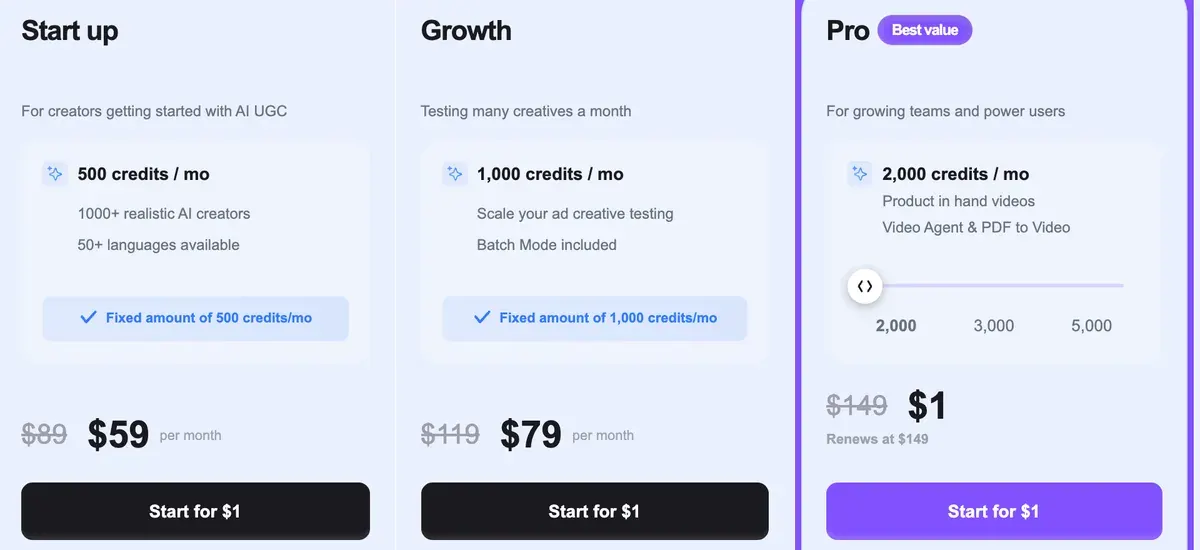
MakeUGC lists product-in-hand videos on Pro at $149 a month, against Start up at $59 a month (pricing page, read ). Pro also carries 2,000 credits a month.
CreateUGC
CreateUGC lists product in hand from Scale at $39.90 a month, with Launch at $26.90 a month leaving it out (pricing page, read ). Its terms are a dropshipping platform’s general terms and say nothing about AI video, so paid-ad rights are unclear (rights row).
Tagshop
Tagshop lists product holding and wearing videos on Starter at $29 a month, its entry plan, with “Upto 5 videos” a month (pricing page, read ). The rights row quotes its output clause.
 JoggAI
JoggAI’s pricing FAQ says Product Avatar and the Product Ad Tools “require a paid plan”, and the Starter card lists them. Starter costs $29 a month (pricing page, read ).
The tools that name no plan for it
Topview lists product avatar videos among its outputs without tying them to a plan, and has no free plan. HeyGen’s Academy page names no plan for its product feature, and HeyGen’s terms keep Free output out of ads.
For Arcads and Creatify, no product-in-hand feature is documented on the pages read. Users report Arcads making product-holding shots from one photo (4 of 64 sources: YouTube, YouTube). The Arcads alternatives page compares the tools that replace it.
What one product-in-hand ad costs
Only two of these tools, Tagshop and CreateUGC, give a figure you can turn into a cost per product-in-hand ad, and neither ties the figure to one video length.
Tagshop’s Starter at $29 a month works out at $5.80 per video, if every credit is used (pricing page, read ).
CreateUGC’s Scale says 200 credits make about 20 videos. At its list price that is $2.00 a video, if every credit is used and each video costs the average.
MakeUGC publishes no credits per video, so a Pro product-in-hand ad has no cost per ad to work out. The AI UGC cost guide and the AI ad cost calculator cover avatar ads without the product.
What goes wrong with product shots, per user reviews
Users of MakeUGC, Arcads and Creatify report hands and product details going wrong (5 of 29, 4 of 64 and 17 of 61 sources).
- MakeUGC: lip sync drifts and hands move oddly, so clips need a human check and some editing (5 of 29 sources: YouTube, YouTube).
- MakeUGC: monthly allowances are small for running many versions, and product in hand sits on Pro (2 of 29 sources: YouTube, YouTube).
- Arcads: actors look awkward holding or using a real item, and a wrong product can appear (4 of 64 sources: Reddit, Trustpilot).
- Creatify: outputs miss the brief, wrong product details among the faults (17 of 61 sources: Trustpilot, Trustpilot).

Budget a retake for each product shot before you plan volume. How to make AI UGC ads sets a retake budget in step 5.
Product in hand on TikTok: Symphony’s product clips and their label
TikTok Symphony makes clips of an avatar holding a product, wearing clothing or showing an app. They are made inside Symphony Creative Studio, which advertisers reach through TikTok Ads Manager. At launch those clips ran five seconds (TikTok, 16 June 2025).
The help page updated June 2026 states no output length, only a reference image or video “less than 10 seconds”.
Every export is labelled: “An AI-generated label is added to all exported videos per TikTok ad policy” (Symphony help page). TikTok’s AI-generated content label for ads covers the label, and AI UGC for TikTok Shop the shop’s own rules.

For a product video with no presenter, product photo to video covers the tools.
Can the AI presenter say they use the product?
The FTC’s rule on fake testimonials makes it a violation “for a business to write, create, or sell” a testimonial that materially misrepresents “that the reviewer or testimonialist used or otherwise had experience with the product” (16 CFR 465.2(a)(2)).
The rule’s text covers an AI presenter holding your bottle and saying it works for them; are AI UGC ads legal? sets out the paragraphs.
Synthesia goes further for stock avatars: they are for content “Free from personal opinions, endorsements, or sensitive claims” (help centre, 22 July 2026).
HeyGen bars presenting output as “entirely human generated” (terms section 2, 23 July 2026), and JoggAI’s terms carry the same bar. A presenter can show the product and describe what it does; claiming to use it is the line the FTC rule draws.
Sources
- MakeUGC: MakeUGC pricing page, product-in-hand videos listed on the Pro card. Checked
- CreateUGC: CreateUGC pricing page, product in hand listed from the Scale plan. Checked
- Tagshop AI: Tagshop pricing page, product holding and wearing videos listed on Starter. Checked
- JoggAI: JoggAI pricing page, FAQ, Product Avatar and Product Ad Tools
require a paid plan
; listed on the Starter and Creator cards. Checked - Topview: Topview pricing page, plans from Basic; no free plan; product avatar not tied to a plan on the page. Checked
- HeyGen: How to add products to your avatar (HeyGen Academy), undated; product image and avatar photo combined into images, then a video on Avatar IV or Veo 3.1; no plan named. Checked
- BytePlus: Seedance 2.5 on Lumina (BytePlus), launch banner, 30-second clips and up to 50 reference inputs. Checked
- TikTok Business Help Center: How to generate videos with Symphony Creative Studio, last updated June 2026;
An AI-generated label is added to all exported videos per TikTok ad policy
; reference image or videoless than 10 seconds
. Checked - TikTok Newsroom: Creativity at Scale: Meet our latest Symphony Generative AI Tools, published 16 June 2025; Showcase Products clips five seconds long at launch. Checked
- eCFR, US Government Publishing Office: 16 CFR 465.2, Fake or false consumer reviews, consumer testimonials, or celebrity testimonials, paragraph (a)(2), a testimonialist who did not use the product. Checked
- Synthesia: Why can’t I use stock avatars for my content? (Synthesia help centre), updated 22 July 2026; stock avatars may not endorse products or services. Checked
- HeyGen: HeyGen terms, last updated 23 July 2026; section 2, output presented as entirely human generated. Checked
- JOGG PTE. LTD.: JoggAI terms of use, undated; representing output as entirely human generated. Checked
What changed on this page
- Page written.

Alexandre S.
Alexandre S. is a creative strategist and copywriter with ten years in content and SEO. He writes and edits short-form ads, works in English and French, and reads the pricing and terms pages behind every tool on this site before anything is written about it.
Related pages
- Alternatives Arcads alternatives
Seven tools that make AI actor ads like Arcads, set against it on billing step, cost of a 30-second video and ad-use terms, checked 24 September 2026.
- Profile Creatify for UGC ads
Creatify bills avatar video in 15-second blocks, so a 30-second ad uses 10 credits. Its ad terms and 20 latest Trustpilot reviews, read 24 September 2026.
- Category AI product video generators
11 AI product video generators that make ads from a product page or photo: cost, free plans, ad terms. Prices checked 1 October 2026.
-
 Data AI ad tool price tracker
59 of 76 AI ad tools show a list price read on the vendor’s own page, last checked 25 September 2026, with the cost per clip or image where a rate allows.


