Wan 2.2 and LTX-2 on Runpod
Wan 2.2 and LTX-2 are open video models. You download the files and run them yourself in ComfyUI, on a graphics card you own or rent. Runpod rents those cards by the second.
Wan 2.2’s small 5B model and LTX-2 fit a 24 or 32 GB card, the RTX 4090 or RTX 5090. At 720p, Wan’s 14B models want 48 GB in the lighter fp8 format. At full size they want 80 GB or more, such as the 96 GB RTX PRO 6000.
Worked from published generation times, a short clip costs from under a cent to about a dollar of GPU time. The dollar comes from Alibaba’s reference script.
| Model | What it makes | Graphics memory (source) | Runpod card that fits | Licence for ads |
|---|---|---|---|---|
| Wan 2.2 TI2V-5B | Text or image to video, 720P at 24 FPS | 24 GB (Wan team), about 8 GB with offloading (ComfyUI) | RTX 4090, 24 GB | Apache 2.0 |
| Wan 2.2 T2V and I2V A14B | Text to video, image to video, 480P and 720P | 80 GB on one GPU (Wan team); 24 GB in fp8 at 480p (Runpod) | RTX PRO 6000, 96 GB, for 720p | Apache 2.0 |
| LTX-2 and LTX-2.3 | Video with synchronised sound | A 720p 4-second clip inside 32 GB (NVIDIA) | RTX 5090, 32 GB | Free under $10,000,000 of yearly revenue |
Scroll sideways for all 5 columns

What are Wan 2.2 and LTX-2?
Wan 2.2 is Alibaba’s open video family. Its newer version, Wan 3.0, is sold per second through Alibaba Cloud’s API instead. Wan 2.2’s GitHub page lists a 5B model that turns text or an image into 720P video (Wan2.2 on GitHub). Its 14B models cover text to video, image to video, speech to video and character animation.
The “B” is billions of parameters, a rough measure of model size. Bigger models need more graphics memory, called VRAM, which is the deciding number when you rent a card.
LTX-2 is Lightricks’ open model, and its 2.3 version makes video and sound in one pass. The LTX-2.3 model card says it is “designed to generate synchronized video and audio within a single model”, and points ComfyUI users to the built-in LTXVideo nodes.

Both run in ComfyUI, a free app where each step of the job is a box on a canvas, wired to the next. Wan 2.2 has been in ComfyUI since 28 July 2025.
Can you use Wan 2.2 and LTX-2 clips in ads?
Yes for both, with one revenue condition and a list of prohibited uses on LTX-2. Runpod rents the hardware, so the model’s own licence decides what you may do with the clips.
Wan 2.2 is under Apache 2.0, a permissive licence that allows commercial use. The Wan team’s repository states: “The models in this repository are licensed under the Apache 2.0 License.”
Licence
Licence The models in this repository are licensed under the Apache 2.0 License.
Outputs We claim no rights over the your generated contents, granting you the freedom to use them.
5B model The TI2V-5B model can also run on consumer-grade graphics cards like 4090.
LTX-2 is under the LTX-2 Community License Agreement, dated 5 January 2026. It grants use “for any purpose”, subject to the prohibited uses in its Attachment A, such as deepfakes made without consent. It covers every LTX-2 version released since that date, LTX-2.3 included.
For ad work, the revenue line is the condition to check. Entities with annual revenues of at least $10,000,000 “are required to obtain a paid commercial use license” (LTX-2 licence).
Section 2.1, grant of rights (dated 5 January 2026)
Entities with annual revenues of at least $10,000,000 (the “Commercial Entities”) are required to obtain a paid commercial use license in order to use LTX-2 and Derivatives of LTX-2.
The threshold counts the whole group, subsidiaries included. Below it, ad use is royalty-free, and Lightricks “claims no rights in the Output you generate”.
MiniMax H3’s open licence excludes the US, the EU, the UK and South Korea (MiniMax H3 licence). For ads there, it stays off the list.
How much VRAM do you need, and which Runpod GPU fits?
Match the model and resolution to the card’s memory first, then compare price. When a model does not fit, ComfyUI moves part of it into the pod’s ordinary memory, which works but runs much slower.
Wan2.2 in ComfyUI
Templates Workflows in this guide can be found in the Workflow Templates.
5B memory The Wan2.2 5B version should fit well on 8GB vram with the ComfyUI native offloading.
Licence The Wan2.2 series models are based on the Apache 2.0 open source license and support commercial use.
Runpod’s own Wan 2.2 guide, updated 22 October 2026, gives memory tiers by job (Runpod’s Wan 2.2 guide). The rates in the table come from Runpod’s pricing page.
| Job | Memory | Card | Secure Cloud an hour | Community Cloud an hour |
|---|---|---|---|---|
| TI2V-5B at 1280 by 704 | 24 GB | RTX 4090 | $0.89 | $0.34 |
| 14B in fp8 at 480p or 640 by 640 | 24 GB | RTX 4090 | $0.89 | $0.34 |
| 14B in fp8, longer clips or LoRAs | 32 GB | RTX 5090 | $1.19 | $0.69 |
| 14B in fp8 at 720p | 48 GB | L40S | $1.09 | $0.79 |
| 14B at 720p with no offloading | 80 GB or more | RTX PRO 6000, 96 GB | $2.49 | $1.69 |
Scroll sideways for all 5 columns
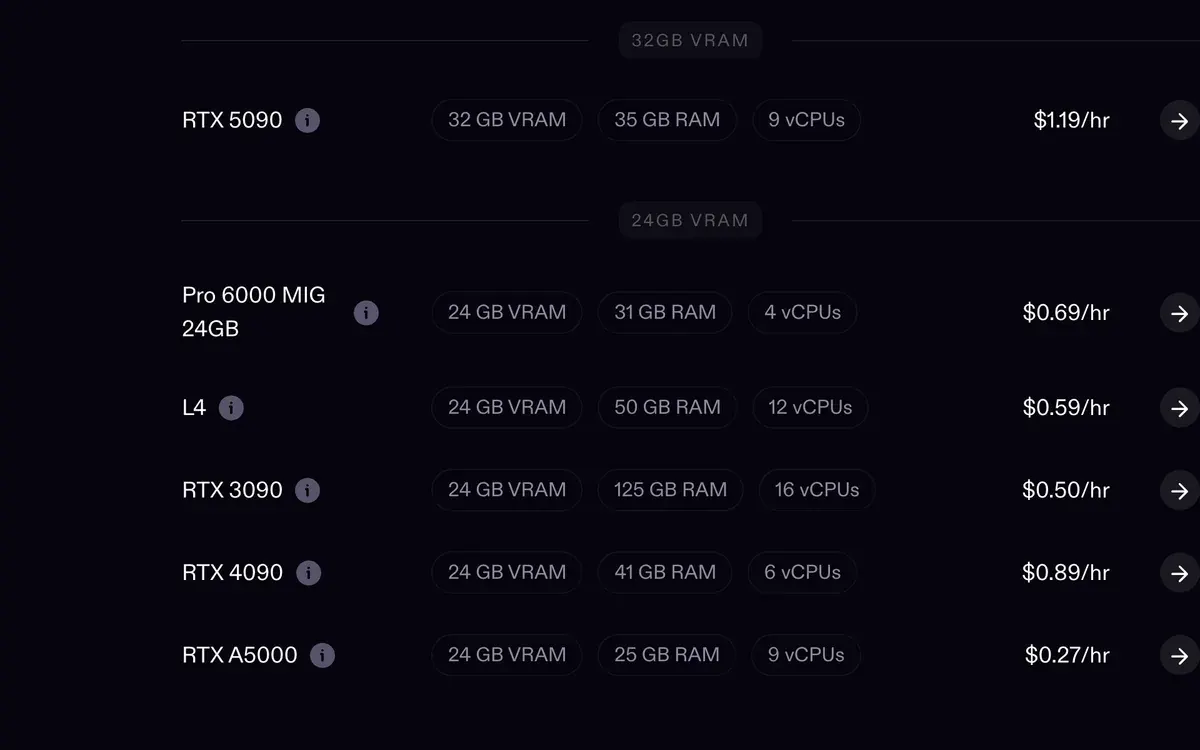
The fp8 in the table is a lighter file format: the model’s numbers are stored with less precision, so it takes about half the memory.
On our own Runpod account we see the same wall from the image side. Image models of 6 to 17 GB sit comfortably on a 5090’s 32 GB. A video model of about 40 GB overflows it and offloads.
That is why a 96 GB card can cost less per clip than a cheaper card that has to offload.
What does one clip cost on Runpod?
From under a cent for a short LTX-2 clip to about a dollar for a 720p Wan 14B clip on Alibaba’s reference script. Each figure below is computed: a published generation time multiplied by Runpod’s hourly rate.
| Clip | Published time (source) | Card | Secure Cloud | Community Cloud |
|---|---|---|---|---|
| LTX-2, 4 seconds, 720p, 24 fps | About 25 seconds (NVIDIA) | RTX 5090 | $0.008 | $0.005 |
| LTX-2, 8 seconds, 720p | About 3 minutes (NVIDIA) | RTX 5090 | $0.06 | $0.03 |
| Wan 2.2 14B, 5 seconds, 640 by 640, Lightning LoRA | About 71 seconds (Runpod, on an RTX 4090D) | RTX 4090 | $0.018 | $0.007 |
| Wan 2.2 14B, 5 seconds, 640 by 640, 20 steps | About 513 seconds (Runpod, on an RTX 4090D) | RTX 4090 | $0.13 | $0.05 |
| Wan 2.2 TI2V-5B, 5 seconds, 720P | Under 9 minutes (Wan team, consumer GPU) | RTX 4090 | $0.13 | $0.05 |
| Wan 2.2 14B, 720p, 40 steps, clip length not stated | 17.4 minutes (Alibaba benchmark) | H100 SXM | $1.16 | $0.78 |
Scroll sideways for all 5 columns
Runpod measured the 71 and 513 seconds on a warm run (models already loaded) on an RTX 4090D, the 4090’s export version with fewer cores. They are priced here at the 4090 rate.
NVIDIA’s three minutes for 8 seconds includes the slowdown when the clip outgrows 32 GB. The Wan team’s 9 minutes is an “under” figure, so that line is a ceiling. Loading models before the first clip bills too and sits outside these rows.
The Lightning LoRA, a small add-on file that cuts Wan’s sampling to 4 steps, takes the same clip from about 513 seconds to about 71.
For scale, here is a figure measured on our own account. A FLUX 3 Klein fast image on a Secure Cloud RTX 4090 takes about 28.5 seconds, or $0.007 each. The ComfyUI on Runpod guide has that table.
RTX 5090 or RTX 4090 for Wan in ComfyUI?
The RTX 4090 for the 5B model and for 14B at 480p; the RTX 5090 when 24 GB runs out. The 5090 costs about a third more an hour on Secure Cloud, so it pays only when the extra 8 GB stops ComfyUI from offloading. On Community Cloud it costs about twice as much ($0.69 against $0.34).
Runpod’s guide puts the 5090’s 32 GB at the 14B jobs that need headroom: longer clips, or LoRAs loaded on top. For LTX-2 the 5090 is the card to rent, since NVIDIA’s 4-second 720p clip fits inside its memory.
Past 32 GB, skip both. A 48 GB L40S costs less an hour than a Secure Cloud 5090. For full 14B at 720p, the 96 GB RTX PRO 6000 holds the whole model.
How to set up Wan 2.2 with HearmemanAI’s template
This route downloads the models and workflows for you on the pod’s first start. It uses a community template, published on Runpod by HearmemanAI. Attach a network volume (Runpod’s permanent disk, kept when the pod is gone) so the download happens once.

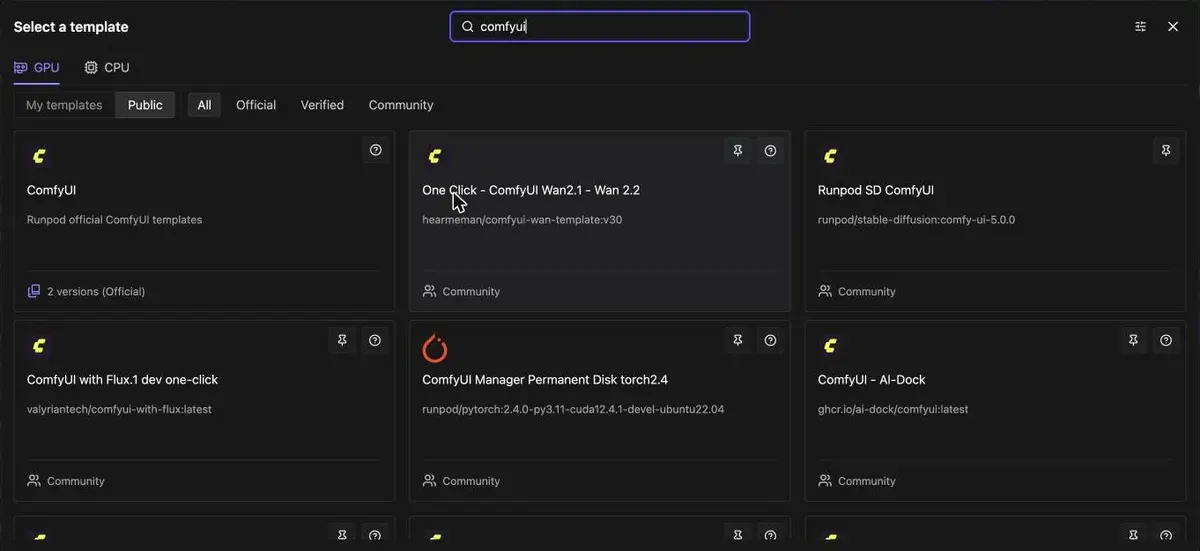
- Find the template. In the Runpod console, open Pods, then Deploy, and search “comfyui”. Pick “One Click - ComfyUI Wan2.1 - Wan 2.2” from the community templates beside the official one.
-
Switch on the Wan 2.2 download. Open Edit Template before you deploy. Every download flag starts as false, so set
download_wan22to true,download_wan21too if you also want the Wan 2.1 workflows, anddownload_wan_animatefor character animation. -
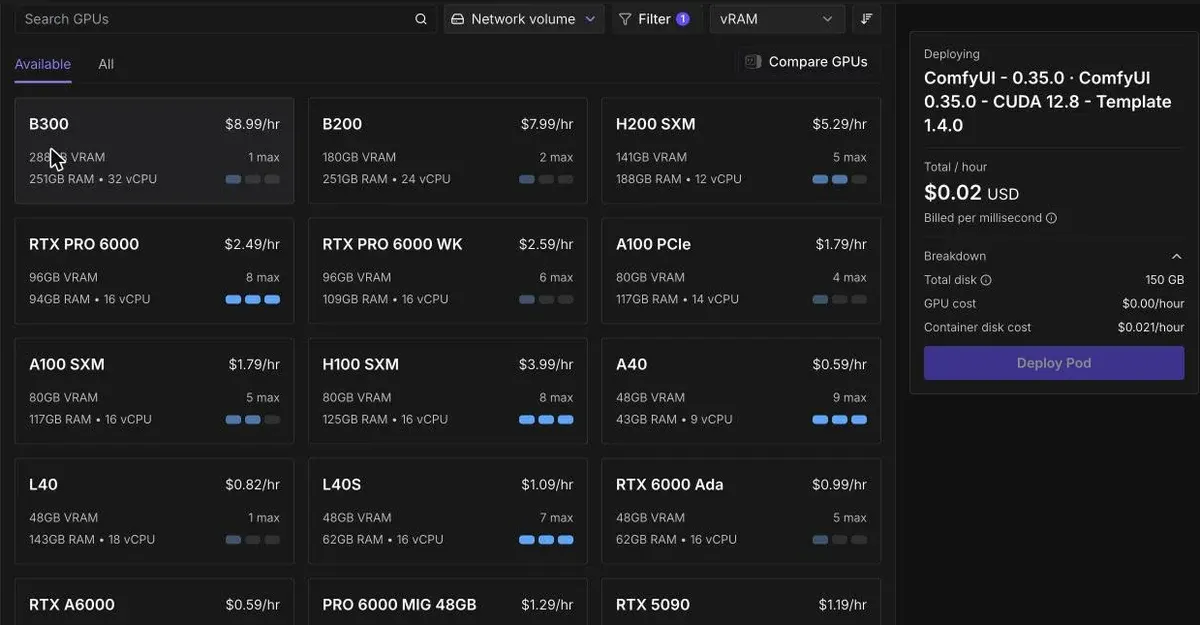
Pick a card that runs CUDA 13. Runpod’s guide says the template “is built for CUDA 13.0 and above”, CUDA being the driver layer for the GPU. Filter the picker by CUDA version. On our account, a template’s CUDA pin was one cause of “no instances available”.
-
Deploy and wait for the first boot. The pod downloads the models before ComfyUI opens. Then click Connect and open the ComfyUI link.
-
Load a Wan 2.2 workflow and run it. The template ships its workflows ready, so you set the prompt or image, the size and the clip length, then queue it.

- Stop the pod when the clips are saved. It bills every second it runs, even while it sits idle.
The official ComfyUI template route
The official template gives you a clean ComfyUI and you add the Wan files yourself. It takes longer the first time and leaves you in charge of each file.
-
Deploy the official ComfyUI template from the same picker, or its Blackwell Edition on an RTX 5090. Set the container disk to 50 GB, which deployed on our account where the 150 GB default often found no card.
-
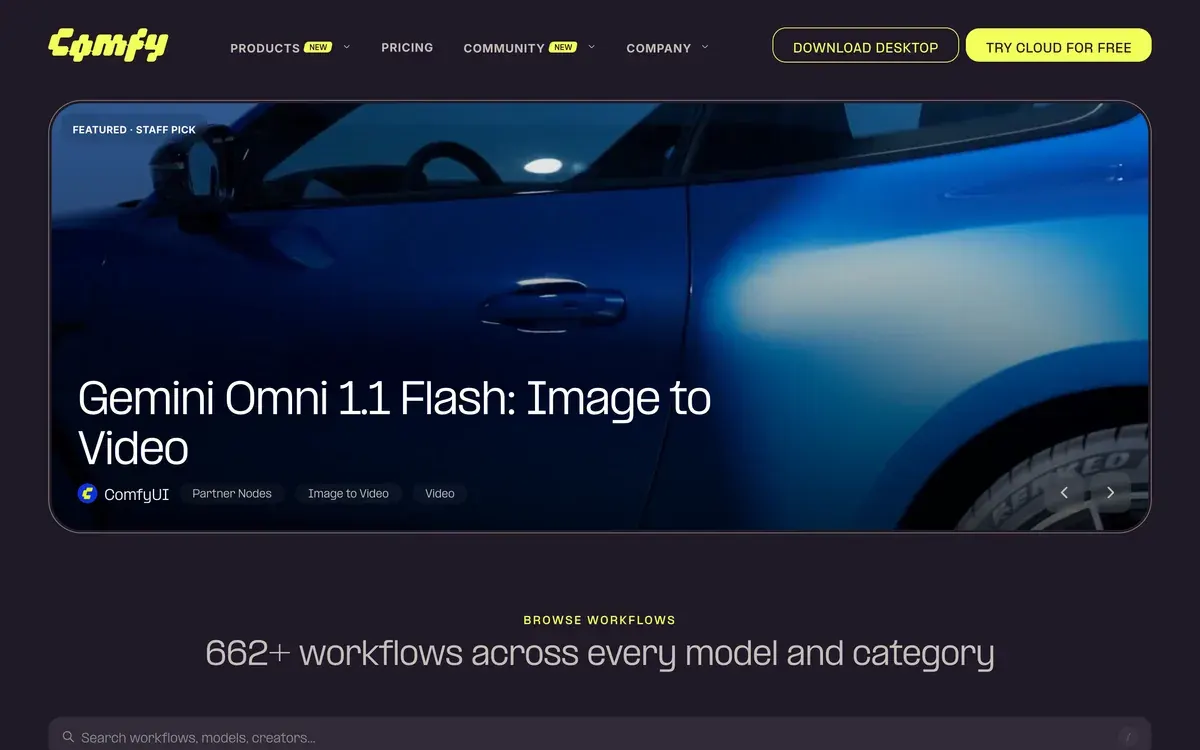
Open the template library. In ComfyUI, search the Template Library for “Wan2.2 5B”. If nothing shows, ComfyUI’s docs say your ComfyUI is out of date. The same workflows sit in the public gallery on comfy.org, searchable by model.
-
Put each file in its folder. For the 5B model, ComfyUI’s docs list
wan2.2_ti2v_5B_fp16.safetensorsinmodels/diffusion_models/,wan2.2_vae.safetensorsinmodels/vae/andumt5_xxl_fp8_e4m3fn_scaled.safetensorsinmodels/text_encoders/(ComfyUI Wan 2.2 docs). -
Set the size and length in the
Wan22ImageToVideoLatentnode. For the 14B models it is theEmptyHunyuanLatentVideonode. -
Run the queue and save the clip. Then stop the pod.
For LTX-2 the same official template works. Install the LTXVideo nodes from ComfyUI Manager, as the model card advises. Then load a text to video or image to video workflow from Template Library, then Video.
LTX-2 in ComfyUI
Go to Template Library > Video > choose any LTX-2 workflow

Can you run Wan 2.2 in ComfyUI on Google Colab?
Not reliably on the free tier. Google’s FAQ lists working through a web UI as disallowed on free runtimes, and says such runtimes are often terminated (Colab FAQ). ComfyUI is a web UI. A rented pod has no such rule, and its GPU bills only while the pod runs.
Our Runpod hub sets out the other Runpod pages, and the cloud GPU price table compares these cards across GPU clouds.
Questions about Wan 2.2 and LTX-2 on Runpod
What GPU do I need for Wan 2.2 in ComfyUI?
A 24 GB card such as the RTX 4090 runs the 5B model at 720P and the 14B models in fp8 at 480p. At 720p the 14B models need 48 GB in fp8, or 80 GB or more at full size on one card.
Can I use Wan 2.2 videos in paid ads?
Yes. Wan 2.2 is under Apache 2.0, which allows commercial use. Runpod only rents the card, so the model’s licence is the one that governs the clips.
Is LTX-2 free for commercial use?
Yes, below $10,000,000 of yearly revenue for your whole group, within its list of prohibited uses. Above that, Lightricks’ licence requires a paid commercial licence.
How long does a Wan 2.2 clip take on a rented GPU?
Runpod’s guide gives about 71 seconds for a 5-second 640 by 640 clip on an RTX 4090D with the Lightning LoRA. At the default 20 steps it takes about 513 seconds.
Does the template also run Wan 2.1?
Yes. Wan 2.1 is the earlier generation, and the HearmemanAI template downloads its workflows when you set download_wan21 to true. Start with 2.2, the newer model.
Sources
- GitHub: Wan2.2, Apache 2.0; TI2V-5B makes 720P at 24 FPS on a GPU with at least 24 GB, a 5-second 720P video in under 9 minutes on one consumer GPU; A14B and S2V need at least 80 GB on one GPU; in ComfyUI since 28 July 2025. Checked
- ComfyUI docs: Wan2.2 Video Generation ComfyUI Official Native Workflow Example, The 5B version should fit well on 8 GB of VRAM with ComfyUI native offloading; model files and folders; templates found by searching the Template Library. Checked
- Runpod: Wan 2.2 in ComfyUI on Runpod (updated 22 October 2026), HearmemanAI one-click template, download flags download_wan22, download_wan21 and download_wan_animate, all false by default; CUDA 13.0 and above; VRAM tiers by GPU; 5-second clip at 640x640 on an RTX 4090D in about 71 seconds with the Lightning LoRA or 513 at 20 steps, warm runs; Alibaba’s 720p benchmark at 17.4 minutes on one H100, reference script at 40 steps, clip length not stated; Runpod keeps it apart from ComfyUI timings. Checked
- Lightricks on Hugging Face: LTX-2.3, Synchronised video and audio in one model; built-in LTXVideo nodes in ComfyUI; distilled version at 8 steps. Checked
- Lightricks on GitHub: LTX-2 Community License Agreement (5 January 2026), Covers all LTX-2 versions released since 5 January 2026, the licence the LTX-2.3 model card links; entities with annual revenues of at least 10 million dollars need a paid commercial use licence; Attachment A lists prohibited uses; Lightricks claims no rights in outputs. Checked
- MiniMax on Hugging Face: MiniMax H3 Community License Agreement, Applicable Territory is worldwide excluding the European Union, the United Kingdom, the Republic of Korea and the United States. Checked
- NVIDIA: Quick start guide for LTX-2 in ComfyUI (5 January 2026, Spanish edition), RTX 5090 with 32 GB makes a 720p, 24 fps, 4-second clip inside GPU memory in about 25 seconds; an 8-second clip takes about three minutes. Checked
- Runpod: Runpod pricing (updated 8 October 2026), RTX 4090 0.89 dollars an hour Secure, 0.34 Community; RTX 5090 1.19 and 0.69; L40S 1.09 and 0.79; RTX PRO 6000 2.49 and 1.69; H100 SXM 3.99 and 2.69. Checked
- Google: Colab FAQ, Working through a web UI instead of the notebook is disallowed on free runtimes, which are often terminated when used to run a web UI for content generation. Checked

Alexandre S.
Alexandre S. is a creative ad strategist and copywriter with ten years' experience in digital marketing across multiple channels.
Related pages
-
 Guide Wan on Higgsfield
Higgsfield runs six Wan video models. A 5-second Wan 3.0 clip at 720p costs 8.75 credits, near Alibaba’s price. When Wan beats Kling or Seedance, and the steps.
-
 Category Best AI video generators for ads
23 AI video generators and model shops compared on cost per clip and ad-use terms, checked 25 September 2026.
-
 Profile Runpod
Runpod for ad images and video: Secure or Community Cloud, Pods or Serverless, model licences, and what 48 user sources report. Checked 24 Oct 2026.
-
 Alternatives Runpod alternatives
Vast.ai, Modal, Lambda, TensorDock, Massed Compute, Paperspace and Comfy Cloud against Runpod on RTX 4090, 5090 and H100 rates, read 24 October 2026.


