Runpod for AI images and video
Runpod rents you a graphics card by the second. The graphics card, or GPU, is the chip that does the maths behind AI images and video. You start a rented computer with one inside, called a pod. You run an open model such as FLUX, Wan 2.2 or LTX-2 on it, and stop it when the job ends.
You pay for the seconds it ran from a prepaid balance, with no monthly plan, and you bring the model.

What is Runpod, and how does it work?
Runpod is a GPU cloud, a company that rents out graphics cards. You pick a card, Runpod starts a pod with your software on it, and you open that software in your browser.
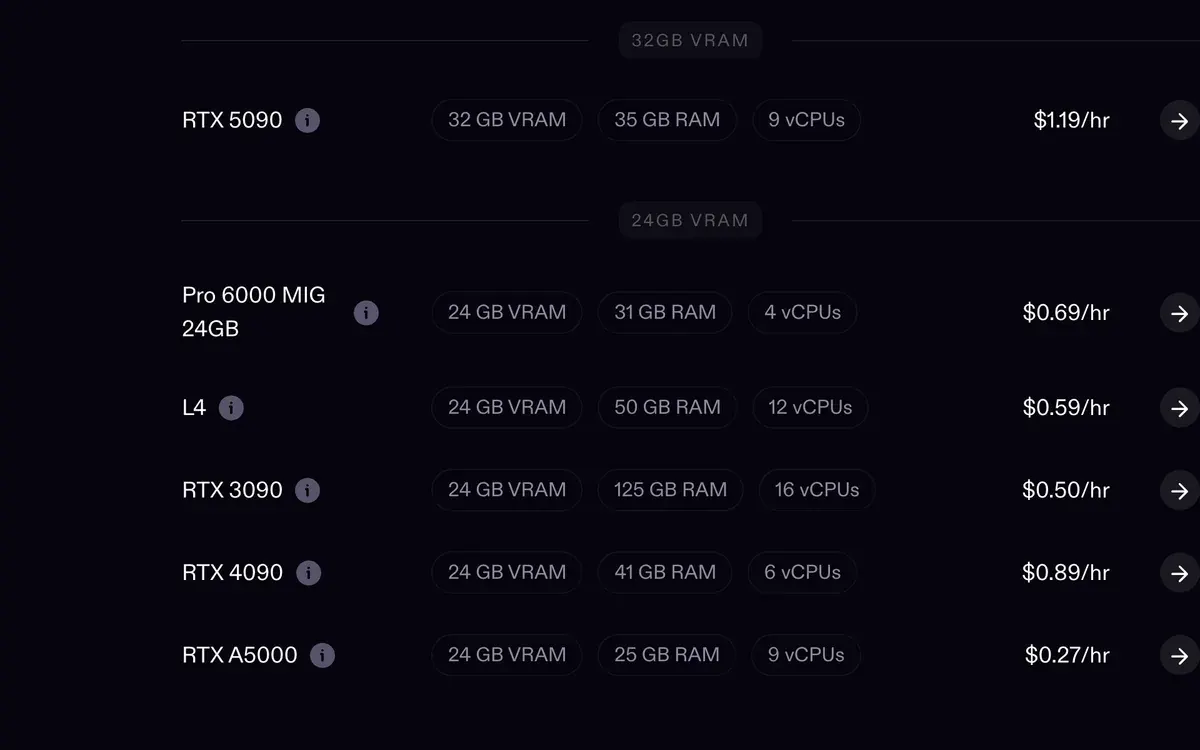
The card’s memory, called VRAM, decides which models fit. An RTX 4090 has 24 GB and an RTX 5090 has 32 GB. Each card shows its price per hour before you start it.
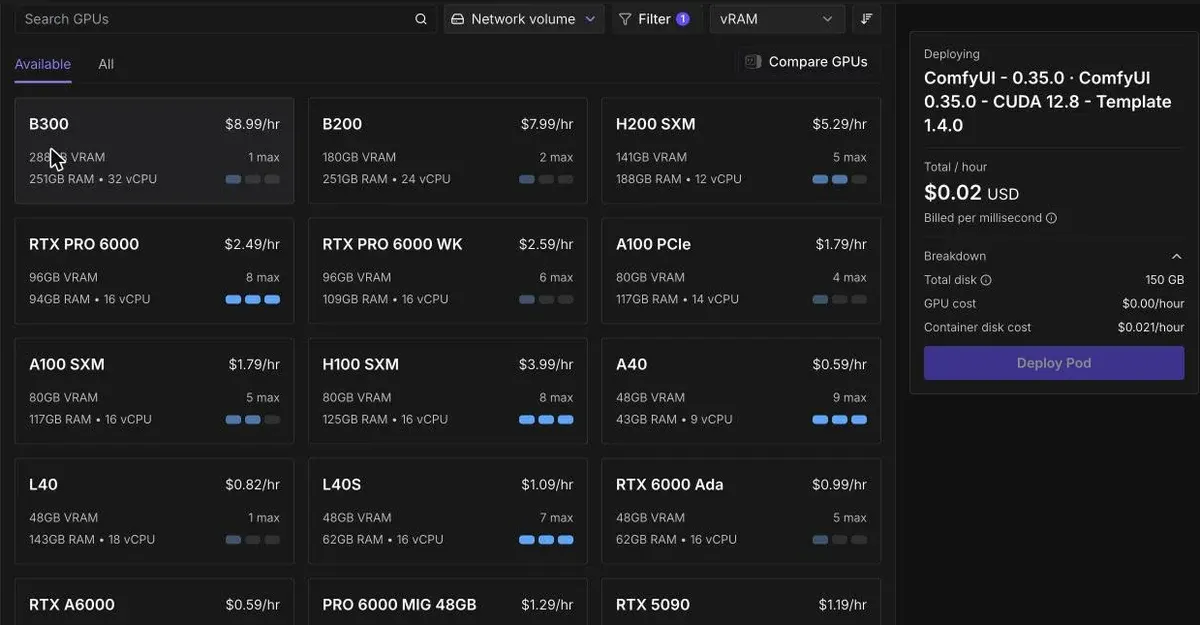
Before your first pod: an on-demand pod deploys only when your balance covers at least one hour of the card you picked (pod pricing docs).
Who Runpod suits, and who it does not
Runpod suits you if you make ad images or clips in volume and want open models you can download and keep. Most people run them through ComfyUI, a free app where each step of the job is a box on a canvas, wired to the next.
It suits you less if you want an ad editor, templates, AI actors or closed models. Closed models such as Veo and Kling are offered only through their makers’ own apps and APIs, so a rented GPU cannot run them. A credit app such as Higgsfield sells those on a monthly plan from $15 a month, and needs no setup.
What one image costs on our own Runpod account
On our own Runpod account, on 17 October 2026, an RTX 4090 on Secure Cloud made 12 product images in 342 seconds. The model was FLUX 3 Klein fast, a quick version of the FLUX image model. Each image took about 28.5 seconds.
At the 4090’s $0.89 an hour, each image costs about $0.007. On 16 October 2026, a slower 50-step render with the full model took about four minutes, or $0.06 an image.
For video, work it out the same way: the price per hour divided by the clips the card makes in an hour. Wan 2.2 on Runpod walks through it for AI clips.
Our pods start for a job and stop when it ends: 28 short sessions between 16 and 21 October 2026 cost $9.26 in all. The steady cost is storage for the models, which keeps billing while every pod is off ($2.21 in October to the 24th).
The four things you set up on Runpod
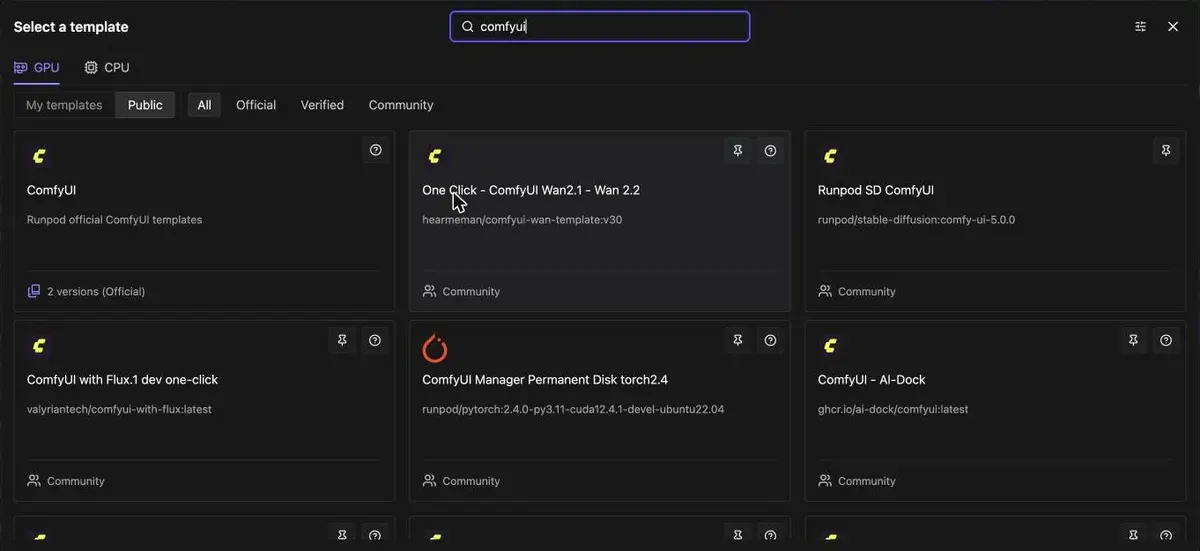
- Pick a template, the ready-made software a pod starts with. Search “comfyui” and the official ComfyUI template comes first, with community templates for Wan 2.2 and FLUX beside it.

- Choose the GPU by cost per output. Price per hour misleads: divide it by the images or clips the card makes in an hour. Image models of 6 to 17 GB fit a 5090’s 32 GB. A video model of about 40 GB overflows it and slows down, so a 96 GB card can cost less per clip.
- Add storage that outlives the pod. A network volume is a drive that keeps your models when the pod is gone. It costs $0.07 per GB a month under 1 TB. Download models from a 4-vCPU CPU pod on the same volume, at $0.12 an hour, with no GPU running.

- Stop the pod when the job ends. A running pod bills every second, even when it sits idle. At a zero balance Runpod stops your pods, and a pod with no network volume is deleted with its files (pod pricing docs).
Two setup traps cost us time. The ComfyUI template asks for a 150 GB container disk, which often shows “no instances available”; 50 GB works. The same message can come from the template’s CUDA version pin, the graphics driver version it demands. Widen the template’s allowed CUDA versions to include the one that hosts with free cards run.

New accounts can start with credit. A Google sign-up through a referral link that adds $10 gets a one-time bonus. Its size is random, from $5 to $500, and most users get $5 (how the Runpod referral bonus works).
What the model’s licence lets you do with your ads
Runpod rents the hardware; the open model’s licence governs what you may do with the outputs.
Wan 2.2, the open video model, ships under Apache 2.0, and its authors claim no rights over what you generate (Wan 2.2 model page). LTX-2 uses its own community licence, dated 5 January 2026. Entities with annual revenues of at least 10 million dollars need “a paid commercial use license” to use it (LTX-2 licence).
Every Runpod page on adtestbench
- Runpod profile: what Runpod does for ad work, its terms and its limits.
- Runpod pricing: every card’s hourly rate, storage costs and the cost of one ad.
- Runpod referral code and free credits: how the sign-up bonus works and how to claim it.
- ComfyUI on Runpod: from template to first image, step by step.
- Wan 2.2 on Runpod with ComfyUI: AI video clips on a rented card.
- Runpod alternatives: other GPU clouds, and apps that need no setup.
- Cloud GPU prices: RTX 4090, RTX 5090 and H100 rates across GPU clouds.
- A consistent AI influencer in ComfyUI: one face across many ad images.
Runpod questions, answered in a line
What is Runpod?
Runpod is a GPU cloud. It rents you a computer with a graphics card inside, called a pod, to run open AI models such as FLUX or Wan 2.2.
How does Runpod bill?
By the second, from a prepaid balance, for as long as a pod runs. Network storage bills every month, even while every pod is off.
Is Runpod free?
No. Runpod has no free tier; a new Google account that signs up through a referral link and adds $10 gets a one-time bonus credit.
Sources
- Runpod: Runpod pricing, Pod rates per hour for Secure and Community Cloud, and Serverless rates. Checked
- Runpod docs: Pod pricing, Billing by the second, one hour of credits to deploy, what a stopped pod and a network volume cost, what happens at a zero balance. Checked
- Runpod docs: Referral, affiliate, and creator programs, The sign-up credit for referred users and its conditions. Checked
- Wan-AI on Hugging Face: Wan2.2-T2V-A14B, Apache 2.0 licence; the authors claim no rights over generated content. Checked
- Lightricks: LTX-2 Community License Agreement, Licence dated 5 January 2026; entities with annual revenues of at least 10 million dollars need a paid commercial licence. Checked
- Comfy Org: ComfyUI, The free node-based app that runs image and video models. Checked

Alexandre S.
Alexandre S. is a creative ad strategist and copywriter with ten years' experience in digital marketing across multiple channels.
Related pages
-
 Guide How to train an AI influencer LoRA
What a LoRA is, when it beats Soul ID or reference images, a 20 to 40 image dataset, two training routes and the cost per run. Checked 24 October 2026.
-
 Pricing Higgsfield pricing
Higgsfield plans start at $15 a month for 200 credits, about $0.075 a credit. What Unlimited covers, the free plan, the trial and refunds. Checked 21 Oct 2026.
-
 Best list Free AI video generators for ads
Of 15 AI video tools with a free plan, 1 has terms that allow ads outright, and its free clips carry a watermark. Free plans checked 2 October 2026.


