How to run ComfyUI on Runpod
ComfyUI is a free app that runs open image models, such as FLUX, on a graphics card. Runpod rents you that graphics card by the second, so you can run ComfyUI in your browser without buying a big card for your desk.
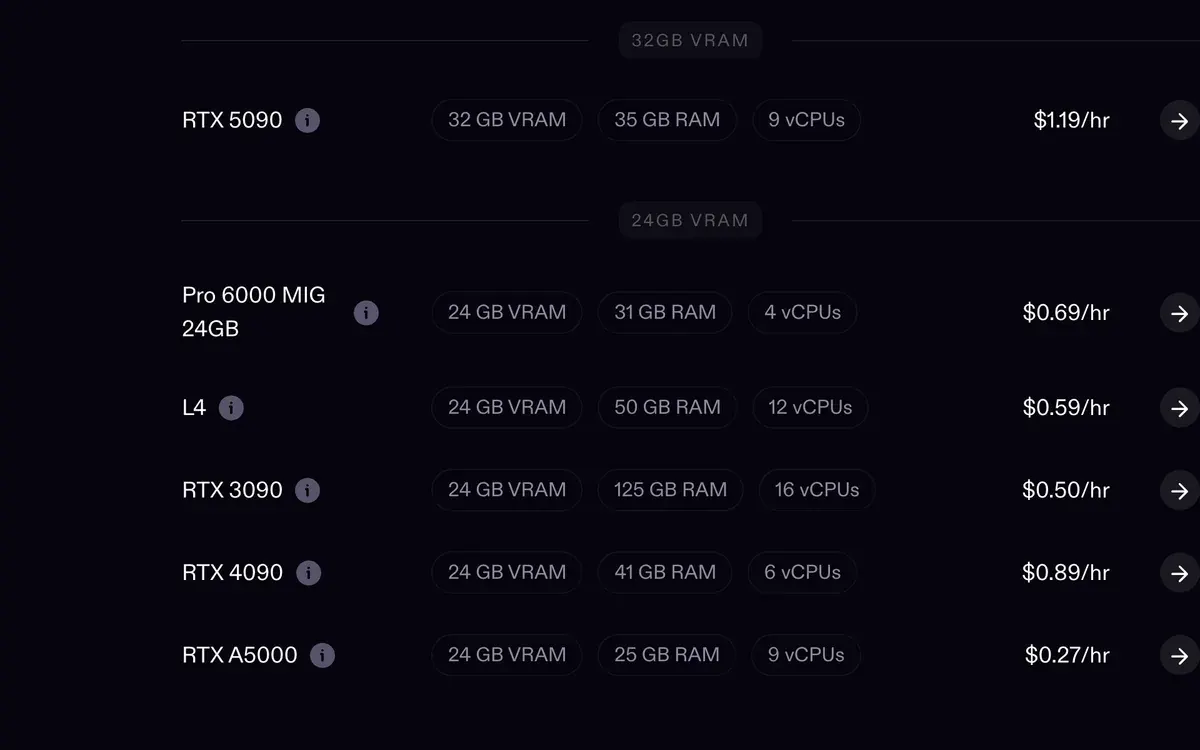
On our own Runpod account, one 1280 by 1280 ad image from FLUX 3 Klein’s fast version takes about 28.5 seconds on an RTX 4090. At the card’s Secure Cloud rate of $0.89 an hour, that is about $0.007 an image.
| Step | What you set | Our setting |
|---|---|---|
| 1. Network volume | Permanent storage for your models | 120 GB |
| 2. Template | The ready-made software image | Official ComfyUI template |
| 3. GPU and disk | The card, and the pod’s working disk | RTX 4090, 50 GB disk |
| 4. Open ComfyUI | The browser link to the app | Port 8188 |
| 5. Workflow | The chain of boxes that makes the image | A FLUX template |
| 6. Stop | Ends the billing for the card | Stop as soon as the batch is saved |
Scroll sideways for all 3 columns

What you rent, in plain words
A GPU (graphics processing unit) is the chip that does the maths behind an AI image. Its memory, called VRAM, decides which models fit: the RTX 4090 has 24 GB and the RTX 5090 has 32 GB.
A pod is the rented computer with that GPU inside. A template is the software the pod starts with, here ComfyUI already installed. A network volume is a separate rented disk that keeps your model files when the pod is gone.
Our Runpod hub explains who this setup suits and who is better off with a credit app.
How to run ComfyUI on Runpod, step by step
The steps follow Runpod’s ComfyUI tutorial, with the settings that worked on our own account. You need an account with credit on it first.
- Create a network volume. In the console, open Storage and make a new network volume before you start any pod. Size it for your models. Image models run 6 to 17 GB each, so 120 GB holds a working library. It leaves room for LoRAs, the small add-on files that teach a model one face or style. Pick the volume’s data centre with care, because a pod can use the volume only in that same data centre.

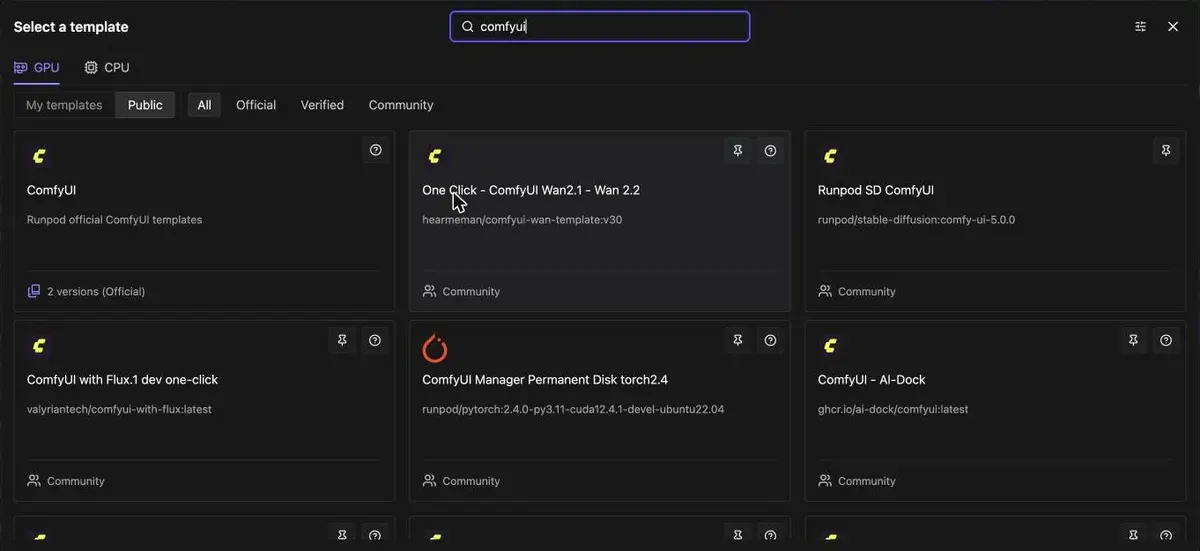
- Pick the official ComfyUI template. Open Pods, then Deploy, and search “comfyui” in the template picker. The official ComfyUI template sits first. Community templates sit next to it, some of them built for one model such as Wan 2.2, a video model. For a still-image workflow, the official one keeps the setup plain. For an RTX 5090 or another Blackwell card, Runpod’s tutorial names the ComfyUI Blackwell Edition template instead.
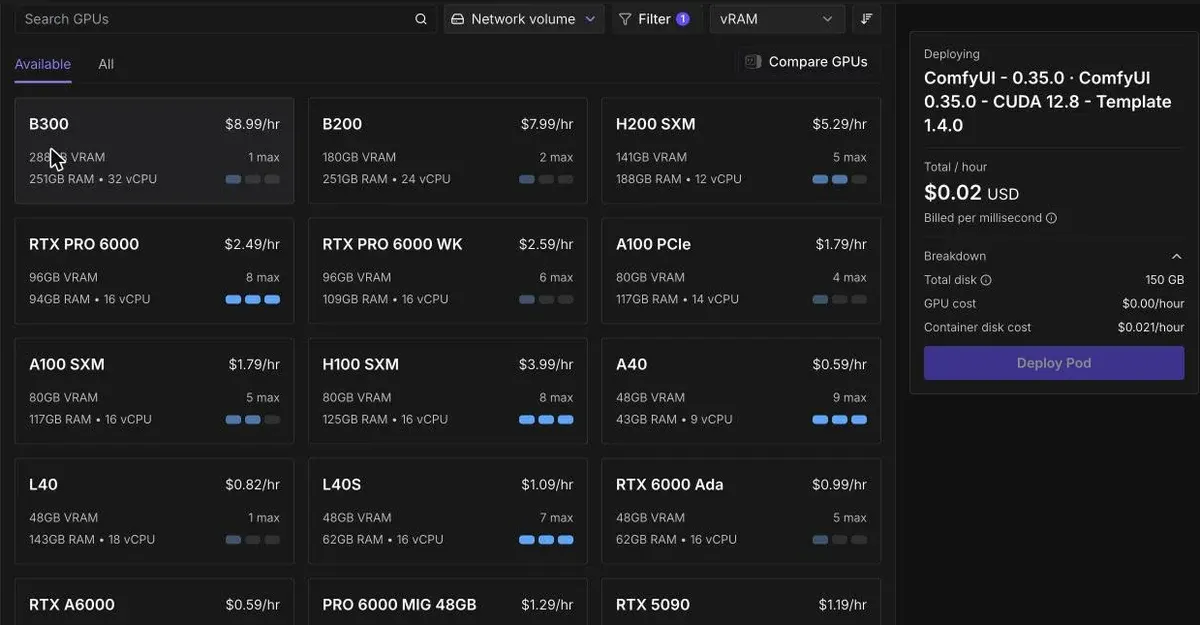
- Choose the GPU by cost per image, then set the disk to 50 GB. Every card in the picker shows its memory and price per hour. Price per hour is the wrong number to compare: divide it by the images the card makes in an hour. A card at half the price that takes three times as long costs you more per image. The ComfyUI template asks for a 150 GB container disk by default. On our account that size often showed “no instances available”, and 50 GB deployed at once. Attach the network volume from step 1 on the same screen.
- Open ComfyUI. When the pod is running, click Connect, then “Connect to HTTP Service [Port 8188]”. Runpod’s tutorial says that a “Not Ready” button or a “Bad Gateway” page means you wait two to three minutes and refresh.

- Load a workflow and its models. A workflow is the chain of boxes, called nodes, that turns your prompt into a picture. The template browser opens on its own; if it does not, open Workflow, then Browse Templates. When ComfyUI warns about missing models, close the warning and install them from Manager, then Model Manager, so they download straight onto the pod’s storage. Point the loader box at the model, type your prompt and run the queue.

- Stop the pod when the batch is saved. A running pod bills every second, even while it sits idle. Runpod’s tutorial says: “Stop your Pod when you’re finished to avoid unnecessary charges.” Download your images or save them to the network volume first, because the container disk is cleared when the pod stops.

What it costs per ad image, measured on our account
These figures come from runs on our own Runpod account on 16 and 17 October 2026, all on a Secure Cloud RTX 4090. The cost is the run time multiplied by the card’s hourly rate.
| Model and job | Time per image | Cost per image |
|---|---|---|
| FLUX 3 Klein fast, 1280 by 1280, 16 steps | About 28.5 seconds (12 images in 342 seconds) | $0.007 |
| FLUX 3 Klein fast, product placed in a scene, 16 steps | About 37 seconds | $0.009 |
| FLUX 3 Klein full, 1152 by 1440, 50 steps | About 4 minutes | $0.06 |
Scroll sideways for all 3 columns
The fast version is the one to run for ad volume. It makes about eight images for the price of one from the full model, on the same card. The two rows use different sizes and step counts.
Our whole account spend in October 2026, to the 24th, is $11.47. Of that, $9.19 is GPU time and $2.21 is the network volume, billed from the day it was created, 16 October.
The GPU share stays small because each pod runs for one job and stops. Between 16 and 21 October 2026, 28 short pod sessions cost $9.26 in all, pod disk and CPU time included.
Current rates for every card sit on our Runpod pricing page, and the cloud GPU price table sets Runpod beside other GPU clouds.
Where your files go when the pod stops
The disk you set in step 3, the container disk, is “cleared when the Pod stops”, by Runpod’s storage docs. Anything saved there is gone at the next start.
A network volume keeps its files after the pod is stopped or deleted. That is why step 1 comes first: you download a model once, and every later pod reads it from the volume.
The volume bills by the month, whether a pod runs or not, at $0.07 per GB. Our 120 GB volume costs $8.40 a month.
A pod’s own volume disk is the other option. It survives a stop but is deleted with the pod, and it bills $0.20 per GB a month while the pod is stopped.
Troubleshooting: the four fixes from our setup
Model downloads need no GPU. On our account, a 4-core CPU pod on the same network volume downloads models for $0.12 an hour. The GPU starts only when the files are in place.
A bigger card can be the cheaper one. Image models of 6 to 17 GB fit a 5090’s 32 GB. A video model of about 40 GB overflows it and spills into slower system memory. For video, a 96 GB card can cost less per clip: our Wan 2.2 and LTX-2 guide works through those numbers.
Other ways to run ComfyUI online
Comfy Cloud is ComfyUI’s own hosted version, with no pod to manage. Its paid plans start at $20 a month (Comfy Cloud pricing).
Google Colab is the free route people try first. Its FAQ says free GPU access is “heavily restricted” (Colab FAQ).
The FAQ lists working through a web UI instead of the notebook as disallowed on free runtimes, which are often terminated when they do it. A web UI is how ComfyUI runs.
Next step: keep one character across your ads
Once single images work, the usual next job is one face across a whole campaign. Our AI influencer ComfyUI workflow adds the character blocks to the same setup. Before you add money, the Runpod referral code page explains the sign-up credit.
Questions about ComfyUI on Runpod
Does Runpod have a ComfyUI template?
Yes. An official ComfyUI template sits first when you search “comfyui” in the template picker, with a Blackwell Edition for RTX 5090 cards. Community templates for single models sit beside it.
How much does ComfyUI on Runpod cost?
Only GPU time and storage. On our account, a FLUX 3 Klein fast image costs under a cent on a Secure Cloud RTX 4090. A 120 GB network volume costs $8.40 a month.
Do I lose my models when I stop the pod?
Files on the container disk, yes. Files on a network volume stay, even after you delete the pod.
Is there a free way to run ComfyUI in the cloud?
Not a dependable one. Google Colab’s free tier lists a web UI such as ComfyUI’s as disallowed, and such runtimes are often terminated. Runpod needs credit on the account first.
The referral bonus is a credit on a deposit. A new user who signs up with Google through a referral link and loads $10 gets a random, weighted one-time bonus of $5 to $500. Most users get $5, and about 96 per cent get $10 or less. Europe gets a flat $5 (Runpod referral terms).
Sources
- Runpod docs: Deploy ComfyUI on a Pod, Official ComfyUI template, port 8188, Connect to HTTP Service, Browse Templates, Model Manager, stop the pod when finished. Checked
- Runpod docs: Storage types, Container disk cleared when a pod stops; volume disk 0.10 dollars per GB a month running, 0.20 stopped; network volume 0.07 dollars per GB a month, kept after a pod is deleted. Checked
- Runpod: Runpod pricing (updated 8 October 2026), RTX 4090 at 0.89 dollars an hour on Secure Cloud and 0.34 on Community Cloud; RTX 5090 at 1.19 and 0.69. Checked
- Runpod docs: Referral, affiliate, and creator programs, A first-time user who signs up with Google SSO and loads at least 10 dollars gets a random, weighted one-time bonus of 5 to 500 dollars: most get 5 dollars and about 96 per cent get 10 dollars or less; European customers get a fixed 5 dollars. Checked
- Comfy Org: ComfyUI, Free, open-source node-based app for image and video models. Checked
- Comfy Org: Comfy Cloud pricing, Hosted ComfyUI: paid plans from Standard at 20 dollars a month; Creator 35 dollars a month. Checked
- Google: Colab FAQ, Free tier GPU access heavily restricted; working through a web UI instead of the notebook is disallowed on free runtimes, which are often terminated when they do. Checked

Alexandre S.
Alexandre S. is a creative ad strategist and copywriter with ten years' experience in digital marketing across multiple channels.
Related pages
-
 Guide How to keep an AI character consistent
Four ways to keep one AI face across images and video, ranked by effort, with each tool’s reference limits read on 24 October 2026.
-
 Guide How to train an AI influencer LoRA
What a LoRA is, when it beats Soul ID or reference images, a 20 to 40 image dataset, two training routes and the cost per run. Checked 24 October 2026.
-
 Category AI static ad generators
Ad tools resell image models at up to 27 times the maker’s price, if every credit is used. 18 static ad tools on price and ad rights, checked 25 September 2026.
-
 Alternatives Runpod alternatives
Vast.ai, Modal, Lambda, TensorDock, Massed Compute, Paperspace and Comfy Cloud against Runpod on RTX 4090, 5090 and H100 rates, read 24 October 2026.


