What’s new in MakeUGC
MakeUGC has no V3: its October 2026 relaunch carries no version number, and MakeUGC calls it “our new dashboard” (homepage). MakeUGC is a web app that turns a written script into a short video ad spoken by an AI actor. Think of the selfie-style clip a paid creator films for TikTok or Reels.
MakeUGC rebuilt its site between 6 and 10 October 2026, and a banner on makeugc.ai reads “New MakeUGC is live”. Its menus now hold 17 tools in three groups, against six feature links on the older site. Product-in-hand video has moved from the top plan to every plan.

Is there a MakeUGC V3, or a V2?
MakeUGC gives its app no version number. On 21 October 2026 the homepage, the logo (“makeugc”) and the pricing page carry none; the banner says “New MakeUGC” (homepage).
The numbers people search for come from elsewhere. MakeUGC’s API, the connection developers use to make videos from their own code, keeps its “v1 routes” and points to “docs v2” as the full reference (API docs). Its product-in-hand route runs a model called Nova V2. Its own talking-actor model is named Make 1.0.
So “MakeUGC V3” is a reader’s name for the new dashboard. Internet Archive copies date the switch. The one from 6 October 2026 shows the old site; the one from 10 October 2026 shows the new menus and the banner (6 October, 10 October).
What changed in the new MakeUGC
The Features menu now has three groups. Create UGC ads covers the first six rows below, Generate AI video & images the next five, and Scale & automate the last six. Every tool except Style Templates appears on the 6 October homepage in some form, and the MCP server is new.
| Tool | What it does | On the 6 October homepage |
|---|---|---|
| Talking Actors | An AI person reads your script on camera | Yes |
| Product in Hand | The actor holds your product | Yes, on the Pro card only |
| Custom AI Avatar | An avatar made from a short video of you | Yes |
| Ad Remake | Rebuilds a reference ad around your product | A “Video Agent” took a sample ad |
| Motion Control | Copies a performer’s moves onto your character | Yes |
| Gestures | Directs the actor’s emotion with a text prompt | Yes |
| AI Video Generator | Seedance, Veo, Kling and other models | A Seedance 2.5 offer only |
| B-roll Generator | Cutaway shots that fit your script | Yes |
| Style Templates | Looks such as claymation | No |
| Video Editor | Captions, music, B-roll and trims | Yes |
| Image Ads | Static ads and product shots | “Image generator” on an API card |
| Content Library | Recreate proven UGC formats | Yes |
| AI Workflows | An agent chains the steps for you | Yes |
| Batch Mode | 10 variations at once | Yes, on Growth |
| 50+ Languages | Scripts spoken in over 50 languages | Yes, on the plan cards |
| Custom Voice | Clone your voice or pick one | “ElevenLabs voice integration” on Enterprise |
| API and MCP | Make videos from code or from an AI assistant | API plans; no MCP |
Scroll sideways for all 3 columns
Ad Remake is the only tool with a “New” badge. The old homepage described a “Video Agent” that rebuilt a sample ad with your product. The Ad Remake page asks for the same inputs: a reference ad and a product photo (Ad Remake).
More models, and an MCP server
The new homepage lists 10 video models and 8 image models. The video list includes MakeUGC’s own Make 1.0 alongside Seedance 2.5, Veo 3.1 and Kling 4.0. Images include Nano Banana Pro, GPT Image 2 and Imagen 4.
MakeUGC also lists an MCP server, a connector that lets an AI assistant such as Claude make videos inside your account. The API docs say it uses the same key as the API (API docs).
What moved between plans
The 6 October pricing block put “Product in hand videos” on the Pro card alone and “Batch Mode included” on Growth (6 October copy). The current Starter card lists product in hand, motion control and Batch Mode. The entry plan, called Start up on the 6 October copy, is now Starter (pricing).
Starter costs $59 a month for 500 credits, with export at 480p and 720p and one video render at a time. Growth adds one custom avatar, 4K export and 10 parallel videos; Pro raises that to three custom avatars. The MakeUGC pricing page breakdown has every plan and billing view.
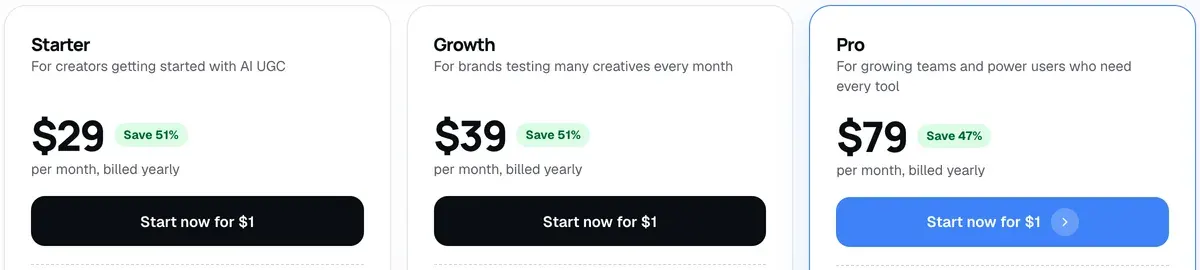
What one MakeUGC video costs in credits
The app’s pricing page does not say how many credits a video uses. Two MakeUGC pages do. The API docs charge 100 credits per talking-actor video, and the Ad Remake page charges 100 credits per video on Seedance 2.0.
At those rates Starter’s 500 credits make five videos, which works out at $11.80 per video on Starter, if every credit is used. Credits expire at the end of each month with no rollover, so a plan you do not use up costs more per video.
Your first MakeUGC ad, step by step
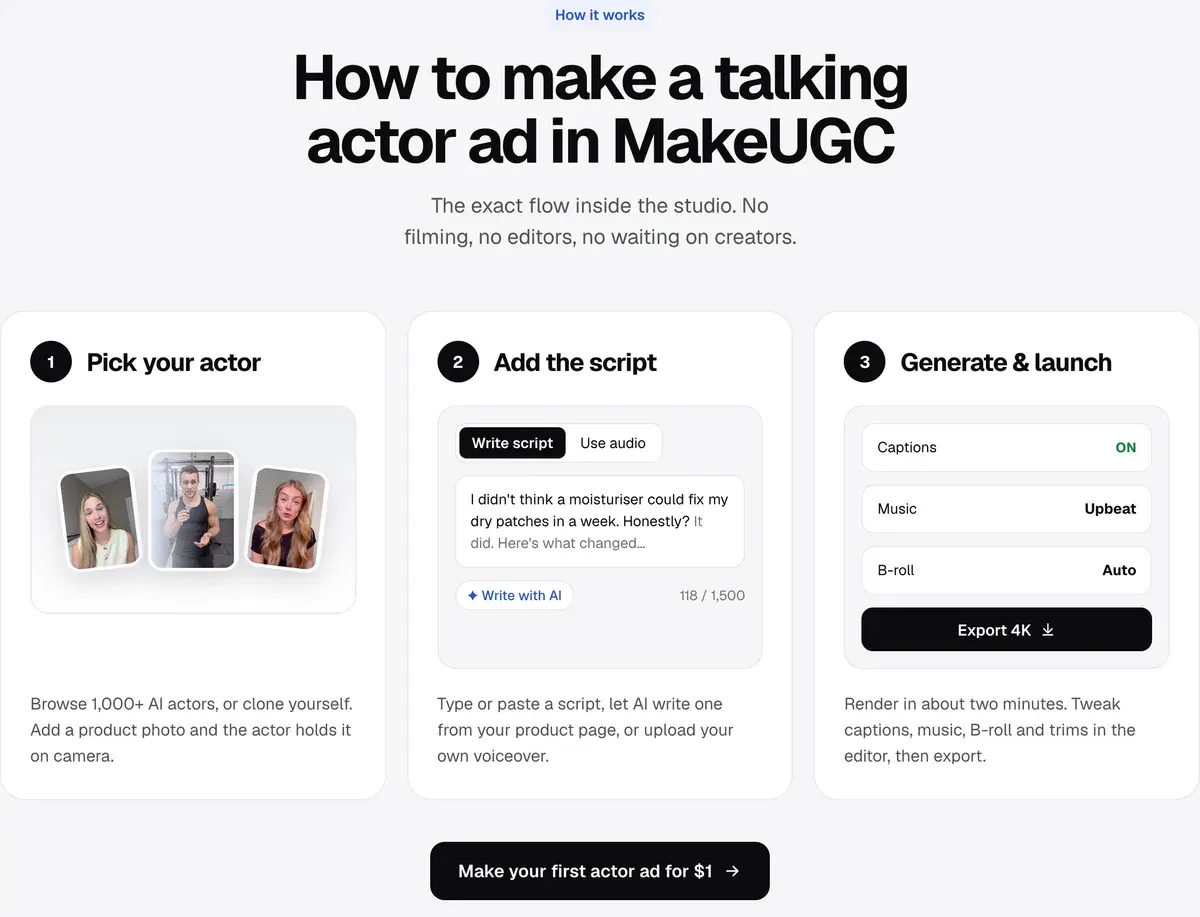
MakeUGC’s own feature pages describe the same short path: actor, script, generate. Below it is laid out in the order you write an ad, with the product photo and language as their own steps.
- Write the script. Type or paste it, or let MakeUGC write one from your product page, the talking-actor page says. Keep the hook in the first line: the same page lists hook tests as one of its six ad formats (talking actors). Our UGC script template gives a structure to start from.
-
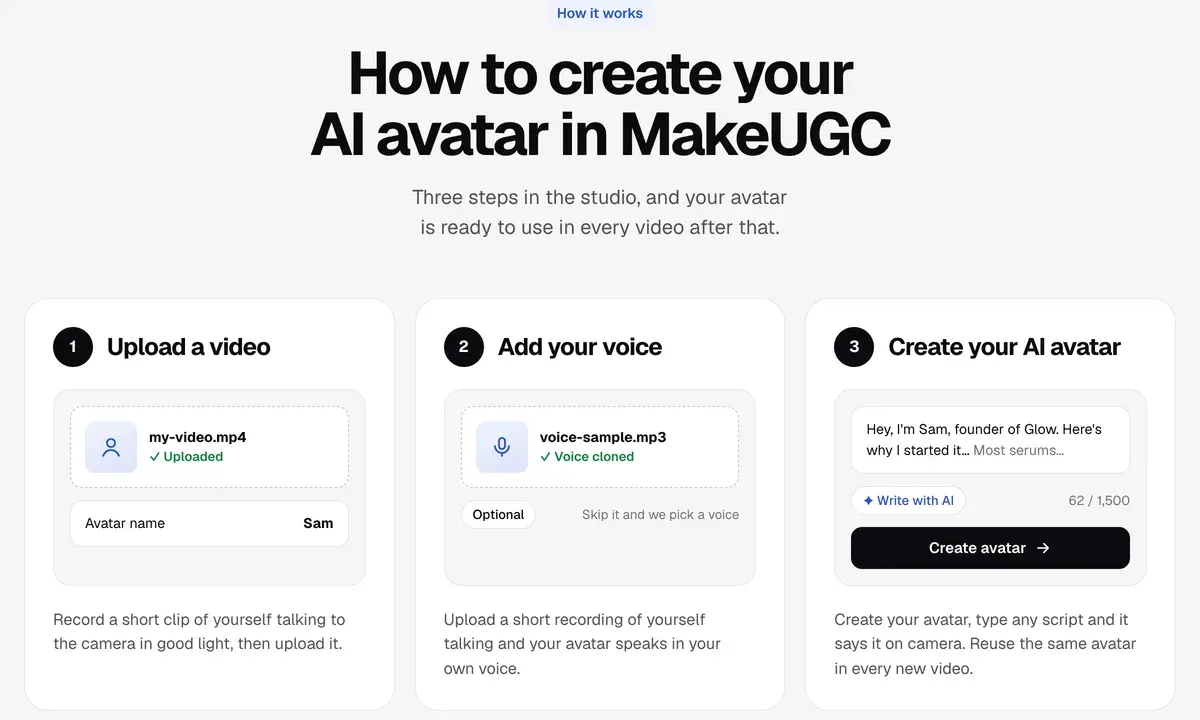
Pick the actor. Browse the actor library: the plan cards list 300+ actors on Starter, 500+ on Growth and 1,000+ on Pro. Or use your own custom avatar on Growth or Pro. A custom avatar starts from a short, well-lit video of you talking to camera. The page allows only yourself or people who have “clearly agreed” (custom avatar).
-
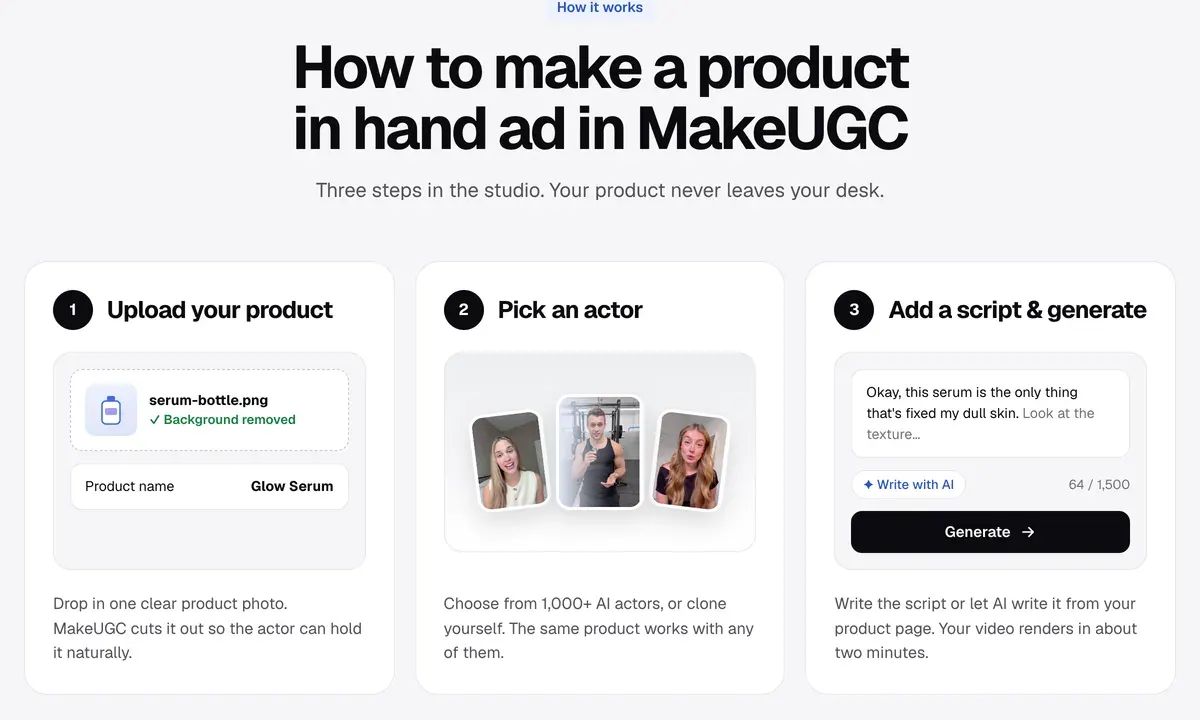
Add the product photo. Upload one sharp photo of the product alone, front label facing the camera, on a plain background. MakeUGC removes the background itself and puts the product in the actor’s hands for the whole clip (product in hand).
- Choose the language and voice. Write the script in the language you want, then pick that language and a voice to match. The actor speaks it with lip sync matched to the words (languages). To use your own voice, upload a short recording when you build a custom avatar.
-
Generate. MakeUGC says a render takes about two minutes. For hook testing, Batch Mode, listed on every plan, makes 10 variations from one brief; on Starter they render one at a time (pricing). Gestures lets you set the actor’s emotion for each take in plain words, such as “make him smile” (Gestures).
-
Edit. The built-in editor adds captions and music, and trims each line. B-roll means short cutaway shots of the product or a scene, dropped in to hide jump cuts between lines. The B-roll generator makes them from a description or your product photo (B-roll).
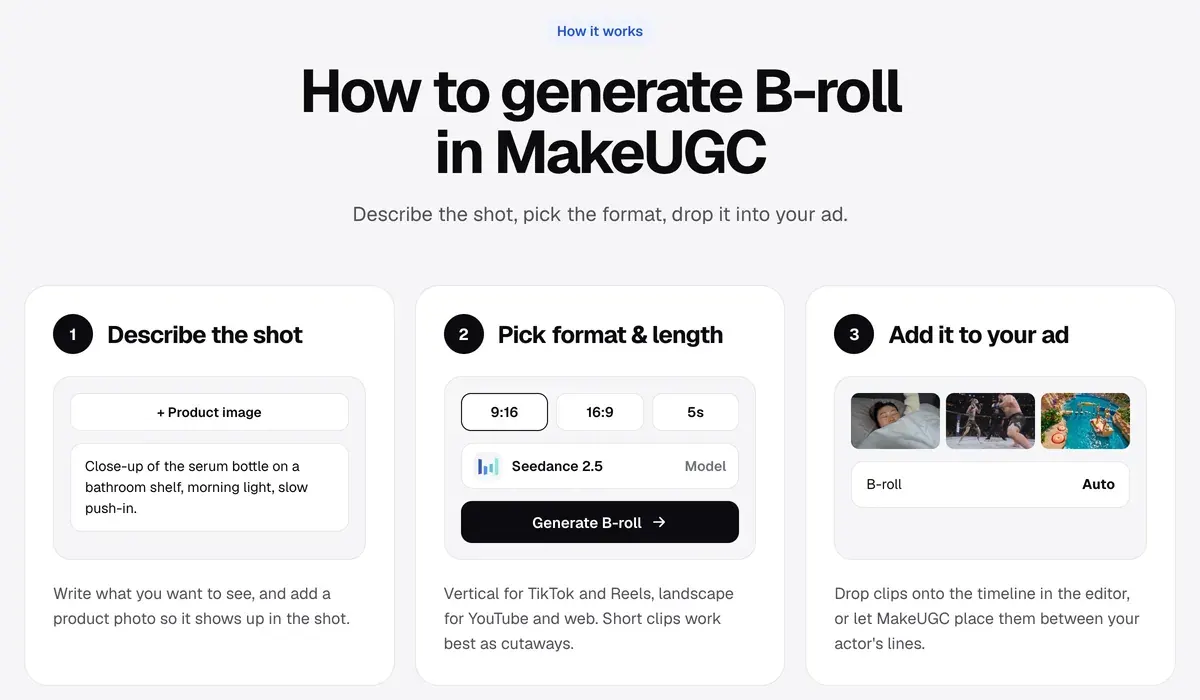
- Export. Starter exports at up to 720p; Growth and Pro go to 4K. Pick 9:16 for TikTok, Reels and Shorts.

Public reviews: clips pass, billing is the main complaint
Users who post about MakeUGC agree on what to check before an ad runs. Lip sync drifts and hands move oddly in some clips. Each one needs a human check and some editing (5 of 29 sources: ClickHive on YouTube, Trustpilot).
Product-in-hand and talking-actor clips pass in a fast-scrolling feed (3 of 29 sources: Trustpilot, How to Easy on YouTube).
Billing is the loudest complaint. Charges that continue after cancelling, and cancellations that fail, come up in 17 of 29 sources (Trustpilot, 10 September, Trustpilot, 20 September). The one-dollar start renews at the full plan price unless you cancel, MakeUGC’s pricing FAQ says. Note the renewal date when you sign up.
These reports predate the new dashboard. The MakeUGC profile has the full count and the terms behind each plan.
Where MakeUGC fits, and where another tool does
MakeUGC fits when you want many short actor-led variants from one script, on one credit balance, with API access on every plan. The Higgsfield and MakeUGC comparison sets it against a model-first app for cinematic clips.
Skip it if you make a few videos a month. Credits expire monthly, so unused credits raise the cost per video, and the MakeUGC alternatives that bill per video fit better. The UGC platforms list covers marketplaces that book human creators instead.
For a deeper look at product shots, read the AI UGC product-in-hand guide. Every MakeUGC guide and price page sits on the MakeUGC hub.
Questions about the new MakeUGC
What is MakeUGC?
MakeUGC is a web app for UGC-style video ads. An AI actor reads your script on camera, can hold your product and speaks over 50 languages. It also makes B-roll, image ads and clips from models such as Seedance and Veo.
Do I need to do anything to get the new MakeUGC?
No. The new dashboard is the live site at makeugc.ai, and MakeUGC lists no opt-in or migration step (homepage).
Can I use my own face and voice?
Yes, on Growth (one custom avatar) and Pro (three). You upload a short video of yourself and, if you want your own voice, a short audio sample.
How long does a MakeUGC video take?
About two minutes per talking-actor render, MakeUGC’s feature pages say. During its Seedance 2.5 unlimited offer, the banner lists about 10 minutes of processing per video.
Every MakeUGC guide, sorted by the ad you want to make, is in the MakeUGC hub
Sources
- MakeUGC: MakeUGC homepage, Banner
New MakeUGC is live
andTo celebrate our new dashboard
; the three feature menus, the video and image model lists, the MCP server line. Checked - Internet Archive: MakeUGC homepage, archived 6 October 2026, The older site, with six feature links, Video Agent and Product in hand videos listed on the Pro card only. Checked
- Internet Archive: MakeUGC homepage, archived 10 October 2026, First archived copy carrying the new menus and the
New MakeUGC is live
banner. Checked - MakeUGC: Talking actor feature, Three steps, about two minutes a render, six ad formats, export up to 4K. Checked
- MakeUGC: Product in hand feature, One product photo, background removed automatically, photo tips. Checked
- MakeUGC: Custom AI avatar feature, Short selfie video, optional voice sample, yourself or people who agreed only. Checked
- MakeUGC: Ad Remake feature, Reference ad plus product photo; 100 credits a video on Seedance 2.0. Checked
- MakeUGC: Motion Control feature, Performer video plus character image, Wan Animate. Checked
- MakeUGC: Gestures, Emotion and movement directed by a short text prompt. Checked
- MakeUGC: B-roll generator, Shot description or product photo, 9:16 or 16:9, Seedance 2.5. Checked
- MakeUGC: AI Workflows, Flow Agent plans the steps and models; cost shown before a run. Checked
- MakeUGC: 50+ languages, Script in the target language, pick a language and voice, lip sync to match. Checked
- MakeUGC: MakeUGC API docs, v1 routes, docs v2 as the full reference, Nova V2 product-in-hand route, credit costs, MCP at mcp.makeugc.ai. Checked
- MakeUGC: MakeUGC pricing, Plan cards, credits, custom avatars by plan, the trial and renewal FAQ. Checked
- Trustpilot, YouTube and Product Hunt: MakeUGC user reports, 29 public sources synthesised, checked 28 September 2026. Checked

Alexandre S.
Alexandre S. is a creative ad strategist and copywriter with ten years' experience in digital marketing across multiple channels.
Related pages
-
 Guide AI UGC meaning: what is AI UGC?
AI UGC is ad video made or edited with AI to look like a customer or creator filmed it. Its two meanings, and vendor terms on passing it off as human.
-
 Guide How to make AI UGC ads
Steps from brief to a labelled AI UGC ad: each step’s billing unit and ad terms, and the free routes whose terms allow ads. Read 2 October 2026.
-
 Compare Arcads vs MakeUGC
Arcads prints a credit rate and no price; MakeUGC prints prices and no credit cost per video. Testimonial rules and ad rights, checked 2 October 2026.
-
 Guide Are AI UGC ads legal? FTC rules and likeness rights
The FTC’s fake-testimonial rule reaches an AI actor who claims to have used the product. That rule and US state and EU laws, quoted with dates.


