AI influencer ComfyUI workflow
ComfyUI is a free app that runs open image and video models on your own graphics card. You build a workflow by wiring blocks together on a canvas: one loads the model, one reads your prompt, one saves the picture.
For an AI influencer, a workflow is about six blocks, from model to video. On a rented RTX 5090, 1,000 FLUX.2 [klein] 4B images cost about $0.23 of GPU time. A 5-second Wan 2.2 clip on a rented RTX 4090 costs under $0.05 on Runpod’s Community Cloud and under $0.13 on Secure Cloud.
| Block | What it does | Open option | Licence |
|---|---|---|---|
| Checkpoint loader | Loads the base image model | FLUX.2 [klein] 4B | Apache 2.0 |
| LoRA loader | Adds your trained character | Your own LoRA file | Follows its base model |
| Prompt and sampler | Turns words into the image | Built into ComfyUI | GPL-3.0 (ComfyUI) |
| Face identity node | Copies a face from one photo (SDXL or FLUX.1 [dev] only) | PuLID or InstantID | Apache-2.0 code, research-only face models |
| Upscaler | Enlarges the final image | Real-ESRGAN x4 | BSD-3-Clause |
| Image to video | Animates the still | Wan 2.2 | Apache 2.0 |
Scroll sideways for all 4 columns

What is ComfyUI?
ComfyUI is open-source software that runs AI models through a visual graph of blocks, called nodes.
It runs on Windows, Linux and macOS, and a desktop app installs it on Windows and macOS. The code is GPL-3.0 (ComfyUI on GitHub), so the software costs nothing. Your costs are the graphics card and your time.
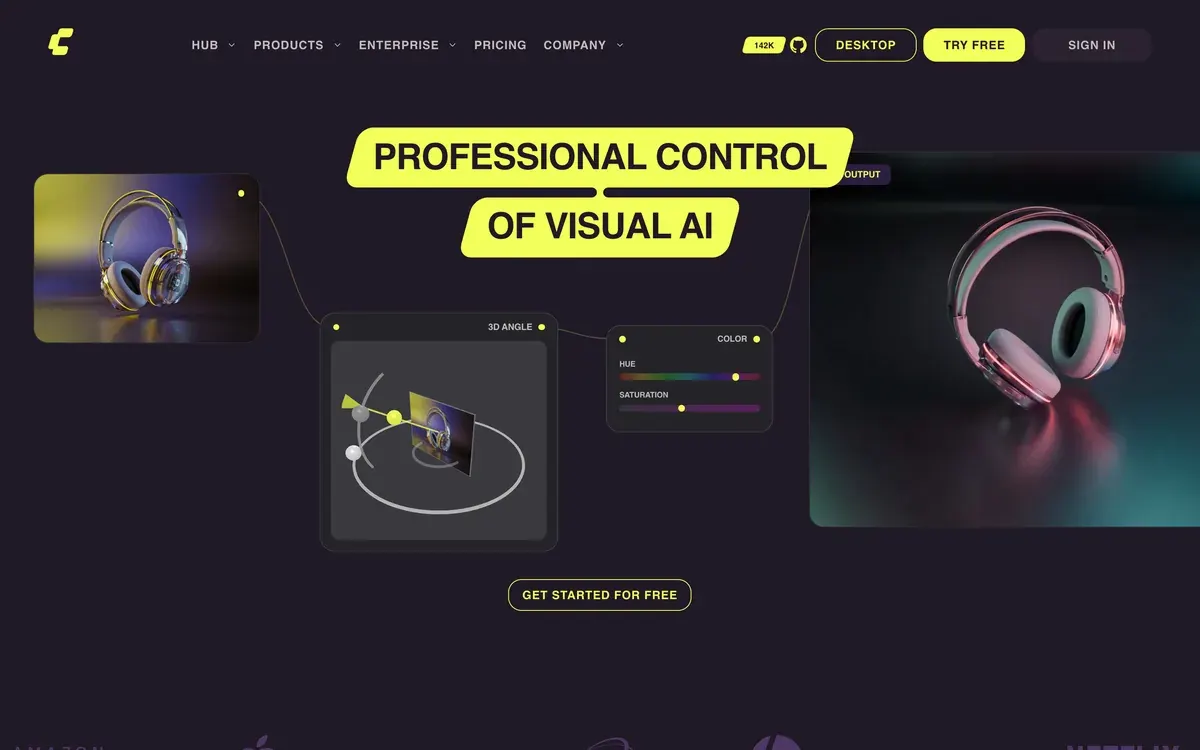
What ComfyUI gives you is control. Every step of the picture is a block you can see and swap, and on your own card nothing leaves your machine. That matters when you make hundreds of posts of one character.
It also means nobody holds your hand. There is no character builder and no “keep this face” button, only the blocks below.
The workflow blocks, explained in plain words
Each block is one job. Read them left to right, the way the wires run.
This beginner tutorial installs ComfyUI, loads a first model and builds a text-to-image workflow.

Checkpoint loader: the base model
The checkpoint is the main image model, the file that knows how to draw. Everything else adjusts its output.
FLUX.2 [klein] 4B from Black Forest Labs is the safe start for a commercial account. Its model card puts it at about 13 GB of graphics memory, on an RTX 3090, 4070 or above, under Apache 2.0 (FLUX.2 klein 4B). The larger 9B version sits under the FLUX Non-Commercial License, so it stays out of anything that earns (FLUX.2 klein).
ComfyUI also lists Qwen Image and older FLUX models among the image models it supports.
LoRA loader: your character
A LoRA is a small trained file that holds one character’s face. The loader block sits between the checkpoint and the prompt, with a strength slider for how hard it pushes.
A LoRA holds the face without a reference photo in every prompt, and it takes a separate training run. Our guide to training an AI influencer LoRA covers the dataset and the cost.
Face identity node: one photo, one face
A face identity node copies a face from a single reference picture, with no training. Two open options are PuLID and InstantID.
InstantID works with SDXL, an older model family, from one image. PuLID has an SDXL version and a FLUX.1 [dev] one. The community ComfyUI node for PuLID, PuLID_ComfyUI, uses the SDXL model and has been in “maintenance only” mode since 14 April 2025.
Both nodes need an SDXL or FLUX.1 [dev] checkpoint, so they do not plug into a FLUX.2 [klein] workflow. On klein, the LoRA is the face route.
This masterclass builds a consistent photoreal character from one input image on open models (published October 2025).
![Thumbnail of the YouTube video "Create HYPERREALISTIC Consistent AI Characters - FREE & LOCAL! [Full ComfyUI Masterclass 2025]" by Mickmumpitz](https://i.ytimg.com/vi/PhiPASFYBmk/hqdefault.jpg)
That clause is a reason to train a LoRA instead, since the LoRA route has no InsightFace step.
Upscaler: the final sharpening
An upscaler makes the finished image bigger and crisper for a feed or a print. Real-ESRGAN is the common open one: its x4plus model makes an image 4 times wider and taller, under a BSD-3-Clause licence.
Image to video: making the character move
The video block takes your best still and animates it. Wan 2.2 from Alibaba is the open choice, under Apache 2.0, and ComfyUI has supported it since 28 July 2025 (Wan2.2).
Its small model, TI2V-5B, runs on one consumer card with 24 GB. The Wan team says it makes “a 5-second 720P video in under 9 minutes” on a consumer GPU; this page prices that on an RTX 4090, a 24 GB card. The larger I2V-A14B model needs 80 GB on a single card.
Starting from the still keeps the face your LoRA or identity node made, instead of letting the video model invent one.
How to set it up, step by step
These steps follow ComfyUI’s own README and template library.
-
Install ComfyUI. On Windows or macOS the desktop app is the route the README calls “The easiest way to get started”. Linux uses the manual install.
-
Open a template. comfy.org/workflows lists 662 or more ready-made workflows by model and task, with image, image to video and motion control among the tags. Pick one built for your base model, so the blocks are already wired.

-
Download the models it asks for. The checkpoint, any LoRA and the upscaler each go into their own folder under
ComfyUI/models/. PuLID’s model goes inComfyUI/models/pulid/, for example. -
Add your character. Insert a LoRA loader after the checkpoint and put the trigger word in the prompt. A face identity node fed with one reference photo works only on an SDXL or FLUX.1 [dev] checkpoint. It does not plug into a FLUX.2 [klein] workflow.
-
Generate a batch and keep the best stills. Change the setting and clothes in the prompt while the face block holds the person.
-
Upscale the keepers with Real-ESRGAN.
-
Animate one still with Wan 2.2 image to video. For dance or gesture clips, the template library also lists a “Wan Animate 2: Motion Transfer” workflow, which copies movement from a reference video.
For the prompt side, our consistent AI character guide covers how to describe the same person scene after scene.
What does it cost on a rented GPU?
Under a cent an image, and cents a clip, if you count GPU time only.
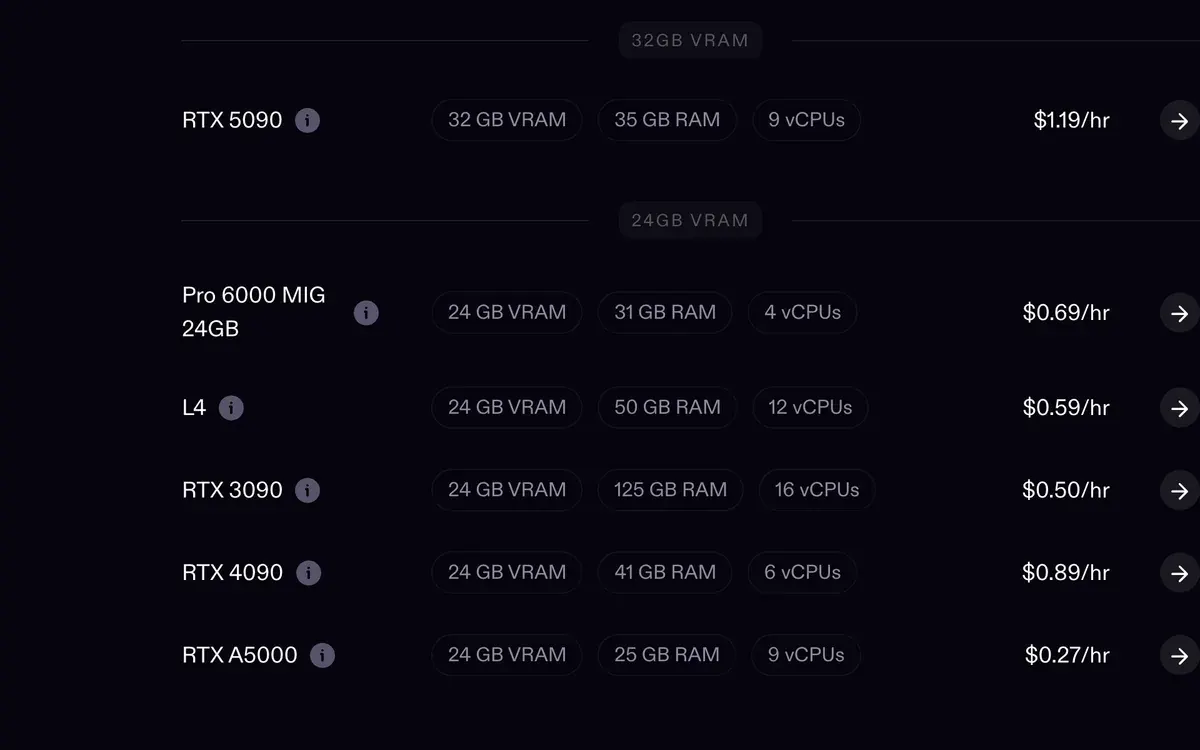
Runpod rents an RTX 5090 at $0.69 an hour on Community Cloud and $1.19 on Secure Cloud. An RTX 4090 runs $0.34 and $0.89.
Those rates come from Runpod’s pricing page, updated on 8 October 2026.
| Output | Time per output (source) | Community Cloud | Secure Cloud |
|---|---|---|---|
| 1,000 FLUX.2 [klein] 4B images, RTX 5090 | About 1.2 seconds each (Black Forest Labs) | $0.23 | $0.40 |
| One 5-second 720P Wan 2.2 TI2V-5B clip, RTX 4090 (our pairing) | Under 9 minutes on a 24 GB card (Wan team) | $0.05 | $0.13 |
Scroll sideways for all 4 columns
The table leaves out the time the machine runs before the first image. A rented pod bills from the moment it starts, so downloading a 13 GB model and trying a workflow run on the same rate.
One hour of setup on the Community Cloud 5090 costs as much as about 3,000 images.
Comfy Cloud is the hosted middle ground. It runs ComfyUI for you on Blackwell RTX 6000 Pro cards with 96 GB.
Its Creator plan at $35 a month is the first that imports your own models, LoRAs included.
Standard and Creator cap each workflow run at 30 minutes (Comfy Cloud pricing).
When does a ready-made app save you time?
When you need a character this week and do not want to manage models. ComfyUI costs less per picture. A ready-made app costs less of your time.
Higgsfield is the clearest example for this reader. Its AI Influencer Studio builds a character from 19 menu settings, with no prompt. Each run returns a portrait and a full-body shot for 1.12 credits, which Higgsfield prices at about $0.06.
The same studio animates that character from a 3 to 30 second reference clip, using up to 40 images a video, at 1080p (AI Influencer). That is the job the Wan 2.2 and motion transfer blocks do in ComfyUI.
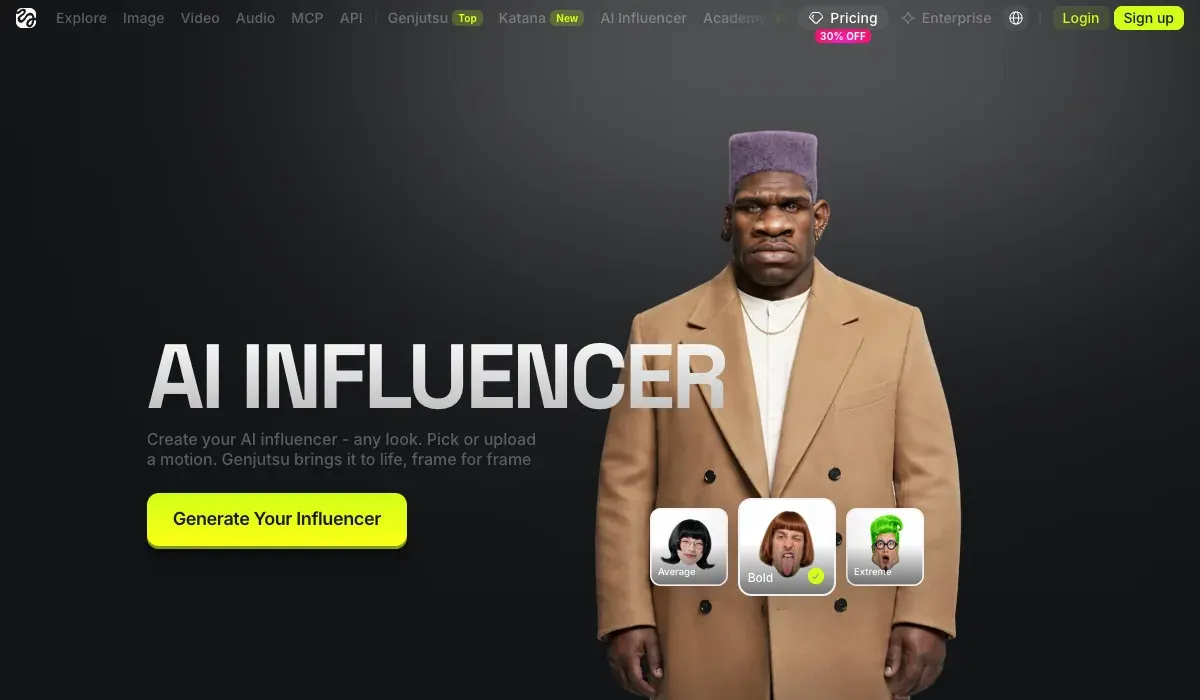
Soul ID replaces the LoRA. You upload 20 or more photos and training takes about 3 to 5 minutes, by Higgsfield’s Soul ID post. The identity stays inside Higgsfield.
Plans start at $19 a month (). Our Higgsfield AI Influencer walkthrough shows each screen.
The trade is plain. ComfyUI gives you the files and open licences, at near-zero cost per image once it works. Higgsfield trains a character in 3 to 5 minutes with Soul ID, paid in credits.
The AI influencer hub and our best AI influencer generators list set out the other app routes.
Questions about ComfyUI for AI influencers
Is ComfyUI free?
Yes. ComfyUI is open source under GPL-3.0. You pay for the graphics card, or for rented GPU time, and the models carry their own licences.
Can ComfyUI keep an AI influencer’s face consistent?
Yes, with a LoRA trained on the character, or a face identity node such as PuLID on an SDXL or FLUX.1 [dev] checkpoint. On FLUX.2 [klein] the LoRA is the face route, and it avoids InsightFace’s research-only face models.
What GPU do I need for an AI influencer in ComfyUI?
About 13 GB of graphics memory for FLUX.2 [klein] 4B images. For Wan 2.2 TI2V-5B video, a 24 GB card such as an RTX 4090.
Can I make AI influencer videos in ComfyUI?
Yes. Wan 2.2 turns a still into a clip, and ComfyUI’s template library lists a Wan Animate 2 motion transfer workflow.
Next on Higgsfield: keeping an AI character consistent
Sources
- GitHub: ComfyUI, GPL-3.0; Windows, Linux and macOS; desktop app for Windows and macOS; supports Flux.2, Flux.2 Klein, Qwen Image and Wan 2.1 and 2.2. Checked
- Comfy Org: ComfyUI workflow templates, 662 or more templates by model and task, Wan Animate 2 motion transfer among them. Checked
- Comfy Org: Comfy Cloud pricing, Standard 20 dollars a month, Creator 35 dollars a month (checked 24 October 2026), Pro and Team plans on Blackwell RTX 6000 Pro GPUs with 96 GB; own models from Creator up; 30-minute runs on Standard and Creator. Checked
- Black Forest Labs: FLUX.2 [klein], About 1.2 seconds for 4B and 2 seconds for 9B on an RTX 5090; 4B Apache 2.0, 9B FLUX Non-Commercial License. Checked
- Black Forest Labs: FLUX.2 [klein] 4B model card, Fits in about 13 GB of VRAM, RTX 3090 or 4070 and above. Checked
- GitHub: PuLID, Apache-2.0 code; PuLID-FLUX for FLUX.1-dev, under that model’s licence; fp8 with offload under 15 GB. Checked
- GitHub: PuLID_ComfyUI, Apache-2.0; SDXL PuLID model; needs EVA CLIP, facexlib and InsightFace AntelopeV2; maintenance only since 14 April 2025. Checked
- GitHub: InstantID, Apache-2.0 code, SDXL pipeline, one reference image; InsightFace face models for non-commercial research only. Checked
- GitHub: InsightFace, Code MIT; models trained on its data for non-commercial research purposes only. Checked
- GitHub: Real-ESRGAN, BSD-3-Clause; RealESRGAN_x4plus upscales 4 times. Checked
- GitHub: Wan2.2, Apache 2.0; TI2V-5B makes a 5-second 720P video in under 9 minutes on one consumer GPU with 24 GB; I2V-A14B needs 80 GB on one GPU; in ComfyUI since 28 July 2025. Checked
- Runpod: Runpod pricing (updated 8 October 2026), RTX 4090 at 0.34 dollars an hour on Community Cloud and 0.89 on Secure Cloud; RTX 5090 at 0.69 and 1.19. Checked
- Higgsfield: AI Influencer, 1.12 credits a character or edit, reference clips of 3 to 30 seconds, up to 40 images a video, 1080p output. Checked
- Higgsfield: AI Influencer (3 October 2026), 19 menu settings, a portrait and a full-body shot per run, 1.12 credits or about 0.06 dollars, 20 credits per dollar. Checked
- Higgsfield: Soul ID character consistency (15 June 2026), 20 or more photos and about 3 to 5 minutes of training. Checked

Alexandre S.
Alexandre S. is a creative ad strategist and copywriter with ten years' experience in digital marketing across multiple channels.
Related pages
-
 Guide What is Higgsfield Soul 2.0?
What Higgsfield Soul 2.0 and Soul ID do, how to train a consistent character, what it costs, and the likeness rules that apply in ads. Checked 16 October 2026.
-
 Guide What is an AI influencer?
An AI influencer is a made-up creator whose face and videos come from AI tools, run by an agency, a brand or one person. How they work and get labelled.
-
 Guide Make an AI influencer with Nano Banana
Where to run Nano Banana Pro for an AI influencer, the six steps from first face to photo set, 10 prompts that use reference images, and the watermark rules.
-
 Guide Famous AI influencers
13 famous AI and virtual influencers, who runs each one and their follower counts, each figure with its source and date. The biggest: a mascot and a sausage.


