Artlist vs Envato
Verdict: Artlist (AI Suite) or Envato
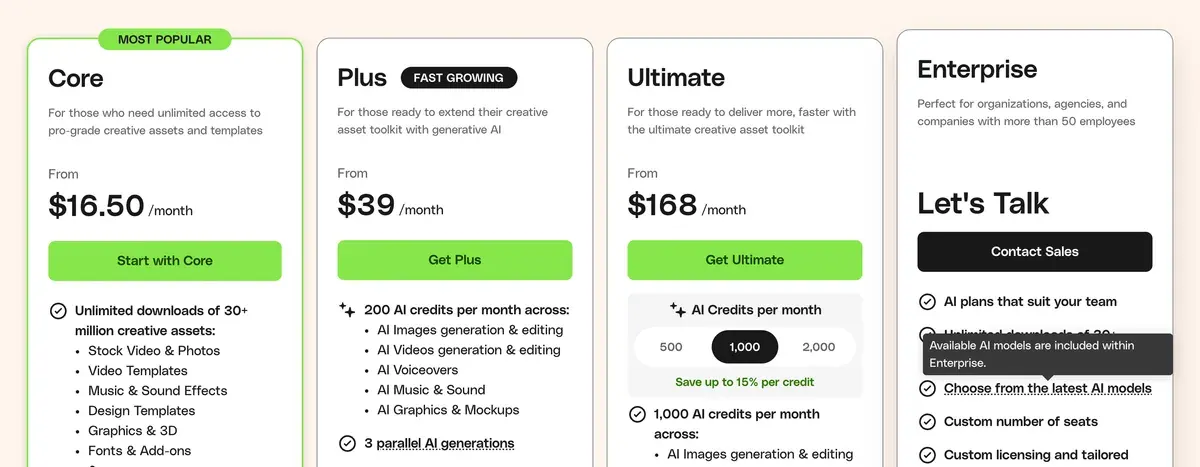
Artlist vs Envato: Artlist for its rights in your AI clips, Envato when unlimited stock matters more than AI credits. Artlist assigns you whatever rights it holds in output (terms 14); Envato assigns none and may license it to other users (AI terms 10, 18). Envato Plus adds 200 AI credits to unlimited stock for $39 a month billed yearly (read ); Artlist Max pairs stock with 7,500 credits for $39.99 a month billed yearly.
Artlist (AI Suite)
- Best for
- Editors who license Artlist stock and want Veo, Kling, Seedance and Wan clips, with AI output under the terms and stock under the Artlist License.
- Not for
- Teams planning to automate generation: Artlist’s
Unlimited
isfor human use only
and its terms bar bots, scripts, scraping and account sharing on Unlimited plans (s.14, 14 October 2026).
Envato
- Best for
- Editors who need stock footage, music and templates for many ads, plus AI images or clips from GPT Image, Seedance or Minimax on one plan.
- Not for
- Buyers who want to own their AI output: Envato licenses it and keeps the right to use it and license it to other users (AI Product Terms 10, 18).
| Artlist (AI Suite) | Envato | |
|---|---|---|
| Monthly from (USD) | $9.99 | $16.50 billed yearly |
| AI output | Assigned to you (14) | Licensed to you; Envato may license it to others (10, 18) |
| Stock in the plan | Sold separately; Max bundles stock and AI | Unlimited downloads on every plan |
| AI credits a month (units differ) | 16,500 to 120,000 | 20 to 2,000 |
| Unlimited AI | Listed models on yearly AI Core and AI Pro | Ended on Ultimate in 2026 |
| Licence after cancelling | Pro catalogue licence: published projects stay covered (2) | Finished End Products only (8) |
| Seats on the entry plan | Up to 3 members | 1 seat |
| Refunds | Within 14 days, if nothing was downloaded or generated | None unless the law requires one |
Who owns the AI clips you make?
With Artlist, you hold whatever rights Artlist had. With Envato, Envato keeps the output and you hold a licence.
Artlist’s Terms of Use (14 October 2026) say: “Artlist hereby assigns to you all of Artlist’s right, title and interest, if any, in and to Output, and Artlist does not restrict your commercial use of such Output” (section 14).
Ownership; Assignment of Output
14 Artlist hereby assigns to you all of Artlist’s right, title and interest, if any, in and to Output, and Artlist does not restrict your commercial use of such Output.
Envato’s AI Product Terms (1 July 2026) go the other way. Clause 10 keeps the output with Envato and says “no rights in the Output are assigned to you”. Clause 15(a) licenses it to you only once it sits inside a larger work, which Envato calls an End Product.
Rights to Output and Output License
10. Rights to Output As between you and Envato, Envato, its licensors, and Group Companies retain all right, title and interest in and to the GenAI Tools and the Output, and grants you a license to use the Output as set out in clause 15. For clarity, no rights in the Output are assigned to you, except in respect of any embedded portions of your Input, and only to the extent that you hold pre-existing rights in that Input.
15(a)(i) General Output License Excluding Output generated by Envato’s Music Generator, for Output generated using Envato’s GenAI Tools, you are granted a non-exclusive, commercial, worldwide, royalty-free and perpetual license to use, modify and reproduce the Output generated by you, provided it is incorporated with other content and/or elements to create a new work that is larger in scope and different in nature than the Output itself (this new work being an End Product).
Clause 18 is the one an ad team should read twice. It lets Envato use your output for marketing and new products, and license it “to other users” (18(f)). Under that clause, a rival on the same subscription could be licensed the AI shot your ad runs on.
Rights of Envato and the Group Companies
18(a) You acknowledge and agree that Envato and the Group Companies retain worldwide, commercial and perpetual rights to use, copy, reproduce, process, adapt, modify, publish, transmit, create derivative works of, publicly display, publicly perform, and distribute any Output generated by you for any purpose of the Group Companies [...] including marketing and promotional purposes and developing new products, features and services (and granting non-exclusive sub-licenses to permit its licensees to do the same).
18(f) [Envato retains] the right (and at its sole discretion) to publish, communicate, perform and otherwise make any Output publicly available on any platform operated by a Group Company on an “AS IS” and royalty-free basis, and to grant non-exclusive, commercial, perpetual, worldwide, royalty-free licenses to other users to access and use such Output in accordance with the applicable license terms of that platform.
Envato lists tailored indemnification on its Enterprise plan only (Envato pricing). The full clauses sit in the rights matrix for Artlist and Envato.
Which licence covers a paid ad?
Envato’s licence covers paid ads on every plan; Artlist’s stock licence covers them only on the Pro tier.
Artlist’s stock runs on the Artlist License, in two tiers. The Social licence (4 January 2026) says “you can’t publish your Projects in paid media” (section 1). The Pro licence (15 February 2026) lists commercials among its covered uses, and its section 3 lets you make projects for clients. Max Business adds billboards and other outdoor ads.
Envato’s Elements License (6 October 2026) gives one licence per project (clause 4).
Elements License, clause 4
Use for a Specific Project This license grants you a non-exclusive, commercial, worldwide and revocable right to use the Item for: a. Use for a Specific Project - use of the Item in one project to create a specific End Product
Envato clause 14 keeps stock music off TV and radio broadcasts, streaming TV included, which reaches connected-TV ads.
One gap on Artlist: its AI plan cards say “License covers commercial use” and name no tier, and the terms do not say whether Artlist’s own AI content carries Social or Pro rules.
What a clip costs in credits
Artlist’s own count works out at $0.04 to $0.06 a clip, against $0.39 to $1.76 on Envato Plus, but the two counts measure different things. Artlist’s pricing page gives “up to” video counts with no model or clip length.
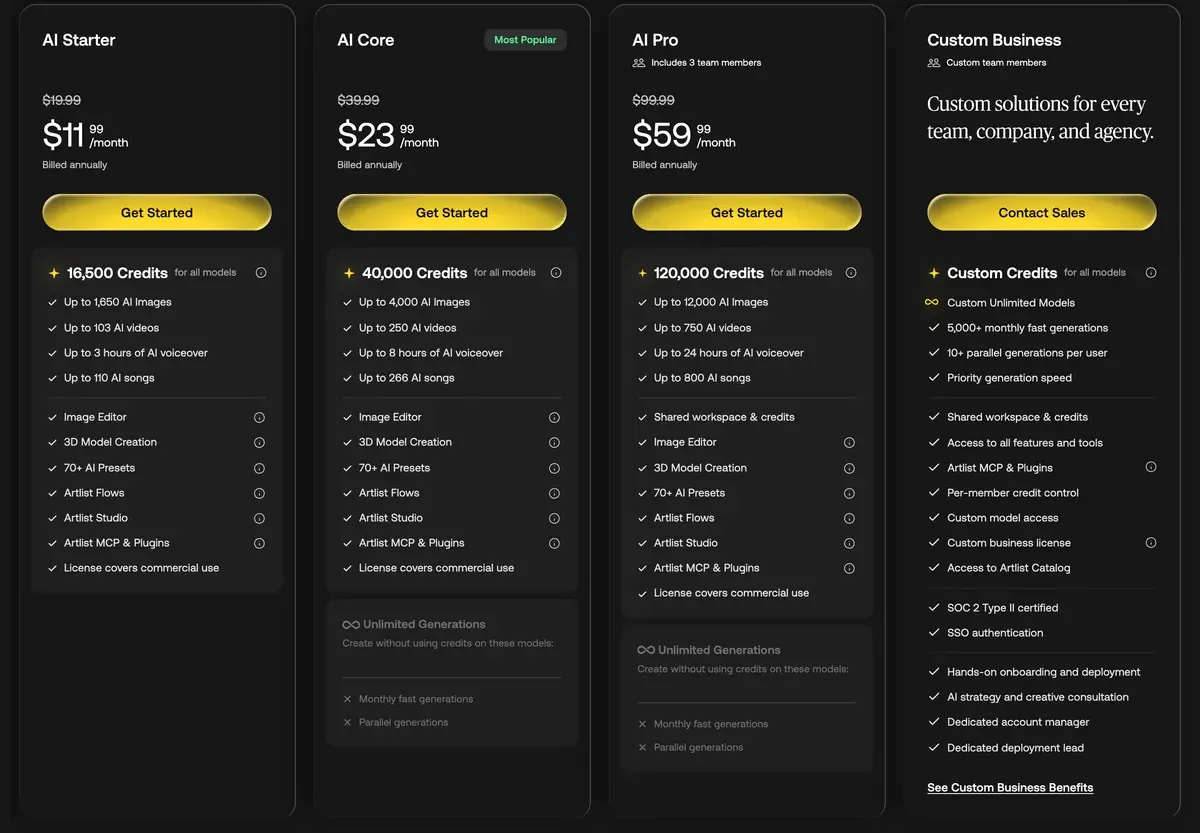
Method: the plan’s price a month divided by the vendor’s own video count, if every credit is used. Envato prints only yearly prices, so both lead on yearly billing (Artlist pricing, Envato pricing, Envato credit article, read ).
| Plan and billing | Price a month | Vendor’s count a month | Per video |
|---|---|---|---|
| Artlist AI Starter, yearly | $11.99 | Up to 330 videos | $0.04 |
| Artlist AI Starter, monthly | $19.99 | Up to 330 videos | $0.06 |
| Envato Core, yearly | $16.50 | 10 at 480p (20 credits) | $1.65 |
| Envato Plus, yearly, 480p | $39 | 100 (200 credits) | $0.39 |
| Envato Plus, yearly, 1080p | $39 | 22 (9 credits each) | $1.76 |
Scroll sideways for all 4 columns
Users of both complain about AI credits. On Artlist, credits run out far faster than the plan figures, above all on video models (5 of 46 sources: Trustpilot, Trustpilot). On Envato, the 2026 credit changes cut how many videos and songs a plan makes (9 of 45 sources: Reddit, Trustpilot).

Unlimited and credit expiry
Artlist still sells Unlimited; Envato withdrew it.
On Artlist, Unlimited needs yearly billing on AI Core or AI Pro and covers listed models only: 10 on AI Core, 20 on AI Pro. Each slows to standard speed after 700 or 900 fast generations a month.

Envato’s Ultimate plan gave unlimited AI until 17 August 2026 for new customers and 23 September 2026 for existing ones (help centre). It now sells 500, 1,000 or 2,000 credits a month, and unused credits expire each billing period.
What happens when you cancel
For stock, the two rules match: only work finished while you subscribe stays licensed. For AI clips, Envato’s rule is the tighter one.
Under the User Terms (10 November 2026), a cancelled account cannot use items “as part of new project or unfinished End Product”, generate output or open its generation history. Licence clause 8 makes an item’s licence perpetual once it sits in an End Product finished while you subscribed. So a new cut of an old ad, made after cancelling, is a new project with no licence.
On Artlist’s Pro licence, projects published during your term stay covered after it ends, and new ones are not (section 2). Your own generations stay assigned to you, with no end date (section 14).
Refunds differ more. Artlist refunds within 14 days of buying or renewing if you downloaded and generated nothing (terms 6), and renews unless you give notice 14 days before the next cycle (terms 4). Envato’s payments are non-refundable except where the law requires (User Terms).
Music and stock libraries
Envato bundles its library into every plan: unlimited downloads of “30+ million” assets, from footage and music to templates and fonts (Envato pricing).
Artlist sells stock separately. Music & SFX starts at $9.99 a month. Max, at $39.99 a month billed yearly, bundles the catalogue, the Pro licence and 7,500 AI credits (Artlist pricing). An ad that needs licensed music and AI clips needs Max, or two Artlist plans.
Plans: Artlist pricing and Envato pricing.
If neither fits
Magnific, formerly Freepik, pairs a stock library with image and video models (Magnific pricing). Higgsfield sells AI generation alone and publishes each model’s credit cost; Artlist vs Higgsfield sets it against Artlist.
Questions buyers ask about Artlist and Envato
Is Artlist or Envato cheaper?
Artlist, at the entry level: AI Starter costs $11.99 a month billed yearly and Envato Core $16.50 a month billed yearly, both on yearly billing. For stock plus AI, Envato Plus at $39 a month billed yearly and Artlist Max at $39.99 a month billed yearly sit within a dollar. Envato’s price includes unlimited stock; Artlist’s AI plan includes none (read ).
Can I use Envato AI videos in ads?
Yes, inside a larger ad. AI terms 15(a) license output only once it is combined with other content into an End Product.
Does Artlist include music with AI plans?
No. AI plans hold credits only; music and footage sit on stock plans or Max.
Sources
- Artlist: Artlist pricing, AI Suite cards on monthly and yearly billing, the
up to
video counts, the Unlimited model lists and the stock catalogue tab, in US dollars, read 12 November 2026. Checked - Artlist: Artlist Terms of Use, last update 14 October 2026; section 14 on output (re-read 13 November 2026), 4 on renewal and 6 on refunds. Checked
- Artlist: Artlist License, Social licence effective 4 January 2026, section 1; Pro licence effective 15 February 2026, sections 1 (covered uses, with out-of-home and billboard ads under Max Business), 2 and 3. Checked
- Artlist: Artlist Acceptable Use Policy, last updated 15 October 2026; sections 3 and 4.3. Checked
- Envato: Envato plans and pricing, Core, Plus and Ultimate cards with their per-month prices on yearly billing, AI credits, the Enterprise card’s
tailored indemnification
and the30+ million
asset count, in US dollars excluding local tax, read 12 November 2026. Checked - Envato: Envato AI Product Terms, last revised 1 July 2026; clauses 10, 15(a) and 18. Checked
- Envato: Envato Elements License, last revised 6 October 2026; clauses 4, 8, 14 and 19. Checked
- Envato: Envato Elements User Terms, last revised 10 November 2026; Post-Cancellation or Termination, Non-refundable, Artificial Intelligence Tools (d)(i) and the seat rules. Checked
- Envato Help Centre: Updates to Envato’s Ultimate Plans and AI Credit Structure, edited 29 September 2026; 2, 5 or 9 credits for a 4-second video by resolution, and the end of unlimited AI on Ultimate. Checked

Alexandre S.
Alexandre S. is a creative ad strategist and copywriter with ten years' experience in digital marketing across multiple channels.
Related pages
-
 Category Best AI video generators for ads
23 AI video generators and model shops compared on cost per clip and ad-use terms, checked 25 September 2026.
- Profile Artlist for ads
Artlist sells stock music and footage plans and a separate AI Suite on credits. What each licence lets an ad run and what Unlimited bars, checked 12 Nov 2026.
- Pricing Artlist pricing
Artlist AI Starter costs $19.99 a month, or $11.99 a month billed yearly, for 16,500 credits. Catalogue plans, Unlimited and cancelling, checked 12 Nov 2026.
- Profile Envato Elements for ads
Envato Elements gives unlimited stock downloads and 20 to 2,000 AI credits a month, and can license your AI output to other users. Checked 12 Nov 2026.
- Pricing Envato Elements pricing
Envato Elements Core is $16.50 a month billed yearly; Plus is $39 a month billed yearly, with 200 AI credits. Credits and cancelling, checked 12 Nov 2026.
-
 Compare Higgsfield vs Artlist
Higgsfield Starter: $19 for 270 credits; Artlist AI Starter: $19.99 for 16,500, with stock on separate plans. Training and ad licence compared.

