AI features in email marketing tools, plan by plan
Every one of the 12 email tools below sells some AI, and the cheap part is the writing. Omnisend’s free plan writes subject lines and email copy, and Klaviyo’s free plan generates subject lines. Choosing a send hour per contact, or predicting who buys next, sits on higher plans: HubSpot keeps send time optimisation for Enterprise.
Each cell below is the lowest plan the vendor’s own pricing or AI page names, read on 1 November 2026.
“Not listed” means the feature does not appear on the pricing and AI pages read; the tool may still sell it elsewhere. “Plan not readable” means the vendor lists the feature but marks its plans with icons that carry no text: that tool’s pricing page, in the sources below, shows the icons.
| Tool | Subject lines | Email writing | Segments | Send time | Predictions | Product picks | Agents |
|---|---|---|---|---|---|---|---|
| ActiveCampaign | Not listed | Plus | Starter | Plus | Pro | Not listed | Not listed |
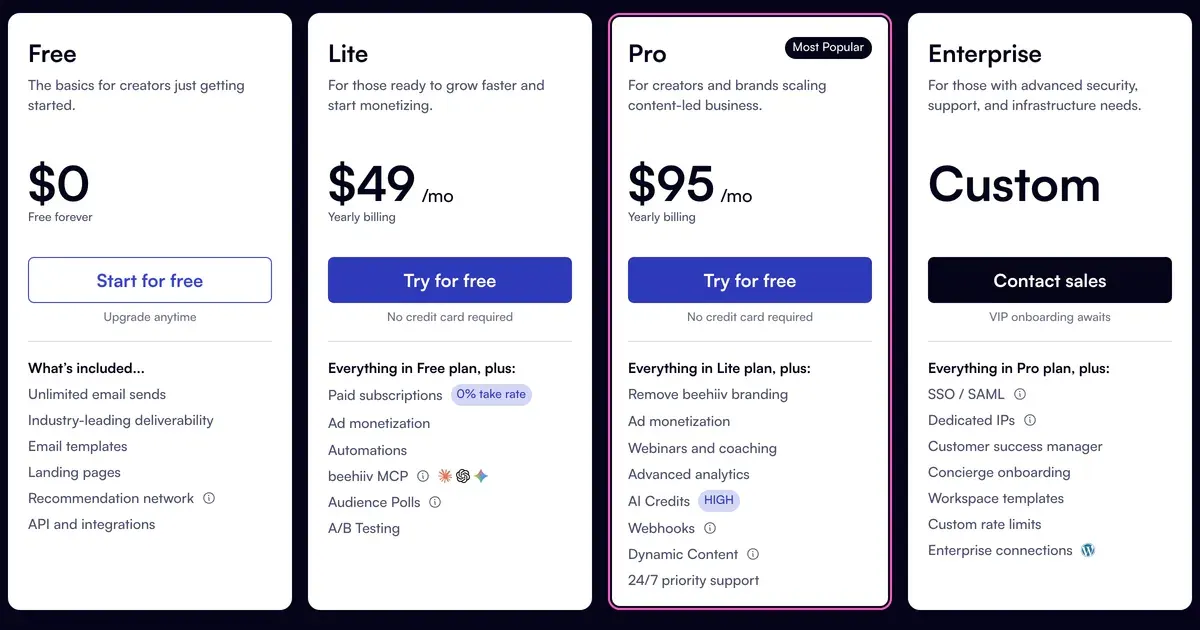
| beehiiv | Not listed | Lite | Not listed | Not listed | Not listed | Not listed | Free (read only); Lite to act |
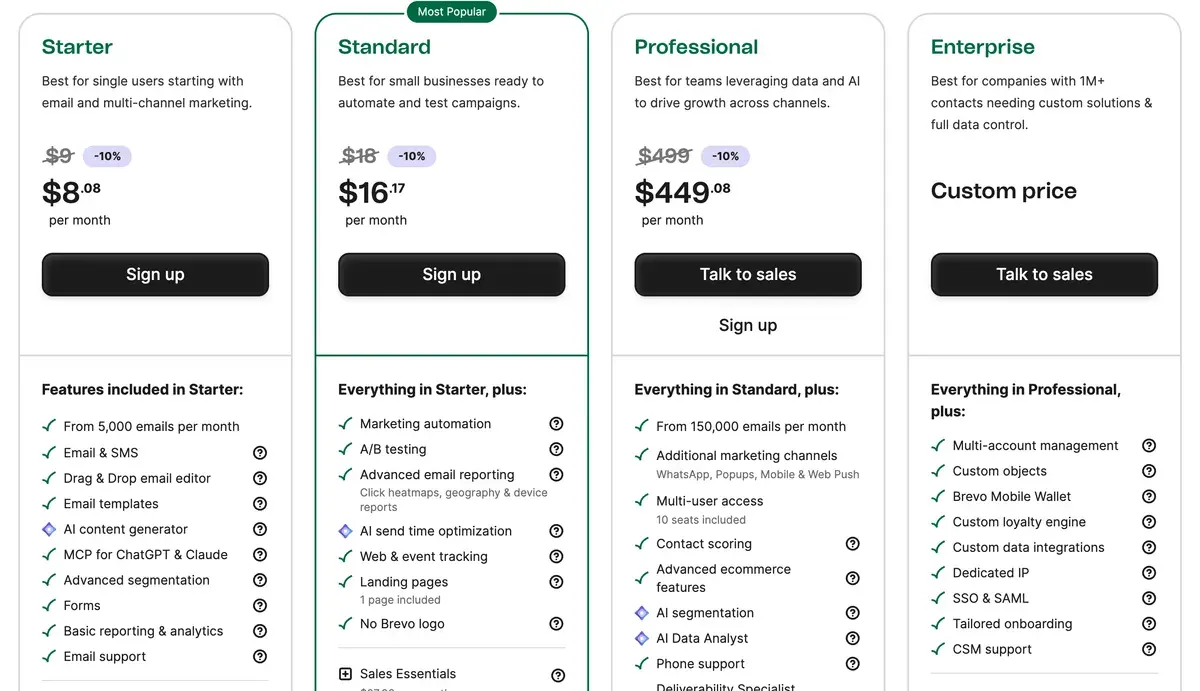
| Brevo | Starter | Starter | Professional | Standard | Not listed | Professional | Starter (MCP) |
| GetResponse | Starter (3 uses); Marketer unlimited | Starter (3 uses); Marketer unlimited | Not listed | Plan not readable | Not listed | Enterprise | Not listed |
| HubSpot | Not listed | Plan not readable | Not listed | Enterprise | Not listed | Not listed | Professional |
| Instantly | Not listed | Outreach Growth | Not listed | Not listed | Not listed | Not listed | Bundle Starter (Sales Agent) |
| Kit | No plan stated | Not listed | Not listed | Not listed | Not listed | Not listed | Creator (MCP) |
| Klaviyo | Free | Not listed | Not listed | Free, with $5 of usage | |||
| lemlist | Not listed | Plan not readable | Not listed | Not listed | Not listed | Not listed | |
| MailerLite | Free (limited); Comfort | Comfort | Not listed | Comfort | Not listed | Not listed | Free (limited); Comfort |
| Mailchimp | Not listed | Standard | Not listed | Not listed | Premium | Not listed | Not listed |
| Omnisend | Free | Free | Free | Pro, or Standard add-on | Not listed | Pro, or Standard add-on | All plans (MCP) |
Scroll sideways for all 8 columns

What does each AI feature do?
Subject lines: drafts you pick from
The tool writes several subject lines from your email or a short prompt. You pick one, or send two to a slice of your list and keep the one that gets more opens (an A/B test). Kit’s AI page says its generator also tests them inside the broadcast editor. MailerLite marks its free subject line generator as Limited, and its AI writing assistant starts on Comfort.
Email writing: a draft of the body
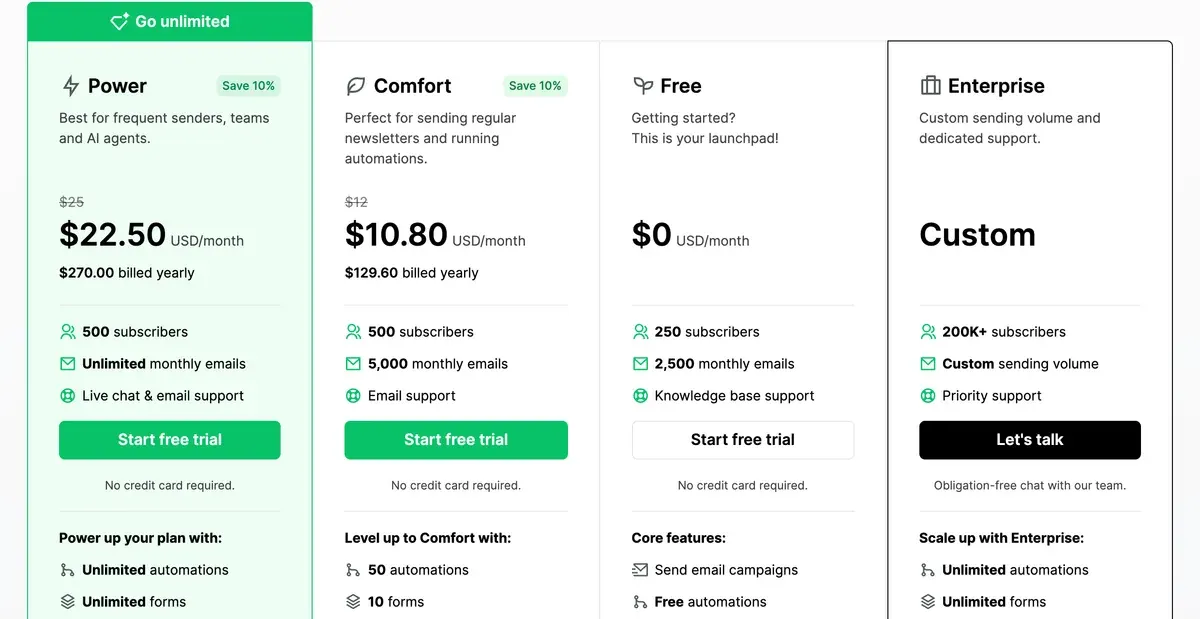
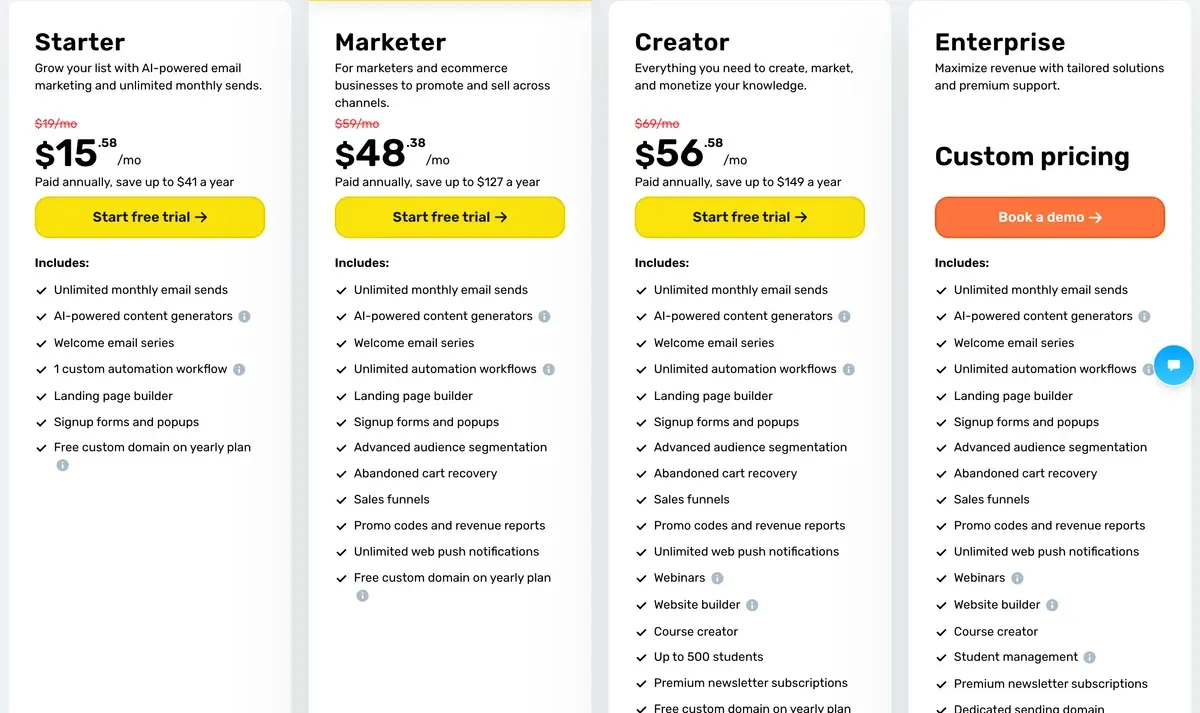
A text box in the editor drafts the body, rewrites a paragraph or changes its tone. GetResponse’s AI email generator is capped at “Up to 3 uses” on Starter and unlimited from Marketer (GetResponse pricing).
Segments: an audience described in words
You describe an audience in plain words, such as “bought twice, no order in 60 days”, and the tool builds the filter. Omnisend’s AI Segment Builder works from a written prompt, on every plan including Free.
Send time: one hour per contact
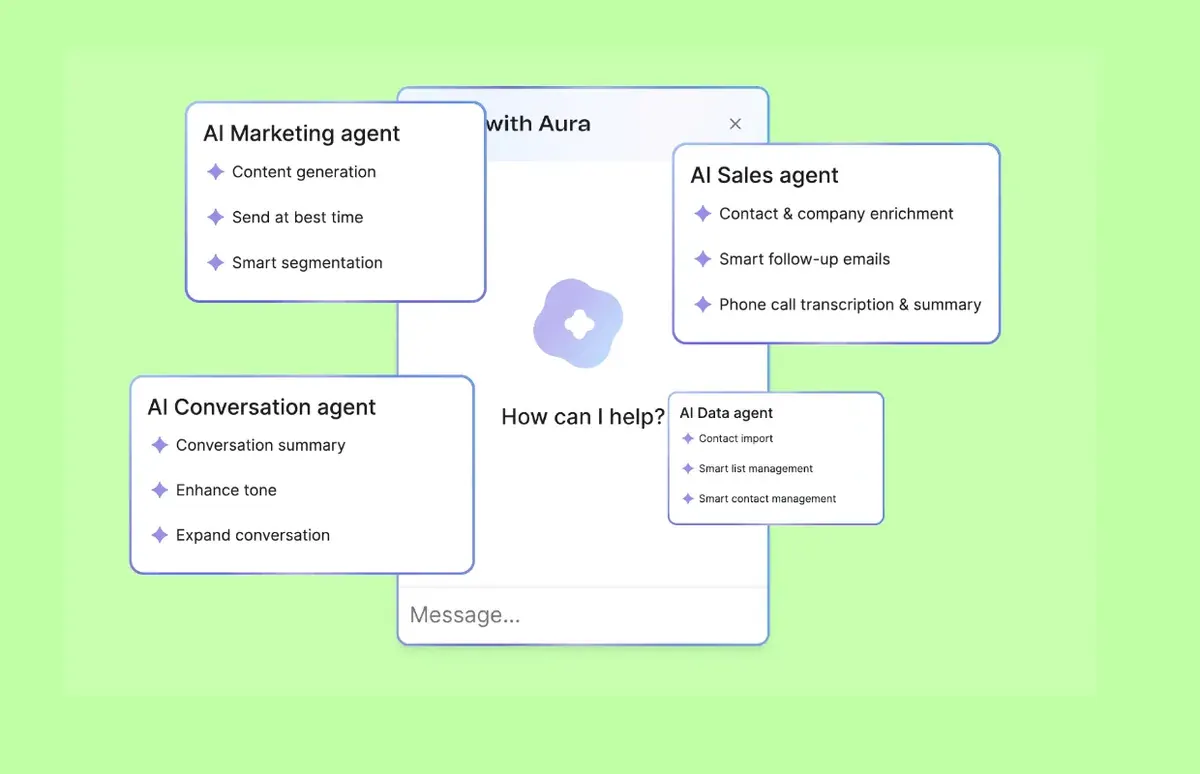
The tool picks a send hour for each contact from that contact’s past opens and clicks. Brevo’s pricing page describes it as sending “when each contact is most likely to engage”. Its marketing agent lists send at best time next to content generation and smart segmentation.
Predictions: scores built from order history
Scores for each customer: next order date, expected spend, chance of leaving. These need history. Klaviyo’s lifetime-value predictions need three things. The store has “at least 500 customers” with an order, 180 days of order history with orders in the last 30 days, and some customers with three or more orders (Klaviyo help, updated 5 August 2025).
Product picks: a block of likely buys
A block in the email shows each customer the products they are most likely to buy. Brevo puts it on Professional; GetResponse on Enterprise.
Agents: AI that does several steps
An AI that carries out several steps for you: building a campaign, writing a sequence, answering replies. Five of the 12 tools list an MCP server: Brevo, Kit, MailerLite, Omnisend and beehiiv. An MCP server is a connector that lets ChatGPT or Claude read your account and act on it. MailerLite’s terms (clause 17.2) say connecting one authorises it to read and modify your account data.
beehiiv gives its agent read access on every plan and write access from Lite.
Kit runs its AI Connectors on Creator and says it does not train AI on Kit data.
AI Connectors, security and data FAQ
Kit itself does not train any AI/LLM on Kit data. Please note, however, once a creator connects AI Connectors to a third-party AI client (ChatGPT, Claude, Gemini, etc.), that provider’s own data-handling settings govern whether prompts/data get used for model training.
This creator walks through the AI features of several email marketing tools in one video.

Which plans include the timing and prediction features?
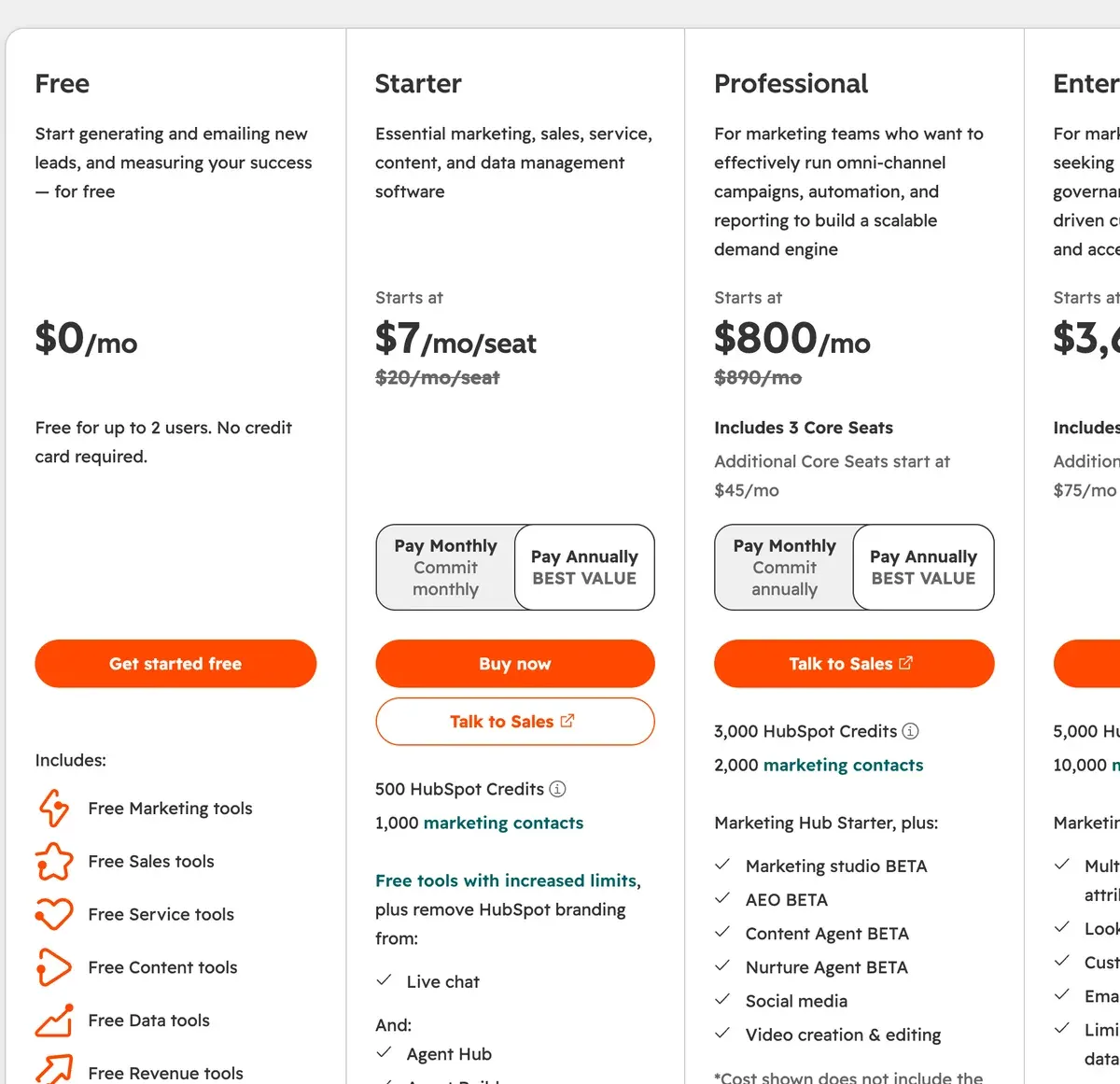
Send time and predictions are where the AI in email tools gets expensive. The cheapest send time model is Brevo Standard at $18 a month. HubSpot keeps it for Enterprise, from $3,600 a month billed annually, for 10,000 marketing contacts. Entry prices hold the smallest list each plan sells, so check yours on email marketing prices by list size.
| Tool | Feature | Lowest plan | Entry price | List at that price | Checked |
|---|---|---|---|---|---|
| Brevo | Send time | Standard | $18 | 5,000 emails a month | |
| MailerLite | Send time | Comfort | $12 | 500 subscribers | |
| Klaviyo | Predictions | $20 | 251 to 500 active profiles | ||
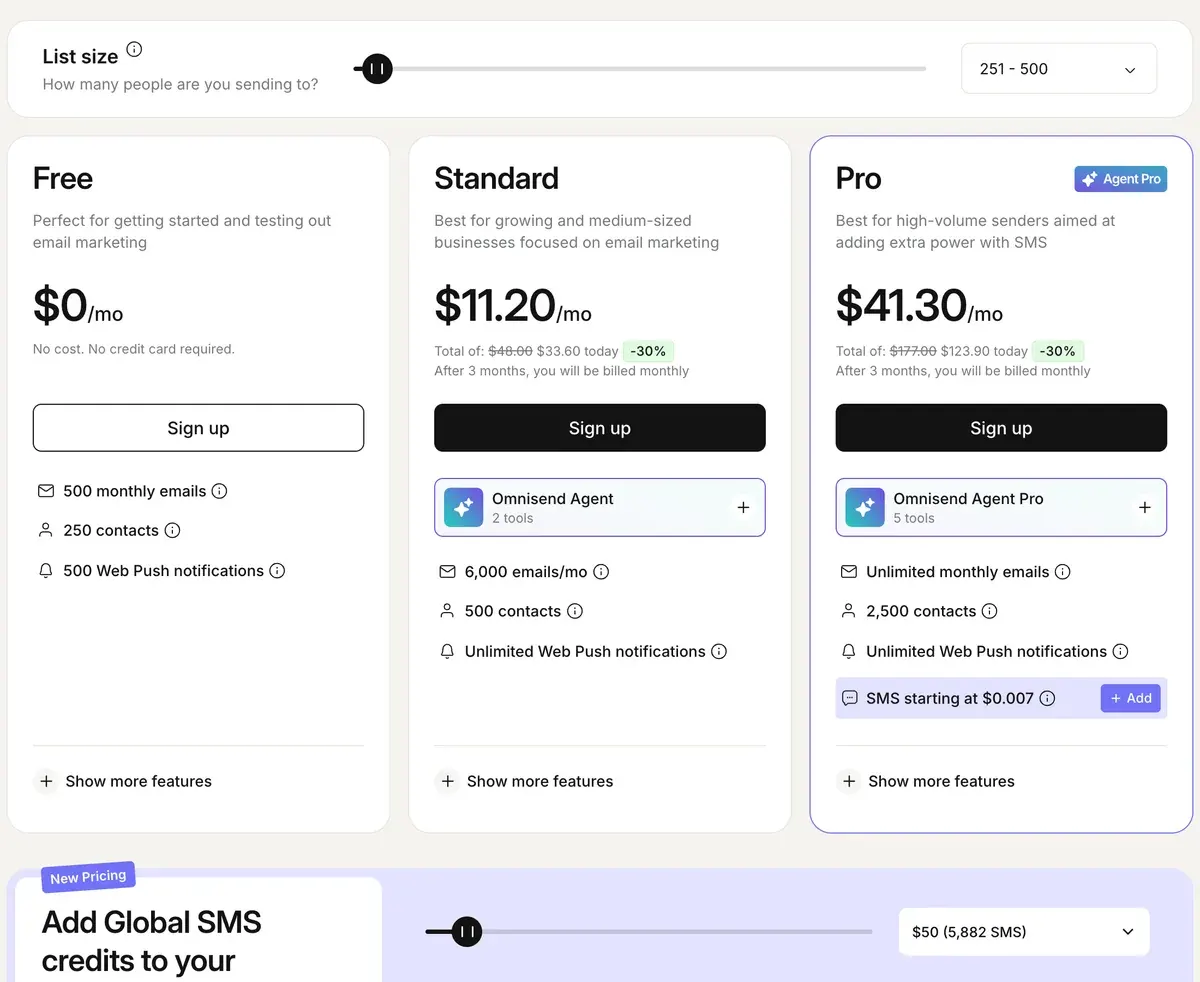
| Omnisend | Send time | Pro | $59 | Up to 2,500 contacts | |
| Mailchimp | Predictions | Standard | $20 | 500 contacts | |
| HubSpot | Send time | Enterprise | $3,600 | 10,000 marketing contacts |
Scroll sideways for all 6 columns
Prices are in USD a month. HubSpot Enterprise is billed annually and adds a one-time onboarding fee; every other row is billed monthly. ActiveCampaign is left out of this table because it publishes yearly billing only: account-based send times sit on Plus, predictive sending on Pro.
Klaviyo is the outlier for a store: its first paid plan carries predictive analytics. Mailchimp puts predictive segments on Standard, its second paid plan.
Is Mailchimp AI included in every plan?
No. Mailchimp’s pricing page lists its Generative AI Features as a “No additional cost add-on” on Standard and Premium and “Not included” on Essentials and Free. Standard starts at $20 a month for 500 contacts (checked ). Predictive segments sit on Standard and Premium, says a pricing page footnote.
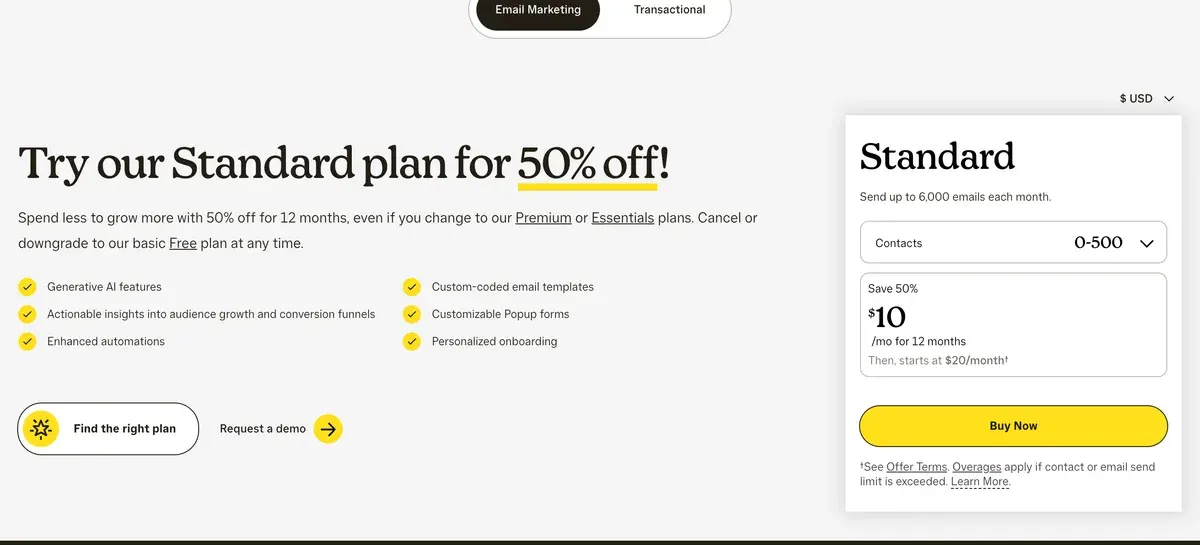
The pricing page does not mention send time optimisation, a subject line helper or product recommendations, so they appear as “Not listed” above. Section 30 of its terms covers what Mailchimp may do with your AI inputs. That clause is quoted in does your email tool train AI on your list.
What does Klaviyo AI include?
Klaviyo groups its AI features under a sparkle icon. The free plan generates subject lines and gives Composer, its marketing agent, $5 of usage.
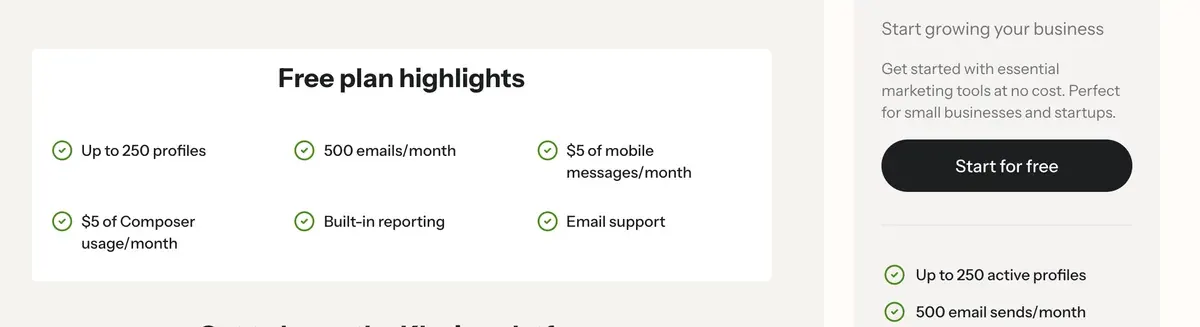
The Email plan card lists “AI-generated segments, content, and images”, plus predictive analytics. Composer’s add-on costs $20 a month for four times the usage (checked ).
Klaviyo bills active profiles, so every sign-up you keep counts towards the price. For a store choosing between Klaviyo and its rivals, see the best email marketing for ecommerce.
Does HubSpot have an AI email writer?
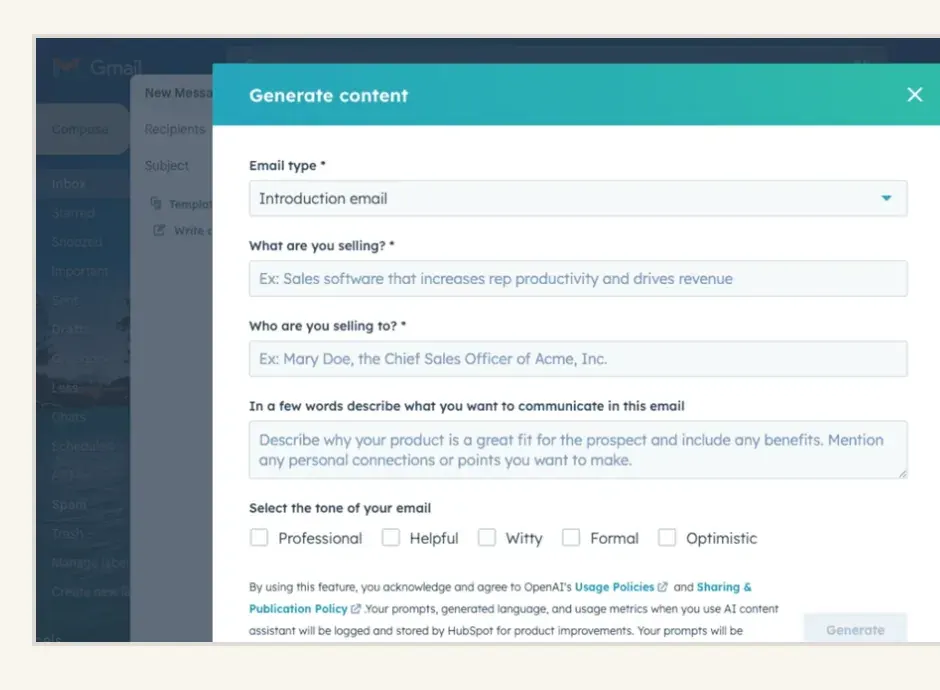
Yes. HubSpot’s product catalogue lists Breeze Assistant, which can “generate content” inside the CRM, but its edition marks are icons, so the lowest plan is not readable. HubSpot’s own page labels its AI Email Writer beta, and its Generate content dialog box asks for the email type, product, audience and tone.
The Content agent (Beta) needs Professional and draws on HubSpot Credits: 3,000 a month on Professional, 5,000 on Enterprise. Send time optimisation (Beta) is Enterprise only.
What do the AI writers in cold email tools add?
Instantly and lemlist sell AI for outreach to people who never signed up. Instantly’s AI Reply Agent sits on the Scale bundle. It spends 5 credits per reply.
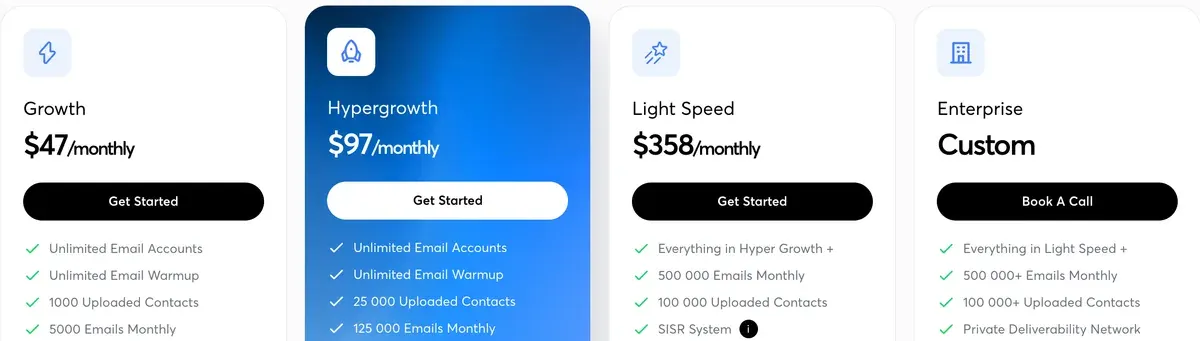
lemlist runs its AI Copilot on Claude, per its AI information page, and lists lemAgent on the Email plan. Price per mailbox and warm-up decide more than the AI here: see the best AI cold email tools.
What the AI in email tools does not do
None of these features knows your list on day one. A send time model works from each contact’s past opens and clicks, so a new subscriber gives it nothing to work from. Klaviyo’s lifetime-value predictions stay blank until a store meets all three order-history conditions above.
A generated subject line is a suggestion. No pricing page in the table promises a higher open rate from it, so you still test it against your own line.
The AI email marketing hub groups every page of this section. The best AI email marketing tools ranks the generalists by price at your list size.
Every AI feature, its plan and its limits
| Tool | AI feature | Lowest plan | Limits | Checked |
|---|---|---|---|---|
| ActiveCampaign | Email writing AI content generation | Plus | Not included on Starter | |
| ActiveCampaign | Segments AI-suggested segments | Starter | Included on all four plans | |
| ActiveCampaign | Send time AI campaign calendar: account-based send times | Plus (account-based); Pro (account and industry-based) | Not on Starter | |
| ActiveCampaign | Predictions Predictive sending | Pro | Not on Starter or Plus | |
| ActiveCampaign | Images AI image generation | Plus | Not included on Starter; image generation uses AI credits | |
| ActiveCampaign | Other Active Intelligence workspace and sidebar | Starter (limited access); unlimited on Pro and Enterprise | All plans include 500 AI credits; core AI keeps working when credits run out | |
| ActiveCampaign | Other AI-powered automation builder and AI campaign builder | Starter | Included on all four plans | |
| beehiiv | Email writing beehiiv AI (in-editor) | Lite | AI usage included: Limited on Free, Elevated on Lite, 5x Lite on Pro, custom on Enterprise. Credit amounts not published. | |
| beehiiv | AI agent beehiiv Agent and MCP | Free (read) / Lite (write) | Read access on every plan; write access from Lite. The MCP also serves a get_pricing tool. | |
| beehiiv | Other AI website builder | Free | Listed in the Free plan’s included features. | |
| beehiiv | Other AI podcast newsletter | Pro | Turns podcast episodes into a newsletter; Pro and Enterprise only. | |
| beehiiv | Other AI bot control | Pro | Controls AI crawler access to the publication’s site; not a writing feature. | |
| Brevo | Subject lines AI content generator (Aura) | Starter | Same feature as above. | |
| Brevo | Email writing AI content generator (Aura) | Starter | Drafts subject lines and email copy, adjusts tone. Free plan access unconfirmed (help.brevo.com blocked). | |
| Brevo | Segments AI segmentation (Aura) | Professional | Suggests audience groups from behaviour and attributes; an AI Segmentation add-on is described in the terms. | |
| Brevo | Send time AI send time optimization | Standard | Sends when each contact is most likely to engage. | |
| Brevo | Product picks AI recommendations (advanced ecommerce) | Professional | AI product recommendations, back-in-stock alerts and coupons. | |
| Brevo | AI agent MCP for ChatGPT and Claude | Starter | Manage campaigns and contacts from ChatGPT, Claude and other AI tools. | |
| Brevo | Other AI Data Analyst (Aura) | Professional | Plain-language questions answered from your data. | |
| GetResponse | Subject lines AI subject line generator | Starter (up to 3 uses); unlimited from Marketer | Same cap as the email generator | |
| GetResponse | Email writing AI email generator | Starter (up to 3 uses); unlimited from Marketer | Starter is capped at Up to 3 uses; Marketer, Creator and Enterprise show it as available without a limit | |
| GetResponse | Send time Perfect timing | listed in the email marketing table; plan columns not readable as text | Shown as a feature row; the check marks per plan are icons, so the lowest plan is not confirmed | |
| GetResponse | Product picks AI product recommendations | Enterprise | Listed under Enterprise inclusions | |
| HubSpot Marketing Hub | Email writing Breeze Assistant (generates content inside the CRM) | Smart CRM (edition marks not readable as text) | The catalogue lists it under Smart CRM as an assistant that can generate content; whether every edition has it was not readable | |
| HubSpot Marketing Hub | Send time Email send time optimization (Beta) | Enterprise | Not on Professional | |
| HubSpot Marketing Hub | AI agent Content agent (Beta) | Professional | Consumes HubSpot Credits (3,000 a month on Professional, 5,000 on Enterprise) | |
| HubSpot Marketing Hub | Personalisation Brand voice / Brand identity (Beta) | not confirmed | Listed as a feature row; plan marks not readable as text | |
| HubSpot Marketing Hub | Other AI email template upload (Beta) | Professional | 100 uploads a month on Professional and Enterprise | |
| Instantly | Email writing AI Sequence Writer | Outreach: Growth | Listed in the Growth feature highlights in pricing.md; no credit limit stated. | |
| Instantly | Email writing AI Email Writer Agent | Credits: Growth | Draws on 1,500 monthly Instantly credits; access to 5 LLMs or your own API key. | |
| Instantly | AI agent AI Sales Agent | Bundle: Starter | 5 credits per lead generated. | |
| Instantly | Reply handling AI Reply Agent | Bundle: Scale | 5 credits per reply generated; the Scale bundle card lists it. | |
| Instantly | Other Deliverability AI Agent | Outreach: Hypergrowth | Listed in the Hypergrowth feature highlights. | |
| Instantly | Other AI Spam Words Checker | Outreach: Growth | Listed in the Growth feature highlights. | |
| Kit | Subject lines AI email writing tools (subject line generator and tester) | Not stated | kit.com/ai says subject lines are generated and tested in the broadcast editor. No plan and no usage limit stated on that page; lowest plan not verified. | |
| Kit | Other AI Connectors (Kit MCP) | Creator | 65+ tools let Claude, ChatGPT, Cursor and other clients read the account and act on it; Free can connect but not run tools; rate limit 120 requests a minute per connection. | |
| Kit | Other AI apps in the Kit App Store | Free apps on any plan; paid apps need Creator or Pro | Third-party apps (kit.com/ai names involve.me, Lex, Wordsmith, Ada) vary; some free, some subscriptions. Each app has its own data practices. | |
| Klaviyo | Subject lines AI subject line generator | Free | Listed in the free plan’s marketing features. | |
| Klaviyo | Email writing Email AI / SMS AI (generative content, sparkle icon) | The Email plan card lists AI-generated segments, content, and images; usage limits were not stated. | ||
| Klaviyo | Segments Segments AI | Same card line as above. | ||
| Klaviyo | Predictions Predictive analytics (K:AI) | Listed on the Email card (Predictive analytics and reporting dashboards); the FAQ says it cannot be opted out of. | ||
| Klaviyo | AI agent Composer (Marketing Agent) | Free (5 USD of usage); 20 USD a month add-on for four times the usage | Extra usage in 10 USD increments. | |
| Klaviyo | Reply handling Customer Agent | Add-on | 50 free AI resolutions a month listed; paid resolution price sits behind a slider and was not read. | |
| lemlist | Email writing AI Copilot and AI Sequence Builder | Not stated | Powered by Claude (Anthropic) per lemlist.com/ai-info; the plan is not readable because the comparison table’s ticks are not in the page text. | |
| lemlist | AI agent lemAgent | Listed on the Email plan card. | ||
| lemlist | Personalisation Smart Messaging (Messaging AI agents) | Listed on the Email plan card as Signal, Enrichment, & Messaging AI agents. Data runs on credits ($20 a month for 2,000). | ||
| lemlist | Reply handling AI reply intent detection, out-of-office detection and AI-generated replies | Not stated | Listed in the comparison table; per-plan ticks not readable. | |
| lemlist | Other AI Columns (OpenAI, Perplexity, Claude, Gemini) | Not stated | Runs models on lead attributes; plan not stated. | |
| MailerLite | Subject lines Subject line generator | Free (limited); full on Comfort | Free is marked Limited without a stated cap. | |
| MailerLite | Email writing AI writing assistant | Comfort | Not on Free. Runs on credits: Comfort has a limited amount, Power the most (help article, edited 16 June 2026). | |
| MailerLite | Send time Smart sending | Comfort | Not on Free. Also deliver by timezone on Comfort. | |
| MailerLite | AI agent MCP server (Claude, ChatGPT) | Free (limited); full on Comfort | Terms clause 17.2: connecting an agent authorises it to read and modify account data. | |
| MailerLite | Images AI landing page builder | Free (once); unlimited use on Comfort | The AI policy also lists an AI image generator (DALL-E 3); its plan was not stated. | |
| MailerLite | Other AI-powered A/B testing | Listed under HeyLite intelligence; plan not itemised | Named in the pricing page menu; the comparison table lists email A/B testing on all plans and multivariate testing on Comfort. | |
| Mailchimp | Email writing Generative AI features (content generation) | Standard | Listed as No additional cost add-onon Standard and Premium, Not includedon Essentials and Free. Terms 30 says it covers campaigns, performance analysis and organising contacts. | |
| Mailchimp | Segments Advanced segmentation and pre-built segments | Standard | Not marked as AI on the page. | |
| Mailchimp | Predictions Predictive segmentation | Standard | Named in the Premium feature set; footnote 17 says Predictive segments available on Standard or Premium plans only. | |
| Omnisend | Subject lines AI-generated subject lines and preheaders | Free | The AI page’s FAQ says the free plan includes subject line generation; no credit limits stated. | |
| Omnisend | Email writing AI copywriting / AI Writer in the email builder | Free | Same FAQ line: content writing on the free plan; no limits stated. | |
| Omnisend | Segments AI Segment Builder | Free (per AI page); listed as a feature row on the pricing table | Plain-language prompt builds a segment; the table’s per-plan tick marks are icons and could not be read as text. | |
| Omnisend | Send time Personalised sending time | Pro, or Standard add-on from 5 USD a month | Add-on price scales with the contact list. | |
| Omnisend | Product picks Personalised product recommender | Pro, or Standard add-on from 5 USD a month | Add-on price scales with the contact list. | |
| Omnisend | AI agent Omnisend MCP | All plans listed | Lets ChatGPT or Claude read account data and create campaigns; terms clause 11.6. | |
| Omnisend | Personalisation Dynamic content | Pro, or Standard add-on | Shows or hides blocks by audience filter. | |
| Omnisend | Other Forms AI and Reports AI agents | Standard (agent cards list them); Free per AI page for forms | Standard card lists Agent: Formsand Agent: Chat. |
Scroll sideways for all 5 columns
Questions buyers ask about AI in email tools
Does Omnisend have an AI subject line tool?
Yes. Omnisend’s AI page says its free plan includes AI-generated subject lines and preheaders, with no credit limit stated.
Does GetResponse have an AI email generator?
Yes, capped at 3 uses on Starter and unlimited from Marketer, per its pricing page. Marketer starts at $59 a month for 1,000 contacts (checked ).
Which email tool has free AI writing?
Omnisend’s free plan writes subject lines and email copy. Klaviyo’s free plan and MailerLite’s free plan (marked Limited) generate subject lines.
Every AI email marketing page, sorted by job, is in the AI email marketing hub
Sources
- Mailchimp: Mailchimp marketing plans, Generative AI Features: a no additional cost add-on on Standard and Premium, absent from Essentials and Free; predictive segments on Standard or Premium (footnote 17). Checked
- Klaviyo: Klaviyo pricing, subject line generator on Free; AI segments, content and images and predictive analytics on Email; Composer with 5 USD of usage on Free. Checked
- Klaviyo Help Center: Understanding Klaviyo’s predictive analytics, updated 5 August 2025; at least 500 customers with an order and 180 days of order history. Checked
- HubSpot: HubSpot product and services catalog, Content agent (Beta) on Professional; email send time optimization (Beta) on Enterprise. Checked
- Brevo: Brevo pricing, Aura content generator from Starter; send time optimisation on Standard; AI segmentation and recommendations on Professional. Checked
- MailerLite: MailerLite pricing, AI writing assistant and smart sending on Comfort; subject line generator limited on Free. Checked
- Kit: Kit AI, subject lines generated and tested in the broadcast editor; no plan stated. Checked
- Kit: How to connect the Kit MCP to your AI tools, AI Connectors run tools on Creator; Free can connect but not run tools. Checked
- beehiiv: beehiiv pricing, beehiiv AI on Lite; Agent and MCP read access on every plan, write access from Lite. Checked
- GetResponse: GetResponse pricing, AI email and subject line generators capped at 3 uses on Starter, unlimited from Marketer; AI product recommendations on Enterprise. Checked
- ActiveCampaign: ActiveCampaign pricing (Wayback capture of 26 October 2026), AI segments on Starter; AI content generation and account-based send times on Plus; predictive sending on Pro. Checked
- Omnisend: Omnisend AI, FAQ: subject line generation and content writing on the free plan. Checked
- Omnisend: Omnisend pricing, product recommender and personalised sending time on Pro, or a Standard add-on. Checked
- Instantly: Instantly pricing, AI Sequence Writer on Outreach Growth; AI Reply Agent on the Scale bundle. Checked
- lemlist: lemlist pricing, lemAgent and messaging AI agents on the Email plan. Checked

Alexandre S.
Alexandre S. is a creative ad strategist and copywriter with ten years' experience in digital marketing across multiple channels.
Related pages
-
 Compare Kit (formerly ConvertKit) vs MailerLite
Kit sends free to 10,000 subscribers; MailerLite’s automations cost less at every size, and its terms license your AI inputs for training. Checked 1 Nov 2026.
-
 Compare MailerLite vs Mailchimp
MailerLite Comfort undercuts Mailchimp Essentials at every list size we price, and puts AI writing on that plan. Billing rules and AI terms, 1 Nov 2026.
-
 Alternatives Mailchimp alternatives: what you save at your list size, and where the AI sits
Eight Mailchimp alternatives priced at 2,500 and 10,000 contacts, with the plan that holds AI and whether each trains on your list. Checked 1 Nov 2026.


