Make vs Zapier
Verdict: Make or Zapier
Pick Make for branching workflows on a budget and Zapier for the most apps and the simplest editor (read on ).
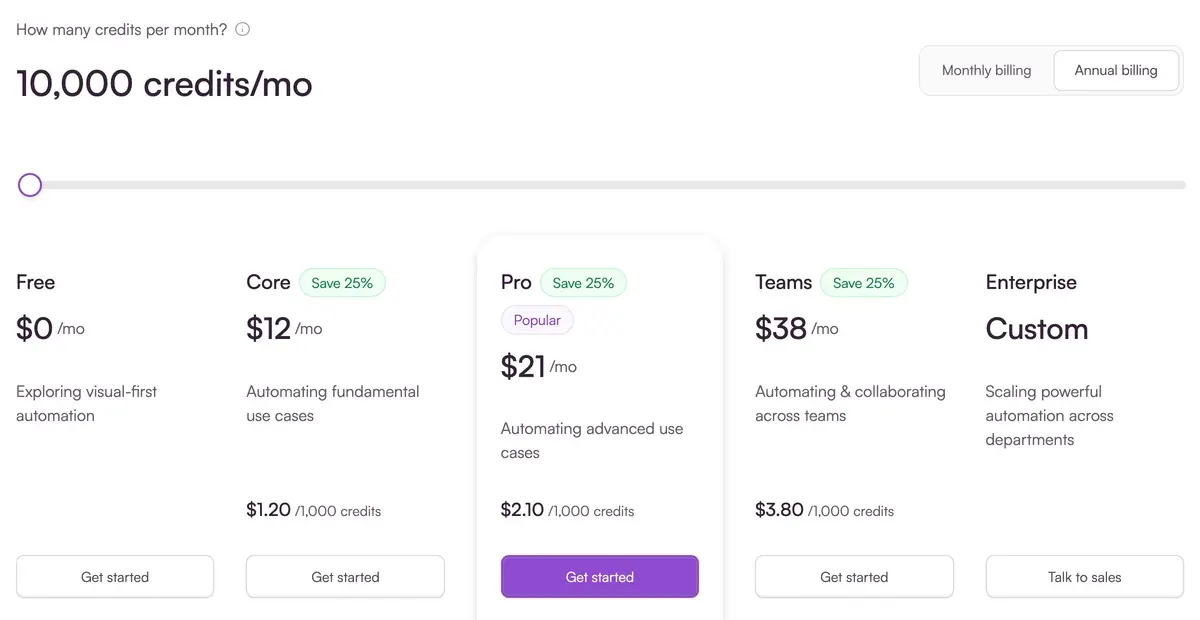
Run 500 times a month, a 4-step lead workflow fits Make Core at $12 a month against $39 on Zapier, billed yearly.
The catch is metering: unused Make credits expire at the end of the term, and a scheduled trigger uses credits on every scheduled run.
Make
- Best for
- Teams who want branching, visual workflows at a lower entry price than Zapier, and are happy to learn a canvas-style editor.
- Not for
- Anyone who wants a refund on an unused annual plan: subscription fees are non-refundable once ordered (MSA s.5.1).
Zapier
- Best for
- Marketers and small teams who want lead, ad and email handoffs running without code, across Zapier’s 9,000+ listed apps.
- Not for
- High-volume or loop-heavy workflows: every successful action uses a task, so costs climb faster than on per-run tools such as n8n.
| Make | Zapier | |
|---|---|---|
| Where they differ | ||
| Monthly from (USD) | $16 | $29.99 |
| What a plan counts | Credits: most modules use 1 each run, the trigger included | Tasks: each successful action; triggers, Filter and Paths are free |
| Free plan | 1,000 credits; scheduled runs at most every 15 minutes | 100 tasks; two-step Zaps only |
| Editor | Visual canvas with routers, iterators and aggregators | Steps in a list, top to bottom, with Paths for branches |
| Apps it claims | 3,500+ | 9,000+ |
| Running out | Scenarios stop, or auto-buy 10,000 credits on paid plans; unused credits expire at term end | Pay-per-task at a higher rate, or Zaps pause |
| The same on both | ||
| API | Both: Yes | |

Credits or tasks: what are you paying for?
Make vs Zapier is a choice between two automation tools: both move data between your apps by themselves. A lead or an order reaches the right place with nobody copying it. Each workflow starts from a trigger, the event that sets it off, and then runs actions.
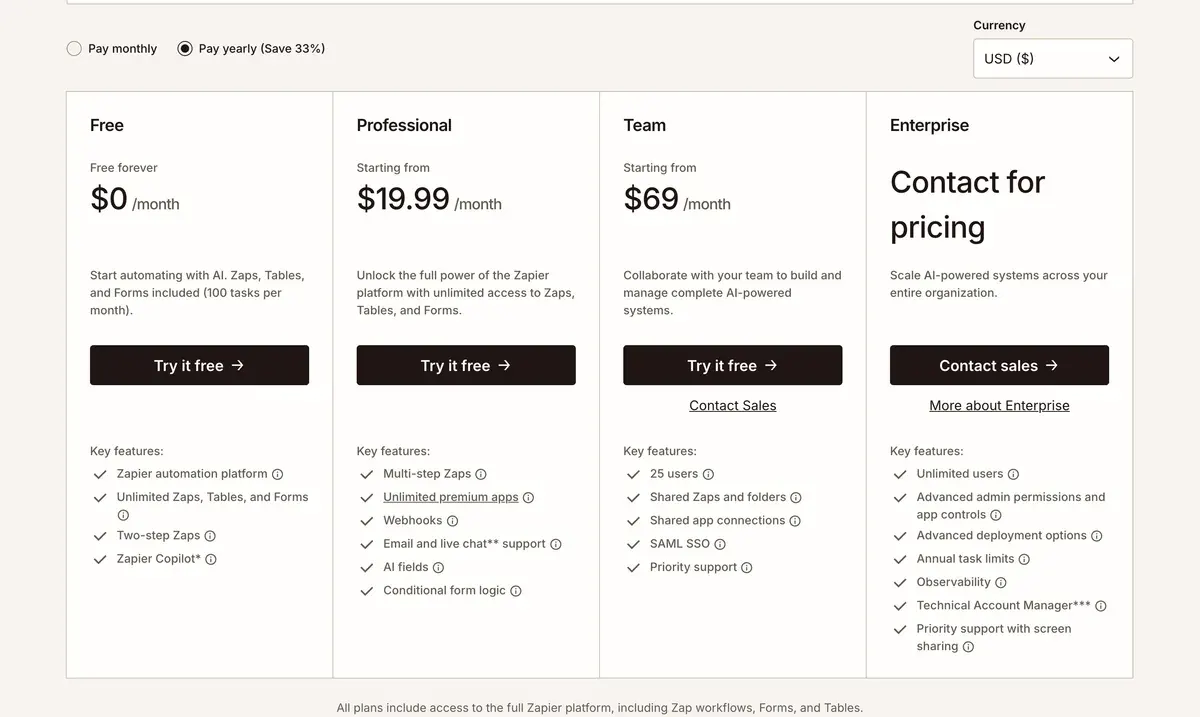
Zapier bills tasks. A task is one successful action, and its pricing FAQ says triggers and built-in tools such as Filter, Formatter and Paths use none.
Make (make.com) bills credits. Its help centre says one operation, a module doing its job once, equals one credit by default.
Credits
Fixed usage By default, 1 operation equals 1 credit.
Dynamic usage Some AI and advanced apps consume a different number of credits per run based on actual usage rather than a fixed rate.
The trigger is a module too, so it counts on every run.
Which costs less for the same workflow?
Make, for an instant-trigger workflow at every volume in the table below. Take a lead workflow many ad teams run: a Facebook Lead Ads lead arrives, goes into the CRM, joins an email list and pings Slack.
Run 500 times a month, that is four modules on Make, about 2,000 credits.
On Zapier it is three actions, 1,500 tasks.
| Runs a month | Make (USD a month) | Zapier (USD a month) |
|---|---|---|
| 100 | Free Free plan, 400 credits |
$19.99 300 tasks |
| 250 | Free Free plan, 1,000 credits, all used |
$19.99 750 tasks |
| 500 | $12 Core plan, 2,000 credits |
$39.00 1,500 tasks |
Scroll sideways for all 3 columns
Zapier’s free plan runs two-step Zaps only, so a workflow with three actions needs Professional.
Make Core’s 10,000 credits stretch to 2,500 runs of this workflow. On Zapier those runs come to 7,500 tasks, five times the 1,500-task tier.
Monthly billing lifts both: $16 a month on Make Core, $58.50 a month for Zapier’s 1,500 tasks (Make pricing).

The scheduled-trigger trap on Make
The table assumes an instant trigger, one that fires when a lead arrives. A scheduled trigger runs on a timer instead, and Make counts its credits on every scheduled run.
Make’s scheduling guide counts 288 credits a day for a trigger run every 5 minutes. A 15-minute schedule comes to 2,880 credits a month (96 checks a day for 30 days), almost three times the free plan.
Zapier’s triggers use no tasks, however often they poll. So on Make, prefer instant triggers wherever the app offers one.
Every Zapier tier: Zapier pricing.
Canvas or list: which editor suits you?
Make draws each workflow, a scenario in its words, as a map of connected bubbles. Routers split it into branches, and iterators and aggregators loop over lists and gather the results. Routers and error handlers use no credits (Make pricing).
Zapier shows a Zap as steps in a list, top to bottom. Paths add branches and Looping repeats steps. Neither step uses a task, but each action inside a loop uses one every time it runs.
The canvas pays off when one lead can go three ways, say by country or by budget. For a straight handoff from form to CRM, the list is quicker to read.

Which connects more apps?
Zapier, by the vendors’ own counts: 9,000+ apps against Make’s 3,500+ (pricing pages of Zapier and Make).
Both list Facebook Lead Ads, Google Ads, LinkedIn and TikTok. The gap shows on smaller CRMs, ad tools and AI apps, so check yours in each directory first.
For a missing app, Make’s Code app runs JavaScript or Python at 2 credits per second of execution (Make help).
What do they offer for AI agents and MCP?
An AI agent is a step that picks its own next action. MCP (Model Context Protocol) is the way assistants such as Claude or ChatGPT call outside tools. Both vendors offer both.
The Make MCP server turns active on-demand scenarios into tools that Claude, ChatGPT and other clients can call. Run scopes work on every plan; scopes that change your account need a paid plan.
Make AI Agents and the AI Toolkit run on Make’s AI Provider on every plan. On paid plans they can use your own model key instead (Make help).
Zapier MCP comes with every plan and takes two tasks per tool call (Zapier MCP). Zapier Agents, Chatbots and Copilot share the task pool. More: Zapier MCP and Zapier AI.
What happens when you cancel or run short?
Neither contract refunds a plan you simply stop using, and they part ways when you run out.
Make’s Master Services Agreement (March 2026) says “Subscription Fees are non-cancelable and non-refundable once Services are ordered” (section 5.1).
5. Fees and Payment
5.1 Subscription Fees are non-cancelable and non-refundable once Services are ordered. Subscription Fees and Taxes are due upfront at the time of purchase.
Unused credits expire at the end of the term, and extra credits come in packs of 1,000 or 10,000.
Zapier’s pricing FAQ says a cancelled plan runs to the end of its billing cycle. Its refund policy calls all purchases non-refundable, including monthly and annual plans. Its terms give prorated refunds only under the warranty and IP remedy clauses.
Zapier refund policy
Scope All purchases are considered non-refundable, including: Monthly and annual plans.
Finality Once a charge is processed, it is considered final and will not be refunded.
Users report both sides of this. On Zapier, 13 of 34 public sources say an annual plan was refused a refund (Trustpilot, 9 Nov 2026, Trustpilot, 8 Nov 2026). On Make, 6 of 32 say support refunded a billing error or an accidental renewal (Trustpilot, 10 Jul 2026, Trustpilot, 3 Feb 2026).
Stopping early on a yearly plan leaves the rest of the year paid on either tool. Start monthly until your usage settles.
Running short works differently. On Make, scenarios stop until credits are added. On Core, Pro and Teams, an optional auto-top-up buys 10,000 credits before you run out. Zapier bills extra tasks at a higher rate, unless you turn that off and let Zaps pause.
What do user reviews say about each?
Reviewers like Make’s builder once learned and Zapier’s quick set-up; both draw complaints about cost and breakage.
On Make, 32 public sources:
- Flexible visual builder with many integrations, rewarding once the learning curve is passed (8 of 32 sources: Trustpilot, 10 Jul 2026, Trustpilot, 3 Feb 2026)
- Complicated, laggy or slow interface with long set-up (11 of 32 sources: Trustpilot, 19 Sep 2026, Trustpilot, 1 Jun 2026)
- Billing surprises such as overcharged credits, forced upgrades and charges after cancelling (6 of 32 sources: Trustpilot, 2 Jun 2026, Trustpilot, 2 Oct 2025)
On Zapier, 34 public sources:
- Wide app library and quick no-code set-up, including on the free plan (4 of 34 sources: Trustpilot, 23 Mar 2026, Trustpilot, 2 Aug 2025)
- Per-task billing gets expensive fast on multi-step Zaps, overages and tier jumps (13 of 34 sources: Trustpilot, 27 Oct 2026, Trustpilot, 21 Sep 2026)
- Zaps fail or need repeated manual fixing, even simple ones (4 of 34 sources: Trustpilot, 26 Jun 2026, Trustpilot, 22 May 2026)
Who should pick which?
Price your busiest workflow in both units first.
Take a small online brand selling direct (DTC) that routes leads by country to two CRMs. Make Core gives it branches and the most room per dollar.
A marketer whose stack includes a niche CRM or ad tool that only Zapier lists, with a few hundred runs a month, fits Zapier Professional.
A team that wants to try paid features before paying can start on Zapier’s 14-day Professional trial, with no card.
When is each the wrong pick?
Make is the wrong pick if nobody on the team wants to learn a canvas. Of 32 public sources, 11 call its interface complicated or slow (Trustpilot, 19 Sep 2026, Trustpilot, 1 Jun 2026).
Zapier is the wrong pick for long workflows at volume: every action adds a task. For thousands of runs, n8n bills one execution per full run, with 2,500 on Starter at $20 a month billed yearly: n8n vs Zapier. Every other route: Zapier alternatives.
Questions buyers ask about Make and Zapier
Is Make cheaper than Zapier?
Yes, at every volume in the lead-workflow table, with an instant trigger. Make Core’s 10,000 credits cover 2,500 runs of it at a lower yearly price than Zapier’s 750-task tier, which covers 250.
Is Make the same as Integromat?
Yes. Integromat is Make’s former name, and Make’s announcement set the end of Integromat support in 2023.
Does Zapier have a discount code?
Zapier publishes no promo code. Its public savings are a 14-day trial, yearly billing and 15% off for non-profits: Zapier promo code.
Sources
- Make: Make pricing, Free, Core, Pro, Teams and Enterprise at the 10,000-credit slider position, read in the browser; the FAQ on credits, expiry and extra credit packs. Checked
- Make help centre: Credits, by default 1 operation equals 1 credit; some AI modules use more. Checked
- Make help centre: Step 10. Schedule your scenario, trigger-module credits per schedule: every 5 minutes is 288 credits a day, hourly is 24. Checked
- Make help centre: How features use credits, Make Code at 2 credits per second of execution; AI Agents and AI Toolkit on Make’s AI Provider or a custom AI provider connection, custom connections on paid plans. Checked
- Zapier help centre: Zapier refund policy, all purchases non-refundable, monthly and annual plans included (updated 20 Nov 2025). Checked
- Make help centre: Make MCP server, scenarios as tools for MCP clients such as Claude and ChatGPT; run scopes on all plans, management scopes on paid plans. Checked
- Celonis, Inc.: Master Services Agreement for Make (March 2026), section 5.1 on fees and section 6.2 on Customer Data. Checked
- Make: Integromat evolves to Make, the announcement of the new name, with Integromat support ending in 2023. Checked
- Zapier: Zapier pricing, plan cards, the task-tier selector and the FAQ on tasks, pay-per-task billing and cancelling. Checked
- Zapier: Zapier MCP, two tasks per tool call, included in every plan. Checked
- Zapier: Zapier Terms of Service (effective 9 April 2026), refunds under the warranty and IP remedy clauses only. Checked
- Trustpilot and Reddit: Make user reviews, 32 public sources from July 2025 to November 2026, synthesised on 20 November 2026. Checked
- Trustpilot and Reddit: Zapier user reviews, 34 public sources from June 2025 to November 2026, synthesised on 20 November 2026. Checked

Alexandre S.
Alexandre S. is a creative ad strategist and copywriter with ten years' experience in digital marketing across multiple channels.
Related pages
-
 Profile What is Zapier, and what does a task cost?
Zapier moves ad leads and orders between apps and bills each finished action as a task. What a lead workflow costs at 500 leads a month, and who should skip it.
-
 Pricing Zapier pricing: plans, task tiers and what a task costs
Zapier Free gives 100 tasks a month and two-step Zaps only. Plans, cost per task and overage, checked 20 November 2026.
-
 Alternatives Zapier alternatives
Seven Zapier alternatives, and what a 500-lead workflow to a CRM, Slack and an email list costs on each that publishes a rate. Prices read 20 November 2026.
-
 Compare n8n vs Zapier
Zapier bills each action, n8n each full run: a 4-step lead workflow run 500 times costs about twice as much on Zapier, billed yearly. Read 20 Nov 2026.
-
 Guide Zapier AI: Agents, AI steps, Chatbots and MCP, and how each one bills
A Premium AI by Zapier step uses 5 tasks a run plus 5 per tool call. Every Zapier AI product, how it bills and a lead agent, step by step.


