What is Zapier, and what does a task cost?
Verdict on Zapier
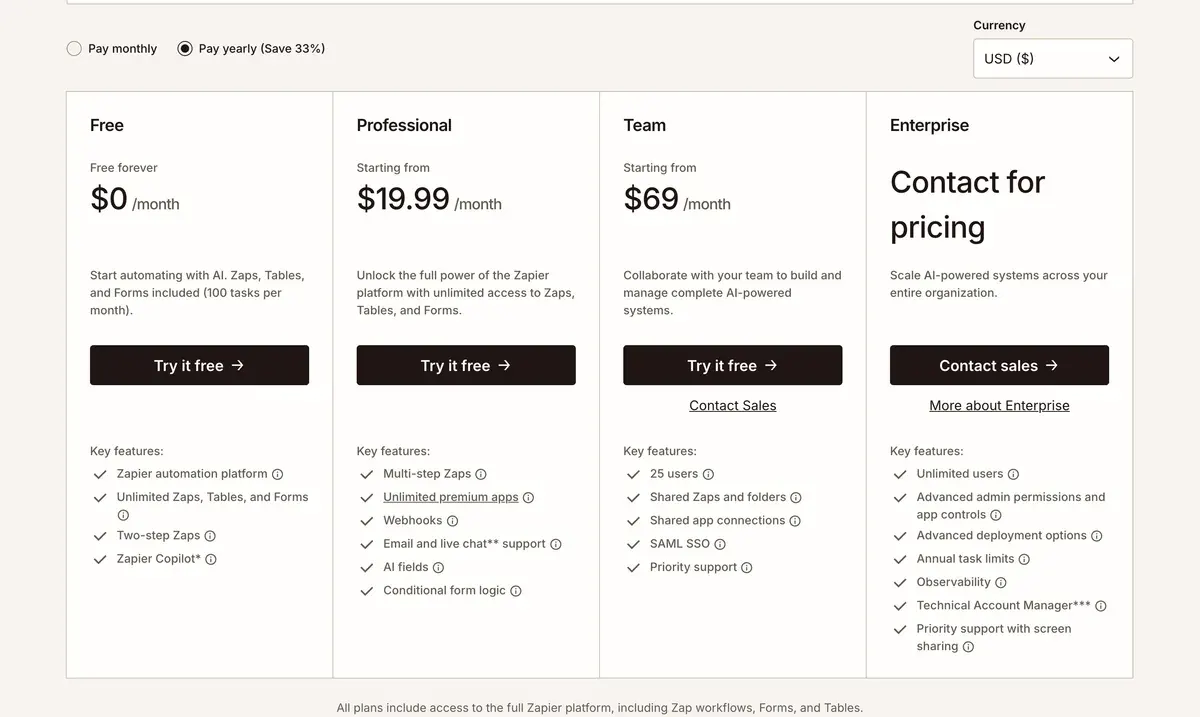
Zapier moves ad leads between apps without code or a server: worth it when set-up speed beats cost per run. Professional costs $19.99 a month billed yearly for 750 tasks (read on ), and triggers, Filter and Formatter steps use none. Each action uses a task: 500 leads a month through a three-action Zap need the 1,500-task tier, while n8n Starter bills them as 500 runs.
Zapier
- Best for
- Marketers and small teams who want lead, ad and email handoffs running without code, across Zapier’s 9,000+ listed apps.
- Not for
- High-volume or loop-heavy workflows: every successful action uses a task, so costs climb faster than on per-run tools such as n8n.
| Made by | Zapier, Inc., San Francisco, United States, founded 2011 |
|---|---|
| Category | Workflow automation |
| Makes | Multi-step workflows (Zaps) with filters, paths, formatter and code steps; Tables (database) and Forms that trigger Zaps; Zapier MCP: an action layer that lets AI assistants act in connected apps; Zapier Agents and Chatbots, billed as add-ons outside the task pool (Agents use a separate activity quota, per Zapier’s help centre); Zapier SDK for coding agents |
| Entry price | From $29.99 a month |
| Cost per output | Not computed: no plan states a quantity |
| Use in ads | Zapier automates work between apps and generates no content for you, so no paid-ads clause applies; you keep ownership of the data you move through Zaps (s.6(a), 9 April 2026). Terms |
| Free plan | Yes |
| Free trial | New accounts get a 14-day trial of the Professional plan with no credit card (pricing FAQ, read 20 November 2026). Team and Enterprise trials go through sales. |
| Languages | Interface in English; the pricing page sells in USD and 19 other currencies. |
| API | Yes |
| Status | Active |

What is Zapier?
Zapier is a web service that makes your apps pass data to each other on their own, which the industry calls automation. Instead of copying each lead from a spreadsheet into your CRM, you let Zapier do it as each lead arrives.
Each automation is a Zap. A Zap starts with a trigger, the event Zapier watches for, such as a new lead in Facebook Lead Ads. Then it runs one or more actions, the jobs it does in other apps, such as creating a HubSpot contact.

Zapier bills by the task. A task is one action Zapier finishes for you. The trigger itself is free, and so is an action that fails (task usage help).
How task usage is measured
Definition A task is any successful action that runs in Zapier. Only successful actions count toward your task usage.
Free steps In Zap workflows, all trigger steps, any Filter or Paths step and testing steps in the Zap editor do not count as tasks.
Zapier’s pricing page says it connects “9,000+ apps”.
How a Zap works: one Facebook lead, step by step
Every automation page on this site prices this same four-step lead workflow, so you can compare tools on one job:
- Trigger: a new lead form arrives in Facebook Lead Ads. No task.
- Action: Zapier creates the contact in HubSpot. One task.
- Action: it adds the email address to your Kit list. One task.
- Action: it posts the lead to your sales channel in Slack. One task.
So one lead uses three tasks. At 500 leads a month, the Zap uses 1,500 tasks.
The free plan cannot run it. Free allows two-step Zaps only: one trigger and one action (pricing page). A Zap with three actions needs Professional or above.
What Zapier costs at a real lead volume
Professional starts at $29.99 a month billed monthly for 750 tasks (pricing page). The task tier you pick sets the price. The 1,500-task tier, which covers the lead Zap above, costs $58.50 a month, or $39.00 a month billed yearly.
On the yearly plan one lead then costs $0.078, if every task in the tier is used.
On accounts opened after January 2024, pay-per-task billing is on by default. Run past your tier and each extra task costs more, unless you turn it off. Zaps then stop at three times your plan’s task limit (pay-per-task help). With it off, Zaps pause until the next billing period.
Each tier, the cost per task and the overage figures are on Zapier pricing. Every Zapier plan sits beside other tools in the price tracker.
Steps that cost no task
Zapier’s own tools for shaping data are free to use inside a Zap. Filter, Formatter, Paths, Delay, Looping, Tables and Forms steps use no task (pricing page).
That changes how you build. A Filter that drops test leads before the HubSpot step saves three tasks on every test lead. Formatter can clean a phone number for free, where a second app would charge you a task.
What Zapier’s AI tools do, and how each is billed
Zapier sells several AI products on top of Zaps, and each is billed its own way.
- Copilot builds Zaps from a description in plain words. Free has a daily message limit; paid plans have none (pricing page).
- AI by Zapier is an AI step inside a Zap, such as writing a reply to a lead. It uses 1, 3 or 5 tasks a step, by model tier (task usage rates).
- Agents are AI assistants that take actions across your apps. They run on a separate activity quota: 400 activities a month free, 1,500 on Agents Pro (pricing page).
- Chatbots answer questions on your site. Free includes two (pricing page).
- Zapier MCP lets an AI assistant such as Claude or ChatGPT act in your apps. MCP (Model Context Protocol) is the way AI assistants call outside tools. Each tool call uses 2 tasks (task usage rates).
What each one does for an ad team, with an agent example, is in Zapier AI. Connecting Claude, ChatGPT or Cursor is in Zapier MCP.
Who owns your data, and the training opt-out
Your leads and orders stay yours. Section 6(a) of Zapier’s Terms of Service, effective 9 April 2026, reads: “You retain ownership of your Customer Content”.
The Improvements clause adds a condition. Zapier may build de-identified data sets from your content, called Derived Data, and use them “to operate, enhance, improve, and develop Zapier products or services, including through model training”.
7(b) Improvements
Derived Data Zapier may derive de-identified data sets from your Customer Content (“Derived Data”) and may use such Derived Data to operate, enhance, improve, and develop Zapier products or services, including through model training. You may opt out of providing Zapier with such permission for Derived Data by submitting this opt-out form.
Company and Enterprise plans If you are a subscriber to the Company Plan or the Enterprise Plan, your Zapier Account and all users on your Zapier Account are automatically opted out from Derived Data sets.
You can opt out with the form the Improvements clause links to. Company and Enterprise accounts are opted out automatically. On Free, Professional and Team, Zapier may use your Derived Data this way until you send the opt-out form.
n8n’s Self Serve Terms (26 October 2026) say it does not use your content or AI output to train machine learning models. The n8n vs Zapier comparison sets both terms side by side.
Refunds and task costs lead Zapier’s user complaints
Most of 34 recent public reviews of Zapier are negative. They run from June 2025 to November 2026: 26 on Trustpilot and 8 Reddit posts in r/zapier and r/n8n. Trustpilot shows 332 reviews for Zapier, 75% of them at one star, as displayed on 20 November 2026.
Refunds lead the complaints. Thirteen of 34 say an annual plan renewed and Zapier refused a refund. Some had left the year unused or sent a cancel request (Trustpilot, Trustpilot). If you pay yearly, note the renewal date the day you subscribe.
Cost is the other big theme. Thirteen of 34 say per-task billing climbs fast once Zaps gain steps, run over the tier or force a tier jump (Trustpilot, Reddit). Six say support answered with policy text or closed the case (Trustpilot, Trustpilot).
The praise is about the catalogue. Four of 34 credit the app library and quick no-code set-up, the free plan included (Trustpilot, Reddit). Two say Zaps run reliably once built (Trustpilot, Trustpilot).
Zapier pros and cons
Pros
- 9,000+ apps in the catalogue, by Zapier’s own count (pricing page)
- Triggers, Filter, Formatter, Paths and Tables use no task (pricing page)
- A 14-day Professional trial on every new account, no card needed (pricing page)
- Ownership of your Customer Content stays with you (terms, section 6(a))
- Yearly billing takes 33% off the monthly rate (pricing page)
- Wide app library and quick no-code set-up (4 of 34 sources: Trustpilot, Reddit)
- Zaps run reliably once built (2 of 34 sources: Trustpilot, Trustpilot)
Cons
- Free runs two-step Zaps only, with 100 tasks a month (pricing page)
- Annual plans refused a refund after renewal (13 of 34 sources: Trustpilot, Trustpilot)
- Per-task costs climb fast with multi-step Zaps and overage (13 of 34 sources: Trustpilot, Reddit)
- Support replies with policy text or closes the case (6 of 34 sources: Trustpilot, Trustpilot)
- Zaps that fail or need repeated fixing (4 of 34 sources: Trustpilot, Trustpilot)
- Overage tasks cost about a quarter more than tier tasks, and Zaps stop at three times the plan’s task limit (pricing page, pay-per-task help)
- Zapier may train models on Derived Data until you opt out (terms, Improvements clause)
- Each MCP tool call uses 2 tasks (task usage rates)
When Zapier is the wrong pick
Zapier is the wrong pick for high-volume or loop-heavy work, and for teams who want to host the tool themselves.
n8n bills a full workflow run as one execution, whatever the number of steps (n8n pricing). The lead Zap above is 500 executions, well inside Starter’s 2,500, at $24 a month in US dollars; n8n shows euros in some countries.

Its Community Edition is free to run on your own server, if you set it up and keep it secure. The n8n vs Zapier comparison prices both side by side.
Make suits branching workflows built on a visual canvas. Most module actions use 1 credit and Make counts the trigger module too, so the lead workflow uses about 2,000 credits (Make pricing). Core covers 10,000 credits at $16 a month. The Make vs Zapier comparison covers the editor and the refund terms.
Every other route, from Power Automate to self-hosted tools, is in Zapier alternatives.
- Workflow automation
n8n
Workflow automation tool billed per full workflow run, hosted by n8n or self-hosted, with AI agent and MCP nodes.
From $24 a month · checked
Best for Technical marketers and agencies running long or high-volume workflows who want per-run billing, code steps or a free self-hosted edition.
- Workflow automation
Make
Visual automation builder (scenarios) for 3,500+ apps, billed by credits, with AI agents and an MCP server.
From $16 a month · checked
Best for Teams who want branching, visual workflows at a lower entry price than Zapier, and are happy to learn a canvas-style editor.
Questions buyers ask about Zapier
What is Zapier used for?
Zapier moves data between apps when something happens. For marketers that means new ad leads into a CRM, Shopify orders into an email list, or a daily report posted to Slack.
Is Zapier free?
Yes. Free gives 100 tasks a month and two-step Zaps only, with Zapier checking for new data every 15 minutes (pricing page).
How does Zapier work with Facebook Lead Ads?
Facebook Lead Ads is a trigger app in Zapier’s directory. Each new lead starts the Zap, and every action after it, such as a CRM contact or a Slack alert, uses one task.
Is there a Zapier promo code?
Zapier publishes no promo or coupon code on its pricing page. The savings it does offer are in the Zapier promo code guide.
Sources
- Zapier: Zapier pricing, the plan cards, the task-tier selector, the plan comparison table, the Agents and Chatbots add-on cards and the FAQ on tasks, pay-per-task billing, annual billing and the non-profit discount. Checked
- Zapier: Task usage rates, 2 tasks per Zapier MCP tool call, 1 task per standard step, 0 for built-in tools, and 1, 3 or 5 tasks per AI by Zapier step by model tier. Checked
- Zapier Help Center: How is task usage measured in Zapier?, trigger steps, Filter and Paths steps, tests and errored steps use no task; Agents use a separate activity quota. Checked
- Zapier Help Center: How pay-per-task billing works in Zapier, updated 16 November 2026; on by default for accounts opened after January 2024, capped at 3 times the plan’s task limit. Checked
- Zapier: Zapier Terms of Service, effective 9 April 2026; section 6(a) on ownership of Customer Content and the Improvements clause on Derived Data and model training. Checked
- Trustpilot: Zapier reviews, 332 reviews, 75% at one star, as displayed on 20 November 2026; 26 reviews read one by one, from the first two pages and the four and five star filter. Checked
- Reddit: r/zapier and r/n8n posts, five r/zapier posts and three r/n8n comparison posts, June 2025 to November 2026. Checked
- n8n: n8n pricing, US, Starter at 2,500 workflow executions a month, billed per full run whatever the number of steps. Checked
- Make: Make pricing, Free at 1,000 credits a month and Core at 10,000 credits; most module actions use 1 credit. Checked

Alexandre S.
Alexandre S. is a creative ad strategist and copywriter with ten years' experience in digital marketing across multiple channels.
Related pages
-
 Pricing Zapier pricing: plans, task tiers and what a task costs
Zapier Free gives 100 tasks a month and two-step Zaps only. Plans, cost per task and overage, checked 20 November 2026.
-
 Alternatives Zapier alternatives
Seven Zapier alternatives, and what a 500-lead workflow to a CRM, Slack and an email list costs on each that publishes a rate. Prices read 20 November 2026.
-
 Compare Make vs Zapier
A 4-step lead workflow run 500 times fits Make Core at $12 a month against $39 on Zapier, billed yearly. Credits, tasks and refund terms, read 20 Nov 2026.
-
 Compare n8n vs Zapier
Zapier bills each action, n8n each full run: a 4-step lead workflow run 500 times costs about twice as much on Zapier, billed yearly. Read 20 Nov 2026.
-
 Guide Zapier promo code
Zapier publishes no promo or coupon code. A 14-day trial, yearly billing at 33% off and 15% for non-profits do lower the bill. Read 20 November 2026.
-
 Data AI ad tool price tracker
69 of 82 AI ad tools show a list price read on the vendor’s own page, last checked 16 October 2026, with the cost per clip or image where a rate allows.


