Higgsfield Vibe Motion
Vibe Motion is Higgsfield’s chat tool for motion graphics. You describe an animated chart or logo, and it writes the animation as code you can keep editing. Its old address, higgsfield.ai/vibe-motion, now opens Supercomputer, Higgsfield’s agent (19 October 2026).
| Format | What it makes | Where it runs |
|---|---|---|
| Infographics | Charts and numbers that animate in | AI Motion Design, Supercomputer |
| Kinetic captions | Words that move with the voiceover | AI Motion Design (“Kinematic Captions”) |
| Presentation | Slides with animated transitions | AI Motion Design |
| Logo reveal | Your logo building on screen | AI Motion Design, AI Motion Designer |
| Editorial motion graphics | A cinematic animated faceless video | Supercomputer skill |
Scroll sideways for all 3 columns
What is Higgsfield Vibe Motion?
Vibe Motion is a no-code generator that produces animations “and the underlying code”, launched on 5 February 2026 (SiliconANGLE). Higgsfield called it the first of a series of “vibe editing” tools. Launch coverage says it is “powered by Anthropic’s Claude” (Let’s Data Science).
The code part is what sets it apart from AI video. A video model paints pixels, so changing a colour means generating the clip again. Here the graphic is a set of instructions (text, colour, timing), so you change one value and the rest stays put.
Higgsfield’s blog puts it this way: the “source of truth is clean, maintainable logic”, so one brand colour change can update a whole library (Higgsfield blog).
Higgsfield’s motion graphics live on three pages today:
- AI Motion Design, “The Code-to-Video Engine”, sets out the prompt-to-render steps and the editing controls (AI Motion Design).
- Supercomputer, where the old Vibe Motion address leads, offers the starter prompt “Turn my script into motion graphics” (Supercomputer).
- AI Motion Designer builds titles and logo reveals inside After Effects or Premiere Pro. You drive it from ChatGPT or Higgsfield’s MCP connector (AI Motion Designer; plugins).
AI Motion Design
Turn text into high-fidelity animation. Create data-driven infographics, kinetic typography, and logo reveals that look hand-crafted by pros
How to make a motion graphic, step by step
Higgsfield’s AI Motion Design page sets out five steps, in its own labels (AI Motion Design). In Supercomputer, the chat agent the old Vibe Motion address opens, you run the same job by prompt and refine it by reply (help article).
- Prompt your vision. Describe the graphic. Name the format, the words on screen, the length and the aspect ratio: “a 6-second 9:16 card, ‘40% off’ counting up from 0, brand green #1F7A5A”.
- Bring your assets (optional). Upload logos, SVGs, images or footage, and they go into the animation.
- Apply motion presets (optional). Pick an animation from Higgsfield’s preset library “with a single click”, which skips setting the easing by hand.
- Refine and iterate. Change any value in the visual editor, a colour or a duration, and the rest holds. Higgsfield’s line is “Edit the code, not the pixels”. In Supercomputer you reply in the chat instead, and it “re-runs only what changed”.
- Render and ship. Render the video and export it “in high-definition (up to 4K)”.
AI Motion Design’s visual editor takes exact hex or RGB codes, so the graphic matches your brand kit. It also sets safe zones: the areas a TikTok or Reels screen covers with buttons. Your text stays clear of them.
Color Control Input your exact Hex or RGB codes to ensure every background, stroke, and font matches your brand guidelines
Text Postion Drag and drop elements exactly where you need them. Define safe zones for social platforms to ensure your text never gets covered by UI buttons
Animation Speed Control the ‘feel’ of the motion. Adjust the duration, delay, and easing curves using simple sliders
Font and Size Use your desired fonts, adjust tracking and leading, and resize text without losing quality
One creator’s walkthrough timed the first draft at over 5 minutes, with a re-render after each tweak (Chase Jarvis). Plan a few rounds per graphic.
What it costs
Motion graphics spend plan credits, and Higgsfield publishes no fixed credit price per graphic. The AI Motion Design page lists none (19 October 2026), and neither does the pricing page (9 October 2026).
Supercomputer shows the bill as it works instead: each generation step “deducts credits at standard rates”, and “the running cost is shown as the task proceeds” (help article).
Three rules decide what you pay:
- Supercomputer, MCP, the CLI and Canvas “always deduct credits”, even for models with Unlimited access on the website (credits article).
- “Most failed generations return credits automatically”, per the same article.
- Supercomputer’s Free Mode, labelled “Run the LLM without spending credits”, covers the chat model’s planning; generation steps still cost credits.
The one published figure comes from a creator walkthrough of Vibe Motion: 8 to 60 credits a generation (Chase Jarvis).
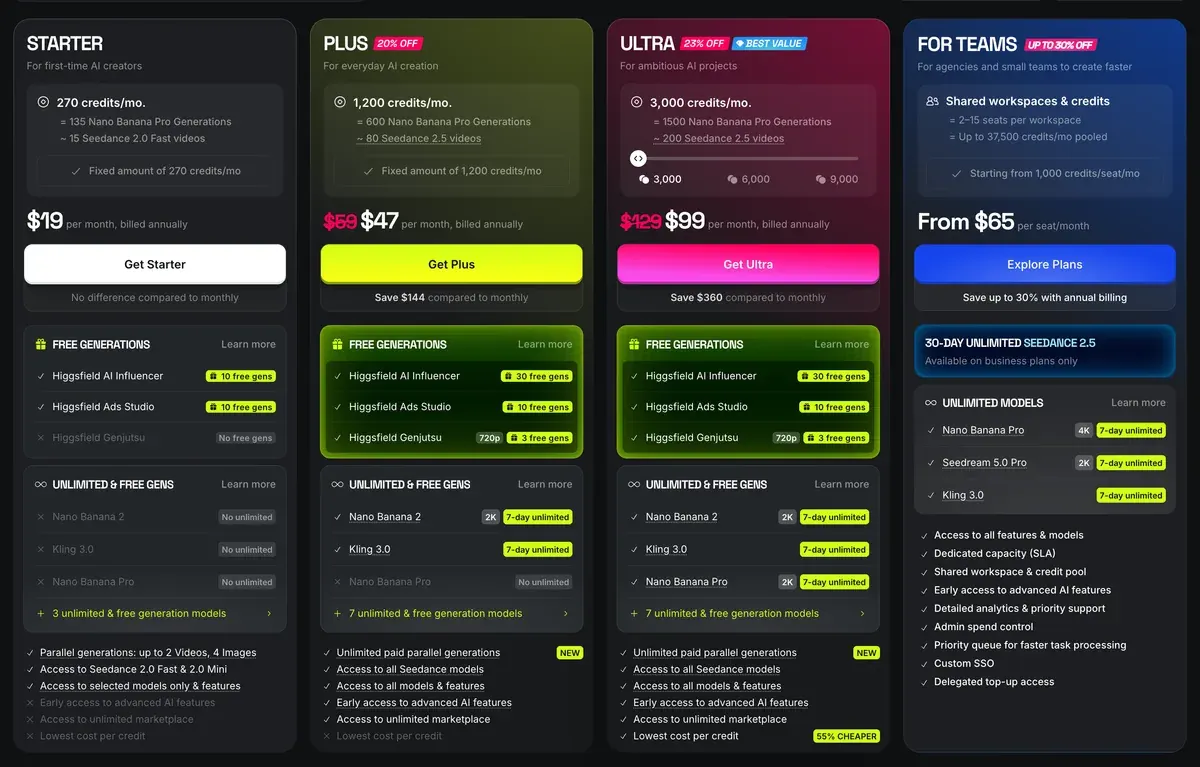
Starter’s 200 monthly credits cost $15 a month. Plus gives 1,000 credits for $49 a month, and Ultra 3,000 for $129 a month. Plan details and refunds: Higgsfield pricing.
Refunds are the catch to know before you buy. Nine of 52 public sources say Higgsfield refuses a refund once any credit is used, citing terms section 9.3 (Trustpilot).
Motion graphics for ads: five uses
Higgsfield’s blog names the jobs its code-based approach suits. It lists swapping product data in a template, re-rendering when data changes, and A/B variants of “hooks, speeds, and color schemes” (Higgsfield blog). For a paid social account, that means five uses.
- Stat cards. A number that counts up, such as orders shipped, or a bar chart: the Infographics format.
- Price and offer callouts. Build one card, then swap the price, product name or discount for each variant. The template keeps timing and layout identical, so your test isolates the offer.
- Logo stings and end cards. AI Motion Design lists logo reveals; put one on the last 2 seconds of every ad in a set.
- Kinetic captions over UGC. Animated words over a creator clip, kept inside the safe zones you set, so the platform’s buttons never cover them.
- Hook and colour variants. Change the opening line or the palette and re-render, then run the versions against each other.
One creator’s walkthrough builds a data dashboard and a SaaS app ad, close to uses 1 and 2, from prompts alone.

Higgsfield’s blog also says each graphic can adapt to Instagram, Stories, YouTube and display placements (Higgsfield blog). Higgsfield names no export file format; the stated limit is up to 4K.
Four of 52 public sources say Higgsfield’s marketing shows results they cannot reproduce, the AI Motion Designer demo among them (YouTube, Trustpilot). Judge the tool on a graphic of your own before you plan a campaign around it.
In an independent test, a motion designer runs Higgsfield’s own release prompts on a logo animation.

Vibe Motion or Motion Control?
Vibe Motion builds graphics; Motion Control moves people. Motion Control copies the movement in a real video onto a character image, through Kling 3.0 Motion Control. Your character then performs a filmed dance or gesture (Higgsfield motion control).
| Question | Vibe Motion and AI Motion Design | Motion Control |
|---|---|---|
| Makes | Text, charts, logos, captions | A character performing a filmed move |
| You give it | A prompt, plus logos or images | A character image and a reference video |
| Edit after | Change the text or timing | Generate the clip again |
| Ad job | Offer cards, stats, end cards | Brand characters, product demos |
Scroll sideways for all 3 columns
Pick Vibe Motion when the ad’s message is words and numbers. Pick Motion Control when it is a person or character moving. For product footage, Ads Studio turns a reference ad into new versions, and Higgsfield transitions covers cuts between clips.
If you run Higgsfield from Claude, the Claude and MCP guide covers the connector setup. Every other tool: how to use Higgsfield, and the Higgsfield profile.
Questions about Higgsfield Vibe Motion
Does Higgsfield make motion graphics?
Yes. AI Motion Design turns a prompt into animated infographics or kinetic captions, exported at up to 4K. AI Motion Designer builds logo reveals inside After Effects. Supercomputer takes motion-graphics jobs in chat, animated infographics among them.
Where did Vibe Motion go?
The higgsfield.ai/vibe-motion address redirects to Supercomputer, Higgsfield’s agent, as of 19 October 2026. Its starter prompt “Turn my script into motion graphics” opens the same kind of job.
How many credits does Vibe Motion use?
Higgsfield publishes no fixed figure. Supercomputer shows the running cost as it works, and one creator walkthrough reports 8 to 60 credits a generation.
Can I edit a Vibe Motion graphic after it renders?
Yes. Every value stays editable because the graphic is code, so a change does not mean generating a new clip.
Is Vibe Motion the same as After Effects?
No. Higgsfield’s own blog says AI motion design does not replace After Effects for work that needs “frame-by-frame manual control”. Its AI Motion Designer agent works inside After Effects instead.
Next on Higgsfield: AI motion design from code
Every Higgsfield guide, sorted by job, is in the Higgsfield hub
Sources
- Higgsfield: AI Motion Design, The Code-to-Video Engine, five steps, Infographics, Presentation and Kinematic Captions, the line
data-driven infographics, kinetic typography, and logo reveals
, hex colours, safe zones, easing sliders, export up to 4K. Checked - Higgsfield: Supercomputer, Where higgsfield.ai/vibe-motion redirects, with the starter prompt Turn my script into motion graphics and a Free Mode for the chat model. Checked
- Higgsfield help centre: How do I use Supercomputer?, Getting started, chat refinement, credits per generation step, the Animated Infographics use case. Checked
- Higgsfield help centre: What uses my credits?, MCP, CLI, Canvas and Supercomputer always deduct credits; most failed generations return credits. Checked
- Higgsfield blog: AI Motion Design: when video generation meets code, Vibe editing, parameterised templates, data-driven animation, hook and colour variants, posted 25 January 2026. Checked
- Higgsfield: AI Motion Designer, An agent that builds editable titles, transitions and logo reveals inside After Effects and Premiere Pro from ChatGPT or MCP. Checked
- SiliconANGLE: Higgsfield launches vibe editor for creating motion graphics, Launch on 5 February 2026, animations plus their code, the first of a series of vibe editing tools. Checked
- Let's Data Science: Higgsfield launches Vibe Motion for no-code motion graphics, Powered by Anthropic’s Claude, parameterised assets edited without a full re-render. Checked
- Chase Jarvis: Higgsfield Vibe Motion walkthrough, Four-step walkthrough, Infographics, Text Animation and Posters templates, 8 to 60 credits a generation, first draft in over 5 minutes. Checked
- Higgsfield: Higgsfield pricing, Plan prices and monthly credits, read in a browser; prices exclude VAT. Checked
- Trustpilot, Reddit and YouTube: Higgsfield user reports, 52 public sources synthesised, checked 28 September 2026. Checked
What changed on this page
- Higgsfield’s prices went back: Starter is 15 dollars a month for 200 credits, Plus 49 a month or 39 billed yearly for 1,000 credits, and Ultra 129 or 99 billed yearly has a card again (was Starter 19 for 270, Plus 59 or 47 for 1,200).
- Higgsfield changed its prices: Starter is 19 dollars a month for 270 credits (was 15 for 200), Plus 59 a month or 47 billed yearly for 1,200 credits (was 49 or 39 for 1,000).

Alexandre S.
Alexandre S. is a creative ad strategist and copywriter with ten years' experience in digital marketing across multiple channels.
Related pages
-
 Guide Higgsfield apps and effects
What Higgsfield’s one-click apps do (Angles, Earth Zoom and the rest), what each costs in credits, and which suit ads. Checked 16 October 2026.
-
 Guide Higgsfield Cinema Studio
What Higgsfield Cinema Studio does, its camera and lens controls, what a clip costs, and when it beats plain prompting for ads. Checked 16 October 2026.
-
 Guide Higgsfield Marketing Studio
Higgsfield Marketing Studio turns a product link into UGC videos, product shots and image ads. The steps, credits per clip and ad rules, 18 October 2026.


