Convert video to anime style with AI
Converting a video to anime style means an AI repaints every frame of your clip as a drawing. The movement and the sound stay as filmed. You keep your actor and your voice-over; only the look changes.
DomoAI builds a whole tool around that job. Its Video to Video tool takes a clip of up to 10 seconds on most plans and bills 50 credits for 10 seconds (pricing page). On Standard and above, it can run in the Relax queue, which spends no credits.
| Route | Longest clip a run | Styles | Billing |
|---|---|---|---|
| DomoAI Video to Video | 10 s; 30 s on Pro and Team | 40+ presets, 20+ anime, or your own | 5 credits a second; free in Relax Mode on Standard and up |
| Runway Aleph 2.0 | Not stated on the pricing page | Described in a prompt | 28 credits a second |
| Wan 3.0 API (Alibaba Cloud) | 30 s of input plus output combined | Described in a prompt | Per second of input and of output |
Scroll sideways for all 4 columns

How to turn a video into anime in DomoAI
DomoAI’s Video to Video page is where you start: it opens the upload box and shows the style gallery. The help article (28 November 2025) gives five steps:
- Upload an MP4, MOV or AVI file, or pick one already in your assets. DomoAI suggests clips of 3 to 10 seconds.
- Choose a style. Presets sit in version groups from V1.0 to V6.0; for your own look, pick Fusion and describe it or upload a reference image.
- Set the duration (3 seconds by default) and the aspect ratio: 16:9, 9:16, 1:1 or custom. Turn on Lip Sync if someone speaks, Subject Only to style the person alone, or Screen Keying to cut out the background.
- Click Generate, then check the style, the motion and the audio. Change the preset or the style strength and run it again if it misses.
- Download the MP4.
How It Works (Step by Step)
Step 1, upload Upload a video file (MP4, MOV, AVI supported) or click “Select Asset” button. Recommended duration: 3-10 seconds for best results.
Step 2, style Browse through style categories (V6.0, V4.0, V3.0, V2.0, V1.0) and click a style to preview how it affects colors, lines and textures. Presets include anime, watercolor, oil painting, pencil sketch and more. You can choose from more than 40 preset styles.
Step 3, settings Duration: Adjust clip length (default 3s). Aspect Ratio: Select from 16:9, 9:16, 1:1, or custom. Subject Only: Apply style transformation exclusively to the main subject while preserving or differently treating the background.
Step 4, generate Click Generate to start processing. DomoAI applies your chosen style frame by frame while preserving original motion and audio.
Step 5, download Once satisfied, download your final styled video.
The Re-gen button in your history applies a new style to a clip you uploaded before, so a second look costs no new upload.

The input decides much of the result. DomoAI says its V6 model works best on half-body shots and close-ups and does not suit full-body shots. Lip Sync needs a visible mouth, real speech, a face turned to the front or three-quarters, and good light on it.
Which anime styles DomoAI offers
DomoAI’s two pages count differently. The help article lists more than 40 presets, over 20 of them anime, plus watercolour, oil painting and pencil sketch. The Video to Video page claims “30+” styles and “14+ anime styles”.
The API reference names the models behind them: four anime versions (anime-v1.2, anime-v5.5, anime-v9.1 and anime-v10) and four illustration versions. Fusion covers anything the presets miss, from a text prompt such as a vintage film look to a frame you upload as the reference.
How long a clip can be, by plan
Most plans restyle 10 seconds a run. The help article sets that cap and tells you to cut longer footage into parts, restyle each, then join them in an editor. In CapCut that join is a drag on the timeline.
Technical specifications and FAQs
Maximum video length 10 seconds per generation. For longer videos, split into segments and process separately, then combine in your video editor.
Audio Yes. When you apply a style transfer to your video, DomoAI preserves the audio track intact. The style changes apply only to the visual elements—your music, dialogue, or sound effects remain unchanged.
Watermark Removed on paid plans (Basic, Standard, Pro).
V6 model Ideal for half-body or close-up portraits; not recommended for full-body shots.
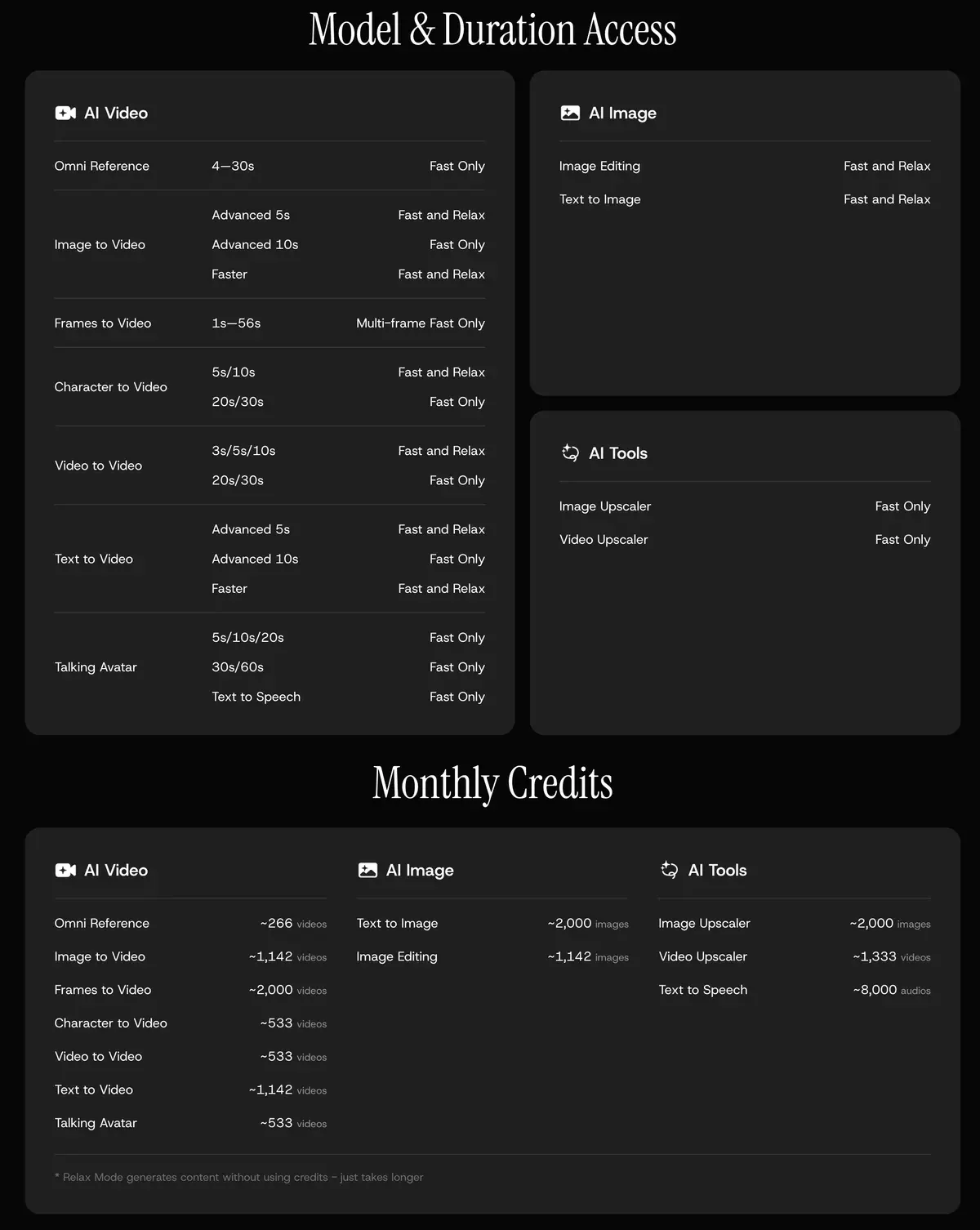
The pricing page sets the plan limits:
- Basic restyles 3, 5 and 10-second clips in Fast Mode, on credits, with no Relax Mode.
- Standard runs the same lengths in Fast Mode or Relax Mode.
- Pro and Team add 20 and 30-second clips, in Fast Mode only.
The help article gives no output resolution. DomoAI sells a separate upscaler for HD and 4K, which every paid plan lists.
What a video to anime restyle costs
DomoAI bills a restyle at 5 credits a second (pricing page). That is 15 credits for 3 seconds, 50 for 10 and 150 for 30.
On Basic at $13 a month, a 10-second restyle costs $1.08. So 600 credits cover 120 seconds a month, if every credit is used.
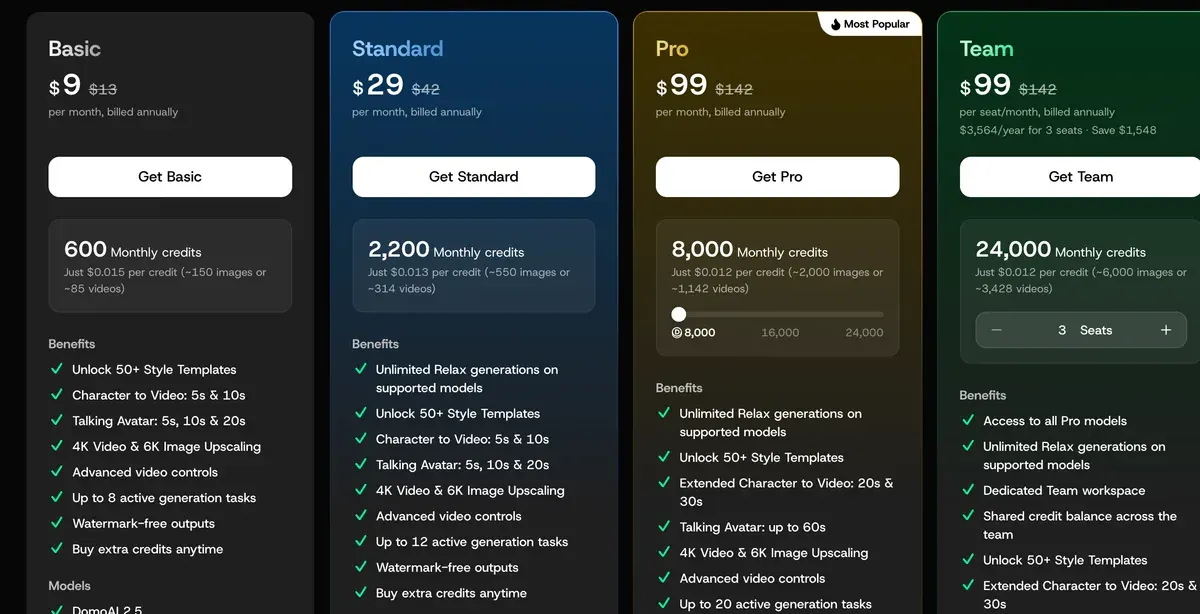
On Standard at $42 a month, the same restyle costs nothing in Relax Mode. The pricing page FAQ warns that “generation may take some waiting time” in that queue. Fast Mode on Standard costs $0.95 for 10 seconds.
On Pro at $142 a month, a 30-second restyle in one run costs $2.66. Every plan and its credit rules are on the DomoAI profile.
Two other tools that restyle video
Runway restyles uploaded footage with Aleph 2.0, its video editing model. Runway’s Aleph page lists style transfer among Aleph’s jobs, and you describe the look in a prompt.
Aleph 2.0 bills “140 credits/5s” on Runway’s pricing page. Standard at $15 a month brings 625 credits, so 10 seconds cost $6.72. That is about 22 seconds of Aleph a month, if every credit is used. Runway’s terms (4.4) place no limit on commercial use of outputs and let Runway train on them (Runway AI for ads).
Wan 3.0 is Alibaba’s video model, sold per second through its cloud API. The Wan3.0 guide edits a reference video from a written instruction, with “Convert the entire scene to clay style” as its example. Input and output together run to 30 seconds at most.
Alibaba bills the input video at the output rate (model pricing). So 10 seconds restyled at 720p in the US region cost $1.65.
Alibaba Cloud’s Model Studio service terms do not say who owns Wan 3.0 output from the paid API or whether it can run in ads. They bar any commercial use of content made in a model trial, and they require AI-generated content to carry a clear label.
For an anime film with no footage at all, OiiOii writes the script, designs the characters and animates the shots. That tool and others are on AI animation generators.
Can you use an anime-style clip in an ad?
On DomoAI, yes. Clause 5.2 of its terms (13 August 2026) says you “may use it for commercial purposes”, within the law and third-party rights. Free output carries a watermark, which the help article says paid plans remove.
The person in your footage still matters. Clause 5.3 bans content that “Depicts real people without their consent”, and a drawn face is still that person. Get a signed release that names paid ads before you restyle anyone’s clip.
Terms of Service, 5.3 Prohibited Content (extract)
You may not create or attempt to create content that: ... Depicts real people without their consent ... Impersonates real people or falsely portrays individuals in misleading or defamatory ways
The platforms add their own rules. TikTok’s ads policy (updated November 2026) wants its AIGC label, or your own “clear disclaimer, caption, watermark, or sticker”, on media significantly modified by AI. Undisclosed AI content “will be rejected or restricted”.
TikTok’s list of minor edits that need no label covers lighting and colour, background changes and denoising.
Its significant-edit examples are fully AI-generated media and footage altered to show someone doing what they did not do. A restyle of every frame fits neither list cleanly, so add the AIGC label or a caption. More in TikTok’s AI label.
Meta’s political and issue ad standards ask for an AI disclosure on a “photorealistic image or video” in those ads. For other ads, “No advertiser action is required”: Meta adds an “AI Info” label when it detects AI content. The cases are in Meta’s AI disclosure rules.
Questions about video to anime AI
Is there a free video to anime converter?
Yes: DomoAI has a free plan with starter credits, and its output carries a watermark. On Standard, restyles of up to 10 seconds cost no credits in the Relax queue.
Does the original audio stay?
Yes, on DomoAI. Its help article says the original audio is kept and only the picture changes. Lip Sync matches the drawn mouth to the speech.
Can a video to anime converter handle a one-minute clip?
Not in one run on DomoAI, which stops at 10 seconds below Pro and 30 seconds on Pro and Team. Cut the clip into parts, restyle each with the same preset and join them in an editor.
Sources
- DomoAI help centre: Video to Video, dated 28 November 2025; five steps, 40+ presets with 20+ anime styles, Fusion custom styles, 10 seconds a generation, kept audio, MP4, MOV and AVI input. Checked
- DomoAI: AI Video to Video Generator, the
30+
styles and14+ anime styles
claims. Checked - DomoAI: DomoAI pricing, credits per task for Video to Video, Relax and Fast Mode by length, 20 and 30 seconds on Pro and Team only. Checked
- DomoAI: DomoAI API, video to video, 1 to 10 seconds a request; anime and illustration model names; five aspect ratios. Checked
- DomoAI Pte. Ltd.: DomoAI Terms of Service, last updated 13 August 2026; clauses 5.2 and 5.3. Checked
- Runway: Runway pricing, Aleph 2.0 at
140 credits/5s
; Standard at 625 credits a month. Checked - Runway: Introducing Runway Aleph, Style Transfer listed among the tools:
apply any style to your footage just by asking for it
. Checked - Alibaba Cloud Model Studio: Wan3.0 video generation guide, editing a reference video by instruction, the
clay style
example, input plus output at 30 seconds or less. Checked - Alibaba Cloud: Model Studio model pricing, wan3.0-video rates a second by resolution in the US (Virginia) region; input video billed at the same rate. Checked
- Alibaba Cloud: Alibaba Cloud Model Studio service-specific terms, no output ownership clause for paid API use; trial output barred from commercial use; AI-generated content must be labelled. Checked
- TikTok Business Help Center: TikTok ads policy: misleading and false content, significant and insignificant AI edits, the AIGC label or your own disclaimer; last updated November 2026. Checked
- Meta Transparency Center: Meta advertising standards: social issues, elections or politics, the
Today
block: AI disclosure for photorealistic media in political and issue ads, theAI Info
label on other ads. Checked

Alexandre S.
Alexandre S. is a creative ad strategist and copywriter with ten years' experience in digital marketing across multiple channels.
Related pages
-
 Guide TikTok’s AI-generated content label for ads
TikTok rejects or restricts AI-generated ads with no AIGC label or disclaimer. Its rules by case, quoted: Spark Ads, Symphony, C2PA. Checked 24 September 2026.
-
 Guide Meta’s AI disclosure rules for Facebook and Instagram ads
Meta labels some AI-made Facebook and Instagram ads itself. It asks you to disclose AI only in political and social issue ads. Checked 24 September 2026.
-
 Data AI commercial use, tool by tool and plan by plan
Can a tool’s output run in your paid ads? Terms quoted with clause and date for each plan: allowed, conditional, barred or unclear. Checked 26 September 2026.


