DomoAI for video ads
Verdict on DomoAI
DomoAI is worth it for restyling footage into anime in volume, on its credit-free Relax queue (read on ).
Standard ($42 a month) restyles 10-second clips in Relax Mode for no credits; on Basic they cost $1.08 if every credit is used.
Ten of 30 Trustpilot reviews report blocked prompts (Trustpilot, Trustpilot), and seven report refunds refused or unanswered (Trustpilot, Trustpilot).
DomoAI
- Best for
- Restyling footage into anime or other looks in volume, on Standard or Pro, where the Relax queue spends no credits on DomoAI models.
- Not for
- Buyers who need third-party models such as Kling 4.0, Seedance or MiniMax H3 at scale (Fast Mode only, on credits), or anyone who wants a refund after the first generation.
| Made by | DomoAI Pte. Ltd. |
|---|---|
| Category | AI video generators, AI UGC and avatars |
| Makes | Video to video restyling (video to anime and other styles); image-to-video and text-to-video clips; character to video (motion transfer); talking avatars and lip sync; frames to video; images and image editing; video and image upscaling; text to speech and voice cloning |
| Entry price | From $13 a month |
| Cost per output | $0.33 to $12.13 per 10-second video at list price, if every credit is used. Method |
| Use in ads | The clauses, quoted and dated: What DomoAI’s terms allow in ads. |
| Free plan | Yes. Paid ads on the free plan: Allowed with conditions |
| Free trial | Free plan, no trial listed |
| Languages | Interface in English and other languages (language switcher); text-to-speech language list not stated on the pages read |
| API | Yes |
| Status | Active |

What DomoAI makes
DomoAI (also written Domo AI) is a web app that changes the look of video. Its best-known tool is Video to Video. You upload a clip and pick a style such as anime, and the AI repaints every frame while the movement and the sound stay.
DomoAI’s video-to-video page is where that tool starts.
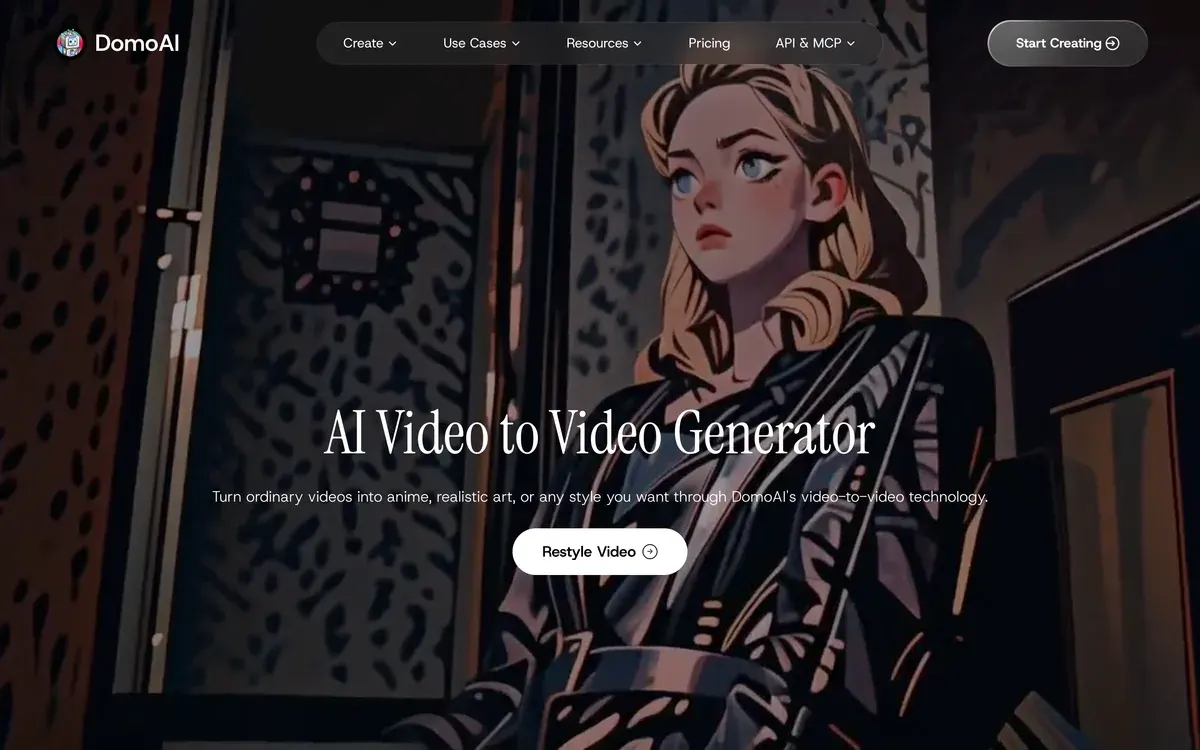
The page claims “30+” styles, “14+ anime styles” among them. The help article counts more than 40 presets, over 20 of them anime. A custom style can come from a text prompt or a reference image.
The same credits pay for three other jobs:
- Image to video turns a still, such as a product photo, into a short moving clip.
- Character to Video copies the motion of one video onto a character from an image.
- Talking Avatar makes a face from a photo speak a script, with lip sync.

DomoAI also resells outside models on the same balance. Its plan cards list Kling 4.0, MiniMax H3, Seedance 2.5 and the GPT Image and Nano Banana image models.
For an ad team, the useful part is the restyle. You film one take and test it in several looks without a reshoot.

DomoAI on the web, on Discord and through the API
DomoAI runs as a web app and as a bot on its Discord server. Its account help page (14 May 2026) lists three sign-in routes: Google, Discord or email. The page does not say whether a Discord sign-in and a web sign-in share one balance, so pick one route and keep it.
The web app holds your history and downloads. An API platform sells the same jobs to developers, including video to video at 1 to 10 seconds a request.
What DomoAI costs
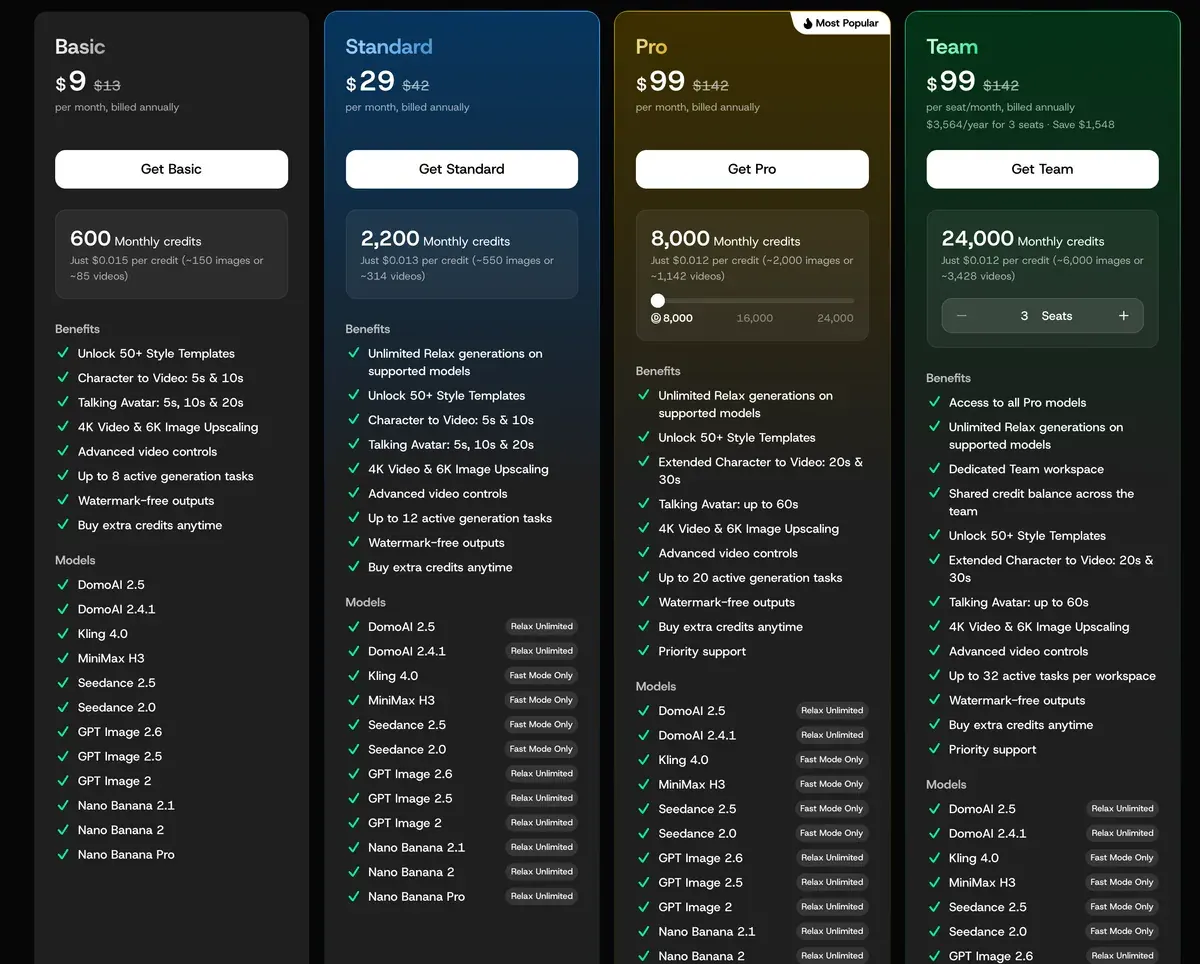
DomoAI sells three paid plans (Basic, Standard and Pro) and a per-seat Team plan, billed monthly or yearly. Basic is $13 a month for 600 credits, which makes a credit $0.022 (pricing page).
| Plan | Monthly price (USD) | Billed yearly, per month (USD) | Cost per 10-second video (USD) | Paid ads | Billed yearly, per month (USD) |
|---|---|---|---|---|---|
| Free | Free | Free | Not computed | Allowed with conditions | Free |
| Basic | $13 | $9 | $0.33 to $12.13 | Allowed | $9 |
| Standard | $42 | $29 | Not computed | Allowed | $29 |
| Pro | $142 | $99 | Not computed | Allowed | $99 |
| Team | $142 | $99 | Not computed | Allowed | $99 |
Scroll sideways for all 5 columns
- Free
- What you get: Free trial credits for new accounts (help centre refund article); the homepage FAQ says
a free plan with credits to get you started
- Notes: The credit amount is not stated on any official page read on 15 November 2026 (third-party guides give 15 or 25). Free output is watermarked: the Video to Video help article (help.domoai.app/en/articles/12958715-video-to-video, read 15 November 2026) says free plans include one by default and paid plans remove it; every paid card lists
Watermark-free outputs
. - Basic
- What you get: 600 credits a month, 50+ style templates, Character to Video 5 and 10 s, Talking Avatar 5, 10 and 20 s, 4K video and 6K image upscaling, up to 8 active generation tasks, watermark-free outputs, extra credits on demand; models DomoAI 2.5 and 2.4.1, Kling 4.0, MiniMax H3, Seedance 2.5 and 2.0, GPT Image 2 to 2.6, Nano Banana 2, 2.1 and Pro
- Notes: No Relax Mode (pricing FAQ:
The Basic Plan does not include Relax mode
). 108 dollars billed yearly. Monthly price read from the page code (USD_VIP_PLANS: monthlyPrice 1300 cents, yearlyPricePerMonth 900); the yearly card shows 13 dollars struck through. - Standard
- What you get: 2,200 credits a month, unlimited Relax generations on DomoAI 2.5 and 2.4.1, GPT Image and Nano Banana models, up to 12 active generation tasks, everything in Basic; Kling 4.0, MiniMax H3 and Seedance run in Fast Mode only
- Notes: 348 dollars billed yearly (page code: monthlyPrice 4200 cents, yearlyPricePerMonth 2900).
- Pro
- What you get: 8,000 credits a month, unlimited Relax generations on supported models, Character to Video and Video to Video up to 30 s, Talking Avatar up to 60 s, up to 20 active generation tasks, priority support; tiers 16,000 credits at 283 dollars a month (198 a month yearly) and 24,000 at 425 (297 yearly)
- Notes: 1,188 dollars billed yearly at 8,000 credits; tiers 2,376 and 3,564 dollars a year (page code, PRO_PLUS and PRO_MAX). 20 and 30 second videos run in Fast Mode only and are Pro only (pricing FAQ).
- Team
- What you get: Per seat: 8,000 credits a month pooled in a shared team balance, dedicated team workspace, all Pro models and features, unlimited Relax generations on supported models, up to 32 active tasks per workspace, priority support
- Notes: Prices are per seat; the card defaults to 3 seats (3,564 dollars a year, 24,000 credits) and the code allows up to 100 (TEAM_PLAN_MONTHLY_PRICE_PER_SEAT_USD 142, TEAM_PLAN_YEARLY_PRICE_PER_SEAT_PER_MONTH_USD 99).
Source: domoai.app/pricing
$0.33 to $12.13 per video at list price on Basic at $13 a month, if every credit is used. Basic at monthly billing: 13 dollars / 600 credits = 0.0217 dollars a credit. The pricing page credit table (How many credits per task?
) bills a 10-second DomoAI V2.4 Fast image-to-video or text-to-video clip at 15 credits = 0.33 dollars; DomoAI V2.4 Advanced 10 s is 50 credits = 1.08 dollars; Seedance 2.0 at 1080p is 56 credits a second, so 10 s = 560 credits = 12.13 dollars. Video to Video (restyle) 10 s is 50 credits = 1.08 dollars; Talking Avatar 10 s is 45 credits = 0.98 dollars. The table does not list DomoAI 2.5, Kling 4.0, MiniMax H3 or Seedance 2.5 rates. On Standard and Pro, Relax Mode generations on DomoAI models use no credits.
The pricing page’s credit table bills each job by length. A 10-second restyle costs 50 credits, and a 10-second image-to-video clip on DomoAI V2.4 Fast costs 15. On Basic that makes the clip $0.33 and the restyle $1.08, if every credit is used (pricing page).
Talking avatars cost more per second. Ten seconds take 45 credits, or $0.98 on Basic. Third-party models cost far more: Seedance 2.0 at 1080p bills 56 credits a second, so 10 seconds run to $12.13 (pricing page).
Relax Mode changes the sums. On Standard and above, DomoAI’s own models generate in a queue that spends no credits, and the pricing page FAQ warns that “generation may take some waiting time”. Basic has no Relax Mode, and Kling 4.0, MiniMax H3 and Seedance stay “Fast Mode Only” on every plan.
Length also depends on the plan. Restyles and character videos of 20 and 30 seconds, and talking avatars up to 60 seconds, are Pro and Team only, in Fast Mode. A 30-second restyle on Pro takes 150 credits, or $2.66 if every credit is used.
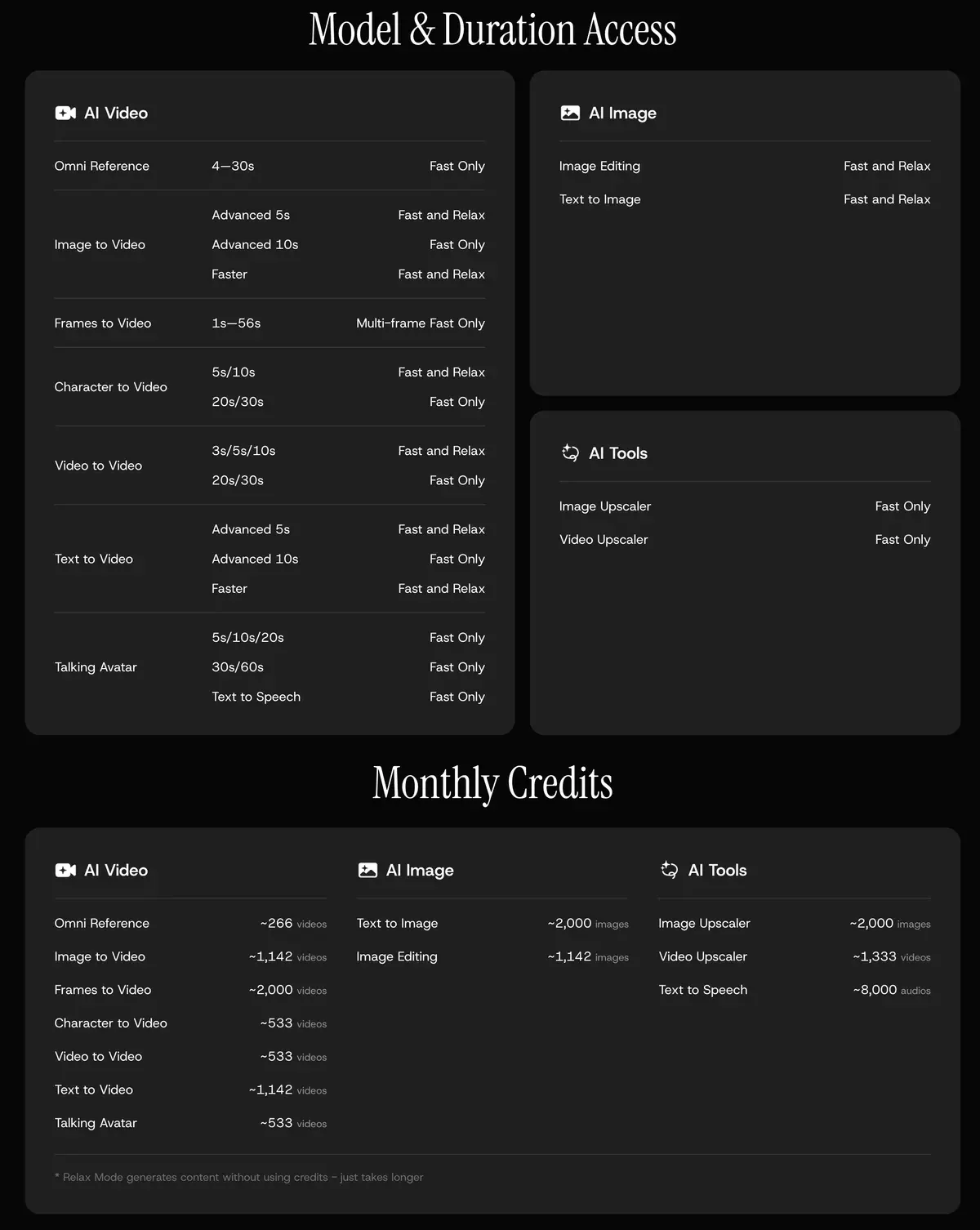
The credit table names DomoAI V2.4 and Seedance 2.0, while the plan cards list DomoAI 2.5, Kling 4.0 and Seedance 2.5. The page prints no rate for those newer models.
Subscription credits reset each month, yearly plans included, and do not roll over (terms 4.2). Top-up credits never expire, but you need an active plan to buy them (help centre).
Is DomoAI free?
Yes, with limits. The homepage FAQ promises “a free plan with credits to get you started”, and no official page states how many credits.
Free output carries a watermark. The video-to-video help article says free plans include one and paid plans remove it, and every paid card lists “Watermark-free outputs”.
Video to Video: settings and technical specifications
Watermark Paid plans remove watermarks; free plans include one by default.
Maximum video length 10 seconds per generation.
Available styles 40+ presets (20+ anime styles, watercolor, oil painting and more).
Audio handling Original audio preserved in output.
Watermark Removed on paid plans (Basic, Standard, Pro).
Terms clause 4.7 turns a free or trial plan into a paid subscription when the trial ends, unless you cancel. Check your account’s billing page before you leave a trial running.
What DomoAI’s terms allow in ads
DomoAI’s Terms of Service, last updated 13 August 2026, are plain on ownership. Clause 5.2 says you “may use it for commercial purposes, provided that such use complies with all applicable laws, regulations, and third-party rights”. The homepage FAQ names “advertisements, and client projects” among the uses.
Terms of Service, 5.2 Generated Content (Output)
Content generated by our AI tools (“Output”) belongs to you, subject to these Terms.
Copyright and Commercial Use You retain copyright ownership of your generated content and may use it for commercial purposes, provided that such use complies with all applicable laws, regulations, and third-party rights. You are solely responsible for ensuring that your commercial use of generated content does not infringe upon any intellectual property rights, violate any laws, or breach any contractual obligations.
The terms draw no line between free and paid plans. Our rights matrix marks paid ads as allowed on paid plans and conditional on Free, where the watermark rules most ads out.
Four more clauses matter to an advertiser:
- Clause 5.3 bans content that “Depicts real people without their consent”, so an avatar or restyle of a real person needs that person’s yes.
- Clause 6.2 bars “service bureau use” and “concurrent use of a single user login”: an agency gives each editor an account or a Team seat.
- Clause 5.2 leaves infringement with you, and clause 15 makes you indemnify DomoAI.
- The Privacy Policy keeps your content out of training without “explicit consent”, except “in anonymized and aggregated form”.
Terms of Service, 5.3 Prohibited Content (extract)
You may not create or attempt to create content that: ... Depicts real people without their consent ... Impersonates real people or falsely portrays individuals in misleading or defamatory ways
The terms also “recommend indicating that content is AI-generated when sharing publicly”. TikTok and Meta have rules of their own, set out in our video to anime guide.
Is DomoAI legit?
DomoAI Pte. Ltd. publishes full terms, a privacy policy and a help centre with a refund article. Trustpilot shows 41 reviews, 71% of them at one star and 15% at five, on 15 November 2026.
We read 30 of them, from February 2025 to November 2026. Moderation leads the complaints. Ten describe prompts blocked as violations, some harmless, such as colourising a photo (Trustpilot, Trustpilot).
Refunds come next: 7 of 30 say a refund was refused, went unanswered or came late (Trustpilot, Trustpilot). That matches the written rule. The refund article allows a full refund only if no credits or Relax generations were used, and terms 4.6 call payments non-refundable.
Five report output that ignores the prompt or cannot be used, Relax Mode included (Trustpilot, Trustpilot). Five more describe slow or absent support (Trustpilot, Trustpilot).
The positive reviews praise the output: 5 of 30 single out quality and speed, style transfer and lip sync included (Trustpilot, Trustpilot).
So run your test restyle on the free plan, then buy a month before a year. Once you generate anything on a paid plan, the money stays with DomoAI.
DomoAI pros and cons
Pros
- Restyles of 3 to 10 seconds cost no credits in Relax Mode on Standard and above (pricing page)
- Over 40 style presets, 20+ of them anime, plus custom styles from a prompt or image (help centre)
- Original audio kept on every restyle (help centre)
- Commercial use granted on every plan, advertisements named (terms 5.2, homepage FAQ)
- Output quality and speed praised (5 of 30 sources: Trustpilot, Trustpilot)
Cons
- Prompts blocked as violations, harmless ones included (10 of 30 sources: Trustpilot, Trustpilot)
- Refunds refused or left unanswered (7 of 30 sources: Trustpilot, Trustpilot)
- Any generation, Relax included, ends refund eligibility (refund article)
- Basic has no Relax Mode; Kling, MiniMax and Seedance run in Fast Mode only
- No published credit rate for DomoAI 2.5, Kling 4.0 or Seedance 2.5
- Billing surprises: unclear currency, a hard-to-find cancel button (3 of 30 sources: Trustpilot, Trustpilot)
- Credits run out fast or feel expensive (3 of 30 sources: Trustpilot, Trustpilot)
When DomoAI is the wrong pick
DomoAI is the wrong pick when the buyer must see your real product. An anime or painted look suits a hook or a brand story, and a product demo needs the item as it is. For clips built from a product photo, two video generators fit better.
Kling makes short clips from an image. Kling 3.0 with native audio at 1080p costs $0.18 a second for a member buying top-up credits (Kling credit policy). Members’ commercial use “is not restricted” under the paid terms, but the main terms do not say whether membership lifts their written-consent rule for advertising. The detail is on Kling AI for ads.
Hailuo AI (MiniMax) sells Standard at $14.99 a month for about 40 six-second clips at 768p, by its plan FAQ. That is $0.37 a clip if every credit is used. Its main terms bar advertising content, and its paid Subscription Service Terms, which prevail in a conflict, grant commercial rights (Hailuo AI for ads).
For a restyle with a longer clip, Runway edits uploaded video with its Aleph 2.0 model. It bills 28 credits a second, about $6.72 for 10 seconds on Standard.
For an animated story from a script, with no footage at all, OiiOii builds multi-shot anime films. Both sit with other tools on AI animation generators, and every video generator we track is on the AI video hub.
-
 AI video generators
Kling AI
Kuaishou’s video models (Kling 3.0, 3.0 Omni, Turbo) with native audio, multi-shot clips up to 15 s and native 4K.
Price unverified
Best for Paying members making 3 to 15-second product clips with native audio who spend each month’s credits before they expire.
-
 AI video generators
Hailuo AI (MiniMax)
MiniMax’s app for the H3 video model, up to 15 s at 2K with native stereo sound, plus older Hailuo 02 and 2.3.
From $14.99 a month · checked
Best for Paid subscribers making 6 to 10-second ad clips who generate and download each clip while the plan is active.
-
 AI video generators
Runway
Gen-4.5 and Aleph video models plus hosted Kling, Seedance and Nano Banana, with an editor, agent and API.
From $15 a month · checked
Best for Teams that want Runway’s own models and Aleph video-to-video editing next to Kling and Seedance, with no commercial restriction on outputs.
Questions buyers ask about DomoAI
Is there a DomoAI app?
DomoAI runs in the browser at domoai.app and as a bot on its Discord server. You sign in with Google, Discord or email, per its account help page.
Can DomoAI turn an image into a video?
Yes. Image to video animates a still into a clip of 5 or 10 seconds. A 10-second clip on DomoAI V2.4 Fast costs 15 credits, and on Standard it can run in Relax Mode for none.
How do I turn a video into anime on DomoAI?
Upload the clip to Video to Video, pick an anime preset and generate; each run takes up to 10 seconds of footage on most plans. The full steps are in our video to anime guide.
Does DomoAI have an API?
Yes. The API documentation covers video to video, with requests of 1 to 10 seconds and anime and illustration models. The API pages do not state a credit rate per task.
Sources
- DomoAI: DomoAI pricing, the five plan cards, monthly credits, the Relax and Fast Mode lines, length limits by plan and the credits-per-task table. Checked
- DomoAI Pte. Ltd.: DomoAI Terms of Service, last updated 13 August 2026; clauses 4.2, 4.6, 4.7, 5.2, 5.3, 6.2 and 15. Checked
- DomoAI Pte. Ltd.: DomoAI Privacy Policy, last updated 13 August 2026; the model training section. Checked
- DomoAI: DomoAI homepage FAQ, the free plan answer and the commercial use answer naming advertisements and client projects. Checked
- DomoAI: AI Video to Video Generator, the
30+
styles and14+ anime styles
claims. Checked - DomoAI help centre: Video to Video, dated 28 November 2025; five steps, 40+ presets, 10 seconds a generation, the free plan watermark. Checked
- DomoAI help centre: What is our refund policy?, a full refund only when no credits or Relax generations were used. Checked
- DomoAI help centre: What are subscription credits and paid credits?, subscription credits reset monthly; top-up credits never expire and need an active subscription. Checked
- DomoAI help centre: Account management, dated 14 May 2026; sign-in with Google, Discord or email. Checked
- DomoAI: DomoAI API documentation, the API platform and the video-to-video endpoint. Checked
- Trustpilot: DomoAI reviews, 41 reviews shown, 71% at one star and 15% at five; 30 reviews from 2025 and 2026 read one by one. Checked

Alexandre S.
Alexandre S. is a creative ad strategist and copywriter with ten years' experience in digital marketing across multiple channels.
Related pages
-
 Category Best AI video generators for ads
23 AI video generators and model shops compared on cost per clip and ad-use terms, checked 25 September 2026.
-
 Data AI commercial use, tool by tool and plan by plan
Can a tool’s output run in your paid ads? Terms quoted with clause and date for each plan: allowed, conditional, barred or unclear. Checked 26 September 2026.
-
 Best list AI animation generators for ads
Four AI animation and cartoon generators by job: story, explainer or anime restyle. What a minute costs and which plans allow ads, checked 15 Nov 2026.


