beehiiv vs Mailchimp
Verdict: beehiiv or Mailchimp
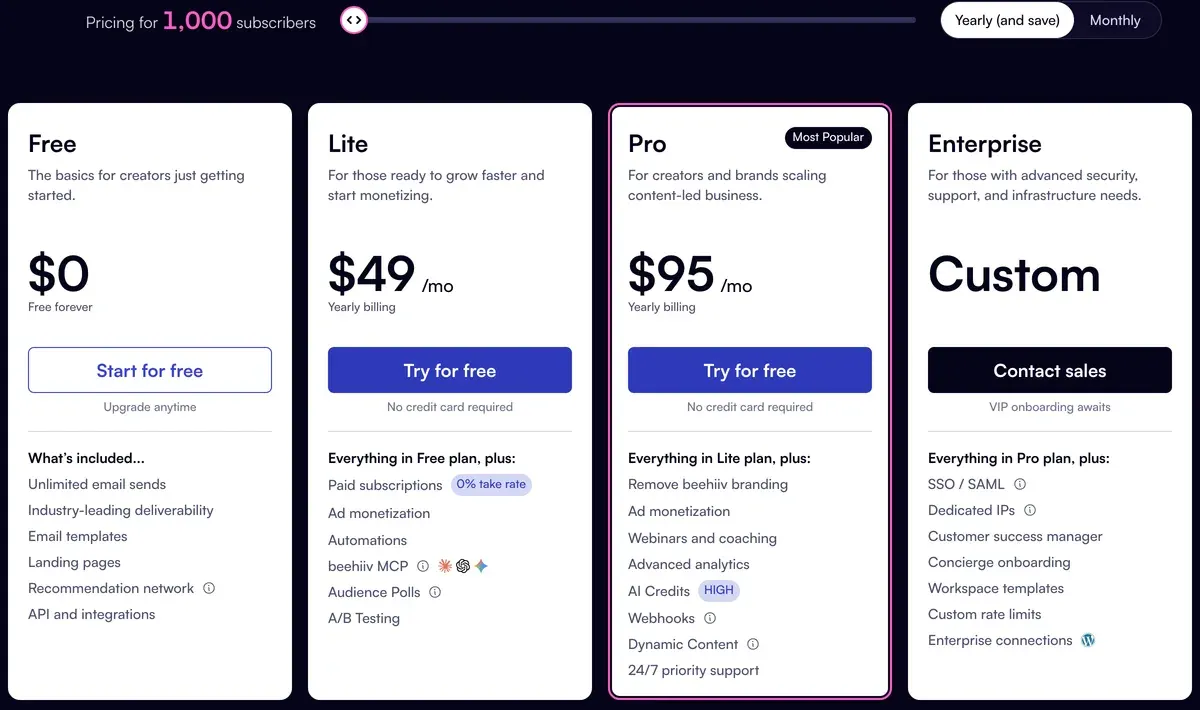
Choose beehiiv for a free list up to 2,500 or paid subscriptions, Mailchimp for cheaper AI writing up to 10,000 contacts (prices checked ). At 1,000 contacts, AI writing costs $45 on Mailchimp Standard against $59 on beehiiv Lite, billed monthly.
Mailchimp bills unsubscribed contacts, and section 30 of its terms lets it use your list for machine learning; beehiiv offers no-training only on Enterprise.
beehiiv
- Best for
- Newsletter publishers who want a site, paid subscriptions and the ad network in one tool, with under 2,500 subscribers or ready to pay Lite prices.
- Not for
- Buyers who need automations or a custom domain free (both start at Lite), a flat price as the list grows (Lite at 50,000 is $299 a month), or AI content farms, which are banned.
Mailchimp
- Best for
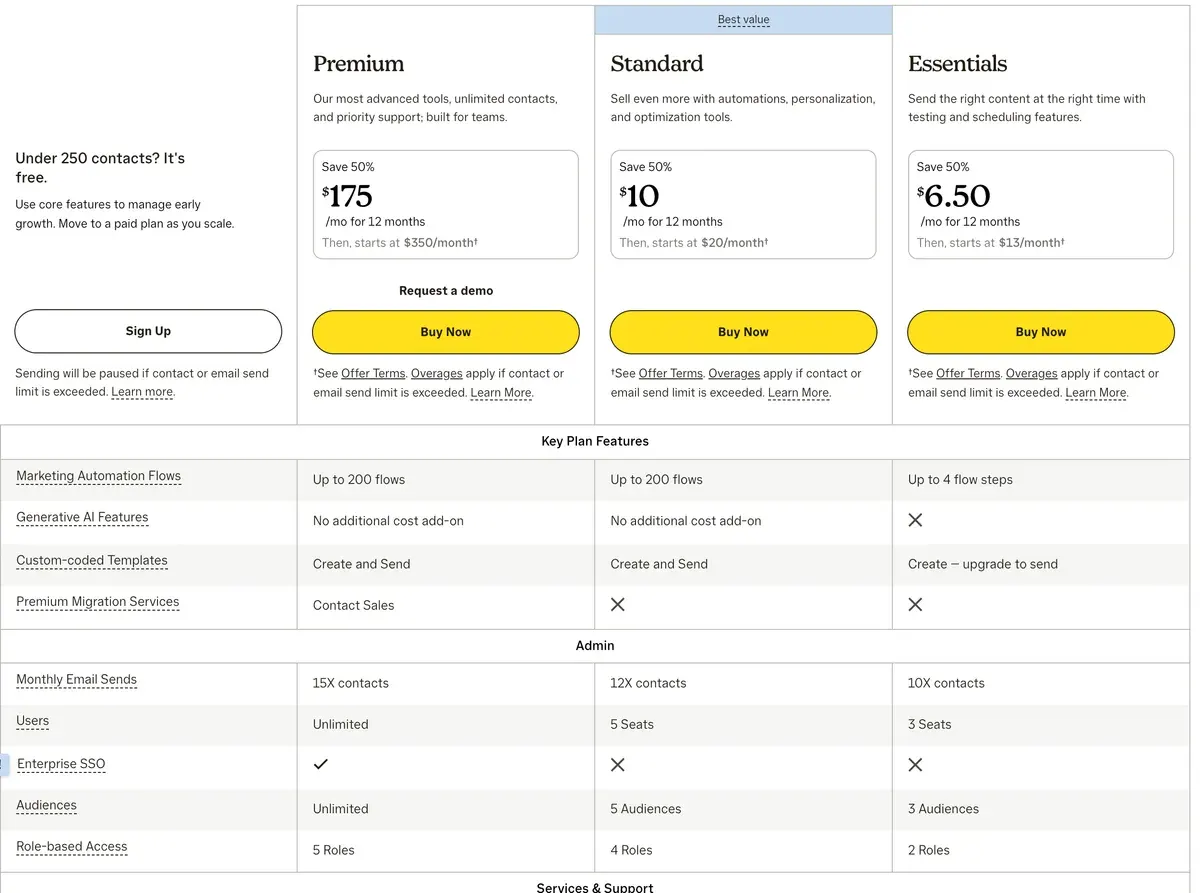
- Small lists that want a large integrations catalogue and templates: Essentials starts at $13 a month for 500 contacts.
- Not for
- Buyers needing AI on a cheap plan (none on Essentials) or holding many unsubscribed contacts, which are billed. Terms let Mailchimp use AI inputs and outputs, Customer Data included, for machine learning (terms 30).
| beehiiv | Mailchimp | |
|---|---|---|
| Monthly from (USD) | $59 | $13 |
| Free plan size | 2,500 subscribers, unlimited sends | 250 contacts, 500 sends a month |
| Sends on paid plans | Unlimited | 10 to 15 times your contact limit, by plan |
| Unsubscribed contacts billed | Not stated | Yes |
| AI writing from | Lite | Standard |
| Paid subscriptions | Lite and up, 0% cut plus Stripe fees | None on the pricing page |
| Trains AI on your data | Terms are silent; no-training on Enterprise | Allowed, terms section 30 |
| Yearly billing | Up to 20% off | No public yearly price |

Which costs less at your list size?
Your list size and the AI writer decide it. Up to 2,500 subscribers, beehiiv Free costs nothing. From 2,501 to 15,000, Mailchimp Essentials costs less than beehiiv Lite: at 15,000 it is $180 against $199. Above 15,000, Essentials rises to $230 and beehiiv Lite stays at $199.
With AI on both, Mailchimp Standard costs less up to 10,000: $135 against $139 at 10,000. From 10,001 to 50,000, beehiiv Lite costs less, starting at $199 against $230 at 15,000 (Mailchimp’s price list, beehiiv pricing data).
The table shows each tool’s cheapest plan at 500, 2,500, 10,000 and 50,000 contacts. The 1,000 and 15,000 figures in the text come from the same price lists. Both bill in size steps (beehiiv says subscribers, Mailchimp says contacts), and a list one past a step pays for the next one.
| Tool | 500 contacts | 2,500 contacts | 10,000 contacts | 50,000 contacts | Free plan | Checked | Pricing page |
|---|---|---|---|---|---|---|---|
| beehiiv | $0 Free | $0 Free | $139 Lite | $299 Lite | Free: up to 2,500 contactsUnlimited email sends, 1 seat, 1 publication, website, podcast, community, 30-day analytics, limited AI usage. No custom domain, automations, A/B testing or beehiiv AI in the editor; beehiiv branding stays. | beehiiv.com/pricing | |
| Mailchimp | $13 Essentials | $45 Essentials | $110 Essentials | $385 Essentials | Free: up to 250 contacts, 500 emails a month250 contacts, 500 sends a month with 250 a day, 1 audience, 1 seat, Mailchimp branding, no scheduling, limited templates, no generative AI. Sending is held above 250 contacts. | mailchimp.com/pricing/marketing |
Scroll sideways for all 8 columns
At 1,000 contacts, Mailchimp Essentials costs $26.50 a month (Mailchimp’s price list). On beehiiv that size costs nothing, since Free covers 2,500.
At 50,000, the order reverses: beehiiv Lite costs $299 against $385 for Mailchimp Essentials (beehiiv pricing). Paying beehiiv for a year cuts that to $249 a month. Mailchimp publishes no yearly price.
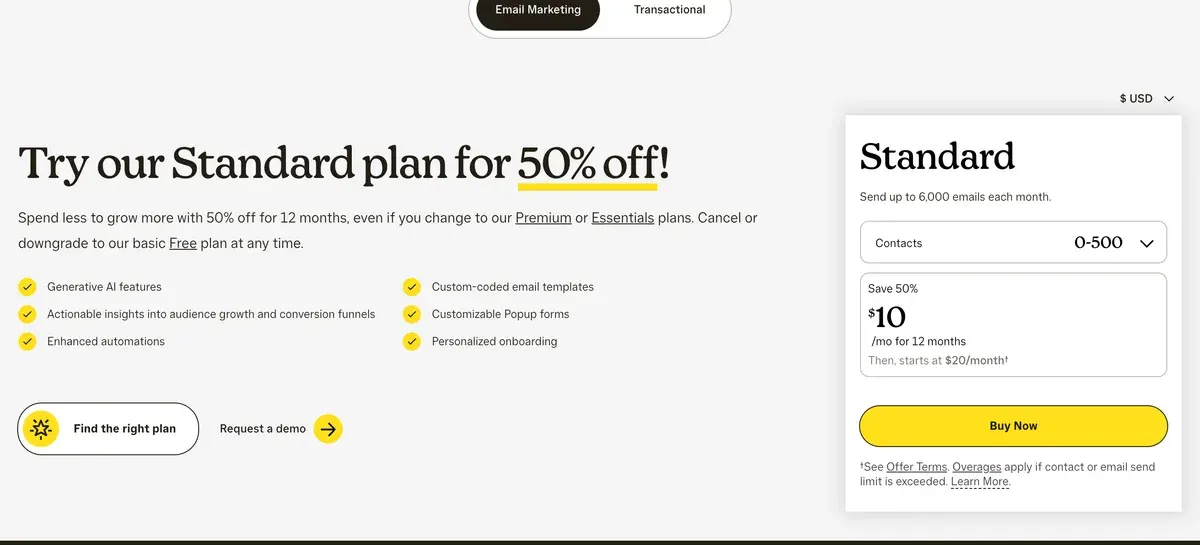
Mailchimp’s pricing page also shows a 50% discount on Standard for the first 12 months. The figures here use list prices, which is what you pay from month 13.
Who counts on the bill
Mailchimp counts subscribed, non-subscribed and unsubscribed contacts towards your limit (Mailchimp help centre).
How contacts are counted
Subscribed, unsubscribed, and non-subscribed contacts are included in your contact count.
Archived, cleaned, and deleted contacts don’t count toward your contact total or the price of your marketing plan.
Archived and deleted contacts do not count. So a list that has lost a few thousand readers keeps paying for them until you archive them.
On beehiiv, the bill follows unique email addresses subscribed to a publication. Its pricing page does not say whether unsubscribed or bounced addresses count.
Sending caps differ too. Every beehiiv plan sends without a monthly limit. Mailchimp Essentials allows 10 sends per contact a month, Standard 12 and Premium 15, and going over adds overage charges (Mailchimp pricing). A daily newsletter to 1,000 people passes the Essentials cap of 15,000 sends by mid-month.

Which plan includes the AI writer?
On Mailchimp, generative AI starts on Standard and is “Not included” on Essentials or Free.

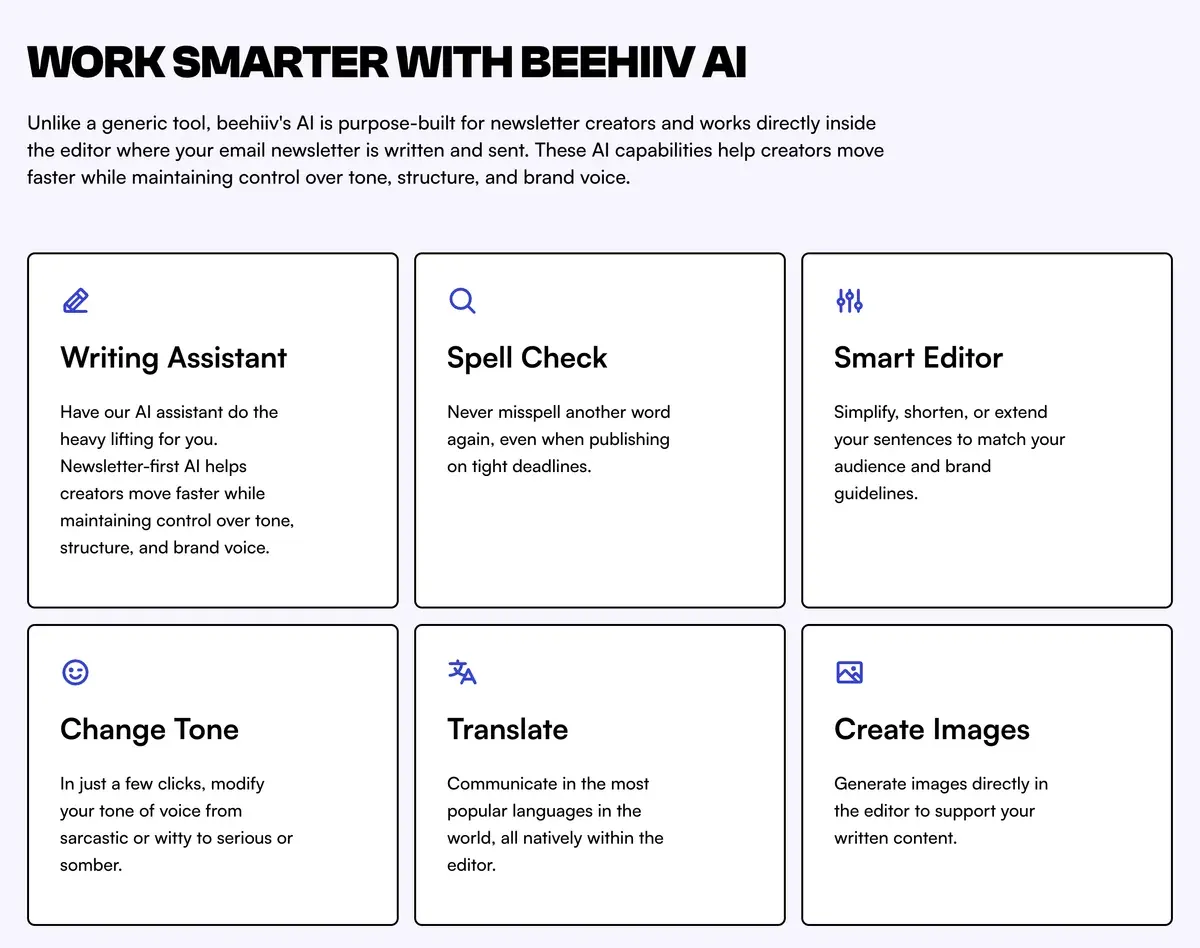
On beehiiv, the in-editor AI starts on Lite; Free gets “limited AI usage” and an AI website builder.
| Tool | AI feature | Lowest plan | Limits | Checked |
|---|---|---|---|---|
| beehiiv | Email writing beehiiv AI (in-editor) | Lite | AI usage included: Limited on Free, Elevated on Lite, 5x Lite on Pro, custom on Enterprise. Credit amounts not published. | |
| beehiiv | AI agent beehiiv Agent and MCP | Free (read) / Lite (write) | Read access on every plan; write access from Lite. The MCP also serves a get_pricing tool. | |
| beehiiv | Other AI website builder | Free | Listed in the Free plan’s included features. | |
| beehiiv | Other AI podcast newsletter | Pro | Turns podcast episodes into a newsletter; Pro and Enterprise only. | |
| beehiiv | Other AI bot control | Pro | Controls AI crawler access to the publication’s site; not a writing feature. | |
| Mailchimp | Email writing Generative AI features (content generation) | Standard | Listed as No additional cost add-onon Standard and Premium, Not includedon Essentials and Free. Terms 30 says it covers campaigns, performance analysis and organising contacts. | |
| Mailchimp | Segments Advanced segmentation and pre-built segments | Standard | Not marked as AI on the page. | |
| Mailchimp | Predictions Predictive segmentation | Standard | Named in the Premium feature set; footnote 17 says Predictive segments available on Standard or Premium plans only. |
Scroll sideways for all 5 columns
Neither vendor publishes how much AI use a plan includes. beehiiv labels it “Elevated” on Lite and “5x Lite” on Pro. Mailchimp lists predictive segments on Standard and Premium only, in a footnote on its pricing page.
The rest of beehiiv’s AI list leans to publishing. On Lite, outside AI assistants can edit your publication through beehiiv’s MCP connector, a link that lets them act inside your account. Pro adds a tool that turns podcast episodes into newsletters (beehiiv pricing data).
What each one takes from paid subscriptions
On Lite and above, beehiiv takes 0% of paid subscription revenue. You pay Stripe’s card fee of 2.9% plus 30 cents a payment, per beehiiv’s pricing FAQ. Paid subscriptions, the ad network and paid recommendations all start on Lite, at $59 a month for up to 1,000 subscribers (beehiiv pricing).
Mailchimp’s marketing pricing page lists no paid subscriptions or newsletter ad network on any plan (read 1 November 2026). If you charge readers, beehiiv is built for it and Mailchimp is not.
Does either one train AI on your list?
Mailchimp’s terms allow it. Section 30 of its Standard Terms of Use (10 October 2025) says: “We may use your Inputs and Outputs, including Customer Data, for machine learning purposes in order to develop and improve the AI Model” (Mailchimp terms). It points to preferences in account settings without saying they switch training off.
Standard Terms of Use, 30
We may use your Inputs and Outputs, including Customer Data, for machine learning purposes in order to develop and improve the AI Model, the Services, and similar products and features, and you instruct us to process Customer Data for such purposes.
The beehiiv terms (6 October 2026) say nothing about training models on your content. Section 3 lets it compile anonymised statistics from your content (beehiiv terms).
Terms of Use, 3 (Aggregated Statistics)
You acknowledge that beehiiv may compile Aggregated Statistics based on your Content (as defined below). You agree that beehiiv may: (i) make Aggregated Statistics publicly available in compliance with applicable law; and (ii) use Aggregated Statistics to the extent and in the manner permitted under applicable law; provided, that such Aggregated Statistics do not identify you or Your Users.
Its pricing table lists “No-training / zero-retention” in the Enterprise column, the custom-priced plan.
| Tool | Trains AI on your data | In plain words | The clause | Terms |
|---|---|---|---|---|
| beehiiv | The terms do not say | The terms of use (6 Oct 2026), privacy policy and DPA (16 Jul 2026) contain no statement on training AI models with customer content. The only controls are section 3, which lets beehiiv compile anonymised Aggregated Statistics from your Content, and the pricing page, which lists No-training / zero-retentionas an Enterprise-only feature. Opt out: Not stated; the no-training and zero-retention option appears only in the Enterprise column of the feature table. | beehiiv may compile Aggregated Statistics based on your ContentTerms of Use section 3 (Aggregated Statistics); DPA heading Confidentiality and Trainingholds only a staff confidentiality clause (19) | Dated 6 Oct 2026 |
| Mailchimp | Yes | Terms section 30 grants Mailchimp an irrevocable licence to AI Inputs and Outputs for any purpose including developing and improving the AI Model, and says it may use them, including Customer Data, for machine learning. It mentions account-setting preferences but does not say they stop training. The Intuit Global Privacy Statement lists training AI models as a use of personal information. Opt out: Terms 30 says You may select preferences about your data by visiting your account settings; the terms do not say this switches training off. | We may use your Inputs and Outputs, including Customer Data, for machine learning purposes in order to develop and improve the AI Model, the Services, and similar products and features, and you instruct us to process Customer Data for such purposes.Standard Terms of Use 30 | Dated 10 Oct 2025 |
Scroll sideways for all 5 columns
The AI training guide for email tools reads the same clauses for every tool in the section.
What beehiiv and Mailchimp users report
The beehiiv sample is 19 public reviews. Six of 19 praise an editor beginners can use without technical skill (Trustpilot review, second Trustpilot review). Three of 19 report price rises, one a month after joining (Trustpilot review, second Trustpilot review).
Mailchimp’s readable sample is thin: 5 Reddit posts, most with their bodies removed. One poster calls its list-size pricing a “subscriber tax” in a post promoting a rival (Reddit). One commenter finds it cheaper than Brevo for a simple sign-up flow (Reddit).
Moving a list from Mailchimp to beehiiv
A beehiiv support guide covers the move on every plan, Free included (beehiiv support). You export the audience from Mailchimp as a CSV file and upload it under Settings, Subscribers Import. Tags and custom fields map across in the same step.
The guide suggests leaving out contacts with a Mailchimp member rating of 1 or 2 for your first two to four weeks. Doing so helps keep your emails out of spam folders.
By default, beehiiv records the import date as each sign-up date. Support can add the original dates after the import.
Past campaigns move separately: beehiiv’s content import tool lists Mailchimp as a source (beehiiv content import).
The guide has you recreate embedded sign-up forms in beehiiv and rebuild Mailchimp automations with beehiiv Automations. Automations start on Lite.
If neither fits
A creator who wants a free plan with automations can compare beehiiv vs Kit. A writer weighing a cut of paid subscriptions against a monthly fee has beehiiv vs Substack.
Leaving Mailchimp for a cheaper store or business tool? Mailchimp vs MailerLite and the Mailchimp alternatives price the options at your list size. Full tier tables sit on beehiiv pricing and Mailchimp pricing, and the AI email marketing hub routes every job.
Questions buyers ask about beehiiv vs Mailchimp
Is beehiiv cheaper than Mailchimp?
Up to 2,500 subscribers, yes: beehiiv Free costs nothing. From 2,501 to 15,000, Mailchimp Essentials costs less on monthly billing. At 50,000, beehiiv Lite costs less than Mailchimp Essentials.
Can you sell paid subscriptions on Mailchimp?
Its marketing pricing page lists no paid subscription feature. beehiiv sells them from Lite and takes 0% of the revenue before Stripe’s fee.
Does beehiiv’s free plan include AI?
It includes “limited AI usage” and an AI website builder. The AI writer inside the editor starts on Lite, per the beehiiv pricing page.
More email tool comparisons sit together in the AI email marketing hub
Sources
- beehiiv: beehiiv pricing, subscriber buckets, plan features and the FAQ on take rate and sends. Checked
- beehiiv: beehiiv pricing data file, tier table, monetisation and AI rows, Enterprise no-training row. Checked
- beehiiv: beehiiv Terms of Use, 6 October 2026; section 3, Aggregated Statistics. Checked
- beehiiv support: How to migrate from Mailchimp to beehiiv, updated 21 November 2025; CSV export and import on all plans, member rating segment. Checked
- beehiiv support: How to import previous content into beehiiv, updated 22 June 2026; content import from Substack, WordPress, Ghost and Mailchimp. Checked
- Intuit Mailchimp: Mailchimp marketing pricing, plan grid, sends per plan, generative AI rows, 50% offer and overages. Checked
- Intuit Mailchimp: Mailchimp pricing tiers in USD, the price list the pricing page loads; tier 501 to 1,500 contacts. Checked
- Mailchimp help centre: About Mailchimp pricing plans, which contacts count toward the limit. Checked
- Intuit Mailchimp: Mailchimp Standard Terms of Use, 10 October 2025; section 30, AI features. Checked

Alexandre S.
Alexandre S. is a creative ad strategist and copywriter with ten years' experience in digital marketing across multiple channels.
Related pages
-
 Profile beehiiv: price at your list size, AI features and terms
beehiiv is free to 2,500 subscribers, and Lite takes 0% of paid subscriptions. Price at four list sizes, AI by plan and the training clause, checked 1 Nov 2026.
-
 Pricing beehiiv pricing: every plan from 500 to 50,000 subscribers
beehiiv pricing, 1 November 2026: free to 2,500 subscribers, then $109 a month at 2,501 on Lite. Every Lite and Pro bucket, and what yearly billing saves.
-
 Profile Mailchimp: what it costs at your list size, its AI and its terms
Mailchimp Essentials costs $13 a month for 500 contacts with no AI; Standard adds it at $20. Unsubscribed contacts are billed. Checked 1 Nov 2026.
-
 Pricing Mailchimp pricing: Free, Essentials, Standard and Premium from 500 to 50,000 contacts
Mailchimp Free holds 250 contacts. Essentials costs $13 a month at 500 contacts and $385 at 50,000. Every plan at four list sizes, checked 1 Nov 2026.
-
 Alternatives Mailchimp alternatives: what you save at your list size, and where the AI sits
Eight Mailchimp alternatives priced at 2,500 and 10,000 contacts, with the plan that holds AI and whether each trains on your list. Checked 1 Nov 2026.
-
 Compare beehiiv vs Kit (formerly ConvertKit)
Kit costs less below 10,000 subscribers, the two match at 10,000, and beehiiv Lite costs less at 50,000 with 0% of paid subscriptions. Checked 1 Nov 2026.


