Mailchimp alternatives: what you save at your list size, and where the AI sits
Verdict on Mailchimp alternatives
MailerLite Comfort costs less than Mailchimp Essentials at every list size we price, and adds AI writing. At 10,000 contacts Comfort lists $89 a month against $110 for Essentials (prices checked ).
The catch is AI training: MailerLite’s terms (17.3) license your AI inputs and outputs to improve its models, as Mailchimp’s section 30 does.
For a cheaper bill at any list size up to 50,000 contacts: MailerLite
Comfort costs less than Essentials at all four list sizes priced here and includes the AI writing assistant.
For a large list you email a few times a month: Brevo
Brevo bills by emails sent. Free stores up to 100,000 contacts and sends 300 emails a day.
For a creator newsletter under 10,000 subscribers: Kit
Kit Free covers up to 10,000 subscribers, without automations. Kit’s help centre says Kit trains no AI on your data.
For a Shopify store that wants AI copy on a free plan: Omnisend
Omnisend Free includes AI subject lines and writing. Standard undercuts Essentials at 2,500 contacts and costs more at 10,000.
For a store that wants predictive data on its first paid plan: Klaviyo
The Email plan lists predictive analytics. It costs more than Essentials at every list size and bills active profiles alone.
| Tool | Monthly from (USD) | Free plan | What it does |
|---|---|---|---|
| Mailchimp The tool you are replacing | $13 | Yes | Intuit-owned email platform priced by contact tier, with generative AI on Standard and Premium; Free has 250 contacts. |
| ActiveCampaign | $15 billed yearly | No | Email automation with a CRM option, four plans priced by contact count, and an AI layer called Active Intelligence. |
| beehiiv | $59 | Yes | Newsletter platform priced by subscriber bucket, free to 2,500, unlimited sends, 0% cut of paid subscriptions. |
| Brevo | $9 | Yes | Email, SMS and transactional platform (formerly Sendinblue) priced by emails sent, with a free plan of 300 emails a day. |
| GetResponse | $19 | No | Email marketing with unlimited sends, priced by list size from 1,000 contacts, plus landing pages and webinars. |
| Kit | $39 | Yes | Creator email platform: free to 10,000 subscribers, paid plans by subscriber tier, AI Connectors (MCP). |
| Klaviyo | $20 | Yes | Email and SMS platform for online stores, billed by active profiles, with AI segments, content and agents. |
| MailerLite | $12 | Yes | Newsletter and automation platform priced by subscriber count, with an AI writing assistant on paid plans. |
| Omnisend | $16 | Yes | Email, SMS and web push platform for online stores, billed by contact count, with AI writing on the free plan. |
Scroll sideways for all 4 columns
Prices checked 6 Nov 2026.

Why people leave Mailchimp
Mailchimp’s bill rises in steps as your list grows. Essentials costs $13 a month at 500 contacts and $45 at 2,500 (Mailchimp pricing).
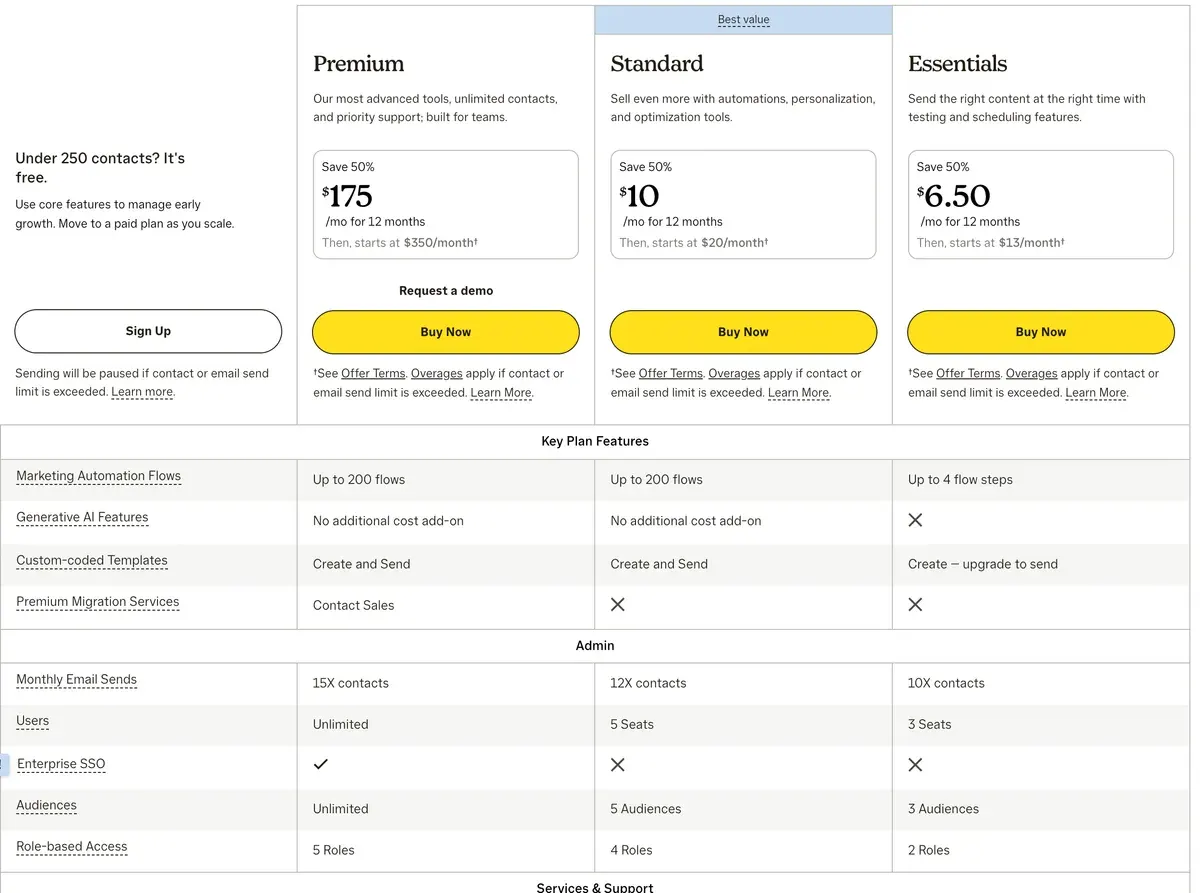
At 10,000 contacts it reaches $110. A 50% offer cuts the base price for the first 12 months, then the list price applies (offer terms).
Who gets billed matters too. Mailchimp counts subscribed, non-subscribed and unsubscribed contacts towards your limit (help centre). A list that has shed readers still pays for them.
Types of contacts
Subscribed Counts toward monthly contact limit?: Yes
Unsubscribed An unsubscribed contact is someone who previously received your marketing content but has opted out. Counts toward monthly contact limit?: Yes
Non-subscribed A non-subscribed contact is someone who’s interacted with you but hasn’t opted in to receive marketing content. Counts toward monthly contact limit?: Yes
Cleaned Hard bounces and repeated soft bounces become cleaned contacts. Counts toward monthly contact limit?: No
Archived An archived contact is someone who’s been removed from your audience. Counts toward monthly contact limit?: No
Generative AI is “Not included” on Free and Essentials. It starts on Standard, at $60 for 2,500 contacts and $135 for 10,000.
The free plan has shrunk as well. It now covers 250 contacts and 500 sends a month. The pricing page’s own plan data set the Free limit at 500 contacts in a 31 May 2025 capture. In public reviews, one Reddit post written to promote a rival tool calls list-size pricing Mailchimp’s “subscriber tax” (1 of 5 sources: r/Emailmarketing).
What each alternative costs at your list size
At 2,500 contacts, Kit and beehiiv both cover you on their free plans, and Brevo Starter is the cheapest paid plan. Just under 10,000, Kit Free still covers you, and Brevo Starter again costs least among paid plans.
| Tool | 500 contacts | 2,500 contacts | 10,000 contacts | 50,000 contacts | Free plan | Checked | Pricing page |
|---|---|---|---|---|---|---|---|
| Mailchimp | $13 Essentials | $45 Essentials | $110 Essentials | $385 Essentials | Free: up to 250 contacts, 500 emails a month250 contacts, 500 sends a month with 250 a day, 1 audience, 1 seat, Mailchimp branding, no scheduling, limited templates, no generative AI. Sending is held above 250 contacts. | mailchimp.com/pricing/marketing | |
| MailerLite | $12 Comfort | $33 Comfort | $89 Comfort | $319 Comfort | Free: up to 250 contacts, 2,500 emails a month250 subscribers and 2,500 emails a month, 2 seats, 1 website, 1 landing page, 3 forms, 3 automations, MailerLite logo, knowledge base support only. Subject line generator limited, AI landing page builder once, no AI writing assistant. | mailerlite.com/pricing | |
| Brevo | $0 Free | $25 Starter | $46 Starter | $249 Standard | Free: up to 100,000 contacts, 9,000 emails a month300 emails a day (about 9,000 a month), up to 100,000 stored contacts, 1 user, Brevo logo, automations capped at 2,000 contacts. AI access on Free was not confirmed. | brevo.com/pricing | |
| Kit | $0 Free | $0 Free | $0 Free | $379 Creator | Free: up to 10,000 contactsUnlimited broadcasts, forms and landing pages, tagging, segmentation, A/B testing of broadcasts, API access, digital products. No visual automations, sequences, rules, RSS campaigns, AI Connectors or paid apps. Wording is under 10,000in one sentence and up to 10,000in another (help centre, 2026-09-23). | kit.com/pricing | |
| Omnisend | $16 Standard | $44 Standard | $132 Standard | $413 Standard | Free: up to 250 contacts, 500 emails a month500 emails a month, 250 contacts, 500 web push notifications, Omnisend branding required. Free plan includes AI subject lines, content writing, segmentation and form creation (omnisend.com/ai). SMS and the Pro AI tools are not included. | omnisend.com/pricing | |
| Klaviyo | $20 Email | $60 Email | $150 Email | $720 Email | Free: up to 250 contacts, 500 emails a monthUp to 250 active profiles and 500 email sends a month, 5 USD of mobile messages and 5 USD of Composer usage a month, basic templates, AI subject line generator, reporting. Email support for the first 60 days. Over either cap the account cannot send until the next cycle or an upgrade. | klaviyo.com/pricing | |
| GetResponse | $19 Starter | $29 Starter | $79 Starter | $299 Starter | No free plan | getresponse.com/pricing | |
| ActiveCampaign | $15 Starter, billed yearly only | $39 Starter, billed yearly only | $149 Starter, billed yearly only | $609 Plus, billed yearly only | No free plan | activecampaign.com/pricing | |
| beehiiv | $0 Free | $0 Free | $139 Lite | $299 Lite | Free: up to 2,500 contactsUnlimited email sends, 1 seat, 1 publication, website, podcast, community, 30-day analytics, limited AI usage. No custom domain, automations, A/B testing or beehiiv AI in the editor; beehiiv branding stays. | beehiiv.com/pricing |
Scroll sideways for all 8 columns
Headline prices hide how each tool counts your list. Mailchimp bills unsubscribed contacts; three of these alternatives say they do not.
| Tool | Billed on | Unsubscribed contacts |
|---|---|---|
| Mailchimp | Contacts | Counted |
| MailerLite | Active subscribers | Not counted |
| Brevo | Emails sent, with a contact cap per tier | Not published |
| Kit | Confirmed subscribers | Not published |
| Omnisend | Contacts who received automated messages | Not counted |
| Klaviyo | Active profiles | Drop out once suppressed |
| GetResponse | Contacts, per list | Counted, and an address on two lists counts twice |
| ActiveCampaign | Contacts | Unverified (help page blocked) |
| beehiiv | Unique subscribed addresses | Not published |
Scroll sideways for all 3 columns
MailerLite: cheaper than Essentials at every tier, with AI on Comfort
MailerLite is a newsletter and automation tool aimed at small businesses. Comfort saves you $12 a month against Essentials at 2,500 contacts and $21 at 10,000 (MailerLite pricing).
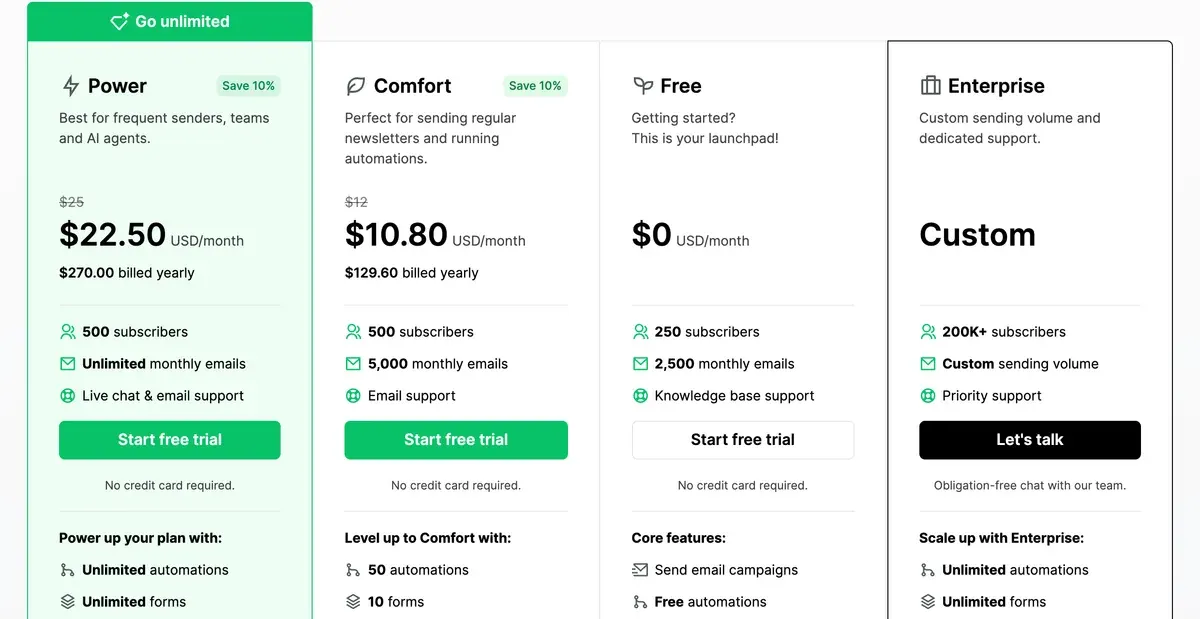
The AI writing assistant and smart sending come with Comfort. Against Mailchimp Standard, the plan with AI, the saving grows to $27 and $46. Unsubscribed and bounced addresses do not count. Mailchimp vs MailerLite goes feature by feature.
- Best for
- Small lists that want automations, landing pages and AI drafting at a low entry price: Comfort starts at $12 a month for 500 subscribers.
- Skip it if
- you want your list kept out of AI training: MailerLite’s terms 17.3 license your AI inputs and outputs to improve AI models.
Brevo: priced by emails sent, so a big quiet list stays cheap
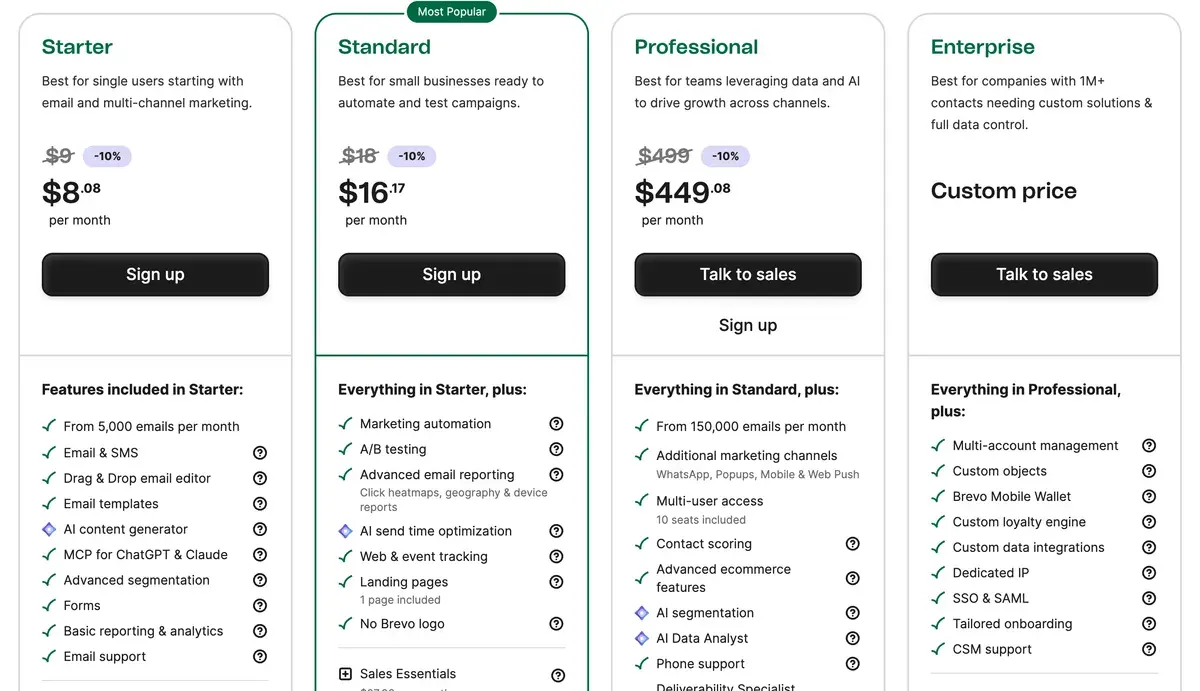
Brevo charges for emails sent each month, and each paid tier caps how many contacts you can store. Free keeps up to 100,000 contacts and sends 300 emails a day (Brevo pricing).
Our list-size figures assume about four sends per contact a month. On that basis Starter costs $25 at 2,500 contacts, $20 less than Essentials. At 10,000 contacts it costs $46, a saving of $64.
The Aura content generator starts on Starter. Marketing automation and send-time optimisation need Standard. Brevo’s terms 6.7 let it use your content to train its AI features. Brevo vs MailerLite sets the two cheapest paid plans side by side.
- Best for
- Lists that send rarely: Free stores up to 100,000 contacts and sends 300 emails a day; Starter costs $9 a month for 5,000 emails.
- Skip it if
- you email the whole list weekly or more: Brevo’s price follows sends, so the saving shrinks as frequency rises.
Kit: free up to 10,000 subscribers for creators
Kit, formerly ConvertKit, is built for creators who sell newsletters and courses. Its Free plan covers up to 10,000 subscribers with unlimited broadcasts (Kit help centre). The help centre words the cap both “up to 10,000” and “under 10,000”, so a list of exactly 10,000 sits on the line. That saves the whole Essentials bill at 2,500 and 10,000 contacts.
Free leaves out visual automations and sequences. Creator, which adds them, costs $59 at the 3,000 step and $139 at 10,000. Kit’s help centre says “Kit itself does not train any AI/LLM on Kit data” (AI Connectors article). Kit vs Mailchimp covers migration.
The Kit Free plan
Past the cap You’ll need to upgrade to a paid plan to keep sending.
Switching back If you’re on a paid plan, you keep your paid features until the end of your current billing period. If you’re on a trial, access to paid features ends as soon as you switch.
Automations Visual automations and sequences stop running while you’re on the Free plan.
- Best for
- Solo creators and small newsletter or course businesses under 10,000 subscribers, free without automations or paid with visual automations priced by list size.
- Skip it if
- you need automated sequences at 10,000 subscribers: Creator costs more than Mailchimp Essentials at that size.
Omnisend: AI copy on the free plan for online stores
Omnisend is email and SMS for online shops, with Shopify among its integrations. Its free plan includes AI subject lines, AI writing and the AI segment builder (Omnisend AI). Mailchimp keeps those behind Standard.
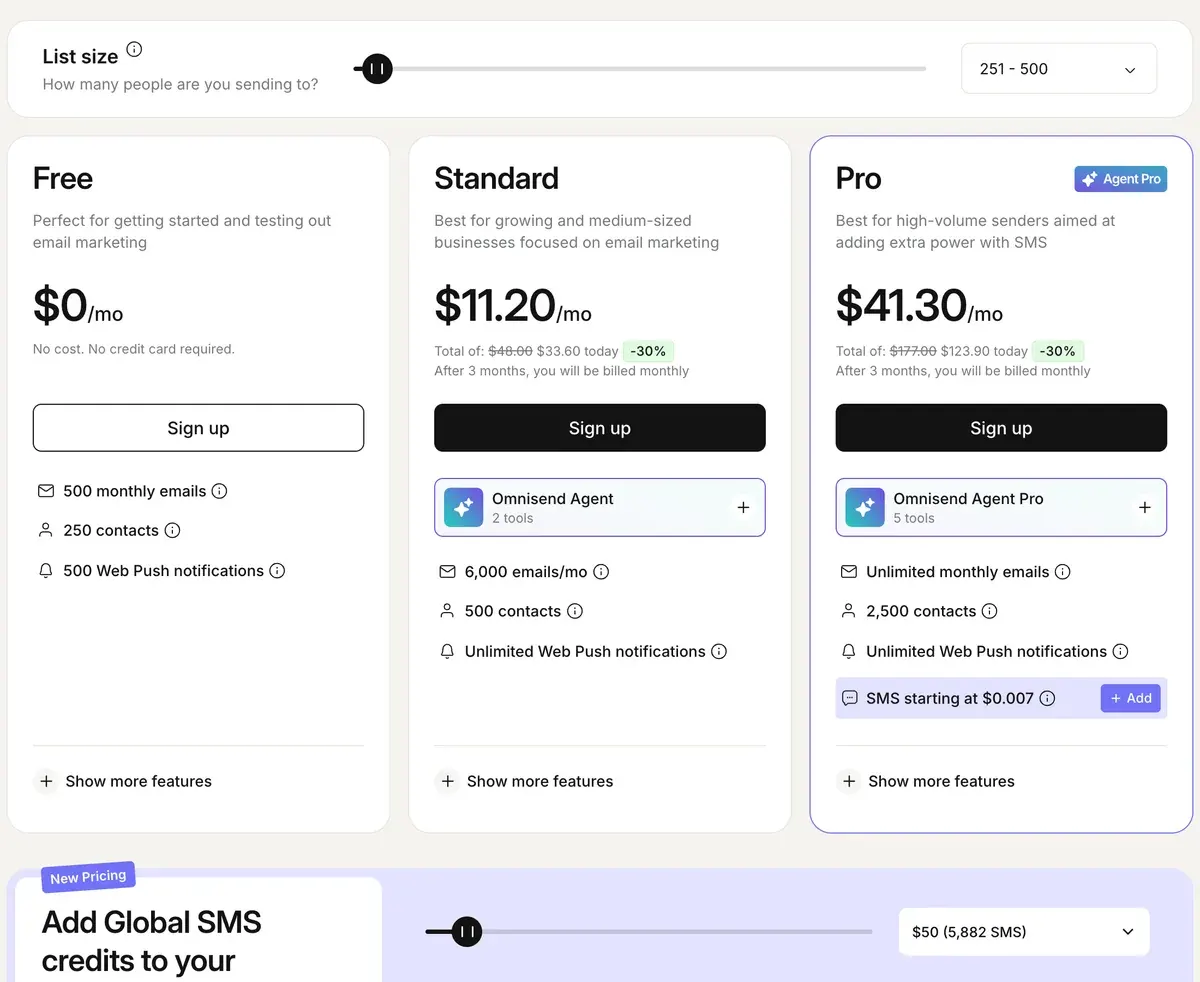
Standard costs $44 at 2,500 contacts, $1 under Essentials. At 10,000 it costs $22 more. The pricing page says “Unsubscribed contacts aren’t billed”. Price jumps by contact count recur in its Shopify App Store reviews (4 of 22 sources: Shopify App Store, Shopify App Store).
- Best for
- Online stores on Shopify or similar that want flows, forms and AI copy at a lower list-size price than Klaviyo, and that send mostly email.
- Skip it if
- you do not sell online: the product recommender and send-time tools sit on Pro or paid add-ons built around store data.
Klaviyo: predictive data on the first paid plan, at a higher price
Klaviyo is an email and SMS platform built around store data. Its Email plan lists predictive analytics and AI-generated segments and content (Klaviyo pricing). Mailchimp keeps predictive segments behind Standard, at $60 a month for 2,500 contacts.
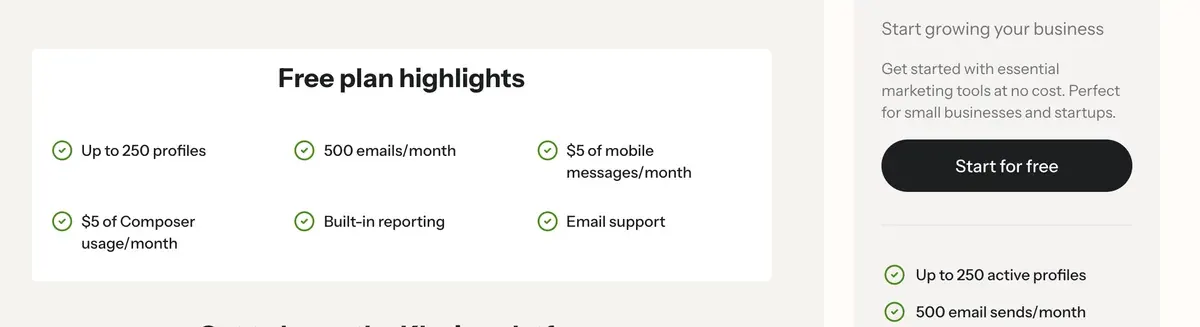
Klaviyo costs more than Essentials: $15 more at 2,500 and $40 more at 10,000. It bills active profiles only, and unsubscribed or bounced profiles drop out once suppressed (billing article). Users report bot sign-ups inflating the active-profile count, and the bill with it (7 of 19 sources: Shopify App Store, Shopify App Store).
- Best for
- Online stores with thousands of contacts wanting flows, segments and predictive data, and willing to clean the list to cut the profile count.
- Skip it if
- you want the lowest price per contact: Klaviyo Email costs more than Mailchimp Essentials at all four list sizes priced here.
GetResponse: unlimited sends, but every list counts separately
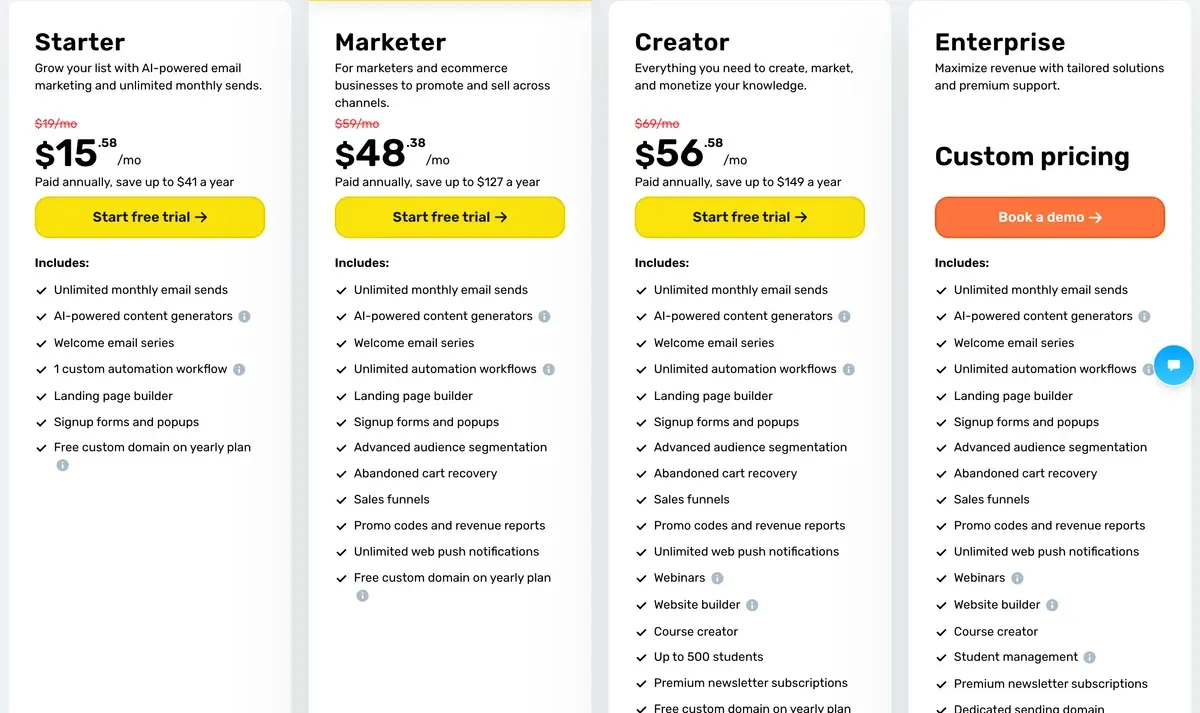
GetResponse sells email with landing pages and webinars. Starter saves $16 against Essentials at 2,500 contacts and $31 at 10,000, with unlimited sends (GetResponse pricing).
Starter caps the AI email generator at “Up to 3 uses”. Marketer removes the cap at $69 for 2,500 contacts and $114 for 10,000. The terms count unsubscribed and deleted contacts, and an address on two lists twice (terms). Section 10 says its chosen AI “does not learn from the content provided by the Customer”.
- Best for
- Small lists wanting unlimited sends and landing pages: Starter is USD 19 a month for 1,000 contacts, USD 79 for 10,000 (monthly, 1 November 2026).
- Skip it if
- you keep several lists with overlapping subscribers: each copy of an address is billed, which can erase the saving.
ActiveCampaign: deeper automation, billed yearly
ActiveCampaign is an automation-first platform for sales and marketing teams. It publishes yearly billing only, and Mailchimp publishes monthly prices only, so the comparison below sets a yearly-billed price against a monthly one (ActiveCampaign pricing).
Starter costs $39 a month billed yearly at 2,500 contacts, below the Essentials monthly price. At 10,000 contacts the yearly Starter price, $149, sits above Essentials. AI content generation starts on Plus, $95 at 2,500. Its terms (section 4) let it use your marketing content “to help us train and improve the Services”.
- Best for
- Teams that need multi-step automation on the entry plan: Starter has it, with 10,000 sends a month and 1 seat (archived page, 26 October 2026).
- Skip it if
- you want to pay month to month: the pricing page shows yearly billing only.
beehiiv: a free newsletter to 2,500 subscribers
beehiiv is a newsletter platform with a website, paid subscriptions and an ad network. Free covers up to 2,500 subscribers with unlimited sends (beehiiv pricing), the whole Essentials bill saved at that size.
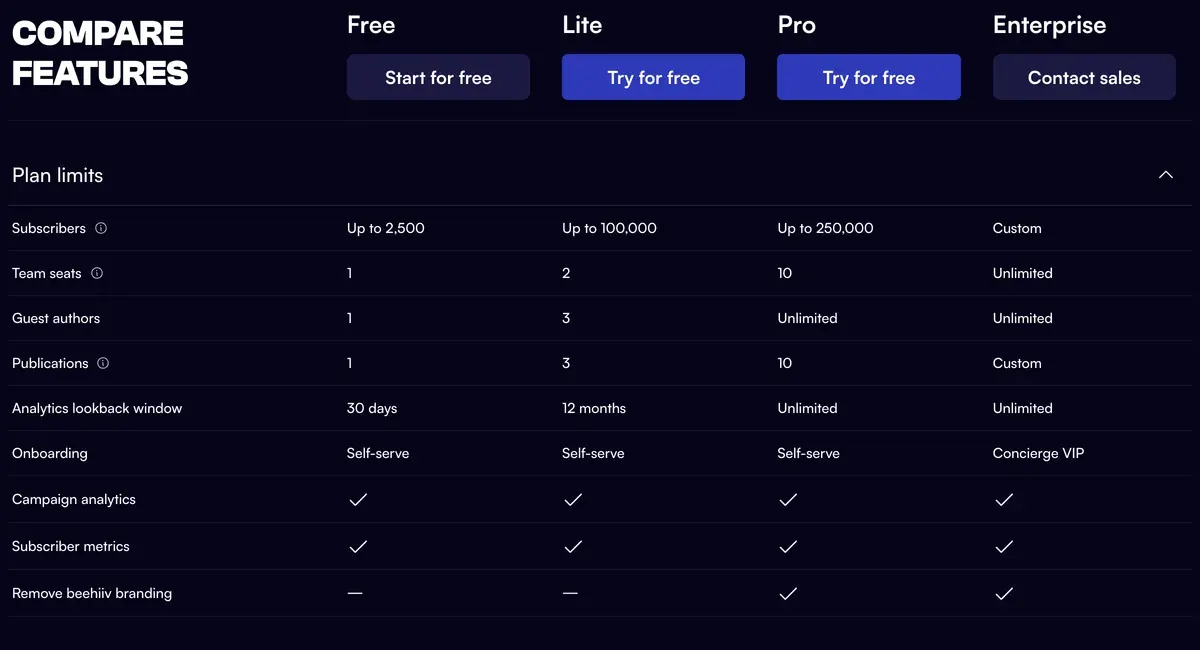
At 10,000 subscribers you need Lite, $139 a month: $29 more than Essentials. The in-editor beehiiv AI starts on Lite. A no-training option appears only in the Enterprise column. beehiiv vs Mailchimp compares the two for publishers.
- Best for
- Newsletter publishers who want a site, paid subscriptions and the ad network in one tool, with under 2,500 subscribers or ready to pay Lite prices.
- Skip it if
- you run store or sales automation: beehiiv is built for publishing, and automations need a paid plan.
Does switching keep your list out of AI training?
Only with Kit, whose help centre says Kit trains no AI on your data, or GetResponse, whose terms say its chosen AI “does not learn from the content provided by the Customer”.
Mailchimp, MailerLite and Brevo have clauses that allow training; ActiveCampaign’s lets it use your content to “train and improve the Services”, without naming AI models. The terms of Omnisend, Klaviyo and beehiiv say nothing either way about their own models. Does your email tool train AI? quotes each clause in full.
| Tool | Trains AI on your data | In plain words | The clause | Terms |
|---|---|---|---|---|
| Mailchimp | Yes | Terms section 30 grants Mailchimp an irrevocable licence to AI Inputs and Outputs for any purpose including developing and improving the AI Model, and says it may use them, including Customer Data, for machine learning. It mentions account-setting preferences but does not say they stop training. The Intuit Global Privacy Statement lists training AI models as a use of personal information. Opt out: Terms 30 says You may select preferences about your data by visiting your account settings; the terms do not say this switches training off. | We may use your Inputs and Outputs, including Customer Data, for machine learning purposes in order to develop and improve the AI Model, the Services, and similar products and features, and you instruct us to process Customer Data for such purposes.Standard Terms of Use 30 | Dated 10 Oct 2025 |
| MailerLite | Yes | Terms clause 17.3 grants MailerLite a licence to use your AI Inputs and Outputs to improve AI models. The AI policy and privacy policy 3.6 say its partners OpenAI and Google do not train on your data under enterprise agreements. No opt-out was found. | You grant MailerLite a license to use your Inputs and Outputs to improve AI models, and you agree to comply with any restrictions on AI usage.Terms of service 17.3 | Dated 22 Sep 2026 |
| Brevo | Yes | Terms 6.7 says Brevo may use Content and Usage Data to enrich and train its AI Features, for improving the Services provided to you, in particular fraud, phishing and spam prevention. AI third-party providers only process your data to provide the AI Features. The Control Center manages AI Features, but fraud and spam detection cannot be disabled. Opt out: Control Center in the app manages AI Features; the terms do not say it stops training, and fraud and spam detection cannot be turned off. | Brevo may use Content and Usage Data to enrich and train its AI Features for the sole purpose of improving the performance of the Services provided to You, in particular to prevent fraud, phishing and unsolicited electronic communications, and to secure the Services.Terms of use 6.7 | Dated 1 Oct 2025 |
| Kit | No | Kit’s help centre says Kit itself does not train any AI or LLM on Kit data, including email content and de-identified subscriber data. The statement is in the AI Connectors FAQ; the terms and privacy policy do not mention training, and a third-party AI client you connect applies its own settings. | Kit itself does not train any AI/LLM on Kit data. Please note, however, once a creator connects AI Connectors to a third-party AI client (ChatGPT, Claude, Gemini, etc.), that provider's own data-handling settings govern whether prompts/data get used for model training.AI Connectors help article, Security and data FAQ (terms clause 8.2 licence to develop, maintain and improve the Servicesdoes not mention AI) | Dated 1 Oct 2026 |
| Omnisend | The terms do not say | The Terms of Use (30 April 2026) say the customer owns AI outputs (11.3) but contain no sentence on training models with customer content, and the privacy policy (18 June 2026) has none either. Clause 10.7 lets Omnisend use aggregated, non-personally-identifiable data for benchmarking, research and marketing analyses, and 10.6 lets it copy content to build account-abuse tools. | a non-exclusive, perpetual, irrevocable, fully-paid up, sublicensable, Territory-wide license to use, compile, license and distribute data derived from the interaction of non-personally identifiable Target Data with the Services10.7 (also 10.6, 11.2) | Dated 30 Apr 2026 |
| Klaviyo | The terms do not say | Clause 8.1 bars using Customer Data to train third-party foundation models, and the Customer Agent help article says customer data is never used to train large language models. The terms are silent on Klaviyo’s own models, and clause 7.3 lets it use aggregated data that does not identify the customer for service improvement and product development. Opt out: None found. The AI FAQ says machine learning and predictive analytics cannot be opted out of; generative AI features are optional. | Customer Data will not be used to train third-party foundation models.8.1 (also 7.3 Aggregated Data) | Dated 17 Dec 2025 |
| GetResponse | No | Section 10 of the terms says the AI solutions chosen ensure that the model does not learn from the content provided by the Customer. It is a statement about third-party providers (OpenAI, and Azure OpenAI for the course-creator AI support), not an opt-out setting. Customer input is sent to those providers for processing. The privacy policy separately says GetResponse applies AI to its own support feedback after masking data, and that Google Workspace API data is not used to train generalized AI models. | The AI solutions we have selected ensure that the model does not learn from the content provided by the Customer.10. Artificial intelligence (AI) | Dated 2026-06-09 (terms-us page); the /legal page of the same text is dated 2026-09-24 |
| ActiveCampaign | Yes | Terms of Service section 4 lets ActiveCampaign view, copy, and internally use Marketing Content to help us train and improve the Servicesand use Contact Data to trainthe Services. The clause does not name AI models and gives no opt-out. Section 5.3 says ActiveCampaign does not claim ownership of AI prompts or output. The privacy policy (last updated 2026-10-01) has no AI-training clause. Read from Wayback captures because the live legal pages blocked fetches. | we may view, copy, and internally use Marketing Content to help us train and improve the Services, including their functionality and effectiveness for you and your campaigns4. Our Services; License | Dated 2025-12-23 (Last Updated, per the 2026-10-05 Wayback capture) |
| beehiiv | The terms do not say | The terms of use (6 Oct 2026), privacy policy and DPA (16 Jul 2026) contain no statement on training AI models with customer content. The only controls are section 3, which lets beehiiv compile anonymised Aggregated Statistics from your Content, and the pricing page, which lists No-training / zero-retentionas an Enterprise-only feature. Opt out: Not stated; the no-training and zero-retention option appears only in the Enterprise column of the feature table. | beehiiv may compile Aggregated Statistics based on your ContentTerms of Use section 3 (Aggregated Statistics); DPA heading Confidentiality and Trainingholds only a staff confidentiality clause (19) | Dated 6 Oct 2026 |
Scroll sideways for all 5 columns
Left out, and why
HubSpot sells email as part of a CRM, so its price follows the CRM plan. Substack takes a share of paid subscriptions and suits writers more than marketers; newsletter platforms covers it. The full field sits on AI email marketing tools and the AI email marketing hub.
When Mailchimp is still the cheaper choice
At 500 contacts, Essentials costs less than Omnisend Standard, Klaviyo Email and GetResponse Starter. The 50% offer halves the base price for a year on top. The Mailchimp profile and Mailchimp pricing read each tier.
Questions buyers ask about Mailchimp alternatives
Which Mailchimp alternative is free?
Kit Free covers up to 10,000 subscribers, without automations. beehiiv Free covers 2,500 subscribers, and Brevo Free stores 100,000 contacts at 300 emails a day. MailerLite, Omnisend and Klaviyo give 250 contacts free, like Mailchimp.
Who are Mailchimp’s main competitors?
MailerLite and Brevo compete on price, Kit and beehiiv on creator newsletters. Omnisend and Klaviyo compete for online stores; GetResponse and ActiveCampaign for automation.
Does any alternative bill unsubscribed contacts?
GetResponse does, and it counts an address on two lists twice. MailerLite, Omnisend and Klaviyo say unsubscribed contacts are not billed.
More email tool comparisons sit together in the AI email marketing hub
Sources
- Mailchimp: Mailchimp marketing pricing, Free, Essentials, Standard and Premium tiers by contact count; generative AI row; 50% offer terms. Checked
- Mailchimp, via the Wayback Machine: Mailchimp marketing pricing (archived copy of 31 May 2025), plan data sets the Free plan’s contact limit at 500. Checked
- Mailchimp help centre: About Mailchimp pricing plans, subscribed, non-subscribed and unsubscribed contacts count towards the limit. Checked
- Mailchimp: Mailchimp Standard Terms of Use (10 October 2025), section 30, AI inputs and outputs. Checked
- MailerLite: MailerLite pricing, Comfort and Power slider tiers; AI writing assistant from Comfort; billing FAQ. Checked
- MailerLite: MailerLite terms of service (22 September 2026), clause 17.3. Checked
- Brevo: Brevo pricing, email tiers, contact caps per tier, Aura AI by plan. Checked
- Brevo: Brevo terms of use (1 October 2025), clause 6.7. Checked
- Kit help centre: The Kit Free plan, Free plan subscriber limit and what it leaves out. Checked
- Kit help centre: How to connect the Kit MCP to your AI tools, Security and data FAQ on AI training. Checked
- Omnisend: Omnisend pricing, Standard and Pro tiers; unsubscribed contacts are not billed. Checked
- Omnisend: Omnisend AI, FAQ: AI subject lines, writing and segments on the free plan. Checked
- Klaviyo: Klaviyo pricing, Email plan tiers by active profile; predictive analytics on the Email card. Checked
- Klaviyo help centre: Klaviyo billing article, how active profiles are counted. Checked
- GetResponse: GetResponse pricing, Starter and Marketer list sizes; AI email generator capped on Starter. Checked
- GetResponse: GetResponse terms of service (US), Contacts section; section 10, artificial intelligence. Checked
- ActiveCampaign: ActiveCampaign pricing, contact selector, yearly billing only; AI content generation from Plus. Checked
- beehiiv: beehiiv pricing, Free up to 2,500 subscribers; Lite buckets; beehiiv AI from Lite. Checked

Alexandre S.
Alexandre S. is a creative ad strategist and copywriter with ten years' experience in digital marketing across multiple channels.
Related pages
-
 About AI email marketing: the tools, the prices and what the AI does
What AI does inside 15 email marketing tools, the plan that has it, the price at your list size and who trains AI on your list. Checked 1 Nov 2026.
-
 Profile Mailchimp: what it costs at your list size, its AI and its terms
Mailchimp Essentials costs $13 a month for 500 contacts with no AI; Standard adds it at $20. Unsubscribed contacts are billed. Checked 1 Nov 2026.
-
 Pricing Mailchimp pricing: Free, Essentials, Standard and Premium from 500 to 50,000 contacts
Mailchimp Free holds 250 contacts. Essentials costs $13 a month at 500 contacts and $385 at 50,000. Every plan at four list sizes, checked 1 Nov 2026.
-
 Compare beehiiv vs Mailchimp
beehiiv is free to 2,500 subscribers; Mailchimp’s AI plan costs less up to 10,000 contacts but counts unsubscribed ones. Prices and terms read 1 Nov 2026.
-
 Compare Kit (formerly ConvertKit) vs Mailchimp
Kit is free under 10,000 subscribers, Mailchimp to 250. Paid plans priced at 500 to 50,000 contacts, AI by plan and who trains on it. Checked 1 November 2026.
-
 Compare MailerLite vs Mailchimp
MailerLite Comfort undercuts Mailchimp Essentials at every list size we price, and puts AI writing on that plan. Billing rules and AI terms, 1 Nov 2026.


