How to use Creatify
Creatify is a web app that turns a product link or a script into a video ad with an AI presenter. It runs on credits, a balance each video uses up.
To get a first ad out cheaply, skip the chat box. Open URL to Video or Avatar Video, where the cost shows before you render, and keep the ad to 15 or 30 seconds. A 30-second ad uses 10 credits, so the free plan makes one, with a watermark, and Standard at $15 a month makes five (pricing page).
| Step | Credits |
|---|---|
| 15-second video in Avatar Video | 5 |
| 30-second video | 10 |
| 31-second video | 15 |
| Revise a 30-second video on Free or Standard | 6, or 10 if it bills as a new video |
| Revise on Pro, same script, avatar and voice | 0 |
| Ad Agent, Ad Flow or Ad Clone | Variable, known once it finishes |
Scroll sideways for all 2 columns
Those figures come from Creatify’s credit article, FAQ and pricing page. The credit article lists “Video Ad” at the same rate, while the site menu calls the link tool URL to Video. Read the figure on screen before you render.

Step 1: Open the app and pick your tool
Creatify’s app now opens on a prompt box under the line “Create, analyze, and scale your ads”. Creating an account puts you on the free plan, with 10 credits a month (free plan article).
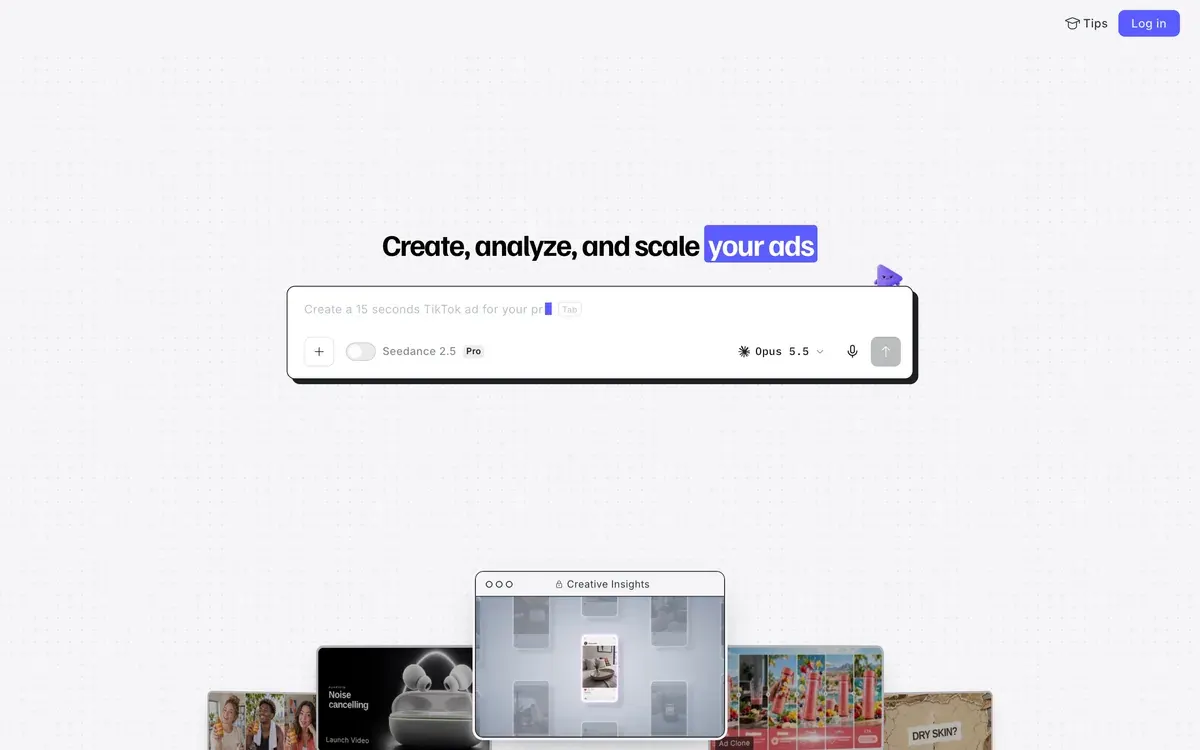
That box is the agent’s way of working: you describe an ad and it makes one. Creatify’s help centre calls Ad Agent “the main way to create ads”.
It is a poor first stop on a small balance. The Creative Agent article, for the tool Ad Agent replaced, says “Each Agent response or generation action has a corresponding credit cost”. Ad Agent’s article says it “usually costs fewer credits” and gives no rate.
The free plan article says 10 credits cannot finish a video with Agent or Ad Flow.
So open URL to Video if you have a product page, or Avatar Video if you have a script. The site menu calls the second one AI Avatar. Creatify’s help articles name few of the app’s buttons and give no menu path, so look for those names in the app.
Step 2: Paste a product link or write a script
URL to Video reads your product page and builds the ad from what it finds there.
URL to video AI tools sets this step beside seven rivals.
Creatify supports “most product links”, naming Amazon, Shopify and App Store links. A site behind a firewall can block it.
If the link fails, upload your assets and type the product details by hand. The FAQ accepts JPG and PNG images and MP4 and MOV videos up to 200 MB. You choose the language on the “Video settings” page.
Avatar Video needs less: pick an avatar and enter a script.
Write to the billing block. Creatify rounds up every 15 seconds, so a 16-second video costs as much as a 30-second one.
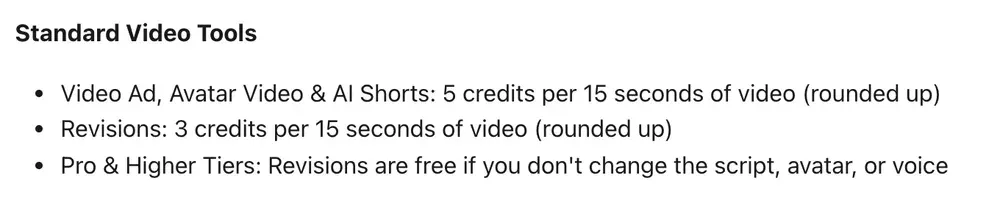
At a speaking pace of 150 words a minute, 30 seconds is about 75 words. Count your words first, because one second over 30 costs half as many credits again: 15 instead of 10.
Step 3: Choose the avatar, voice and format
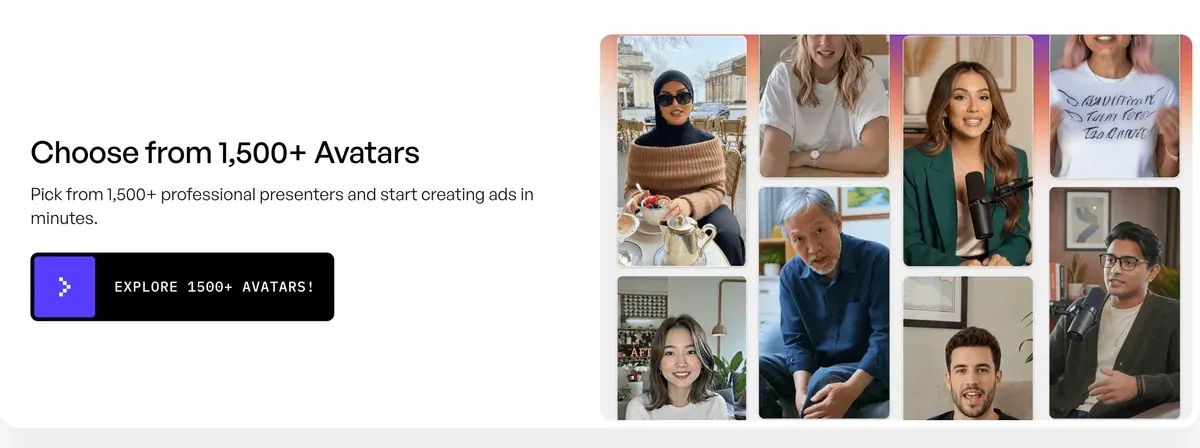
Free and Standard list 300 AI actors, and Pro lists 1,500 plus 3 custom avatars of your own. In Avatar Video you select the presenter before you enter the script.
Creatify Aurora explains the model behind its talking photos.
You can change your mind after generating. Quick edit changes the avatar, voice, music, captions and aspect ratio. Captions are free, while a new avatar or voice re-runs the AI and uses credits. Use 9:16 for Reels and TikTok.
Pick the voice with care. Creatify’s Aurora guide recommends “Voice Model V3” for “the most natural sync”, and says to slow the voice slightly if lip sync feels off.
Avatar Video also lets you choose Aurora, the default, or Boreal. The pricing page’s Standard card counts 110 five-second Boreal videos, where Aurora gets 11 fifteen-second avatar videos. That is about 3 credits for 30 seconds of Boreal, against 10. The credit article gives Avatar Video one rate with no split by model, so read the button.
Your choice of presenter carries a rule too. A stock actor saying “I love this product” is a testimonial from nobody, and the AI UGC legal guide sets out what the US rules say about that.
Step 4: Check the script, then generate
Rendering is what spends the credits, and the credit article says the platform “will display the exact cost before you hit render”.
Run three checks first, all from Creatify’s own help pages:
- After changing the script or voice, click PLAY. Your change applies once the line turns green (voice and script).
- Do not judge lip sync on the preview. “You need to render your video to see the final result” (lip-sync article).
- Use only full stops, commas, exclamation marks and question marks in the script. The same article says a long pause after a full stop goes away if you use a comma.
Then read the cost on screen and click Render.
A creator’s Creatify tutorial for the same link-to-ad route:

Step 5: Change the script or the hook
The hook is the first line, the one that decides whether anyone keeps watching. What a change costs depends on what it touches.
Trims, captions and swapped clips are the free kind. The pricing page FAQ says manual edits to an exported project “are free and unlimited”. Make these first, in Quick edit or the multi-track web editor.
A new script, avatar or voice is the paid kind, and Creatify’s pages disagree on the bill. The credit article charges a revision at 3 credits per 15 seconds, so 6 for a 30-second ad. The pricing FAQ calls anything that re-runs the AI “a new generation”, which would be the full 10.
Pro’s free revisions apply only if the script, avatar and voice stay the same, so a new hook is never free there.
Step 6: Make variants
A hook test needs several versions of the same body, and the cheapest way to make them in Creatify is to keep each one short.
Four hooks on one 15-second body use 14 credits if a changed script bills as a revision. They use 20 if it bills as a new video. Four 30-second versions use 28 or 40. Standard’s 55 credits cover two or three rounds at 15 seconds.
Standard renders one video at a time, so four hooks queue one after another. Pro runs up to 5 at once.
Three other routes make versions too:
- Ad Flow builds a pipeline of connected steps on a canvas. Its article says the cost “can only be determined once the generation is complete”, and “There is no option to stop a generation once it has started”.
- Ad Clone rebuilds another ad’s structure for your product, through Ad Flow. The plan table ticks it from Pro. The FAQ says 1 credit a second, and the credit article says variable.
- Batch Mode has left the dashboard and opens from a link in its help article.
Step 7: Export the ad
Go to Projects, click the three dots on your video and choose Download. The other route is the Download button on the video’s own page (download article).
On the free plan the file carries a watermark, and that decides what a free ad is good for. It can show you whether the tool suits your product. It cannot give you a clean test in a live ad account.
The terms say Free users “have limited rights” without listing them, and our commercial use matrix marks free-plan ad use as unclear.
After upgrading, Remove watermark sits under the same three dots. The article does not say whether that spends credits.
Step 8: Launch it
You have two ways to launch: from Creatify, or by uploading the file yourself.
The plan table on the pricing page ticks “Ad Launcher (Meta / TikTok / AppLovin)” from Standard up. The help centre lists no Ad Launcher guide, so the clearest description sits on the Facebook ads page.
With a Meta account connected, the agent “builds the campaign, ad set and ad and shows an approval card”, and “Nothing launches or spends until you approve”. That route needs Standard or above, and it runs through the agent, whose credit use is known only once it finishes.
The manual route is the download from step 7, uploaded to Meta Ads Manager or TikTok Ads Manager. It costs no extra credits.
What 10 free credits and 55 Standard credits buy
Standard at $15 a month works out at $2.73 per video for a 30-second ad if every credit is used, and Pro at $55 a month gives 280 credits (pricing page). Every plan and length: Creatify pricing.
| What you make | Credits each | From 10 free | From 55 on Standard |
|---|---|---|---|
| 15-second ad | 5 | 2 | 11 |
| 30-second ad | 10 | 1 | 5 |
| 30-second ad, reworked once | 16 to 20 | 0 | 2 to 3 |
| 60-second ad | 20 | 0 | 2 |
| Four hooks at 15 seconds | 14 to 20 | 0 | 2 to 3 |
Scroll sideways for all 4 columns
Credits on a monthly plan stay “valid for two months” (FAQ). The pricing FAQ says free credits “cannot be transferred to or used on paid plans”, so spend them before you upgrade. The help-centre FAQ says 5 free credits a month, where the pricing page and the free plan article say 10.
Mistakes public reviews report
We read 61 public sources on Creatify, from August 2025 to September 2026. These are the mistakes they point to, each with what to do instead.
Rendering long. One Reddit user spent a whole month’s 100 credits, on an older Starter plan, on a single 4:59 lip-sync video. That is what 5 credits per 15 seconds predicts. Check the sum before you render anything over a minute.
Retrying blind. Users report credits running out faster than the pricing suggests, through retries, failed renders and agent runs (15 of 61 sources: Trustpilot, Trustpilot). Change the script before you render again. After a failed render, ask support: users report fast answers and sometimes refunded credits or charges (7 of 61 sources: Trustpilot, Trustpilot).

Launching unwatched. The largest complaint is output that misses the brief, with lip sync, faces, voices or product details gone wrong (17 of 61 sources: Trustpilot, Trustpilot). Watch every render through with the sound on, and check the product name and price.
Paying before you need to. The refund policy says “payments are final and non-refundable”, and refused refunds are a repeated report (8 of 61 sources: Trustpilot, Reddit). The FAQ adds that you cannot switch from an annual plan “until you have less than 10 credits left”, so start monthly.
Assuming you have cancelled. Users report charges after leaving (9 of 61 sources: Trustpilot, Trustpilot). The cancellation path starts at Settings, Subscription, and runs nine steps. Keep the final confirmation.
Next: the full method, the buying call and Higgsfield
The full method across tools, from brief to launch: how to make AI UGC ads. Whether Creatify is the right buy at all: the Creatify profile. Cost per ad and launching against a rival: Creatify vs Higgsfield.
Creatify against its nearest avatar rival: Creatify vs Arcads.
Questions about using Creatify
Is Creatify free to use?
Yes, with limits. The free plan gives 10 credits a month and watermarks every export. That covers two videos of up to 15 seconds.
How many credits does a Creatify video use?
5 credits per 15 seconds, rounded up, in Avatar Video. Creatify’s credit article says use on Agent, Ad Flow and Ad Clone “cannot be determined upfront”.
Can I edit a Creatify video after it is made?
Yes. Captions, trims and media swaps are free in Quick edit or the web editor. A new avatar, voice or script re-runs the AI and uses credits.
Does Creatify have a mobile app?
Ad Agent has a native iOS app, where you can chat, attach files and view your ads. The other tools run in the browser.
Every Creatify guide, sorted by the ad you want to make, is in the Creatify hub
Sources
- Creatify: Creatify app, the signed-out home with its prompt box. Checked
- Creatify help centre: Credit usage, billing and validity, 5 credits per 15 seconds, rounded up; 3 credits per 15 seconds for revisions; variable credits for Agent, Ad Flow and Ad Clone. Checked
- Creatify help centre: Free plan, 10 credits a month, a watermark on every video, two videos of up to 15 seconds. Checked
- Creatify help centre: FAQs, file types and sizes, the Video settings page, credits valid for two months, 5 free credits a month. Checked
- Creatify: Creatify pricing, plan cards with clip counts; the Compare Plans table; FAQ on revisions and free credits. Checked
- Creatify help centre: Ad Agent, replaces Creative Agent; product link, script drafts, chat edits, an iPhone app; updated 4 October 2026. Checked
- Creatify help centre: Creative Agent, each response or generation action has a credit cost; updated 4 October 2026. Checked
- Creatify help centre: Ad Flow, a node-based canvas, Copilot, Run All and Render Final Video; no way to stop a run; updated 14 September 2026. Checked
- Creatify help centre: Ads Clone, cloning now runs through Ad Flow; updated 14 September 2026. Checked
- Creatify help centre: URL-to-Video, a product link, or assets uploaded by hand; updated 20 September 2026. Checked
- Creatify help centre: Supported links, Amazon, Shopify and App Store links; firewalls can block the scrape. Checked
- Creatify help centre: Avatar Video, select an avatar and enter a script; updated 18 February 2026. Checked
- Creatify help centre: Aurora model, Aurora is the Avatar Video default; Boreal is the other choice. Checked
- Creatify help centre: Aurora model best practices, use Voice Model V3, keep speech moderate; updated 26 October 2025. Checked
- Creatify help centre: Voice and script, click PLAY to apply changes, then Render; 1,000 characters on the free plan. Checked
- Creatify help centre: Lip-sync issue, the preview does not sync; four punctuation marks accepted. Checked
- Creatify help centre: How to edit the generated video, Quick edit and the multi-track web editor. Checked
- Creatify help centre: Batch Mode, off the dashboard, reachable by link; updated 22 January 2026. Checked
- Creatify help centre: Download completed video, two routes to Download. Checked
- Creatify help centre: How to remove watermark, after an upgrade, from the three dots in Projects. Checked
- Creatify: AI Facebook Ad Creator, the agent builds the campaign, ad set and ad and shows an approval card. Checked
- Creatify help centre: Cancellation, the path from Settings, Subscription; nine steps. Checked
- Creatify help centre: Refund policy, payments final and non-refundable; updated 23 August 2026. Checked
- Creatify: Creatify terms, effective 23 September 2024; section 1 on Free Tier rights. Checked

Alexandre S.
Alexandre S. is a creative ad strategist and copywriter with ten years' experience in digital marketing across multiple channels.
Related pages
-
 Guide AI UGC meaning: what is AI UGC?
AI UGC is ad video made or edited with AI to look like a customer or creator filmed it. Its two meanings, and vendor terms on passing it off as human.
-
 Best list Free AI UGC video generators
Of 10 AI UGC tools, 2 allow commercial use of free output with no free-plan exception in terms or pricing; 4 bar a paid social ad. Checked 24 September 2026.
-
 Alternatives Creatify alternatives
Tools that make URL-to-video and avatar ads like Creatify, compared on cost per video, credit expiry and ad-use terms, checked 24 September 2026.
-
 Calculator AI ad cost calculator
Pick a tool, an ad length and how many takes you keep to see what one usable AI ad costs to make, billing rounding included. Prices checked 24 September 2026.


