Klap podcast clips
Klap podcast clips start from a video episode of up to 3 hours. Klap cuts it into vertical clips with captions and frames each speaker. It does not work on audio-only shows. Klap’s podcast page says so plainly: “We’re not the right fit for audio-only”.
For a weekly 60-minute show, the bill follows the clips Klap makes per episode, and you set that number before each run. Twenty clips from every episode fit Basic, at $29 a month (Klap pricing, read on ).

Does Klap work with audio-only podcasts?
No. Klap needs a video file, and it works best with someone on camera. Its upload docs accept MP4, MOV and WebM video, and its error list refuses a file with “no video track”.
Can I make audiograms from audio-only podcasts?
Not in Klap Klap is built for video podcasts where there’s a camera on the speaker.
Fit We’re not the right fit for audio-only.
A still image saved as a video has a video track, but Klap’s framing follows faces, and a cover image has none. Klap’s homepage describes “intelligent framing and facial recognition”.
Klap’s own page names two routes for audio shows. One is to record video as well, then upload the file or paste the link from Riverside, Zencastr or StreamYard. The other is an audiogram, a waveform over a still headshot, from tools it names such as Podsqueeze or Headliner.
How Klap frames two hosts or a remote guest
Klap’s reframing turns a wide shot vertical while keeping whoever speaks in frame. For podcasts, the podcast page says its speaker tracking picks a layout by itself:
- split screen for two people in an interview
- three or four screens for a panel
- picture-in-picture for a remote guest
Captions carry speaker labels, so each line on screen names who said it.
How does Klap handle multi-host podcasts?
Speaker tracking Klap’s speaker tracking detects every speaker in your podcast automatically and applies the right multi-host layout.
Length Process full-length video podcast episodes in one upload, no splitting into chunks. The clip maker handles episodes up to 3 hours long.
Those layouts lean on faces being visible. A wide two-shot where both hosts face the camera gives the tracker most to work with. A host who turns away, or a guest shown only as a name card, is the case to check first on the free video.
Names are where captions go wrong. In the app, fix guest and sponsor names in the caption editor before you post. API users can pass them up front in a transcription_context field (Klap API for clipping).
How long can a podcast episode be?
Klap takes episodes of up to 3 hours on paid plans, and at least 10 seconds (API docs). The pricing FAQ gives the same 3-hour limit.
A longer recording needs splitting first, or another tool. Vizard Creator, at $29 a month, takes uploads of up to 10 hours (Vizard pricing). Vizard bills one credit per minute of video, so a 4-hour episode uses 240 of the plan’s 600 credits.
What a weekly 60-minute show costs on Klap
Klap counts clips, so once you set the count, an episode’s length changes nothing on the bill. Its podcast page says a 90-minute episode typically gives “10-20+” clips. Most months hold four episodes and some hold five, and the five-episode month decides the plan.
| Clips per episode | Clips in a five-episode month | Plan, billed monthly | Per episode, monthly | A year of episodes on yearly billing |
|---|---|---|---|---|
| 10 | 50 | Basic, 100 clips | $6.69 | 520 clips: Basic yearly, 1,200 clips |
| 20 | 100 | Basic, 100 clips | $6.69 | 1,040 clips: Basic yearly, 1,200 clips |
| 30 | 150 | Pro, 300 clips | $18.23 | 1,560 clips: Pro yearly, 3,600 clips |
Scroll sideways for all 5 columns
Method: the plan price over 52 episodes a year. Basic billed yearly is $14.50 a month billed yearly, which comes to $3.35 an episode.
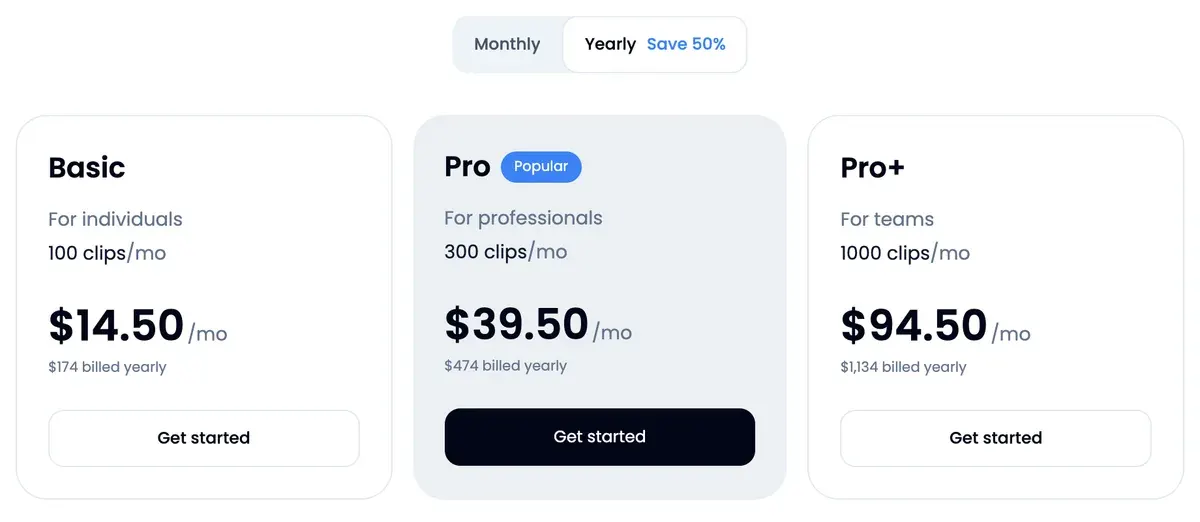
The 20-clip row is the tight one. A five-episode month uses all 100 Basic clips, so a re-run of any episode that month fails. Klap’s docs refuse a video when its clips “exceed the user’s remaining clip allowance”.
Yearly billing removes that monthly ceiling, since the year’s 1,200 Basic clips arrive at once, in exchange for paying for twelve months up front. At 30 clips an episode, though, Basic yearly runs dry after 40 episodes.
That reader code takes 30 per cent off the first payment on a monthly plan. Klap promo code works out when it beats yearly billing.
From one episode to a week of clips
A week of daily posts takes seven clips. One upload gets there in six steps:
- Publish the full episode on YouTube, then paste its link into Klap. A file from Riverside, StreamYard or Zencastr uploads directly too.
- Tell Klap what to look for. The podcast page offers prompts such as “Find every guest answer about funding” and “Find the part where they disagree”.
- Set the clip count before you generate, at 10 or 20: the podcast page says you can adjust “the target clip length and count”. Every clip Klap makes uses your allowance, the ones you skip included.
- Read the batch top down by Virality Score, Klap’s 0 to 100 guess at reach, and keep the best seven.
- Fix names in the captions and check each clip opens on a full sentence.
- Connect TikTok, Instagram or YouTube and schedule one clip a day from Klap’s calendar.
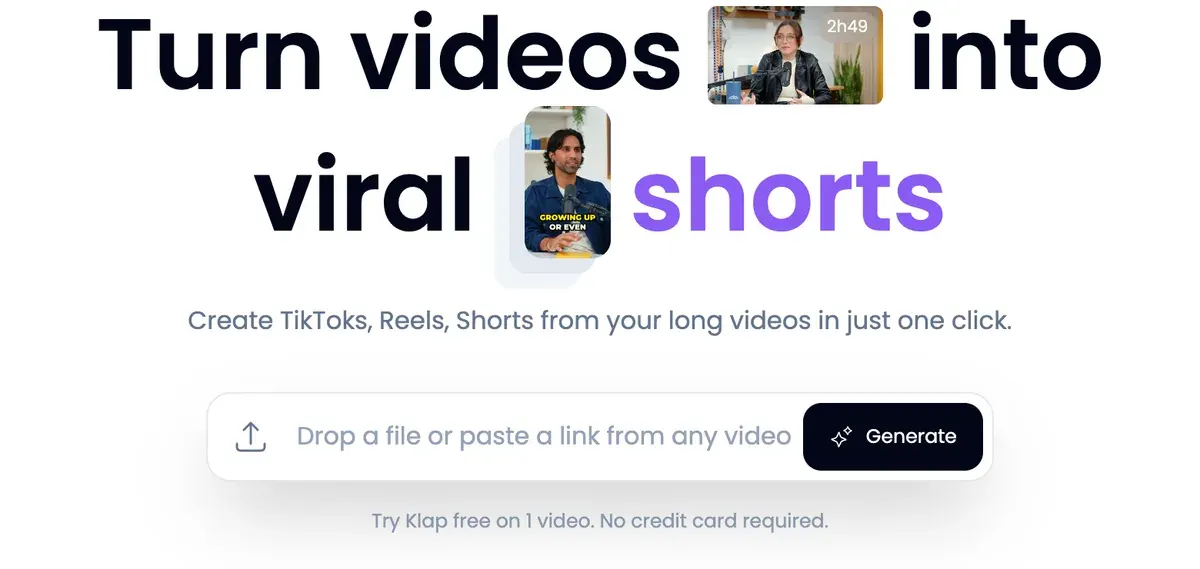
One creator’s run on a 45-minute video shows what a single long recording returns as clips and captions.

Clipping “takes several minutes”, in the docs’ words. Two of 28 public reviews say Klap picks good moments and ranks them (Trustpilot, Trustpilot). Six of 28 say support answers fast and fixes problems (Trustpilot, Trustpilot).
The catch sits in billing. Five of 28 reviews report trouble cancelling or a charge after asking to cancel (Trustpilot, Trustpilot). The pricing FAQ puts the cancel button on your billing page.
When a podcast needs another tool
Klap is the wrong pick in three cases, each set by its own documents:
- The show is audio-only. Klap sends you to audiogram tools or to recording video.
- Episodes run past 3 hours. Vizard takes 10.
- Your team needs a login for each editor. Klap’s Pro+ card says “For teams” and states no seat count.
Klap alternatives sets OpusClip, Vizard and five other clippers beside it, with the cost of clipping an hour on each. For Shorts cut from any long YouTube video, YouTube video to Shorts with Klap has the settings and YouTube’s rules.
Sources
- Klap: Podcast clip maker, video podcasts only; split-screen, three or four-screen and picture-in-picture layouts; speaker labels; custom prompts; 10 to 20 or more clips from 90 minutes, 26 to 30 from 2 hours or more. Checked
- Klap API docs: Uploads, uploads accept MP4, MOV and WebM video files. Checked
- Klap API docs: Errors, no_video_stream and no_audio_stream refusals; no_speech_detected; clip_limit_reached; YouTube daily posting capacity. Checked
- Klap API docs: Projects and clips endpoints, videos of 10 seconds to 3 hours on paid plans; curation_prompt up to 1,000 characters; clipping takes several minutes. Checked
- Klap API docs: Tasks endpoints, transcription_context for speaker names, brand names and jargon, up to 1,000 characters; remove_silences option. Checked
- Klap: Klap pricing, plans counted in clips; source length does not use the plan; yearly plans deliver the year’s clips at once. Checked
- Klap: Klap homepage, framing and facial recognition; podcasts listed among supported speech content. Checked
- Vizard: Vizard pricing, Creator plan uploads up to 10 hours; 600 credits, one per minute of video. Checked

Alexandre S.
Alexandre S. is a creative ad strategist and copywriter with ten years' experience in digital marketing across multiple channels.
Related pages
-
 Profile Klap AI video clipping
Klap AI cuts long videos into captioned vertical shorts and bills per clip: $29 a month buys 100 on Basic. Plans, API and user reports, checked 16 Nov 2026.
-
 Pricing Klap pricing
Klap costs $29, $79 or $189 a month for 100, 300 or 1,000 clips, half that billed yearly. Price per clip, free try limits and API rates, checked 16 Nov 2026.
-
 Best list AI clipping tools
Eight AI clipping tools for podcasts and streams, compared on cost per minute or per clip, free plans, longest video and ad rights, read 16 November 2026.
-
 Compare Klap vs Opus Clip
Klap bills each clip it makes, OpusClip each source minute: 20 clips an hour is the entry-plan break-even. Free use and ad terms, read 16 November 2026.


