Klap vs Opus Clip
Verdict: Klap or OpusClip
Klap if it makes under 20 clips per hour of video; OpusClip for more, team seats or a written ad licence (read on ).
Klap Basic and OpusClip Pro both list $29 a month, but Klap counts every clip it makes and OpusClip counts minutes of source video.
Klap’s terms never say who owns a clip or whether it can run as an ad, and Klap has no free plan.
Klap
- Best for
- Creators and agencies cutting many shorts from long videos (up to 3 hours each) who want a fixed clip count whatever the source length.
- Not for
- Anyone who needs to download a clip before paying: the free try covers 1 video for preview and editing only. Teams needing a stated seat count, since no plan card gives one.
OpusClip
- Best for
- Creators and small teams clipping long videos who want AI b-roll, Premiere or DaVinci export, a multi-network scheduler and up to 4 seats on Pro.
- Not for
- Anyone clipping hours of footage on a small budget: credits are spent per minute of source video, whatever the clip count. Free users needing commercial use, which the terms reserve for paid plans.
| Klap | OpusClip | |
|---|---|---|
| Where they differ | ||
| Monthly from (USD) | $29 | $15 |
| Free plan | No | Yes |
| What a plan counts | Each clip it generates, kept or not, whatever the source length | Each minute of source video, whatever the clip count |
| Longest source | 3 hours | No hour limit stated; 30 GB upload on Pro; 10 hours through the API |
| Caption languages | 99+ | 20+ on the pricing page, 25 in the help centre |
| Caption styles | Animated captions; fonts, colours, logo and framing presets in the editor | Animated captions with emoji and keyword highlights; 1 brand template on Starter, 2 on Pro |
| Reframing | Active speaker; split screen, screencast and gaming layouts | Speaker and object tracking; 1:1 and 16:9 too on Pro |
| B-roll | Added in the editor | AI b-roll on Pro |
| Scheduling | 5 networks, every plan | 9 networks, from Pro |
| Team seats | No plan card states a count | 2 per Pro pack, up to 4 |
| Ad use in the terms | Not addressed (25 July 2024) | Licensed on paid plans; Free is non-commercial |
| The same on both | ||
| API | Both: Yes | |

Which costs less: Klap per clip or OpusClip per minute?
Clipping, cutting a long video into shorts, costs less on Klap Basic than OpusClip Pro below 20 clips per hour. Above 20, OpusClip Pro does, if every credit is used; at exactly 20 they cost the same.
In Klap vs Opus Clip, the billing unit decides it. Klap Basic lists $29 a month for 100 clips (pricing). Klap counts every short it generates, whether you keep it or not, and source length does not count, up to 3 hours.
Klap states no average number of shorts for an hour of video. Its home page gives a rule of thumb of about 5 clips from a one-minute video, and its API allows up to 100 shorts a video, so the count it makes is the count you pay for.
OpusClip Pro lists $29 a month for 300 credits, and one credit is one minute of source video (pricing, credits article). An hour costs 60 credits whether OpusClip returns 5 clips or 30.
OpusClip’s own pricing page says an hour-long video gives 15 clips on average. If Klap makes the same 15, Klap is cheaper.
| Clips Klap makes from the hour | Klap Basic (USD) | OpusClip Pro (USD) |
|---|---|---|
| 5 | $1.45 | $5.80 |
| 10 | $2.90 | $5.80 |
| 15 | $4.35 | $5.80 |
| 20 | $5.80 | $5.80 |
| 30 | $8.70 | $5.80 |
Scroll sideways for all 3 columns
Bigger Klap plans cost less a clip, so the line moves. Against OpusClip Pro’s hour, Klap Pro breaks even at 22 clips and Pro+ at about 31, on monthly list prices.
| Plan | A month (USD) | Allowance | Per clip or source minute (USD) |
|---|---|---|---|
| Klap Basic | $29 | 100 clips | $0.29 a clip |
| Klap Pro | $79 | 300 clips | $0.263 a clip |
| Klap Pro+ | $189 | 1,000 clips | $0.189 a clip |
| OpusClip Starter | $15 | 150 minutes | $0.10 a minute |
| OpusClip Pro | $29 | 300 minutes | $0.097 a minute |
| OpusClip Max | $129 | 1,500 minutes | $0.086 a minute |
Scroll sideways for all 4 columns
Yearly billing halves both entry plans to the same price, $14.50 a month billed yearly, so the break-even stays at 20 (Klap pricing, OpusClip pricing).
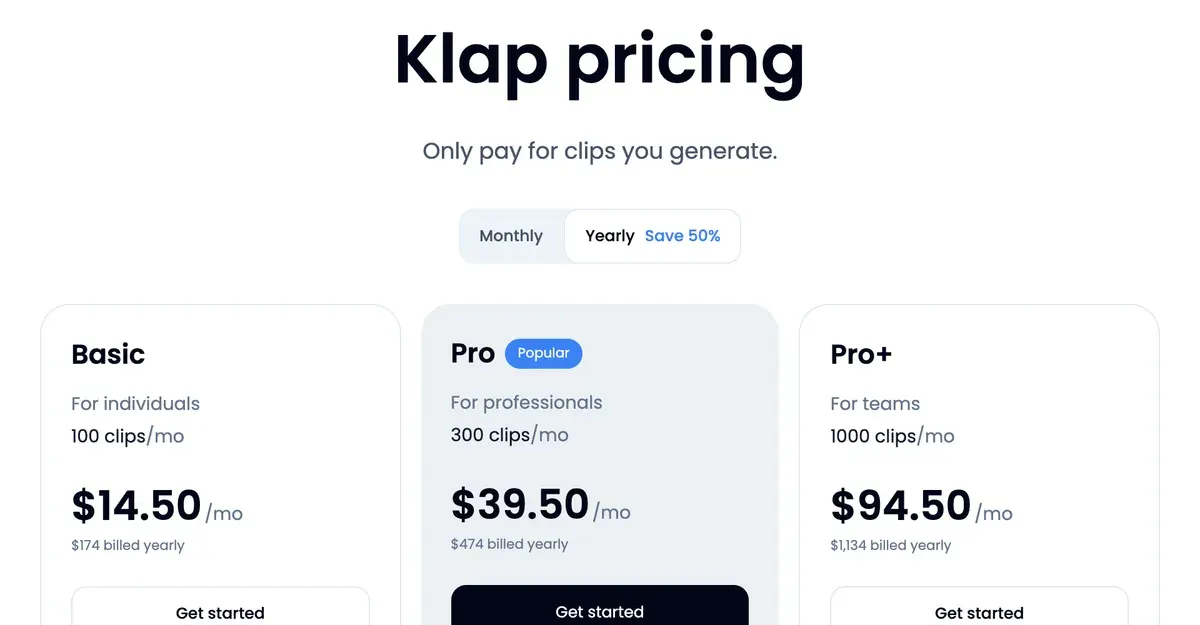
Both hand over a year’s allowance at once on yearly billing: 1,200 clips on Klap, 3,600 credits on OpusClip, says its help centre. Unused OpusClip Pro credits roll over for 2 months, says its pricing card.
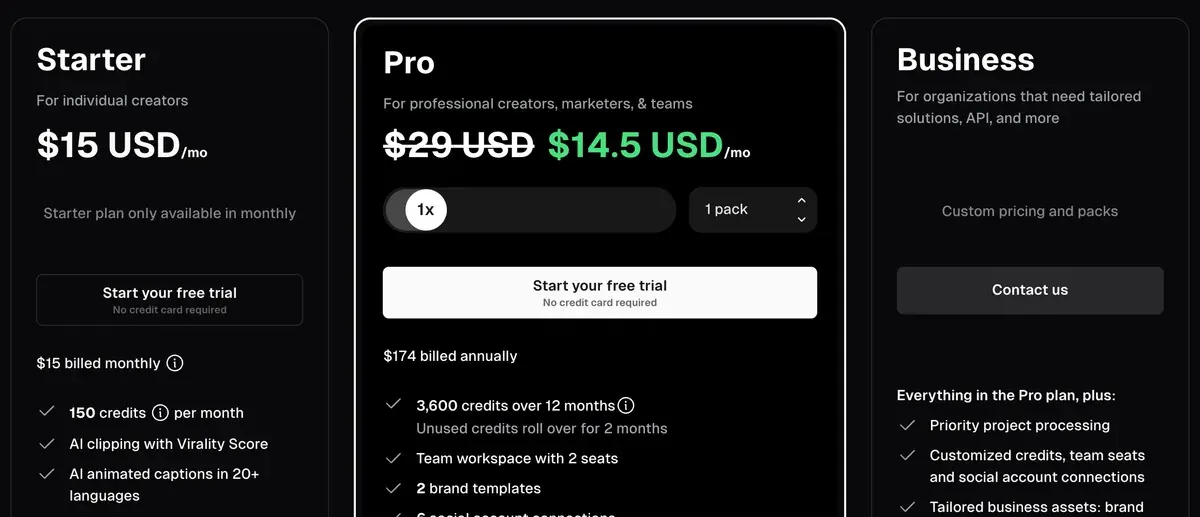
Every plan in detail: Klap pricing and OpusClip pricing.
What can you do free on each?
OpusClip has a free plan; Klap has a free try on one video. Neither gives you a free clip you can run as an ad.
OpusClip Free gives 60 credits a month, so 60 minutes of source video (pricing). Its clips carry a watermark and stop exporting after 3 days. Its terms limit non-paying users to “your own internal, personal, non-commercial use”.
Klap’s free try turns 1 video into clips you can preview and edit. Downloading or posting them needs a paid plan, says its pricing FAQ. Klap users confirm it (2 of 28 sources: Trustpilot, Trustpilot).
Which one can you use for ads?
OpusClip says it in writing; Klap says nothing. Neither connects to an ad account: both post organic clips only.
OpusClip’s terms (17 November 2025) say users of Paid Services “are licensed to use the Services for commercial uses and otherwise to the fullest extent possible under applicable law”. Your uploads stay yours: “your ownership in User Submissions is not affected.”
Klap’s terms (25 July 2024) hold no clause on who owns a clip and no grant or limit on commercial use. Section 3 makes you “solely responsible” for what you create, and section 4 for holding rights in what you upload. Klap’s pricing FAQ says paid exports “carry no Klap branding”.
That matters when a client or legal team asks for the licence behind an ad. With OpusClip you can point to a clause; Klap’s terms are silent on clip ownership and ad use. The clauses, quoted: the Klap profile and the OpusClip profile.
Which has more editing and posting tools?
OpusClip has more tools on Pro; Klap puts its whole feature list on every plan.
Both reframe to 9:16, the vertical shape of TikTok and Reels, keeping the speaker in frame. Both add animated captions and give each clip a virality score, a guess at how well it could perform.
OpusClip Pro adds AI b-roll, extra footage the app lays over your speaker, plus dubbing and export to Premiere Pro or DaVinci Resolve (pricing). It schedules to 9 networks, X, Pinterest, Threads and Bluesky among them. Starter clips in 9:16 only, with no scheduler.
Klap lists the same features on Basic, Pro and Pro+. They include the editor with b-roll and hook titles, and auto-post, where the app publishes for you at set times. It posts to TikTok, YouTube, Instagram, LinkedIn and Facebook, with unlimited social accounts (pricing).

Languages split the other way. Klap captions in 99+ languages. OpusClip’s help centre lists 25, with 20 still in beta.
Which suits teams and automation?
OpusClip, for seats; Klap, for an API with no plan attached.
OpusClip Pro adds 2 team seats per pack, up to 4 a workspace; more needs Business at a custom price (pricing). Klap’s Pro+ card says “For teams” and states no seat count.
Klap’s API is self-serve and priced per job: $0.44 per input video, $0.32 per short and $0.48 per export. Klap’s example of 1 video, 10 shorts and 10 exports costs $8.44 (API page).
OpusClip’s API runs on plan credits, on Pro (in beta) and on Max, a plan at $129 a month sold through Agent Opus. It is capped at 15 hours a month, with a 10-credit minimum per project (API limits).
For no-code automation, OpusClip’s Zapier app works on Pro, up to 300 credits a month (help centre). Klap’s integrations page lists a Zapier app in public beta and an n8n community node. Step by step: AI video clipping APIs.
What do Trustpilot and Reddit reviews say about each?
Users of both praise speed and complain about cancelling. OpusClip’s complaints add slow support and credit costs on long videos.
On Klap, 28 public sources:
- Saves editing time and is easy to use (7 of 28 sources: Trustpilot, Trustpilot)
- Support answers fast and fixes problems (6 of 28 sources: Trustpilot, Trustpilot)
- Hard to cancel, or charged after asking to cancel (5 of 28 sources: Trustpilot, Trustpilot)
On OpusClip, 54 public sources:
- Support that is slow, answers with bots or stays silent for days (10 of 54 sources: Trustpilot, Trustpilot)
- Support resolves problems and refunds mistaken charges (9 of 54 sources: Trustpilot, Trustpilot)
- Easy and fast to go from a long video to clips (8 of 54 sources: Trustpilot, Trustpilot)
- Charged after cancelling, or billing errors left unfixed (7 of 54 sources: Trustpilot, Trustpilot)
- Costly for long videos, with frequent prompts to buy credits (5 of 54 sources: Trustpilot, Trustpilot)

Refund terms differ too. Klap’s terms refund any time in the first month, or up to the last 3 fully unused months (section 10). OpusClip’s do not refund or prorate fees already paid.
More on each: the Klap profile and the OpusClip profile.
Who should pick which?
Pick by how you clip and who signs off on the ads.
A podcaster who has Klap make 5 or 6 clips from each weekly hour pays less on Klap, and gets 99+ caption languages. A marketer cutting webinars for paid social picks OpusClip Pro for the commercial licence a legal team can read.
An agency with up to 4 editors fits OpusClip Pro packs; past that, OpusClip routes you to Business at a custom price. Klap states no seat count on any plan. A developer who wants clips per job without a subscription fits Klap’s API.
A clipper paid per view, who wants more than 20 clips from every stream, pays less per clip on OpusClip Pro than on Klap Basic. On Klap Pro+ the line moves to about 31. How that work pays: clipping for money.
If neither fits
For many hours a month at the lowest cost per minute, WayinVideo Starter clips a 60-minute video for $1.92 if every credit is used (pricing). For recordings up to 10 hours, Vizard Creator takes them for $29 a month (pricing).
Every replacement by job: Klap alternatives and OpusClip alternatives. The whole field, ranked by reader job: AI clipping tools.
Questions buyers ask about Klap and OpusClip
Is Klap better than OpusClip?
When Klap makes fewer than 20 clips from each hour of video, Klap Basic costs less at the same plan price. For more clips, team seats or a commercial licence in the terms, OpusClip.
Is Klap free like OpusClip?
No. Klap’s free try covers 1 video and blocks downloads until you pay. OpusClip Free gives 60 minutes a month with a watermark, for non-commercial use.
Can I use OpusClip or Klap clips in ads?
On OpusClip, yes, on a paid plan: its terms license Paid Services users for commercial use. Klap’s terms say nothing either way; section 4 makes you responsible for the rights in what you upload.
Sources
- Klap: Klap pricing, Basic, Pro and Pro+ cards; the pricing FAQ on the free try, yearly clips delivered at once and exports with no Klap branding. Checked
- Klap: Klap home page, the rule of thumb of about 5 clips from a one-minute video. Checked
- Klap: Klap API, per-use prices and the worked example of 1 video, 10 shorts and 10 exports. Checked
- Klap: Klap integrations (updated 4 November 2026), Zapier app in public beta, n8n community node, Make app in review. Checked
- ZIGG SAS: Klap Terms of Service (last updated 25 July 2024), sections 3, 4, 10 and 11. Checked
- OpusClip: OpusClip pricing, Free, Starter, Pro and Business cards; seats per pack; the average of 15 clips for an hour-long video. Checked
- OpusClip: Agent Opus pricing, the Max plan, sold through Agent Opus. Checked
- OpusClip help centre: OpusClip plans and credits, credit rollover and yearly credits. Checked
- OpusClip help centre: How are credits consumed?, 1 credit for each minute of source video; clips under a minute round up. Checked
- OpusClip help centre: OpusClip API limitations, 15 hours a month on Pro and Max; a 10-credit minimum per project. Checked
- OpusClip help centre: OpusClip Zapier integration, Pro and Enterprise; up to 300 credits a month on Pro. Checked
- Opusclip Inc.: OpusClip Terms of Service (effective 17 November 2025), OpusClip Account; Auto-Renewal for Paid Services. Checked
- OpusClip help centre: OpusClip video languages supported, 25 languages, 5 out of beta. Checked
- Trustpilot and Reddit: Klap user reviews, 28 public sources from September 2023 to 10 November 2026, synthesised on 16 November 2026. Checked
- Trustpilot, Product Hunt and Reddit: OpusClip user reviews, 54 public sources, synthesised on 16 November 2026. Checked
- WayinVideo: WayinVideo pricing. Checked
- Vizard: Vizard pricing. Checked

Alexandre S.
Alexandre S. is a creative ad strategist and copywriter with ten years' experience in digital marketing across multiple channels.
Related pages
-
 Category Best AI video generators for ads
23 AI video generators and model shops compared on cost per clip and ad-use terms, checked 25 September 2026.
-
 Profile Klap AI video clipping
Klap AI cuts long videos into captioned vertical shorts and bills per clip: $29 a month buys 100 on Basic. Plans, API and user reports, checked 16 Nov 2026.
-
 Pricing Klap pricing
Klap costs $29, $79 or $189 a month for 100, 300 or 1,000 clips, half that billed yearly. Price per clip, free try limits and API rates, checked 16 Nov 2026.
-
 Alternatives Klap alternatives
Seven tools that could replace Klap, compared on what clipping an hour of video costs, free plans and ad rights, read 16 November 2026.
-
 Profile OpusClip for marketing clips
OpusClip bills 1 credit per source minute: Pro is $29 a month for 300. Free bars commercial use; 10 of 54 reviews flag support. Read 16 Nov 2026.
-
 Pricing OpusClip pricing
OpusClip Pro costs $29 a month, or $14.50 a month billed yearly ($174), for 300 credits, 1 per source minute. Every plan and the trial, checked 16 Nov 2026.


