AI clipping tools
Verdict on AI clipping tools
For podcasts, Klap bills a fixed price per clip; for marketing teams, OpusClip puts commercial use in writing (read on ).
Klap Basic charges $0.29 a clip whatever the source length, while OpusClip Pro licenses paying users for commercial use.
But Klap’s terms say nothing on who owns a clip, and 5 of its 28 user reviews report trouble cancelling.
For podcasts, with a price per clip known before you start: Klap
Basic bills each clip from sources up to 3 hours, and the length of the episode uses none of the allowance.
For webinars and brand clips meant to run as ads: OpusClip
Paid plans carry a written commercial licence; Pro adds up to 4 seats and Premiere Pro export.
For streams and other long hours on a small budget: WayinVideo
Pro bills 1,000 input minutes a month and imports Twitch and Kick; WayinVideo’s plans have the lowest per-minute rates on this list.
For captions only, on videos already cut: Submagic
Animated captions in 118 languages with zooms and silence removal; Magic Clips takes uploads up to 30 minutes on Business + API.
For clipping on a free plan, with your own footage cleared for ads: CapCut
A free AI long video to shorts tool; own footage exports with no watermark. CapCut assets in an ad clip must be marked for commercial use.
| Tool | Monthly from (USD) | Cost per output at list price if every credit is used | Free plan | What it does | Official site |
|---|---|---|---|---|---|
| CapCut | $9.99 | $0.033 to $0.083per second of Seedance 2.0 Mini | Yes | Free timeline video editor with templates, auto captions and credit-based AI video from Seedance models. | Visit CapCut |
| Klap | $29 | $0.29per clip (short), length set per job | No | AI clipper that turns long videos into captioned 9:16 shorts, billed per clip, with scheduling and a per-use API. | Visit Klap |
| Munch Studio (formerly Munch) | $68 | Not computed | No | AI social media manager that writes posts, cuts long videos into captioned clips and schedules them to five networks. | Visit Munch Studio |
| OpusClip | $15 | $0.0967per minute of source video | Yes | AI clipper billed per source minute: long video to captioned shorts with reframing, AI b-roll, scheduler and an API. | Visit OpusClip |
| Spikes Studio | $32.99 | Not computed | Yes | AI clipper for streams, podcasts and long videos: finds moments, reframes to vertical, captions and schedules. | Visit Spikes Studio |
| Submagic | $19 | $1.27 to $3.38per captioned video, up to 2 minutes | Yes | AI short-video editor: animated captions in 118 languages, b-roll, zooms, silence cuts and Magic Clips from long videos. | Visit Submagic |
| Vizard | $29 | $2.90per 60-minute source video clipped | Yes | AI clipping tool: long videos to captioned 9:16 clips, plus an editing agent, scheduling and a clipping API. | Visit Vizard |
| WayinVideo | $15.99 | $1.92per 60-minute source video clipped | Yes | AI clipping and video understanding: long videos to captioned clips, montages, summaries and scheduled posts. | Visit WayinVideo |
Scroll sideways for all 6 columns
Prices checked between 15 Nov 2026 and 16 Nov 2026.

How AI clipping works, in four steps
Clipping means cutting a long video into short clips for TikTok, Reels and YouTube Shorts. An AI clipper does the cutting for you in four steps:
- You give it the long video: paste a YouTube or Twitch link, or upload the file.
- It reads the transcript and picks moments. OpusClip and Klap give each clip a virality score, the tool’s own guess at how well it could perform.
- It reframes and captions. 9:16 reframing crops a wide 16:9 shot to an upright phone frame and follows whoever is speaking. Animated captions go on top.
- You edit and export. Where the tool offers them, add b-roll (extra footage laid over the speaker) or auto-post (the app publishes to your accounts at set times).
The billing differs more than the steps. Most tools charge per minute of source video; Klap charges per clip it makes; Submagic charges per run.

What each clipper costs per source minute
Per-minute billing favours many clips from short sources; per-clip billing favours few clips from long ones. On per-minute plans, WayinVideo’s are the cheapest rates here and Munch Studio’s the dearest.
| Tool and plan | A month (USD) | Per source minute (USD) | Free plan | Longest source |
|---|---|---|---|---|
| Klap Basic | $29 | Per clip: $0.29 | No: 1 video to preview | 3 hours |
| OpusClip Starter | $15 | $0.100 | 60 minutes a month, watermark | 10 GB file; 30 GB on Pro |
| WayinVideo Starter | $15.99 | $0.032 | 100 one-time minutes | 10 GB upload |
| Submagic Starter | $19 | Per run: $3.80 | Yes, watermark | 2 minutes; 30 on Business + API |
| CapCut Free | Free | No minute allowance | Yes, no watermark on own footage | Not stated |
| Vizard Creator | $29 | $0.048 | 60 minutes a month, watermark | 10 hours; 60 minutes on Free |
| Spikes Studio PRO+ | $32.99 | $0.110 | Demo clips, watermark | Not published |
| Munch Studio Essential | $68 | $0.136 | No: 7-day trial with a card | Not published |
Scroll sideways for all 5 columns
Each per-minute figure is the monthly price divided by the plan’s minutes, if every minute is used. Billed yearly, Klap Basic and Vizard Creator each drop to $14.50 a month billed yearly, and Submagic Starter to $12 a month billed yearly; OpusClip Starter is sold monthly only.
Klap Basic and OpusClip Pro cost the same at 20 clips an hour of source: Klap charges $0.29 a clip, OpusClip Pro about $5.80 an hour. OpusClip says an hour-long video gives 15 clips on average (pricing); Klap says 1 to 2 hours typically give 26 (Klap for clippers). Below 20 clips an hour, Klap costs less than OpusClip Pro.
WayinVideo Pro clips an hour for about $1.62, less than Klap from 6 clips an hour.
Klap: podcasts with a known price per clip
Klap counts every short it makes as one clip, and source length uses none of the allowance (pricing). Basic lists $29 a month for 100 clips, from sources up to 3 hours.
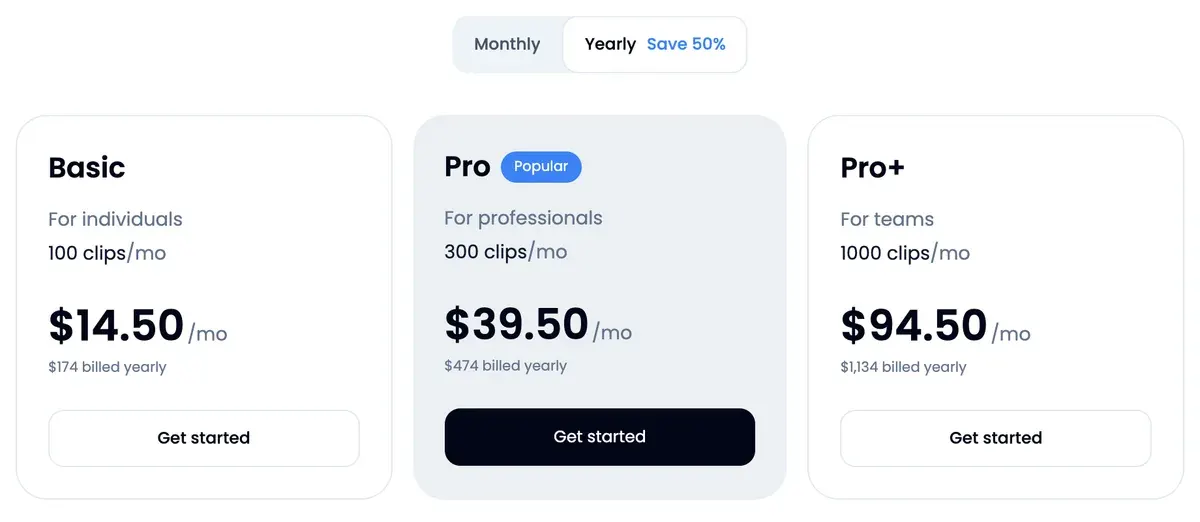
That suits a weekly podcast: you know the bill before uploading a 2-hour episode. Every plan schedules posts to TikTok, YouTube, Instagram, LinkedIn and Facebook, and paid exports carry no Klap branding. Developers get a pay-per-use API (AI video clipping APIs).
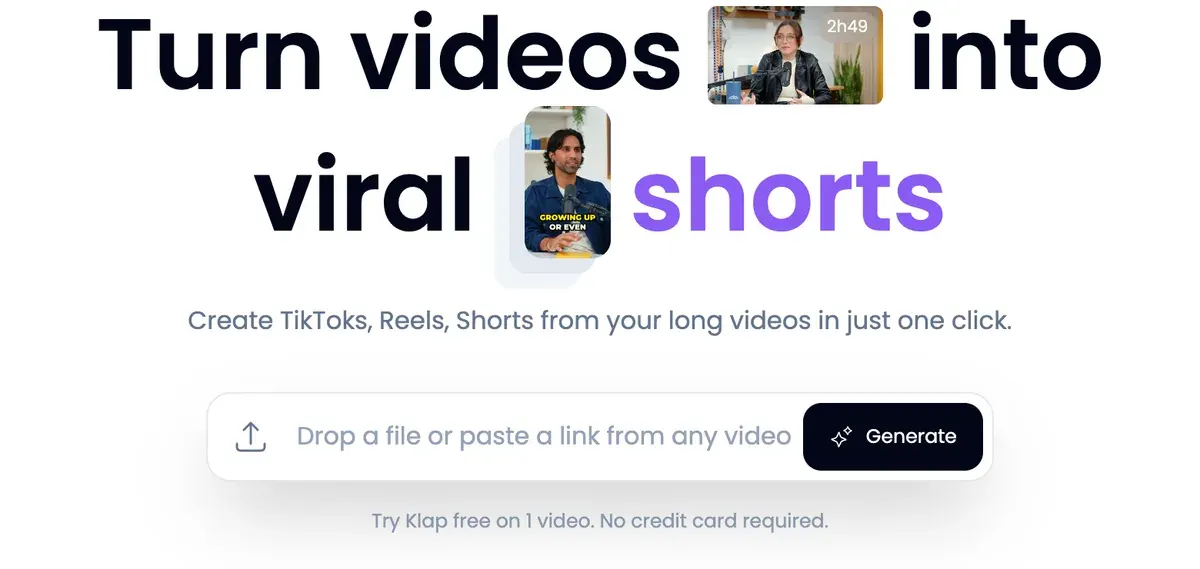
For ad work, Klap’s terms (25 July 2024) neither grant nor limit commercial use. Section 4 puts the rights in what you upload on you. There is no free plan: the free try lets you preview and edit 1 video, with no download.
Reviewers say it saves editing time (7 of 28 sources: Trustpilot, Trustpilot). Cancelling draws the complaints (5 of 28 sources: Trustpilot, Trustpilot). More: the Klap profile and Klap pricing.
- Best for
- Creators and agencies cutting many shorts from long videos (up to 3 hours each) who want a fixed clip count whatever the source length.
- Not for
- Anyone who needs to download a clip before paying: the free try covers 1 video for preview and editing only. Teams needing a stated seat count, since no plan card gives one.
OpusClip: webinars and brand clips for ads
OpusClip writes ad use into its terms, as WayinVideo does. Users of Paid Services “are licensed to use the Services for commercial uses” (terms). Free users are held to “non-commercial use”.
It bills 1 credit per source minute (help centre). Pro lists $29 a month for 300 credits, with 2 seats per pack, up to 4. It adds AI b-roll and export to Premiere Pro or DaVinci Resolve (pricing). That fits a marketing team turning a monthly webinar into ad cuts.
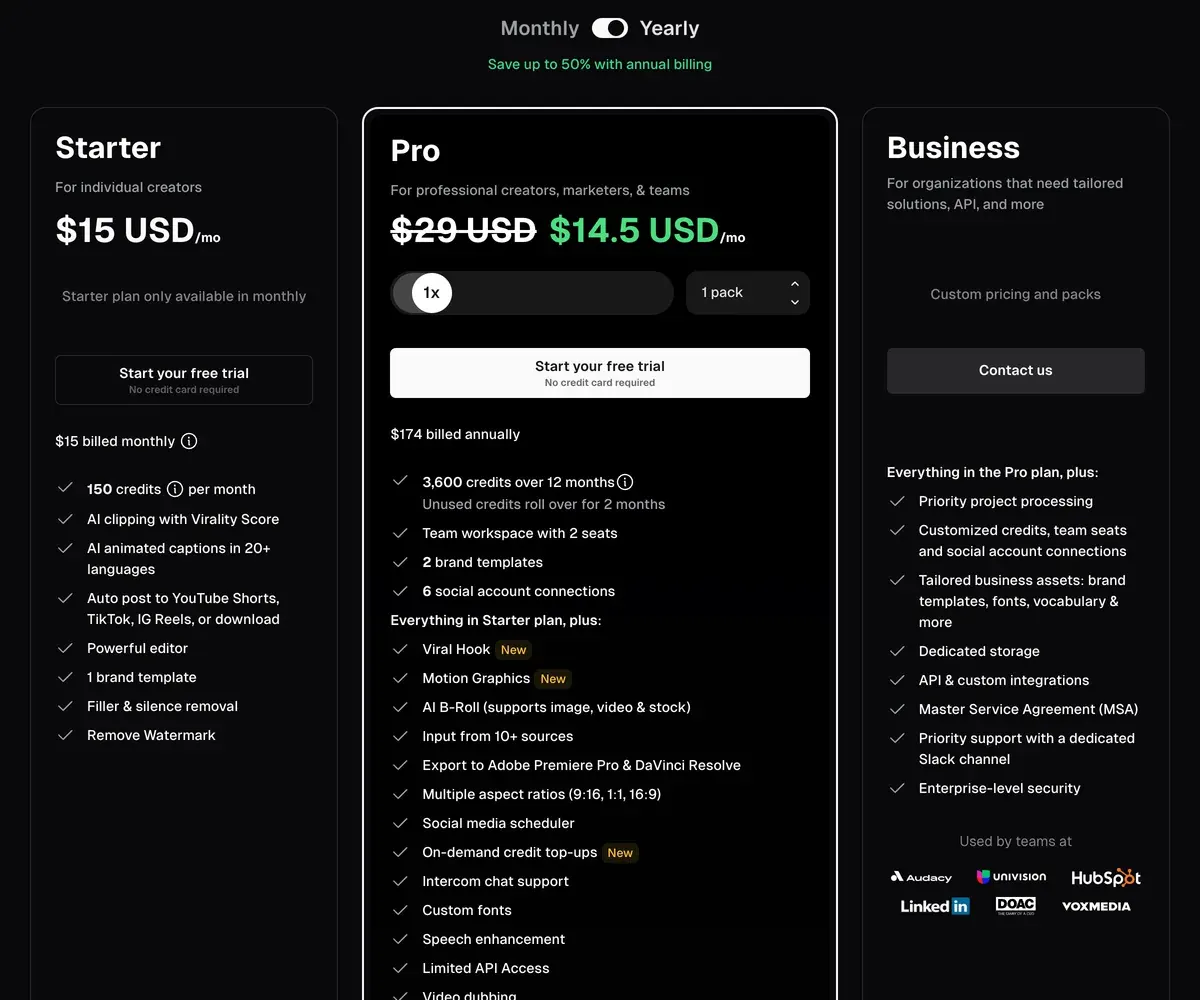
Long recordings get costly on it. Users report frequent prompts to buy credits (5 of 54 sources: Trustpilot, Trustpilot), while 8 of 54 call it fast and easy (Trustpilot, Trustpilot). More: the OpusClip profile, OpusClip pricing and Klap vs OpusClip.
- Best for
- Creators and small teams clipping long videos who want AI b-roll, Premiere or DaVinci export, a multi-network scheduler and up to 4 seats on Pro.
- Not for
- Anyone clipping hours of footage on a small budget: credits are spent per minute of source video, whatever the clip count. Free users needing commercial use, which the terms reserve for paid plans.
WayinVideo: streams and long hours on a small budget
WayinVideo bills 1 credit per input minute (help centre) at the lowest rates here. Pro lists $26.99 a month for 1,000 minutes, about 16 hours of streams a month (pricing).
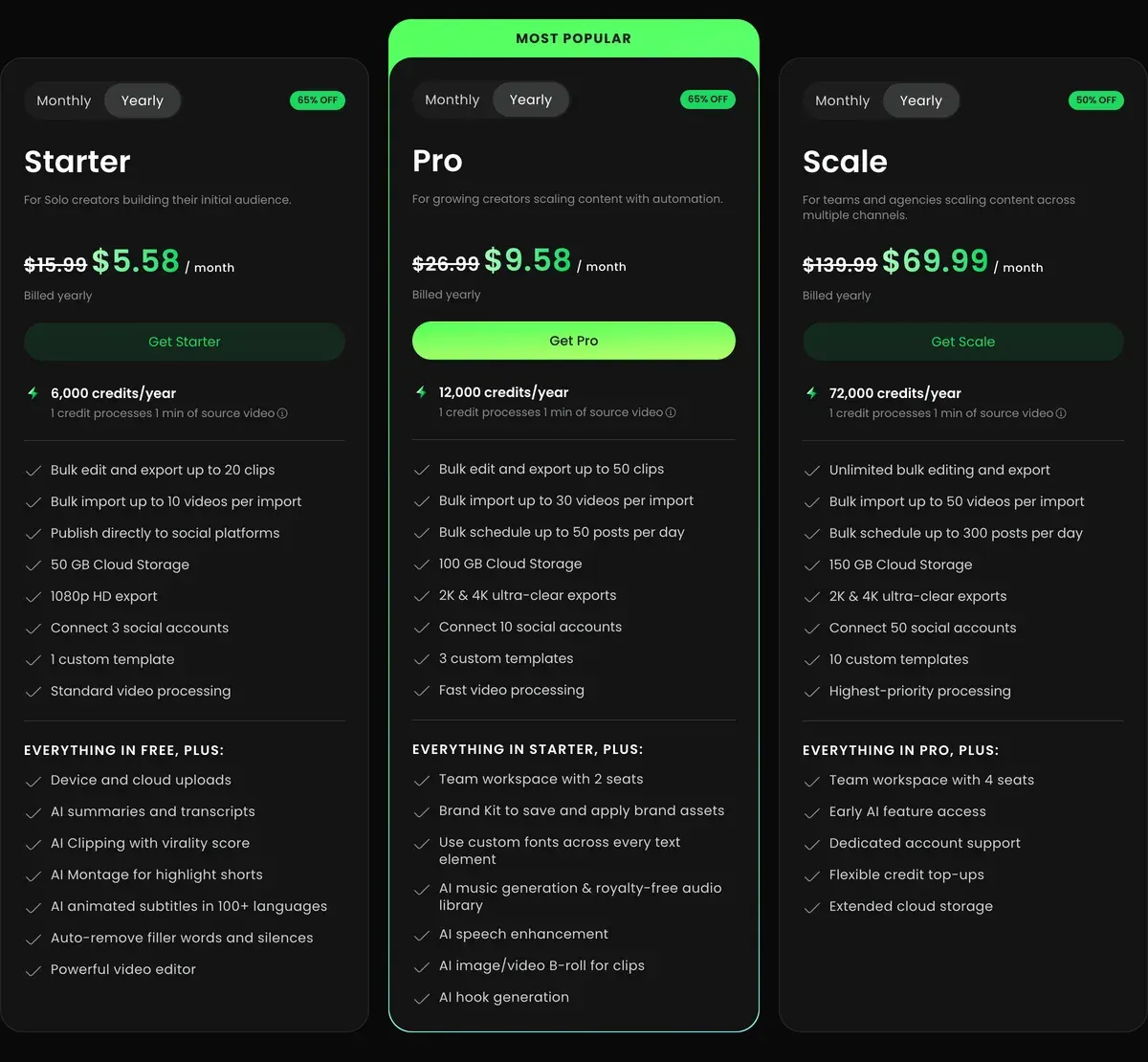
It imports from Twitch, Kick, Zoom and YouTube, and offers game clipping. Pro adds scheduled auto-posting to 10 accounts. Its terms (12 February 2026) license paid users for commercial use and limit free users to “non-commercial purposes”.
Monthly credits do not roll over. Of only 7 public reviews, 3 report a paywall after promised free credits (Trustpilot, Trustpilot).
- Best for
- Streamers, podcasters and agencies clipping many hours a month who want cheap per-minute clipping, bulk import and auto-publishing.
- Not for
- Free users who need commercial use (the terms limit non-paying users to non-commercial use), and anyone who needs API work billed from a subscription: API Units are bought apart.
Submagic: captions on videos already cut
Submagic is a caption editor first. It puts animated captions in 118 languages on a short video, with auto zooms and silence removal (pricing). Its Magic Clips feature cuts a longer upload into clips: Starter’s 45 credits cover 5 runs and Pro’s 120 cover 15.
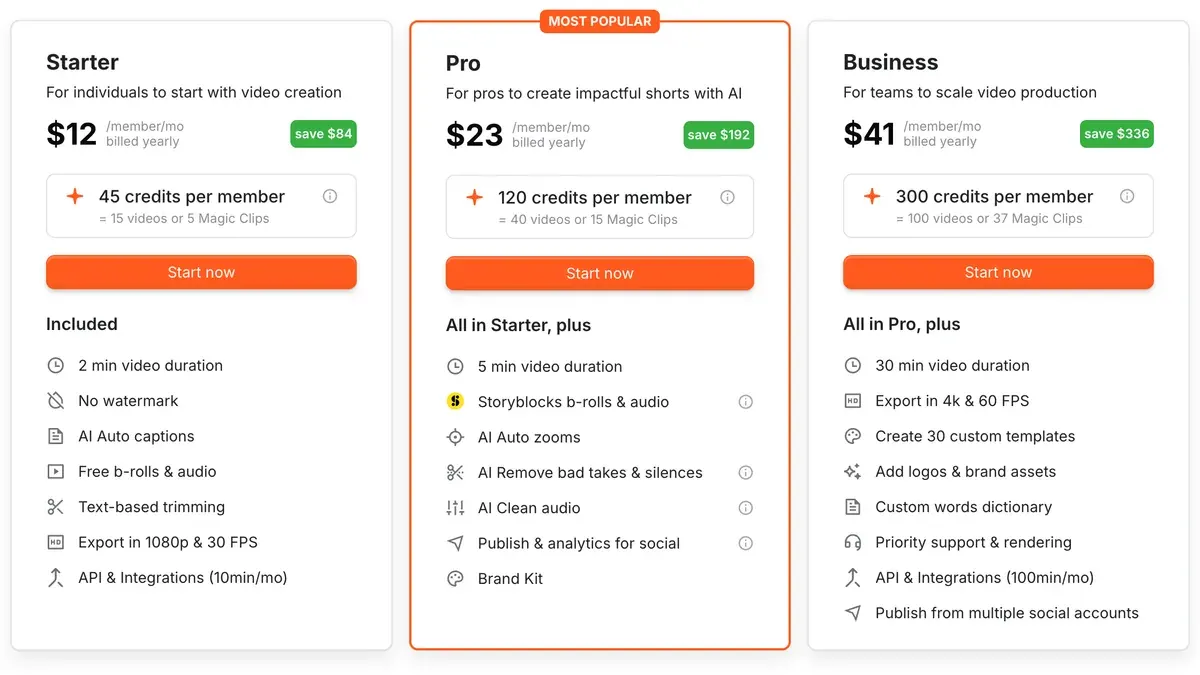
Upload caps decide whether it clips for you: 2 minutes on Starter, 5 on Pro, 30 on Business + API. For hour-long sources, cut elsewhere and caption here. Starter lists $19 a month per member.

Its terms put no plan limit on commercial use. Reviewers single out its support (17 of 21 sources: Trustpilot, Trustpilot). More: the Submagic profile.
- Best for
- Creators and small teams who caption and polish talking-head shorts every week and want b-roll, zooms, silence removal and social publishing in one editor.
- Not for
- Teams clipping hours of long video a month: Starter caps uploads at 2 minutes, and a Magic Clips run costs 8 credits, so 45 credits give 5 runs.
CapCut: free clipping, own footage cleared for ads
CapCut is the free route whose documents clear your own footage for ads. Its web long video to shorts tool lets “AI smart analysis identify video highlights”, reframes 16:9 to 9:16 with subject tracking and adds captions (tool page). The page names no plan or length limit.
Your own footage can run in paid ads from the free plan. The Materials License Agreement (22 January 2026) sets the limits: stock and templates count as personal use unless marked “commercial use” (section 2). One unmarked sticker or font makes the whole clip personal use only (section 2), so check the captions and effects the AI tool adds.
Commercial Sounds stay on CapCut and TikTok (section 3).
Charges after cancelling or a trial lead recent complaints (10 of 64 sources: Trustpilot, Trustpilot). More: the CapCut profile.
- Best for
- Editing your own footage into short social videos and TikTok ads on a free or cheap plan, with auto captions.
- Not for
- Ads built from CapCut templates or stock unless every asset is marked commercial use. Meta or YouTube ads with CapCut music, since Commercial Sounds cover CapCut and TikTok only.
Vizard: day-long recordings
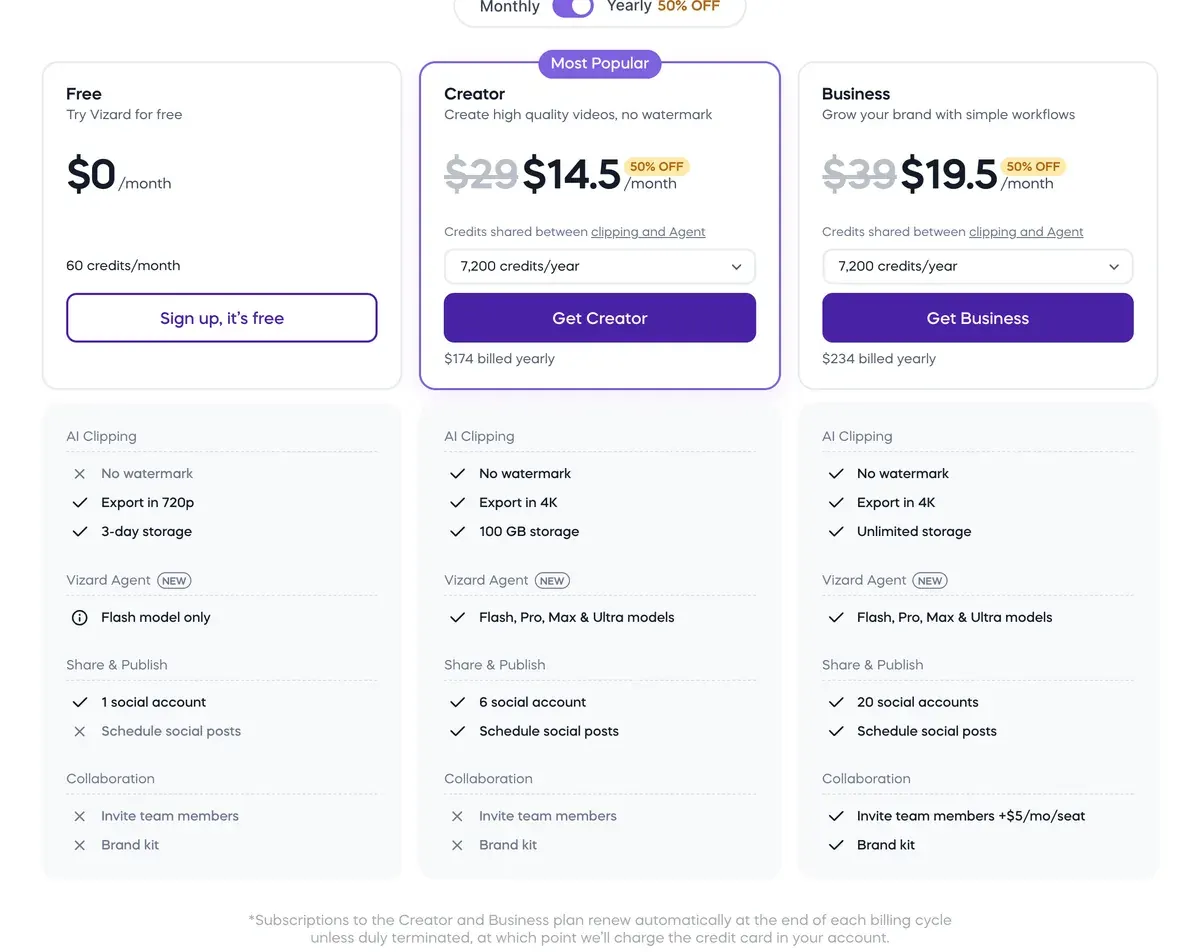
Vizard takes uploads up to 10 hours on Creator and Business (pricing), the longest stated limit here. Creator lists $29 a month for 600 credits at 1 a clipping minute (help centre). Clipping an hour costs $2.90 if every credit is used.
Its terms (31 October 2022) say nothing on who owns clips or on commercial use. Reviewers praise the moments it finds (3 of 12 sources: Trustpilot, Trustpilot). More: the Vizard profile.
- Best for
- Podcasters, coaches and marketers who clip long recordings into shorts every week and want reframing, captions, scheduling and an API on one credit balance.
- Not for
- Buyers who want clear rights on outputs: the 2022 terms say nothing about who owns clips or whether they can run in ads.
Spikes Studio: stream VODs for personal channels
Spikes Studio clips Twitch, Kick and YouTube VODs, the saved recordings of past streams. PRO+ lists $32.99 a month for 300 minutes (pricing).
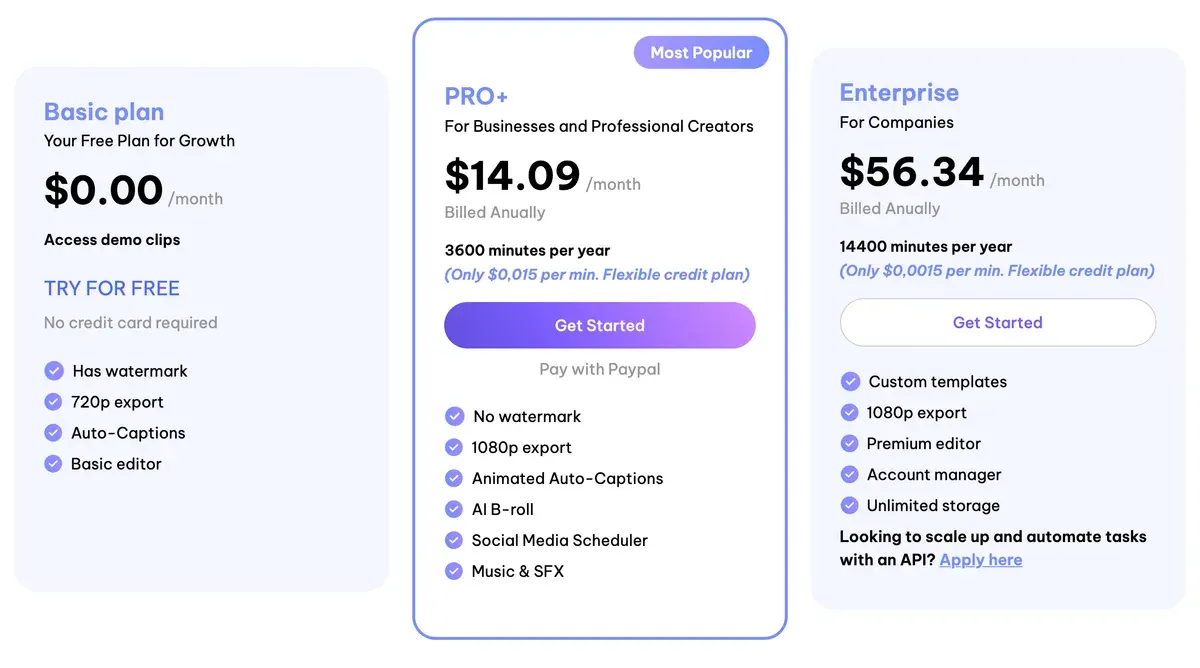
Its terms grant use “solely for your own personal and non-commercial use” (section 2), so it suits a streamer’s own channel, never a brand’s ads. Reviewers report charges after cancelling (4 of 12 sources: Trustpilot, Trustpilot).
- Best for
- Streamers and podcasters who clip Twitch, Kick or YouTube VODs into vertical shorts and want captions, B-roll and a scheduler in one minute-based plan.
- Not for
- Brands that need written commercial rights: the terms grant use
solely for your own personal and non-commercial use
, and the free plan exports at 720p with a watermark.
Munch Studio: clipping inside a social media manager
Munch Studio (formerly Munch) bundles clipping minutes with AI-written posts and scheduling. Essential lists $68 a month for 500 minutes (pricing), the dearest rate per minute here.
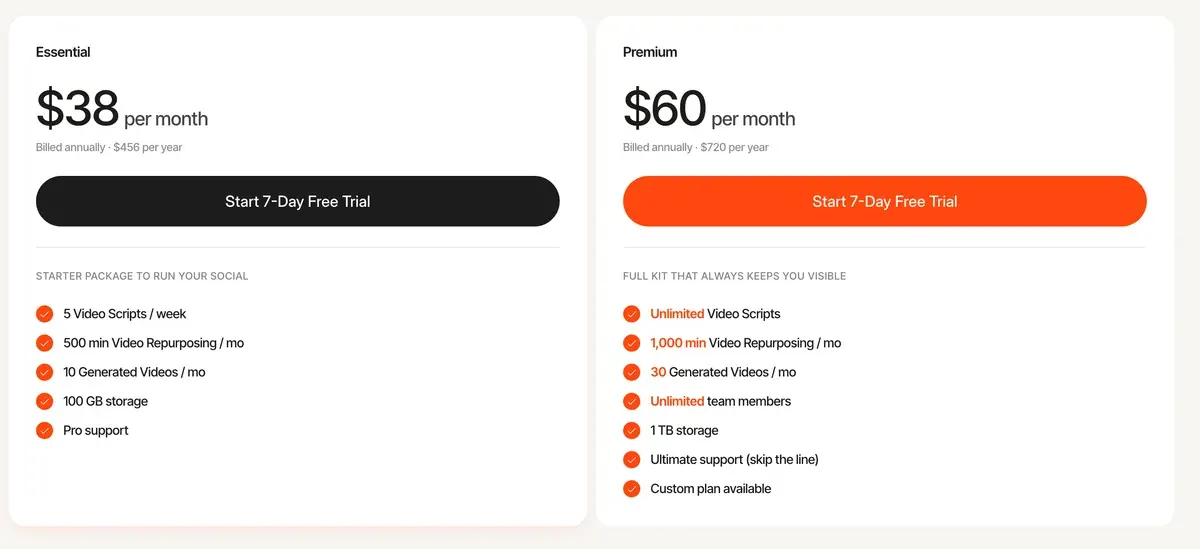
Clause 15.7 of its terms makes you owner of the deliverables; 11.1 bars content about gambling and dating, among others. Ten of 22 sources report charges after cancelling or for plans never chosen (Trustpilot, Trustpilot).
- Best for
- Small businesses and agencies that want posts, carousels and clips from long videos, scheduled to Instagram, Facebook, LinkedIn, YouTube and TikTok from one app.
- Not for
- Clippers or editors who only want long-to-short clipping: the cheapest plan is 68 USD a month for 500 input minutes, with no listed free plan and no public API.
Clips in ads and on your channel: what YouTube and TikTok say
Clipping your own webinar or podcast raises no reuse question. Clipping someone else’s video does, on both platforms.
YouTube’s monetisation policies define reused content as repurposing what is already online “without adding significant original commentary, substantive modifications, or educational or entertainment value”. The penalty reaches the whole channel, and “This policy applies even if you have permission from the original creator.”
Reused content
Definition. Reused content refers to channels that repurpose content that’s already on YouTube or another online source without adding significant original commentary, substantive modifications, or educational or entertainment value.
Not eligible. Content downloaded or copied from another online source without any substantive modifications.
Permission. This policy applies even if you have permission from the original creator.
The same page bars “AI-generated content made with generic or unoriginal templates giving the impression of mass production”. That matters if you post a tool’s default clips unchanged at volume.
TikTok’s Community Guidelines say “You should only post content you created or have the right to share”. Reused material “without anything new” is ineligible for the For You feed, TikTok’s main discovery page.
For paid ads, run clips of footage you own or hold a licence for. The tools leave that duty with you: Klap’s terms (section 4) and Munch’s (clause 11.1) both put content rights and bans on the user. Paid clipping campaigns: clipping for money.
Questions buyers ask about AI clipping tools
Is there a free AI clipping tool?
Yes. OpusClip and Vizard give 60 minutes a month with a watermark; OpusClip’s free clips are for non-commercial use only. CapCut’s free plan exports your own footage with no watermark, and those clips can run as ads if every CapCut asset in them is marked “commercial use”.
Which AI clipping tool costs less for podcasts?
Klap is cheaper than OpusClip Pro below 20 clips an hour: 15 clips cost $4.35 against $5.80. WayinVideo Pro clips an hour for about $1.62, so it costs less than Klap from 6 clips an hour; Klap’s gain is a bill known before you upload.
Can I use AI clips in ads?
On paid plans of OpusClip and WayinVideo, yes: their terms grant commercial use. Munch Studio’s terms make you owner of the deliverables, and Submagic’s set no plan limit on commercial use. Spikes Studio’s terms cover personal use only, and Klap’s and Vizard’s say nothing either way.
Sources
- Klap: Klap pricing, Basic, Pro and Pro+ cards; each short counts as one clip; sources up to 3 hours; the free try FAQ. Checked
- Klap: Klap for clippers, typically 26 clips from 1 to 2 hours; updated November 2026. Checked
- ZIGG SAS: Klap Terms of Service (last updated 25 July 2024), sections 3, 4 and 11; no clause on output ownership or commercial use. Checked
- OpusClip: OpusClip pricing, Free, Starter and Pro cards; 10 GB uploads on Free and Starter, 30 GB on Pro; no source length in hours. Checked
- OpusClip help centre: How are credits consumed?, 1 credit per minute of source video. Checked
- Opusclip Inc.: OpusClip Terms of Service (effective 17 November 2025), OpusClip Account section on commercial use. Checked
- WayinVideo: WayinVideo pricing, Free, Starter, Pro and Scale cards. Checked
- WayinVideo help centre: How credits work, AI Clipping costs 1 credit per input minute. Checked
- WayinVideo: WayinVideo Terms of Use (last updated 12 February 2026), Who can use. Checked
- Vizard: Vizard pricing, uploads up to 60 minutes on Free and 10 hours on Creator and Business. Checked
- Vizard help centre: How credits are used for AI processing (15 August 2025), clipping costs 1 credit per minute of uploaded video. Checked
- Vizard, Corp.: Vizard Terms of Service (last updated 31 October 2022). Checked
- Submagic: Submagic pricing, credits per member; 45 credits = 5 Magic Clips on Starter, 120 = 15 on Pro; uploads up to 2, 5 or 30 minutes by plan. Checked
- TURBO STUDIO S.A.S.: Submagic Terms of Use and Sale (no date shown), GTS 13. Checked
- CapCut: CapCut long video to shorts, AI highlight detection, 16:9 to 9:16 with subject tracking, captions; no plan or length limit stated. Checked
- CapCut: CapCut Materials License Agreement (last updated 22 January 2026), sections 2 and 3. Checked
- Spikes Studio: Spikes Studio pricing, Basic, PRO+ and Enterprise; free plan up to 30 minutes in the FAQ; caption editor up to 5 minutes. Checked
- PlayStream Ltd.: Spikes Studio Terms and Conditions (no date shown), sections 2 and 8. Checked
- Munch Studio: Munch Studio pricing, Essential to Scale; video repurposing minutes. Checked
- Munch Content Platform Ltd.: Munch Studio Terms of Use (last updated 12 July 2026), clauses 11.1 and 15.7. Checked
- YouTube Help: YouTube channel monetisation policies, reused content and inauthentic content. Checked
- TikTok: TikTok Community Guidelines, Integrity and Authenticity, posting only what you created or have the right to share; For You feed eligibility of reused material. Checked
- Trustpilot, Product Hunt, Reddit and the App Store: AI clipping tools user reviews, 220 public sources across the eight tools, synthesised on 16 November 2026. Checked

Alexandre S.
Alexandre S. is a creative ad strategist and copywriter with ten years' experience in digital marketing across multiple channels.
Related pages
-
 Alternatives Opus Clip alternatives
Seven tools that could replace OpusClip, compared on price per source minute or per clip, free plans for ads and commercial rights, read 16 November 2026.
-
 Compare Klap vs Opus Clip
Klap bills each clip it makes, OpusClip each source minute: 20 clips an hour is the entry-plan break-even. Free use and ad terms, read 16 November 2026.
-
 Guide Clipping for money
Clipping for money: Content Rewards says campaigns that fill mostly pay 0.80 to 2 dollars per 1,000 views, minus a 10% fee. Checked 16 November 2026.
-
 Guide Klap API and other video clipping APIs
Klap API and four other self-serve clipping APIs: 100 hour-long videos cost 295 dollars on Vizard and 844 on Klap. Checked 16 November 2026.


