Klap AI video clipping
Verdict on Klap
Klap AI is worth it if you cut a few shorts from each long video, because it bills per clip. Ten clips from an hour-long webinar cost $2.90 on Basic and $5.80 on OpusClip Pro, with every clip or credit used, prices checked . Five of 28 reviews report trouble cancelling or charges after a cancel request (Trustpilot, Trustpilot).
Klap
- Best for
- Creators and agencies cutting many shorts from long videos (up to 3 hours each) who want a fixed clip count whatever the source length.
- Not for
- Anyone who needs to download a clip before paying: the free try covers 1 video for preview and editing only. Teams needing a stated seat count, since no plan card gives one.
| Made by | ZIGG SAS (doing business as Klap), Maisons-Alfort, France |
|---|---|
| Category | All-in-one suites |
| Makes | Vertical shorts (9:16) cut from a long video, each with a virality score; 1080 x 1920 MP4 by default through the API, other sizes on request; active-speaker reframing and AI Reframe 2 layouts (split screen, screencast, gaming); animated captions in 99+ languages, with caption translation (API translate_to); editor with b-roll, hook titles, fonts, colours, logo and framing presets; scheduling and publishing to TikTok, YouTube, Instagram, LinkedIn and Facebook, with AI-written post captions and post analytics; transcripts with word-level timecodes (API) |
| Entry price | From $29 a month |
| Cost per output | $0.29 per clip (short) at list price, if all 100 clips are used; length set per job. Method |
| Use in ads | The terms neither grant nor limit commercial or ad use of clips and say nothing on output ownership; the user alone is responsible for content and for holding rights in what is uploaded (Terms s.3, s.4, 25/07/2024). Terms |
| Free plan | No |
| Free trial | Free on 1 video with no credit card: Klap turns it into clips you can preview and edit, but downloading and posting them needs a paid plan (pricing FAQ, read 16 November 2026). |
| Languages | 99+ languages for captions and clipping, auto-detected or set per job, with caption translation (pricing FAQ and API page, read 16 November 2026). |
| API | Yes |
| Status | Active |

What Klap does with a long video
Klap is a web app for clipping: cutting one long video into short clips for TikTok, YouTube Shorts and Instagram Reels. You paste a YouTube link or upload a file of up to 3 hours, and Klap picks the moments it expects to hold attention.
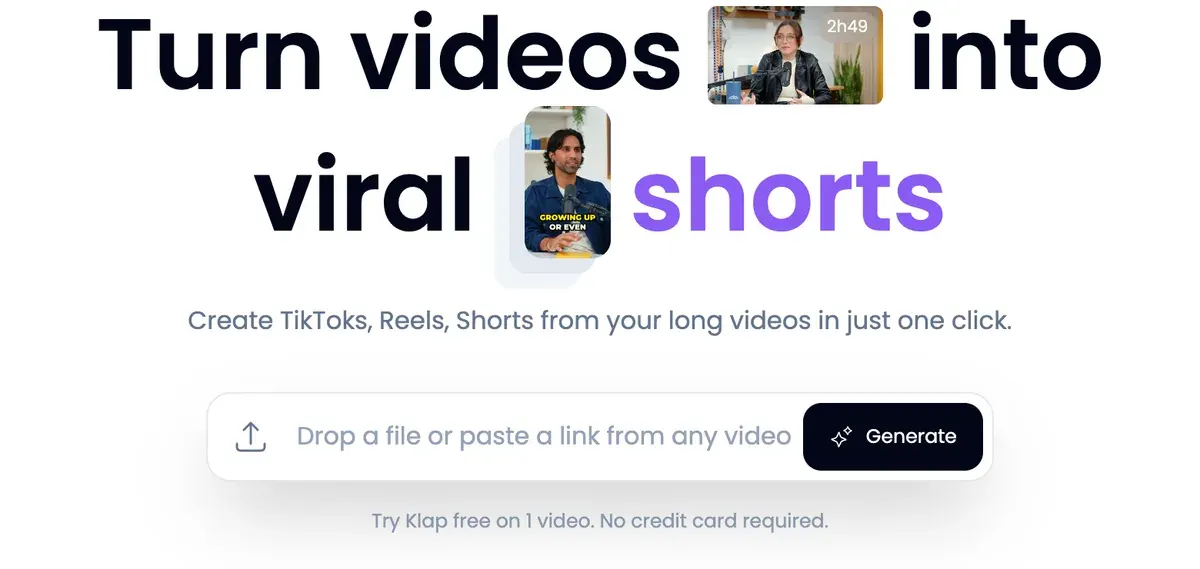
Each clip then goes through four steps on its own:
- Klap gives it a virality score, its own guess at how far the clip travels, so you can sort the batch.
- It reframes the clip to 9:16. That means turning a wide video into a vertical one while the camera follows whoever is speaking.
- It adds animated captions in 99+ languages, as the pricing page FAQ lists.
- It opens the clip in an editor for b-roll (cutaway footage laid over the speech), hook titles and your logo.

Klap can then auto-post: it schedules and publishes the clips to TikTok, YouTube, Instagram, LinkedIn and Facebook, with AI-written post captions and post analytics.
Klap says 8.5M clips have been made by 3.5M creators on its homepage.
What Klap costs per clip
Klap sells three plans and counts clips, never minutes. Basic is $29 a month for 100 clips, Pro $79 a month for 300 and Pro+ $189 a month for 1,000 (Klap pricing).
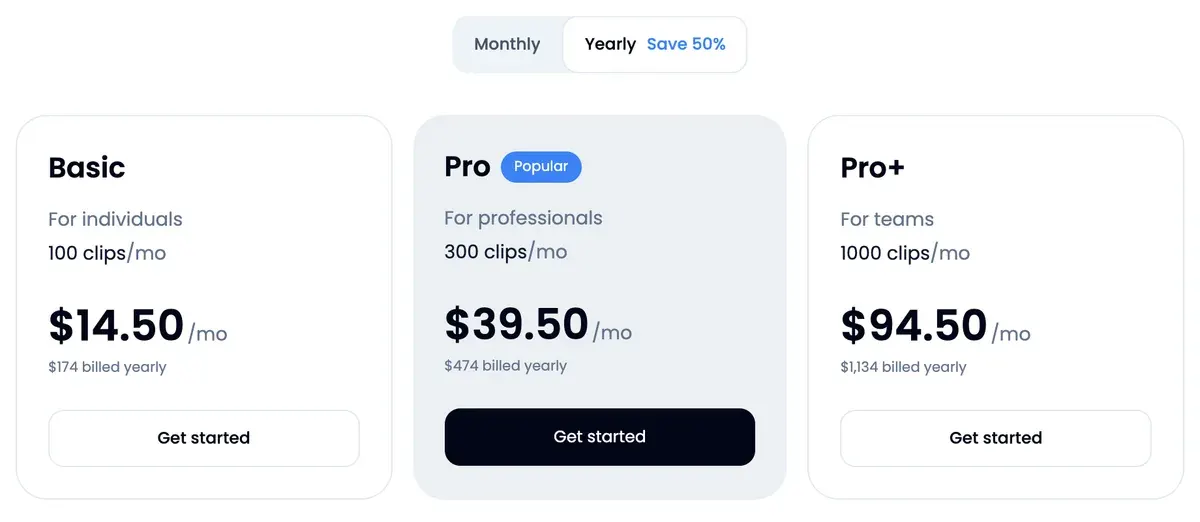
The FAQ says source length does not use up the allowance. So a 3-hour livestream and a 10-minute talk cost the same if each gives five clips.
A Basic clip comes to $0.29 billed monthly, if all 100 are used.
Yearly billing halves every plan, and the year’s clips arrive at once: 1,200 on Basic for $14.50 a month billed yearly.
OpusClip and Vizard bill the other way, per minute of source video. OpusClip Pro at $29 a month buys 300 source minutes, and Vizard Creator at $29 a month buys 600 (OpusClip pricing, Vizard pricing).
For one hour of source, Klap Basic costs less than OpusClip Pro up to 19 clips, and the two tie at 20. Against Vizard Creator, Basic costs less up to 9 clips and ties at 10. All three are billed monthly with every clip or credit used.
OpusClip’s pricing page says it makes “15 clips for you on average” from an hour, which comes to $4.35 on Klap Basic.
Each plan’s yearly figure and the reader code are on Klap pricing.
Is there a Klap free plan?
No. Klap offers a free try on one video with no card, and the FAQ limits it to preview and editing. Downloading or posting the clips needs a paid plan (Klap pricing).
Two of 28 reviews say the try has no value, since they found out about the download paywall only after the clips were made (Trustpilot, Trustpilot). Judge the clip picks in the editor first, then pay for a month if they work.
Klap API and no-code automation
Klap has a self-serve REST API, billed per use and apart from the app plans. The API pricing lists $0.44 per input video, $0.32 per generated short and $0.48 per export.
Its own worked example clips a one-hour podcast into 10 shorts and exports each once. That costs $8.44, nearly three times the same 10 clips on Basic. Credits start at $10, and adding a card gives $5 of free credits (Klap API).
The no-code routes draw on your app plan instead. Klap’s integrations page, updated 4 November 2026, lists Zapier in public beta, an n8n community node and Make “In review”. It also lists an MCP server and apps for ChatGPT and Claude.
The request shape and a cost per 100 videos are in the AI video clipping API guide.
Can you use Klap clips in ads?
Klap’s terms leave that to you. The Terms of Service, last updated 25 July 2024, carry no clause on who owns a clip and no grant or limit on commercial use. So the rights to run a clip as an ad are unclear.
Two sections put the weight on you. Section 3 says “You are solely responsible for your use of our Service and any content you create or share”. Section 4 makes you hold the rights to anything you upload, which matters when you clip a guest’s interview or a client’s webinar.
Klap’s publishing list names TikTok, YouTube, Instagram, LinkedIn and Facebook posts, with no ad account among them (Klap pricing). To run a clip as an ad, you download it and upload it to Meta or TikTok Ads Manager. The FAQ says paid exports “carry no Klap branding”, so the file is clean.
Client footage raises one more point. Section 14 of the privacy policy, last updated 1 October 2026, says “explicit consent before data sharing with third-party AI models is not obtained”, and OpenAI is named. Section 10 names contractors who review samples of video frames to improve the reframing.
Is Klap legit?
Klap is run by ZIGG SAS and publishes its terms, a refund rule and a privacy policy. Trustpilot shows 60 reviews and a TrustScore of 3.8 on 16 November 2026.
The split is wide. Of those reviews, 55 per cent give five stars and 30 per cent give one. Many recent five-star reviews are a title with no text.
We read 28: the 20 most recent, every one-star review the filtered page showed and one Reddit post. Ease of use leads the praise, with 7 saying Klap saves editing time, non-technical users included (Trustpilot, Trustpilot). Six praise fast support (Trustpilot, Trustpilot).
Cancelling leads the complaints. Five describe a hidden cancel option or charges after a cancel request, and three say support was unreachable or refunds were refused (Trustpilot, Trustpilot). In one public reply, Klap says it issued the refund.
Section 10 of the terms refunds a monthly plan in the first month, or for up to your last 3 consecutive unused months. Cancel first, then ask from the billing page.
Klap pros and cons
Pros
- Billed per clip, so a 3-hour source costs no more than a 10-minute one (pricing FAQ)
- Saves editing time, easy for non-technical users (7 of 28 sources: Trustpilot, Trustpilot)
- Support answers fast and fixes problems (6 of 28 sources: Trustpilot, Trustpilot)
- Captions in 99+ languages; two reviewers value its Arabic (2 of 28 sources: Trustpilot, Trustpilot)
- Auto-posting to five networks with unlimited social accounts on every plan (pricing page)
- A per-use API with a published price per short (API pricing)
Cons
- Hard to cancel, or charged after asking to cancel (5 of 28 sources: Trustpilot, Trustpilot)
- Support or refunds unreachable or refused (3 of 28 sources: Trustpilot, Trustpilot)
- The free try allows no download (2 of 28 sources: Trustpilot, Trustpilot)
- Terms silent on output ownership and commercial use (terms, 25 July 2024)
- No seat count on any plan card, Pro+ “For teams” included
When Klap is the wrong pick
Klap is the wrong pick when you need many clips from each hour of footage. Vizard Creator clips an hour for $2.90, if every credit is used, whatever the clip count (Vizard profile).
A team that needs named seats fits OpusClip better. Its Pro plan gives 2 seats per pack and up to 4, which no Klap card matches (OpusClip profile). The two side by side are in Klap vs OpusClip.

If your videos are already short and only need captions and b-roll, Submagic does that job. Starter at $19 a month covers 15 videos of up to 2 minutes (Submagic profile).
If you would rather pick every cut by hand, CapCut has a free editor with no watermark on plain exports, and Pro costs $19.99 a month (CapCut profile). Every clipper we track, sorted by job, is on the AI clipping tools list.
- All-in-one suites
OpusClip
AI clipper billed per source minute: long video to captioned shorts with reframing, AI b-roll, scheduler and an API.
From $15 a month · checked
Best for Creators and small teams clipping long videos who want AI b-roll, Premiere or DaVinci export, a multi-network scheduler and up to 4 seats on Pro.
- All-in-one suites
Vizard
AI clipping tool: long videos to captioned 9:16 clips, plus an editing agent, scheduling and a clipping API.
From $29 a month · checked
Best for Podcasters, coaches and marketers who clip long recordings into shorts every week and want reframing, captions, scheduling and an API on one credit balance.
- All-in-one suites
Submagic
AI short-video editor: animated captions in 118 languages, b-roll, zooms, silence cuts and Magic Clips from long videos.
From $19 a month · checked
Best for Creators and small teams who caption and polish talking-head shorts every week and want b-roll, zooms, silence removal and social publishing in one editor.
- All-in-one suites
CapCut
Free timeline video editor with templates, auto captions and credit-based AI video from Seedance models.
From $9.99 a month · checked
Best for Editing your own footage into short social videos and TikTok ads on a free or cheap plan, with auto captions.
Questions buyers ask about Klap
Do Klap clips carry a watermark?
No. The pricing FAQ says paid exports carry no Klap branding. The free try never exports, so it has no watermarked file to give.
How long can a video be on Klap?
Up to 3 hours on every plan. Klap’s API limits allow up to 100 shorts per video, each 1 to 180 seconds long.
What is a clip on Klap?
Each short Klap generates counts as one clip, in the FAQ’s words. The allowance refills every billing period.
Who makes Klap?
ZIGG SAS, a French company trading as Klap. French law governs its terms (section 9).
Sources
- Klap: Klap pricing, the Basic, Pro and Pro+ cards, clips a month, the yearly toggle and the FAQ on the free try, clips, refunds and branding; prices last updated 4 November 2026. Checked
- Klap: Klap, the homepage claim of 8.5M clips made by 3.5M creators. Checked
- Klap: Klap API, per-use API prices, credits from 10 dollars, 5 dollars of free credits once a card is added, and the limits table (up to 3 hours per video, up to 100 shorts, each 1 to 180 seconds). Checked
- Klap docs: Klap API pricing, 0.44 dollars per input video, 0.32 per short, 0.48 per export, and the one-hour podcast example at 8.44 dollars. Checked
- Klap: Klap integrations, updated 4 November 2026; Zapier in public beta, Make in review, an n8n community node, the MCP server, ChatGPT and Claude apps on the Klap plan. Checked
- ZIGG SAS: Klap Terms of Service, last updated 25 July 2024; sections 3, 4, 10 and 11. Checked
- ZIGG SAS: Klap Privacy Policy, last updated 1 October 2026; sections 10 and 14 on contractors and third-party AI models. Checked
- Trustpilot: Klap reviews, 60 reviews, TrustScore 3.8; the 20 most recent and every one-star review the filtered page showed, read one by one. Checked
- OpusClip: OpusClip pricing, credits per plan, 1 credit for 1 minute of source video, seats per Pro pack and the 15 clips an hour average. Checked
- Vizard: Vizard pricing, the Free and Creator plans and their credits a month. Checked
- Submagic: Submagic pricing, Starter credits per member and its 2-minute upload cap. Checked

Alexandre S.
Alexandre S. is a creative ad strategist and copywriter with ten years' experience in digital marketing across multiple channels.
Related pages
-
 Category Best AI video generators for ads
23 AI video generators and model shops compared on cost per clip and ad-use terms, checked 25 September 2026.
-
 Pricing Klap pricing
Klap costs $29, $79 or $189 a month for 100, 300 or 1,000 clips, half that billed yearly. Price per clip, free try limits and API rates, checked 16 Nov 2026.
-
 Alternatives Klap alternatives
Seven tools that could replace Klap, compared on what clipping an hour of video costs, free plans and ad rights, read 16 November 2026.
-
 Compare Klap vs Opus Clip
Klap bills each clip it makes, OpusClip each source minute: 20 clips an hour is the entry-plan break-even. Free use and ad terms, read 16 November 2026.
-
 Best list AI clipping tools
Eight AI clipping tools for podcasts and streams, compared on cost per minute or per clip, free plans, longest video and ad rights, read 16 November 2026.
-
 Guide Clipping for money
Clipping for money: Content Rewards says campaigns that fill mostly pay 0.80 to 2 dollars per 1,000 views, minus a 10% fee. Checked 16 November 2026.


