How to make a realistic AI UGC character on Higgsfield
A believable AI UGC creator is one invented person, cast once and reused in every shot. On Higgsfield that takes six steps. Write who they are, generate the face and lock it. Then place them with your product, make them talk and take the AI polish off.
| Step | Higgsfield tool or model | What you get | Credits |
|---|---|---|---|
| 1. Casting sheet | None: a note or a chat | One page on who they are | None |
| 2. Face | Soul 2.0 or Nano Banana Pro | Candidate portraits | 0.12 an image on Soul 2.0, 2 on Nano Banana Pro |
| 3. Lock | Soul ID, or a reference sheet | The same face in every shot | Soul ID: a monthly cap; a sheet costs 2 |
| 4. Room and product | Nano Banana Pro with references | Start frames, product in hand | 2 a frame |
| 5. Talk | Seedance with sound, or Speak 2.0 | A lip-synced clip | About 22 per 5 seconds (Seedance 2.0, 720p); about 14 per 5 seconds (Speak 2.0, 720p) |
| 6. AI look off | Your editor, then the upscaler | A cut, graded, captioned edit | None in the editor |
Scroll sideways for all 4 columns

What makes an AI UGC creator look real?
Real UGC is a phone video shot in someone’s own life. Four tells give an AI creator away:
- Skin like plastic: no pores, no marks, perfectly even colour.
- Light from nowhere: a soft studio glow in a kitchen with one window.
- A camera nobody holds: dead-centre framing, perfect focus, a background as tidy as a set.
- A face that changes between shots: a new nose in the close-up, a new hairline in the next clip.
Higgsfield’s own list of causes points the same way: no identity anchor, drifting reference images, the wrong model and no lip sync layer.
Why AI Characters Look Weird: The Root Causes
No identity anchor. When you describe a character in text only, the model interprets that description freshly each generation.
Reference image drift. When the scene changes, the anchor weakens and the face starts to drift.
Wrong model for the use case. Some models handle human subjects better than others.
Missing lip sync layer. When audio and video generate separately and get combined in post, the mouth movements are approximated rather than driven by the actual audio. The result looks dubbed.
Low-resolution prototyping at final quality expectations. A face that looks acceptable at 720p can look wrong at 1080p because the higher resolution reveals artifacts the lower resolution masks.
Each step below removes one of them.
Step 1: Write a casting sheet
A casting sheet is the creator’s ID card. Write it before any prompt, because every later prompt copies from it word for word.
Cast for the product, never the prettiest face: a bottle for shift workers wants someone who works shifts.
Name: Dana. Age: 34. British, Nigerian parents.
Life: A&E nurse on 12-hour nights, two kids, small terraced house.
Why she films: short honest clips about getting through night shifts.
Where: her kitchen just after a shift, her parked car, the hospital car park.
Camera: her phone, front camera, held in one hand.
Wardrobe: grey marl sweatshirt with a stretched collar, black leggings, white trainers with no logo.
Two signature details: a healed scar through one eyebrow, a black hair band.
Voice: London accent, low and dry, a little tired, quick to laugh.
Check the two signature details in every shot: they are the quickest way to spot drift.
Step 2: Generate the face
Generate the face alone, on a plain wall, before any scene. A portrait gives the model one job; a scene asks it to invent the room, the light and the face at once.
Soul 2.0, Higgsfield’s own image model for people, costs 0.12 credits an image; Google’s Nano Banana Pro costs 2. Run the same prompt on both and keep the better face.
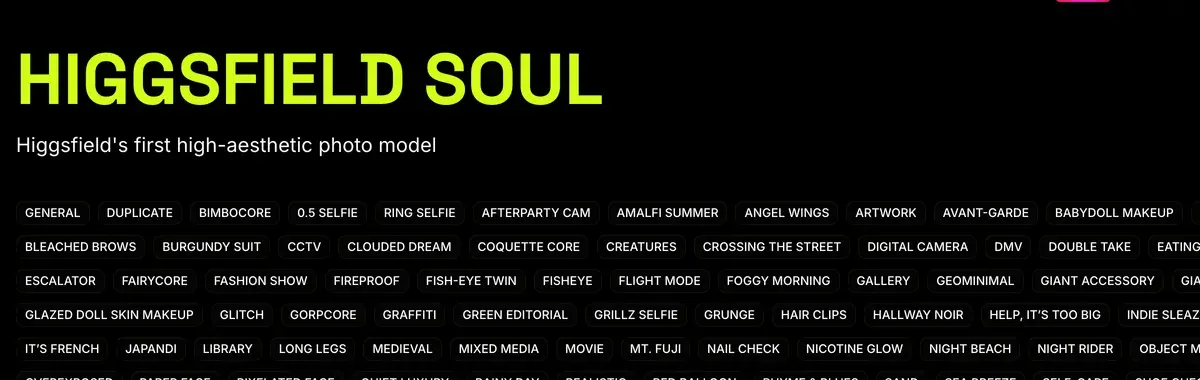
A head-and-shoulders photo of a 34-year-old British woman with Nigerian parents, short natural hair pushed back with a black band, small gold studs, a grey marl sweatshirt with a stretched collar. She sits against a plain off-white wall, lips closed, a tired half-smile that reaches her eyes. Soft overcast daylight from a window off frame to one side, about 5600K, the far cheek in gentle shadow. Taken by her sister about a metre away on a phone at eye level. Skin after a night shift: pores across the nose, faint dark circles, a healed scar through one eyebrow, a light oil sheen on the forehead. Muted colour, fine phone grain, no plastic skin, no watermark, no readable text anywhere.
The prompt names the light’s source and colour temperature (5600K is daylight), who holds the camera, and marks the day left on the skin. Words like “ultra-realistic”, “8K” or “perfect lighting” push the model towards the polished look you are trying to avoid.
Judge each face at full size: visible pores, both eyes the same colour, a small reflection of the window in each. If one fails, regenerate. A weak face only gets worse in motion.
A full build of one character on Soul 2.0, from first prompt to final face, runs in this walkthrough by Lera AiLab:

Step 3: Lock the character so every shot is the same person
Locking gives Higgsfield a fixed record of the face, so it stops reinventing it. The first route is Soul ID, Higgsfield’s trained character. Its help article asks for “20 or more photos of the same person (up to 80 supported)”, and training “takes a few minutes”.
What is Soul ID?
Train once and reuse the identity.
A trained Soul ID works across the Soul family.
For an invented creator, Higgsfield says to “generate those portraits first, then train a Soul ID on them”: 20 portraits of your chosen face, varied in angle and expression, one full length. Trained characters “appear in Elements automatically”, which is how the face reaches Seedance video.
Higgsfield sets the bar at “clearly the same person” across generations; a pixel-identical face is not promised. Each plan caps Soul ID generations a month: 9 on Starter and 40 on Plus, billed monthly.
Code And Create trains a Soul ID from uploaded photos, start to finish:

The second route is a reference sheet: four views of the person in one image, attached to every later prompt. It costs one Nano Banana Pro image.
Image 1 is the woman: face, hair and build only. One photo, a 2 by 2 grid of this exact woman against the same off-white wall in the same window daylight. Top left: facing the camera, lips closed. Top right: three-quarter view. Bottom left: full profile. Bottom right: full length, hands in the sweatshirt pocket, black leggings, plain white trainers. The hair band, gold studs and eyebrow scar in every panel. Unretouched phone photo, no plastic skin, no watermark, no readable text anywhere.
Test a close-up early: faces drift there first. Five of 52 public sources credit Soul ID, Elements and reference sheets with keeping characters consistent (YouTube, Reddit). Training in full: the Soul guide.
Step 4: Put them in a real room with the product
These stills become your video’s start frames. In Image, pick Nano Banana Pro and attach the master portrait, the sheet and a real photo of your product. Then say what each image is for: an image with no stated job gets copied whole.
How do I generate with Nano Banana Pro?
Open higgsfield.ai → Image → Nano Banana Pro.
Choose your input mode: Text-to-Image, Multi-reference, or Image-to-Image.
Write a clear, specific prompt. Describe the subject, setting, lighting, and any specific quantities or text. Be explicit.
Add references if needed (up to 14), and describe the role of each reference in the prompt.
Set the resolution. Start at 1K when iterating, scale to 2K or up to native 4K for final assets.
Generate and iterate. If something is off, change the prompt or the reference, not both at once.
Images 1 and 2 show the woman: face, hair and build only. Image 3 is the product only: shape, colour and label exactly as shown. She stands at her kitchen counter at 8:10 in the morning, just home from a night shift, in the grey sweatshirt. She holds the sage-green steel bottle at chest height, four fingers round it, thumb on the far side, label flat to the camera and a little closer to the lens than her face. She films herself on her phone's front camera at arm's length, just above eye level. Behind her: a kettle, a fruit bowl, her lanyard face down on the counter. Cool daylight from a window behind the phone, about 5200K, and a warm 2700K under-cabinet light. The label reads "FIELDWELL" in large white capitals. Mild phone HDR, slight wide-angle stretch at the edges, no plastic skin, no watermark, no other readable text.
Type every word on the label in quotation marks: anything you leave out gets invented. And use a photo of the real product, never an AI render of it.
Check the hand at full size: four fingers and a thumb, gripping with weight. Grip, scale and label fixes in depth: AI UGC product in hand.
Step 5: Make them talk
Talking video needs a script short enough to say out loud. Start from a budget of about two and a half words a second: 36 to 40 words for a 15-second take. More words come out rushed. Fewer, and the model fills the gap with mumbling.
Write the script as a creator showing the product on camera, in their own day. Cut stock phrases (“game changer”, “I’m obsessed”) and any result your product cannot deliver. Templates by ad format: UGC script template.
Higgsfield’s own checklist for talking video adds two fixes for a frozen face. Give the source image a light, natural expression, and write emotion cues into the script.
How to make an AI Talking Video Feel Real?
A believable LipSync video coordinates six elements simultaneously: lip movement aligned to speech phonemes; facial expressions that shift with emotional content; eye movement; subtle head motion that follows speech rhythm; gestures that match meaning; voice delivery with pacing, pauses, and tonal variation.
Frozen facial expressions. The cause is usually a source image with a neutral, flat expression. Use an image where the subject has a light, natural expression, not a passport-photo neutral face. Adding emotion cues to the script also helps: words like [excited], [thoughtful], or [warm] in brackets give performance-based models a signal to animate from.
The first route is Seedance, which generates “video with native sound in a single pass, with lip sync in multiple languages” (Seedance help article).
Seedance 2.0 runs 4 to 15 seconds. Seedance 2.5 runs up to 30, on Plus and above. Pick your Soul character with @ from Elements, or upload the reference sheet. To keep one voice, upload a voice file and tag it with @audio.
9:16, 15 seconds, one continuous selfie take, no cuts. Spoken language: British English.
Start frame: the kitchen still. THE WOMAN is @Dana. THE BOTTLE keeps its shape, colour and the word "FIELDWELL".
0 to 3 s: THE WOMAN lifts the bottle into frame and speaks within the first half-second. DANA (dry, tired, warm): "The label says ice for twenty-four hours. Night shift, so fair test."
3 to 10 s: She tilts the bottle towards the lens and shakes it once; ice knocks inside. DANA (matter-of-fact): "Listen to that. Ice, and plenty of it, still knocking about in there."
10 to 15 s: She lowers the bottle onto the counter, out of frame. DANA (a small laugh): "Which is more than I can say for my coffee. Right, bed." She settles, eyes on the lens.
Camera: we look through the phone in her other hand: a small breathing bob, a slight wrist roll, quick reframing. Real time, normal speed.
Sound: her voice, ice, a fridge hum, no music. Only Dana speaks, only these lines. Pores stay on her skin; four fingers and a thumb on each hand; no subtitles, no watermark.
Every action uses one hand, because the other holds the phone: a lid unscrewed one-handed is the hand glitch Step 6 cuts. The camera line describes the arm holding the phone, which models handle better than “handheld shake”.
In the edit, open on a 3-second clip of ice going into the bottle, with a dark window behind it. The claim is then shown, never just told.
GameTrainer US goes from an avatar image to a speaking UGC ad inside Higgsfield:

The second route is Lipsync Studio, which makes a talking clip from an image plus a typed script (lipsync article); lip sync on Higgsfield walks through it.
How do I use lipsync, voiceover, and aspect ratios?
Voice generation, voice change, and translation live in Audio, while making a character talk (lip sync) lives in Lipsync Studio, which offers several models for image-to-video and video-to-video talking clips. Some video models also generate audio together with video in a single pass. Aspect ratio is set per generation inside each tool: common options are 9:16 for vertical, 16:9 for horizontal, and 1:1 for square, and not every model supports every ratio.
Its Higgsfield Speak 2.0 engine sits on Plus and Ultra, at about 14 credits per 5 seconds at 720p. Voice cloning is allowed for “a voice that is your own or one you have the person’s permission to use.”
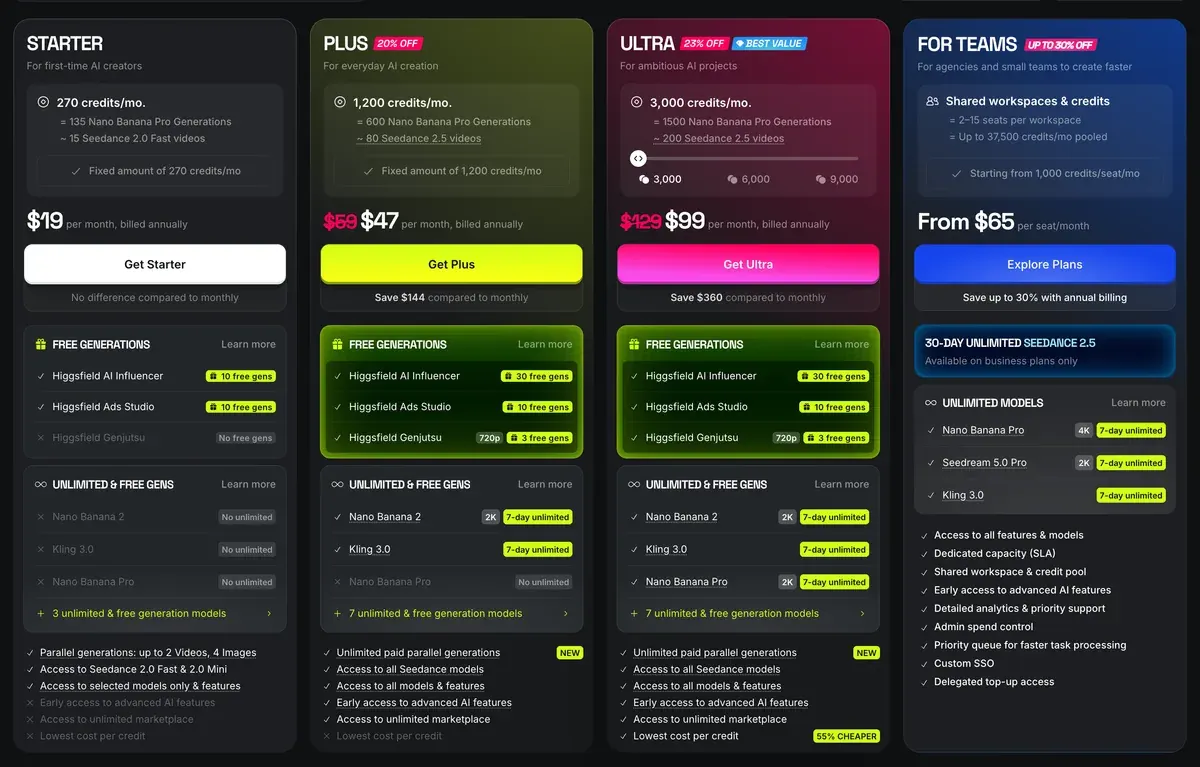
On Plus, which opens Seedance 2.5 and Speak, the plan costs $49 a month (pricing page; plans in full on Higgsfield pricing).
The compare table, read 19 October 2026, lists 22 credits per 5 seconds. One 15-second Seedance 2.0 clip at 720p is then about 66 credits. Plus’s 1,000 monthly credits cover about 15 such takes, if every credit is used.
Step 6: Take the AI look off
Raw AI video is too clean: strong contrast, rich colour, a camera that never wobbles. Fix it in your editor.
- Trim each clip to its first syllable and cut any moment where a hand or the label glitches.
- Cut away every few seconds. When the creator names the product, show it close up. Cutaways also hide a stretch of weak lip sync.
- Add one adjustment layer over the whole edit. Lower contrast until it stops looking like a render, then pull the colour back.
- Add a shake effect so faint the viewer never notices it.
- Add captions in the editor, never in the generation, where AI text comes out garbled.
- Export at 1080p, 9:16.
For a large placement, Higgsfield’s video upscaler takes clips to 1080p, 2K or 4K through ByteDance or Topaz. The full edit-to-launch workflow sits in how to make AI UGC ads.
What goes wrong, and the fix
Most failed takes trace back to one missing instruction. Find it before you spend credits on another try.
| What you see | Why | Fix |
|---|---|---|
| Plastic, airbrushed skin | Gloss words, no marks listed | Cut “ultra-realistic”; list 4 to 7 marks the day left |
| Glowing studio light indoors | No light source named | Name the window or lamp, its side and its colour temperature |
| Centred, posed, staring at the lens | Nobody holds the camera | Say who takes the photo, from how far and how high |
| A new face in each shot | No lock | Train a Soul ID or attach the reference sheet every time |
| Face drifts in close-ups | Sheet lacks a close view | Add a close-up panel; test close-ups first |
| Label letters change | Label words not typed | Quote every word on the label; use a real packshot |
| Gibberish signs or captions | The model invents text | Keep text out of frame; add captions in the edit |
| Lips lag or mumble | Script too long or too short | Rewrite to about two and a half words a second |
| Voice changes between clips | New voice each generation | Upload one voice file and tag it with @audio |
Scroll sideways for all 3 columns
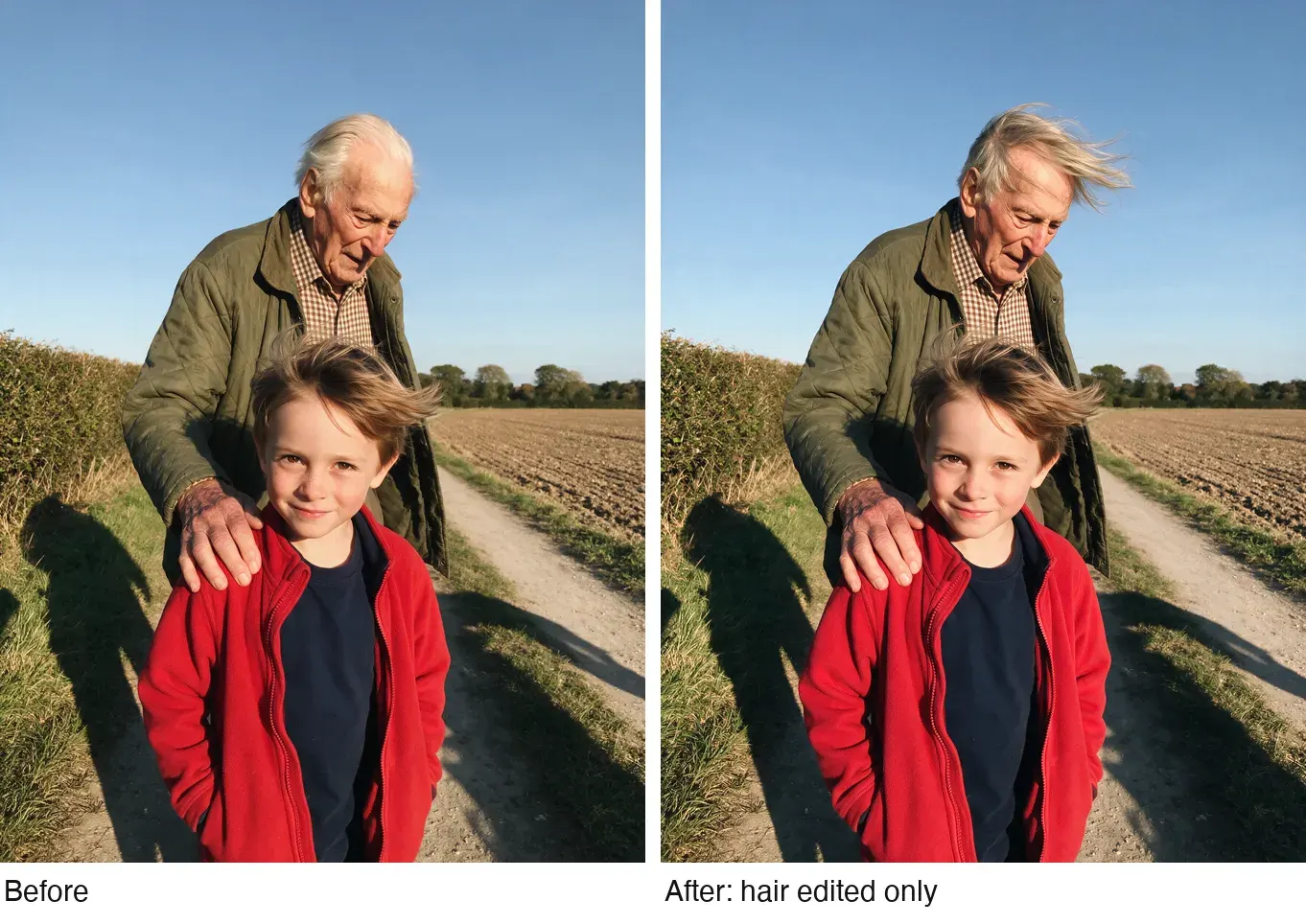
When a still is mostly right, edit it: one prompt that changes one thing keeps the rest in place. In the pair below, one prompt changed only the man’s hair; check the boy’s face, the hands and the background, which stay as they were.
Four more ready-to-adapt UGC characters
Dana’s casting sheet is in Step 1; here are four more. Each prompt casts one creator as a portrait for Steps 2 and 3. Swap the details to fit your product; keep the order: person, place, light, who holds the camera, skin.
A home-cook dad, for kitchen and food brands:
Head-and-shoulders photo of a 58-year-old Korean American man, thinning grey hair, reading glasses pushed up on his forehead, a faded navy apron over a flannel shirt, against a plain cream wall, lips closed, a patient half-smile. Warm 3000K pendant light from above one side. Taken by his daughter a metre away at eye level on a phone. Skin: deep smile lines, age spots on one temple, stubble missed under the jaw. Fine phone grain, no plastic skin, no watermark, no readable text anywhere.
A nursing student, for snacks, study and budget apps:
Head-and-shoulders photo of a 24-year-old Mexican American woman in navy scrubs, dark hair in a loose clip with strands falling out, sitting in the driver's seat of a parked car after a shift, head resting back, lips closed. Flat grey daylight through the windscreen, about 6000K. Taken on her own front camera, held just below her chin. Skin: a red mask mark across the nose, mascara softened under one eye, oil sheen on the forehead. Mild phone HDR, no plastic skin, no watermark, no readable text anywhere.
A runner, for sportswear and recovery products:
Head-and-shoulders photo of a 41-year-old white Scottish woman, auburn hair in a damp ponytail, a black running jacket zipped to the chin, against a stone park wall in fine drizzle, breathing hard, lips closed, a tight satisfied smile. Overcast light from above, about 6500K. Taken by her running partner a metre away at chest height on a phone. Skin: windburn on both cheeks, freckles, water beads on the forehead, flyaway hairs stuck to one temple. Fine grain, no plastic skin, no watermark, no readable text anywhere.
A retired gardener, for home, garden and health brands:
Head-and-shoulders photo of a 67-year-old Black British woman of Caribbean heritage, short silver curls, small hoop earrings, a mustard cardigan with soil on one cuff, at her back door against a pale green frame, lips closed, smiling with her eyes. Low late-afternoon sun from one side, about 3500K. Taken by her grandson a metre away at eye level on a phone. Skin: fine lines around the eyes, dark marks on the cheekbones, dry knuckles. Fine grain, no plastic skin, no watermark, no readable text anywhere.
Rules for running it as an ad
- Label it where the platform asks. TikTok’s ads policy requires a label on ads with “images, video, or audio that are completely AI-generated” (TikTok AI label). Meta requires your own disclosure only on political and social issue ads, and labels other ads itself when it detects AI (Meta AI disclosure).
- The label is also what keeps an AI creator inside Higgsfield’s terms, 5.2(xi), which bar presenting “that any Output is human-generated when it is not”.
- Let the character speak as a creator showing the product on camera, never as a customer reporting their own results. An AI face saying “I’ve used it for months” is a fake testimonial under the FTC rule (AI UGC and the law). Dana reads the brand’s claim and shows the ice; she never reports months of use.
- Use no real person’s face or voice without written consent. Section 5.3 of the same terms makes you warrant every consent for faces and voices you upload.
Where to go deeper
The method on this page follows techniques taught in AI Video Bootcamp, a paid course on Skool. Every Higgsfield tab is in how to use Higgsfield, and every Higgsfield page on the Higgsfield hub.
- Models: Seedance, Kling, Nano Banana, AI UGC prompts.
- Ready-made avatars: Marketing Studio, AI Influencer. Plans and terms: the Higgsfield profile.
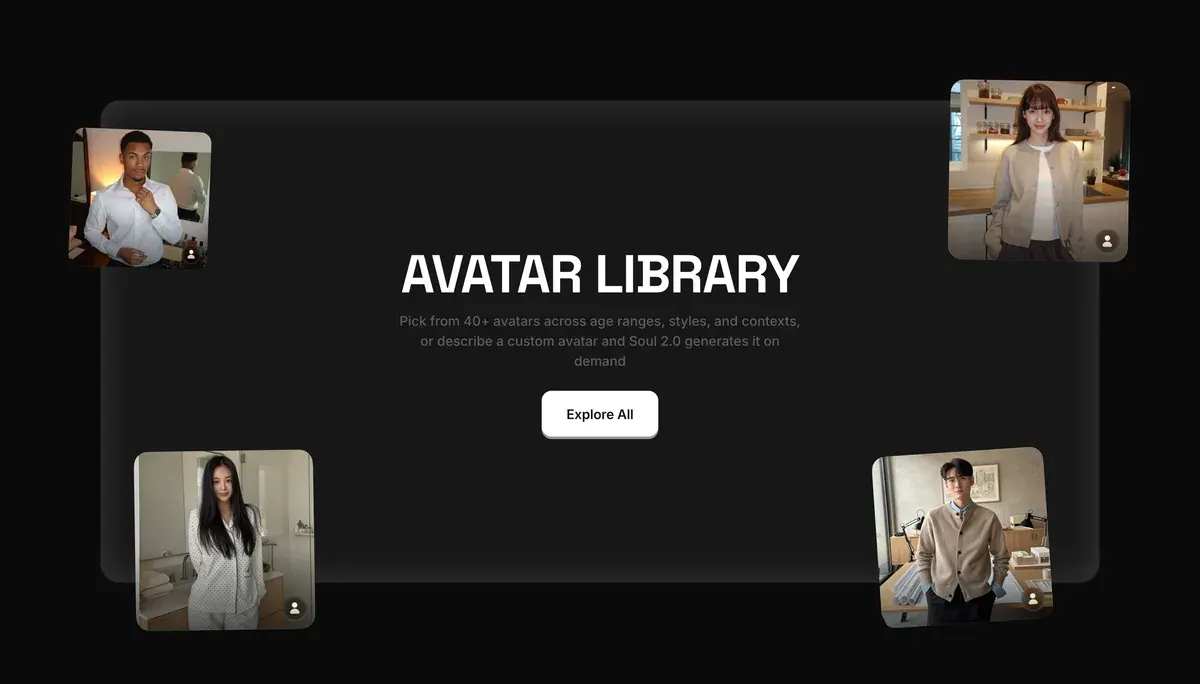
Marketing Studio is the shortcut: Higgsfield lists 40+ ready avatars, or a custom one made with Soul 2.0.
Questions about realistic AI UGC on Higgsfield
Can Higgsfield make realistic AI UGC?
It has every part: Soul 2.0 and Nano Banana Pro for faces, Soul ID to hold them, Seedance and Speak for talking clips. Public reviews back the stills. A Trustpilot review of a cosmetics campaign calls Soul’s images photorealistic and consistent, and a Reddit review thread praises them too.
Can my AI creator speak French or Spanish?
Yes. Seedance generates lip sync “in multiple languages”, and Higgsfield’s voice tools translate a script into 18 languages (lipsync article). Write the script in the target language and state the spoken language on the prompt’s first line.
Can I make an AI version of myself?
Yes, from 20 to 80 photos of yourself in a Soul ID. Higgsfield’s own rule: “Only upload photos of yourself, or of someone who has given you permission to use their likeness.”
Every Higgsfield guide, sorted by job, is in the Higgsfield hub
Sources
- Higgsfield help centre: How do I create and use a Soul ID character?, 20 or more photos of one person, up to 80; invented faces trained from generated portraits; Soul characters appear in Elements; modified 2 September 2026. Checked
- Higgsfield help centre: How do I use Soul to generate images?, Soul, Soul 2.0 and Soul Cinema, ratios from 9:16 to 16:9, batches of 1 to 4, the prompt field closes when a reference image is attached. Checked
- Higgsfield help centre: How do I use Seedance?, Clip lengths, reference limits, the @character and @audio tags, native sound with lip sync in several languages, Seedance 2.5 on Plus and above; modified 9 September 2026. Checked
- Higgsfield help centre: Lipsync, voiceover and aspect ratios, Lipsync Studio engines from Higgsfield Speak 2.0 to Sync Lipsync 3, voice cloning with permission, translation into 18 languages; modified 1 September 2026. Checked
- Higgsfield: Higgsfield pricing, Compare table read in a browser: Soul 2.0, Nano Banana Pro, Seedance 2.0 and Soul ID caps on 19 October 2026; Speak 2.0 and Speak by plan on 9 October 2026. Checked
- Higgsfield: AI video upscaler, ByteDance and Topaz upscaling to 1080p, 2K or 4K. Checked
- Higgsfield: Higgsfield Terms of Use (26 July 2026), 4.2(b) and 5.3 on likeness and consent, 5.2(xi) on output presented as human-generated, 5.5 on AI disclosure. Checked
- TikTok: TikTok ads policy, misleading and false content, Label ads with completely AI-generated images, video or audio; updated April 2026. Checked
- Trustpilot, Reddit and YouTube: Higgsfield user reports, 52 public sources synthesised, checked 28 September 2026. Checked
What changed on this page
- Higgsfield’s prices went back: Starter is 15 dollars a month for 200 credits, Plus 49 a month or 39 billed yearly for 1,000 credits, and Ultra 129 or 99 billed yearly has a card again (was Starter 19 for 270, Plus 59 or 47 for 1,200).

Alexandre S.
Alexandre S. is a creative ad strategist and copywriter with ten years' experience in digital marketing across multiple channels.
Related pages
-
 Guide Seedance for AI UGC ads
Seedance’s face filter rejects real and AI faces in 10 of 35 user reviews. The consent its terms ask for, and how to prompt a UGC clip. Checked 2 October 2026.
-
 Guide AI UGC meaning: what is AI UGC?
AI UGC is ad video made or edited with AI to look like a customer or creator filmed it. Its two meanings, and vendor terms on passing it off as human.
-
 Guide Higgsfield motion control
How Higgsfield’s motion control and motion presets work, which models support them, what they cost, and examples that suit ads. Checked 16 October 2026.
-
 Guide AI UGC vs human UGC: what the evidence says
Public comparisons of AI and human UGC ads, graded on how each was run and by whom. Most come from sellers or a single account. Checked 24 September 2026.


