Axon Ads Manager is now AppLovin Ads
Axon Ads Manager no longer exists under that name. AppLovin renamed it AppLovin Ads on 22 June 2026 and opened it to any business, with no referral code. You sign up at ads.applovin.com, and your ads run as full-screen videos inside mobile games.
Older guides still send you hunting for a code, including a December 2025 post from Creatify. This guide takes the current steps from AppLovin’s support pages, for a store or service with a website. It also shows where Creatify fits at the video stage.
The old names still appear all over the web, so here is what each one means today.
| You read | It means today |
|---|---|
| Axon Ads Manager | AppLovin Ads, the dashboard at ads.applovin.com |
| Axon | AppLovin’s AI recommendation system |
| axon.ai | Redirects to applovin.com |
| support.axon.ai | Redirects to support.applovin.com |
| Axon pixel | AppLovin Pixel; some help pages keep the old word |
| Axon app on Shopify | Listed as AppLovin, at the old address |
| Axon Campaign Management API | Campaign Management API; the docs address keeps the old word |
Scroll sideways for all 2 columns

Is Axon the same as AppLovin?
Axon is part of AppLovin, the company behind the ad platform. It started as the name of AppLovin’s recommendation engine, the software that decides which ad to show to whom. In October 2025 the whole ad platform took the name and launched a self-serve manager on a referral-only basis.
The June 2026 post reversed the branding. Its words are “Going forward, our ad platform is simply called AppLovin Ads”, and “Axon remains the name of our AI recommendation system”.
Do you still need an Axon referral code?
You do not need a referral code. AppLovin’s launch post says: “For the past eight months, it required a referral code. Starting today, it requires neither.” Creatify’s Axon page agrees, with “no referral code required since June 2026”.
Partner links still exist, and one detail is worth a look before you click one. AppLovin’s FAQ offers eligible new advertisers $5,000 in ad credit after $5,000 of spend within 60 days. It adds: “Some advertisers are onboarded through a marketing partner and receive a different credit structure.”
Creatify’s sign-up link carries a partner code, and an AppLovin partner page uses the same code. Neither page says what the code changes. Ask AppLovin which credit applies to your sign-up path before you enter a card.
How do you open an account and launch a first campaign?
You open an account at ads.applovin.com, connect your site, then build one campaign around one creative set. AppLovin’s consumer page says “Go live in under an hour”. These steps follow its launch checklist and campaign guide:
- Create your account on ads.applovin.com and add your business and payment details.
- Install the pixel, the snippet that tells AppLovin who bought what. The next section covers it.
- Fill in Brand assets: logo, name, description and call-to-action text.
- Click Create and name the campaign. Add your landing page URL and tracking tags, known as UTMs.
- Pick a goal. ROAS (return on ad spend) suits shops with many products, cost per purchase suits one product or a subscription, and cost per lead suits lead generation.
- Pick an audience strategy: Universal, Prospecting or Discovery. The last two need the Shopify app or uploaded purchase history.
- Pick your regions. Group every country you ship to in one campaign and leave out Western Europe, which AppLovin does not support.
- Pick Day 0 for quick decisions, or Day 7 for dearer products that take longer to buy.
- Set a target and a daily budget, as covered below.
- Build a creative set with at least one video and one image or interactive page, then launch.
App owners follow a different path. AppLovin’s app guide swaps the pixel for a measurement partner such as Adjust or AppsFlyer, and your app must already be live in a store.
What does the AppLovin pixel need?
The AppLovin Pixel needs to report each step of a sale, and on Shopify an app does that for you. The AppLovin app is free to install. It sets up the pixel, syncs your catalogue and tracks purchases. Ad spend bills through AppLovin, separately from your Shopify invoice.
Every other platform goes through Google Tag Manager. There you send the events yourself, and AppLovin’s event list warns that a required event left out causes pixel failure:
- Purchase sites send
page_view,view_item,add_to_cart,begin_checkoutandpurchase. - Lead generation sites send
page_viewandgenerate_lead.
Confirm it before you spend. AppLovin’s Pixel Helper, a Chrome extension, shows whether the pixel fires, and Events Manager should show no errors. The model learns from these events, so a broken one costs you its main signal.
What are the AppLovin creative specs?
AppLovin ads pair a 9:16 video with a second screen, the AppLovin Interactive Page, which other networks call an end card. Each creative set holds up to 10 videos and 10 pages, with at least one of each. Video must be portrait: the spec lists no other shape.
| Asset | Files | Size | Limits |
|---|---|---|---|
| Video | MP4, MOV, M4V | 1 GB | 9:16, 270 x 480 minimum, 60 seconds maximum |
| Image page | GIF, JPEG, PNG | 10 MB | 270 x 480 minimum, GIF up to 60 seconds |
| HTML page | One HTML file | 5 MB | Everything embedded, MRAID 2.0, works in portrait and landscape |
Scroll sideways for all 4 columns
AppLovin recommends a good number of videos at 30 seconds or longer. The HTML rules come from its app specs page, and MRAID is the standard that lets an ad open a link on a phone. An image is the simple start, and the dashboard’s Creative Studio can build pages for you.
How much should a first campaign spend?
A first campaign should spend enough for several purchases a day, and the published minimum falls far short of that. AppLovin gives two floors: $10 a day on its brands page and $15 a day in its FAQ.
The same FAQ asks for a budget that brings at least 10 purchases a day, and the campaign guide says “at least a handful”. So multiply your cost per purchase by 10. At $30, that is $300 a day.
If that is out of reach, multiply by 3 for a smaller first read. AppLovin vs Meta ads has the monthly sums and the spend at which a test makes sense.
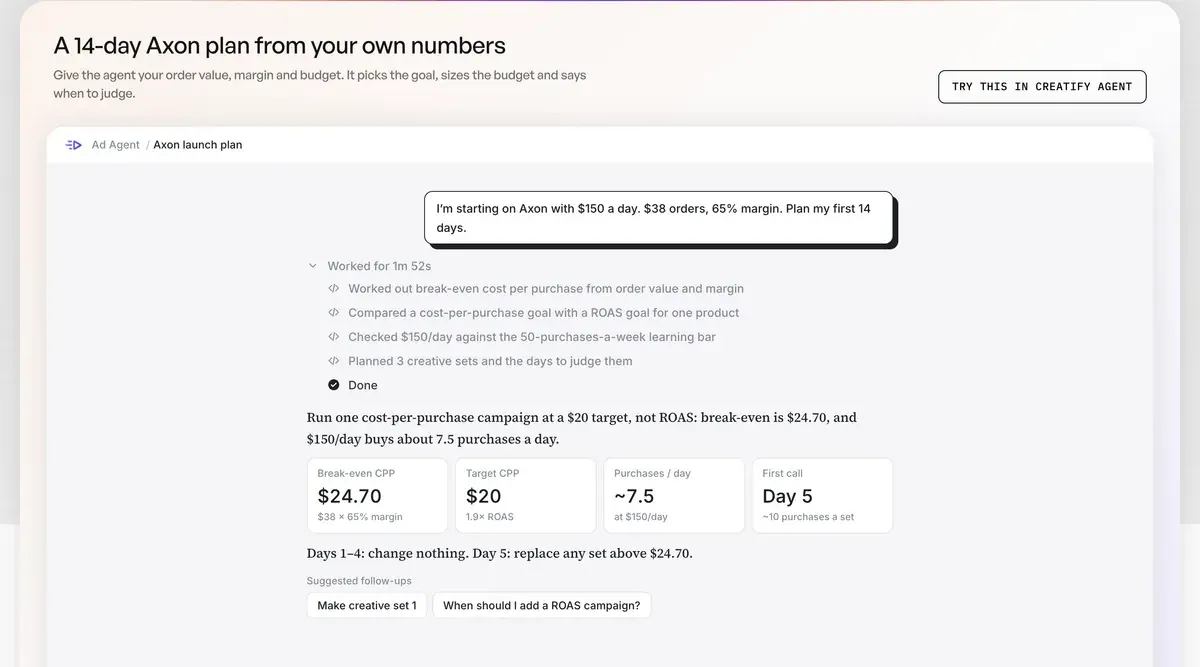
Creatify’s Axon page shows a middle path in a sample plan from its agent. A store with $38 orders and a 65 per cent margin breaks even at $24.70 a purchase. The plan sets a $20 target and spends $150 a day for about 7.5 purchases, then makes its first call on day 5.
Two settings need care. Enter a ROAS target as a percentage, so 2x return is 200%. And set the target from your margin: WKND Agency warns that an aggressive target at launch can restrict spend before the model has enough data.
WKND also says it makes larger budget changes at the start of the UTC day, because AppLovin charges the next day’s budget at 0:00 UTC.
Which videos should you make first?
Make a mix of lengths with most at 30 seconds or longer, in the talk-to-camera style that AppLovin says dominates its top ads. Its video guide counts what top-spending ads share:
- About 95 per cent carry prominent captions, and AppLovin says most mobile gamers have sound off by default.
- About 85 per cent use voiceover.
- About 40 per cent feature a promotion, often in the hook.
- About 30 per cent name a specific audience in the opening line.
AppLovin’s checklist says viewers cannot skip a video for at least 5 seconds, so your offer goes first. Test one change per video: a different audience in the first line, a different offer, a different person. AppLovin says a user sees around eight creatives before converting, which is why one video rarely gets a fair read.
Start with your best existing ads. The FAQ says top assets from other platforms often transfer well, as long as the file is 9:16.
If you run short, Creatify bills avatar video at 5 credits per 15 seconds, rounded up. Four 30-second videos and one 45-second video use 55 credits, exactly one month of Standard at $15 a month (read ).
A weekly refresh, which WKND recommends, outruns that. A weekly set of four 45-second videos uses 60 credits, or about 260 a month, and Pro at $55 a month gives 280. Users name credits running out faster than the pricing suggests (15 of 61 sources: Trustpilot, r/FacebookAds), so leave room for retries.
How does Creatify’s AppLovin route work?
Creatify’s route lets you make the creative set, launch it and read results from one dashboard. This order comes from Creatify’s AppLovin page:
- Sign up through its partner link, with purchases or leads as your goal.
- Install the pixel and add payment details, as above.
- Build a creative set in Creatify: 9:16 videos, end cards and HTML playables from a product page.
- Launch in AppLovin yourself, or connect your account to Creatify.
The connection takes more than a login. You give Creatify your account ID and reporting key to read results. Launching from Creatify also takes a management key, which Creatify requests for you and says is usually ready within a day.
The limit is that the agent cannot change a live campaign. Creatify says it reads AppLovin data such as spend, ROAS and cost per purchase and recommends what to keep, refresh or cut, and any change happens in AppLovin. Its pricing page ticks the Ad Launcher and Ad Agent for AppLovin from Standard up.
When is Creatify the wrong pick for AppLovin?
Creatify is the wrong pick if you already hold enough 9:16 video. AppLovin needs a 9:16 file, and its dashboard’s Creative Studio builds the page after it. A brand with creator footage can launch on the platform alone.
It also fits apps and games less well, since Creatify’s page centres on websites and purchases. AI UGC for apps covers tools for that job. And if you sell only into Western Europe, no creative tool helps, because AppLovin’s web campaigns leave that region out.
Questions about Axon Ads Manager
Is Axon by AppLovin free to join?
AppLovin lists no sign-up fee, and the Shopify app is free to install. You pay for your ads. AppLovin’s billing page describes a daily charge at 0:00 UTC for the next day’s budget, held as a deposit. Unused funds move to your balance.
Is there still an Axon waitlist?
No. AppLovin’s post says any business can sign up. Older guides that mention a waitlist describe the period before 22 June 2026.
Where do I log in to Axon Ads Manager?
Log in at ads.applovin.com, the address in AppLovin’s launch checklist. The old ads.axon.ai address still loads a page titled AppLovin Ads.
Can I advertise on AppLovin from Europe?
AppLovin’s web campaign guide says Western Europe is “not supported at this time” as a target, and it lists no countries. That rule covers where your ads show, and the guide says nothing on where your company is based. Check your target countries in the campaign’s region list before you build creative.
More pages for Creatify users, sorted by job, in the Creatify hub
Sources
- AppLovin: AppLovin Ads is now open to all advertisers, 22 June 2026;
Going forward, our ad platform is simply called AppLovin Ads
;Axon remains the name of our AI recommendation system
; referral phase of about eight months ended. Checked - Modern Retail: AppLovin rebrands its ad platform as Axon, launches ads manager on referral-only basis, 1 October 2025; second source for the referral-only launch. Checked
- AppLovin support: Launch checklist, account at ads.applovin.com; Shopify app or Google Tag Manager; Pixel Helper; goal types; audience strategy; regions outside Western Europe; brand assets; creative sets, each holding up to 10 of each asset type; video skip-delayed at least 5 seconds. Checked
- AppLovin: Setting up your web campaign, the campaign steps; ROAS entered as a percentage; Day 0 and Day 7; budget for at least a handful of purchases daily; around eight creatives seen before converting; Western Europe
not supported at this time
, no countries listed. Checked - AppLovin support: Events and objects, required events for purchase and lead generation sites. Checked
- AppLovin support: Web advertiser FAQ, launch budget as low as 15 dollars a day; 10 purchases a day; 5,000-dollar credit; some advertisers onboarded through a marketing partner receive a different credit structure; top assets often transfer well. Checked
- AppLovin: AppLovin Ads for consumer brands, launch budget as low as 10 dollars a day. Checked
- AppLovin support: Ad specs and requirements, video MP4, MOV or M4V, 9:16, 1 GB, 270 x 480 minimum, 60 seconds maximum; image GIF, JPEG or PNG, 10 MB. Checked
- AppLovin support: Creative specs and guidelines, HTML: one file, 5 MB, resources embedded, MRAID 2.0, portrait and landscape; written for app campaigns. Checked
- AppLovin support: Video best practices, about 30 per cent of top ads name an audience; about 40 per cent feature a promotion; 95 per cent prominent captions; 85 per cent voiceover; most top videos are UGC-style;
Most mobile gamers have sound off by default
. Checked - AppLovin: Setting up your app campaign, the app route. Checked
- Shopify App Store: AppLovin app on the Shopify App Store, listed as AppLovin; free to install; external charges may be billed by AppLovin separately from your Shopify invoice. Checked
- AppLovin: AppLovin partner sign-up page, the page does not mention Creatify; its sign-up buttons carry referral code TZSWWREZWA. Checked
- Creatify: Creatify for AppLovin Axon, no referral code since June 2026; sign-up through a partner link; account ID and reporting key; management key to launch, usually ready within a day; agent reads AppLovin data only; sample plan for 38-dollar orders at a 65 per cent margin: 24.70-dollar break-even, 20-dollar target, about 7.5 purchases a day at 150 dollars a day, first call on day 5. Checked
- Creatify: Axon AppLovin ads manager: setting up your first video ad campaign, 23 December 2025; says Axon normally requires a referral code or waitlist approval. Checked
- WKND Agency: How does AppLovin work for advertisers?, 7 September 2026; larger budget changes at the start of the UTC day; add new creative weekly; aggressive targets at launch can restrict spend before the model has enough data; targets set from contribution margin. Checked
- AppLovin support: Billing, a daily 0:00 UTC charge for the next day’s budget, minus any balance, held as a temporary deposit; unused funds go to your balance; a monthly invoice. Checked
- AppLovin support: Campaign Management API, the page is titled Campaign Management API; its address keeps axon-campaign-management-api. Checked
- AppLovin: axon.ai, axon.ai returns a 301 to applovin.com and support.axon.ai to support.applovin.com; ads.axon.ai still loads a page titled AppLovin Ads. Checked
- Creatify help centre: Credit usage, billing and validity, 5 credits per 15 seconds, rounded up. Checked
- Creatify: Creatify pricing, Ad Launcher for AppLovin from Standard up; credits per plan from src/data/tools.json. Checked
- Trustpilot, Reddit and others, as counted in our reviews file: Public user reviews of Creatify, 61 sources; 15 name credits running out faster than the pricing suggests. Checked

Alexandre S.
Alexandre S. is a creative ad strategist and copywriter with ten years' experience in digital marketing across multiple channels.
Related pages
-
 Guide AppLovin vs Meta ads
AppLovin wants budget for 10 purchases a day, Meta about 50 a week per ad set. The trial cost by cost per purchase, and who should add AppLovin. 7 November 2026.
-
 Best list AI UGC for apps
Apple can pull an app whose marketing, in or outside its store, promotes what it lacks. AI UGC tools that show your real app screen, checked 2 October 2026.
-
 Guide How to use Creatify
A 30-second Creatify ad uses 10 credits, and the agent’s cost is unknown until it finishes. Eight steps to a first ad, with what each spends, 5 November 2026.
-
 Guide AI media buyer
An AI media buyer launches, budgets and pauses ads. What Creatify, Madgicx, Meta, Google and Zeely document, and who carries the loss. Checked 6 November 2026.
-
 Profile Creatify for UGC ads
Creatify bills avatar video in 15-second blocks, so a 30-second ad uses 10 credits. Its ad terms and 20 latest Trustpilot reviews, read 24 September 2026.


