B2B video ads
A B2B video ad sells to people at work, usually software or a service. There is often nothing to hold up to the camera. The ad shows the product on a screen, the problem it fixes, or a person explaining it.
On LinkedIn, the main home for these ads, the video plays muted by default. Every claim has to work as on-screen text. Fifteen seconds is the length to aim for, because it sits inside both of LinkedIn’s recommended ranges.
An AI presenter suits the explainer and fails the personal story. Creatify makes a 15-second presenter ad from your website for $1.36 on Standard if every credit is used, at prices read on .

What does a B2B video ad show when there is no product?
Pick the doubt your buyer needs settled first. A buyer asking “does it work?” needs the screen. A buyer asking “is this about me?” needs the problem.
| Show | Works when | Fails when |
|---|---|---|
| The screen | The interface is the proof | The product needs setup before it shows anything |
| The problem | Buyers don’t know your category yet | The problem is generic to the whole market |
| A person | Trust is the sale, as with services and big contracts | The person reads a script they didn’t write |
Scroll sideways for all 3 columns
The screen takes a real recording of one task. The problem takes one painful moment from a sales call. A person means a founder, an expert or a customer.
SaaS video ads lean towards the screen, since a task can finish in seconds. Services lean towards a person, since the buyer is hiring people. If you can’t choose, start with the problem. It needs one screen capture and no presenter, and it tells you which pain gets attention.
Why does the sound-off rule shape a B2B script?
LinkedIn says its video ads “will autoplay in the feed with the sound muted by default”. Its tips page adds that “a large portion of LinkedIn members will watch your ad with the sound off” and suggests burning subtitles into the video.
Burned-in text beats a caption file here. LinkedIn’s specs accept SRT files with text only, and no styling. Burned-in lines let you size the words and place them away from the interface you are showing.
Test the cut by muting it. If a stranger can’t name the product and the problem from the screen alone, rewrite it.
Length has two answers from LinkedIn. The help page recommends 15 to 30 seconds so a video qualifies for every placement. The tips page reports up to a 300 per cent lift in completion for 7 to 15-second videos, from LinkedIn’s own 2025 data. Fifteen seconds satisfies both.
LinkedIn video ads specs
LinkedIn takes four shapes and calls 4:5 its recommended ratio. All of this comes from its specifications page.
Video ads advertising specifications
Aspect ratio Horizontal/landscape: 16:9 (1.78). Square: 1:1. Vertical: 4:5 (.80). Vertical: 9:16 (0.56).
Length Three seconds to 30 minutes. We recommend uploading videos that are 15-30 seconds long. In-stream video ads can be up to 90 seconds in length.
File size Between 75 KB and 500 MB.
File format MP4.
Captions Must be in SRT format.
| Spec | Requirement |
|---|---|
| Vertical 4:5 (recommended) | 720 x 900 recommended; 360 x 450 to 1080 x 1350 |
| Horizontal 16:9 | 1920 x 1080 or 1200 x 675 recommended; 640 x 360 minimum |
| Square 1:1 | 360 x 360 to 1920 x 1920 |
| Vertical 9:16 | 720 x 1280 recommended; 360 x 640 to 1080 x 1920 |
| Length | 3 seconds to 30 minutes; 15 to 30 recommended |
| File | MP4, 75 KB to 500 MB, H.264 or VP8 |
| Frame rate | Less than 30 FPS |
| Audio | AAC or MPEG4 |
| Captions | SRT, text only |
| Intro text | 150 characters before it cuts off |
| Headline | 70 characters before it cuts off on most devices |
Scroll sideways for all 2 columns
Check frame rate on any export, because LinkedIn’s limit is “Less than 30 FPS”.
Videos under 30 seconds loop until they reach 30 seconds of playback, so your last frame runs straight into your first. End on the offer and open on the problem, and the loop reads as a second pitch.
What do LinkedIn video ads cost?
LinkedIn publishes no cost per click. Costs come from an auction, and the price depends on your bid and how much others want the same audience. It does publish the floor: $10 a day, or $100 over a campaign’s lifetime.
ZenABM’s report of 16 February 2026 covers 211 B2B companies and 161,256 ads, and it does not state the period covered. A guide from Factors.ai, dated 28 July 2026, gives a range for Sponsored Content with no source behind it.
| Measure | Figure | Source |
|---|---|---|
| Video ads, median cost per click | $15.61 | ZenABM |
| Thought Leader Ads, median cost per click | $2.29 | ZenABM |
| Video ads, median cost per 1,000 impressions | $38.94 | ZenABM |
| Sponsored Content, cost per click | $6 to $9 | Factors.ai |
Scroll sideways for all 3 columns
Video on LinkedIn buys clicks badly. ZenABM’s data puts the median at $15.61 a click. Its median click-through rate, the share of impressions that get a click, is 0.24 per cent.
At the median cost per 1,000 impressions, the $10 daily floor buys about 257 impressions (10 divided by 38.94, times 1,000). That is less than one click a day, so judge video on who watched, then retarget them.
A 15-second AI ad costs less than one LinkedIn click at any of those rates. The ad file is rarely the expensive part, so spend your care on the audience and the script.
Three B2B video ad scripts to copy
Each runs 15 seconds and works on mute. The product here is an invented invoice tool, so swap in your own task and your own real figure.
The problem first
No people, no voice. A spreadsheet fills the frame.
- 0 to 3 seconds. Text over a scrolling invoice list: “Month end. 212 invoices. One PO number missing.”
- 3 to 9 seconds. The cursor opens your tool and the search finds the invoice. Text: “Find it in one search.”
- 9 to 13 seconds. The row turns green. Text: “Month closed in [your real number] days.”
- 13 to 15 seconds. End card with one step: “Start free”.
The one-task walkthrough
A real recording at real speed. Pick the task a buyer asks about on every demo call.
- 0 to 2 seconds. Text names the task: “Approve an invoice from your phone.”
- 2 to 12 seconds. The recording shows every tap, with a short caption on each screen.
- 12 to 15 seconds. The finished state, then “Book a demo”.
The founder’s reason
The founder sits at their own desk with the laptop open and talks to the camera. Every spoken line appears as text.
- 0 to 5 seconds. “I spent four years chasing PO numbers by email.”
- 5 to 11 seconds. Cut to the screen. “So we built the search I wanted. It finds the missing one before month end.”
- 11 to 15 seconds. Back to the founder, who says it to camera, with the web address on screen. “Try it on last month’s invoices.”
Where do AI presenters hurt trust in B2B?
They hurt wherever the viewer is meant to believe a person. The founder script above fails with an avatar, because nobody spent four years chasing anything. An AI actor who claims to be a customer falls under the FTC’s fake-testimonial rule, as AI UGC and the law explains.
LinkedIn’s ad policy has no section on AI content. It does say “Any claims in your ad must have factual support”, and it bars implying an endorsement you don’t have.
Avatars also sit badly with Thought Leader Ads, the lowest median cost per click in ZenABM’s four-format table. They promote a real member’s post, the profile must show their full name, and that member approves the sponsorship by email.
LinkedIn’s page doesn’t mention AI video, but a synthetic face under a real person’s name is the mismatch the founder script runs into.
Video in this format carries no call-to-action button, so the link goes in the intro text.
The look is a smaller risk, and a real one. Users say Creatify’s avatar ads have a recognisable, templated look, fine at scroll speed and less so on a close look (6 of 61 sources: Reddit, Reddit). A buyer weighing a yearly contract looks closely.
AI presenters earn their place in the third-person explainer and in versions for each language or job title. They also make cheap script drafts. Run five problem statements with an avatar, then film the one that holds attention with a person from your team.
What Creatify does for LinkedIn ads, and when to skip it
Creatify’s LinkedIn page offers a captioned 15-second ad from a website link, as an MP4 you upload to Campaign Manager. It lists four versions, from a problem ad to an event sign-up, and it can write the intro text and headline. It says it uses “only the names, features and proof on your website”.
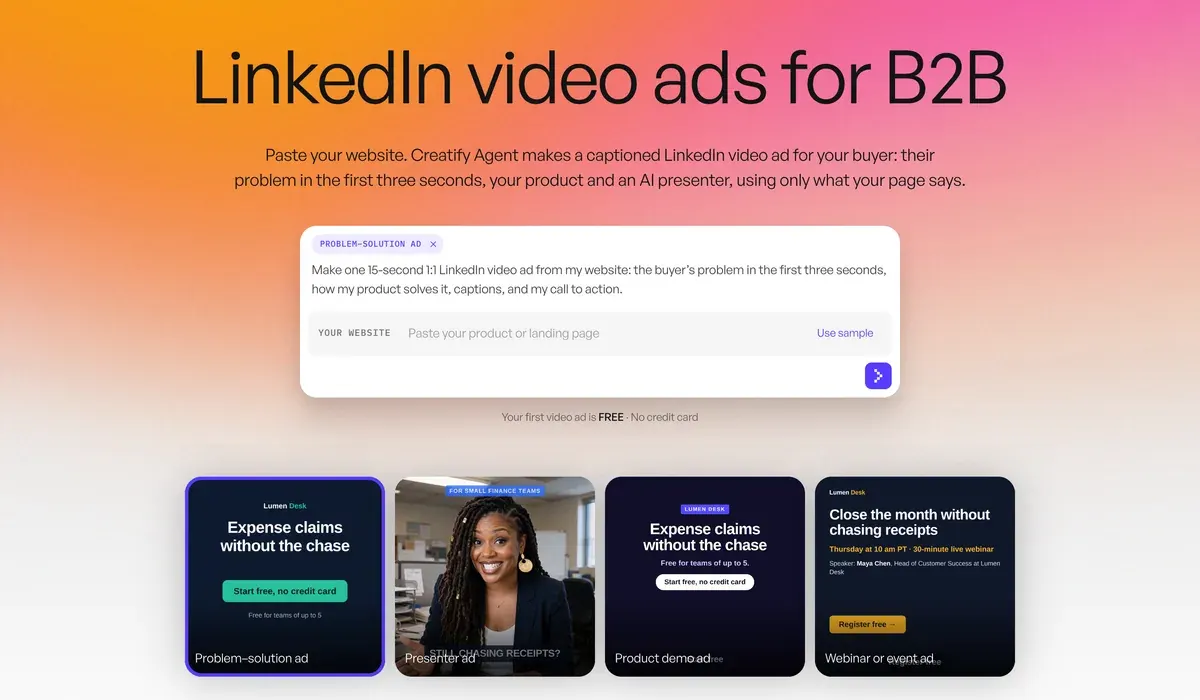
The first ad comes square, so ask for LinkedIn’s recommended 4:5 in the same chat. Your first video is free but carries a watermark, and the Creatify free plan covers what that means for running ads.
The customer numbers on that page are Creatify’s own. One quotes a 27 per cent lower cost per new customer on Meta. Nothing there measures LinkedIn. Users also report details that miss the script (17 of 61 sources: Trustpilot, Trustpilot), so check every product name and screen.
Standard at $15 a month has one seat. Pro at $55 a month has 2 seats and 3 custom avatars, so a founder can front language versions with their own likeness and consent. Avatar video bills per 15 seconds, rounded up.
Skip Creatify when the proof is your own interface. A screen recording shows the real product at no cost, and a generated scene can’t. Skip it too if a filmed founder or customer fronts the campaign and you need no language versions.
Other presenter tools carry their own rules. Synthesia lists Starter at $19 a month, and its Acceptable Use Policy bans stock avatars in paid social advertising without its written consent. HeyGen works out at $0.10 for a 30-second Avatar III video on Creator. Its terms allow paid ads on Creator, Pro and Business, and forbid them on Free.
Questions about B2B video ads
How long should a LinkedIn video ad be?
Fifteen seconds fits both of LinkedIn’s recommendations: 15 to 30 seconds for every placement, and 7 to 15 seconds for completion.
Which aspect ratio does LinkedIn recommend for video ads?
LinkedIn marks vertical 4:5 as its recommended ratio. It also accepts 1:1, 16:9 and 9:16.
Does LinkedIn allow AI video in ads?
Its advertising policy has no section on AI content. Claims still need factual support, and you can’t imply an endorsement you don’t have.
More pages for Creatify users, sorted by job, in the Creatify hub
Sources
- LinkedIn: Video ads advertising specifications, LinkedIn Help, ratios, 3 seconds to 30 minutes, 15 to 30 seconds recommended, 75 KB to 500 MB, MP4, under 30 FPS, SRT captions, text limits. Checked
- LinkedIn: Video Ads with LinkedIn, autoplay muted by default; captions strongly recommended. Checked
- LinkedIn: Best practices for video ads, LinkedIn, sound off, burned-in subtitles, 7 to 15-second videos with up to a 300 per cent completion lift (LinkedIn data, 2025). Checked
- LinkedIn: Making the Most of Your Budget, LinkedIn, minimum daily and lifetime budgets. Checked
- LinkedIn: LinkedIn ad pricing, costs set by the ad auction; no figures published. Checked
- LinkedIn: Thought Leader Ads, LinkedIn Help, member, creator and employee posts; full name on the profile; permission by email; no call-to-action button on video. Checked
- LinkedIn: LinkedIn Advertising Policies (18 November 2025), no AI section; claims need factual support; no implied endorsement. Checked
- ZenABM: LinkedIn Ads Benchmarks: Real Data from 211 B2B Companies in 2026 (16 February 2026), 211 companies, 161,256 ads, medians by format; the period covered is not stated. Checked
- Factors.ai: Understanding LinkedIn Ads Budget (28 July 2026), Sponsored Content cost per click range; no source or sample stated. Checked
- Creatify: Creatify for LinkedIn ads, 15-second captioned ad from a website link, square first, 4:5 or 16:9 on request; customer numbers are vendor figures. Checked
- Creatify: Creatify credit usage, billing and validity, 5 credits per 15 seconds, rounded up. Checked
- Synthesia: Synthesia Acceptable Use Policy, last updated 23 February 2024; stock avatars in promoted, boosted or paid social advertising need written consent. Checked

Alexandre S.
Alexandre S. is a creative ad strategist and copywriter with ten years' experience in digital marketing across multiple channels.
Related pages
-
 Guide AI UGC vs human UGC: what the evidence says
Public comparisons of AI and human UGC ads, graded on how each was run and by whom. Most come from sellers or a single account. Checked 24 September 2026.
-
 Guide Creative fatigue on Meta ads and the Andromeda update
How to spot creative fatigue in Meta Ads Manager, why Andromeda rewards many distinct creatives, and how AI tools make that volume. Checked 15 Oct 2026.
-
 Guide How to use Creatify
A 30-second Creatify ad uses 10 credits, and the agent’s cost is unknown until it finishes. Eight steps to a first ad, with what each spends, 5 November 2026.
-
 Best list AI video tools for agencies
Seats, brand spaces, client rights and white label by plan, plus what five clients at ten ads each cost on Creatify, HeyGen and Synthesia. Checked 7 Nov 2026.


