Kit (formerly ConvertKit) vs Mailchimp
Verdict: Kit or Mailchimp
Kit Free for lists under 10,000 that skip automations; Mailchimp Standard for in-editor AI writing at 500 contacts. Paid, Kit Creator and Mailchimp Standard sit within 3 per cent of each other at 2,500 and 10,000 contacts, checked . Mailchimp’s terms (section 30) let it train AI on Customer Data; Kit’s help centre says Kit trains no AI on Kit data.
Kit
- Best for
- Solo creators and small newsletter or course businesses under 10,000 subscribers, free without automations or paid with visual automations priced by list size.
- Not for
- Teams needing predictable cost as the list grows: tiers step up with every band of confirmed subscribers, and Creator reaches $379 a month at 50,000.
Mailchimp
- Best for
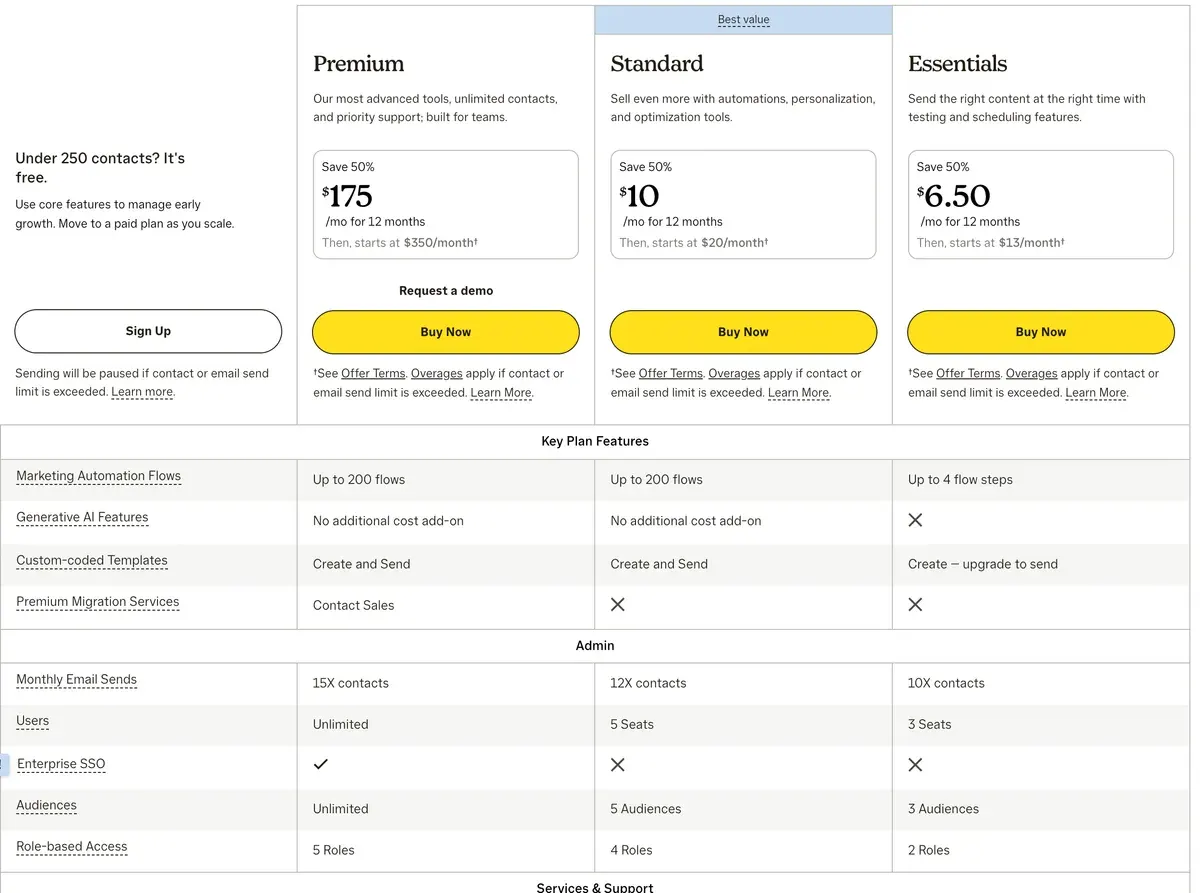
- Small lists that want a large integrations catalogue and templates: Essentials starts at $13 a month for 500 contacts.
- Not for
- Buyers needing AI on a cheap plan (none on Essentials) or holding many unsubscribed contacts, which are billed. Terms let Mailchimp use AI inputs and outputs, Customer Data included, for machine learning (terms 30).
| Kit | Mailchimp | |
|---|---|---|
| Where they differ | ||
| Monthly from (USD) | $39 | $13 |
| Free trial | 14-day free trial on Creator and Pro, no card required (pricing page capture 2026-10-30; help centre article dated 2026-09-23). | The pricing page offers a free trial of Premium for 1 month (read 2026-11-01). |
| Free plan size | Under 10,000 subscribers, no automations | 250 contacts, 500 sends a month |
| Who counts towards the bill | Confirmed subscribers | Every contact, unsubscribed ones included |
| Over the limit | Moves up a tier automatically | Overage blocks on the next bill |
| AI from | No plan named for editor AI; AI Connectors (MCP) on Creator | Standard (generative AI) |
| Trains AI on your list | No, per the help centre | Yes, Customer Data included (terms 30) |
| The same on both | ||
| Free plan | Both: Yes | |
| API | Both: Yes | |

Is Kit the same as ConvertKit?
Yes. ConvertKit renamed itself Kit, and on 1 November 2026 convertkit.com answers with a permanent redirect (an automatic forward) to kit.com. Guides that say ConvertKit describe the same product.
Which costs less at your list size?
Kit costs nothing under 10,000 subscribers, the lower bill for a list that can do without automations. Mailchimp’s free plan stops at 250 contacts. Each tool’s cheapest plan that fits the list, read on from the Kit pricing page and the Mailchimp pricing page:
| Tool | 500 contacts | 2,500 contacts | 10,000 contacts | 50,000 contacts | Free plan | Checked | Pricing page |
|---|---|---|---|---|---|---|---|
| Kit | $0 Free | $0 Free | $0 Free | $379 Creator | Free: up to 10,000 contactsUnlimited broadcasts, forms and landing pages, tagging, segmentation, A/B testing of broadcasts, API access, digital products. No visual automations, sequences, rules, RSS campaigns, AI Connectors or paid apps. Wording is under 10,000in one sentence and up to 10,000in another (help centre, 2026-09-23). | kit.com/pricing | |
| Mailchimp | $13 Essentials | $45 Essentials | $110 Essentials | $385 Essentials | Free: up to 250 contacts, 500 emails a month250 contacts, 500 sends a month with 250 a day, 1 audience, 1 seat, Mailchimp branding, no scheduling, limited templates, no generative AI. Sending is held above 250 contacts. | mailchimp.com/pricing/marketing |
Scroll sideways for all 8 columns
Those rows compare unlike plans, though. Kit Free has no visual automations, sequences or AI Connectors (Kit Free plan).
The Kit Free plan
Price The Free plan costs $0 per month for as long as you stay under 10,000 subscribers.
Not on Free Visual automations and the automation template library, email sequences, rules and RSS campaigns, AI Connectors, and paid apps in the Kit App Store.
Kit’s help centre words the free limit both as “under 10,000” and “up to 10,000” subscribers. Past it, you upgrade to a paid plan to keep sending.
The Kit Free plan
Past the cap You’ll need to upgrade to a paid plan to keep sending.
Switching back If you’re on a paid plan, you keep your paid features until the end of your current billing period. If you’re on a trial, access to paid features ends as soon as you switch.
Automations Visual automations and sequences stop running while you’re on the Free plan.
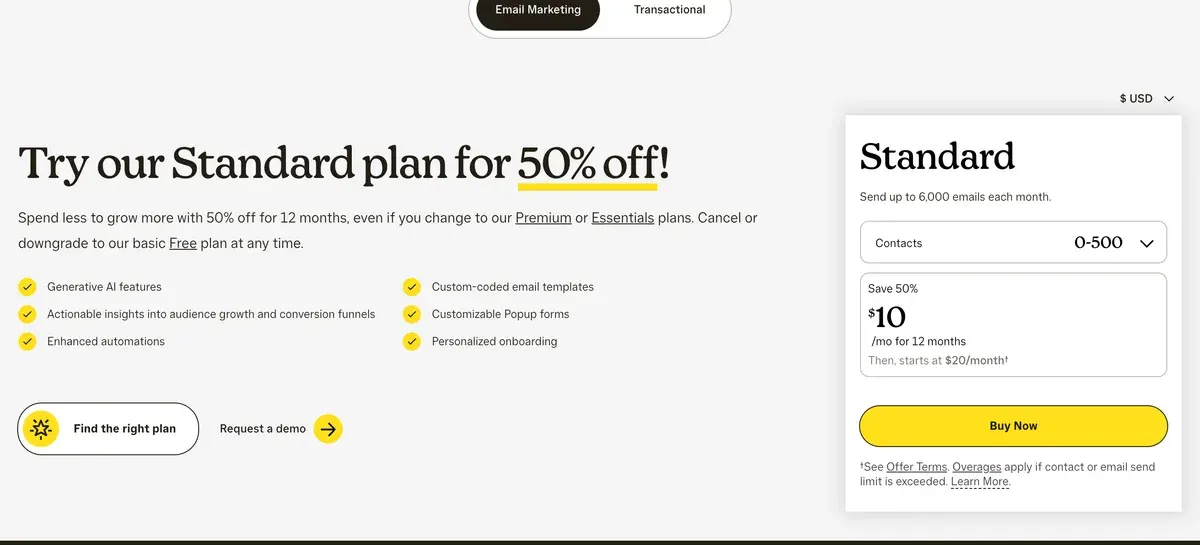
Mailchimp Essentials has no generative AI. The closer match is Kit Creator, Kit’s first plan with automations and AI Connectors, against Mailchimp Standard, Mailchimp’s first plan with generative AI.
| Contacts | Kit Creator | Mailchimp Standard |
|---|---|---|
| 500 | $39 | $20 |
| 2,500 | $59 | $60 |
| 10,000 | $139 | $135 |
| 50,000 | $379 | $450 |
Scroll sideways for all 3 columns
Kit’s slider jumps from 45,000 to 55,000 subscribers, so a 50,000 list pays the 55,000 price. Kit’s smallest paid step is 1,000, which is why it costs nearly double at 500. A 1,000-subscriber list also pays $39 on Kit Creator. Mailchimp prices it on its 501 to 1,500 tier, between the 500 and 2,500 rows.
Two offers sit outside these list prices. Kit’s yearly billing saves 17 per cent (Kit pricing). Mailchimp shows 50 per cent off for the first 12 months and publishes no yearly price, so month 13 brings the full figure (Mailchimp pricing).
The same tiers for 15 tools, with a finder: email marketing prices.
Who counts towards each bill?
Kit bills by confirmed subscribers, and Mailchimp bills by every contact you store. The gap grows with the age of your list.
Mailchimp’s help centre says subscribed, non-subscribed and unsubscribed contacts all count towards the limit; archived, cleaned and deleted ones do not (About Mailchimp pricing plans).
How contacts are counted
Subscribed, unsubscribed, and non-subscribed contacts are included in your contact count.
Archived, cleaned, and deleted contacts don’t count toward your contact total or the price of your marketing plan.
A list that has shed 1,000 unsubscribers keeps paying for them until you archive them.
Kit’s billing article counts confirmed subscribers and ignores how many emails you send. Pass a tier and the account moves up by itself. Dropping back is a manual “Switch to a lower tier” request that takes effect on the next billing date. Kit’s billing article does not say how it counts unsubscribed or bounced addresses.
Mailchimp also caps sends at 12 times your contacts a month on Standard. Over a contact or send limit, it adds overage blocks to the next bill instead of stopping your campaign (Mailchimp pricing).
Which AI features sit on which plan?
Mailchimp’s generative AI starts on Standard. Kit names no plan for its editor AI. Its AI Connectors (an MCP server, a link that lets Claude or ChatGPT read and act on your account) need Creator.
| Tool | AI feature | Lowest plan | Limits | Checked |
|---|---|---|---|---|
| Kit | Subject lines AI email writing tools (subject line generator and tester) | Not stated | kit.com/ai says subject lines are generated and tested in the broadcast editor. No plan and no usage limit stated on that page; lowest plan not verified. | |
| Kit | Other AI Connectors (Kit MCP) | Creator | 65+ tools let Claude, ChatGPT, Cursor and other clients read the account and act on it; Free can connect but not run tools; rate limit 120 requests a minute per connection. | |
| Kit | Other AI apps in the Kit App Store | Free apps on any plan; paid apps need Creator or Pro | Third-party apps (kit.com/ai names involve.me, Lex, Wordsmith, Ada) vary; some free, some subscriptions. Each app has its own data practices. | |
| Mailchimp | Email writing Generative AI features (content generation) | Standard | Listed as No additional cost add-onon Standard and Premium, Not includedon Essentials and Free. Terms 30 says it covers campaigns, performance analysis and organising contacts. | |
| Mailchimp | Segments Advanced segmentation and pre-built segments | Standard | Not marked as AI on the page. | |
| Mailchimp | Predictions Predictive segmentation | Standard | Named in the Premium feature set; footnote 17 says Predictive segments available on Standard or Premium plans only. |
Scroll sideways for all 5 columns
The Mailchimp pricing page lists generative AI as “No additional cost add-on” on Standard and Premium and “Not included” on Essentials and Free. A pricing page footnote puts predictive segments on Standard or Premium; Standard starts at $20 a month for 500 contacts, read .
Kit’s AI page describes a subject-line generator and tester inside the broadcast editor, and names no plan or limit (kit.com/ai).
AI Connectors give an assistant 65 or more tools on your account. On Free the client connects, but every tool call returns an upgrade prompt (Kit help centre). What these features do across the category: AI features in email tools.
Does Kit or Mailchimp train AI on your list?
Mailchimp’s terms say yes, Customer Data included. Kit says it trains no AI model on Kit data; that statement sits in a help article, and its terms do not mention AI.
| Tool | Trains AI on your data | In plain words | The clause | Terms |
|---|---|---|---|---|
| Kit | No | Kit’s help centre says Kit itself does not train any AI or LLM on Kit data, including email content and de-identified subscriber data. The statement is in the AI Connectors FAQ; the terms and privacy policy do not mention training, and a third-party AI client you connect applies its own settings. | Kit itself does not train any AI/LLM on Kit data. Please note, however, once a creator connects AI Connectors to a third-party AI client (ChatGPT, Claude, Gemini, etc.), that provider's own data-handling settings govern whether prompts/data get used for model training.AI Connectors help article, Security and data FAQ (terms clause 8.2 licence to develop, maintain and improve the Servicesdoes not mention AI) | Dated 1 Oct 2026 |
| Mailchimp | Yes | Terms section 30 grants Mailchimp an irrevocable licence to AI Inputs and Outputs for any purpose including developing and improving the AI Model, and says it may use them, including Customer Data, for machine learning. It mentions account-setting preferences but does not say they stop training. The Intuit Global Privacy Statement lists training AI models as a use of personal information. Opt out: Terms 30 says You may select preferences about your data by visiting your account settings; the terms do not say this switches training off. | We may use your Inputs and Outputs, including Customer Data, for machine learning purposes in order to develop and improve the AI Model, the Services, and similar products and features, and you instruct us to process Customer Data for such purposes.Standard Terms of Use 30 | Dated 10 Oct 2025 |
Scroll sideways for all 5 columns
Mailchimp’s Standard Terms of Use (effective 10 October 2025) say “We may use your Inputs and Outputs, including Customer Data, for machine learning purposes in order to develop and improve the AI Model” (section 30).
Standard Terms of Use, 30
We may use your Inputs and Outputs, including Customer Data, for machine learning purposes in order to develop and improve the AI Model, the Services, and similar products and features, and you instruct us to process Customer Data for such purposes.
Customer Data is your contact list and what you store about it.
The same section adds “You may select preferences about your data by visiting your account settings”, without saying that a setting stops training.
Section 30 also grants Mailchimp an “irrevocable” licence to process Inputs and Outputs “for any purpose”. It asks you to add a disclaimer to AI-built campaigns where Mailchimp requires one.
Kit’s AI Connectors article states: “Kit itself does not train any AI/LLM on Kit data.” The same answer warns that a third-party assistant you connect follows its own training settings.
AI Connectors, security and data FAQ
Kit itself does not train any AI/LLM on Kit data. Please note, however, once a creator connects AI Connectors to a third-party AI client (ChatGPT, Claude, Gemini, etc.), that provider’s own data-handling settings govern whether prompts/data get used for model training.
Kit’s terms (5 September 2025) do not mention AI. Every vendor’s answer in one table: does your email tool train AI?
What Kit charges on sales, and what Mailchimp adds
Kit takes a fee on anything you sell through it: paid newsletters, digital products and tips. Selling in US dollars costs 3.5 per cent plus $0.30 a transaction, on every plan including Free (Kit Commerce FAQs). The article calls that “the only cost of selling through Kit”.
Mailchimp’s extra charges come from the list instead. Unsubscribed contacts count, overage blocks land on the next bill, and Premium has no tier below 10,000 contacts. Its pricing page sells SMS as an add-on.
So a creator selling a paid newsletter to 2,000 readers pays Kit nothing a month on Free, plus the fee on each sale. On Mailchimp, the same list needs a paid plan before the first email.
Moving from Mailchimp to Kit
Kit includes migration with every paid plan (Kit migrations). Under 10,000 subscribers, the Essentials service moves your subscribers, tags, lists and segments in 2 to 5 business days.
From 10,000 subscribers, Concierge adds a rebuild of your forms, automation emails, templates and integrations, with a rush service at extra cost.
Kit’s migrations page says broadcast analytics stay on the old platform, so export the campaign reports you want before closing that account. Archive the unsubscribed contacts you no longer need first, too: Mailchimp bills them until you do.
What Kit and Mailchimp users report
Kit users praise ease of use and complain about slow support and price rises as lists grow. Mailchimp’s readable review text is too thin to show a pattern.
- Kit is easy to use, including for people with little technical skill (6 of 19 Kit sources: Trustpilot, Trustpilot).
- Kit support turns slow or unhelpful once a billing or technical problem starts (5 of 19 Kit sources: Trustpilot, Trustpilot).
- Kit’s price climbs as contacts are added, and some find it too high for their size (4 of 19 Kit sources: Trustpilot, Trustpilot).
- Kit closed some accounts with little or no notice (2 of 19 Kit sources: Trustpilot, Trustpilot).
- Mailchimp’s cost grows with the list, called a “subscriber tax” in a post promoting a rival (1 of 5 Mailchimp sources: Reddit).
Who should pick which?
Pick Kit if you run a newsletter under 10,000 subscribers and broadcasts are enough. Free covers it, and selling to that list costs only the per-sale fee. Pick Kit Creator from about 2,500 subscribers if you want automations. It sits within 3 per cent of Mailchimp Standard at 2,500 and 10,000 and costs $71 less at 50,000.
Pick Mailchimp if your list sits near 500 contacts and you want generative AI on a plan that names it. Standard costs about half of Kit Creator there. It also suits teams that keep their list clean, since unsubscribed contacts are what inflate a Mailchimp bill.
For a newsletter that earns from ads and referrals, see beehiiv vs Kit. For a cheaper paid plan with AI drafting, Kit vs MailerLite and Mailchimp alternatives. Each tool alone: Kit for email marketing and Kit pricing, Mailchimp for email marketing and Mailchimp pricing. The whole section: AI email marketing.
Questions buyers ask about Kit and Mailchimp
Is Kit cheaper than Mailchimp?
Under 10,000 subscribers, yes, on Kit’s Free plan. On Kit Creator and Mailchimp Standard, Mailchimp costs less at 500 contacts and Kit costs less at 50,000. At 2,500 and 10,000 the two sit within 3 per cent.
Does Mailchimp charge for unsubscribed contacts?
Yes. Mailchimp’s help centre counts subscribed, non-subscribed and unsubscribed contacts towards your limit. Archived, cleaned and deleted contacts do not count.
Does Kit have AI writing?
Kit’s AI page describes a subject-line generator and tester in the broadcast editor, and names no plan. Its AI Connectors, which let Claude or ChatGPT work in your account, need Creator.
Does Kit migrate my list for free?
Yes, on any paid plan. Under 10,000 subscribers Kit moves subscribers, tags, lists and segments in 2 to 5 business days; from 10,000 it also rebuilds forms and automation emails.
More email tool comparisons sit together in the AI email marketing hub
Sources
- Kit: Kit pricing, subscriber slider read in a browser, monthly billing; yearly saves 17%; tier prices above 3,000 from the page’s own price script (Wayback capture 30 October 2026), matching the plan cards read 1 November 2026. Checked
- Kit help centre: The Kit Free plan, under 10,000 subscribers, also worded
up to 10,000
; no visual automations, sequences or AI Connectors. Checked - Kit help centre: Billing at Kit, billing by confirmed subscribers; tier moves up automatically, down by request. Checked
- Kit help centre: How to connect the Kit MCP to your AI tools, AI Connectors on Creator and Pro; the Security and data FAQ on training. Checked
- Kit help centre: Kit Commerce overview and FAQs, dated 3 September 2026; 3.5% plus 30 cents per USD sale, on every plan. Checked
- Kit: Kit migrations, migration included with every paid plan; Essentials under 10K subscribers (subscribers, tags, lists, segments, 2 to 5 business days), Concierge from 10K; rush on Concierge only; broadcast analytics stay on the old platform. Checked
- Mailchimp: Mailchimp marketing pricing, plan grid, generative AI on Standard and Premium, 50% introductory offer for 12 months. Checked
- Mailchimp help centre: About Mailchimp pricing plans, subscribed, non-subscribed and unsubscribed contacts count towards the limit. Checked
- Mailchimp: Mailchimp Standard Terms of Use, updated and effective 10 October 2025; section 30 on the AI Model. Checked
- Kit: Kit terms of service, dated 5 September 2025; no AI wording. Checked
- Kit: Kit AI, subject-line generator and tester in the broadcast editor; no plan or limit named. Checked

Alexandre S.
Alexandre S. is a creative ad strategist and copywriter with ten years' experience in digital marketing across multiple channels.
Related pages
-
 Profile Kit email marketing: what the free plan, the AI tools and your list size cost
Kit sends free to 10,000 subscribers; automations and AI Connectors start on Creator. Price at four list sizes and the AI-training answer, 1 November 2026.
-
 Pricing Kit pricing: what each plan costs from 500 to 50,000 subscribers
Kit Free holds 10,000 subscribers. Creator costs $39 a month at 1,000 subscribers and $379 at 50,000. Every step, the yearly rate and add-ons, 1 November 2026.
-
 Profile Mailchimp: what it costs at your list size, its AI and its terms
Mailchimp Essentials costs $13 a month for 500 contacts with no AI; Standard adds it at $20. Unsubscribed contacts are billed. Checked 1 Nov 2026.
-
 Pricing Mailchimp pricing: Free, Essentials, Standard and Premium from 500 to 50,000 contacts
Mailchimp Free holds 250 contacts. Essentials costs $13 a month at 500 contacts and $385 at 50,000. Every plan at four list sizes, checked 1 Nov 2026.
-
 Alternatives Mailchimp alternatives: what you save at your list size, and where the AI sits
Eight Mailchimp alternatives priced at 2,500 and 10,000 contacts, with the plan that holds AI and whether each trains on your list. Checked 1 Nov 2026.
-
 Compare beehiiv vs Kit (formerly ConvertKit)
Kit costs less below 10,000 subscribers, the two match at 10,000, and beehiiv Lite costs less at 50,000 with 0% of paid subscriptions. Checked 1 Nov 2026.


