Opus Clip alternatives
Verdict on Opus Clip alternatives
WayinVideo gives the most clipping minutes below OpusClip Pro’s price; Klap suits few clips an hour (read on ).
WayinVideo Pro lists $26.99 a month for 1,000 input minutes, and OpusClip Pro lists $29 a month for 300.
But WayinVideo’s free plan bars commercial use, and 3 of its 7 public reviews report a paywall after promised free credits.
For the most clipping minutes for less than OpusClip Pro: WayinVideo
Pro holds 1,000 input minutes a month against OpusClip Pro’s 300, and paid plans carry a commercial licence.
For a price per clip instead of per source minute: Klap
Basic bills each clip, from sources up to 3 hours. Below 20 clips an hour, it costs less than OpusClip Pro.
For twice OpusClip Pro’s minutes at the same list price: Vizard
Creator gives 600 credits at 1 per clipping minute, with uploads up to 10 hours. Its 2022 terms say nothing on ad use.
For captions and polish on clips you already have: Submagic
Animated captions in 118 languages with auto zooms and silence removal. Starter caps uploads at 2 minutes.
For clipping on a free plan with your own footage cleared for ads: CapCut
Your own footage exports with no watermark on Free; every CapCut sticker or font in an ad clip must be marked for commercial use.
| Tool | Monthly from (USD) | Cost per output at list price if every credit is used | Free plan | Official site |
|---|---|---|---|---|
| OpusClip The tool you are replacing | $15 | $0.0967per minute of source video | Yes | Visit OpusClip |
| CapCut | $9.99 | $0.033 to $0.083per second of Seedance 2.0 Mini | Yes | Visit CapCut |
| Klap | $29 | $0.29per clip (short), length set per job | No | Visit Klap |
| Munch Studio (formerly Munch) | $68 | Not computed | No | Visit Munch Studio |
| Spikes Studio | $32.99 | Not computed | Yes | Visit Spikes Studio |
| Submagic | $19 | $1.27 to $3.38per captioned video, up to 2 minutes | Yes | Visit Submagic |
| Vizard | $29 | $2.90per 60-minute source video clipped | Yes | Visit Vizard |
| WayinVideo | $15.99 | $1.92per 60-minute source video clipped | Yes | Visit WayinVideo |
Scroll sideways for all 5 columns
Prices checked between 15 Nov 2026 and 16 Nov 2026.

Why OpusClip users look elsewhere
OpusClip (often searched as Opus Clip) is an AI clipper. You give it a long video, such as a podcast or webinar, and it cuts out short vertical clips with captions. It also reframes each clip to 9:16, the upright shape of TikTok and Reels, keeping the speaker in shot.
It bills by the minute of source video. One credit is one minute you upload, however many clips come back (help centre). Pro lists $29 a month for 300 credits, so each source minute costs $0.0967 if every credit is used.
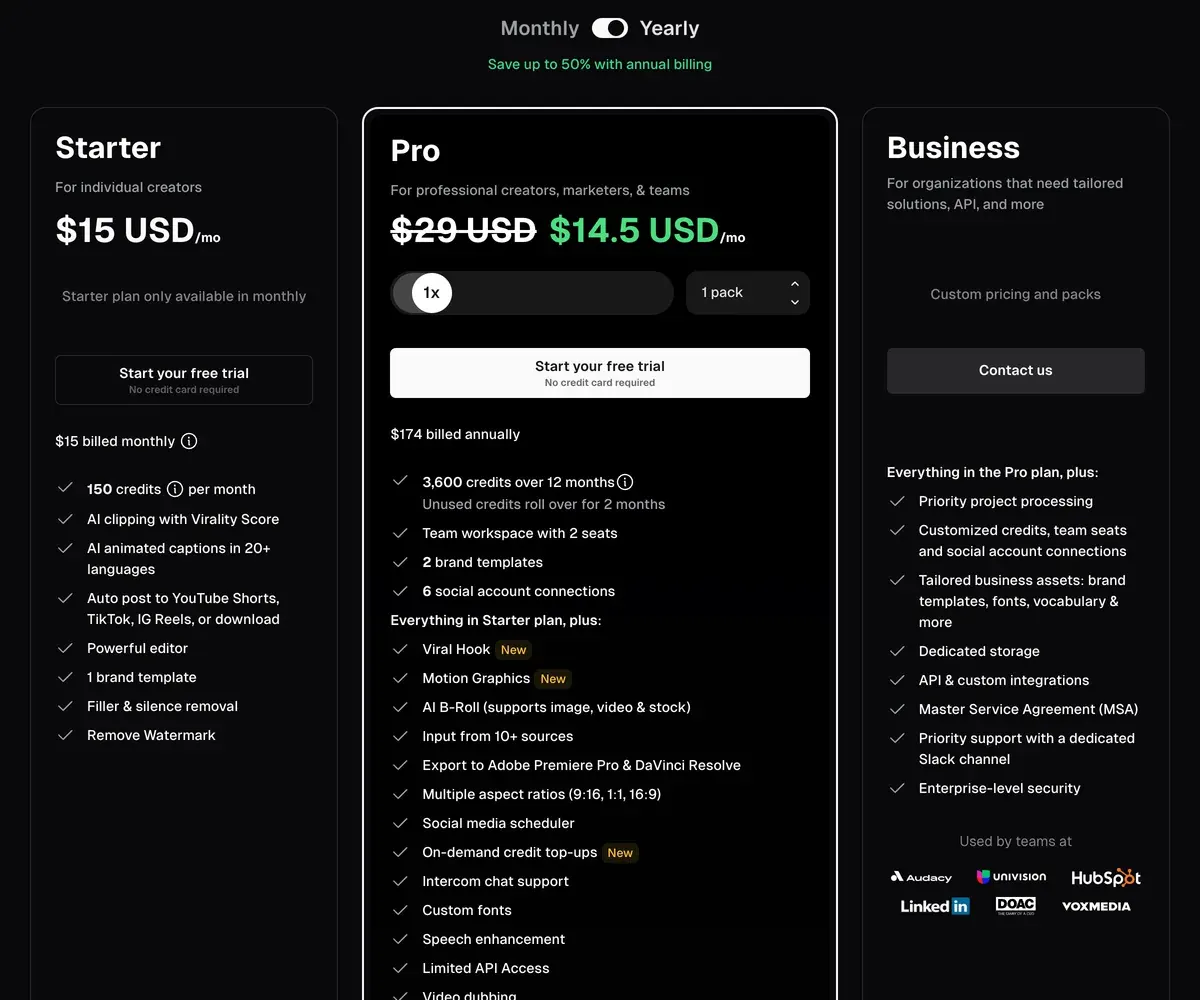
That model hurts when your recordings run long. Five hours of podcast a month already uses all of Pro. Users say the same: long videos get costly, with frequent prompts to buy more credits (5 of 54 sources: Trustpilot, Trustpilot).
The free plan is the other push. Its 60 monthly credits come with a watermark and no editing, and clips stop exporting after 3 days (pricing). The terms limit free users to “internal, personal, non-commercial use”, so a free clip cannot run as an ad.
Billing complaints come next. Seven of 54 sources report charges after cancelling or billing errors left unfixed (Trustpilot, Trustpilot). The terms add that fees already paid are not refunded. The full picture: the OpusClip profile.
What OpusClip Pro’s price buys on each tool
At about the price of OpusClip Pro, two rivals give you more source minutes. Vizard Creator doubles them at the same list price. WayinVideo Pro gives more than three times as many for less.

| Tool and plan | A month (USD) | What you get | Per source minute (USD) |
|---|---|---|---|
| OpusClip Pro | $29 | 300 minutes, 2 seats | $0.097 |
| WayinVideo Pro | $26.99 | 1,000 minutes, 2 seats | $0.027 |
| Vizard Creator | $29 | 600 minutes, shared with its editing agent | $0.048 |
| Klap Basic | $29 | 100 clips, sources up to 3 hours | Billed per clip: $0.29 |
| Spikes Studio PRO+ | $32.99 | 300 minutes | $0.110 |
| Submagic Pro | $39 | 15 Magic Clips runs on uploads up to 5 minutes | Billed per run |
| Munch Studio Essential | $68 | 500 minutes, plus posts and carousels | $0.136 |
Scroll sideways for all 4 columns
Each per-minute figure is the monthly price divided by the minutes the plan includes, if every one is used. CapCut is out of the table: it is a free editor with no minute allowance.
Klap needs its own maths. OpusClip says an hour-long video gives 15 clips on average (pricing). At that count, Klap Basic charges $4.35 for the hour against $5.80 on OpusClip Pro. The two cost the same at 20 clips an hour; above that, OpusClip wins on price.
Free OpusClip alternatives, and which free clips can run in ads
A free plan that bars commercial use is a trial for ad work. Three free plans here bar it in their terms: OpusClip, WayinVideo and Spikes Studio. Four stamp a watermark on every export: OpusClip, Vizard, Spikes Studio and Submagic.
| Tool | What the free plan gives | Watermark | Commercial use on free |
|---|---|---|---|
| OpusClip | 60 minutes a month; clips export for 3 days | Yes | Barred: “non-commercial use” |
| Vizard | 60 minutes a month at 720p; videos kept 3 days | Yes | The 2022 terms say nothing |
| WayinVideo | 100 one-time minutes at 720p; links only, no upload | No | Barred: “non-commercial purposes” |
| Spikes Studio | Demo clips, up to 30 minutes a month at 720p | Yes | The terms grant personal, non-commercial use on every plan |
| Submagic | Editing; limits not published | Yes | No plan limit in the terms |
| CapCut | Full editor; an AI long-video tool on the web | No, for your own footage | Your own footage, yes; stock only when marked |
| Klap | No free plan: 1 video to preview and edit | No download | No download |
| Munch Studio | No free plan: a 7-day trial with a card | Not stated | No free plan |
Scroll sideways for all 4 columns
For ads on a free plan, CapCut is the one tool here with no watermark on your own footage and no free-plan bar in its documents.
Its help article (18 March 2026) says your own footage exports with no watermark, and its long video to shorts tool lets “AI smart analysis identify video highlights” (tool page). That page does not say which plan the tool needs.
To try a clipper before paying, Vizard and OpusClip each give 60 minutes a month. WayinVideo’s 100 minutes come once and carry no watermark, but only links go in: local upload starts on Starter.
WayinVideo: the most clipping minutes for the money
WayinVideo bills the way OpusClip does, 1 credit per input minute (help centre), with far more credits per dollar. Pro lists $26.99 a month for 1,000 a month; Starter lists $15.99 a month for 500 (pricing).
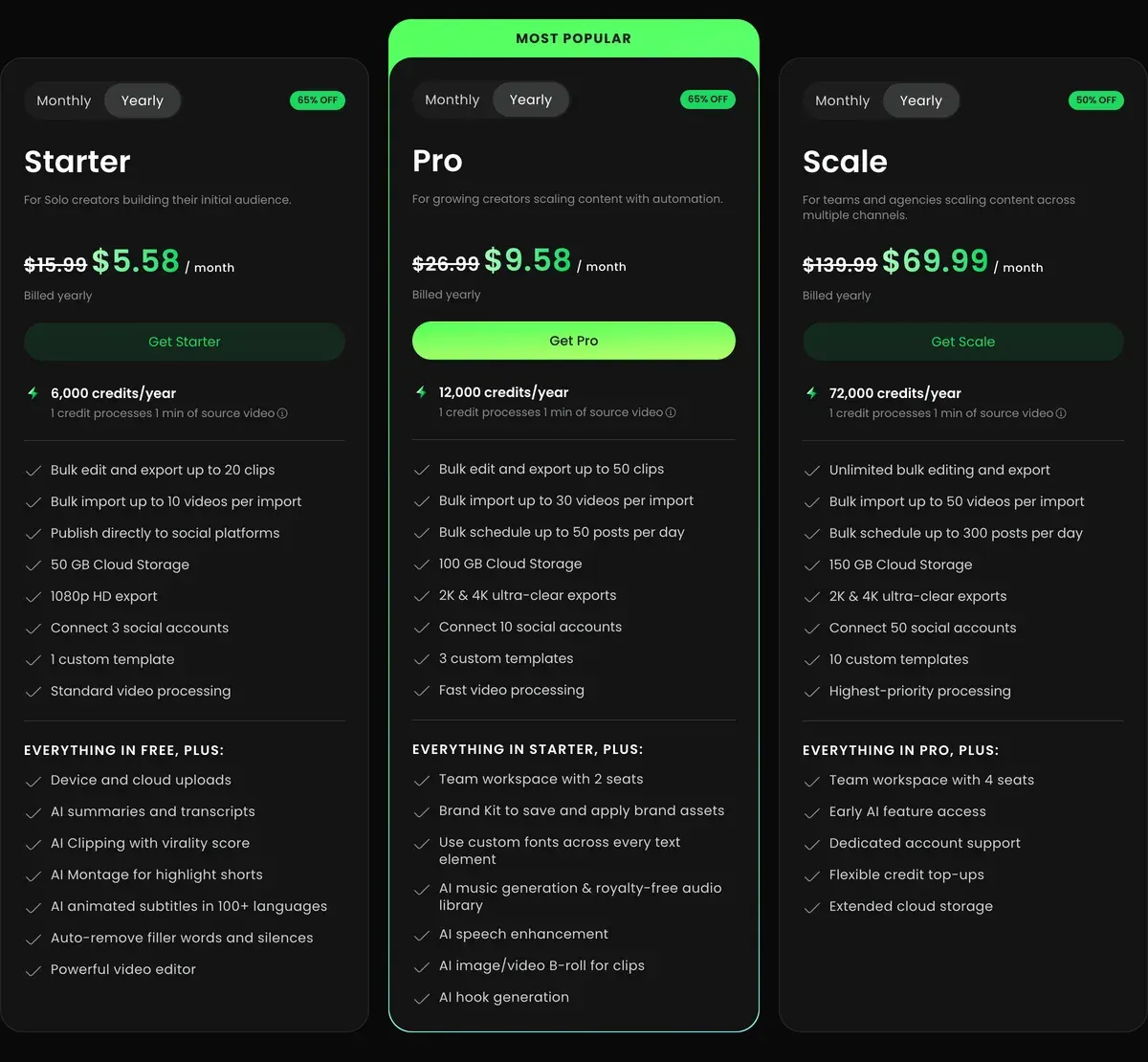
WayinVideo Pro has 2 team seats, as OpusClip Pro does, plus AI b-roll (stock or AI footage laid over the speaker) and scheduled auto-posting to 10 accounts. Its terms (12 February 2026) license “users of Paid Services” for commercial purposes, as OpusClip’s do.
Two catches. Monthly credits do not roll over, where OpusClip Pro keeps them 2 months. And yearly prices sit under a countdown discount, while the terms renew at “the then-current, non-promotional rate”, which the page does not show.
Public reviews are thin: 7 in all. Reviewers find it quick and easy for clips and captions (2 of 7 sources: Trustpilot, Trustpilot). Others report a paywall after promised free credits (3 of 7 sources: Trustpilot, Trustpilot).
- Best for
- Streamers, podcasters and agencies clipping many hours a month who want cheap per-minute clipping, bulk import and auto-publishing.
- Not for
- Free users who need commercial use (the terms limit non-paying users to non-commercial use), and anyone who needs API work billed from a subscription: API Units are bought apart.
Klap: a price per clip instead of per source minute
Klap counts clips, so the length of your recording stops mattering. Basic lists $29 a month for 100 clips from sources up to 3 hours (pricing). A 2-hour podcast that yields 10 usable clips costs 10 clips; on OpusClip it costs 120 credits.
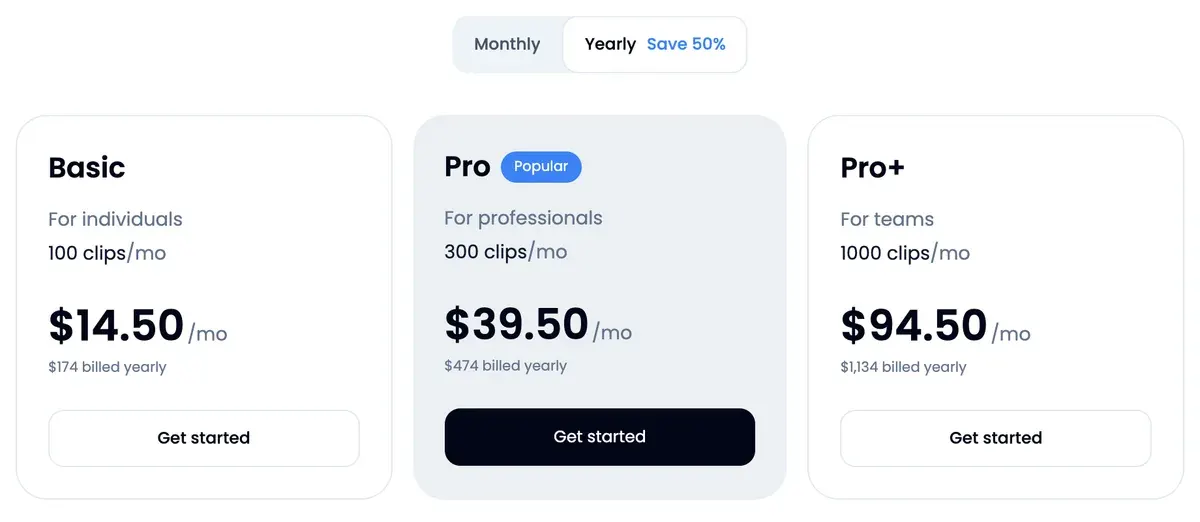
It suits OpusClip users who clip long recordings but post few clips from each. Paid exports carry no Klap branding, and scheduling to five networks comes on every plan.
What you give up: Klap has no free plan, only 1 video to preview, and no plan card states a seat count. Its terms (25 July 2024) have no clause on who owns a clip or on ad use. Section 4 makes you responsible for rights in what you upload.
Users praise the time it saves (7 of 28 sources: Trustpilot, Trustpilot). Cancelling is the main complaint (5 of 28 sources: Trustpilot, Trustpilot). Head to head: Klap vs OpusClip.

- Best for
- Creators and agencies cutting many shorts from long videos (up to 3 hours each) who want a fixed clip count whatever the source length.
- Not for
- Anyone who needs to download a clip before paying: the free try covers 1 video for preview and editing only. Teams needing a stated seat count, since no plan card gives one.
Vizard: double the minutes at OpusClip Pro’s price
Vizard Creator lists $29 a month, the same as OpusClip Pro, for 600 credits (pricing). Clipping costs 1 credit a minute (help centre), so the hour costs $2.90 if every credit is used.
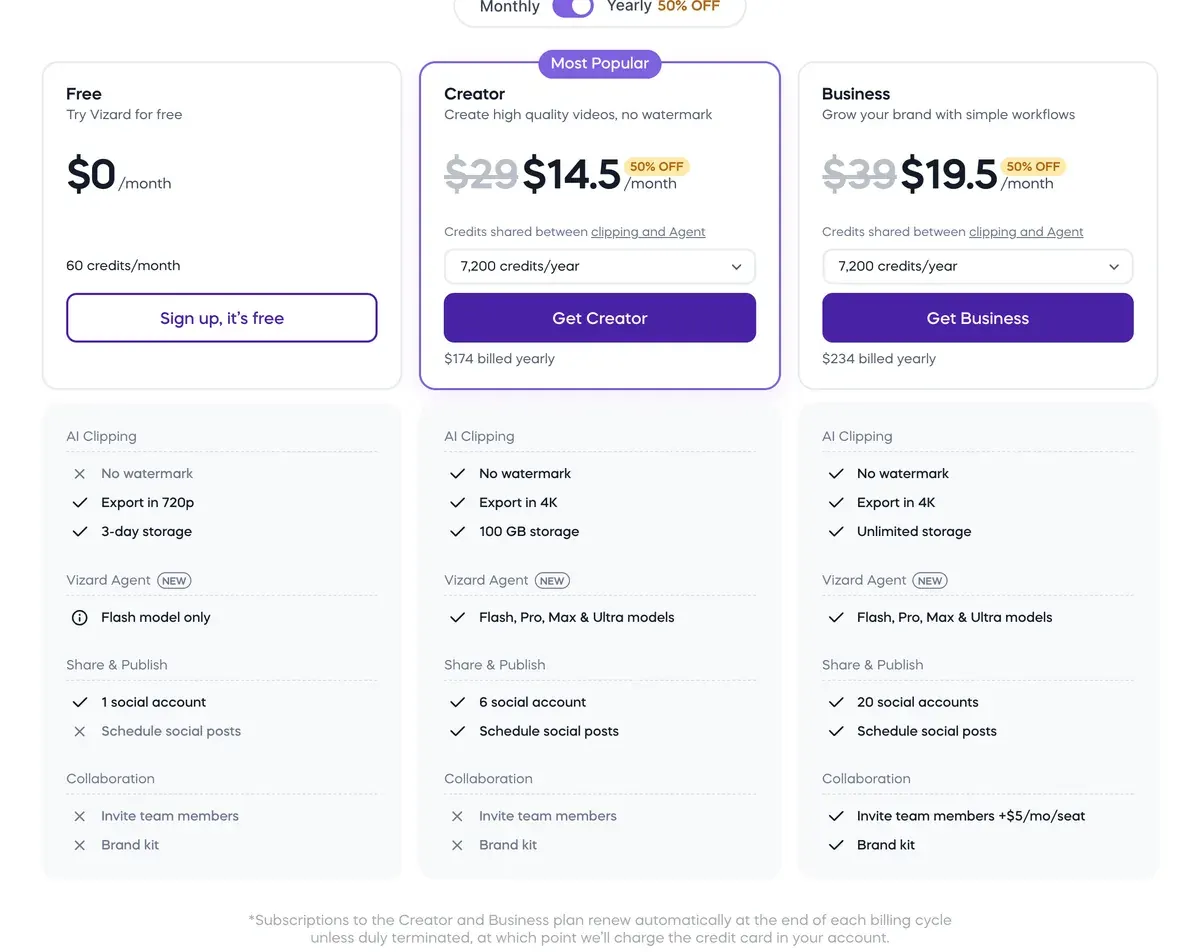
Uploads run up to 10 hours, which suits day-long webinars. You can also name a topic, and it searches the video for the moments about it. Unused credits roll over for 2 months, as on OpusClip Pro.
The credits are shared with Vizard Agent, its prompt-driven editor. An Agent job uses far more: half finish within about 230 credits (help centre).
For ads, Vizard’s terms (31 October 2022) say nothing on who owns clips or on commercial use. Reviewers report unused credits lost at cancellation (4 of 12 sources: Trustpilot, Trustpilot). More: the Vizard profile.
- Best for
- Podcasters, coaches and marketers who clip long recordings into shorts every week and want reframing, captions, scheduling and an API on one credit balance.
- Not for
- Buyers who want clear rights on outputs: the 2022 terms say nothing about who owns clips or whether they can run in ads.
Submagic: captions on clips you already cut
Submagic works on short videos. It adds animated captions in 118 languages, then auto zooms, stock b-roll and silence removal (pricing). Its Magic Clips feature turns a longer upload into clips: Starter’s 45 credits cover 5 runs and Pro’s 120 cover 15.
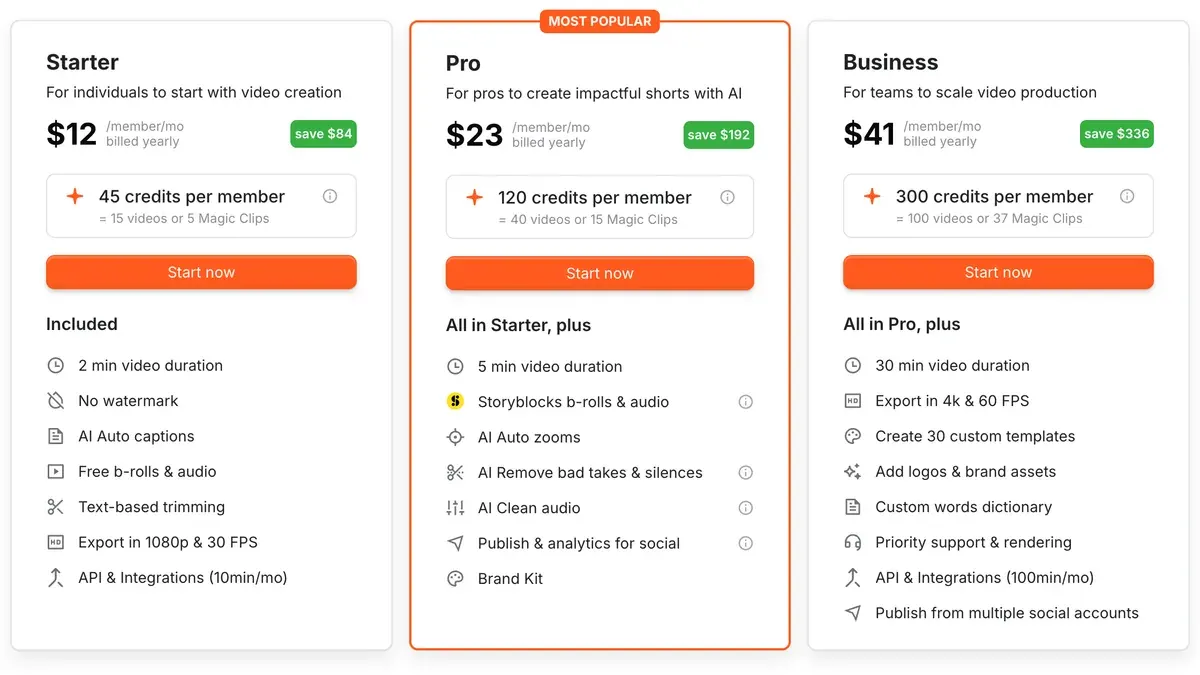
Upload caps keep it from replacing OpusClip on long sources: 2 minutes on Starter, 5 on Pro, 30 on Business + API. Pairing them works better, with OpusClip or Klap cutting and Submagic polishing. Starter lists $19 a month per member.

Its terms set no plan limit on commercial use and leave you “full responsibility for the use of AI-generated results”. Support is what reviewers single out (17 of 21 sources: Trustpilot, Trustpilot). More: the Submagic profile.
- Best for
- Creators and small teams who caption and polish talking-head shorts every week and want b-roll, zooms, silence removal and social publishing in one editor.
- Not for
- Teams clipping hours of long video a month: Starter caps uploads at 2 minutes, and a Magic Clips run costs 8 credits, so 45 credits give 5 runs.
CapCut: free clipping you can use for ads
CapCut is a timeline editor with an AI long video to shorts tool on the web. The tool finds highlights, turns 16:9 into 9:16 with subject tracking and adds captions (tool page). You can also cut every clip by hand.
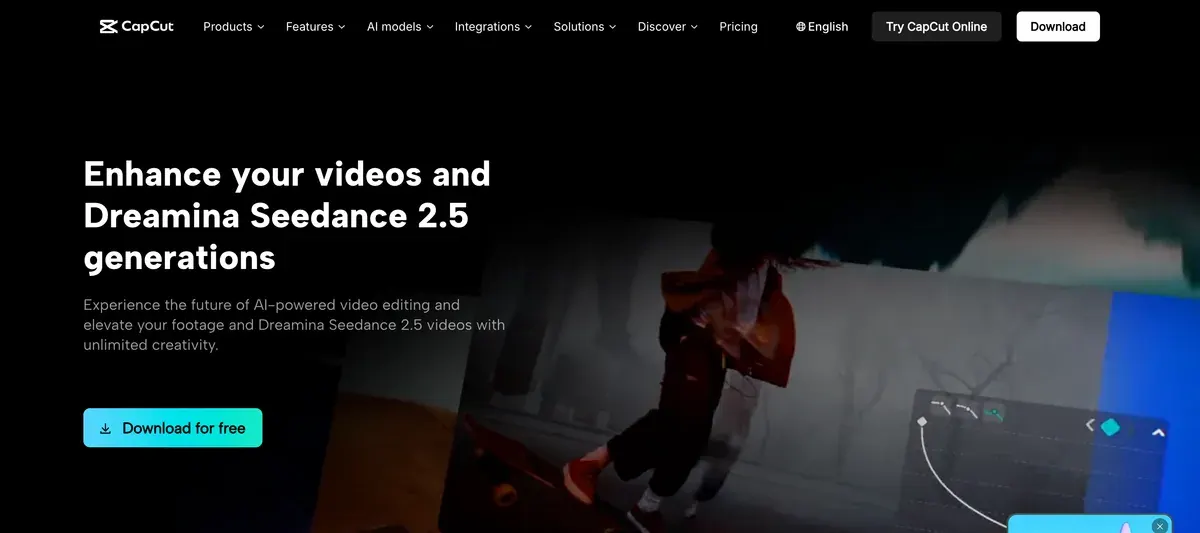
Your own footage can run in paid ads from the free plan. The limits sit in the Materials License Agreement (22 January 2026). Stock and templates count as personal use unless marked “commercial use” (section 2). One unmarked sticker or font makes the whole clip personal use only (section 2), so check the captions and effects the AI tool adds.
Commercial Sounds stay on CapCut and TikTok (section 3).
Pro lists $19.99 a month if you want its AI credits. Charges after cancelling or a trial lead the complaints (10 of 64 sources: Trustpilot, Trustpilot). More: the CapCut profile.
- Best for
- Editing your own footage into short social videos and TikTok ads on a free or cheap plan, with auto captions.
- Not for
- Ads built from CapCut templates or stock unless every asset is marked commercial use. Meta or YouTube ads with CapCut music, since Commercial Sounds cover CapCut and TikTok only.
Spikes Studio: stream VODs, with a personal-use licence
Spikes Studio imports Twitch, Kick and YouTube VODs, the saved recordings of past streams. PRO+ lists $32.99 a month for 300 minutes, the same allowance as OpusClip Pro at a higher price (pricing).
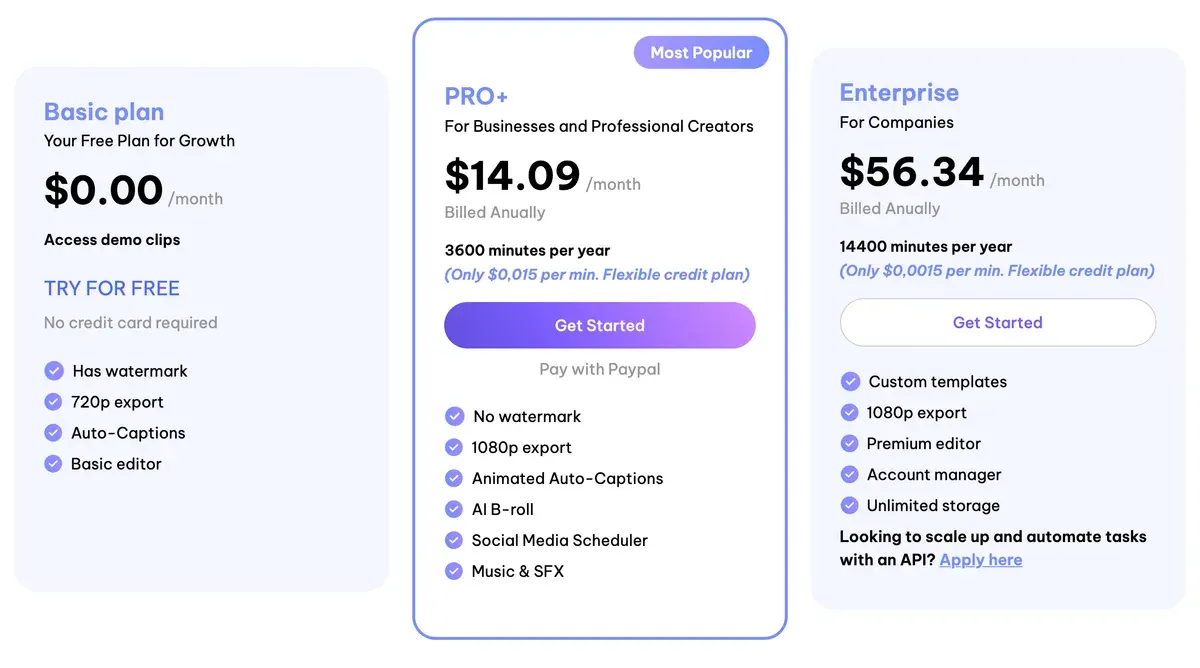
Brands should look elsewhere. Section 2 of its terms grants use “solely for your own personal and non-commercial use”, though section 8 keeps your clips yours. Reviewers report charges after cancelling (4 of 12 sources: Trustpilot, Trustpilot).
- Best for
- Streamers and podcasters who clip Twitch, Kick or YouTube VODs into vertical shorts and want captions, B-roll and a scheduler in one minute-based plan.
- Not for
- Brands that need written commercial rights: the terms grant use
solely for your own personal and non-commercial use
, and the free plan exports at 720p with a watermark.
Munch Studio: clips inside a social media manager
Munch Studio (formerly Munch) now sells itself as an AI social media manager, with clipping billed as video repurposing minutes. Essential lists $68 a month for 500 minutes, and it also writes posts and schedules them to five networks (pricing).
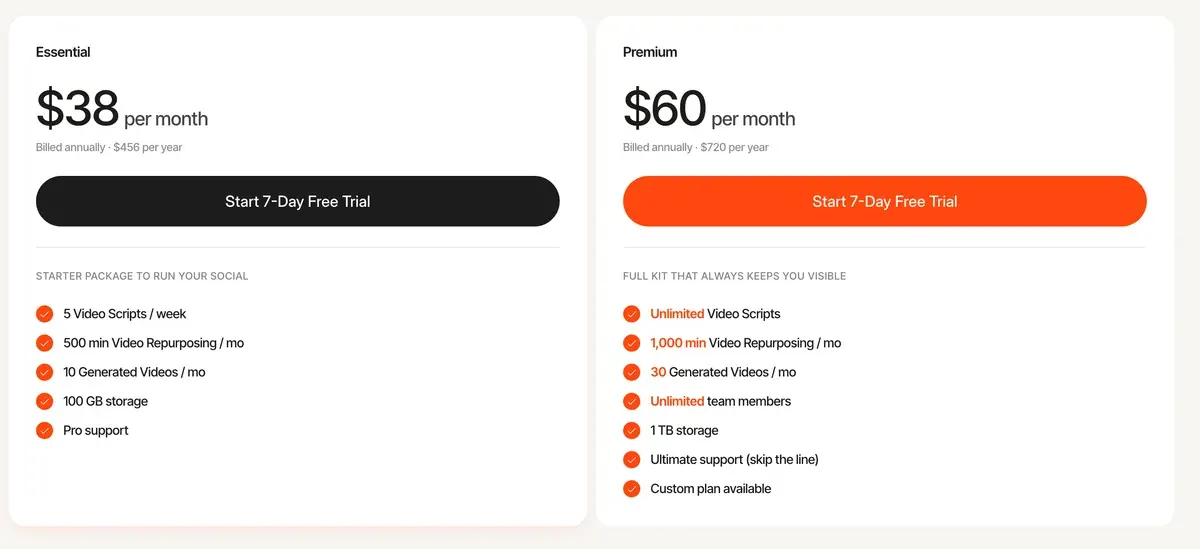
Clause 15.7 of its terms makes you owner of the deliverables, while 11.1 bars content on alcohol, tobacco, gambling, weapons or dating. Ten of 22 sources report charges after cancelling or for plans never chosen (Trustpilot, Trustpilot).
- Best for
- Small businesses and agencies that want posts, carousels and clips from long videos, scheduled to Instagram, Facebook, LinkedIn, YouTube and TikTok from one app.
- Not for
- Clippers or editors who only want long-to-short clipping: the cheapest plan is 68 USD a month for 500 input minutes, with no listed free plan and no public API.
When OpusClip is still the better pick
Stay on OpusClip if your team edits together. Each Pro pack adds 2 seats, up to 4, and Pro exports to Premiere Pro and DaVinci Resolve (pricing). Its scheduler posts to nine networks, X, Pinterest, Threads and Bluesky among them.
It also writes ad use down. Paid Services users “are licensed to use the Services for commercial uses” (terms); of the clippers here, WayinVideo is the other one whose terms say so.
And it keeps fans. Eight of 54 sources call it fast and easy from long video to clips (Trustpilot, Trustpilot). Every plan: OpusClip pricing. Every clipper by job: AI clipping tools.
Questions buyers ask about Opus Clip alternatives
Is there a free Opus Clip alternative?
Yes. Vizard Free gives 60 minutes a month at 720p with a watermark. CapCut’s free plan exports your own footage with no watermark; keep every CapCut asset in it marked “commercial use”.
Who are Opus Clip’s main competitors?
Klap, Vizard and WayinVideo are the closest: each cuts long videos into clips from about the same monthly price. Klap bills per clip; the other two bill per source minute, like OpusClip.
Is Klap cheaper than Opus Clip?
Below 20 clips an hour of source, yes, against OpusClip Pro. At 15 clips from an hour, Klap Basic charges $4.35 and OpusClip Pro about $5.80. WayinVideo Pro clips the same hour for about $1.62.
Sources
- OpusClip: OpusClip pricing, Free, Starter and Pro cards; 10 GB uploads on Free and Starter, 30 GB on Pro; Starter 9:16 only; the average of 15 clips for an hour-long video. Checked
- OpusClip help centre: How are credits consumed?, 1 credit per minute of source video; partial minutes round down, clips under a minute round up. Checked
- Opusclip Inc.: OpusClip Terms of Service (effective 17 November 2025), OpusClip Account section: non-commercial use for free users, commercial use for Paid Services users; Auto-Renewal for Paid Services. Checked
- WayinVideo: WayinVideo pricing, Free, Starter, Pro and Scale cards; yearly prices under a countdown discount. Checked
- WayinVideo help centre: How credits work, AI Clipping costs 1 credit per input minute. Checked
- WayinVideo: WayinVideo Terms of Use (last updated 12 February 2026), Who can use; Recurring payment. Checked
- Klap: Klap pricing, Basic, Pro and Pro+ cards; clips per month; the free try FAQ; sources up to 3 hours. Checked
- ZIGG SAS: Klap Terms of Service (last updated 25 July 2024), sections 3 and 4; no clause on output ownership or commercial use. Checked
- Vizard: Vizard pricing, Free, Creator and Business; uploads up to 60 minutes on Free and 10 hours on paid plans; Free at 720p with a watermark. Checked
- Vizard help centre: How credits are used for AI processing (15 August 2025), clipping costs 1 credit per minute of uploaded video. Checked
- Vizard help centre: How credit works in Vizard Agent, half of Agent projects finish within about 230 credits. Checked
- Vizard, Corp.: Vizard Terms of Service (last updated 31 October 2022). Checked
- Submagic: Submagic pricing, Starter, Pro and Business + API cards; credits per member; 45 credits = 5 Magic Clips on Starter, 120 = 15 on Pro; upload caps of 2, 5 and 30 minutes. Checked
- TURBO STUDIO S.A.S.: Submagic Terms of Use and Sale (no date shown), GTS 13 on uploaded content and AI results. Checked
- CapCut: CapCut long video to shorts, AI highlight detection, 16:9 to 9:16 with subject tracking, captions; no plan or length limit stated. Checked
- CapCut help centre: Is it possible to export videos from CapCut without a watermark? (18 March 2026). Checked
- CapCut: CapCut Materials License Agreement (last updated 22 January 2026), sections 2 and 3. Checked
- Spikes Studio: Spikes Studio pricing, Basic, PRO+ and Enterprise cards; the free plan’s 30 minutes in the FAQ. Checked
- PlayStream Ltd.: Spikes Studio Terms and Conditions (no date shown), sections 2 and 8. Checked
- Munch Studio: Munch Studio pricing, Essential, Premium, Studio and Scale; video repurposing minutes; 7-day trial. Checked
- Munch Content Platform Ltd.: Munch Studio Terms of Use (last updated 12 July 2026), clauses 11.1 and 15.7. Checked
- Trustpilot, Product Hunt and Reddit: OpusClip user reviews, 54 public sources, synthesised on 16 November 2026. Checked
- Trustpilot, Reddit and the App Store: WayinVideo, Klap, Vizard, Submagic, Spikes Studio, Munch Studio and CapCut user reviews, 166 public sources across the seven tools, synthesised on 16 November 2026. Checked

Alexandre S.
Alexandre S. is a creative ad strategist and copywriter with ten years' experience in digital marketing across multiple channels.
Related pages
-
 Category Best AI video generators for ads
23 AI video generators and model shops compared on cost per clip and ad-use terms, checked 25 September 2026.
-
 Profile OpusClip for marketing clips
OpusClip bills 1 credit per source minute: Pro is $29 a month for 300. Free bars commercial use; 10 of 54 reviews flag support. Read 16 Nov 2026.
-
 Pricing OpusClip pricing
OpusClip Pro costs $29 a month, or $14.50 a month billed yearly ($174), for 300 credits, 1 per source minute. Every plan and the trial, checked 16 Nov 2026.
-
 Compare Klap vs Opus Clip
Klap bills each clip it makes, OpusClip each source minute: 20 clips an hour is the entry-plan break-even. Free use and ad terms, read 16 November 2026.
-
 Best list AI clipping tools
Eight AI clipping tools for podcasts and streams, compared on cost per minute or per clip, free plans, longest video and ad rights, read 16 November 2026.
-
 Guide Clipping for money
Clipping for money: Content Rewards says campaigns that fill mostly pay 0.80 to 2 dollars per 1,000 views, minus a 10% fee. Checked 16 November 2026.


