OpusClip for marketing clips
Verdict on OpusClip
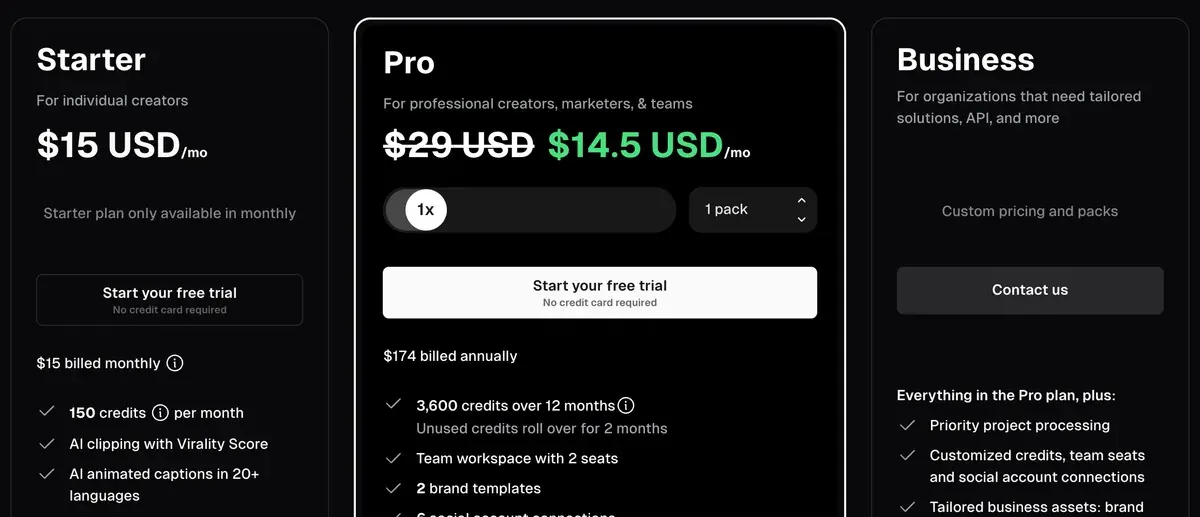
OpusClip Pro earns its price if you clip up to five hours of talk a month and can pay yearly (read on ). Pro is $14.50 a month billed yearly for 300 source minutes, so an hour costs $2.90 at full use. Ten of 54 public reviews report slow or absent support, and seven report charges after cancelling or billing errors left unfixed (Trustpilot, Trustpilot).
OpusClip
- Best for
- Creators and small teams clipping long videos who want AI b-roll, Premiere or DaVinci export, a multi-network scheduler and up to 4 seats on Pro.
- Not for
- Anyone clipping hours of footage on a small budget: credits are spent per minute of source video, whatever the clip count. Free users needing commercial use, which the terms reserve for paid plans.
| Made by | Opusclip Inc. (Delaware corporation, Mountain View, California) |
|---|---|
| Category | All-in-one suites |
| Makes | Short clips from a long video with a virality score, in 9:16 (all plans) and 1:1 or 16:9 (Pro); clip lengths 0 to 15 minutes; AI reframe with speaker and object tracking, genre-specific layouts and screenshare or gameplay split layouts; animated captions, emoji and keyword highlights, caption translation; AI image, stock and video b-roll, AI voice-over, speech enhancement, filler and pause removal, dubbing (Pro); social scheduler and auto-post to YouTube Shorts, TikTok, Instagram Reels, Facebook, LinkedIn, X, Pinterest, Threads and Bluesky (scheduling on Pro); XML export to Adobe Premiere Pro and DaVinci Resolve (Pro) |
| Entry price | From $15 a month |
| Cost per output | $0.0967 per minute of source video at list price, if all 300 credits are used. Method |
| Use in ads | Commercial use, ads included, needs a paid plan: free users are limited to internal, personal, non-commercial use, while Paid Services users are licensed to use the Services for commercial uses(Terms, OpusClip Account, effective 17 Nov 2025). Terms |
| Free plan | Yes |
| Free trial | 7-day Pro free trial with no credit card; it then converts to the Free plan. Trial exports carry the OpusClip watermark, and trial users cannot post, schedule, bulk-download or use teams (help centre, read 16 November 2026). |
| Languages | Transcription and captions in 20+ languages by the pricing page; the help centre lists 25 (English, German, Spanish, French and Portuguese out of beta; 20 others, Japanese and Korean among them, in beta). |
| API | Yes |
| Status | Active |
Best for: creators and small teams clipping long videos. Pro adds AI b-roll, Premiere or DaVinci export, a multi-network scheduler and up to 4 seats.
Skip it if: you clip hours of footage on a small budget, since credits are spent per source minute. Free clips are also barred from commercial use.

What OpusClip does with a long video
OpusClip is a clipping tool. It cuts one long video, such as a podcast or webinar, into short clips for TikTok, Instagram Reels and YouTube Shorts. You paste a link or upload a file.
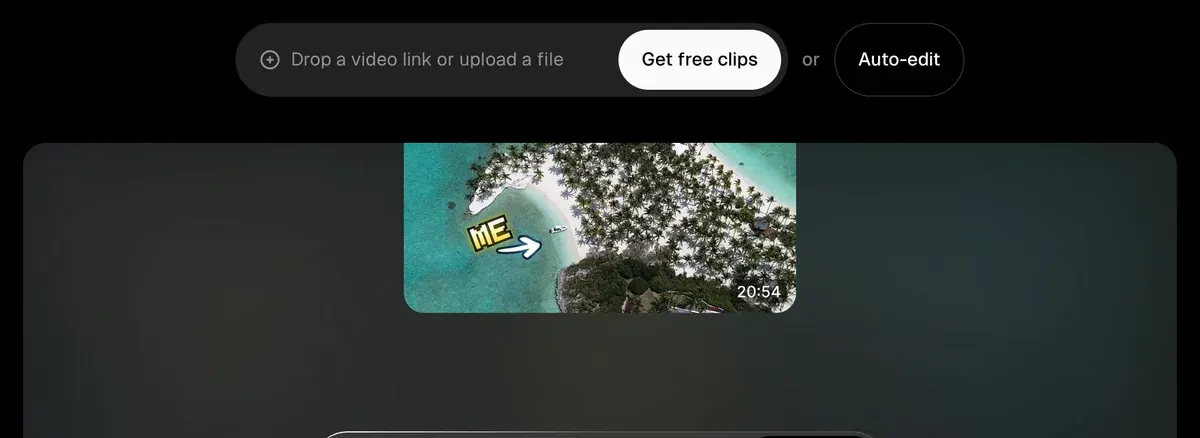
The AI reads the transcript and picks the moments it rates most likely to hold attention.

You get a batch of clips with captions burned in, each reframed to 9:16, the tall phone format. 9:16 reframing means the crop follows whoever is speaking. A wide two-person podcast shot becomes a vertical clip with the right face in frame. The pricing page lists split layouts for screenshare and gameplay too.
From Starter up, each clip carries a virality score. That is OpusClip’s own estimate of how well a clip may perform. It ranks clips; it measures no views. Pro adds AI b-roll: stock or generated footage cut over the speaker to cover jumps and illustrate a point.
Clips can be posted straight to YouTube Shorts, TikTok and Instagram Reels on Starter. Pro adds a scheduler for several networks and 1:1 and 16:9 exports. Its XML export opens the cut in Premiere Pro or DaVinci Resolve, for a human editor to finish.
People also call it Opus Pro: opus.pro is the company’s domain. Agent Opus is a separate product from the same company that sells the Max plan.
What OpusClip costs per minute of video
OpusClip sells credits, and one credit is one minute of the video you upload, whatever number of clips comes back. A 30-minute webinar uses 30 credits (help centre).
| Plan | Price | Credits a month | Per source minute | Per source hour |
|---|---|---|---|---|
| Free | Free | 60 | Free | Free |
| Starter | $15 | 150 | $0.10 | $6.00 |
| Pro, monthly | $29 | 300 | $0.0967 | $5.80 |
| Pro, yearly | $14.50 | 300 | $0.0483 | $2.90 |
| Max | $129 | 1,500 | $0.086 | $5.16 |
Scroll sideways for all 5 columns
Yearly Pro halves the cost of every minute. Billed yearly, Pro costs less a month than Starter and doubles the minutes. So Starter only makes sense if you do not want to pay a year upfront.
Starter is sold monthly only, and Max is sold through Agent Opus. Business is priced on request. Every plan, the trial and the renewal rules are in our OpusClip pricing breakdown.
Three billing details change the sum. A video under a minute still costs 1 credit, while partial minutes round down. Each post to X costs 3 credits per clip per account. Unused credits on a monthly plan expire after 60 days, so they carry over one month (help centre).
Can you use OpusClip clips in ads?
Yes, on a paid plan. The terms limit every user to “your own internal, personal, non-commercial use”, then add that users of Paid Services “are licensed to use the Services for commercial uses”. An ad is a commercial use, so Free clips stay out of your campaigns.
Your footage stays yours: the same terms say “your ownership in User Submissions is not affected”. They say nothing specific about who owns the finished clips. They offer no IP indemnity either, so a rights claim over the source video lands on you.
For an ad team that means two checks before a clip runs. Own or license the long video you cut. And post through your ad manager yourself. The pricing page lists the scheduler for social accounts (YouTube Shorts, TikTok, Instagram Reels and others) and no ad platform.
Free plan and the 7-day trial
Free gives 60 credits a month, one hour of source video. The pricing page’s Free card lists a watermark, no editing and clips that stop being exportable after 3 days.
The 7-day Pro trial needs no card. Trial exports carry the watermark too, and trial users cannot post, schedule, bulk-download or add a team (help centre). When it ends, the account drops to Free.
So the free route is a test of the clip picks on your own content. Anything you plan to publish for a brand needs Starter or above.
API and automation
OpusClip has an API on Pro (Beta) and Max, billed from the same credits with a 10-credit minimum per project (API overview). Both plans stop at 15 hours of video a month per workspace and 4 projects at a time (limits). Business is priced on request.
Zapier works on Pro up to 300 credits a month, by the pricing page’s compare table. Make has only community apps for OpusClip, and n8n no official node. The AI video clipping API guide sets this route beside Klap’s per-video API and those no-code routes.
Reviewers praise the speed and fault the support
Trustpilot shows 522 OpusClip reviews with a TrustScore of 4.0: 63% at five stars and 20% at one. We read 54 public reviews: 38 recent and one-star Trustpilot reviews, 13 on Product Hunt and 3 Reddit threads.
The praise is about speed. Eight sources find it quick and easy to go from a long video to clips. Five say it picks good moments and frames speakers well. Nine praise support staff who fixed problems or refunded mistaken charges.
The complaints are about the company more than the clips. Ten describe support that sent automated replies or went silent for days. Seven were charged after cancelling or saw billing errors left unfixed, and six hit failed uploads or lost saves. Five call it costly on long videos, which follows from billing by the source minute.

OpusClip pros and cons
Pros
- 1:1 and 16:9 exports, scheduler and Premiere or DaVinci export on Pro (pricing page)
- Yearly Pro brings a source minute to $0.0483 if every credit is used (pricing page)
- Quick and easy from long video to clips (8 of 54 sources: Trustpilot, Trustpilot)
- Picks good moments and frames speakers well (5 of 54 sources: Trustpilot, Product Hunt)
- Support staff who resolve problems and refund mistaken charges (9 of 54 sources: Trustpilot, Trustpilot)
- Posts to many networks at once with captions and hashtags (3 of 54 sources: Trustpilot, Trustpilot)
Cons
- Support that sends automated replies or stays silent for days (10 of 54 sources: Trustpilot, Trustpilot)
- Charged after cancelling, or billing errors left unfixed (7 of 54 sources: Trustpilot, Trustpilot)
- Failed uploads and lost saves (6 of 54 sources: Trustpilot, Trustpilot)
- Costly on long videos, with prompts to buy credits (5 of 54 sources: Trustpilot, Trustpilot)
- Free clips are personal use only and expire after 3 days (terms)
- No refund on fees already paid, and renewal at the non-promotional rate (terms)
When OpusClip is the wrong pick
OpusClip charges for the minutes you feed it. That suits short, dense recordings and costs more on long ones where you keep only a few clips.
For long recordings with few keepers, Klap bills per clip and ignores source length. Basic at $29 a month gives 100 clips, or $0.29 a clip if every clip is used (Klap pricing). Against OpusClip Pro monthly, Klap Basic costs less while you keep 19 clips or fewer per source hour.
The Klap profile and Klap vs Opus Clip cover its catch: no free plan beyond one test video.
For hours of footage on a small budget, Vizard also bills a credit per minute. Its Creator plan at $29 a month brings 600 credits, double Pro’s. An hour of source then costs $2.90 if every credit is used (Vizard pricing).
The catch for ads: Vizard’s terms, dated 2022, say nothing about who owns the clips or whether they can run in paid campaigns. The Vizard profile has its limits.
Short videos that only need captions suit Submagic. Starter at $19 a month covers 15 captioned videos of up to 2 minutes (Submagic pricing), and the Submagic profile explains its credits.
For full manual control, CapCut has a free editor (CapCut profile). And a team past four seats goes to OpusClip Business, priced on request.
- All-in-one suites
Klap
AI clipper that turns long videos into captioned 9:16 shorts, billed per clip, with scheduling and a per-use API.
From $29 a month · checked
Best for Creators and agencies cutting many shorts from long videos (up to 3 hours each) who want a fixed clip count whatever the source length.
- All-in-one suites
Vizard
AI clipping tool: long videos to captioned 9:16 clips, plus an editing agent, scheduling and a clipping API.
From $29 a month · checked
Best for Podcasters, coaches and marketers who clip long recordings into shorts every week and want reframing, captions, scheduling and an API on one credit balance.
- All-in-one suites
Submagic
AI short-video editor: animated captions in 118 languages, b-roll, zooms, silence cuts and Magic Clips from long videos.
From $19 a month · checked
Best for Creators and small teams who caption and polish talking-head shorts every week and want b-roll, zooms, silence removal and social publishing in one editor.
Questions buyers ask about OpusClip
Is OpusClip free?
Yes, with 60 credits a month, one hour of source video. Free clips carry a watermark, stop being exportable after 3 days and are for personal, non-commercial use only under the terms.
What is Opus Pro?
Opus Pro is a common name for OpusClip, taken from its domain, opus.pro. The paid plan called Pro costs $29 a month billed monthly (pricing page).
Does OpusClip charge per clip?
No. It charges 1 credit per minute of the video you upload, however many clips it returns. Posts to X are the exception, at 3 credits per clip per account.
Can I cancel OpusClip and keep my credits?
Yes, until their original expiry date (help centre). The terms refund no fees already paid, so cancel before the renewal date.
Sources
- OpusClip: OpusClip pricing, the Free, Starter, Pro and Business cards and the compare table, with export windows, seats, sources and the Zapier cap. Checked
- OpusClip help centre: How are credits consumed, 1 credit per minute of the original video, the rounding rules, 3 credits per X post per account, credit expiry on monthly and yearly plans. Checked
- OpusClip help centre: Plans and credits, processing minutes per plan and the rule on switching to Free. Checked
- OpusClip: Agent Opus pricing, the Max plan, sold only through Agent Opus, with credits usable in OpusClip. Checked
- Opusclip Inc.: OpusClip Terms of Service, effective 17 November 2025; the OpusClip Account section on commercial use, Rights You Grant, Permissions and Restrictions and Auto-Renewal for Paid Services. Checked
- OpusClip help centre: Features not included in the free trial, the 7-day Pro trial with no card, its watermark and the posting, scheduling, bulk download and team limits. Checked
- OpusClip help centre: OpusClip API overview, API on Pro (Beta) and Max, billed in plan credits with a 10-credit minimum per project. Checked
- OpusClip help centre: API limitations, the 15-hour monthly cap per workspace and 4 projects at a time on Pro and Max. Checked
- Trustpilot: OpusClip reviews, 522 reviews, TrustScore 4.0, 63% at five stars and 20% at one; the 20 newest reviews and the 20 newest one-star reviews read one by one, two in both. Checked
- Product Hunt: OpusClip reviews on Product Hunt, 4.5 from 78 reviews, most from about 2023; 13 read. Checked
- Klap: Klap pricing, Basic, Pro and Pro+ billed per clip, and the free test on one video. Checked
- Vizard: Vizard pricing, Free and Creator cards, 1 credit per minute of video processed. Checked
- Submagic: Submagic pricing, Starter credits for captioned videos up to 2 minutes. Checked
- CapCut: CapCut pricing, Free, Standard and Pro plans. Checked

Alexandre S.
Alexandre S. is a creative ad strategist and copywriter with ten years' experience in digital marketing across multiple channels.
Related pages
-
 Category Best AI video generators for ads
23 AI video generators and model shops compared on cost per clip and ad-use terms, checked 25 September 2026.
-
 Pricing OpusClip pricing
OpusClip Pro costs $29 a month, or $14.50 a month billed yearly ($174), for 300 credits, 1 per source minute. Every plan and the trial, checked 16 Nov 2026.
-
 Alternatives Opus Clip alternatives
Seven tools that could replace OpusClip, compared on price per source minute or per clip, free plans for ads and commercial rights, read 16 November 2026.
-
 Compare Klap vs Opus Clip
Klap bills each clip it makes, OpusClip each source minute: 20 clips an hour is the entry-plan break-even. Free use and ad terms, read 16 November 2026.
-
 Best list AI clipping tools
Eight AI clipping tools for podcasts and streams, compared on cost per minute or per clip, free plans, longest video and ad rights, read 16 November 2026.
-
 Guide Clipping for money
Clipping for money: Content Rewards says campaigns that fill mostly pay 0.80 to 2 dollars per 1,000 views, minus a 10% fee. Checked 16 November 2026.


