Opus Clip vs SnapDub
Verdict: OpusClip or SnapDub
Opus Clip vs SnapDub: SnapDub costs less on long sources and includes more seats. OpusClip has prompt search and a written commercial licence (read on ).
A 30-minute podcast cut into 15 captioned clips costs $1.65 on SnapDub Pro and $2.90 on OpusClip Pro, if every credit is used.
But SnapDub’s terms put a watermark on Starter clips that its pricing card says they lack, and its payments are final.
OpusClip
- Best for
- Creators and small teams clipping long videos who want AI b-roll, Premiere or DaVinci export, a multi-network scheduler and up to 4 seats on Pro.
- Not for
- Anyone clipping hours of footage on a small budget: credits are spent per minute of source video, whatever the clip count. Free users needing commercial use, which the terms reserve for paid plans.
SnapDub
- Best for
- Small teams that clip streams and podcasts, share seats and post to many networks from one place.
- Not for
- Anyone who needs a refund if the clips disappoint: fees are final and unused time is not prorated. Buyers who need a stated export resolution or source length cap, since no page gives one.
| OpusClip | SnapDub | |
|---|---|---|
| Where they differ | ||
| Monthly from (USD) | $15 | $14.99 |
| What a plan counts | Each minute of source video, whatever the clip count | 5 credits per source minute, plus 20 per captioned clip |
| Team seats | None on Starter; 2 per Pro pack, up to 4 | 3 on Starter, 10 on Pro, 50 on Business |
| Prompt search for a moment | ClipAnything: describe the moment in a sentence | Not offered |
| Video links it takes | YouTube on every plan; Zoom and Rumble from Starter; Twitch from Pro | YouTube, Twitch, Kick, Rumble and Zoom |
| Posting | 3 networks on Starter; a scheduler for 9 on Pro | 10 networks plus Buffer and Postiz; 2, 5 or unlimited accounts |
| API and MCP | API on Pro (beta) and Max, 15 hours a month | API on every paid plan; MCP on Free too |
| Dubbing | On Pro | Voice-clone dubbing and lip-sync (beta) on Pro and Business |
| Ad use in the terms | Commercial use licensed on paid plans; Free is non-commercial | You own the clips (s.3); no clause on ad use |
| Refunds | Fees already paid are not refunded | Payments final; failed jobs refunded in credits |
| The same on both | ||
| Free plan | Both: Yes | |
| API | Both: Yes | |

Which costs less: per minute, or per minute plus per clip?
SnapDub costs less until you cut about one captioned clip per source minute on Pro. Cut harder than that and OpusClip Pro costs less.
Both are AI clippers. You give them a long video, such as a podcast or a stream, and they cut it into short vertical clips with captions. Both sell credits, a prepaid allowance each job draws from, but they spend them differently.
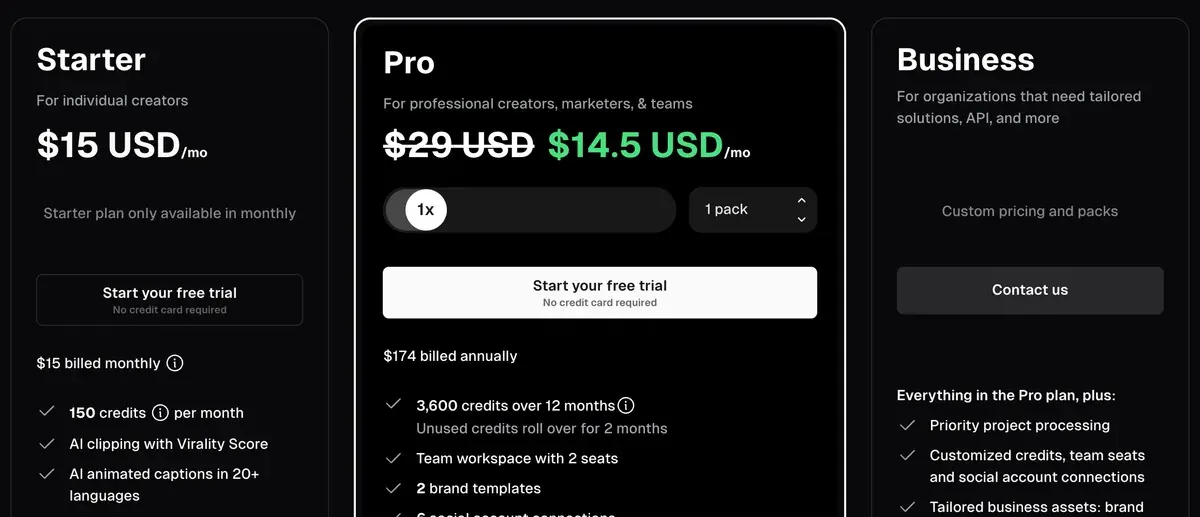
OpusClip spends 1 credit per minute of source video, however many clips come back (help centre). Pro lists $29 a month for 300 credits (pricing).
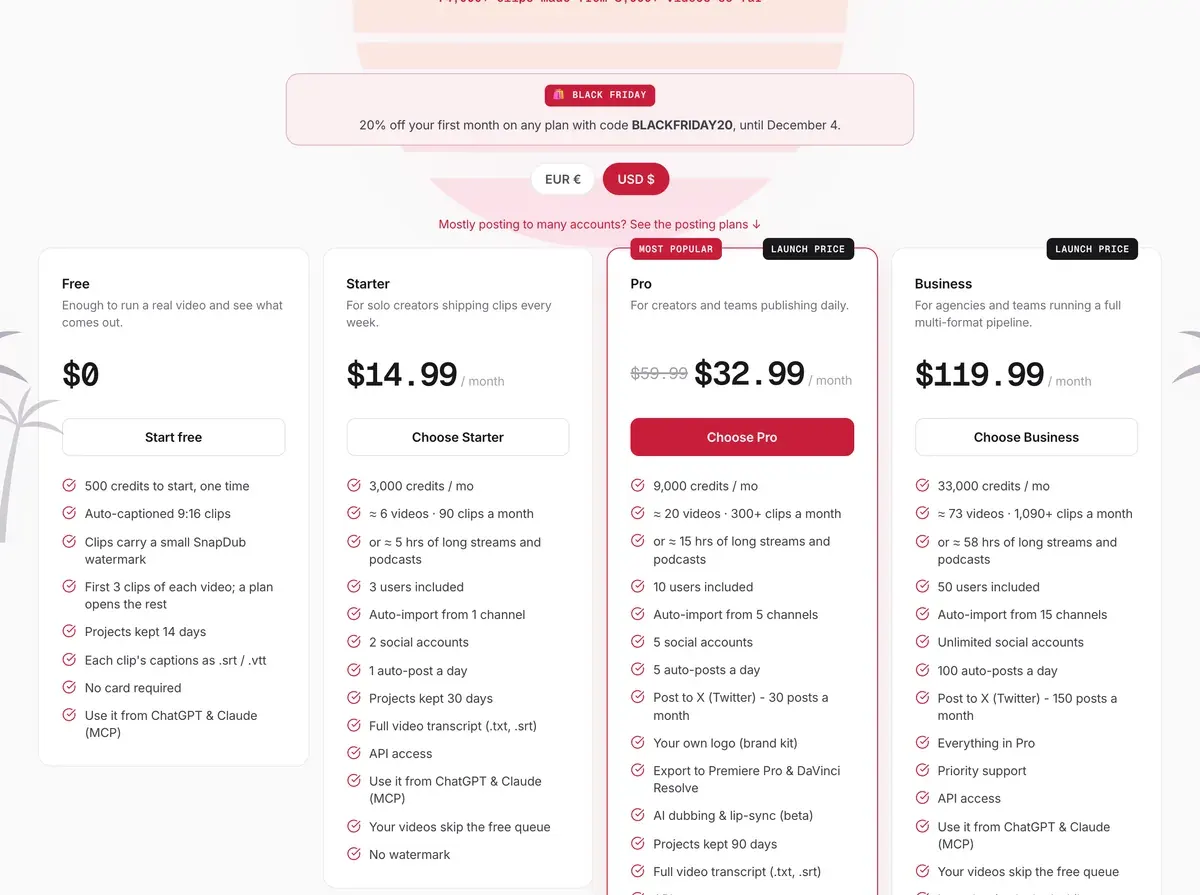
SnapDub charges for both sides of the job (pricing). Each source minute costs 5 credits: 4 to transcribe it and pick moments, 1 for the visual pass. Each clip costs 16 credits to render and 4 more for captions. Pro lists $32.99 a month for 9,000 credits.
Take one real job: a 30-minute podcast cut into 15 captioned clips. On OpusClip that is 30 credits. On SnapDub it is 150 credits for the source and 300 for the clips, 450 in all.
| Plan | A month (USD) | Credits the job uses | The job (USD) | Per clip (USD) |
|---|---|---|---|---|
| OpusClip Starter | $15 | 30 of 150 | $3.00 | $0.20 |
| OpusClip Pro | $29 | 30 of 300 | $2.90 | $0.19 |
| SnapDub Starter | $14.99 | 450 of 3,000 | $2.25 | $0.15 |
| SnapDub Pro | $32.99 | 450 of 9,000 | $1.65 | $0.11 |
Scroll sideways for all 5 columns
The clip count moves the line. From a 30-minute source, SnapDub Starter costs less than OpusClip Starter up to 22 captioned clips. SnapDub Pro costs less than OpusClip Pro up to 32.
Longer sources favour SnapDub. OpusClip’s help centre counts 23 to 32 clips from a 30 to 60 minute video. An hour cut into 32 captioned clips costs $3.45 on SnapDub Pro and $5.80 on OpusClip Pro.
Two SnapDub extras raise the count. A clip longer than a minute adds 10 credits per extra 30 seconds, and translated captions add 3 per clip. OpusClip’s credit stays at one per source minute whatever the clip length.
Which plan fits your monthly volume?
For one weekly show, either entry plan covers it at about the same price. For a show every weekday, SnapDub Pro covers what takes two OpusClip Pro packs.
A weekly 30-minute podcast with 15 clips an episode means 4 or 5 jobs a month. OpusClip Starter’s 150 credits cover 5 episodes for $15 a month. SnapDub Starter’s 3,000 credits cover 6 for $14.99 a month.
Twenty such episodes a month need 600 OpusClip credits, so two Pro packs at $58.00. SnapDub Pro’s 9,000 credits cover exactly 20 jobs of 450 for $32.99 a month.
Yearly billing narrows the gap. OpusClip Pro drops to $14.50 a month billed yearly and SnapDub Pro to $27.50 a month billed yearly. OpusClip Starter is sold monthly only. SnapDub’s prices exclude VAT, and Pro’s launch price stays locked while you stay subscribed.
If your sources run long and you keep few clips, look at Klap too. It bills per clip and leaves source length out: Basic lists $29 a month for 100 clips from sources up to 3 hours (pricing). A 3-hour stream cut into 5 clips costs $1.45 on Klap Basic and $3.67 on SnapDub Pro. More in the Klap profile.
What can you do free on each?
OpusClip gives free minutes every month; SnapDub gives one start of credits. Both watermark free clips.
OpusClip Free gives 60 credits a month, so 60 minutes of source video (pricing). There is no editing, and clips stop exporting after 3 days. Its terms hold free users to “your own internal, personal, non-commercial use”.
SnapDub Free gives 500 credits once at sign-up, with no card, and they do not come back (pricing). That covers one 30-minute video cut into 15 captioned clips. You can download the first 3 clips of each video, and projects stay 14 days.
SnapDub’s free plan also includes its MCP connector. MCP (Model Context Protocol) is the standard that lets an AI assistant such as ChatGPT or Claude work inside another app. With it, you can ask the assistant to clip a video for you (MCP page).
Can OpusClip find one moment from a prompt?
Yes: ClipAnything does it, and SnapDub has no match. SnapDub’s own comparison page says so.
With ClipAnything you type a sentence describing the moment, such as a guest holding a product. The model reads the picture and the sound as well as the words. OpusClip’s how-to advises it for videos with little talking.

That matters if you mine long footage for one kind of shot, such as goals in a match or product mentions in a webinar. SnapDub picks moments from the transcript and visual pass, then scores each clip.
Which suits teams, posting and automation?
SnapDub, on seats and posting networks. OpusClip Pro tops out at 4 seats and its API at 15 hours a month.
SnapDub puts 3 users on Starter, 10 on Pro and 50 on Business, all sharing one credit pool. OpusClip Starter has no team seats, and Pro adds 2 per pack, up to 4. Past that, OpusClip sends you to Business at a custom price.
SnapDub posts to 10 networks, Telegram, Bluesky, Mastodon and Pinterest among them, plus Buffer and Postiz. Starter connects 2 social accounts and Pro 5. X posting starts on Pro, at 30 posts a month.
OpusClip Starter posts to YouTube Shorts, TikTok and Instagram Reels; Pro adds a scheduler for 9 networks. Each X post costs 3 OpusClip credits per account.
An API is a way for your own code to send videos and get clips back. SnapDub’s REST API comes on every paid plan at no extra fee, with 120 requests a minute per key (API page). Clips cost the same credits as in the app.
OpusClip’s API runs on Pro, in beta, and on Max, and is capped at 15 hours a month per workspace. Each project uses at least 10 credits (API limits). Its API page also lists an MCP server and a Claude connector. Both, step by step: AI video clipping APIs.
SnapDub also dubs clips in the speaker’s cloned voice on Pro and Business, with lip-sync in beta. A dubbed clip costs 30 extra credits, 60 with lip-sync (dubbing page).
Which one can you use for ads?
OpusClip licenses commercial use in writing on paid plans; SnapDub says you own the clips and stays silent on ads. Neither connects to an ad account.
OpusClip’s terms (17 November 2025) say users of Paid Services “are licensed to use the Services for commercial uses and otherwise to the fullest extent possible under applicable law”. Free users stay non-commercial.
SnapDub’s terms (27 August 2026) say you keep ownership of what you upload “and of the clips SnapDub generates from them” (section 3). No clause grants or limits ad use. Section 3 also makes you warrant the rights to every source and the consent of anyone shown. Section 4 bans deepfakes and voice clones made without consent.
The watermark is the open conflict. SnapDub’s pricing card says Starter has no watermark. Section 6 of the terms says free and Starter clips carry a small “snapdub.ai” watermark and higher tiers export without it. On Starter, check your first export before an ad goes out.
Training differs too. OpusClip’s help centre says it may use individual users’ data to improve its models. SnapDub’s privacy policy says it does not use your videos to train models for third parties, and runs open-source models on its own infrastructure.
What do user reviews say about each?
OpusClip has 54 public sources to read; SnapDub has none.
On OpusClip, 54 public sources:
- Support that is slow, answers with bots or stays silent for days (10 of 54 sources: Trustpilot, Trustpilot)
- Support resolves problems and refunds mistaken charges (9 of 54 sources: Trustpilot, Trustpilot)
- Easy and fast to go from a long video to clips (8 of 54 sources: Trustpilot, Trustpilot)
- Charged after cancelling, or billing errors left unfixed (7 of 54 sources: Trustpilot, Trustpilot)
- Costly for long videos, with frequent prompts to buy credits (5 of 54 sources: Trustpilot, Trustpilot)
SnapDub is new, and the public evidence on it is thin. Its Trustpilot page shows 0 reviews, and it has no G2 or Product Hunt page. The quotes on its home page are its own.
Neither refunds fees already paid. OpusClip’s terms do not refund or prorate them. SnapDub’s refund policy makes payments and top-ups final, and refunds failed jobs in credits. SnapDub is run by Aheront Ltd, a Bulgarian company; OpusClip by Opusclip Inc., a Delaware corporation.
Who should pick which?
Pick by how hard you cut each video, and who signs off on the ads.
A podcaster cutting 15 clips from each hour pays less on SnapDub, on either plan. A small team of 5 editors fits SnapDub Pro’s 10 seats, where OpusClip stops at 4. A streamer on Kick gets a link import SnapDub lists and OpusClip’s input list leaves out.
A marketer cutting webinars for paid social picks OpusClip Pro for the commercial licence a legal team can read. An editor hunting one kind of moment in raw footage picks OpusClip for ClipAnything. A creator cutting 40 clips from a 30-minute video pays less on OpusClip, where the clip count is free.
- Best for
- Small teams that clip streams and podcasts, share seats and post to many networks from one place.
- Not for
- Anyone who needs a refund if the clips disappoint: fees are final and unused time is not prorated. Buyers who need a stated export resolution or source length cap, since no page gives one.
- Best for
- Creators and small teams clipping long videos who want AI b-roll, Premiere or DaVinci export, a multi-network scheduler and up to 4 seats on Pro.
- Not for
- Anyone clipping hours of footage on a small budget: credits are spent per minute of source video, whatever the clip count. Free users needing commercial use, which the terms reserve for paid plans.
Every plan in detail: SnapDub pricing and OpusClip pricing. The full profiles: SnapDub and OpusClip. Every replacement by job: OpusClip alternatives, and the per-clip rival in Klap vs OpusClip.
Questions buyers ask about OpusClip and SnapDub
Is SnapDub cheaper than OpusClip?
For most podcast and stream jobs, yes. A 30-minute video cut into 15 captioned clips costs $1.65 on SnapDub Pro and $2.90 on OpusClip Pro. Past about one clip per source minute, OpusClip Pro costs less.
Does SnapDub have a free plan like OpusClip?
Yes, of a different kind. SnapDub gives 500 credits once, enough for one 30-minute video, with 3 watermarked downloads per video. OpusClip Free gives 60 minutes every month, watermarked, for non-commercial use.
Can I use SnapDub clips in ads?
Its terms say you own the clips and neither grant nor limit ad use. You must hold the rights to the source and consent from anyone shown. On Starter, check the first export for a watermark: the terms and the pricing card disagree.
Sources
- SnapDub: SnapDub pricing, Free, Starter, Pro and Business cards; the credit rates per source minute, clip, caption and extra 30 seconds; users and social accounts by plan; prices exclude VAT. Checked
- SnapDub: SnapDub clipping API, REST API on every paid plan at no extra fee; 120 requests a minute per key. Checked
- SnapDub: SnapDub MCP server, remote MCP connector for ChatGPT and Claude on every plan, the free plan included. Checked
- SnapDub: SnapDub AI dubbing, 30 credits per dubbed clip, 60 with lip-sync, in beta on Pro and Business. Checked
- SnapDub: SnapDub vs OpusClip, SnapDub’s own comparison page; it says OpusClip’s ClipAnything takes a written prompt and SnapDub has no such search. Checked
- Aheront Ltd: SnapDub Terms of Service (last updated 27 August 2026), sections 3, 4, 6 and 13. Checked
- Aheront Ltd: SnapDub Privacy Policy (11 November 2026), sections 2 and 3 on training and processing. Checked
- Aheront Ltd: SnapDub Refund Policy (25 August 2026), payments and top-ups final; failed jobs refunded in credits. Checked
- Trustpilot: SnapDub on Trustpilot, 0 reviews. Checked
- OpusClip: OpusClip pricing, Free, Starter and Pro cards; seats per Pro pack; inputs and scheduler by plan. Checked
- OpusClip help centre: How are credits consumed?, 1 credit for each minute of source video; 3 credits per X post per account. Checked
- OpusClip help centre: How many clips will I get?, 23 to 32 clips from a 30 to 60 minute video. Checked
- OpusClip help centre: How to use ClipAnything?, prompt-based clip search; recommended for videos with little talking. Checked
- OpusClip help centre: OpusClip API limitations, 15 hours a month on Pro and Max; a 10-credit minimum per project. Checked
- Opusclip Inc.: OpusClip Terms of Service (effective 17 November 2025), OpusClip Account; Auto-Renewal for Paid Services. Checked
- OpusClip help centre: OpusClip data training, individual users’ data may improve its models; enterprise data is not used. Checked
- Trustpilot, Product Hunt and Reddit: OpusClip user reviews, 54 public sources, synthesised on 16 November 2026. Checked
- Klap: Klap pricing, Basic card: 100 clips a month from sources up to 3 hours. Checked

Alexandre S.
Alexandre S. is a creative ad strategist and copywriter with ten years' experience in digital marketing across multiple channels.
Related pages
-
 Category Best AI video generators for ads
23 AI video generators and model shops compared on cost per clip and ad-use terms, checked 25 September 2026.
-
 Profile OpusClip for marketing clips
OpusClip bills 1 credit per source minute: Pro is $29 a month for 300. Free bars commercial use; 10 of 54 user posts flag support. Read 16 Nov 2026.
-
 Pricing OpusClip pricing
OpusClip Pro costs $29 a month, or $14.50 a month billed yearly ($174), for 300 credits, 1 per source minute. Every plan and the trial, checked 16 Nov 2026.
-
 Alternatives Opus Clip alternatives
Eight tools that could replace OpusClip, compared on price per source minute or per clip, free plans for ads and commercial rights, read 22 November 2026.
-
 Profile SnapDub AI clipping
SnapDub cuts streams and podcasts into captioned vertical clips for $14.99 a month with 3 seats. Credits, API, MCP and terms, checked 22 Nov 2026.
-
 Pricing SnapDub pricing
SnapDub costs $14.99, $32.99 or $119.99 a month for 3,000, 9,000 or 33,000 credits. Cost per clip, free credits, add-ons and refunds, checked 22 Nov 2026.


