SnapDub AI clipping
Verdict on SnapDub
SnapDub suits small teams clipping streams and podcasts who want shared seats, posting and an API on one plan. Starter costs $14.99 a month for 3 users and 3,000 credits, about 90 captioned clips by SnapDub’s estimate (read on ). Payments are final under its refund policy, and Trustpilot, SaaSHub, G2 and Product Hunt list no review of SnapDub.
SnapDub
- Best for
- Small teams clipping streams and podcasts, Twitch and Kick included, who want shared seats, posting to ten networks and an API on paid plans.
- Skip it if
- you need a refund if the clips disappoint, since payments are final. Long streams cut into few clips cost less on Klap, which bills per clip.
| Made by | Aheront Ltd, Bulgaria (operator of snapdub.ai) |
|---|---|
| Category | All-in-one suites |
| Makes | Vertical 9:16 clips cut from a long video, each with a virality score, title, description and hashtags; speaker-following reframing, or centre crop, blurred-edge fit or black bars for screen recordings and gameplay; word-by-word burned-in captions, 36 caption styles, saved templates; captions as .srt or .vtt on every plan, full transcript on paid plans; translated captions (16 languages) and AI dubbing in the speaker’s cloned voice with optional lip-sync (beta, Pro and Business); AI b-roll suggestions, prompt-to-video clips (paid plans) and UGC-style promos from a brief: 60, 100 or 140 credits for 15, 30 or 45 seconds; direct posting and a content plan for TikTok, Instagram, YouTube, Facebook Pages, LinkedIn, Telegram, Bluesky, Mastodon, Pinterest and X, plus Buffer and Postiz; export to Premiere Pro and DaVinci Resolve (Pro and Business) |
| Entry price | From $14.99 a month |
| Cost per output | $0.17 per captioned clip at list price, if all 3,000 credits are used; 15 from 30 min. Method |
| Use in ads | Users own the clips (Terms s.3, 27/08/2026); the terms neither grant nor limit ad use, so paid-ad use rests on ownership, with the user responsible for rights in the source and consent of people shown. Terms |
| Free plan | Yes |
| Free trial | Free plan, no trial listed |
| Languages | Translation in 16 languages; dubbing into Spanish, French, German, Italian, Portuguese, Dutch, Polish, Russian, Turkish, Arabic, Hindi, Japanese, Korean, Chinese or English, with Ukrainian for captions only (dubbing guide, read 22 November 2026). UGC promo voiceovers in 6 languages. |
| API | Yes |
| Status | Active |

What SnapDub does with a long video
SnapDub is a web app for clipping: cutting one long video into short clips for TikTok, YouTube Shorts and Instagram Reels. It suits footage where people talk, such as a livestream, a podcast or a webinar.
The job runs in five steps:
- You paste a YouTube, Twitch, Kick, Rumble or Zoom link, or upload a file.
- SnapDub reads the transcript and picks the moments it scores as most likely to travel.
- It reframes each moment to 9:16, the tall shape phones use, following whoever speaks.
- It burns in word-by-word captions, and you adjust each clip in the editor.
- It posts the clips to your networks, or you download them.
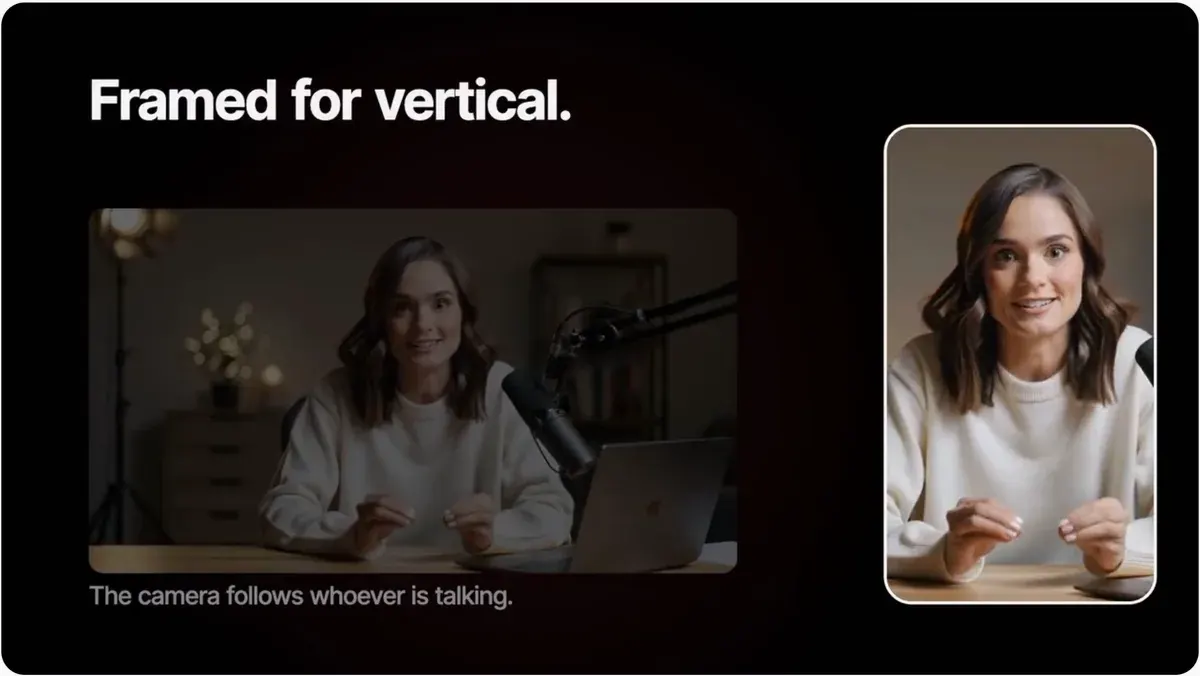
Streamers can skip step one. SnapDub auto-imports new videos from YouTube and Twitch channels: 1 channel on Starter, 5 on Pro and 15 on Business (pricing page).
SnapDub’s llms.txt, read 22 November 2026, says about 11,000 creators have made about 75,000 clips from 8,900 videos.
How SnapDub credits work
Credits are SnapDub’s currency: each plan buys a monthly pool, and each step of a job spends a set number. The pricing page publishes every rate.
A source minute costs 5 credits: 4 for the transcript and the moment search, 1 for the visual pass. Each clip rendered costs 16 more, and captions add 4. So a captioned clip costs 20 credits on top of the source.
Take a 30-minute podcast cut into 15 captioned clips. The source costs 150 credits and the clips 300, so the job uses 450.
| Plan | Billing unit | Cost of the job |
|---|---|---|
| SnapDub Starter, monthly | Source minutes plus clips | $2.25 |
| SnapDub Pro, monthly | Source minutes plus clips | $1.65 |
| Klap Basic, monthly | Per clip | $4.35 |
| OpusClip Pro, monthly | Per source minute | $2.90 |
Scroll sideways for all 3 columns
Per-job figures hold when the whole allowance gets used. A weekly 30-minute show cut into 15 clips needs 1,800 SnapDub credits a month, 60 Klap clips or 120 OpusClip minutes.
Each fits the entry plan. So the real monthly bill is $14.99 a month on SnapDub Starter, $29 a month on Klap Basic or $15 a month on OpusClip Starter.
Long sources turn the sums around. Klap bills per clip whatever the length, so a 3-hour stream cut into 5 clips costs 5 Klap clips and 1,000 SnapDub credits (Klap pricing).
One SnapDub figure does not add up. The homepage prices a 10-minute video cut into 6 captioned clips at about 140 credits, while the published rates give 170. Plan on 170.
The plans, the yearly saving and the extra-credit items are on SnapDub pricing.
Is there a SnapDub free plan?
Yes. A new account gets 500 credits once, with no card, and the pricing FAQ says the free credits “do not come back” (pricing page).
That runs one 30-minute source cut into 15 clips, of which you download the first 3. Free downloads carry a small SnapDub watermark, and the project stays for 14 days.
The free plan also opens the MCP connector for ChatGPT and Claude. It has no REST API.
Seats, posting and channels by plan
Every paid plan includes seats that share one credit pool. Klap’s plan cards state no seat count at all (Klap pricing).
| Plan | Users | Social accounts | Auto-posts a day | Posts to X a month |
|---|---|---|---|---|
| Starter | 3 | 2 | 1 | None |
| Pro | 10 | 5 | 5 | 30 |
| Business | 50 | Unlimited | 100 | 150 |
Scroll sideways for all 5 columns
SnapDub posts to TikTok, Instagram, YouTube, Facebook Pages, LinkedIn, Telegram, Bluesky, Mastodon, Pinterest and X. It also hands clips to Buffer and Postiz.
Two limits apply. YouTube uploads arrive as private videos (privacy policy, section 4), so you publish each one yourself. And section 7 of the terms still names TikTok, Instagram and YouTube alone.
A team that posts more than its plan allows buys a posting add-on, which adds accounts and scheduled posts with no credits. The three add-ons are priced on SnapDub pricing.
SnapDub API and MCP connector
An API (application programming interface) lets your own software send videos to SnapDub and collect the clips without opening the app. SnapDub includes its REST API on every paid plan, with no separate fee, and API clips cost the same credits as app clips (clipping API).
One call asks for 1 to 20 clips, each 15 to 180 seconds long. A key handles 120 requests a minute, a signed webhook reports a finished job, and download links last one hour (API reference). Klap sells its API apart from the app plans, per use.
MCP (Model Context Protocol) is a standard way for an AI assistant to use another app from the chat. SnapDub runs a remote MCP server on every plan, the free one included, with sign-in through OAuth and no key to copy (MCP server).
It is listed in the ChatGPT app directory, and Claude reaches it through a custom connector. Code and no-code routes for every clipper are in the AI video clipping API guide.
Dubbing and lip-sync on Pro and Business
Dubbing replaces the speaker’s voice with a translation in a clone of that voice. Lip-sync then moves the mouth to match. Both are in beta, on Pro and Business (dubbing page).
A dub adds 30 credits per clip and lip-sync adds 60. SnapDub’s own example cuts a 10-minute video into 5 dubbed clips for 315 credits, and the published rates agree.
Captions translate into 16 languages. Dubbing covers 15, among them Spanish, French, German, Japanese and Hindi.
Does SnapDub put a watermark on Starter clips?
SnapDub’s own pages disagree. The Starter card on the pricing page says “No watermark”, and the home FAQ says every paid plan renders without it.
Section 6 of the terms, last updated 27 August 2026, says the opposite: clips on the free grant and the Starter plan “carry a small” SnapDub watermark. Pro and Business export without one in both texts.
Check your first Starter export before you build a posting schedule on it. If it carries the mark, Pro is the plan with a clean file in both texts.
Can you use SnapDub clips in ads?
The clips stay yours. Section 3 of the terms says you keep ownership of what you upload “and of the clips SnapDub generates from them”. No clause grants or limits ad use.
Section 3 also puts the rights on you. You warrant that you hold the rights to every source, links included, and the consent of anyone whose face or voice appears or is cloned. That matters when you clip a guest’s interview or dub a client’s founder.
Section 4 bans deepfakes and voice clones made without consent, and “deceptive, defamatory, or fraudulent media”. A dubbed ad of a real person needs that person’s yes.
SnapDub posts organically and connects to no ad account. To run a clip as an ad, download it and upload it to Meta or TikTok Ads Manager.
What SnapDub does with your uploads
Section 2 of the privacy policy, last updated 11 November 2026, says SnapDub does not sell your data or use your videos “to train models for third parties”. It says nothing about SnapDub’s own models.
Section 3 names Cloudflare R2, RunPod and Stripe as subprocessors. It also says open-source models on SnapDub’s own infrastructure process media; nothing goes to external AI APIs (privacy, section 3). For client footage, that answers the usual question about OpenAI or Google seeing the file.
Is SnapDub legit?
SnapDub is run by Aheront Ltd, a Bulgarian company, and Bulgarian law governs its terms (section 13). It publishes its terms, a privacy policy and a refund policy.
Public evidence is thin. Trustpilot shows 0 reviews, SaaSHub shows 0, and SnapDub has no G2 or Product Hunt page. The quotes on its homepage are SnapDub’s own.
The refund policy, last updated 25 August 2026, makes payments and top-ups final, with no pro-rating. A failed job comes back as credits. A duplicate or mistaken charge can be refunded, and statutory consumer rights stay in place.
So the free 500 credits are your test. Run one real video through them before you pay.
SnapDub pros and cons
Pros
- 3 users on Starter, 10 on Pro and 50 on Business, sharing one credit pool (pricing page)
- Free plan with 500 one-time credits and 3 downloadable clips per video
- Every credit rate published, so a job can be priced before it runs
- REST API on every paid plan with no separate fee (clipping API)
- MCP connector for ChatGPT and Claude on every plan, the free one included
- Twitch, Kick, Rumble and Zoom links accepted, plus posting to 10 networks
- Open-source models on SnapDub’s own infrastructure process media; nothing goes to external AI APIs (privacy, section 3)
Cons
- Payments and top-ups final, no pro-rating (refund policy, 25 August 2026)
- Terms and pricing card disagree on a Starter watermark (terms, section 6)
- Long sources with few clips cost more than on per-clip Klap
- No page states an export resolution or a maximum source length
- No independent user reviews on Trustpilot, SaaSHub, G2 or Product Hunt
- Best for
- Small teams clipping streams and podcasts, Twitch and Kick included, who want shared seats, posting to ten networks and an API on paid plans.
- Skip it if
- you cut a few clips from long streams, since SnapDub bills every source minute and Klap bills per clip whatever the length.
When SnapDub is the wrong pick
SnapDub is the wrong pick for long sources cut into few clips. Klap Basic at $29 a month counts 100 clips a month and ignores source length, so a 3-hour stream costs no more than a 10-minute talk (Klap profile).
If you want to type what to find, such as “every moment about pricing”, OpusClip has ClipAnything. SnapDub’s own comparison page concedes it has no prompt search of that kind. OpusClip Pro costs $29 a month (OpusClip profile).
For many clips from each hour, Vizard Creator bills per source minute at $29 a month (Vizard profile). And if you would rather cut by hand, CapCut has a free editor (CapCut profile).
Every clipper we track, sorted by job, is on the AI clipping tools list.
- All-in-one suites
Klap
AI clipper that turns long videos into captioned 9:16 shorts, billed per clip, with scheduling and a per-use API.
From $29 a month · checked
Best for Creators and agencies cutting many shorts from long videos (up to 3 hours each) who want a fixed clip count whatever the source length.
- All-in-one suites
OpusClip
AI clipper billed per source minute: long video to captioned shorts with reframing, AI b-roll, scheduler and an API.
From $15 a month · checked
Best for Creators and small teams clipping long videos who want AI b-roll, Premiere or DaVinci export, a multi-network scheduler and up to 4 seats on Pro.
- All-in-one suites
Vizard
AI clipping tool: long videos to captioned 9:16 clips, plus an editing agent, scheduling and a clipping API.
From $29 a month · checked
Best for Podcasters, coaches and marketers who clip long recordings into shorts every week and want reframing, captions, scheduling and an API on one credit balance.
- All-in-one suites
CapCut
Free timeline video editor with templates, auto captions and credit-based AI video from Seedance models.
From $9.99 a month · checked
Best for Editing your own footage into short social videos and TikTok ads on a free or cheap plan, with auto captions.
Questions buyers ask about SnapDub
Is SnapDub free?
It has a free plan: 500 credits once at sign-up, with no card. The credits do not refill, and free clips carry a watermark.
How many clips does a SnapDub plan make?
SnapDub’s cards estimate 90 clips a month on Starter, 300 on Pro and 1,090 on Business. Each estimate assumes a 30-minute source cut into 15 clips.
Does SnapDub work with Twitch and Kick?
Yes. It takes Twitch, Kick, Rumble, YouTube and Zoom links, and it auto-imports new YouTube and Twitch videos from connected channels.
Who makes SnapDub?
Aheront Ltd, a company in Bulgaria. Bulgarian law governs its terms (section 13).
Sources
- SnapDub: SnapDub pricing, the Free, Starter, Pro and Business cards, the posting add-ons, the credit rates per source minute and per clip, the yearly toggle and the FAQ on free credits and VAT. Checked
- SnapDub: SnapDub, the sources it takes, the posting networks, the home FAQ on watermarks and the worked example of a 10-minute video. Checked
- SnapDub: SnapDub clipping API, the REST API on every paid plan with no separate fee, the rate limit and the free plan’s 402 reply. Checked
- SnapDub: SnapDub API reference, OpenAPI 3.1; 1 to 20 clips per call, each 15 to 180 seconds, signed webhooks and one-hour download links. Checked
- SnapDub: SnapDub MCP server, the remote MCP server on every plan, OAuth sign-in, the ChatGPT app directory listing and the Claude custom connector. Checked
- SnapDub: SnapDub AI dubbing, dub and lip-sync credits per clip, the whole-video rates and the worked example of 5 dubbed clips. Checked
- Aheront Ltd: SnapDub Terms of Service, last updated 27 August 2026; sections 3, 4, 6, 7 and 13. Checked
- Aheront Ltd: SnapDub Privacy Policy, last updated 11 November 2026; sections 2, 3 and 4 on training, subprocessors and YouTube uploads. Checked
- Aheront Ltd: SnapDub Refund Policy, last updated 25 August 2026; final payments, credit refunds for failed jobs and statutory rights. Checked
- SnapDub: SnapDub vs OpusClip, the vendor’s own comparison, which concedes that OpusClip’s ClipAnything takes a written prompt. Checked
- SnapDub: SnapDub llms.txt, the creator, clip and video counts SnapDub states for itself. Checked
- Trustpilot: SnapDub on Trustpilot, claimed profile with 0 reviews. Checked
- Klap: Klap pricing, clips per plan and the FAQ line that source length does not count. Checked
- OpusClip: OpusClip pricing, credits per plan, 1 credit for 1 minute of source video. Checked

Alexandre S.
Alexandre S. is a creative ad strategist and copywriter with ten years' experience in digital marketing across multiple channels.
Related pages
-
 Category Best AI video generators for ads
23 AI video generators and model shops compared on cost per clip and ad-use terms, checked 25 September 2026.
-
 Pricing SnapDub pricing
SnapDub costs $14.99, $32.99 or $119.99 a month for 3,000, 9,000 or 33,000 credits. Cost per clip, free credits, add-ons and refunds, checked 22 Nov 2026.
-
 Compare Opus Clip vs SnapDub
SnapDub bills source minutes plus clips, OpusClip source minutes alone: 15 clips from 30 minutes cost less on SnapDub. Free plans, seats, API, read 22 Nov 2026.
-
 Best list AI clipping tools
Nine AI clipping tools for podcasts and streams, compared on cost per minute or per clip, free plans, longest video and ad rights, read 22 November 2026.
-
 Alternatives Opus Clip alternatives
Eight tools that could replace OpusClip, compared on price per source minute or per clip, free plans for ads and commercial rights, read 22 November 2026.
-
 Guide Clipping for money
Clipping for money: Content Rewards says campaigns that fill mostly pay 0.80 to 2 dollars per 1,000 views, minus a 10% fee. Checked 16 November 2026.


