Brevo SMTP: server settings, the free 300 emails a day and what paid plans cost
Brevo SMTP sends the emails your website or app needs to send, such as receipts and password resets. SMTP (Simple Mail Transfer Protocol) is the standard way an app hands an email to a sending service. Brevo runs its server at smtp-relay.brevo.com on port 587.
It is built for transactional email, a message one person triggers. The Free plan sends 300 emails a day through it. Paid plans start at $9 a month for 5,000 emails, on Brevo’s pricing page read on .
Six settings connect any app to Brevo SMTP. They come from Brevo’s SMTP help article and its port guide.
| Setting | Value | What to know |
|---|---|---|
| SMTP server | smtp-relay.brevo.com |
Typing it in the login field causes a 535 error |
| Port | 587 | The default. Use 2525 when your host blocks 587 |
| SSL port | 465 | Choose SSL or TLS in the encryption field |
| Login | Your SMTP login | Your account email or an address ending @smtp-brevo.com, depending on when the account was created |
| Password | An SMTP key | 64 characters, or a 15-character short key. An API key fails here |
| Encryption | Empty on 587 and 2525; SSL or TLS on 465 | Where an app has no empty choice, pick STARTTLS on 587 |
Scroll sideways for all 3 columns

What is Brevo SMTP relay?
Brevo SMTP relay is a mail server you borrow: your app passes each email to Brevo, which delivers it from its own servers. Every plan includes it, Free too, per the pricing page FAQ.
How to set up Brevo SMTP
The steps follow Brevo’s help articles for domains and SMTP keys.
You need a domain you own. Brevo cannot authenticate a free address such as @gmail.com.
- Open a Brevo account. No card is asked for, and Brevo approves each account before it can send.
- Go to Settings, then “Senders, Domains, IPs”, then Domains. Add the domain your emails come from.
- Pick “Authenticate the domain automatically”. You enter your domain provider’s login in Brevo’s window and Brevo adds the records. If that fails, pick “Authenticate the domain yourself” and paste the three records.
- Create a sender on that domain, such as
no-reply@yourshop.com. - Go to Settings, then “SMTP & API”. On the SMTP tab, click “Generate a new SMTP key” and enter the verification code.
- Name the key after the app that uses it. Copy it at once: Brevo shows it in full only this one time.
- Paste the six settings into your app. On WordPress, Brevo names the WP Mail SMTP plugin for this.
- Trigger a real email, then check it under Transactional, then Logs.

Brevo’s free SMTP page adds a step some accounts meet: ask support to activate SMTP.
Which encryption to pick on each port
Brevo’s developer docs say to leave the encryption field empty unless you use port 465, where you select SSL or TLS.
SMTP relay integration
SMTP credentials. Retrieve your SMTP username and password from SMTP and API settings. Under the “SMTP” tab, copy existing credentials or generate new ones.
Warning. Use an SMTP key, not an API key, for SMTP relay connections.
Ports. Non-encrypted: Use ports 587 or 2525. Encrypted: Use port 465 with SSL or TLS encryption.
Encryption. Leave empty unless using port 465, which requires SSL or TLS encryption.
Some apps offer no empty choice. Brevo’s Supabase guide pairs port 587 with STARTTLS, the setting that encrypts a connection after it opens, and 465 with SSL or TLS.
What the DNS records do
Domain authentication proves to mailbox providers that an email comes from you, which helps deliverability, the share of your emails that reach the inbox. Brevo’s authentication FAQ says it has been mandatory since 1 February 2024 under Gmail and Yahoo’s requirements for email senders.
Brevo asks for three DNS records, the small text entries in your domain’s settings:
- The Brevo code verifies you own and control the domain.
- DKIM signs each email, so providers can check nobody altered it.
- DMARC tells mail servers what to do with a suspicious email: nothing, quarantine it or reject it.
Brevo’s help article says SPF and MX records “are not required to authenticate a domain”. Brevo provides them only with a dedicated IP, a sending address no other customer shares, so on a shared IP you add no SPF record for Brevo. DNS changes can take up to 48 hours to show.
What happens at email 301 on the Free plan?
Brevo holds up to 1,000 extra transactional emails in a retry queue, and emails beyond that queue are not delivered. The rule sits in Brevo’s Free plan limits. The article does not say when the queued emails go out.
The 300 sends reset every day, and campaigns share them. A sale email to 1,000 contacts uses the day’s 300 and puts that day’s receipts and password resets in the queue. You resend the rest by hand with the Requeue option.
Other Brevo SMTP limits
- An idle key switches off. A key that sends no successful email for 90 days is deactivated, even with no expiry date. A small site whose only mail is the odd password reset can hit this.
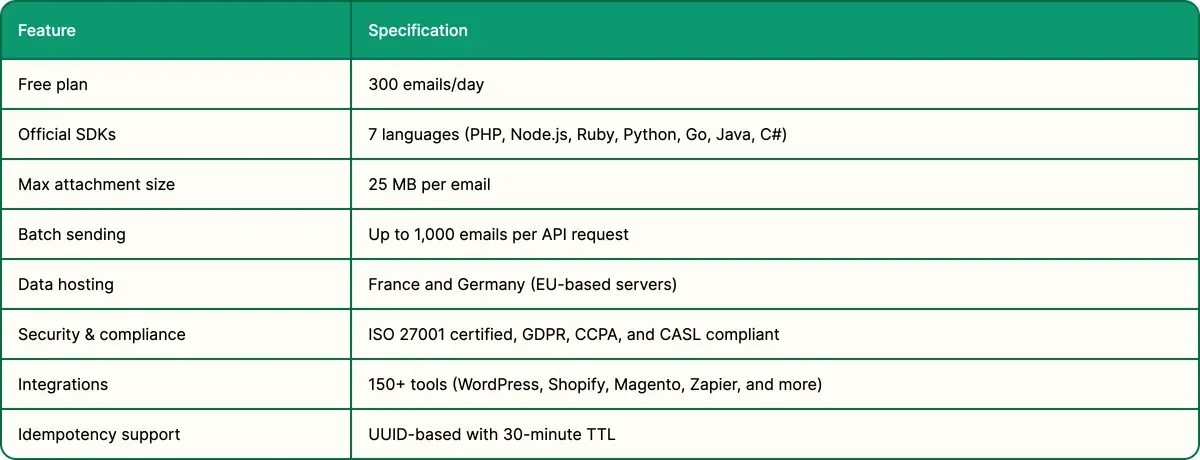
- Attachments stop at 25 MB per email.
- The relay has no batch sending. The API takes up to 1,000 emails per request.
What does Brevo transactional email cost on paid plans?
Paid plans have no separate transactional price: receipts and newsletters draw on one monthly email allowance. Brevo’s free SMTP page says its “Marketing Platform plans cover both”.
Starter lists $9 a month for 5,000 emails and has no daily limit.
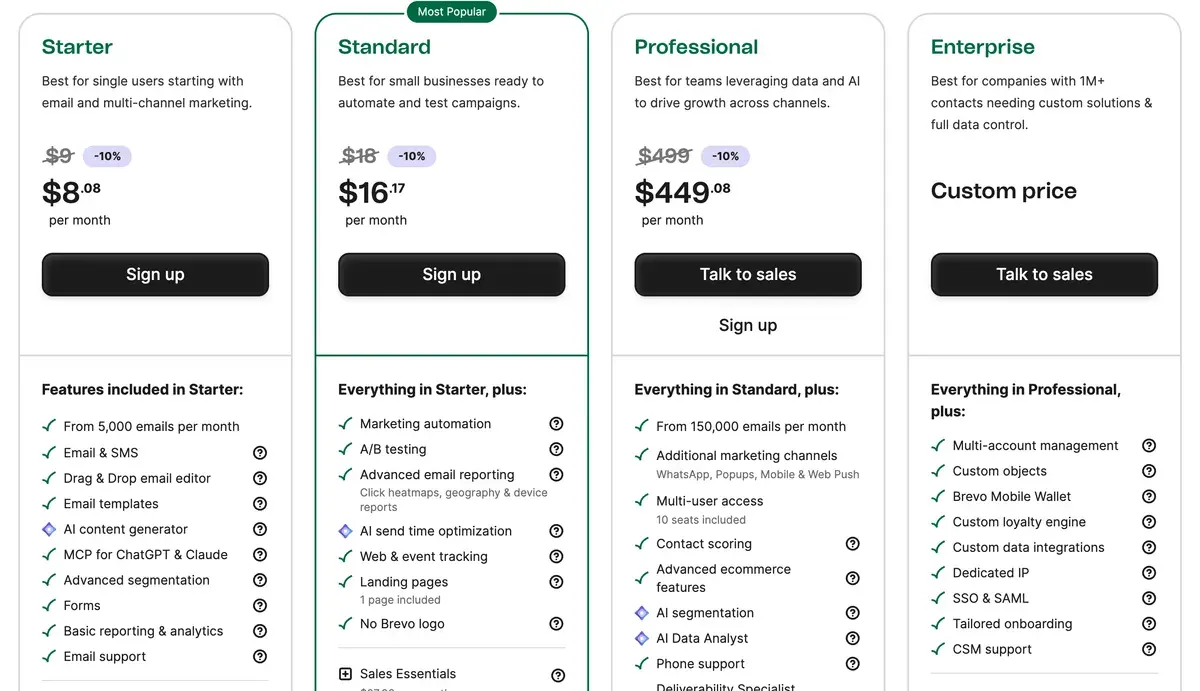
Bigger tiers add a fixed sum, set out in Brevo’s pricing API.
| Emails a month | Starter price (USD a month) |
|---|---|
| 5,000 | $9 |
| 20,000 | $32 |
| 50,000 | $56 |
| 100,000 | $82 |
Scroll sideways for all 2 columns
Take a store with 2,500 contacts that emails them four times a month and sends 2,000 receipts. That is 12,000 emails, so it needs the 15,000-email tier: $25 a month. The 2,500 contacts already need that tier, so the receipts add nothing. Brevo pricing covers every tier.
Our Brevo coupon code page lists the current annual-plan code and its real saving.
SMTP or API: which should you use?
Use SMTP when your platform already speaks it: WordPress and Magento only need a host, a port and a login. Use the API, a way for code to talk to Brevo directly, when your own code sends the email. It adds batches of 1,000 and webhooks that report each open or bounce, per Brevo’s transactional page.
Can an AI assistant manage Brevo transactional email?
Yes. Brevo’s MCP server, the way AI assistants such as Claude call outside tools, has a transactional template module and with a key can send transactional email. Our Brevo MCP guide has the set-up and safety settings.
Brevo vs Resend, SendGrid, Mailgun and Amazon SES
Brevo has the largest standing free plan of the five, at 9,000 emails a month. Amazon SES’s credits are a one-off allowance, and SendGrid’s free tier ends after 60 days. At 50,000 emails Brevo costs more than Mailgun, Resend and Amazon SES.
| Service | Free allowance | Entry price (USD a month; SES per 1,000 emails) | What it buys | Suits |
|---|---|---|---|---|
| Brevo | 300 emails a day | $9 | 5,000 emails a month, campaigns included | Newsletters and receipts from one account |
| Resend | 3,000 emails a month, 100 a day at most | $20 | 50,000 emails a month | Developers who send from code |
| SendGrid | 100 emails a day for a 60-day trial | $19.95 | Essentials; send volume sets the exact price | Large senders: its selector runs past 5 million emails |
| Mailgun | 100 emails a day | $15 | 10,000 emails a month | Apps under 10,000 emails a month |
| Amazon SES | New AWS customers get up to $200 of credits | $0.10 | 1,000 emails, pay as you go | Teams already on AWS |
Scroll sideways for all 5 columns
At 50,000 emails a month, Brevo Starter costs $56, Mailgun Foundation $35 and Resend Pro $20. Amazon SES comes to $5, before $0.12 per GB of attachments. Twilio’s page sets SendGrid’s price at that volume with a selector.
Brevo vs Resend
Brevo has the bigger free plan and the lower price up to 10,000 emails a month. Resend is cheaper from 15,000. Brevo’s 9,000 a month is three times Resend’s free 3,000. At 10,000 emails Brevo Starter costs $17 and Resend Pro $20. At 15,000 Brevo costs $25 and Resend still $20.
At 50,000 emails Resend costs under half of Brevo’s price. Brevo adds the marketing side for the money: a campaign editor and contact lists.
Where Brevo SMTP is the wrong pick
Brevo is the wrong pick for a developer who sends high volumes and wants only an API. Pick Resend, at $20 for 50,000 emails, or Amazon SES at $5 for the same volume if you already run on AWS.
Brevo fits a shop that sends newsletter and receipts from one account, such as the 12,000 emails above for $25. For other marketing platforms, Brevo alternatives prices eight at 2,500 and 10,000 contacts. Our Brevo profile covers the rest of the platform, and email marketing prices puts its bill next to other email tools.
Questions about Brevo SMTP
Is Brevo SMTP free?
Yes. The Free plan includes the relay and 300 emails a day, shared with campaigns, with no card and no time limit.
Is the Brevo SMTP key the same as the API key?
No. They are separate credentials, and the SMTP relay accepts SMTP keys only. Both are made under Settings, then “SMTP & API”.
Why does Brevo SMTP return a 535 error?
The login or password was refused. Brevo’s troubleshooting article names the host typed as the login, an API key as the password, and clients that cut long passwords short.
Every AI email marketing page, sorted by job, is in the AI email marketing hub
Sources
- Brevo Help Center: Send transactional emails using Brevo SMTP, The server name smtp-relay.brevo.com, the two SMTP login formats, the SMTP key as password, the encryption field and the Logs page; read through the help centre’s public article API. Checked
- Brevo Help Center: Which SMTP port should I use? (Port 587, 465, or 2525), 587 as the default port, 2525 when 587 is blocked, 465 for SSL. Checked
- Brevo Developers: SMTP relay integration, Ports, the encryption rule, the SMTP key warning and the note that the SMTP relay does not support batch sending. Checked
- Brevo Developers: Connect Brevo SMTP to Supabase, Port 587 with STARTTLS or 465 with SSL or TLS, and the option that limits an SMTP key to authorised IP addresses. Checked
- Brevo Help Center: Create and manage your SMTP keys, Where a key is made, the verification code, the 64-character and 15-character variants, the key shown once and the 90-day inactivity rule. Checked
- Brevo Help Center: Authenticate your domain with Brevo (Brevo code, DKIM, DMARC), The menu path, automatic set-up, free email domains refused, up to 48 hours for DNS changes, and the answer that SPF and MX records are only provided with a dedicated IP. Checked
- Brevo Help Center: FAQs about domain authentication (Brevo code, DKIM, DMARC), What the Brevo code, DKIM and DMARC records each do, and the Gmail and Yahoo sender requirement with its date. Checked
- Brevo Help Center: What are the limits of the Free plan?, 300 sends a day with a daily reset, the retry queue of 1,000 transactional emails and the Requeue option for campaigns. Checked
- Brevo Help Center: About Brevo’s pricing plans, No daily sending limit on the Starter plan. Checked
- Brevo: Brevo pricing, Plan prices, and the FAQ answers that every plan includes SMTP with unlimited log retention, that sign-up needs no card and that an account is approved before it sends. Checked
- Brevo: Brevo pricing API, Starter email tiers in US dollars a month on top of the base price, from 5,000 to 100,000 emails. Checked
- Brevo: Free SMTP server, Marketing Platform plans cover campaigns and transactional email, the WP Mail SMTP plugin route for WordPress and the set-up answer that asks you to request SMTP activation from support. Checked
- Brevo: Transactional email service and API, The at-a-glance table (25 MB attachments, 1,000 emails per API request), when to use the API or the SMTP relay, and 9,000 emails a month on the Free plan. Checked
- Brevo Help Center: Troubleshooting issues with Brevo SMTP, The 535 authentication error and its causes, including the host name typed as the login and clients that truncate long passwords. Checked
- Brevo Developers: Brevo MCP, The transactional templates module of the MCP server. Checked
- Brevo: Email MCP server, The MCP server, connected with a key, has tools for sending transactional email. Checked
- Resend: Resend pricing, Free plan of 3,000 emails a month limited to 100 a day; Pro at 20 US dollars a month for 50,000 emails. Checked
- Twilio: Twilio SendGrid Email API pricing, Free trial of 60 days at 100 emails a day; Essentials from 19.95 US dollars a month, the exact price set by send volume on a selector that runs past 5 million emails. Checked
- Mailgun: Mailgun pricing, Free plan of 100 emails a day; Basic from 15 US dollars a month with 10,000 emails; Foundation at 35 with 50,000. Checked
- Amazon Web Services: Amazon SES pricing, 0.10 US dollars per 1,000 outbound emails, 0.12 per GB of attachments, and up to 200 US dollars of Free Tier credits for new AWS customers. Checked

Alexandre S.
Alexandre S. is a creative ad strategist and copywriter with ten years' experience in digital marketing across multiple channels.
Related pages
-
 Alternatives Brevo alternatives: who costs less when you send often
Eight Brevo alternatives priced at 2,500 and 10,000 contacts, with the send count where a flat price beats Brevo’s per-email bill. Checked 24 Nov 2026.
-
 Guide Brevo CRM: free limits and what each sales seat costs
Brevo’s CRM is free up to 50 open deals and one pipeline. Paid sales seats sit on top of an email plan: the monthly bill for 1 to 6 users, read 24 Nov 2026.
-
 Compare Brevo vs Mailchimp
Brevo bills by emails sent, Mailchimp by contacts stored: both priced at 500 to 50,000 contacts, with free plans and AI by plan. Checked 24 November 2026.
-
 Compare Brevo vs MailerLite
Brevo bills by emails sent, MailerLite by active subscribers: priced at 500 to 50,000 contacts, with AI by plan and training terms. Checked 1 November 2026.


