Brevo vs MailerLite
Verdict: Brevo or MailerLite
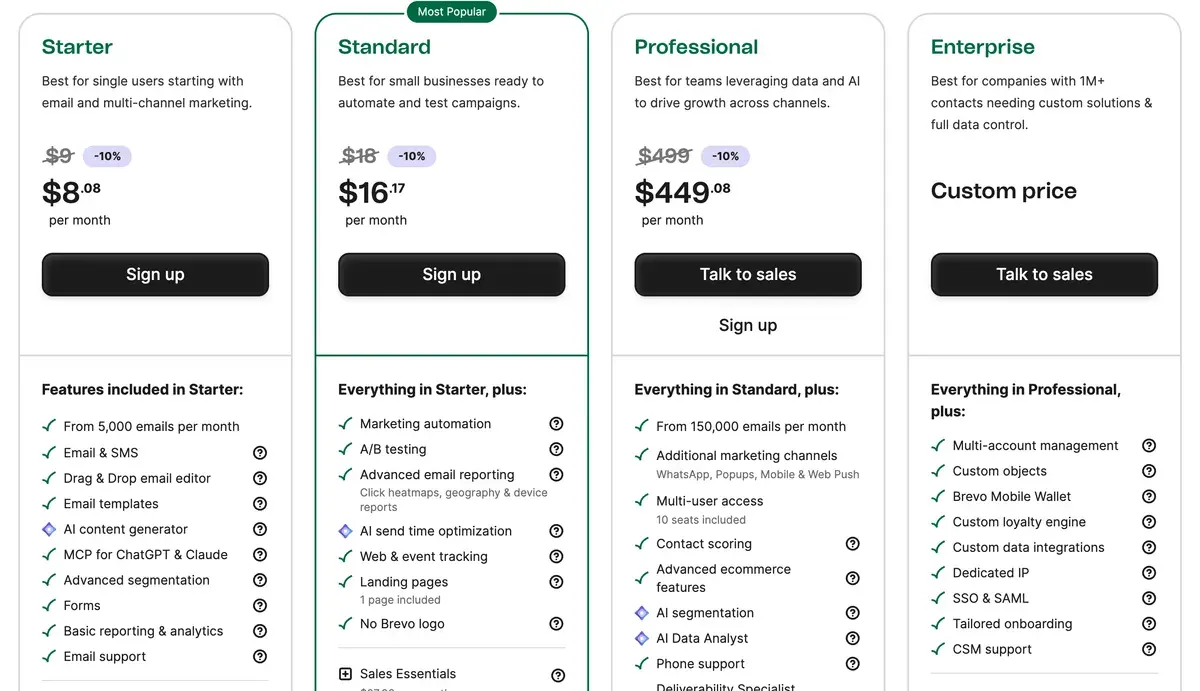
Brevo if you email a large list rarely; MailerLite if you email often and want automations from the entry plan. On plans with automations, MailerLite costs less up to 2,500 contacts, they tie at 10,000 and Brevo costs less at 50,000, checked . Brevo’s price assumes four emails per contact a month and rises if you send more; MailerLite Comfort’s price holds up to ten emails per subscriber.
Brevo
- Best for
- Lists that send rarely: Free stores up to 100,000 contacts and sends 300 emails a day; Starter costs $9 a month for 5,000 emails.
- Not for
- Lists that email often: the price rises with sends, and Starter has a contact cap tied to its email tier (500 contacts at 5,000 emails). Marketing automation and send-time optimisation start on Standard.
MailerLite
- Best for
- Small lists that want automations, landing pages and AI drafting at a low entry price: Comfort starts at $12 a month for 500 subscribers.
- Not for
- Buyers needing a free plan above 250 subscribers or AI features on Free (the AI writing assistant is paid only); terms let MailerLite use your AI inputs and outputs to improve AI models (clause 17.3).
| Brevo | MailerLite | |
|---|---|---|
| Where they differ | ||
| Monthly from (USD) | $9 | $12 |
| Free trial | No trial: a Free plan runs on every new account (pricing FAQ, 2026-11-01). | The pricing page says the paid plans have a 14-day free trial with no credit card required (read 2026-11-01). |
| What the bill follows | Emails sent a month, with a contact cap on each email tier | Active subscribers, with a monthly email cap on Comfort |
| Free plan size | 100,000 stored contacts, 300 emails a day | 250 subscribers, 2,500 emails a month |
| AI writing from | Starter (AI content generator) | Comfort (AI writing assistant) |
| Send-time optimisation from | Standard | Comfort (smart sending) |
| Trains AI on your content | Yes, to improve the service you use, fraud and spam prevention in particular (terms 6.7) | Yes, to improve AI models (terms 17.3) |
| The same on both | ||
| Free plan | Both: Yes | |
| API | Both: Yes | |

Which costs less at your list size?
Brevo’s cheapest plan that fits your list costs less at every size we price. At 500 contacts that plan is Free, if you split each send over two days. Once you need automations, MailerLite costs less up to 2,500 contacts and the two tie at 10,000. The table below prices each tool’s cheapest plan that fits the list, read on from the Brevo pricing page and the MailerLite pricing page.
| Tool | 500 contacts | 2,500 contacts | 10,000 contacts | 50,000 contacts | Free plan | Checked | Pricing page |
|---|---|---|---|---|---|---|---|
| Brevo | $0 Free | $25 Starter | $46 Starter | $249 Standard | Free: up to 100,000 contacts, 9,000 emails a month300 emails a day (about 9,000 a month), up to 100,000 stored contacts, 1 user, Brevo logo, automations capped at 2,000 contacts. AI access on Free was not confirmed. | brevo.com/pricing | |
| MailerLite | $12 Comfort | $33 Comfort | $89 Comfort | $319 Comfort | Free: up to 250 contacts, 2,500 emails a month250 subscribers and 2,500 emails a month, 2 seats, 1 website, 1 landing page, 3 forms, 3 automations, MailerLite logo, knowledge base support only. Subject line generator limited, AI landing page builder once, no AI writing assistant. | mailerlite.com/pricing |
Scroll sideways for all 8 columns
The two bills follow different things. Brevo charges for emails sent, so our figures assume about four emails per contact a month, a weekly newsletter. MailerLite charges for active subscribers, whatever you send up to its cap.
That changes which plans you compare. Brevo’s rows at 2,500 and 10,000 contacts are Starter, which has no marketing automation: a welcome series or abandoned-form email needs Standard. MailerLite’s Comfort plan includes 50 automations at its entry price.
Priced like for like, with automations on both, the order flips at the small end. Brevo Standard and MailerLite Comfort, monthly billing, from the same two pricing pages:
| Contacts | Brevo Standard | MailerLite Comfort |
|---|---|---|
| 500 | $18 | $12 |
| 2,500 | $49 | $33 |
| 10,000 | $89 | $89 |
| 50,000 | $249 | $319 |
Scroll sideways for all 3 columns
Both vendors take 10 per cent off for yearly billing, so the order holds on annual plans (Brevo pricing, MailerLite pricing). A 1,000-contact list falls between the 500 and 2,500 rows. Every plan at every tier, with a finder for your own list size: email marketing prices.
How Brevo and MailerLite count your list
Brevo counts emails. One email to one contact uses one credit, and each paid tier also caps how many contacts you can store (Brevo pricing file). At 5,000 emails a month, Starter and Standard hold 500 contacts. At 10,000 emails they hold 1,500.
That cap is what sets Brevo’s price at 2,500 contacts. Four sends each would be 10,000 emails, but the 10,000-email tier stores only 1,500 contacts, so the account moves up to the 15,000-email tier. From 20,000 emails a month the cap rises to 500,000 contacts and stops mattering.
MailerLite counts active subscribers. Unsubscribed and bounced addresses do not count. An address active at any point in a billing cycle counts for that whole cycle, even if you delete it (MailerLite pricing FAQ).
How do you count subscribers?
Counting Billing is based on the number of active subscribers in your account. Subscribers who have unsubscribed or bounced don’t count. To keep things fair, we use a cumulative count within each billing cycle: this means any address that was active at any point during the cycle counts toward your limit, even if it’s deleted later.
Paid accounts When the number of active subscribers exceeds the current subscriber limit, the subscriber limit will automatically increase and your credit card will be charged for the next pricing tier.
Free accounts When the number of active subscribers exceeds the 250 active subscriber limit, sendings will be locked (campaigns + automation).
Comfort allows ten times the top of your tier in emails a month; Power removes the cap under a fair-use policy.
So the habit that decides the bill is how often you send. A list emailed once a month buys a quarter of the Brevo emails our figures assume. One emailed twice a week buys twice as many, while MailerLite Comfort’s price stays put up to ten sends per subscriber.
Brevo also keeps its logo on Starter emails unless you add the logo remover, priced on the Brevo pricing page; Standard drops it. MailerLite’s Free plan carries the MailerLite logo.
Which AI features sit on which plan?
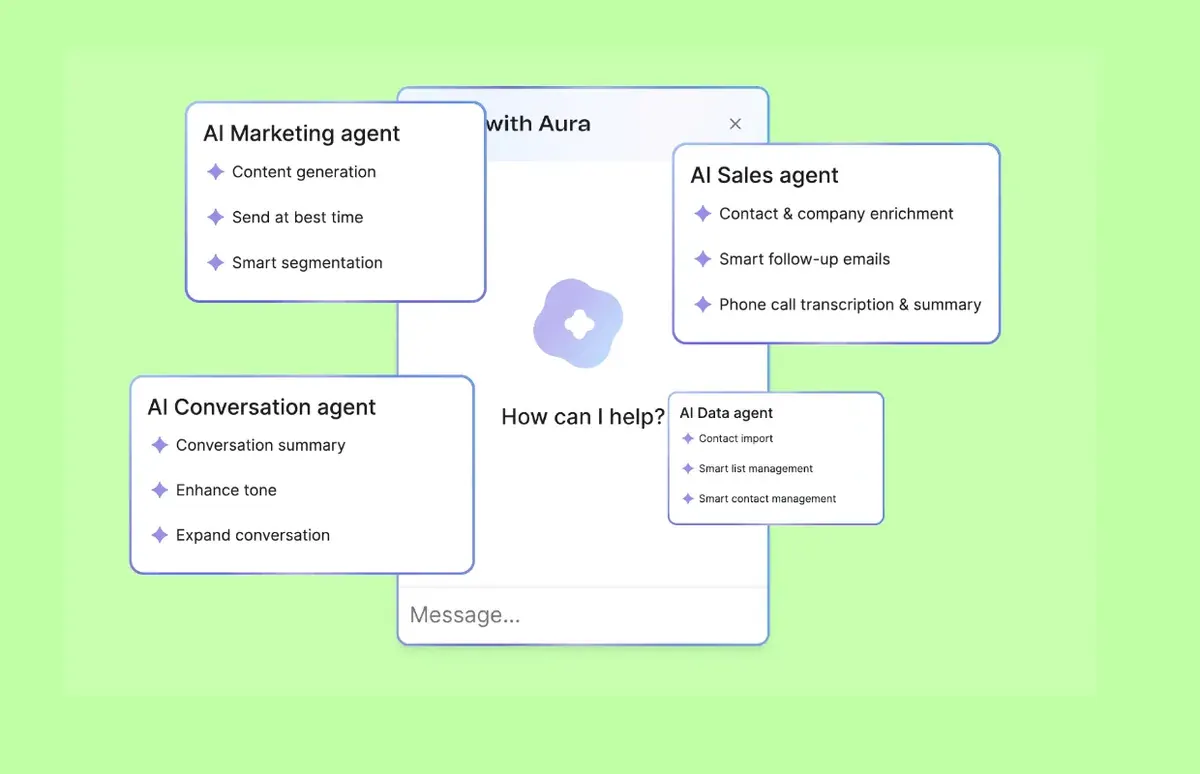
Brevo puts AI writing on Starter and MailerLite puts it on Comfort, each vendor’s cheapest paid plan. The bigger gap sits above that: Brevo keeps AI segmentation, product recommendations and its AI Data Analyst for Professional.
| Tool | AI feature | Lowest plan | Limits | Checked |
|---|---|---|---|---|
| Brevo | Subject lines AI content generator (Aura) | Starter | Same feature as above. | |
| Brevo | Email writing AI content generator (Aura) | Starter | Drafts subject lines and email copy, adjusts tone. Free plan access unconfirmed (help.brevo.com blocked). | |
| Brevo | Segments AI segmentation (Aura) | Professional | Suggests audience groups from behaviour and attributes; an AI Segmentation add-on is described in the terms. | |
| Brevo | Send time AI send time optimization | Standard | Sends when each contact is most likely to engage. | |
| Brevo | Product picks AI recommendations (advanced ecommerce) | Professional | AI product recommendations, back-in-stock alerts and coupons. | |
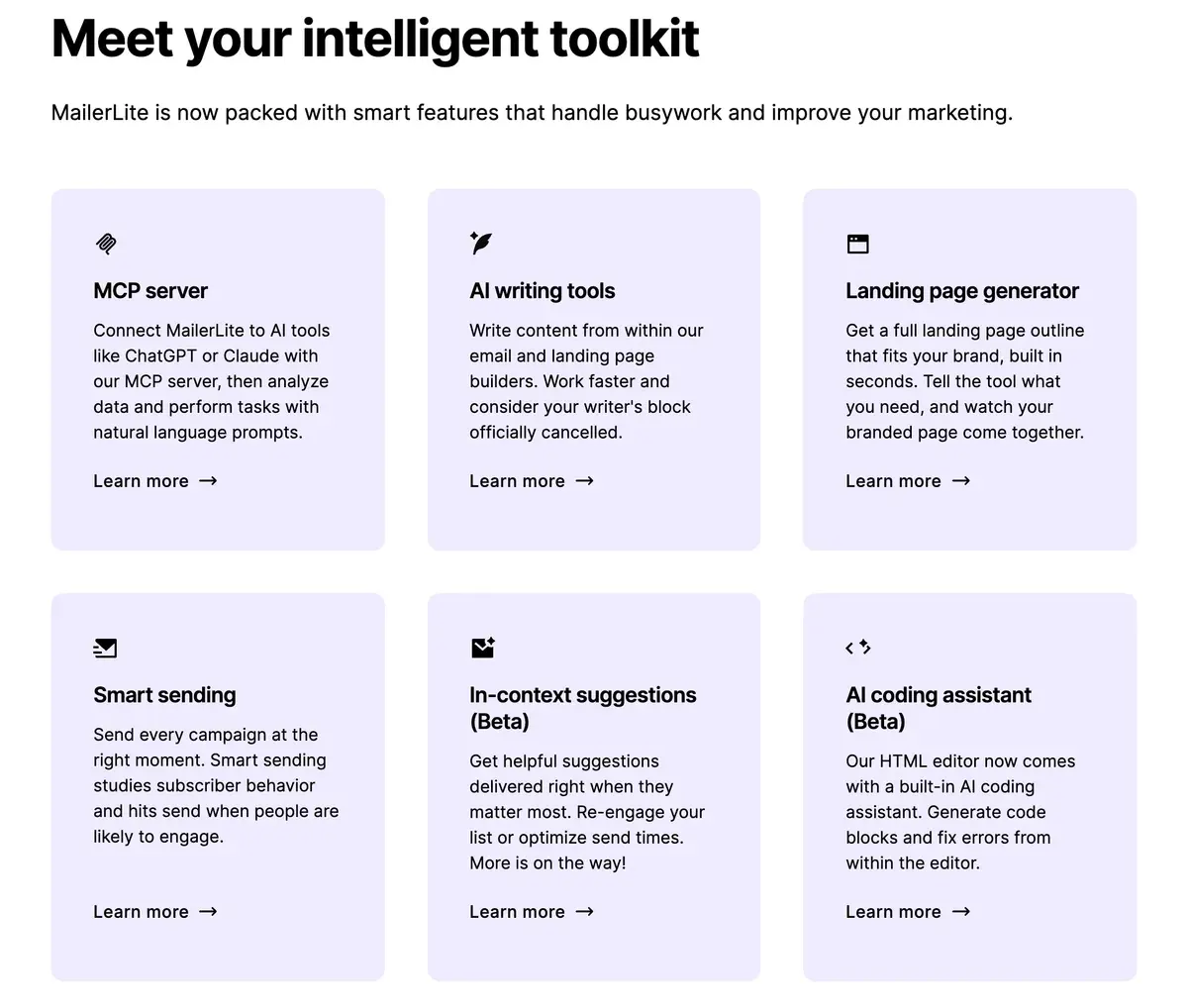
| Brevo | AI agent MCP for ChatGPT and Claude | Starter | Manage campaigns and contacts from ChatGPT, Claude and other AI tools. | |
| Brevo | Other AI Data Analyst (Aura) | Professional | Plain-language questions answered from your data. | |
| MailerLite | Subject lines Subject line generator | Free (limited); full on Comfort | Free is marked Limited without a stated cap. | |
| MailerLite | Email writing AI writing assistant | Comfort | Not on Free. Runs on credits: Comfort has a limited amount, Power the most (help article, edited 16 June 2026). | |
| MailerLite | Send time Smart sending | Comfort | Not on Free. Also deliver by timezone on Comfort. | |
| MailerLite | AI agent MCP server (Claude, ChatGPT) | Free (limited); full on Comfort | Terms clause 17.2: connecting an agent authorises it to read and modify account data. | |
| MailerLite | Images AI landing page builder | Free (once); unlimited use on Comfort | The AI policy also lists an AI image generator (DALL-E 3); its plan was not stated. | |
| MailerLite | Other AI-powered A/B testing | Listed under HeyLite intelligence; plan not itemised | Named in the pricing page menu; the comparison table lists email A/B testing on all plans and multivariate testing on Comfort. |
Scroll sideways for all 5 columns
Brevo’s Professional plan starts at $499 a month for 150,000 emails, read on the Brevo pricing page. MailerLite’s pricing page lists no AI segmentation on any plan.
MailerLite gives the Free plan a limited subject line generator and one go at the AI landing page builder. The MailerLite pricing page marks the AI writing assistant as paid only. Brevo’s pricing page lists its AI content generator from Starter and does not say whether Free gets it.
Both connect to ChatGPT and Claude through an MCP server (a link that lets an AI assistant read and change your account). MailerLite’s terms add that connecting an agent authorises it to read and modify account data, subscriber lists included (17.2).
What each AI feature does across 15 tools: AI features in email tools.
Does Brevo or MailerLite train AI on your emails?
Both terms say yes, for different purposes. Brevo limits training to improving the service you get, “in particular” fraud and spam prevention. MailerLite takes a licence to improve AI models in general.
| Tool | Trains AI on your data | In plain words | The clause | Terms |
|---|---|---|---|---|
| Brevo | Yes | Terms 6.7 says Brevo may use Content and Usage Data to enrich and train its AI Features, for improving the Services provided to you, in particular fraud, phishing and spam prevention. AI third-party providers only process your data to provide the AI Features. The Control Center manages AI Features, but fraud and spam detection cannot be disabled. Opt out: Control Center in the app manages AI Features; the terms do not say it stops training, and fraud and spam detection cannot be turned off. | Brevo may use Content and Usage Data to enrich and train its AI Features for the sole purpose of improving the performance of the Services provided to You, in particular to prevent fraud, phishing and unsolicited electronic communications, and to secure the Services.Terms of use 6.7 | Dated 1 Oct 2025 |
| MailerLite | Yes | Terms clause 17.3 grants MailerLite a licence to use your AI Inputs and Outputs to improve AI models. The AI policy and privacy policy 3.6 say its partners OpenAI and Google do not train on your data under enterprise agreements. No opt-out was found. | You grant MailerLite a license to use your Inputs and Outputs to improve AI models, and you agree to comply with any restrictions on AI usage.Terms of service 17.3 | Dated 22 Sep 2026 |
Scroll sideways for all 5 columns
Brevo’s terms of use (version 1 October 2025) say “Brevo may use Content and Usage Data to enrich and train its AI Features for the sole purpose of improving the performance of the Services provided to You” (6.7). Terms of use, 6.7 Brevo may use Content and Usage Data to enrich and train its AI Features for the sole purpose of improving the performance of the Services provided to You, in particular to prevent fraud, phishing and unsolicited electronic communications, and to secure the Services.
The in-app “Control Center” manages AI Features, but fraud and spam detection cannot be switched off.
The subprocessor list in Brevo’s data processing agreement, on the terms page, names OpenAI, Google Gemini, Anthropic and Langfuse as AI providers.
MailerLite’s terms of service (updated 22 September 2026) say “You grant MailerLite a license to use your Inputs and Outputs to improve AI models” (17.3).
Terms of service, 17.3
You grant MailerLite a license to use your Inputs and Outputs to improve AI models, and you agree to comply with any restrictions on AI usage.
Inputs and Outputs are what you type into an AI feature and what it writes back.
The AI policy adds that its partners, OpenAI and Google, do not train on your data under enterprise agreements. That narrows who trains; the licence to MailerLite stays. Neither document names an opt-out.
Ownership differs too. Brevo’s 6.4 says you “own all Output”, to the extent the law allows. MailerLite’s 17.3 says Outputs may repeat across customers and assigns no ownership. Every vendor’s clause side by side: does your email tool train AI?
Free plans: 100,000 stored contacts against 250 subscribers
Brevo’s Free plan stores up to 100,000 contacts and sends 300 emails a day. A bigger campaign reaches 300 contacts that day, and you resend it to the rest the next day with Requeue (Brevo help). A 500-contact list emailed weekly fits the monthly total (about 2,000 emails) but takes two days and a manual resend each week.
MailerLite’s Free plan stops at 250 subscribers and 2,500 emails a month. Sending locks once active subscribers pass 250, and support is the knowledge base only (MailerLite pricing). It does include 3 active automations, one landing page and 3 forms.
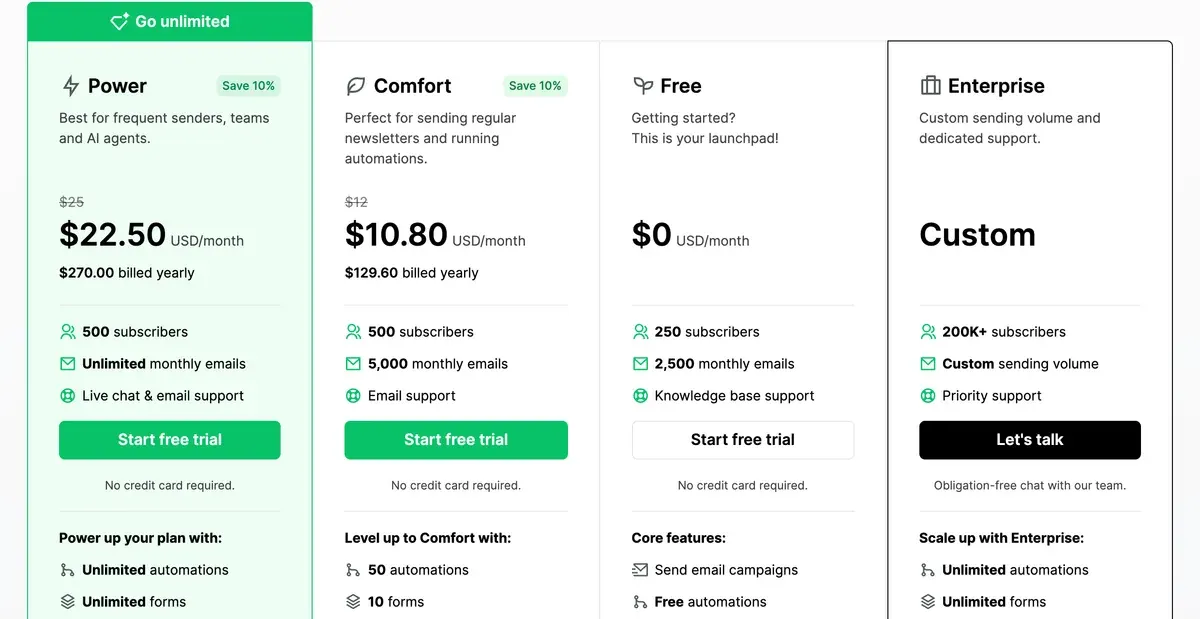
So a new list grows further on Brevo Free. A list that needs automation and AI drafting from day one starts paying sooner on either: $12 a month on MailerLite against $18 a month on Brevo, read .
Moving from Brevo to MailerLite, or back
MailerLite publishes a step-by-step guide for leaving Brevo (last edited 12 August 2026). You export your list from Brevo as a CSV file. Then you upload it on MailerLite’s Subscribers page through Add subscribers and match each column to a field.
The guide tells you to leave behind contacts who unsubscribed, marked your emails as spam or stopped opening. Templates and automations do not move: its steps are to recreate your templates and rebuild your automated flows by hand.
Going the other way also starts with a CSV export from MailerLite and an import into Brevo. Check one thing before you switch to Brevo. Count your sends for the last month, since that figure, more than your list size, sets the new bill.
What Brevo and MailerLite users report
Readable public reviews are thin for both: seven sources in all, most of them Reddit posts with the body removed, so no pattern shows.
- One Brevo user says the 300 free emails a day are enough for a small company (1 of 5 Brevo sources: Reddit).
- One detailed Brevo post says automation emails count as transactional, so their unsubscribe link blocks only transactional mail (1 of 5 Brevo sources: Reddit).
- A MailerLite user moving from Mailchimp reports an account closed at the first send; the post text is gone (1 of 2 MailerLite sources: Reddit).
Who should pick which?
Pick Brevo if your list is large and you email it monthly or less. Its Free plan holds 100,000 contacts, and a quiet list pays for the few emails it gets. It also fits stores that want order emails and SMS in the same account, both sold on the Brevo pricing page.
Pick MailerLite if you send weekly or more and want automations and AI drafting at the entry price. Up to 2,500 subscribers, Comfort costs less than Brevo Standard, and its bill does not move with your sending.
A creator list that sells paid subscriptions fits Kit Free, which covers under 10,000 subscribers and charges only a fee per sale: Kit vs MailerLite. For a list leaving Mailchimp, Mailchimp vs MailerLite prices the switch. Each tool on its own: Brevo for email marketing and Brevo pricing, MailerLite for email marketing and MailerLite pricing. Every tool in the section: AI email marketing.
Questions buyers ask about Brevo and MailerLite
Is Brevo cheaper than MailerLite?
On each vendor’s cheapest plan that fits the list, yes, at every size we price. At 500 contacts Brevo is free if you split each send over two days. With automations on both, MailerLite costs less up to 2,500 contacts, the two tie at 10,000 and Brevo costs less at 50,000.
Is Brevo the same as Sendinblue?
Yes. Brevo is the company formerly called Sendinblue, and its pricing page sells the same email, SMS and transactional email service under the new name.
Does MailerLite have a free plan?
Yes, for up to 250 subscribers and 2,500 emails a month. Sending locks once active subscribers pass 250, and the AI writing assistant is paid only.
Which one writes emails with AI on the cheapest plan?
Both. Brevo’s AI content generator starts on Starter and MailerLite’s AI writing assistant on Comfort, each vendor’s cheapest paid plan.
More email tool comparisons sit together in the AI email marketing hub
Sources
- Brevo: Brevo pricing, plans, AI features by plan, the Free plan’s 300 emails a day; prices from the public pricing API behind the page. Checked
- Brevo: Brevo pricing file, contact limit per email tier on Starter and Standard: 500 contacts at 5,000 emails, 1,500 at 10,000, 2,500 at 15,000. Checked
- Brevo: Brevo terms of use, version 1 October 2025; 6.4 on Output ownership, 6.7 on training AI Features; the subprocessor list in the data processing agreement names its AI providers. Checked
- MailerLite: MailerLite pricing, slider prices per subscriber tier, plan comparison table, billing FAQ. Checked
- MailerLite: MailerLite terms of service, updated 22 September 2026; 17.3 on AI Inputs and Outputs. Checked
- Brevo help centre: FAQs: What are the limits of the Free plan?, 300 sends a day on Free; the rest of a bigger campaign is resent by hand with Requeue. Checked
- MailerLite: MailerLite AI policy, AI partners OpenAI and Google; essential account and campaign review by AI cannot be switched off. Checked
- MailerLite help: How to migrate from Brevo to MailerLite, last edited 12 August 2026; CSV export from Brevo, import through Add subscribers. Checked

Alexandre S.
Alexandre S. is a creative ad strategist and copywriter with ten years' experience in digital marketing across multiple channels.
Related pages
-
 Profile Brevo email marketing: billed by emails sent, with Aura AI from Starter
Brevo bills by emails sent: 50,000 contacts mailed monthly cost 56 dollars, weekly 249. AI by plan and the clause 6.7 training terms, checked 1 Nov 2026.
-
 Pricing Brevo pricing: Free, Starter, Standard and Professional by emails sent
Brevo Starter starts at 9 dollars for 5,000 emails; past 2,500 contacts the cheapest paid tier is 32. Every tier, the contact cap and the AI plans, 1 Nov 2026.
-
 Profile MailerLite: what it costs at your list size, its AI and its terms
MailerLite Comfort costs 12 dollars at 500 subscribers with AI writing; Free stops at 250. Prices at four list sizes and the AI-training clause, 1 Nov 2026.
-
 Pricing MailerLite pricing: Free, Comfort and Power from 500 to 50,000 subscribers
MailerLite Free holds 250 subscribers; Comfort costs 12 dollars a month at 500 and 319 at 50,000. Every step, the Power gap and the send cap, 1 Nov 2026.
-
 Compare Kit (formerly ConvertKit) vs MailerLite
Kit sends free to 10,000 subscribers; MailerLite’s automations cost less at every size, and its terms license your AI inputs for training. Checked 1 Nov 2026.
-
 Compare MailerLite vs Mailchimp
MailerLite Comfort undercuts Mailchimp Essentials at every list size we price, and puts AI writing on that plan. Billing rules and AI terms, 1 Nov 2026.


